Instrument · Version 1.4.0
Fret Loft
REAL RECORDED GUITARS THAT STRUM, PICK AND VOICE CHORDS LIKE A GUITARIST.
Set Play Mode to Chord , pick a Pattern , and hold a pad. Fret Loft voices the chord on six real strings and strums it in rhythm, locked to your MPC tempo. Change pads and the next strum plays the new chord. No programming, no MIDI clips: your fingers stay on the progression, the guitarist does the rest.
3 = $993 Plugins nach Wahl für $99 →
A hard rock guitar solo: singing sustain, legato slides and wide vibrato, through a hot lead amp with delay.
Das Handbuch
Jeder Screen,
Seite für Seite.
Die komplette Anleitung, Screen für Screen, genau wie auf der MPC. Die Namen der Einstellungen bleiben die englischen Wörter des Screens.
THE BIG ONE
One pad. A whole guitar part.
Set Play Mode to Chord, pick a Pattern, and hold a pad. Fret Loft voices the chord on six real strings and strums it in rhythm, locked to your MPC tempo. Change pads and the next strum plays the new chord. No programming, no MIDI clips: your fingers stay on the progression, the guitarist does the rest.
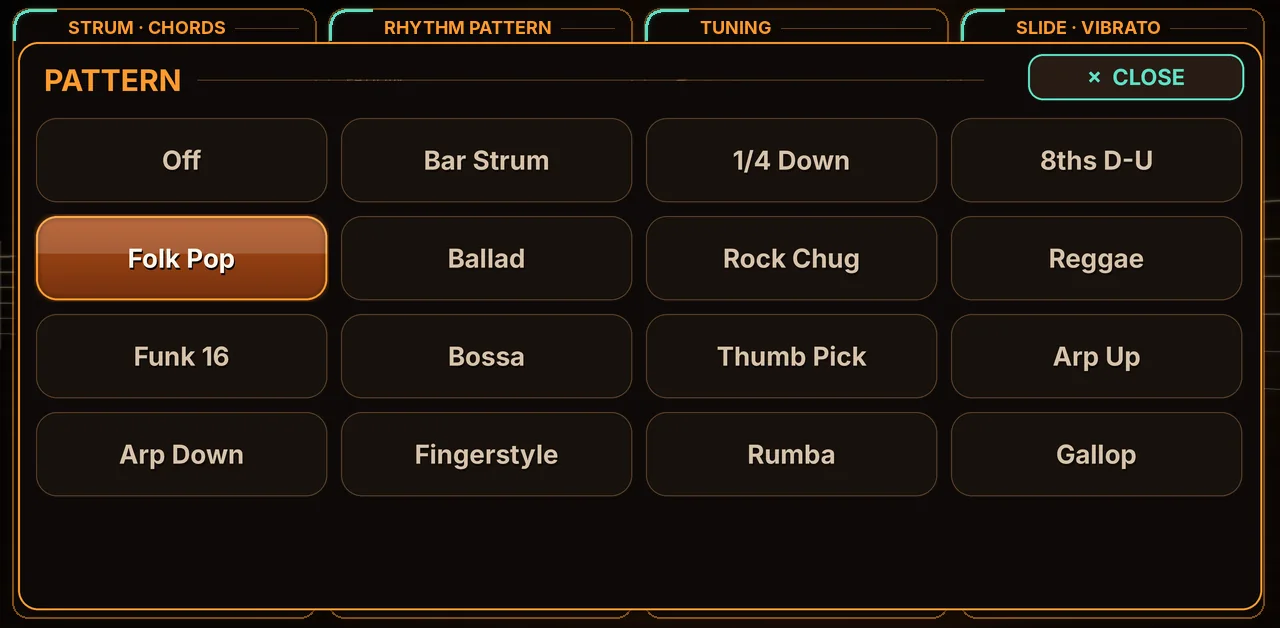
What a pattern looks like, step by step
AND IT KNOWS ITS CHORDS
Play a chord. Hear a guitarist play it.
A keyboard chord is not a guitar chord. With Real Voicing on, Fret Loft recognizes what you hold, then plays it the way a guitarist would: real fingerings, open strings, the bass you asked for when the neck allows it. The LISTEN page shows you the shape on the fretboard, so you also learn the chord while you play.
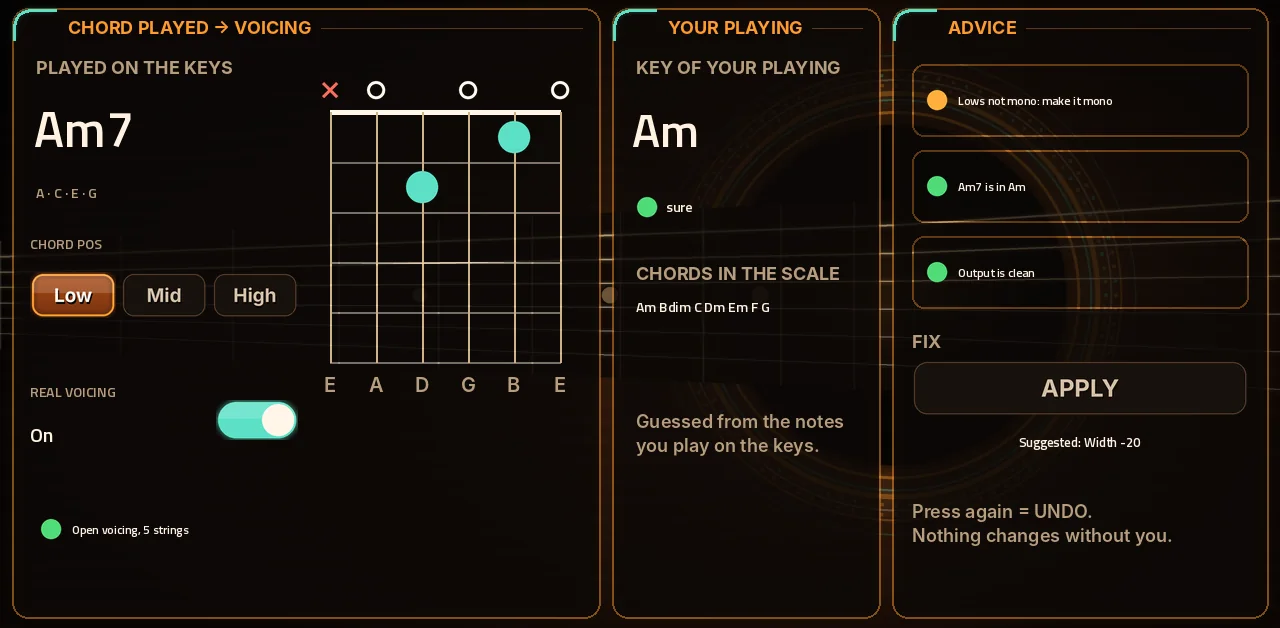
Am7
Open voicing on 5 strings, the shape every guitarist knows.
C/E
Bass E kept: the low strings go, the E stays at the bottom.
Cmaj9
Five notes on six strings: the 9th is left out and the page tells you so.
What it feels like: you stop thinking about voicings and start writing. Your keyboard ideas come out sounding like they were played on a real neck.
FINDING YOUR WAY
Six pages, one per function key.
Q-Links
Each page has four columns. The 16 Q-Links follow them: one column of four knobs per column on screen, top to bottom.
Menus
Touch a menu box to open the full list, then tap a name.
Presets
112 presets in four folders: Init, Classical, Folk and Electric. Every preset sets the whole sound, including amp and effects.
PLAY
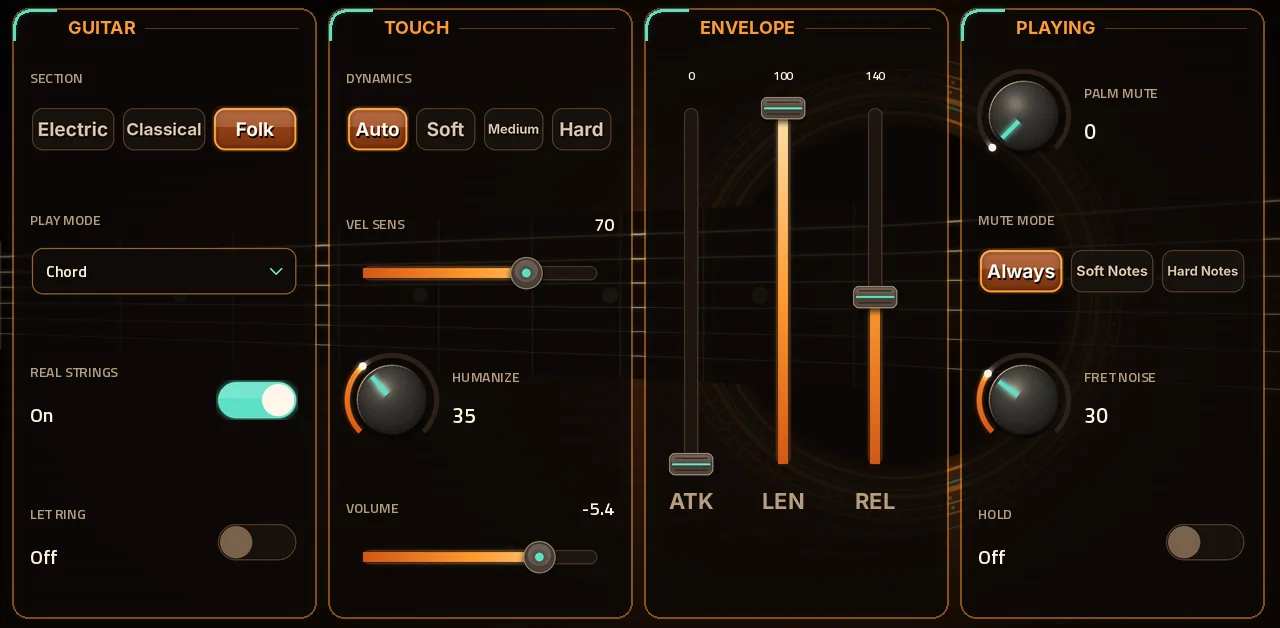 12345678910111213
Tipp
For a tight rhythm part in Strum mode, set Mute Mode to Soft Notes and raise Palm Mute: play soft for muted chugs, hit hard for open chords.
What you see
GUITAR
- 1Section Electric, Classical (nylon) or Folk (steel-string). Each one is a real recorded guitar.
- 2Play Mode Poly, Strum, Chord, Mono or Legato: how your pads and keys turn into guitar playing.
- 3Real Strings One note per string, like a real guitar: a new note on a busy string cuts the old one.
- 4Let Ring Notes keep ringing after you let go. The sustain pedal does the same.
TOUCH
- 5Dynamics Auto picks the recorded layer from your velocity. Soft, Medium or Hard locks one layer.
- 6Vel Sens How much your velocity changes the volume.
- 7Humanize Tiny random changes in timing, pitch and level, so repeated notes never sound copied.
- 8Volume Output level of the plugin.
ENVELOPE
- 9ATK / LEN / REL Attack fades the note in, Length shortens it, Release sets how it dies when you let go.
PLAYING
- 10Palm Mute Muted, chunky strings, from a light touch to a full chug.
- 11Mute Mode Always, Soft Notes or Hard Notes: decide which velocities get palm-muted.
- 12Fret Noise The sound of fingers sliding on the strings between notes.
- 13Hold Endless sustain: the note never fades while you hold it.
LISTEN
12345678910Tipp
Not sure what comes next? Play your chord, then try the chords listed under CHORDS IN THE SCALE: they always fit.
What you see
CHORD PLAYED → VOICING
- 1Chord The chord you hold, named instantly, with its notes underneath.
- 2Fretboard What the six strings really play: x = muted string, o = open string, dots = fingers. The fret number appears below when the shape moves up the neck.
- 3Chord Pos Low, Mid or High: where on the neck chords are voiced.
- 4Real Voicing On: in Strum mode, the chord you hold is played with a real guitar fingering. Off: your notes are played as is.
- 5Voicing status Green when all is well; orange when a note is left out or the chord had to be inverted.
YOUR PLAYING
- 6Key The key of what you play, guessed from your notes.
- 7Confidence Red unsure, orange fair, green sure.
- 8Chords in the scale The seven chords that belong to that key: ready-made ideas for your next chord.
ADVICE
- 9Advice Three short lines about your output and your harmony, most important first.
- 10Apply / Undo Applies the one suggested fix shown underneath. Press again to undo. Nothing changes without you.
STRUM
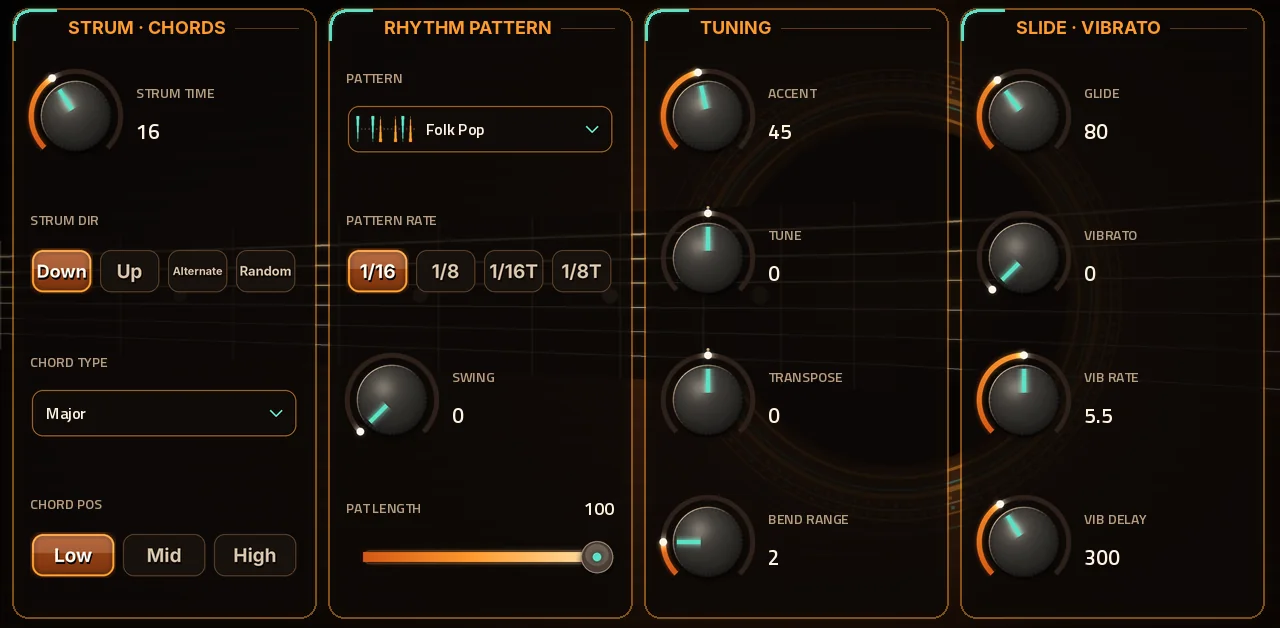 12345678910111213141516
Tipp
For a laid-back ballad, choose Ballad, set Pattern Rate to 1/8, add a little Swing and lower Pat Length so the chords breathe.
What you see
STRUM · CHORDS
- 1Strum Time Time between strings, from a fast flick to a slow, harp-like roll (0 to 80 ms).
- 2Strum Dir Down, Up, Alternate or Random.
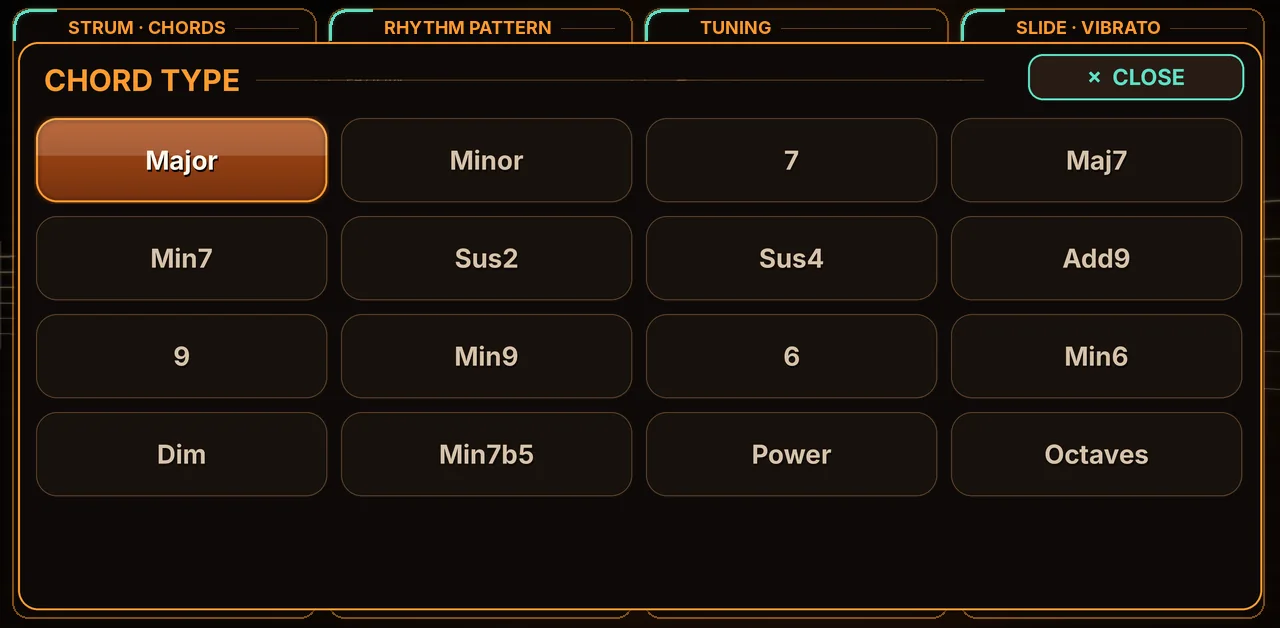
- 3Chord Type In Chord mode, one pad plays this chord: 16 types from Major to Octaves.
- 4Chord Pos Low, Mid or High position on the neck.
RHYTHM PATTERN
- 5Pattern 15 rhythm patterns, from simple downstrokes to funk, bossa and fingerpicking.
- 6Pattern Rate 1/16, 1/8 or triplets: the speed of the pattern, locked to the MPC tempo.
- 7Swing Pushes the off-beats for a looser feel.
- 8Pat Length How long each strum rings: short for staccato, long for open chords.
TUNING
- 9Accent Makes the strong beats of the pattern hit harder.
- 10Tune Fine tuning, in cents.
- 11Transpose Moves everything up or down in semitones.
- 12Bend Range Range of the pitch wheel, in semitones.
SLIDE · VIBRATO
- 13Glide Slide time between notes in Mono and Legato.
- 14Vibrato Depth of the string vibrato. The mod wheel and aftertouch add more.
- 15Vib Rate Speed of the vibrato.
- 16Vib Delay Waits before the vibrato starts, like a real player.
BODY
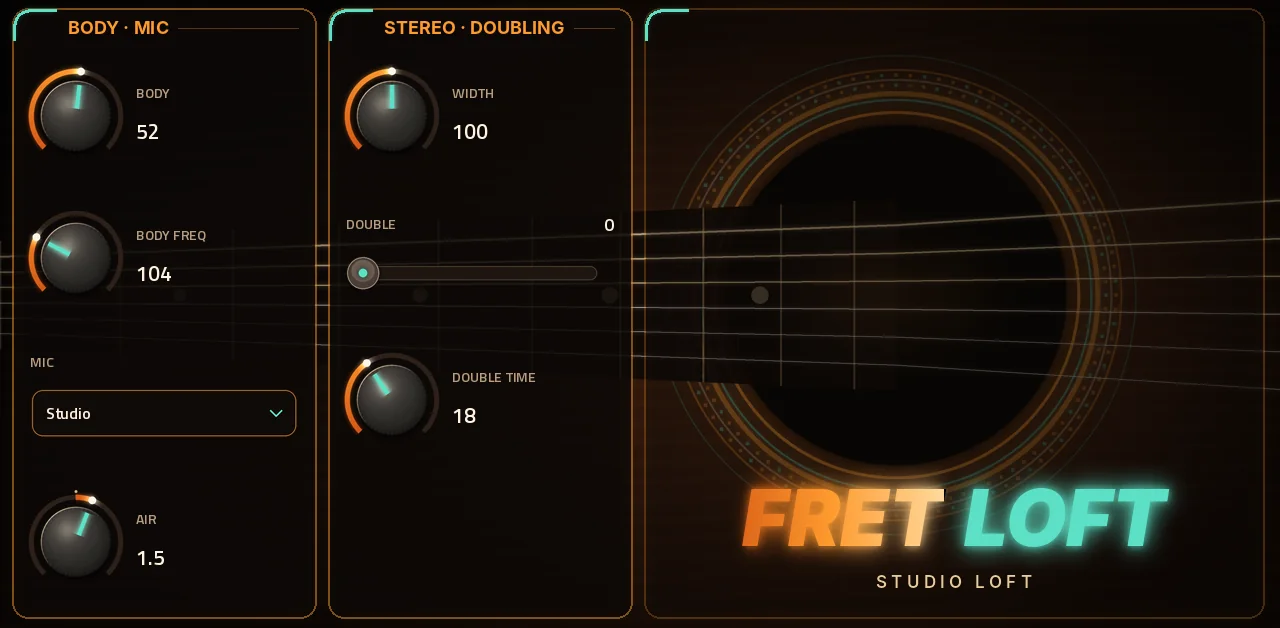 1234567
Tipp
For an intimate fingerstyle track, pick Close, lower Width, and add Body. For a wide pop chorus, turn Double up.
What you see
BODY · MIC
- 1Body How much the guitar body resonates.
- 2Body Freq The pitch of that resonance: low for a big box, higher for a small one.
- 3Mic Studio, Close, Room, Piezo, Ribbon or Vintage: six ways to record the guitar.
- 4Air Adds or removes the top-end sparkle (±9 dB).
STEREO · DOUBLING
- 5Width Stereo width, from mono to extra wide.
- 6Double A second take, played a little later on the other side: the classic wide double-tracked guitar.
- 7Double Time Delay between the two takes (5 to 40 ms).
AMP
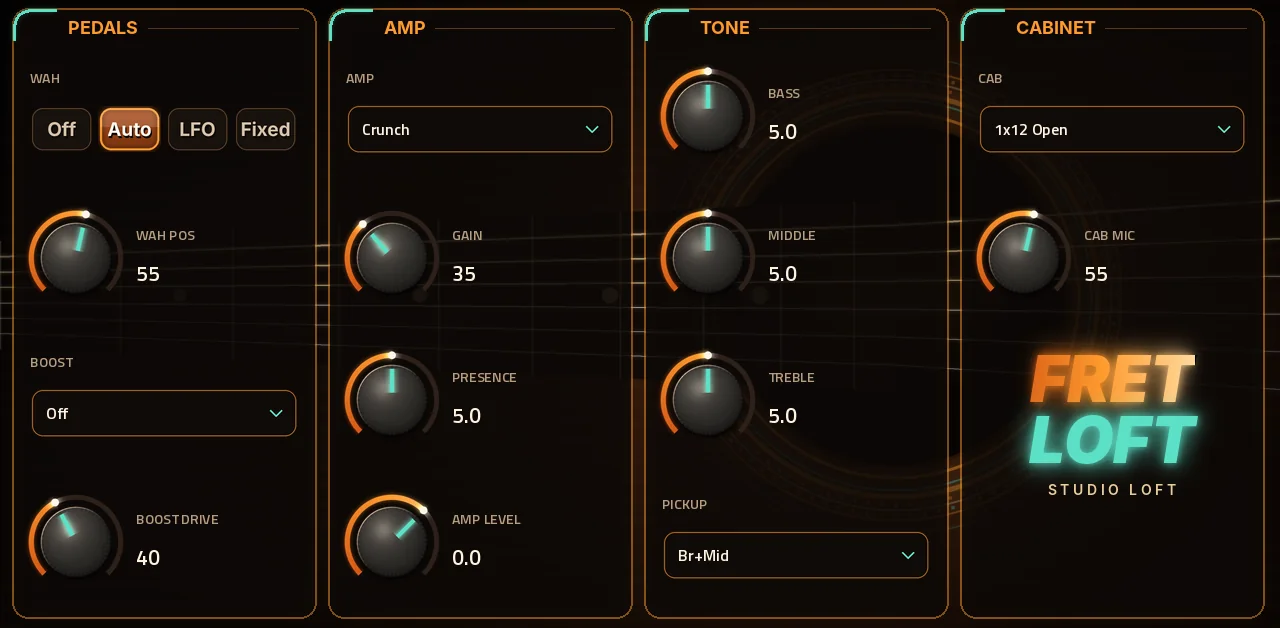 123456789101112
Tipp
Funk scratch in seconds: Wah on Auto, Amp on Crunch with low Gain, Pickup on Mid+Neck, and the Funk 16 pattern.
What you see
PEDALS
- 1Wah Off, Auto (follows how hard you play), LFO (sweeps on its own) or Fixed (parked pedal).
- 2Wah Pos Sensitivity, speed or pedal position, depending on the Wah mode.
- 3Boost Off, Tube Drive, Treble or Clean, before the amp.
- 4Boost Drive How hard the boost pushes.
AMP
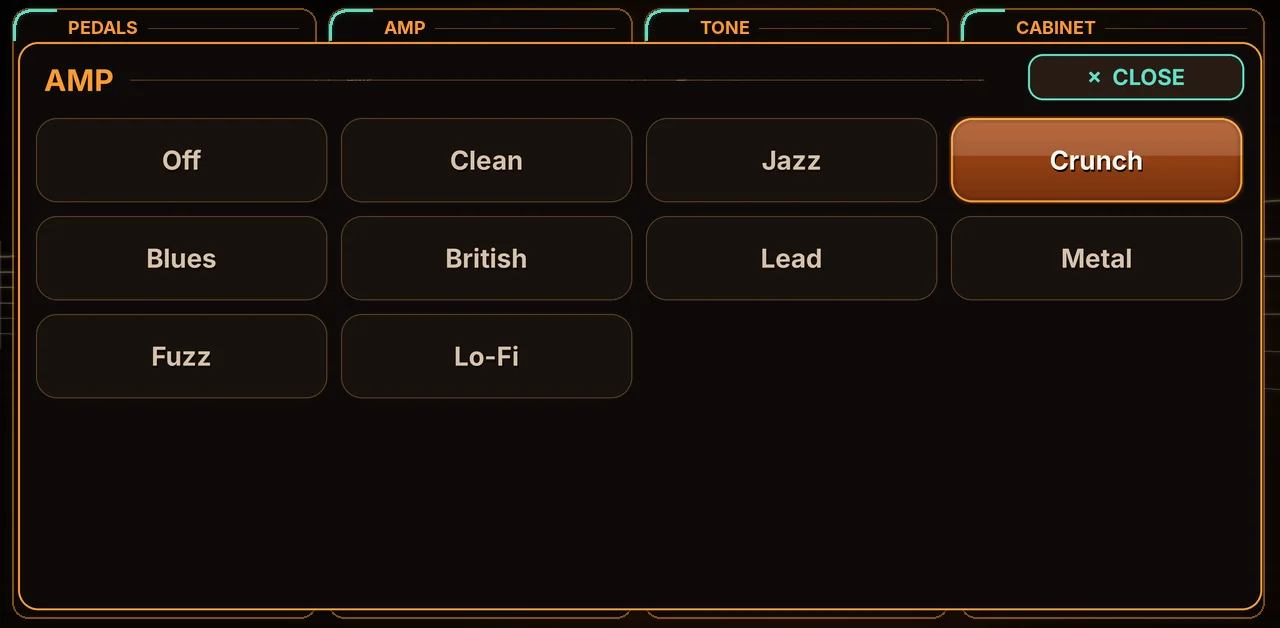
- 5Amp Clean, Jazz, Crunch, Blues, British, Lead, Metal, Fuzz or Lo-Fi.
- 6Gain Amount of drive.
- 7Presence Bite in the upper mids.
- 8Amp Level Output of the amp.
TONE
- 9Bass / Middle / Treble The amp's tone stack.
- 10Pickup Bridge, Br+Mid, Middle, Mid+Neck or Neck: the pickup selector of the electric guitar.
CABINET
- 11Cab 1x12 Open, 2x12 Vintage, 4x12 Closed, 1x10 Small or Jazz Box.
- 12Cab Mic Moves the microphone on the speaker: darker or brighter.
FX
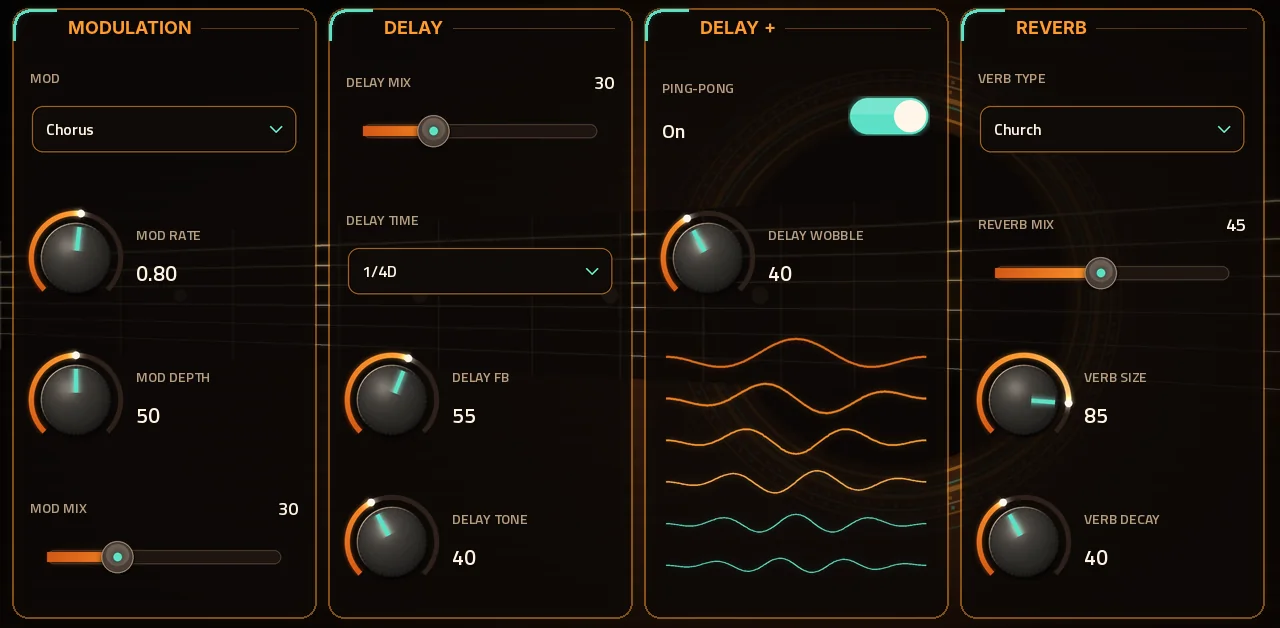 123456789101112
Tipp
Ambient swells: Attack up on the PLAY page, Mod on Chorus, Delay Mix around 30 with Ping-Pong, and a long Church reverb.
What you see
MODULATION
- 1Mod Chorus, Flanger, Phaser, Tremolo or Vibe.
- 2Mod Rate / Depth Speed and amount of the movement.
- 3Mod Mix Blend with the dry guitar.
DELAY
- 4Delay Mix Level of the echoes.
- 5Delay Time Locked to the MPC tempo, from 1/32T to 2 bars.
- 6Delay Fb Number of repeats.
- 7Delay Tone Darker or brighter repeats.
DELAY +
- 8Ping-Pong Echoes bounce left and right.
- 9Delay Wobble A gentle tape-like wobble on the repeats.
REVERB
- 10Verb Type Room, Studio, Plate, Spring, Hall or Church.
- 11Reverb Mix Amount of space.
- 12Verb Size / Decay How big the space is and how long it rings.
MASTER
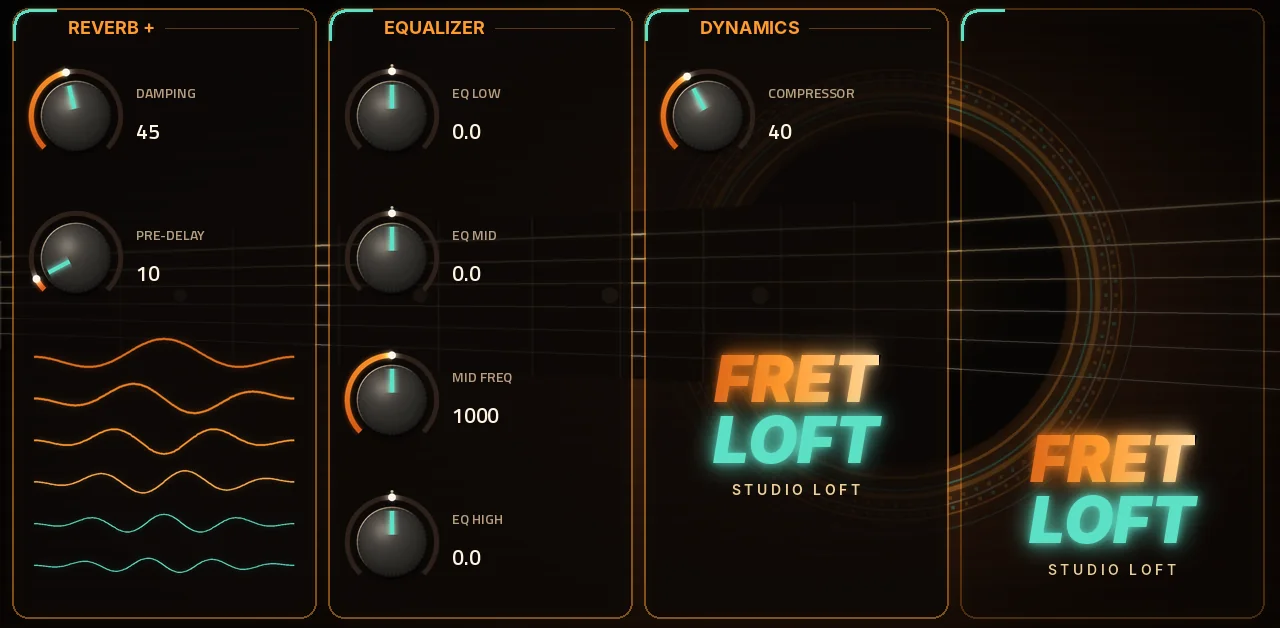 12345
Tipp
Guitar too boomy in a busy beat? Cut EQ Low by 3 dB before touching anything else.
What you see
REVERB +
- 1Damping Softens the reverb tail.
- 2Pre-Delay Gap before the reverb starts, to keep the attack clear.
EQUALIZER
- 3EQ Low / Mid / High Three-band EQ at the end of the chain.
- 4Mid Freq Where the Mid band works.
DYNAMICS
- 5Compressor Evens out the level. A safety limiter always keeps the output below 0 dB.
SPEC SHEET
Fret Loft at a glance
A guitar instrument for the MPC that plays real recorded nylon, steel-string and electric guitars, with strums, chord voicings, rhythm patterns, amps and effects.
For who, for what
- Hip-hop and R&B producers who need a real guitar loop fast
- Pop, folk and singer-songwriter demos with strummed chords
- Lo-fi, ambient and film beds with nylon picking and long swells
Strong points
- Real recordings: each note on its own string, up to 3 dynamic layers
- Chord mode: one pad plays a full chord, 16 types in 3 neck positions
- 15 rhythm patterns locked to the MPC tempo, with swing and accent
- Real Voicing and a LISTEN page that shows the shape on the neck
- Complete chain: body, mic, pedals, 9 amps, 5 cabinets, effects
- Light on the CPU: the sound bank is loaded once for all instances
Numbers
| 112 | presets in 4 folders |
|---|---|
| 3 | guitars: nylon, steel-string, electric |
| 5 | play modes: Poly, Strum, Chord, Mono, Legato |
| 16 × 3 | chord types × neck positions |
| 15 | rhythm patterns |
| 9 · 5 · 5 · 6 | amps · cabinets · modulations · reverbs |
| 40 | voices |
| 73 | sound parameters |
| 85 MB | on disk (75 MB sample bank) |
| MPC | standalone, MPC OS 3.10.1 or later |
Get started in 3 steps
Install
Copy the folder "Studio Loft - VST - Fret Loft" into "VST2 Plugins" on your MPC drive. On the MPC, turn on Preferences › Enhancements (Beta) › Enable Enhancements and External Plugin Support.
Load
Create a plugin program and choose Studio Loft › Fret Loft. Open a preset from the Init, Classical, Folk or Electric folder.
Play
Play the pads or a keyboard. Try Play Mode Chord with a Pattern: one pad, one whole guitar part.
PRESETS
112 presets, ready to play
Init 3
- INIT · Classical
- INIT · Folk
- INIT · Electric
Classical 30
- CLAS · Concert Nylon
- CLAS · Warm Fingerstyle
- CLAS · Close & Intimate
- CLAS · Bright Pick
- CLAS · Spanish Night
- CLAS · Flamenco Rumba
- CLAS · Bossa Nova
- CLAS · Bossa Minor 9
- CLAS · Thumb Picking
- CLAS · Harp Arp
- CLAS · Falling Arp
- CLAS · Fingerstyle Arp
- CLAS · Ballad Strum
- CLAS · Chord Strum
- CLAS · Minor Strum
- CLAS · Muted Nylon
- CLAS · Pizzicato
- CLAS · Double Nylon
- CLAS · Nylon Pad Hold
- CLAS · Nylon Slide
- CLAS · Lo-Fi Nylon
- CLAS · Trap Nylon
- CLAS · Dark Drill Nylon
- CLAS · Piezo Stage
- CLAS · Vintage Record
- CLAS · Wide Duo
- CLAS · Ambient Nylon
- CLAS · Crunch Amp Nylon
- CLAS · Tremolo Nylon
- CLAS · Octave Melody
Folk 33
- FOLK · Steel Studio
- FOLK · Campfire Strum
- FOLK · Campfire Minor
- FOLK · Eighths Strum
- FOLK · Indie Ballad
- FOLK · Quarter Strums
- FOLK · Big Bar Strum
- FOLK · Thumb Pick
- FOLK · Fingerpick Minor
- FOLK · Arp Sparkle
- FOLK · Pop Muted 8ths
- FOLK · Reggae Acoustic
- FOLK · Funky Acoustic
- FOLK · Rumba Steel
- FOLK · Chord Strum
- FOLK · Sus Strum
- FOLK · Bright Pick
- FOLK · Warm Soft
- FOLK · Twelve String
- FOLK · Double Tracked
- FOLK · Piezo Live
- FOLK · Country Twang
- FOLK · Muted Plucks
- FOLK · Steel Pad Hold
- FOLK · Slide Steel
- FOLK · Lo-Fi Steel
- FOLK · Trap Steel
- FOLK · Emo Ballad
- FOLK · Afro Highlife
- FOLK · Wide Ambient
- FOLK · Octave Lines
- FOLK · Through Amp
- FOLK · Nashville Shine
Electric 46
- ELEC · Clean Bridge
- ELEC · Glass Neck
- ELEC · Quack Funk
- ELEC · Funk Scratch m7
- ELEC · Neo Soul
- ELEC · Neo Soul Chords
- ELEC · Jazz Box
- ELEC · Jazz Chords
- ELEC · Surf Spring
- ELEC · Swamp Tremolo
- ELEC · Reggae Skank
- ELEC · Indie Jangle
- ELEC · Britpop Chime
- ELEC · Blues Crunch
- ELEC · Blues Lead
- ELEC · Stack Rock
- ELEC · Rock Power Chord
- ELEC · Rock Chug 8ths
- ELEC · Punk Downstrokes
- ELEC · Lead Singer
- ELEC · Lead Mono Shred
- ELEC · Endless Sustain
- ELEC · Metal Rhythm
- ELEC · Metal Gallop
- ELEC · Djent Chug
- ELEC · Palm Mute Riff
- ELEC · Stoner Fuzz
- ELEC · Fuzz Lead
- ELEC · Shoegaze Wall
- ELEC · Wah Funk
- ELEC · Wah Lead
- ELEC · Cocked Wah
- ELEC · Lo-Fi Radio
- ELEC · Ambient Swells
- ELEC · Trap Clean
- ELEC · Drill Dark Pluck
- ELEC · Vibe Machine
- ELEC · Phaser Funk
- ELEC · Flanger Jet
- ELEC · Double Clean
- ELEC · Arp Delay Dream
- ELEC · Thumb Clean
- ELEC · Afrobeat Lines
- ELEC · Octaves Smooth
- ELEC · Treble Boost
- ELEC · Slide Blues
LICENCE
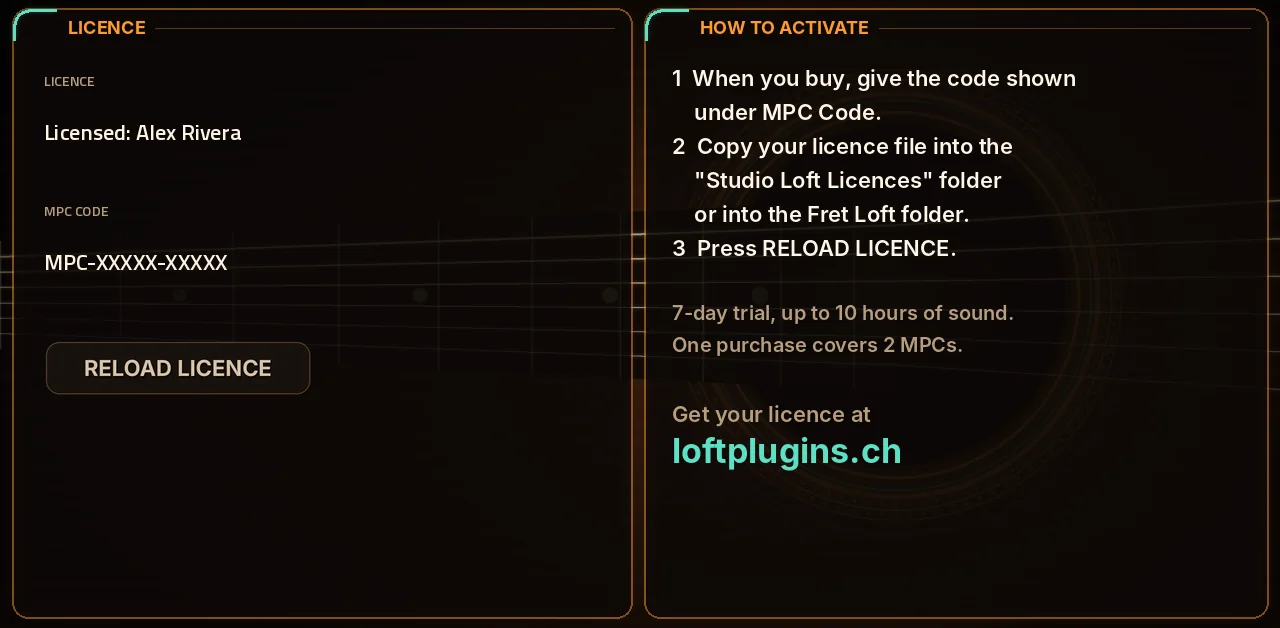
What you see
- 1Licence Your licence status: licensed, or no licence found.
- 2MPC Code The code of your MPC, needed once to activate your licence.
- 3Reload Licence Reads the licence files again after you copied a new one (also on the top-left Q-Link).
- 4How to activate The steps, always at hand on the MPC, with the address of the shop.
Your licence
Buy once, get your licence by e-mail. Without a valid licence, Fret Loft stays silent. One purchase covers 2 MPCs. Everything works offline: nothing is sent over the internet.
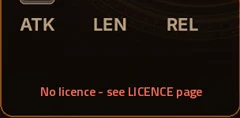
When Fret Loft is silent, the PLAY page says why and where to go.
Activate in 4 steps
Install Fret Loft and open it: the LICENCE page shows the code of your MPC.
When you buy at loftplugins.ch, give the code shown under MPC Code (it is also saved in the file "Studio Loft Licences/MY MPC CODE.txt" on your MPC drive).
Copy the licence file you receive by e-mail into the "Studio Loft Licences" folder or into the Fret Loft folder.
Press RELOAD LICENCE on the LICENCE page. The status shows your name.
The code and the name on this screen are examples.
Lizenz & Aktivierung
In drei Schritten deins.
Kaufen
Einmal auf dieser Seite zahlen. Dein persönlicher Link kommt per E-Mail und bleibt gültig.
Loft Hub installieren
MPC OS 3.10.1 oder neuer, mit aktivierten Enhancements und External Plugin Support in den Preferences. Kopiere Loft Hub einmal auf das MPC-Laufwerk.
Verbinden und spielen
In Loft Hub akzeptieren, MPC verbinden, und deine Plugins installieren sich von selbst. Funktioniert auf zwei MPC. Das war's.
Deins
Fret Loft
Nylon-, Steelstring- und E-Gitarren, Strums und Patterns.
Einmal zahlen, für immer deins. Deine Lizenz gilt für zwei MPCs.