Instrument · Version 1.4.0
Kickass Loft
THE KICK AND BASS SYNTH FOR HARD MUSIC, INSIDE YOUR MPC.
Every kick here is two sounds welded together: a PUNCH you feel in the chest, and a TAIL that sings the note you play. Change the note, the whole kick changes key.
3 = $993 Plugins nach Wahl für $99 →
Hardtek at 165 BPM: a deep, round kick with a long body and a sub you feel in the chest.
Das Handbuch
Jeder Screen,
Seite für Seite.
Die komplette Anleitung, Screen für Screen, genau wie auf der MPC. Die Namen der Einstellungen bleiben die englischen Wörter des Screens.
Play your kick like a bass line .
Every kick here is two sounds welded together: a PUNCH you feel in the chest, and a TAIL that sings the note you play. Change the note, the whole kick changes key.
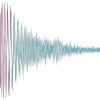
The first 0.4 s of the preset RAW - Zaag Screamer, rendered by the plugin itself.
Measured, not promised
| Pad note | Tail note | Frequency |
|---|---|---|
| 29 | F0 | 43.7 Hz |
| 31 | G0 | 49.0 Hz |
| 33 | A0 | 55.0 Hz |
| 36 | C1 | 65.4 Hz |
| 38 | D1 | 73.4 Hz |
Read on the LISTEN page while playing RAW - Zaag Screamer.
Phase Lock
With PHASE LOCK on, the punch and the tail share one phase. The pitch drop lands exactly on the note: no hollow dip, no cancelled low end at the impact.
What it feels like: your kick sits in the key of the track instead of fighting the bass. Write the kick line first, the rest falls into place.
Hold the note. It rolls.
Kick, two basses and the roll live in the same instrument. Hold a pad: the basses re-trigger on your MPC's tempo grid until you let go.
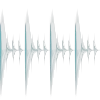
One bar of TEK - Double Roll at 150 BPM: four kicks, and the rolling bass between them. Saw on Bass A, Square on Bass B, ROLL on Rolling, 1/16.
Three styles, three shapes
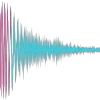 RAW - Zaag ScreamerScreaming, distorted tail.
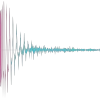 HS - Euphoric KickLong, clean, tuned tail.
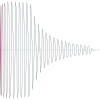 GABBER - Doef DoefRound square body, the classic « doef ».
What it feels like: load a preset, hold one pad and you already have the backbone of a track.
Three steps
Install
Copy the folder « Studio Loft - VST - Kickass Loft » into « VST2 Plugins » on your MPC drive. On the MPC, in Preferences › Enhancements, turn on Enable Enhancements and External Plugin Support.
Load
Create a plugin track and choose Kickass Loft from the external plugins. Pick a preset: they are grouped by style.
Play
Play a pad or a key. Note 36 (C1) gives a tail at 65.4 Hz. For deeper kicks, play notes 29 to 33 (F0 to A0).
Find your way
Each function key opens a page. Press the same key again for its next page.
Touch and turn
- Touch a control, then turn the data wheel.
- Touch a list to open it, pick a name, or press × CLOSE.
- Click the data wheel on a choice: lists open, On/Off switches flip, small choices open the big value window.
- Each column of 4 controls is played by one column of 4 Q-Links: top knob, top control.
Program mode Q-Links
The 16 Q-Links hold what matters most for a kick: Punch Lvl, Tail Lvl, BassA Lvl, Sub Lvl, Punch Drive, Tail Drive, Tail Cutoff, Tail Decay, Tail Drop, Tail Shape, Click Lvl, SC Depth, Roll Gate, Master Drive, Clip Drive, Volume.
MAIN
The whole kick on one page.
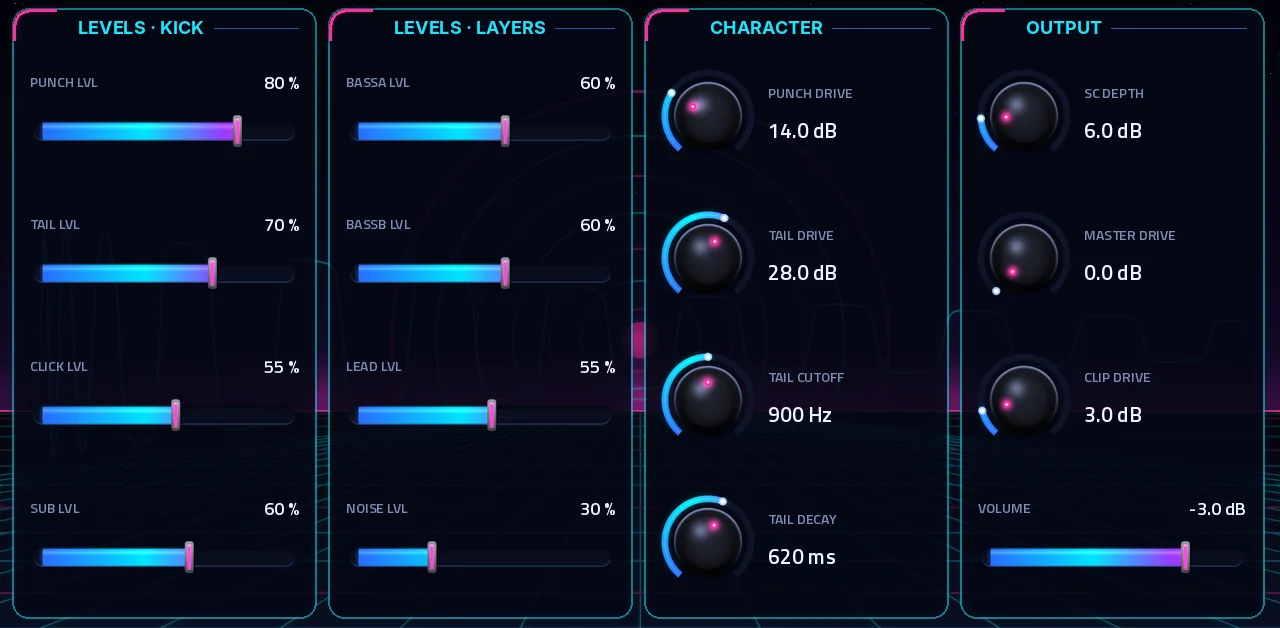 1234
Tipp
Kick too long for a fast tempo? Pull TAIL DECAY down before touching anything else. Too polite? Push TAIL DRIVE and open TAIL CUTOFF.
- 1
LEVELS · KICK
PUNCH LVL, TAIL LVL, CLICK LVL, SUB LVL: the balance between the four parts of the kick.
- 2
LEVELS · LAYERS
BASSA LVL, BASSB LVL, LEAD LVL, NOISE LVL: how loud each extra layer sits under the kick.
- 3
CHARACTER
PUNCH DRIVE, TAIL DRIVE, TAIL CUTOFF, TAIL DECAY: the four moves that change a kick the most.
- 4
OUTPUT
SC DEPTH (how much the kick ducks the rest), MASTER DRIVE, CLIP DRIVE and VOLUME.
Your home page. Load a preset, then shape it here without diving into the detail pages. Each column is played by one column of four Q-Links: top knob, top control.
PUNCH
The hit you feel in the chest.
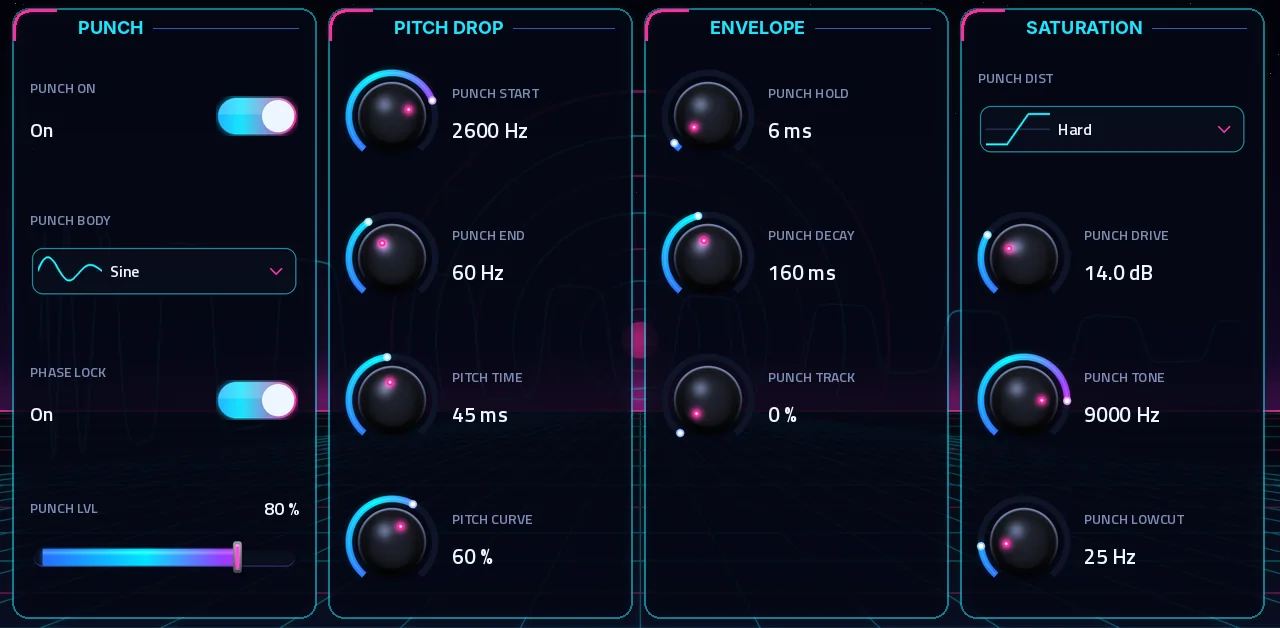 1234
Tipp
For more knock, raise PUNCH START and shorten PITCH TIME. For a rounder, heavier body, lower PUNCH END and lengthen PUNCH DECAY.
- 1
PUNCH
PUNCH ON, PUNCH BODY (Sine, Round, Harmonic, Driven, Square), PHASE LOCK and PUNCH LVL.
- 2
PITCH DROP
PUNCH START and PUNCH END in Hz, PITCH TIME and PITCH CURVE: how fast the attack falls.
- 3
ENVELOPE
PUNCH HOLD and PUNCH DECAY set its length. PUNCH TRACK: how much the punch follows the note.
- 4
SATURATION
PUNCH DIST (9 types), PUNCH DRIVE, PUNCH TONE (high cut) and PUNCH LOWCUT.
The punch is the short, fast-falling attack of the kick. With PHASE LOCK on, it shares its phase with the tail, so the drop lands right on the note with no hollow dip at the impact. Off, the punch keeps its own pitch and only the tail follows the note.
CLICK
The first milliseconds, plus how the kick is played.
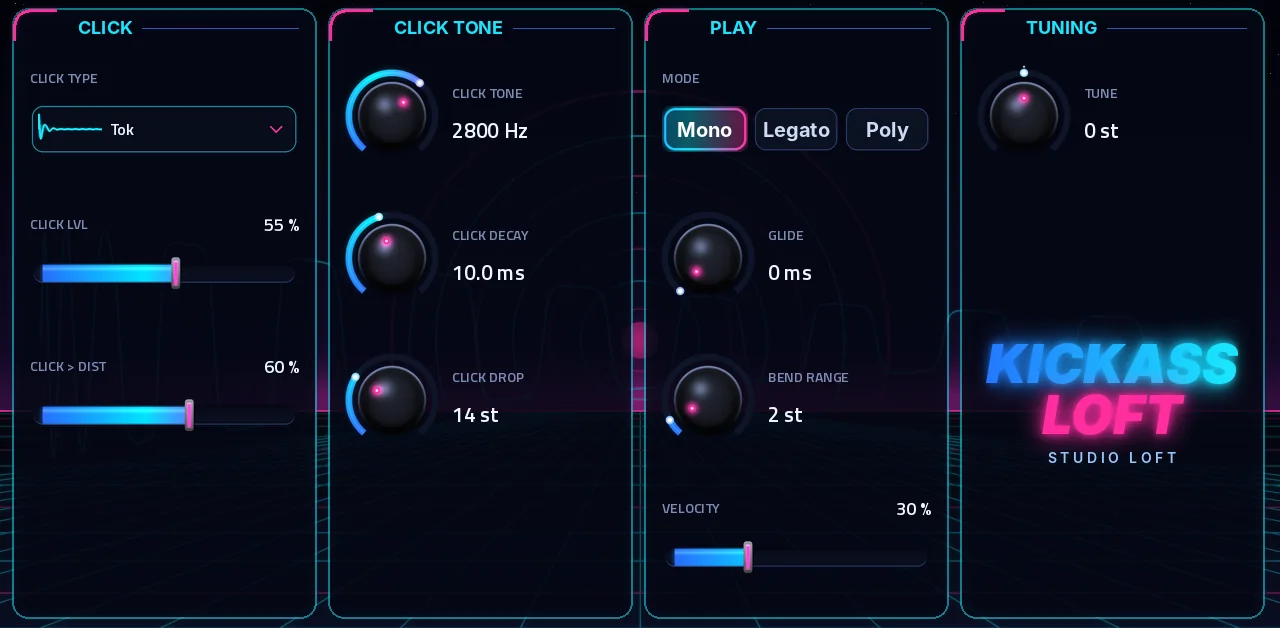 1234
Tipp
Tok and Snap give a sharp front without making the kick louder. Keep CLICK > DIST high when the tail is heavily distorted, so the click and the tail feel welded together.
- 1
CLICK
CLICK TYPE (10 models: Click, Tok, Snap, Noise, Metal, Laser, Zap, Thump, Rip, Crack), CLICK LVL, and CLICK > DIST: the part sent into the distortion.
- 2
CLICK TONE
CLICK TONE in Hz, CLICK DECAY and CLICK DROP in semitones.
- 3
PLAY
MODE (Mono, Legato, Poly), GLIDE, BEND RANGE and VELOCITY.
- 4
TUNING
TUNE: moves the whole kick by ±12 semitones.
The click cuts through a busy mix and through small speakers. The PLAY column decides what a new note does: Mono restarts the kick, Legato changes the bass or lead note without restarting it, Poly plays up to 4 voices for leads and chords.
TAIL
The part that sings your note.
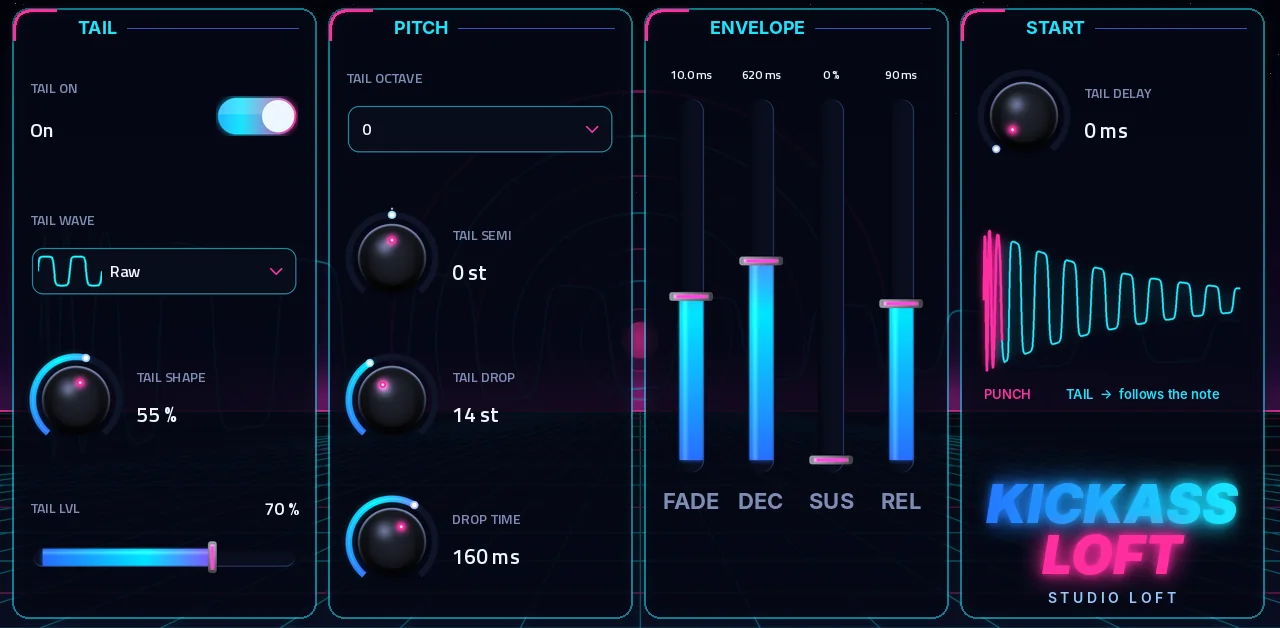 1234
Tipp
For a long, euphoric tail, raise TAIL SUSTAIN and let the note length decide the kick length. For a tight hardcore kick, keep SUS at 0 % and use DEC.
- 1
TAIL
TAIL ON, TAIL WAVE (16 waves, with an icon), TAIL SHAPE and TAIL LVL.
- 2
PITCH
TAIL OCTAVE, TAIL SEMI, TAIL DROP (start higher and fall onto the note) and DROP TIME.
- 3
ENVELOPE
FADE, DEC, SUS, REL: the four vertical bars (TAIL FADE IN, TAIL DECAY, TAIL SUSTAIN, TAIL RELEASE).
- 4
START
TAIL DELAY: lets the punch speak alone for a few milliseconds before the tail comes in.
The tail follows the note you play: this is what makes a rawstyle kick scream in key. Choose its wave, then decide how far it falls (TAIL DROP) and how long it lasts.
TONE
Two distortions and a filter, in that order.
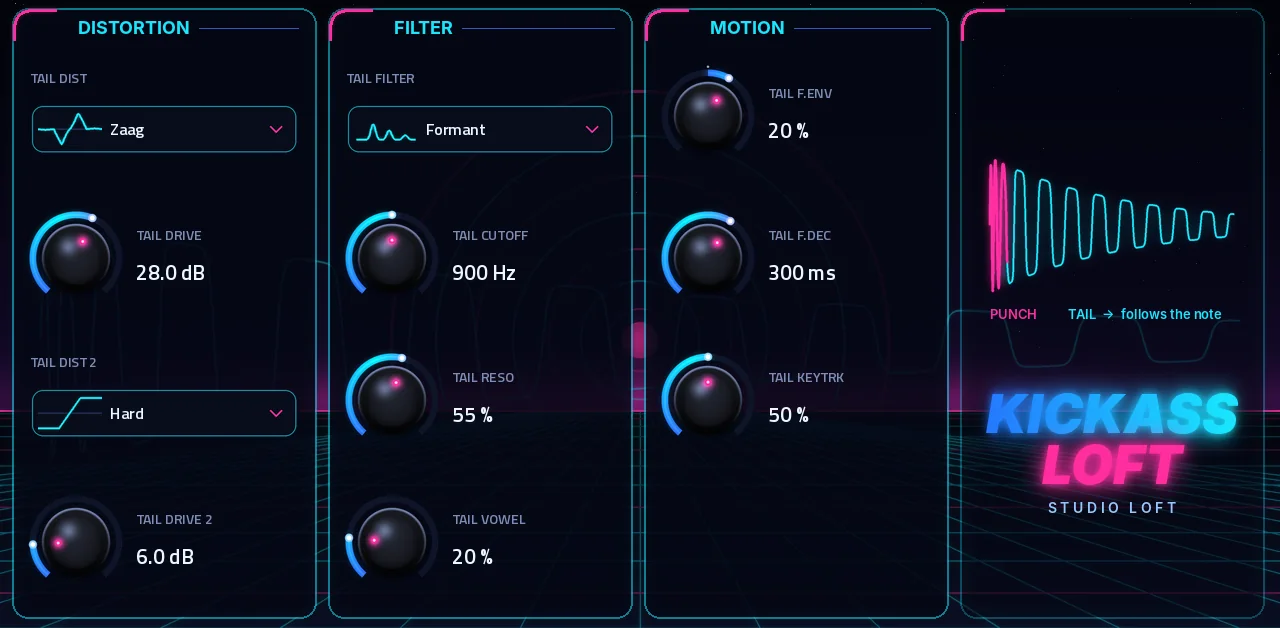 123
Tipp
Formant filter + TAIL VOWEL gives the talking, screeching tails of rawstyle. Sweep TAIL VOWEL with an LFO for movement.
- 1
DISTORTION
TAIL DIST and TAIL DRIVE (stage 1), TAIL DIST 2 and TAIL DRIVE 2 (stage 2, after the filter). 9 types: Soft, Hard, Tube, Fold, Rectify, Scream, Gabber, Zaag, Crush.
- 2
FILTER
TAIL FILTER (Off, LP12, LP24, BP, HP, Notch, Comb+, Comb-, Formant), TAIL CUTOFF, TAIL RESO, TAIL VOWEL.
- 3
MOTION
TAIL F.ENV and TAIL F.DEC: a filter sweep on each hit. TAIL KEYTRK: the filter follows the note.
This is where the tail gets its grit. The signal goes distortion 1 → filter → distortion 2, so you can carve the first distortion with the filter before crushing it again.
BASS A
A full bass layer under the kick.
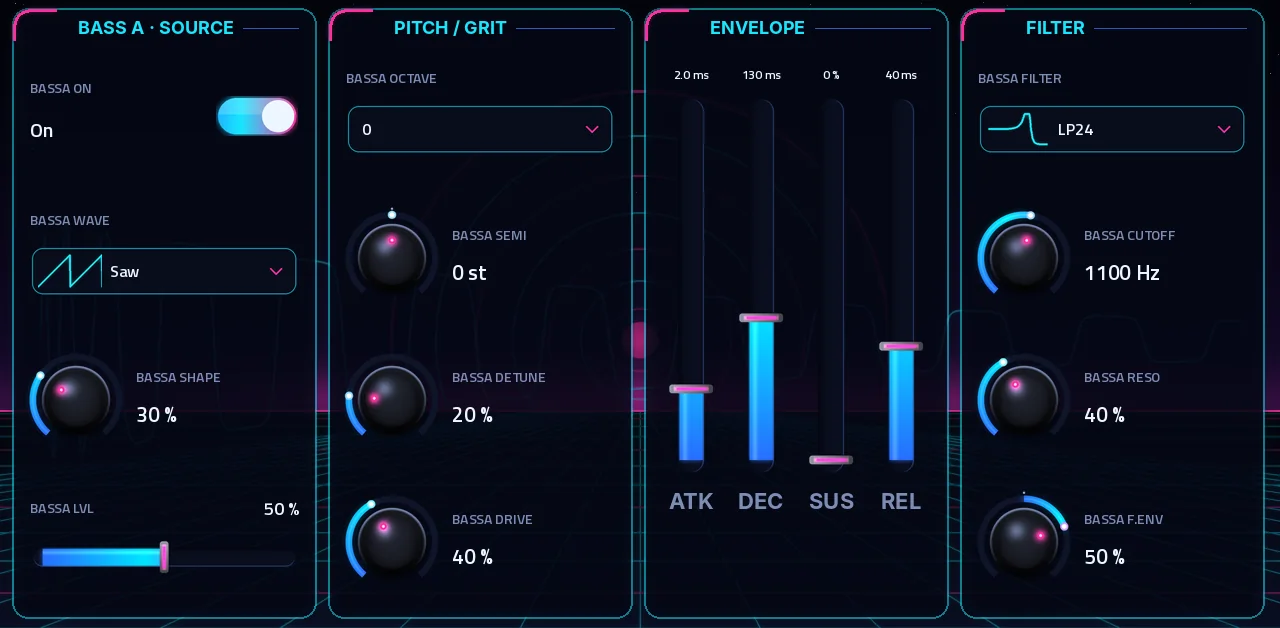 1234
Tipp
For a hardtek rolling bass: Saw wave, short DEC, SUS at 0 %, then switch the ROLL page on.
- 1
BASS A · SOURCE
BASSA ON, BASSA WAVE (16 waves), BASSA SHAPE, BASSA LVL.
- 2
PITCH / GRIT
BASSA OCTAVE, BASSA SEMI, BASSA DETUNE (a doubled, detuned copy), BASSA DRIVE.
- 3
ENVELOPE
ATK, DEC, SUS, REL: the bass envelope.
- 4
FILTER
BASSA FILTER (9 types), BASSA CUTOFF, BASSA RESO, BASSA F.ENV.
Bass A plays the same note as the kick, for off-beat basses, rolling basses or a fat stack under the tail. It has its own saturation and filter.
BASS B
A second bass layer, same controls.
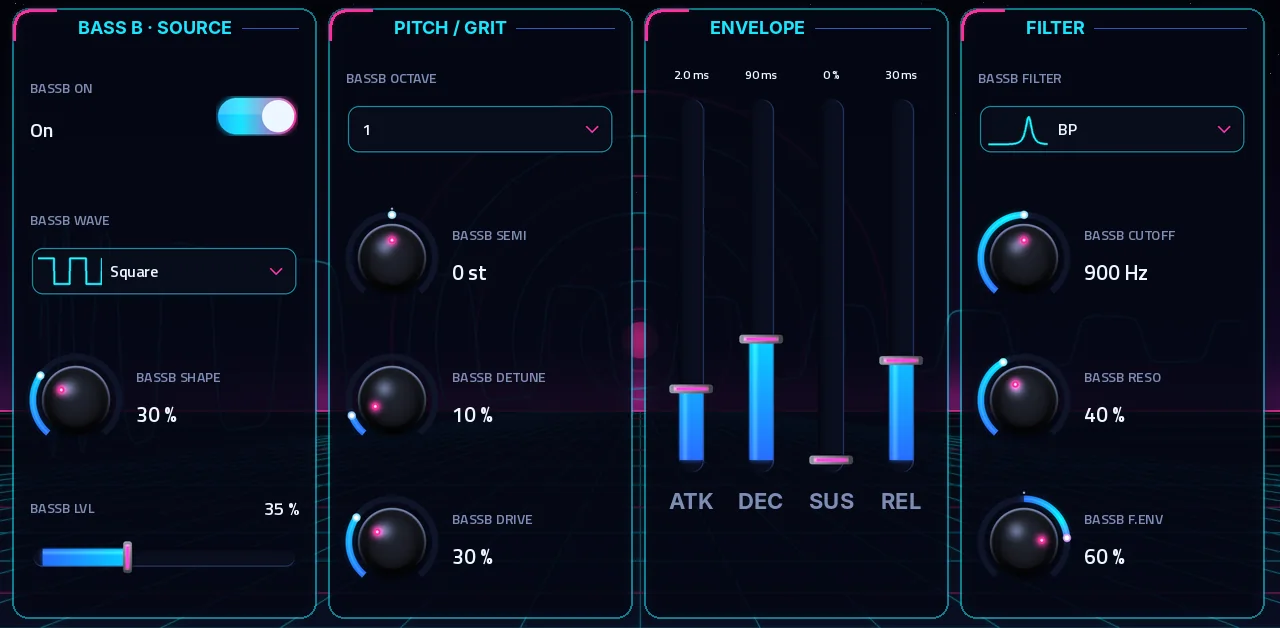 1234
Tipp
Give each bass a different filter: one low-pass for weight, one band-pass for the bite. They will stay apart in the mix.
- 1
BASS B · SOURCE
BASSB ON, BASSB WAVE, BASSB SHAPE, BASSB LVL.
- 2
PITCH / GRIT
BASSB OCTAVE, BASSB SEMI, BASSB DETUNE, BASSB DRIVE.
- 3
ENVELOPE
ATK, DEC, SUS, REL.
- 4
FILTER
BASSB FILTER, BASSB CUTOFF, BASSB RESO, BASSB F.ENV.
Stack a second wave on Bass A: a square under a saw, or one octave apart. In the preset shown, Bass A is a Saw and Bass B a Square, an octave higher.
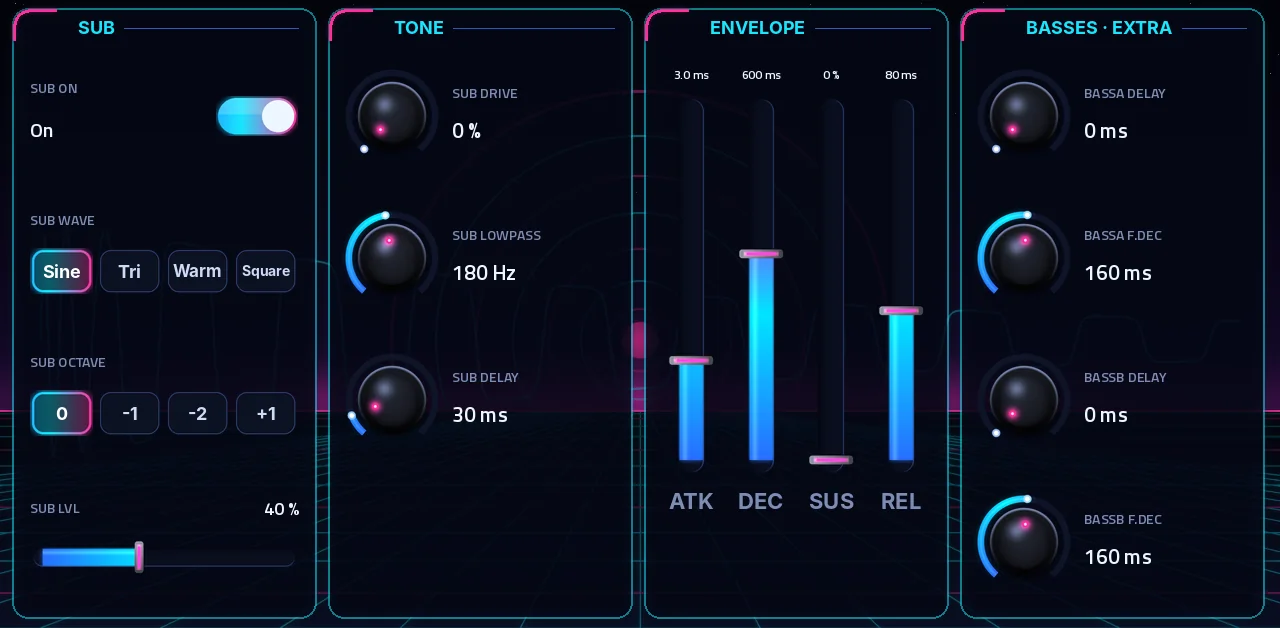
SUB
The weight under everything.
 1234
Tipp
Keep the sub on Sine with a low SUB LOWPASS and add a little SUB DRIVE: it will be heard on small speakers without losing its weight.
- 1
SUB
SUB ON, SUB WAVE (Sine, Tri, Warm, Square), SUB OCTAVE (0, -1, -2, +1), SUB LVL.
- 2
TONE
SUB DRIVE, SUB LOWPASS, SUB DELAY.
- 3
ENVELOPE
ATK, DEC, SUS, REL.
- 4
BASSES · EXTRA
BASSA DELAY, BASSA F.DEC, BASSB DELAY, BASSB F.DEC: timing and filter decay of the two basses.
A clean sub layer in mono, for kicks that need to be felt on a big system. SUB DELAY lets the kick hit first and the sub take over just after.
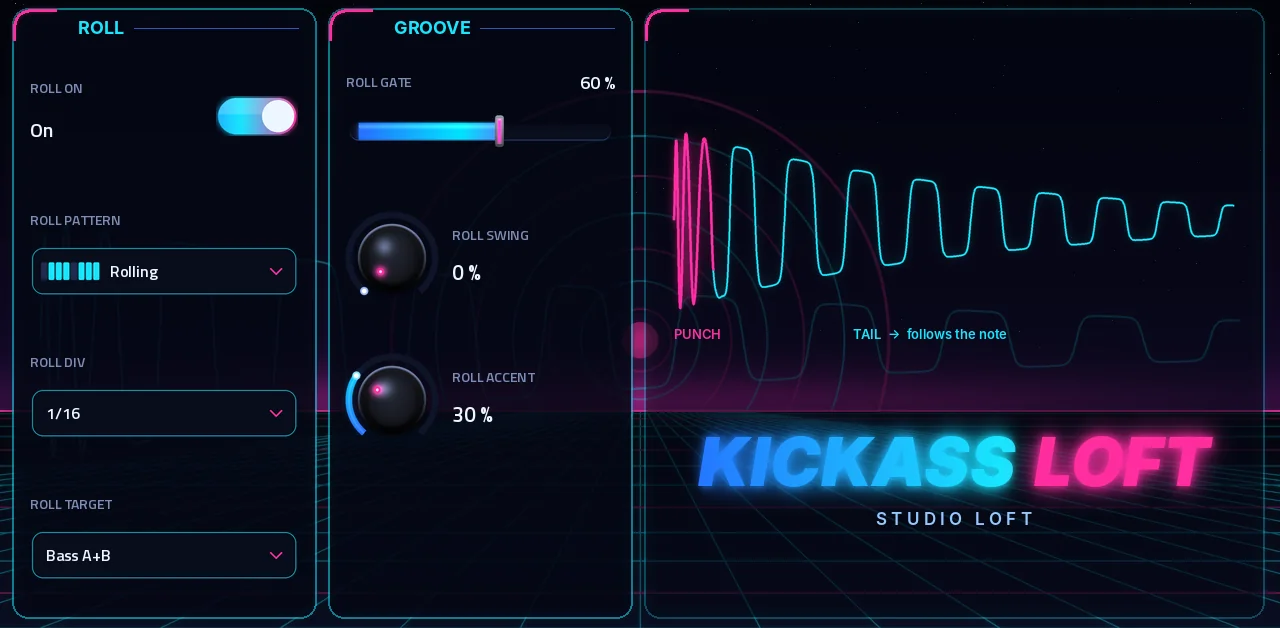
ROLL
Hold the note, the bass rolls.
 12
Tipp
Start with Rolling at 1/16 on Bass A+B, ROLL GATE around 60 %. Try Gallop for a tribe feel, then add a touch of ROLL SWING.
- 1
ROLL
ROLL ON, ROLL PATTERN (All, Offbeat, Rolling, Gallop, Hardtek, Skip 1, 1 + 3), ROLL DIV (17 divisions), ROLL TARGET (Bass A, Bass B, Bass A+B, Bass+Sub, Bass+Sub+Tail).
- 2
GROOVE
ROLL GATE (note length), ROLL SWING and ROLL ACCENT (louder downbeats).
While you hold the pad, the basses re-trigger on the tempo grid of your MPC. Release the pad, the roll stops. A complete hardtek groove from one note.
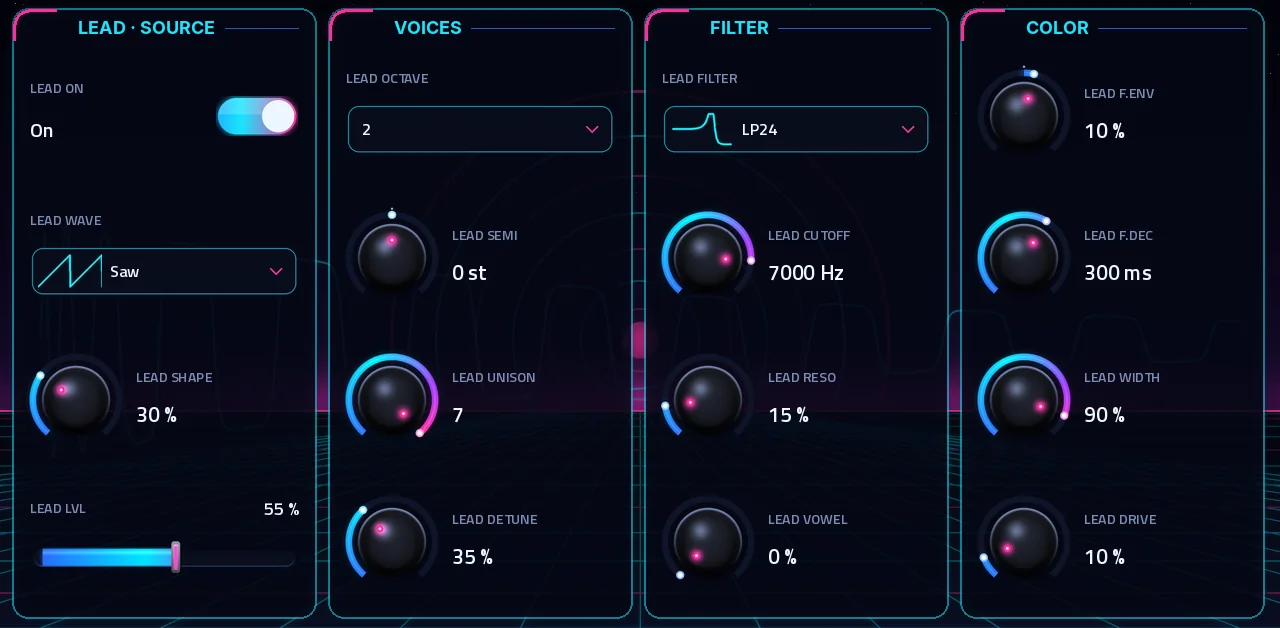
LEAD
Screeches, sirens and stabs.
 1234
Tipp
For a huge euphoric lead: Saw, LEAD UNISON 7, LEAD DETUNE around 35 %, LEAD WIDTH 90 %, then some reverb on the FX page.
- 1
LEAD · SOURCE
LEAD ON, LEAD WAVE (16 waves), LEAD SHAPE, LEAD LVL.
- 2
VOICES
LEAD OCTAVE, LEAD SEMI, LEAD UNISON (up to 7 voices in stereo), LEAD DETUNE.
- 3
FILTER
LEAD FILTER (9 types), LEAD CUTOFF, LEAD RESO, LEAD VOWEL.
- 4
COLOR
LEAD F.ENV, LEAD F.DEC, LEAD WIDTH, LEAD DRIVE.
A wide stereo lead for euphoric melodies, rave stabs and screeches. Switch MODE to Poly on the CLICK page to play chords.
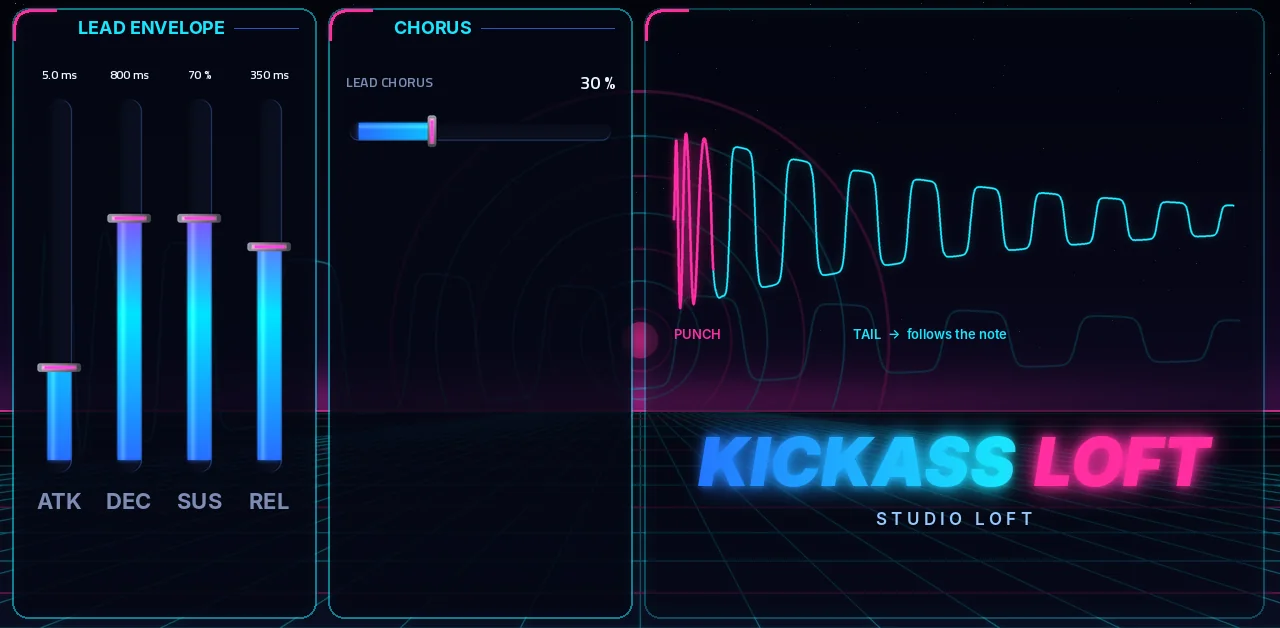
LEAD ENV
How the lead starts and ends.
 12
Tipp
Pluck: ATK 0, DEC around 250 ms, SUS 0 %. Siren: slower ATK, SUS 100 % and a long REL.
- 1
LEAD ENVELOPE
ATK, DEC, SUS, REL of the lead.
- 2
CHORUS
LEAD CHORUS: a chorus on the lead only.
Short envelopes for stabs and plucks, long release for pads and sirens. The chorus widens the lead without touching the kick.
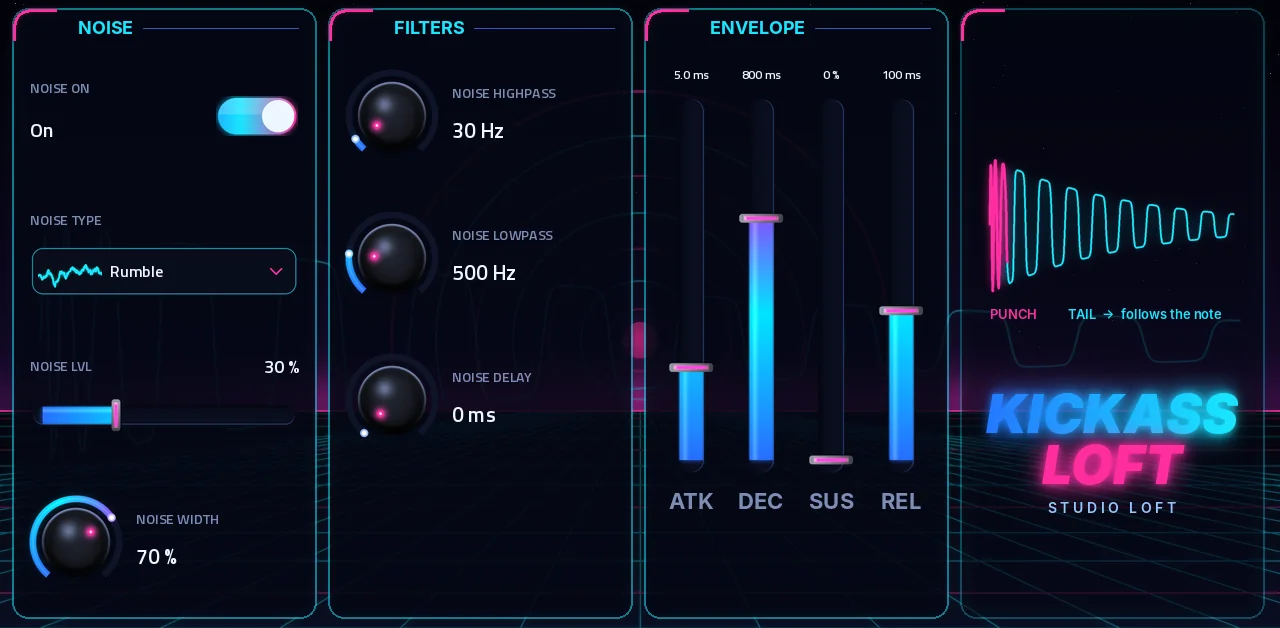
NOISE
Texture: rumble, crackle, tape.
 123
Tipp
Rumble at low level with a long DEC turns a dry kick into a hard-techno rumble kick in seconds.
- 1
NOISE
NOISE ON, NOISE TYPE (White, Pink, Crackle, Rumble, Hiss, Industrial, Tape), NOISE LVL, NOISE WIDTH.
- 2
FILTERS
NOISE HIGHPASS, NOISE LOWPASS, NOISE DELAY.
- 3
ENVELOPE
ATK, DEC, SUS, REL of the noise.
A noise layer for the air and dirt around the kick: rumble for hard techno, crackle and tape for an industrial or worn sound.
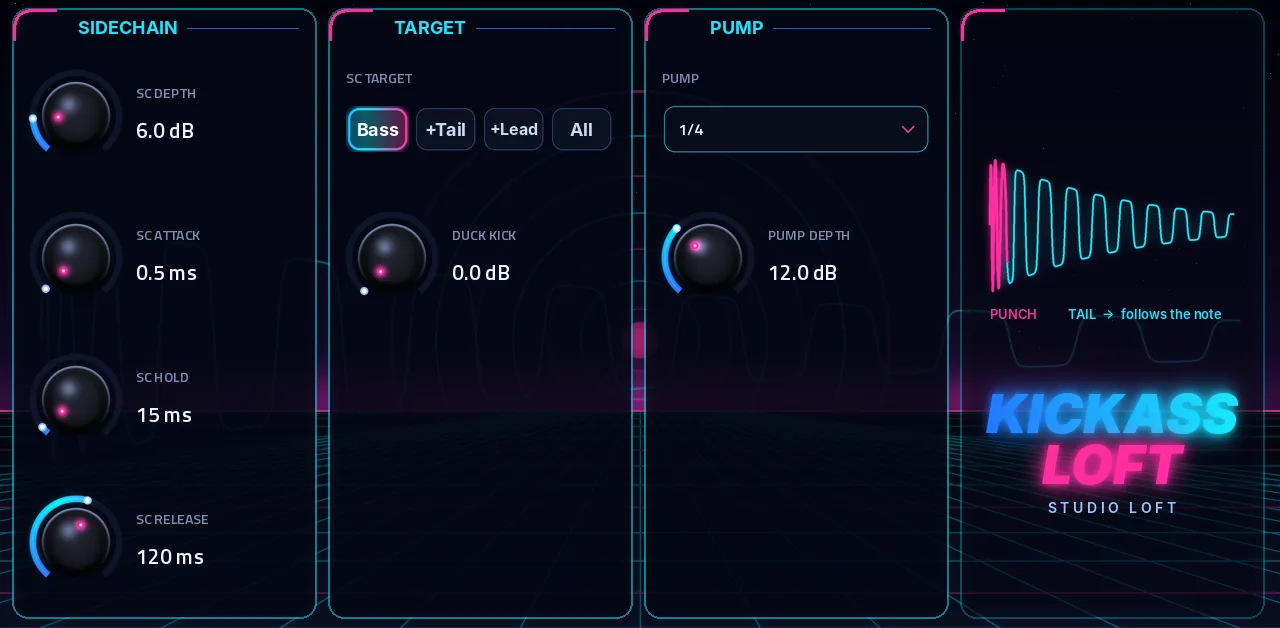
SIDECHN
The kick makes room for itself.
 123
Tipp
For a clean low end, SC DEPTH between 1 and 3 dB with SC HOLD around 10–20 ms is enough. For an obvious pump, use PUMP at 1/4.
- 1
SIDECHAIN
SC DEPTH (0 to 36 dB), SC ATTACK, SC HOLD, SC RELEASE.
- 2
TARGET
SC TARGET (Bass, +Tail, +Lead, All) and DUCK KICK: the reverse, the bass ducks the kick.
- 3
PUMP
PUMP (Off or a tempo division) and PUMP DEPTH: a pump locked to the tempo.
Every kick ducks the other layers, at the exact sample of the hit. No routing, no extra track: it is inside the instrument.
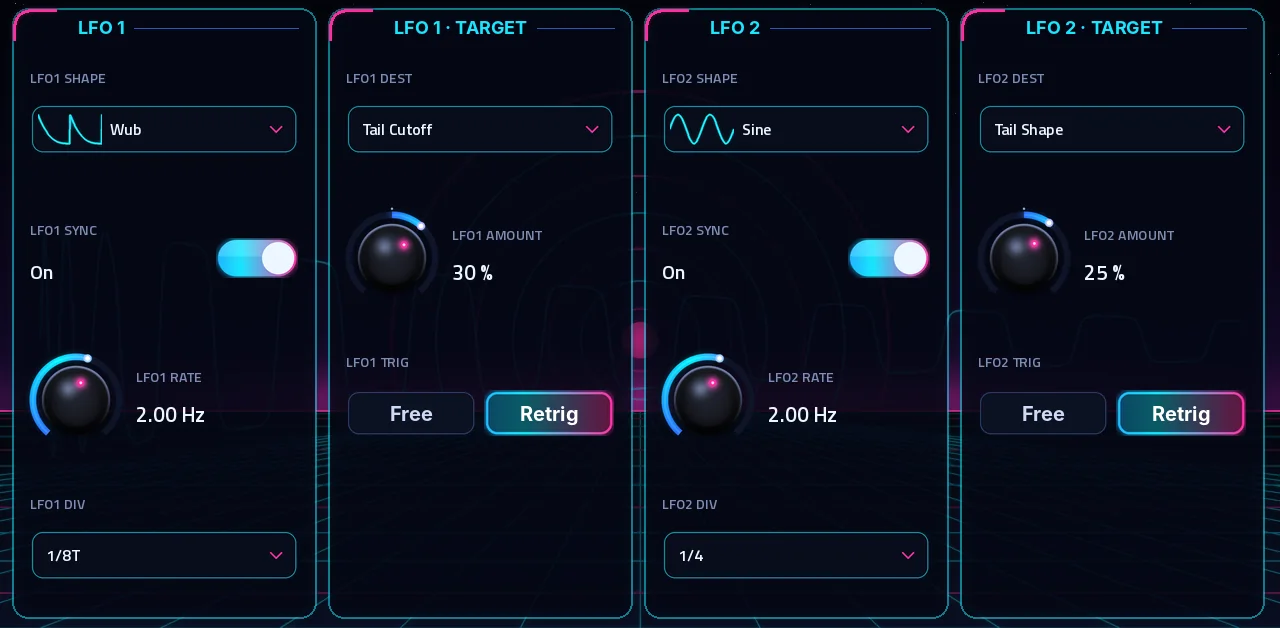
LFO
Movement, in time with your track.
 1234
Tipp
Wub on TAIL CUTOFF at 1/8 with Retrig gives a growling tail that restarts the same way on every kick.
- 1
LFO 1
LFO1 SHAPE (Sine, Triangle, Saw Up, Saw Down, Square, S&H, Wub), LFO1 SYNC, LFO1 RATE or LFO1 DIV.
- 2
LFO 1 · TARGET
LFO1 DEST (13 destinations), LFO1 AMOUNT, LFO1 TRIG (Free or Retrig on each note).
- 3
LFO 2
Same controls for the second LFO.
- 4
LFO 2 · TARGET
LFO2 DEST, LFO2 AMOUNT, LFO2 TRIG.
Two LFOs to move tail pitch, cutoff, shape or drive, bass and lead filters, noise, sub level or punch drive. With SYNC on, they follow the tempo.
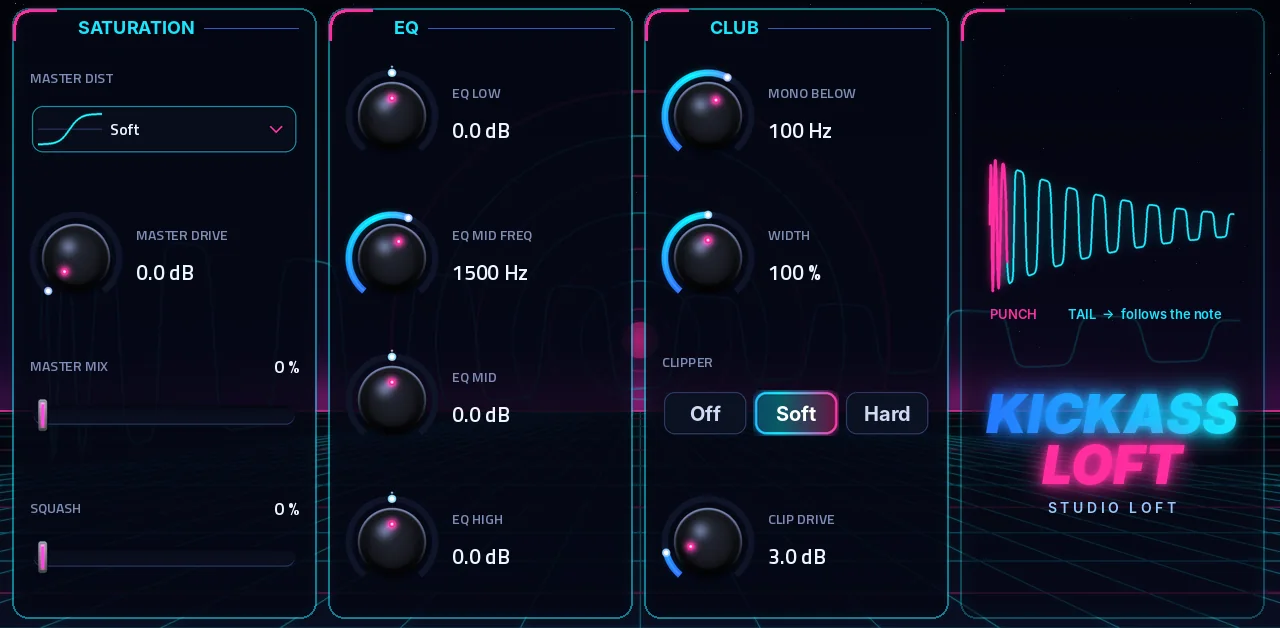
MASTER
Club-ready output.
 123
Tipp
Leave MONO BELOW at 100 Hz: the low end stays solid on any club system. Use CLIPPER Soft and CLIP DRIVE for loudness before reaching for more drive.
- 1
SATURATION
MASTER DIST, MASTER DRIVE, MASTER MIX (parallel blend), SQUASH (a 3-band compressor).
- 2
EQ
EQ LOW, EQ MID FREQ, EQ MID, EQ HIGH.
- 3
CLUB
MONO BELOW (everything under this frequency in strict mono), WIDTH, CLIPPER (Off, Soft, Hard), CLIP DRIVE.
The last stage before the MPC: glue, tone and a safe, loud output. A limiter at -1 dBFS sits after the clipper.
FX
Space, without mud.
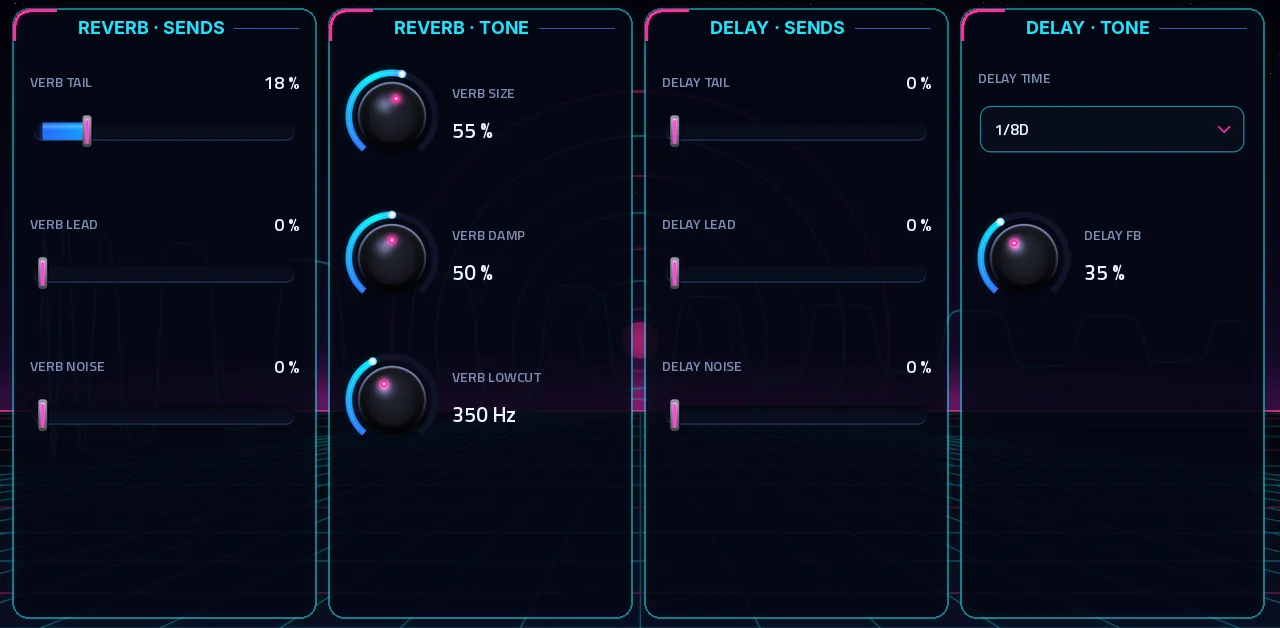 1234
Tipp
A little VERB TAIL with a high VERB LOWCUT gives a big-room tail while the kick itself stays tight.
- 1
REVERB · SENDS
VERB TAIL, VERB LEAD, VERB NOISE: how much of each layer goes to the reverb.
- 2
REVERB · TONE
VERB SIZE, VERB DAMP, VERB LOWCUT.
- 3
DELAY · SENDS
DELAY TAIL, DELAY LEAD, DELAY NOISE.
- 4
DELAY · TONE
DELAY TIME (tempo divisions) and DELAY FB.
Reverb and delay on the tail, lead and noise only. The punch, basses and sub stay dry, and the effects are cut in the low end.
LISTEN
A second pair of ears on your kick.
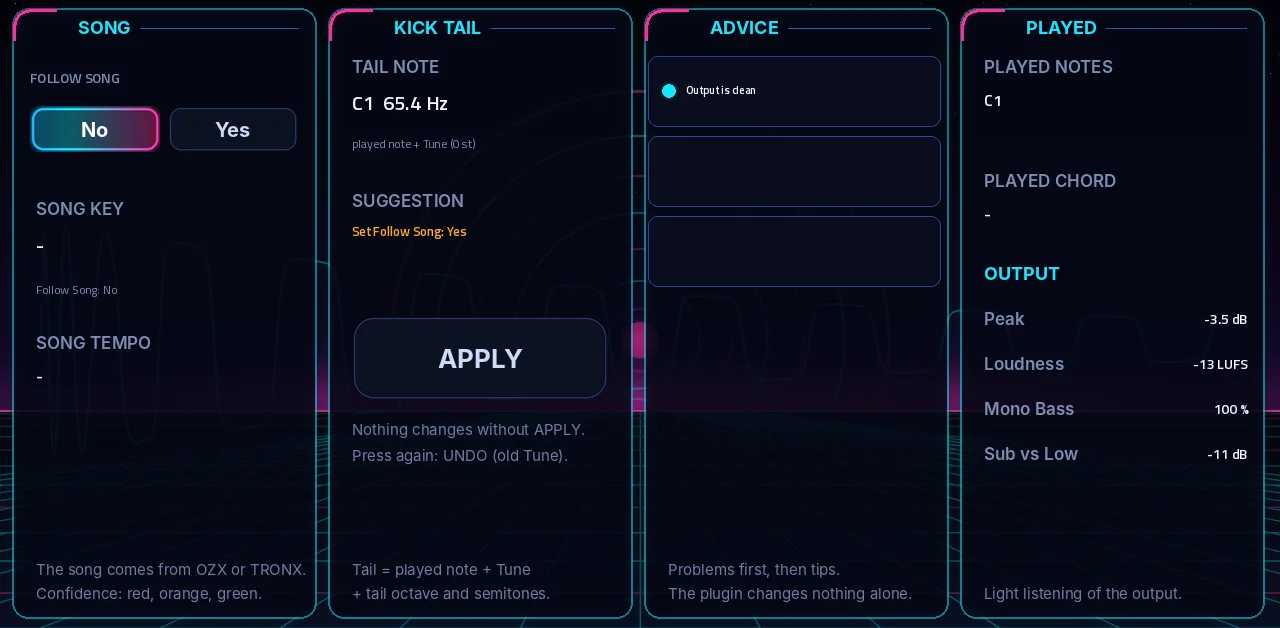 1234
Tipp
Tuning a kick to your track? Watch TAIL NOTE while you move TUNE or TAIL SEMI on the other pages: you read the result in Hz, no guessing.
- 1
SONG
FOLLOW SONG, SONG KEY, SONG TEMPO. This version does not read a song key: the panel shows « - » and APPLY has nothing to apply.
- 2
KICK TAIL
TAIL NOTE: the note and frequency of the tail right now (here C1, 65.4 Hz).
- 3
ADVICE
Up to three short notes on the output, problems first, each with a coloured dot.
- 4
PLAYED
PLAYED NOTES, PLAYED CHORD, and the OUTPUT: Peak, Loudness (LUFS), Mono Bass, Sub vs Low.
Check that the tail sits where you think it does, and that the output is clean before you bounce. The plugin measures, it never changes your sound on its own.
Pick one
Touch a list or click the data wheel on it: the choices open full screen, with the list name at the top. The current choice is lit. Touch a name to pick it, or press × CLOSE.
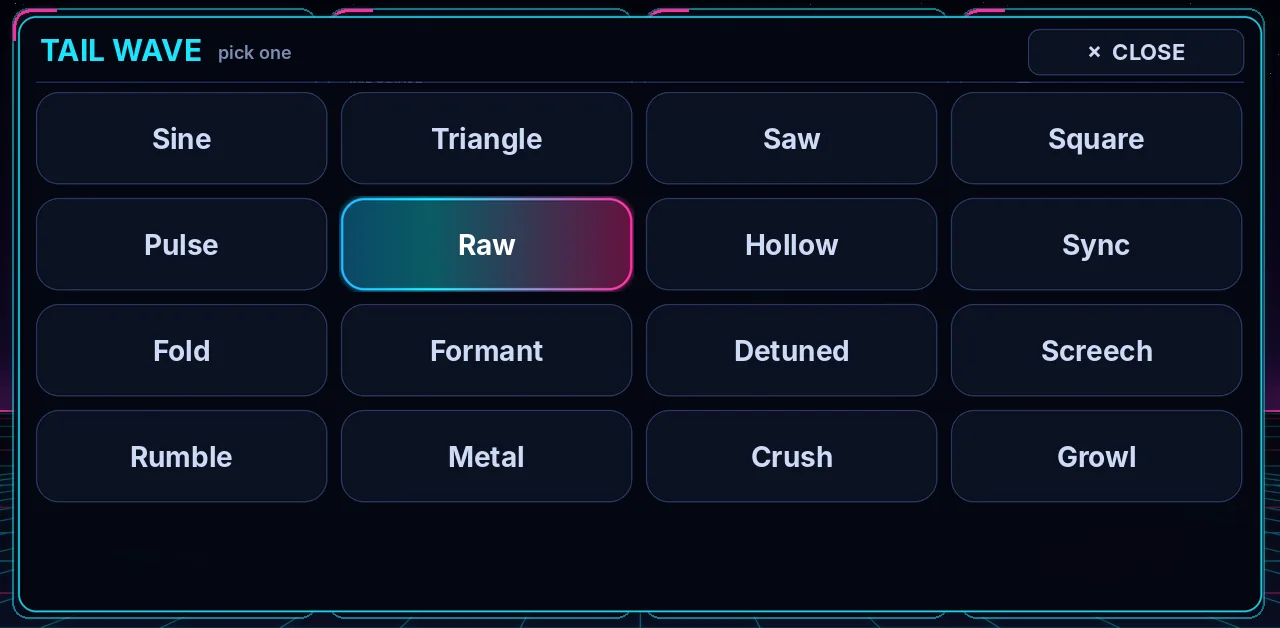
TAIL WAVE
16 waves for the tail, the basses and the lead: Sine, Triangle, Saw, Square, Pulse, Raw, Hollow, Sync, Fold, Formant, Detuned, Screech, Rumble, Metal, Crush, Growl.
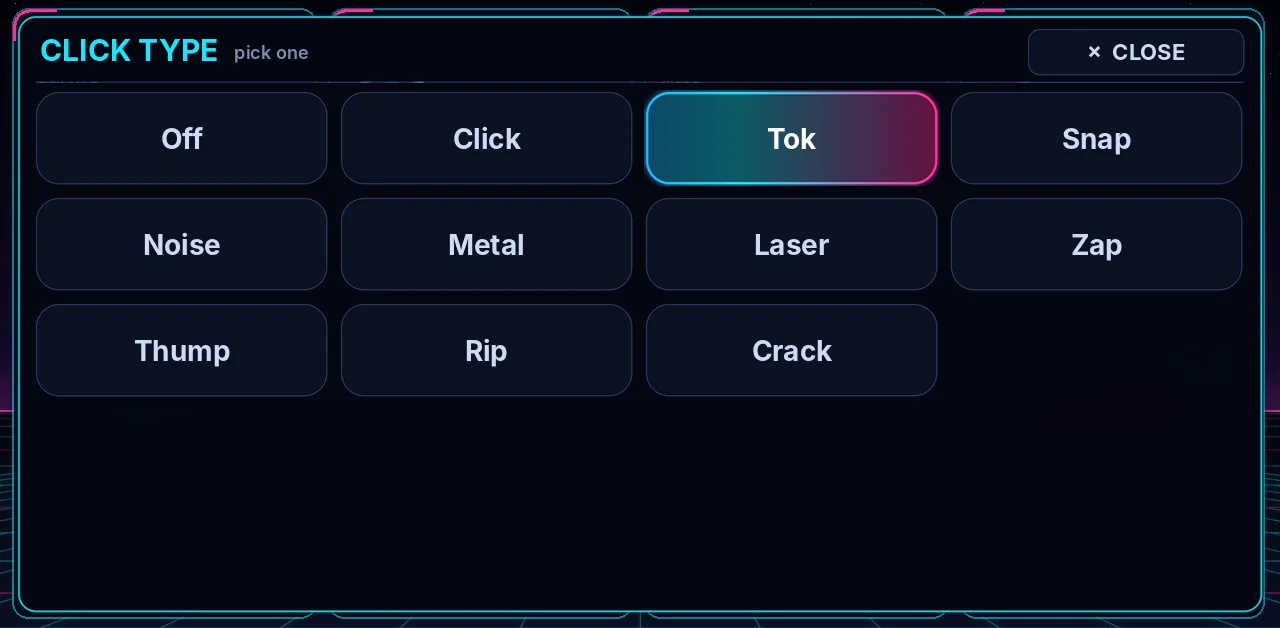
CLICK TYPE
Off and 10 click models, from the soft Thump to the metallic Crack.
Kickass Loft in one page
A kick and bass synthesizer for hard music: a punch and a tail fused in phase, tuned to the note you play, with bass, sub, rolling bass, lead and noise layers on top, running inside your MPC.
Made for
- Rawstyle and hardstyle: screaming, distorted or euphoric tails in key.
- Hardtek and tribe: kick plus rolling basses from a single pad.
- Hardcore, uptempo, frenchcore, gabber and hard techno: crushed, round or rumbling kicks.
Strengths
- The tail follows the note; PHASE LOCK keeps the impact full.
- Two distortion stages on the tail with a 9-type filter in between.
- Rolling basses on the MPC tempo: 7 patterns, 17 divisions, 5 targets.
- Internal sidechain at the exact sample of each kick, plus a tempo pump.
- Club master: strict mono low end (24 dB/oct), clipper, limiter at -1 dBFS.
- LISTEN page: tail note in Hz, peak, loudness and short advice.
Numbers
| Presets | 142 in 13 styles |
| Sound sources | 8: punch, click, tail, bass A, bass B, sub, lead, noise |
| Waves | 16 (tail, basses, lead) |
| Clicks | 10 models |
| Distortions | 9 types |
| Filters | 9 types |
| Noises | 7 types |
| LFOs | 2, 7 shapes, 13 destinations |
| Voices | Mono, Legato, Poly (4); lead unison up to 7 |
| Sound controls | 182, on 18 screen pages |
| Samples | None: 100 % synthesized |
| Size | about 14 MB |
| Runs on | MPC standalone, MPC OS 3.10.1 or later |
142 presets
Names as they appear on the MPC. Preset 1 is Init Kick, a clean starting point. On the MPC drive the preset files are sorted in one folder per style.
RAW Rawstyle · 14
- RAW - Zaag Screamer
- RAW - Screech Monster
- RAW - Fold Destroyer
- RAW - Vowel Rip
- RAW - Gated Rage
- RAW - Growl Tail
- RAW - Metal Tail
- RAW - Pitch Dive
- RAW - Detuned Kick
- RAW - Bitcrush Raw
- RAW - Sync Stutter
- RAW - Rolling Raw
- RAW - Decoupled Punch
- RAW - Fixed Tok Screech
HS Hardstyle · 9
- HS - Euphoric Kick
- HS - Classic Punch
- HS - Reverse Bass
- HS - Reverse Fat
- HS - Kick + Reverse
- HS - Soft Euphoric
- HS - Dirty Pulse
- HS - Laser Kick
- HS - Fixed Punch
TEK Hardtek / tribe · 11
- TEK - Tribe Kick
- TEK - Hardtek Slam
- TEK - Kick Roll Saw
- TEK - Kick Roll Pulse
- TEK - Fold Roller
- TEK - Double Roll
- TEK - Triplet Tribe
- TEK - Gallop Swing
- TEK - Rumble Tribe
- TEK - Detuned Roller
- TEK - Tracked Punch
CORE Hardcore / uptempo / frenchcore · 10
- CORE - Gabber Classic
- CORE - Uptempo Destroy
- CORE - Frenchcore Kick
- CORE - Rotterdam Fold
- CORE - Terror Crush
- CORE - Screech Core
- CORE - Long Distort
- CORE - Mid Growl
- CORE - Frenchcore Combo
- CORE - Indus Gabber
TECH Hard techno / industrial · 10
- TECH - Hard Techno
- TECH - Rumble Techno
- TECH - Industrial Slam
- TECH - Schranz Pump
- TECH - Deep Boom
- TECH - Metal Warehouse
- TECH - Kick + Rumble
- TECH - Distorted Loop
- TECH - Dusty Hard
- TECH - Long Boom 909
COMBO Kick + bass, ready to play · 14
- COMBO - Raw + Sub
- COMBO - Tek Full Roll
- COMBO - Euphoric Stack
- COMBO - Gabber Bounce
- COMBO - Techno Offbeat
- COMBO - Tribe Machine
- COMBO - Raw + Screech
- COMBO - Rumble Roll
- COMBO - Core + Warm Sub
- COMBO - Detuned Hold
- COMBO - Raw Growl Roll
- COMBO - Laser Stutter
- COMBO - Acid Techno
- COMBO - Rawstyle Full
Buy it once, own it
The hours only count while the plugin makes sound.
MPCs per purchase
One purchase activates Kickass Loft on two MPCs, with no time limit.
Internet on the MPC
The licence is checked on the MPC itself, offline. You only need a computer to buy and download it.
Activation
- 1
Load Kickass Loft once. It writes your code in « Studio Loft Licences / MY MPC CODE.txt » on the MPC drive (also shown on the LICENCE page).
- 2
On loftplugins.ch. You receive a licence file (.sllic).
- 3
Copy the .sllic file into the « Studio Loft Licences » folder, then press RELOAD LICENCE on the LICENCE page.
KICKASS LOFT
Studio Loft — loftplugins.ch
Kickass Loft version 1.3.1 · User guide
Lizenz & Aktivierung
In drei Schritten deins.
Kaufen
Einmal auf dieser Seite zahlen. Dein persönlicher Link kommt per E-Mail und bleibt gültig.
Loft Hub installieren
MPC OS 3.10.1 oder neuer, mit aktivierten Enhancements und External Plugin Support in den Preferences. Kopiere Loft Hub einmal auf das MPC-Laufwerk.
Verbinden und spielen
In Loft Hub akzeptieren, MPC verbinden, und deine Plugins installieren sich von selbst. Funktioniert auf zwei MPC. Das war's.
LICENCE
Your licence, your MPC code.
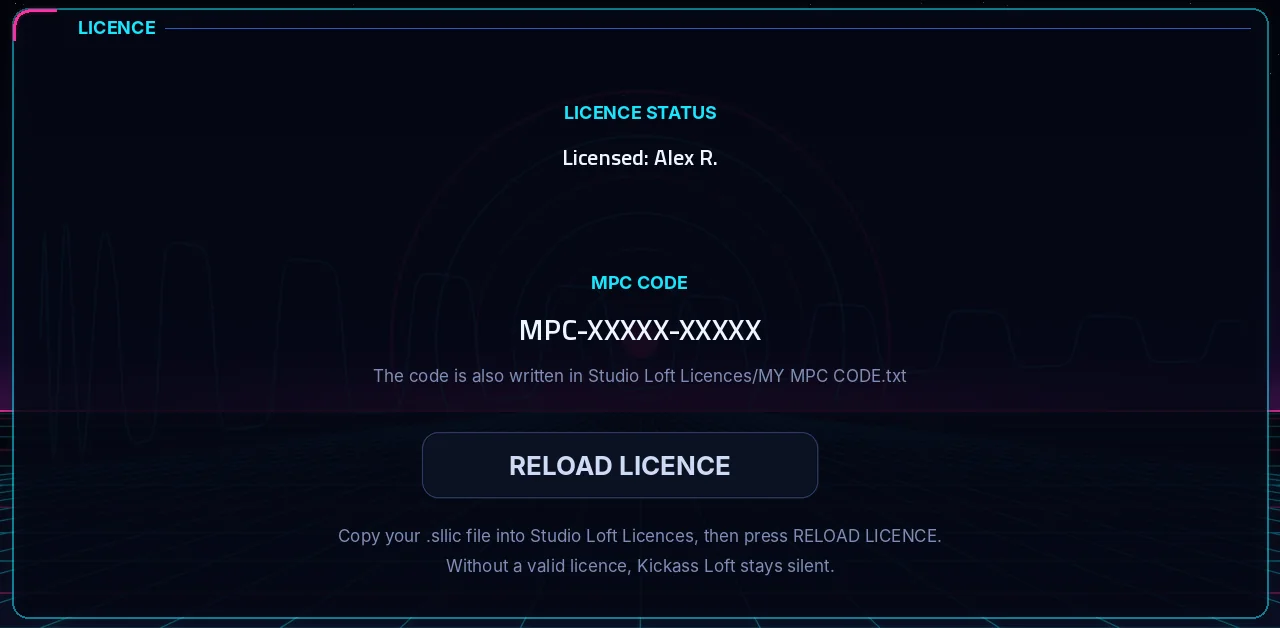 1234
Tipp
Copy your .sllic file into the Studio Loft Licences folder from your computer, plug the drive back, then press RELOAD LICENCE: no restart needed.
- 1
LICENCE STATUS
Licensed, or No licence found.
- 2
Shop line
« Get it at loftplugins.ch » appears when there is no valid licence.
- 3
MPC CODE
The code of this MPC. It is also written in Studio Loft Licences / MY MPC CODE.txt.
- 4
RELOAD LICENCE
Reads the licence files again after you copy a new one.
Everything about activation in one place. Without a valid licence, Kickass Loft stays silent.
Deins
Kickass Loft
Kick und Bass für Hardtek, Rawstyle und Hardcore.
Einmal zahlen, für immer deins. Deine Lizenz gilt für zwei MPCs.