Instrument · Version 1.6.0
Ripper Loft
THE WAVETABLE BASS MACHINE FOR YOUR MPC. BUILT TO WOBBLE.
33 Wobble presets share one simple rule. Learn it once, and every wobble is yours to bend.
3 = $993 Plugins nach Wahl für $99 →
A classic half-time wobble bass: LFO 1, locked to the tempo, opens the filter on every eighth note.
Das Handbuch
Jeder Screen,
Seite für Seite.
Die komplette Anleitung, Screen für Screen, genau wie auf der MPC. Die Namen der Einstellungen bleiben die englischen Wörter des Screens.
THE RIPPER LOFT SIGNATURE
Built to wobble.
33 Wobble presets share one simple rule. Learn it once, and every wobble is yours to bend.
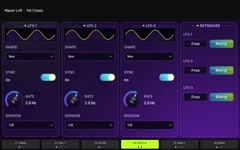
Wobble · Fat Classic — LFO 1: Sine, synced, DIVISION 1/8, Retrig.
TRY IT IN 30 SECONDS
From one wobble to a whole drop.
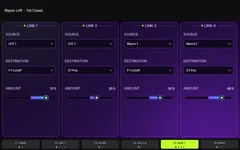
Wobble · Fat Classic — LINK 1: LFO 1 → F1 Cutoff 70 %, LINK 2: LFO 1 → O1 Pos 30 %.
- Load Wobble · Init Wobble and hold a low note.
- On F4 LFO 1-3, step LFO 1 DIVISION from 1/8 to 1/4, then 1/16T: three grooves from one sound.
- On F5 MOD 1, raise the AMOUNT of LINK 2: the bass starts to talk.
- Back on F1 MAIN, push M3 DRIVE and M4 OTT for the drop.
WELCOME
Heavy bass, zero menu diving.
Ripper Loft is a wavetable synth that runs inside your MPC, with no computer. Three wavetable oscillators, a sub, two filters and a full effects chain, all on big touch pages made for fingers and Q-Links.
Find your way
The MPC has six function keys. Press a key to open its page; press it again to go to the next sub-page (the dots under the key show where you are).
| F1 | MAIN · LISTEN | F4 | LFO 1-3 · LFO 4-6 |
| F2 | OSC 1 · OSC 2 · OSC 3 · SUB | F5 | MOD 1 · MOD 2 · MOD 3 · MOD 4 |
| F3 | FILTER · ENV | F6 | DRIVE · FX · LICENCE |
Main Your performance page
 1234
Was du siehst
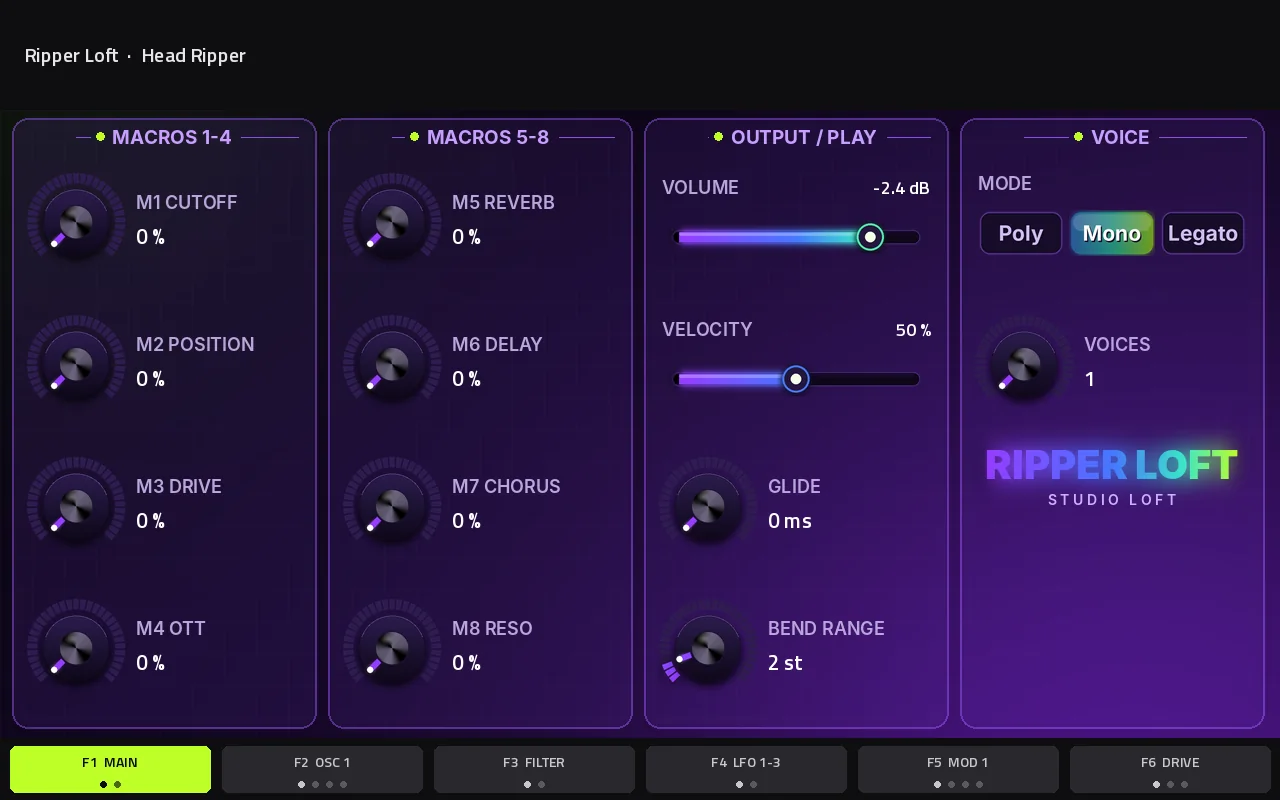
- MACROS 1-4 — M1 CUTOFF , M2 POSITION , M3 DRIVE , M4 OTT .
- MACROS 5-8 — M5 REVERB , M6 DELAY , M7 CHORUS , M8 RESO . Each macro does the same job in all 294 presets.
- OUTPUT / PLAY — VOLUME , VELOCITY (how much your playing strength opens the sound), GLIDE , BEND RANGE .
- VOICE — MODE (Poly, Mono, Legato) and VOICES (up to 8 notes at once in Poly). If Ripper Loft is silent because no valid licence is found, an orange banner appears here and points you to the LICENCE page.
Wofür es ist
Load a preset, then stay here. The eight macros are already wired to the right places, so you can shape any sound without opening a single menu. The Q-Links follow the columns: top knob = top control. Ride M1 CUTOFF and M3 DRIVE together on two Q-Links during a drop: closed and clean in the build, wide open and dirty on the hit.
Tipp
Ride M1 CUTOFF and M3 DRIVE together on two Q-Links during a drop: closed and clean in the build, wide open and dirty on the hit.
Screens shown with the preset Bass Dubstep · Head Ripper. The top and bottom bars belong to the MPC and may look slightly different on your model.
Listen An assistant that hears what you play
 1234
Was du siehst
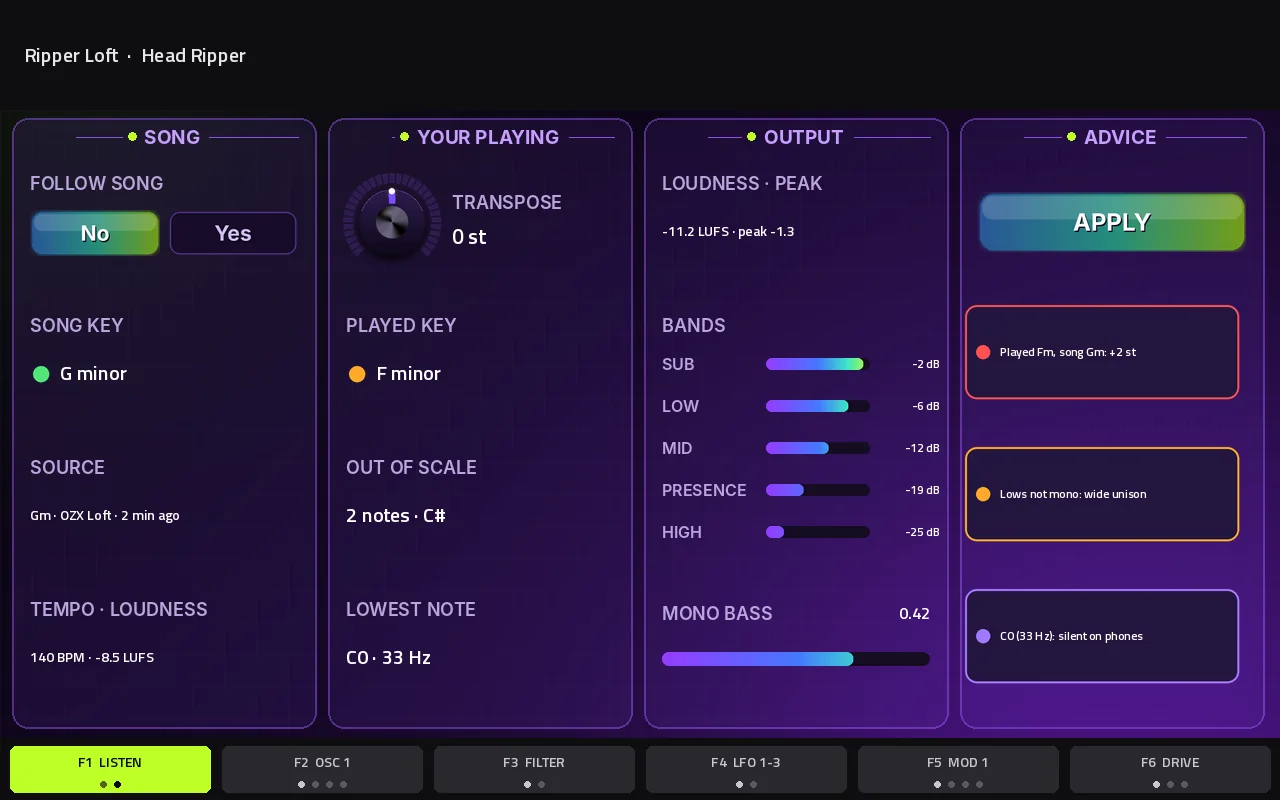
- SONG — FOLLOW SONG (No / Yes), SONG KEY , SOURCE , TEMPO · LOUDNESS : the key and tempo shared by Studio Loft plugins that analyse your song.
- YOUR PLAYING — TRANSPOSE (-12 to +12 st), PLAYED KEY , OUT OF SCALE (notes that clash), LOWEST NOTE with its frequency.
- OUTPUT — LOUDNESS · PEAK , five BANDS (Sub, Low, Mid, Presence, High) and MONO BASS (how centred your low end is).
- ADVICE — up to three short notes, coloured by type (info, tip, problem), and APPLY / UNDO to fix the key in one press.
Wofür es ist
Play your bass line and glance here. Ripper Loft measures its own output and tells you if you are in the song's key, if your sub will vanish on small speakers, or if your low end is too wide. Played your riff in F minor but the song is in G minor? Press APPLY : Ripper Loft moves TRANSPOSE by +2 st. Not convinced? UNDO .
Tipp
Played your riff in F minor but the song is in G minor? Press APPLY : Ripper Loft moves TRANSPOSE by +2 st. Not convinced? UNDO .
Oscillator 1 512 wavetables, morph and warp
 1234
Was du siehst
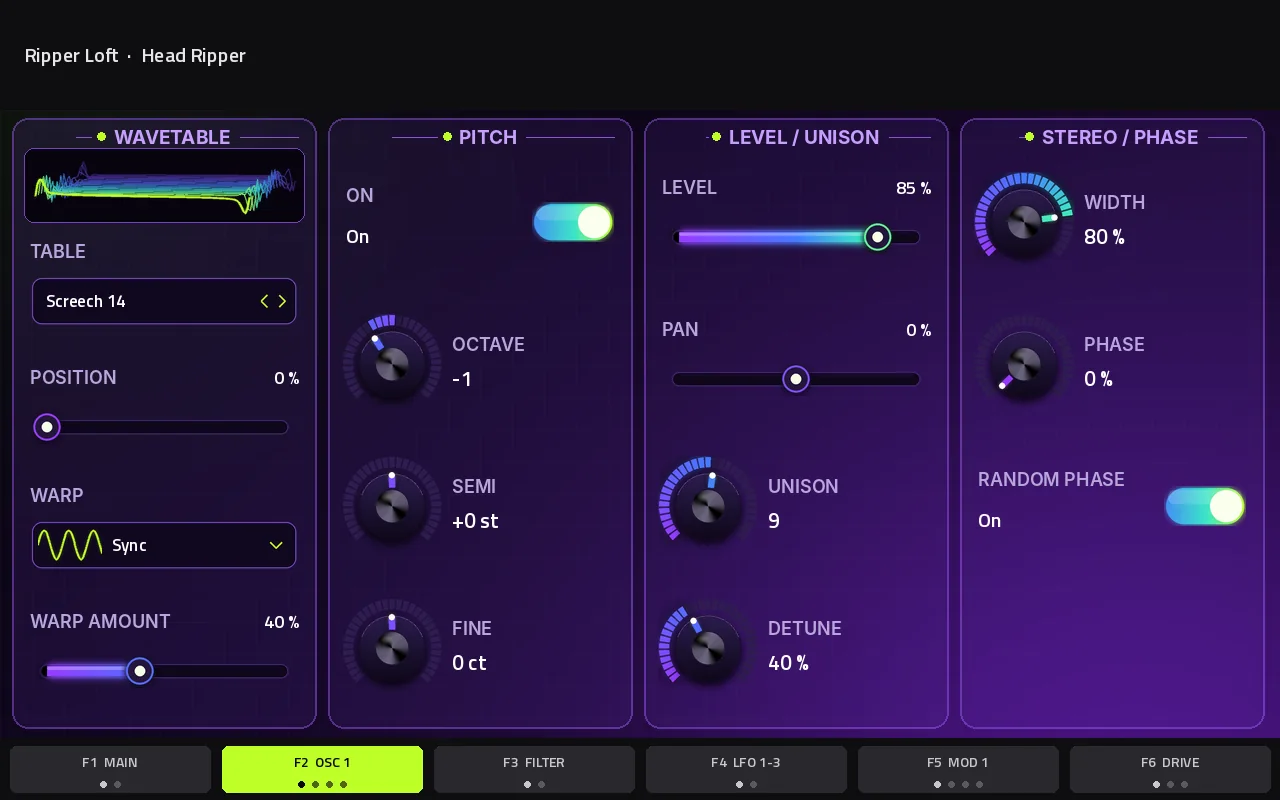
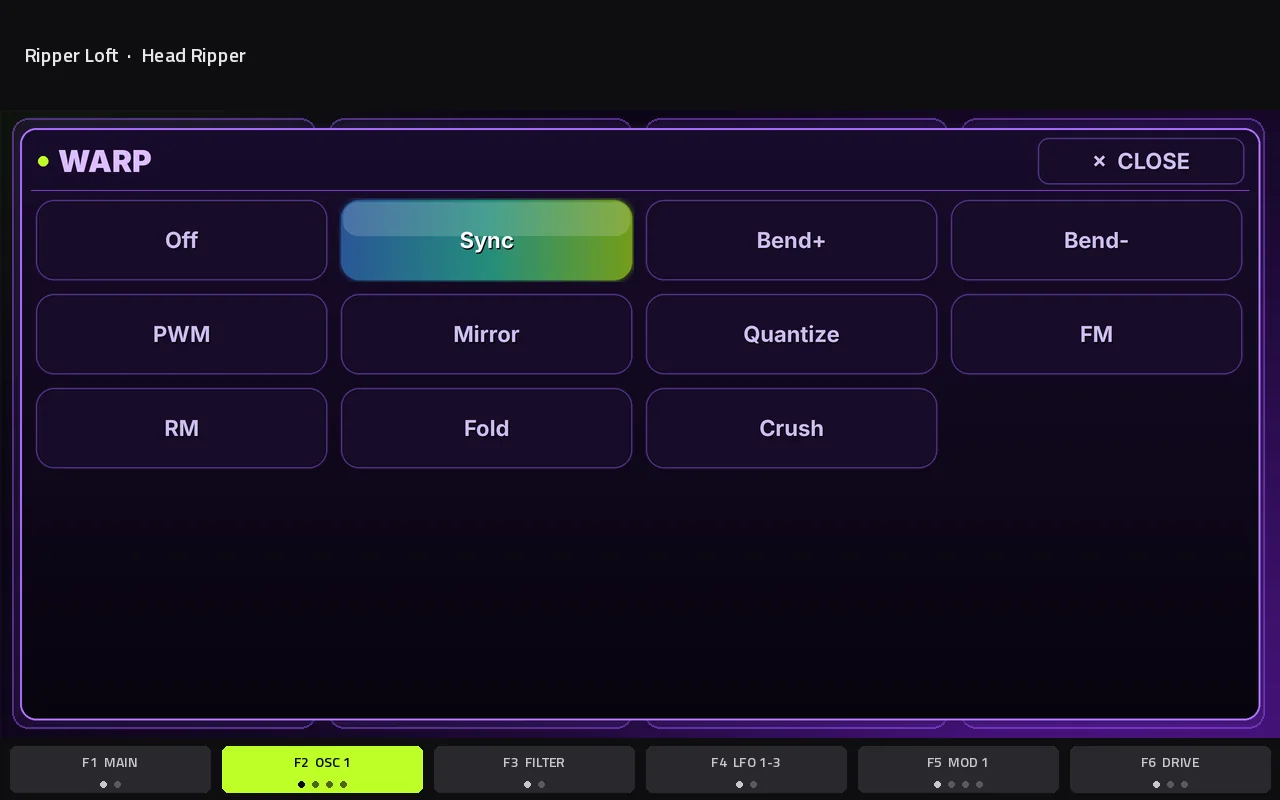
- WAVETABLE — live picture of the wave, TABLE (512 tables in 32 families, ‹ › to step), POSITION (scans through the table), WARP (11 modes) and WARP AMOUNT .
- PITCH — ON , OCTAVE , SEMI , FINE .
- LEVEL / UNISON — LEVEL , PAN , UNISON (up to 16 stacked voices) and DETUNE .
- STEREO / PHASE — WIDTH of the unison, start PHASE , RANDOM PHASE .
Wofür es ist
Pick the raw material of your sound. The wave display redraws as you move POSITION and WARP AMOUNT , so you see the tone before you hear it. TIP For a fat mid bass: UNISON 7 to 9, DETUNE around 30 %, WIDTH 80 %, and keep the sub on its own (SUB page) so the low end stays mono.
Tipp
For a fat mid bass: UNISON 7 to 9, DETUNE around 30 %, WIDTH 80 %, and keep the sub on its own (SUB page) so the low end stays mono.
Oscillator 2 Same controls, second layer
 1234
Was du siehst
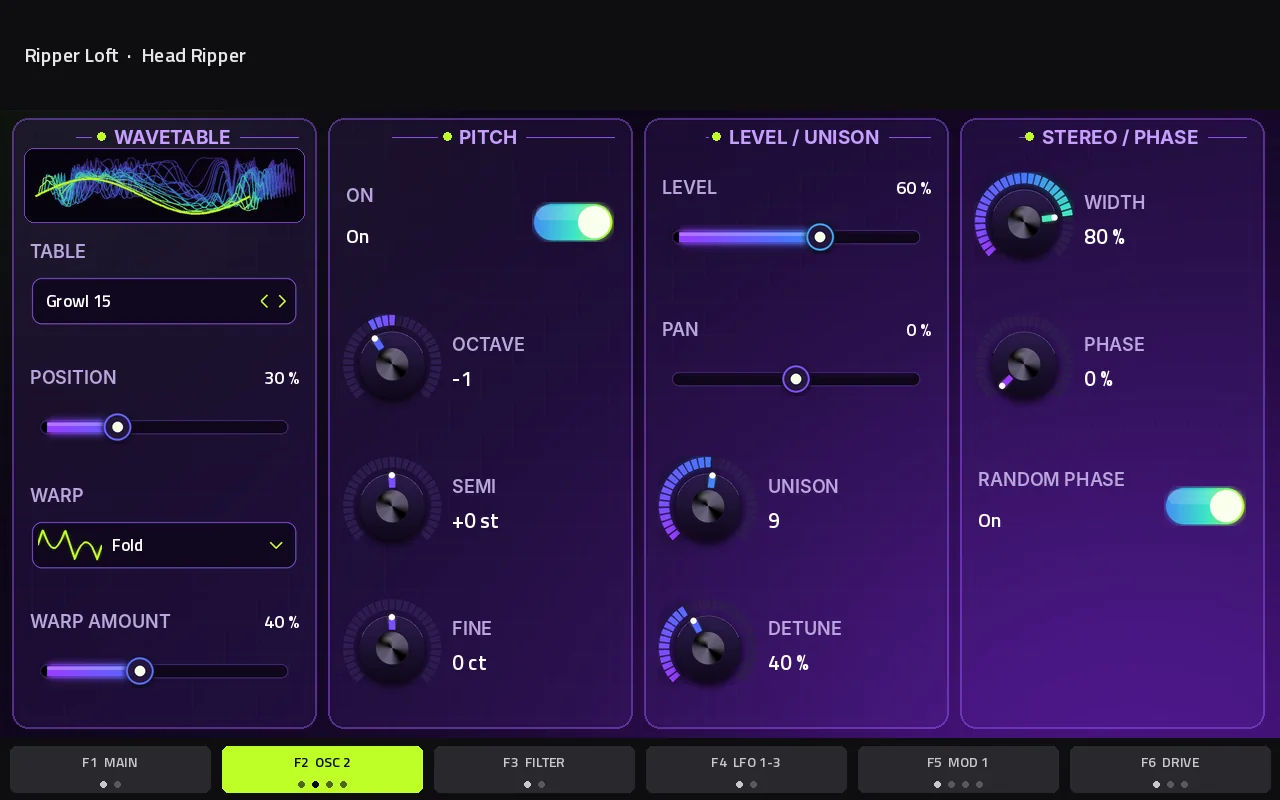
- WAVETABLE — TABLE , POSITION , WARP , WARP AMOUNT .
- PITCH — ON , OCTAVE , SEMI , FINE .
- LEVEL / UNISON — LEVEL , PAN , UNISON , DETUNE .
- STEREO / PHASE — WIDTH , PHASE , RANDOM PHASE .
Wofür es ist
Layer a second table on top of Oscillator 1: a growl under a clean tone, or the same table an octave apart for weight. Two oscillators on the same table with FINE set to +7 ct and -7 ct give a slow, living beat.
Tipp
Two oscillators on the same table with FINE set to +7 ct and -7 ct give a slow, living beat.
Oscillator 3 A third layer when you need it
 1234
Was du siehst
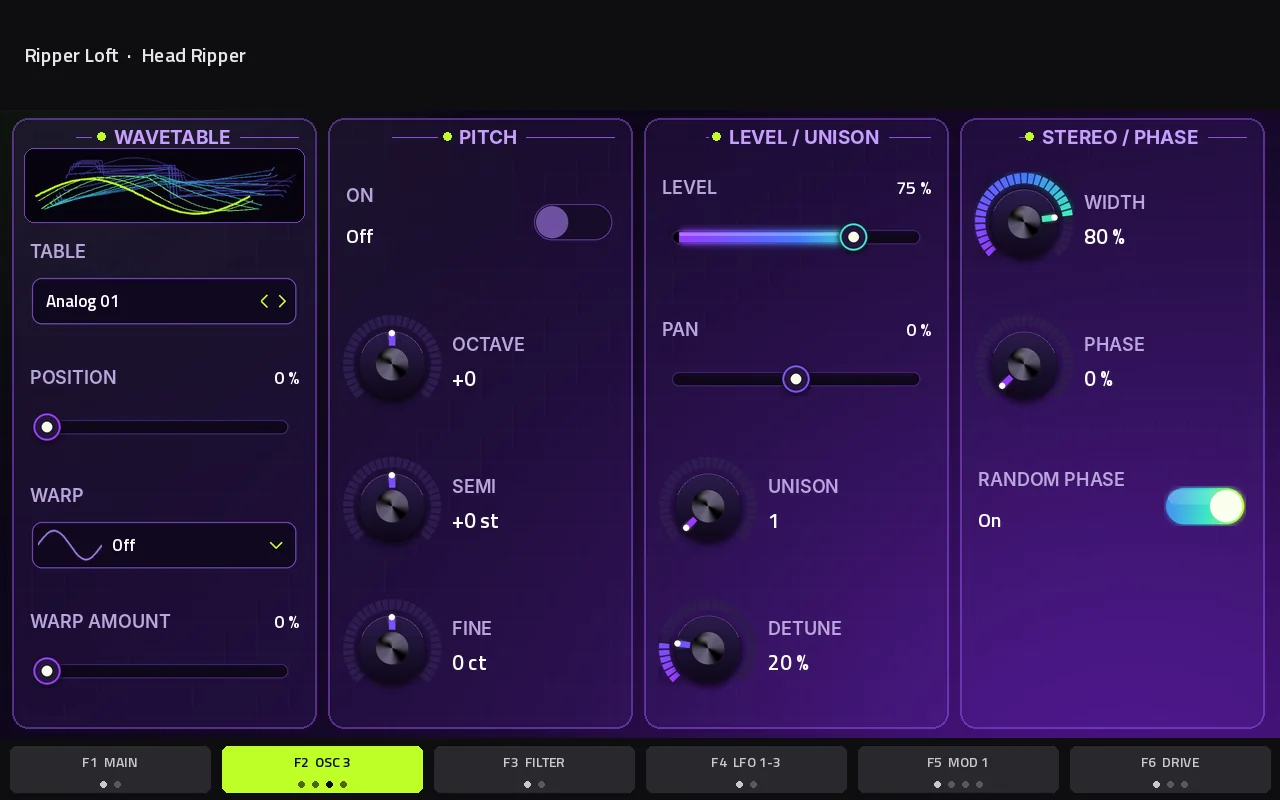
- WAVETABLE — TABLE , POSITION , WARP , WARP AMOUNT .
- PITCH — ON , OCTAVE , SEMI , FINE .
- LEVEL / UNISON — LEVEL , PAN , UNISON , DETUNE .
- STEREO / PHASE — WIDTH , PHASE , RANDOM PHASE .
Wofür es ist
Off in many presets to save power. Switch it ON to add air, a fifth or a top-end bite. TIP Set SEMI to +7 st and LEVEL around 30 % for an instant power-chord layer on leads.
Tipp
Set SEMI to +7 st and LEVEL around 30 % for an instant power-chord layer on leads.
Sub & Noise The foundation and the grit
 12
Was du siehst
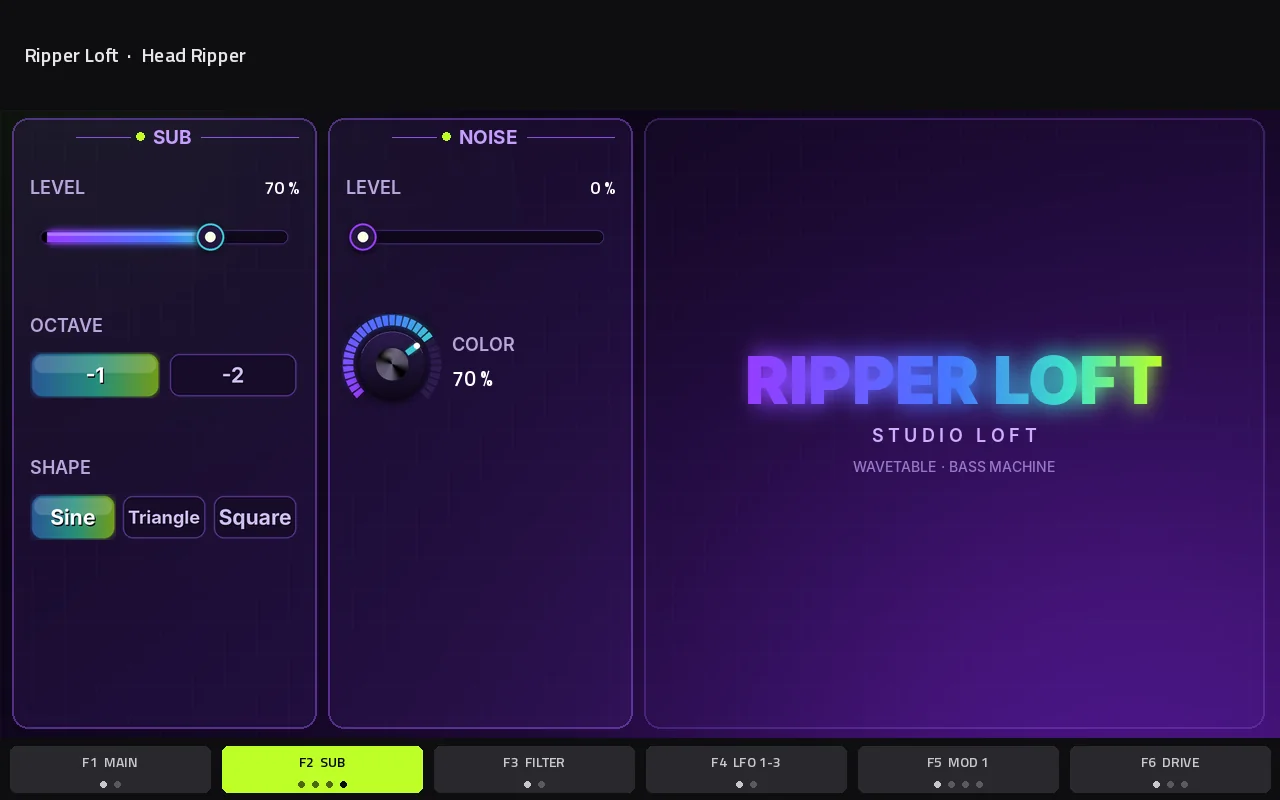
- SUB — LEVEL , OCTAVE (-1 or -2) and SHAPE (Sine, Triangle, Square).
- NOISE — LEVEL and COLOR (dark to bright).
Wofür es ist
The sub oscillator follows your notes one or two octaves down and stays mono, so the low end is solid on every system. Sine sub at -1 under a wide unison bass: the club hears the weight, the phone hears the mid growl.
Tipp
Sine sub at -1 under a wide unison bass: the club hears the weight, the phone hears the mid growl.
Filters Two filters, nine types each
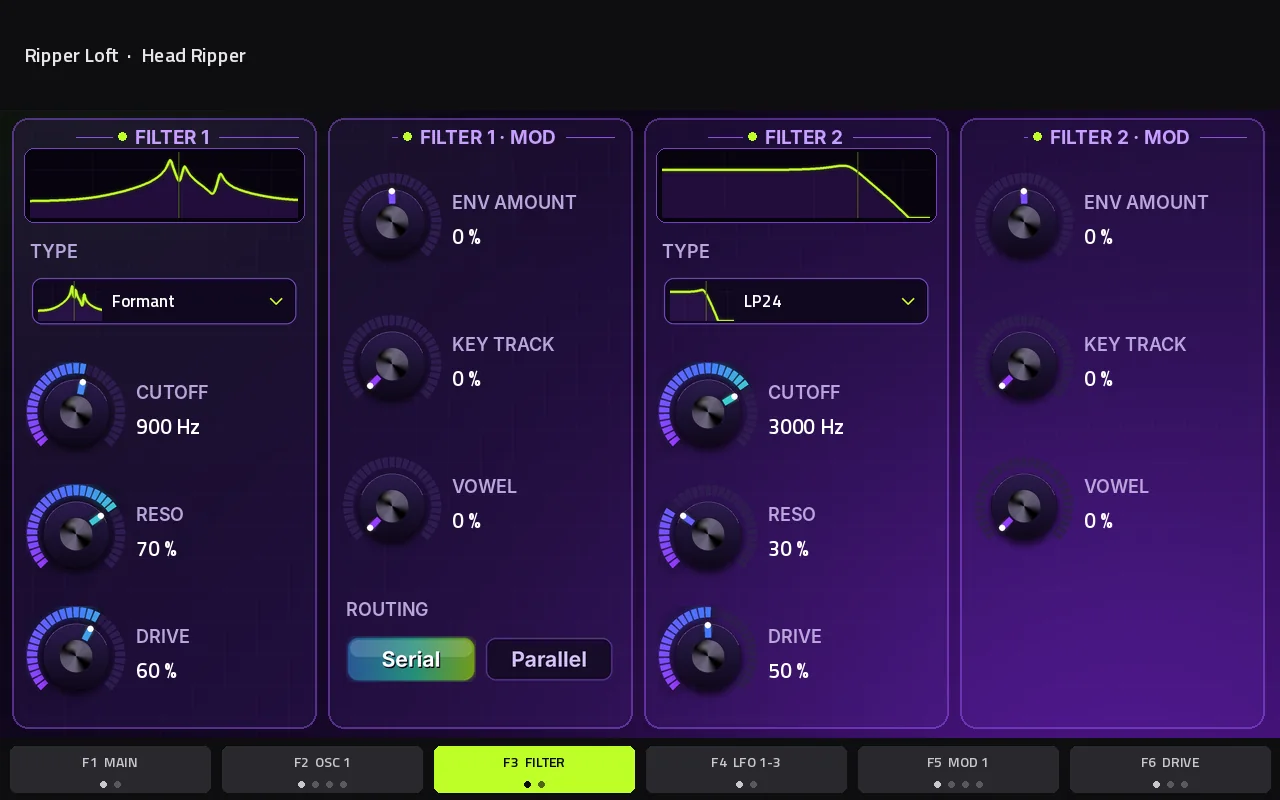 1234
Was du siehst
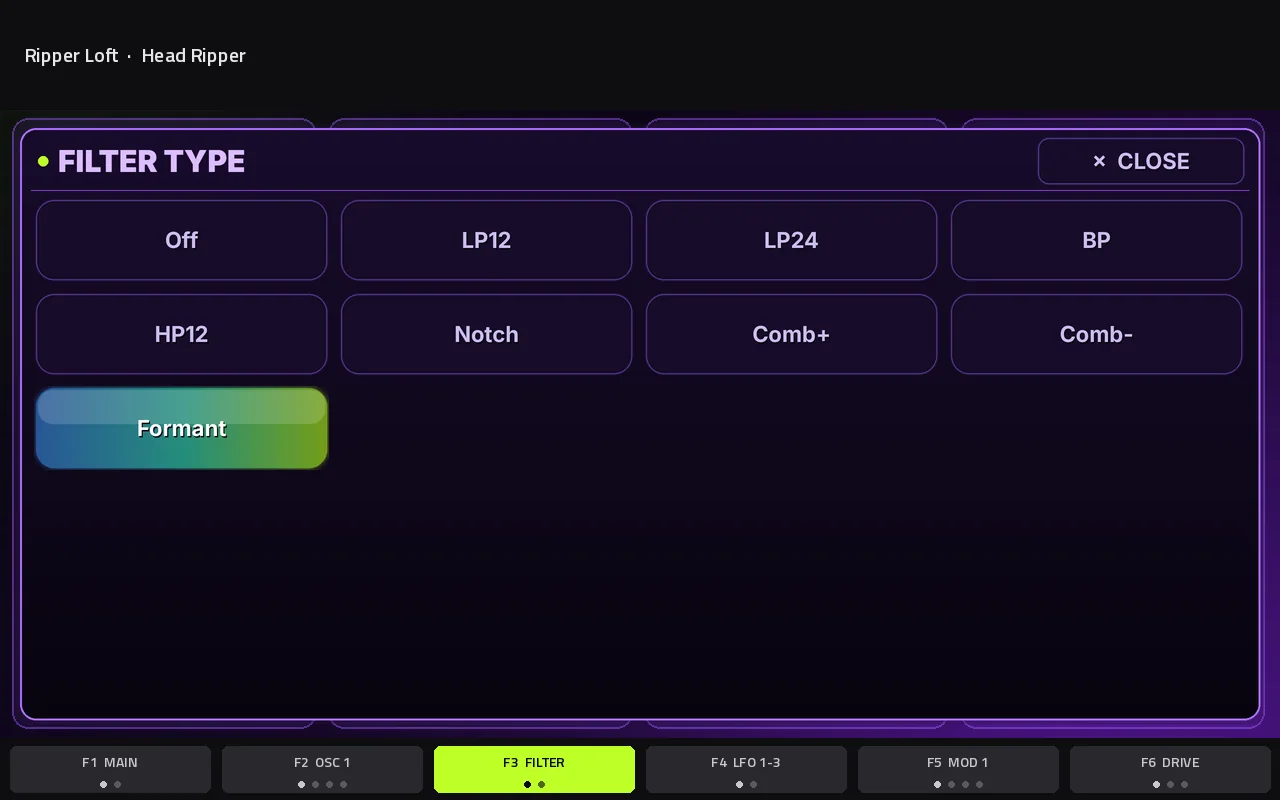
- FILTER 1 — the filter picture, TYPE (Off, LP12, LP24, BP, HP12, Notch, Comb+, Comb-, Formant), CUTOFF , RESO , DRIVE .
- FILTER 1 · MOD — ENV AMOUNT (Env 2 opens the filter), KEY TRACK , VOWEL (for Formant) and ROUTING (Serial or Parallel).
- FILTER 2 — TYPE , CUTOFF , RESO , DRIVE .
- FILTER 2 · MOD — ENV AMOUNT , KEY TRACK , VOWEL .
Wofür es ist
Where wobbles and talking basses are born. Serial runs filter 1 into filter 2; Parallel splits the sound and mixes both. For a talking bass, set TYPE to Formant and let an LFO move VOWEL (MOD pages): the bass says “yoi” and “wow”.
Tipp
For a talking bass, set TYPE to Formant and let an LFO move VOWEL (MOD pages): the bass says “yoi” and “wow”.
Envelopes Three envelopes, one look
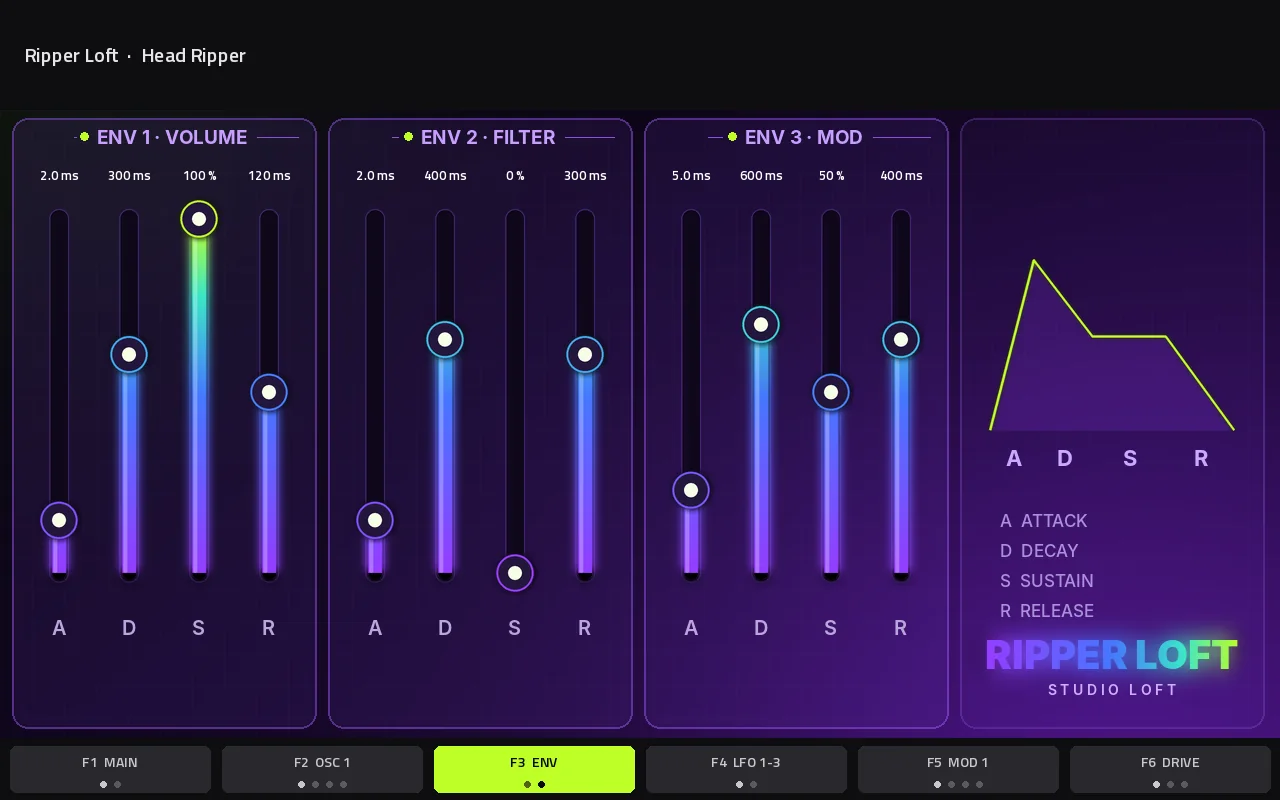 123
Was du siehst
- ENV 1 · VOLUME — A , D , S , R : the loudness of each note.
- ENV 2 · FILTER — A , D , S , R : drives ENV AMOUNT on the filters.
- ENV 3 · MOD — A , D , S , R : free, use it on any link (MOD pages).
Wofür es ist
Shape how each note starts and ends. Big vertical faders: one finger per stage. Pluck bass: ENV 2 D around 200 ms, S 0 %, and ENV AMOUNT up on Filter 1. Each note snaps open, then closes.
Tipp
Pluck bass: ENV 2 D around 200 ms, S 0 %, and ENV AMOUNT up on Filter 1. Each note snaps open, then closes.
LFO 1-3 Movement, locked to your tempo
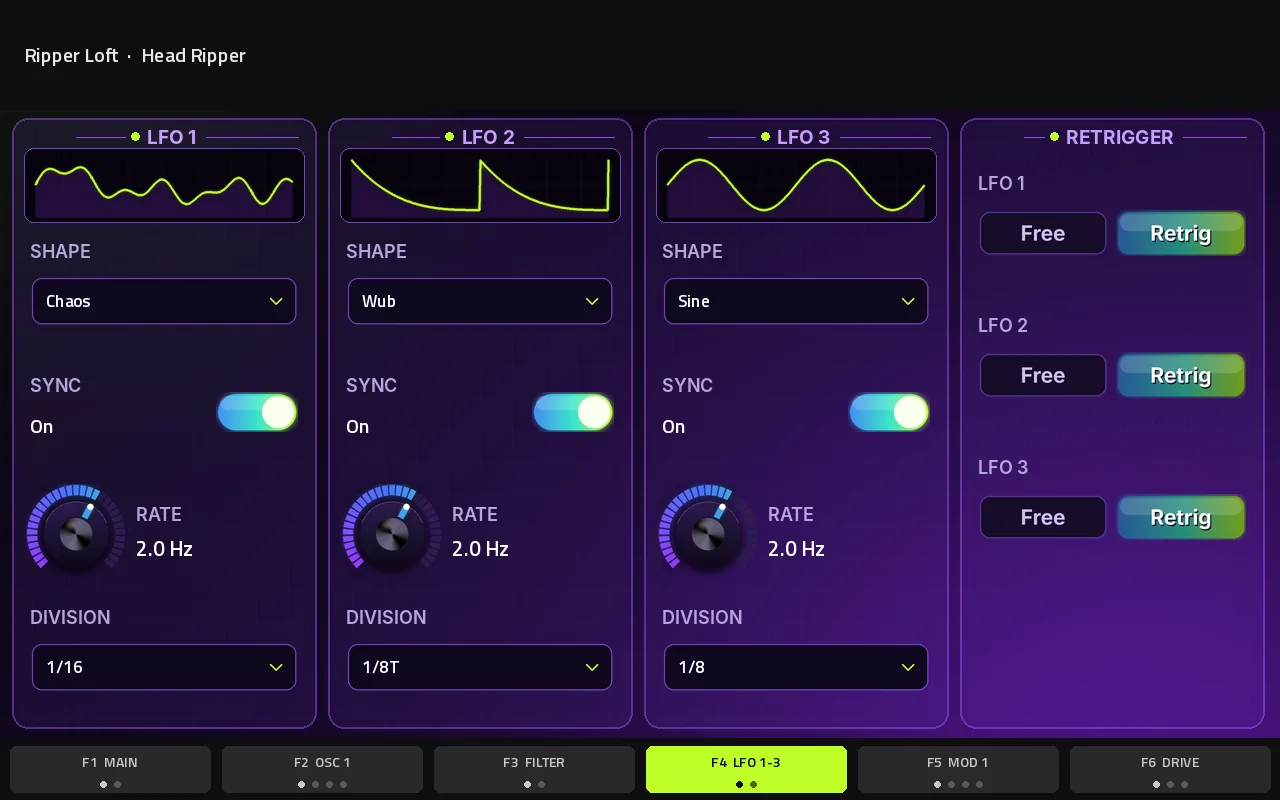 1234
Was du siehst
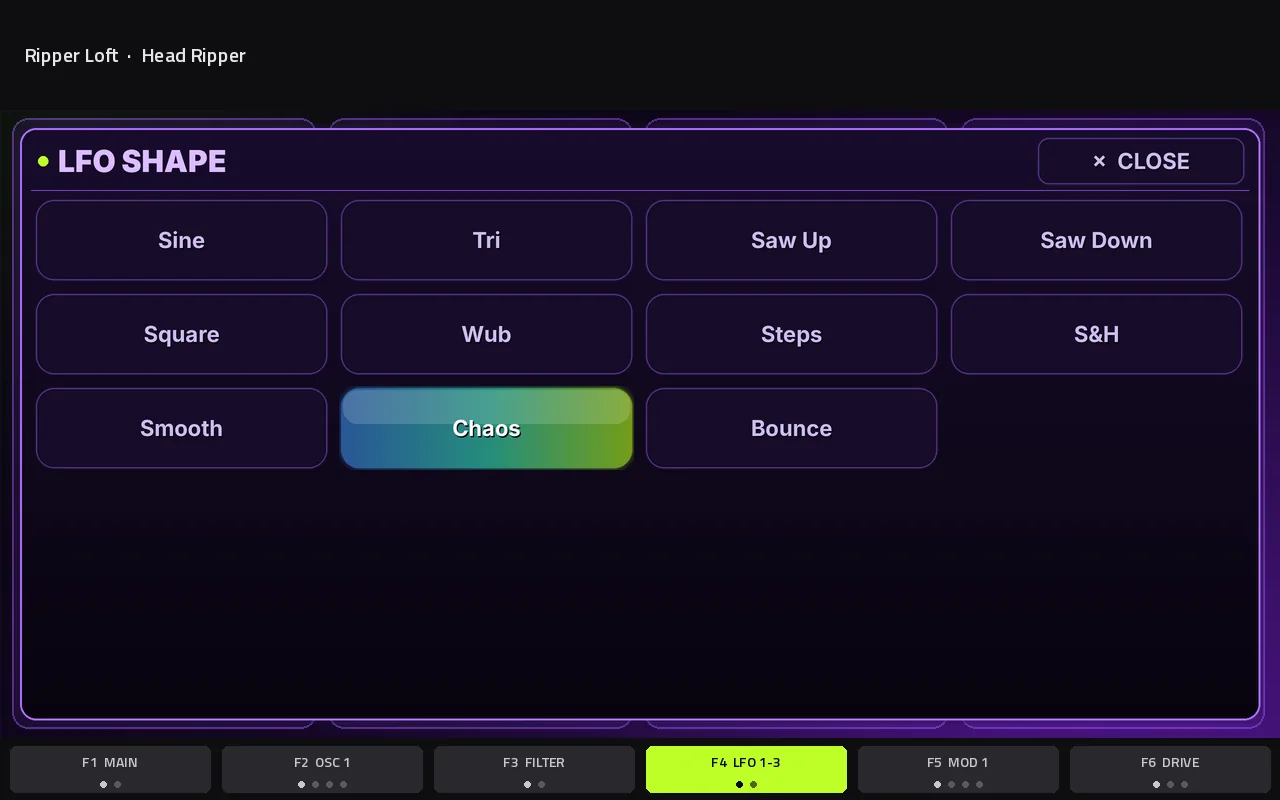
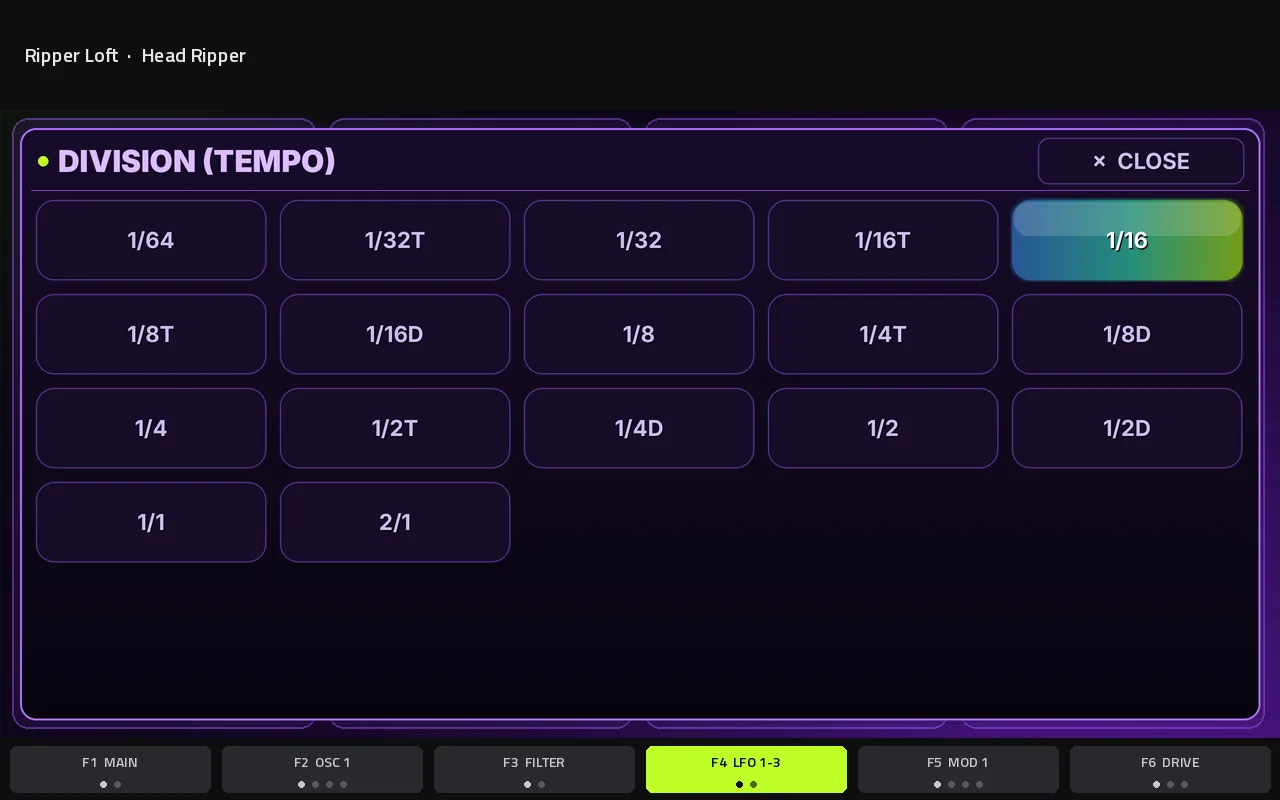
- LFO 1 — wave picture, SHAPE (11 shapes, from Sine to Wub, S&H and Chaos), SYNC , RATE (when not synced) and DIVISION (1/64 to 2/1, with T and D).
- LFO 2 — the same controls.
- LFO 3 — the same controls.
- RETRIGGER — for each LFO, Free or Retrig (restarts with every note).
Wofür es ist
Six LFOs on two pages. In every Wobble preset, LFO 1 is the wobble itself. TIP Change DIVISION of LFO 1 on the fly — 1/4, 1/8, 1/16T — to switch the wobble rhythm between bars without touching anything else.
Tipp
Change DIVISION of LFO 1 on the fly — 1/4, 1/8, 1/16T — to switch the wobble rhythm between bars without touching anything else.
LFO 4-6 Three more LFOs
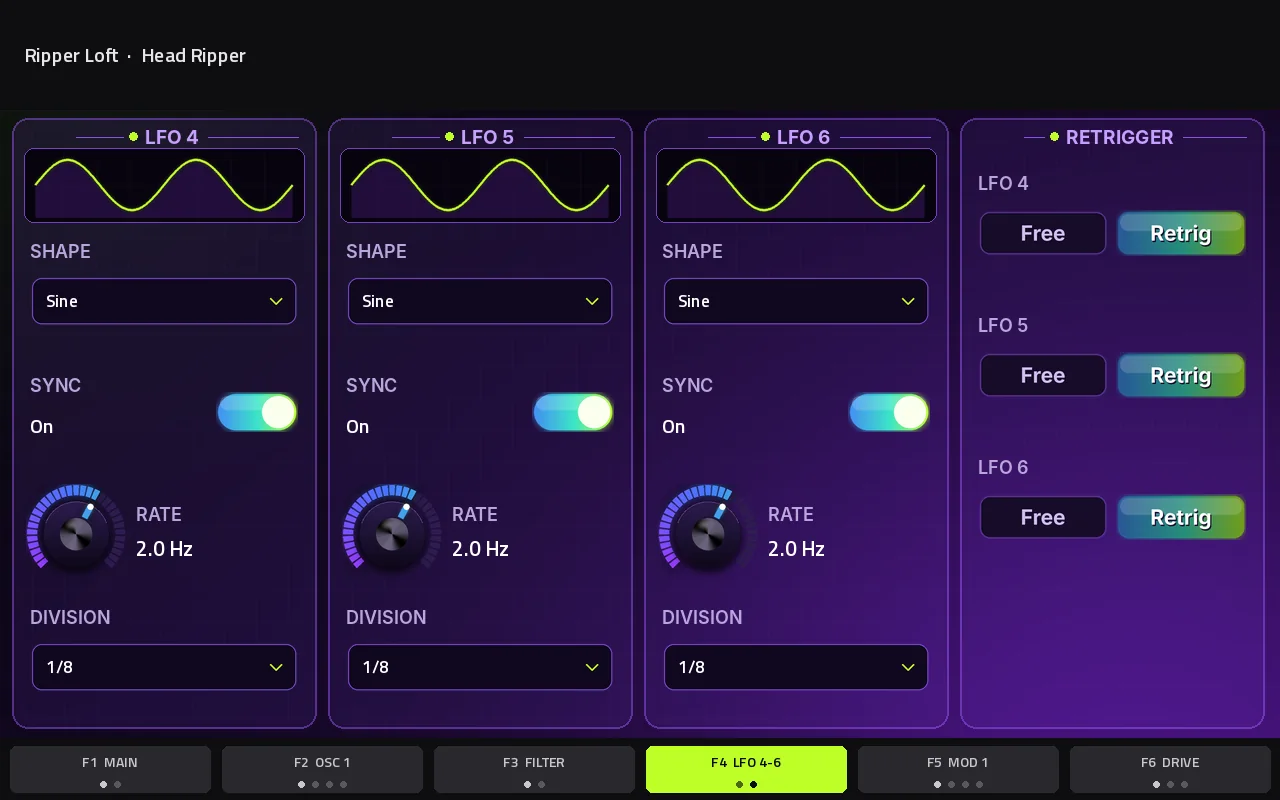 1234
Was du siehst
- LFO 4 — SHAPE , SYNC , RATE , DIVISION .
- LFO 5 — the same controls.
- LFO 6 — the same controls.
- RETRIGGER — Free or Retrig for LFO 4, 5 and 6.
Wofür es ist
Slow drifts, stereo motion, rhythmic gates: more movement layers when one wobble is not enough. LFO 4 on a slow 2/1 Sine into O1 Pos keeps long notes evolving under a fast wobble.
Tipp
LFO 4 on a slow 2/1 Sine into O1 Pos keeps long notes evolving under a fast wobble.
Modulation 1 Links 1 to 4
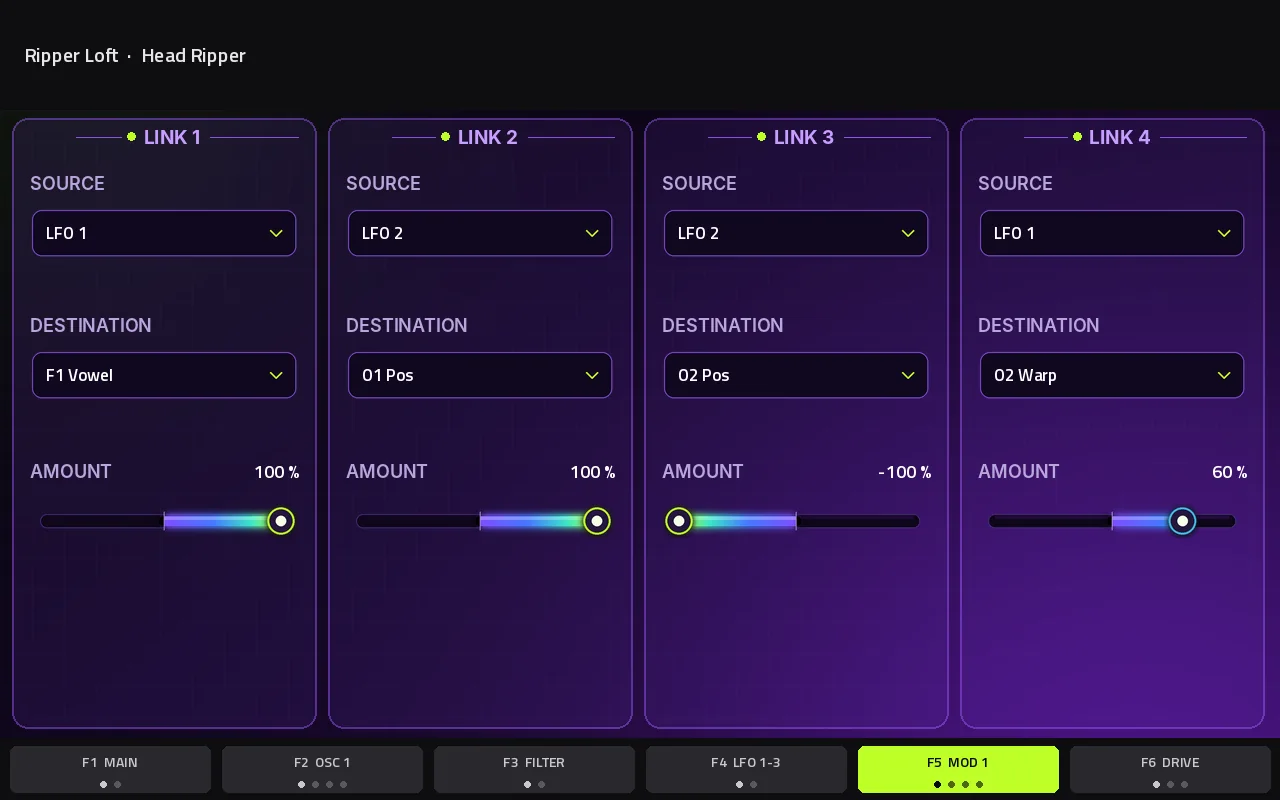 1234
Was du siehst
- LINK 1 — SOURCE , DESTINATION , AMOUNT (-100 % to +100 %).
- LINK 2 — the same.
- LINK 3 — the same.
- LINK 4 — the same.
Wofür es ist
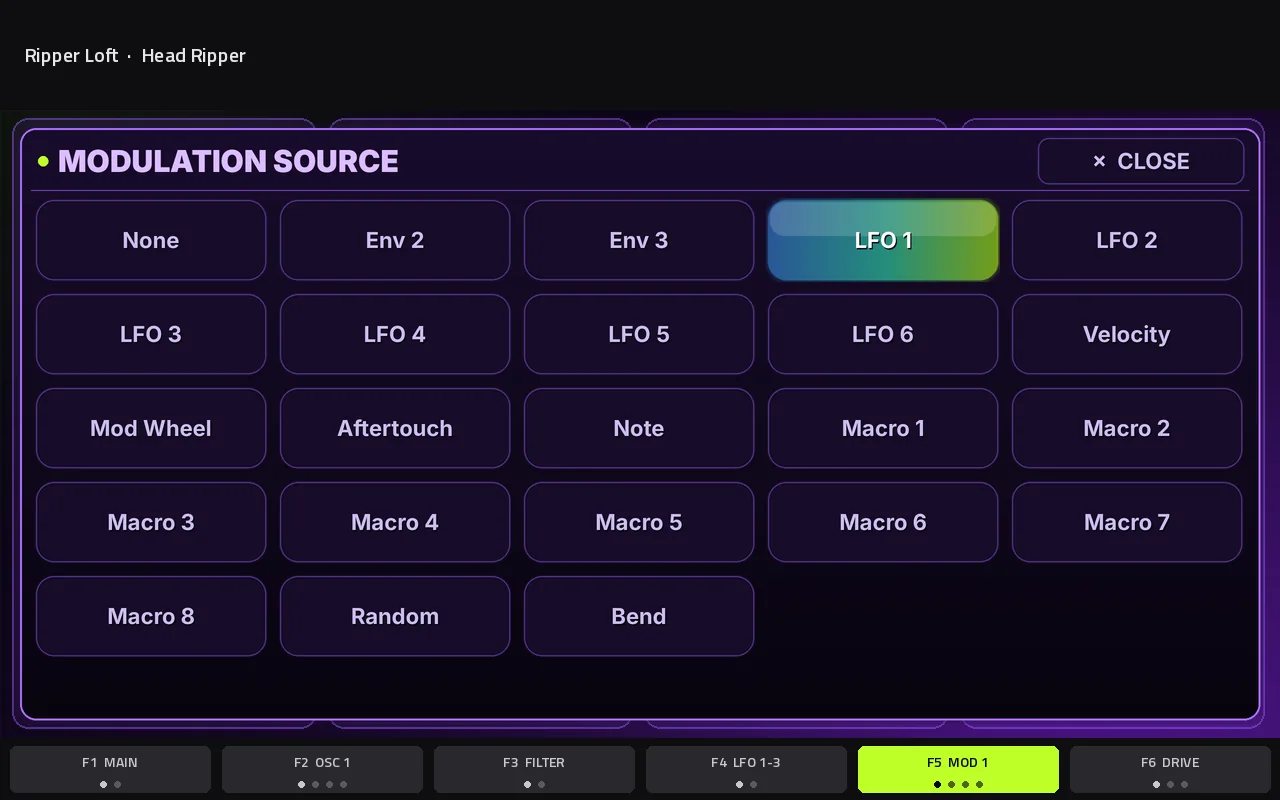
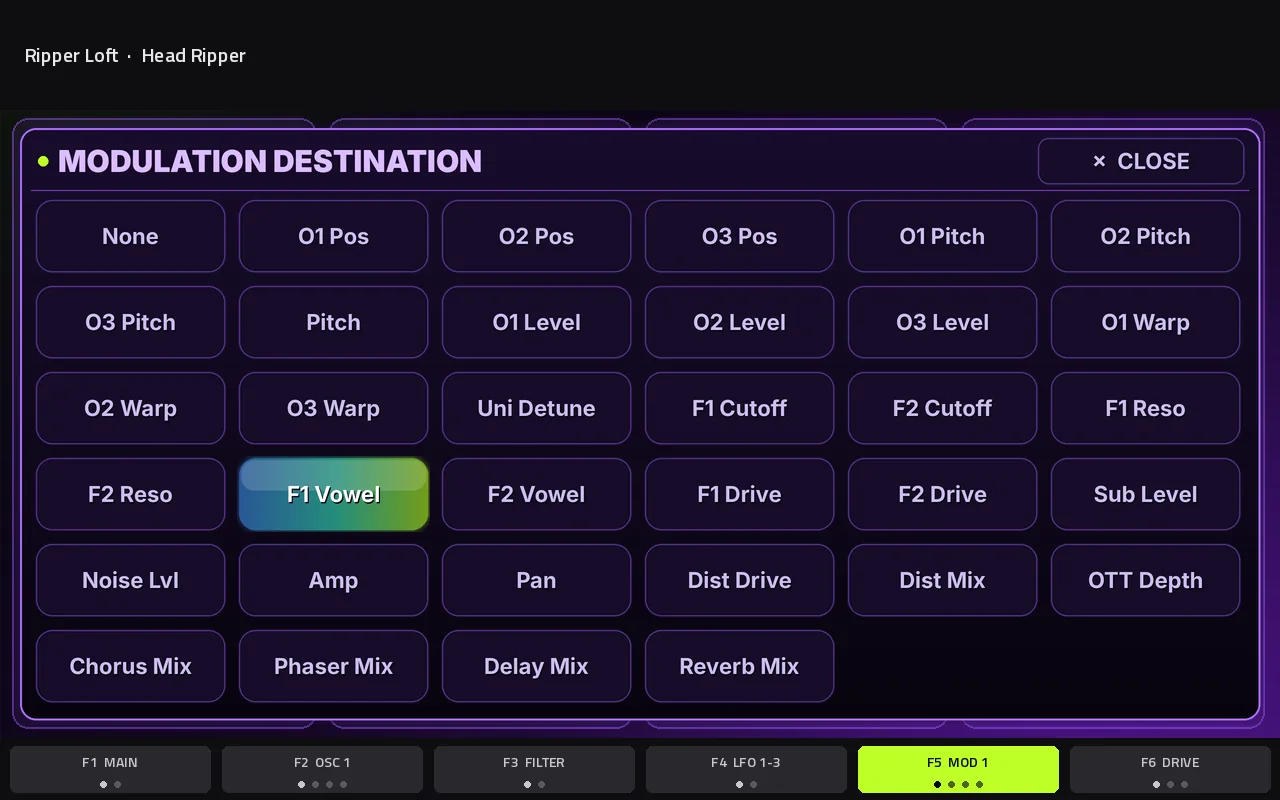
16 links connect 22 sources (envelopes, LFOs, velocity, mod wheel, aftertouch, note, macros, random, bend) to 33 destinations. In Wobble presets, LINK 1 is the wobble depth and LINK 2 the growl. TIP Negative AMOUNT turns a movement upside down: LFO 1 → F1 Cutoff at -60 % makes the wobble duck instead of open.
Tipp
Negative AMOUNT turns a movement upside down: LFO 1 → F1 Cutoff at -60 % makes the wobble duck instead of open.
Modulation 2 Links 5 to 8
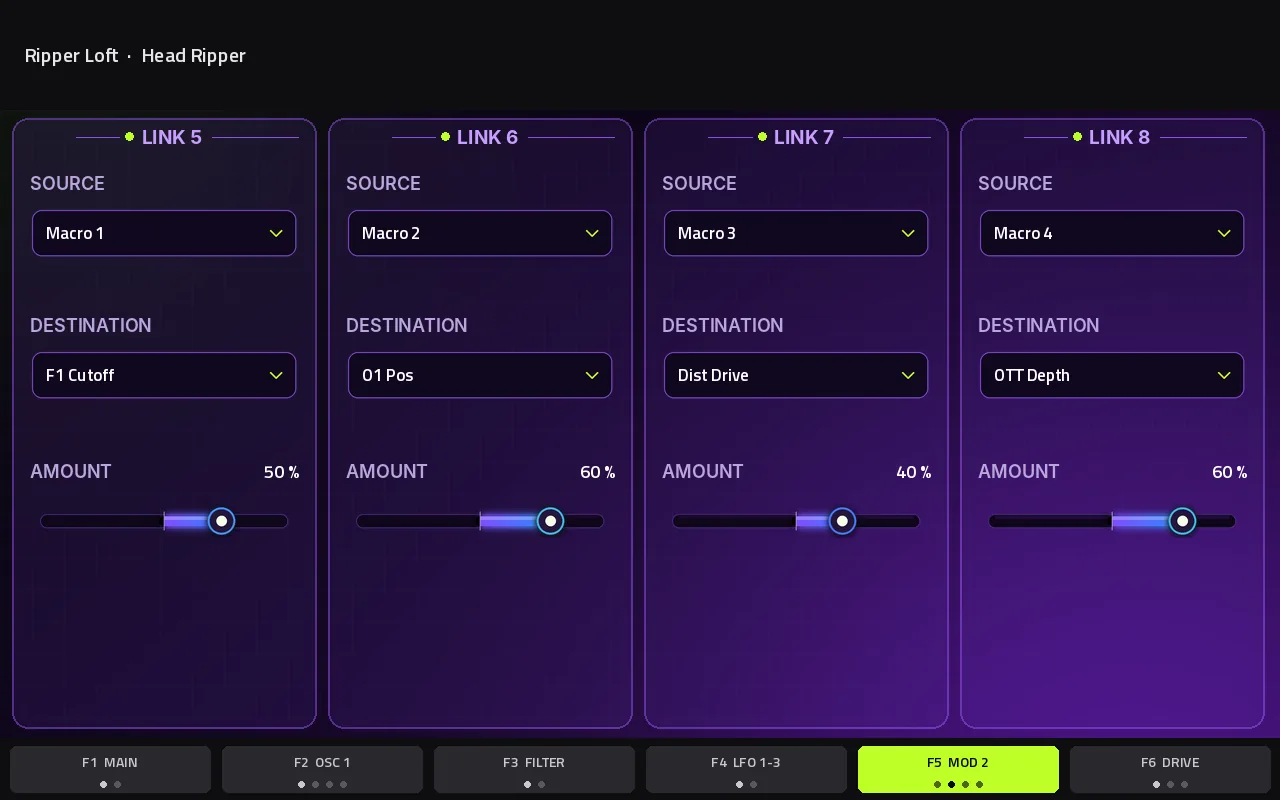 1234
Was du siehst
- LINK 5 — SOURCE , DESTINATION , AMOUNT .
- LINK 6 — the same.
- LINK 7 — the same.
- LINK 8 — the same.
Wofür es ist
Most presets use links like these for the macros: here you see exactly what each macro moves, and you can change it. Want M2 POSITION to also add drive? Set a free link: Macro 2 → F1 Drive, AMOUNT 40 %.
Tipp
Want M2 POSITION to also add drive? Set a free link: Macro 2 → F1 Drive, AMOUNT 40 %.
Modulation 3 Links 9 to 12
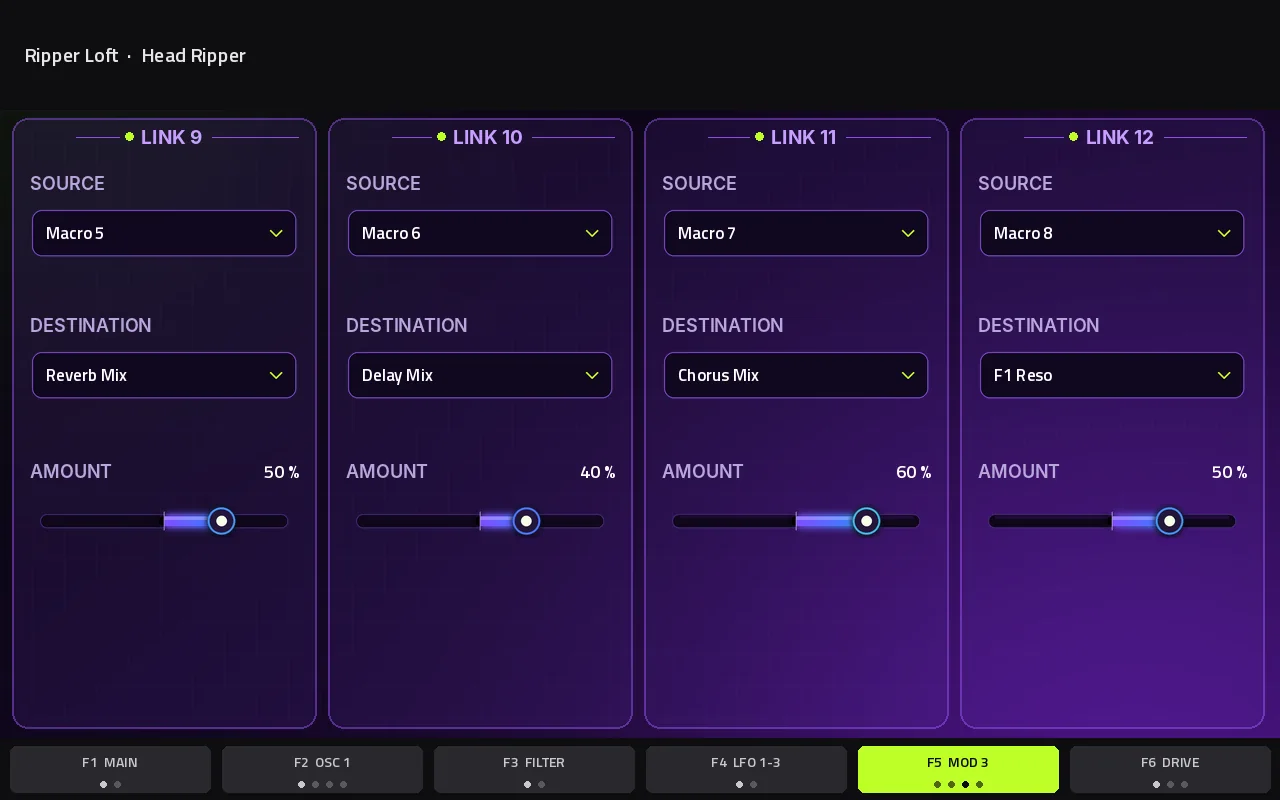 1234
Was du siehst
- LINK 9 — SOURCE , DESTINATION , AMOUNT .
- LINK 10 — the same.
- LINK 11 — the same.
- LINK 12 — the same.
Wofür es ist
More macro links and room for your own ideas. Velocity → F1 Cutoff at 30 % makes hard hits brighter: your pads start to feel like an instrument.
Tipp
Velocity → F1 Cutoff at 30 % makes hard hits brighter: your pads start to feel like an instrument.
Modulation 4 Links 13 to 16
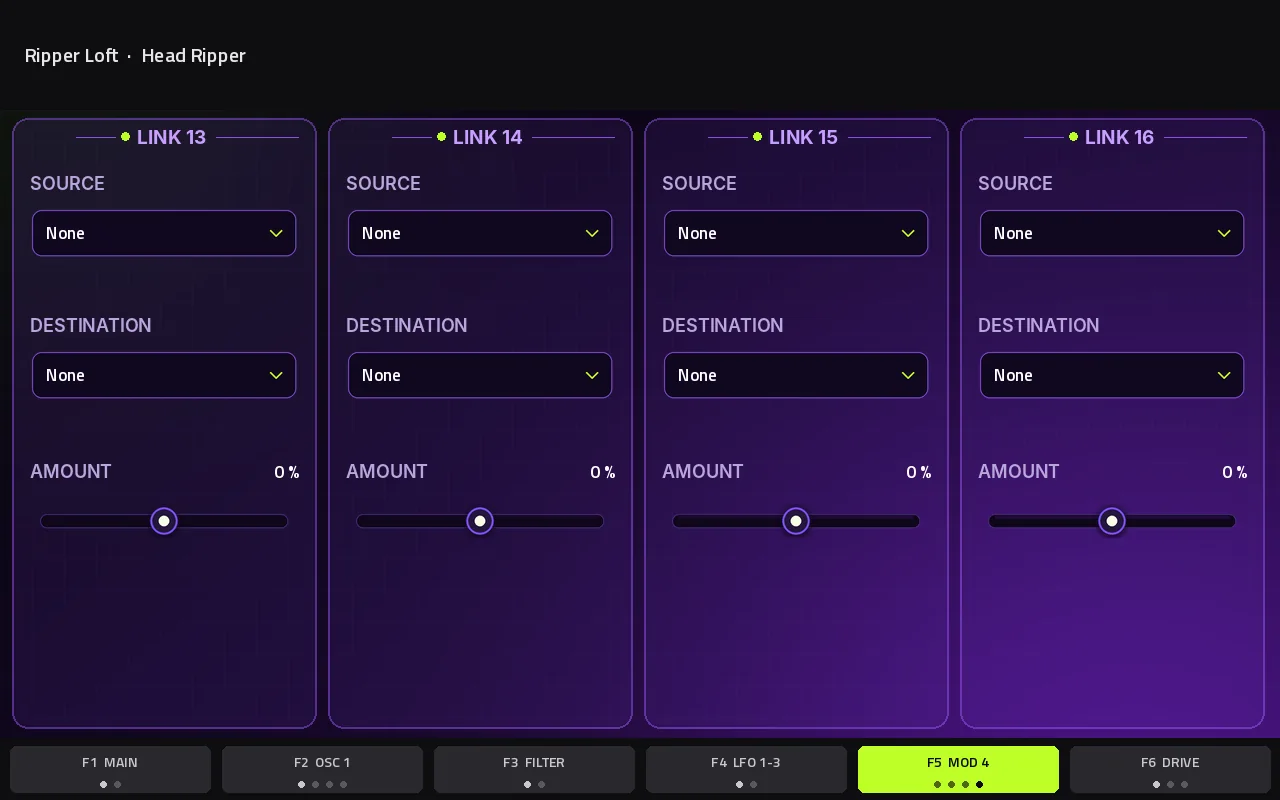 1234
Was du siehst
- LINK 13 — SOURCE , DESTINATION , AMOUNT .
- LINK 14 — the same.
- LINK 15 — the same.
- LINK 16 — the same.
Wofür es ist
Often free: your space to add expression without breaking the preset. Random → Pan at 20 % gives every note a slightly different place in the stereo field.
Tipp
Random → Pan at 20 % gives every note a slightly different place in the stereo field.
Drive Distortion, upward/downward compression, EQ
 123
Was du siehst
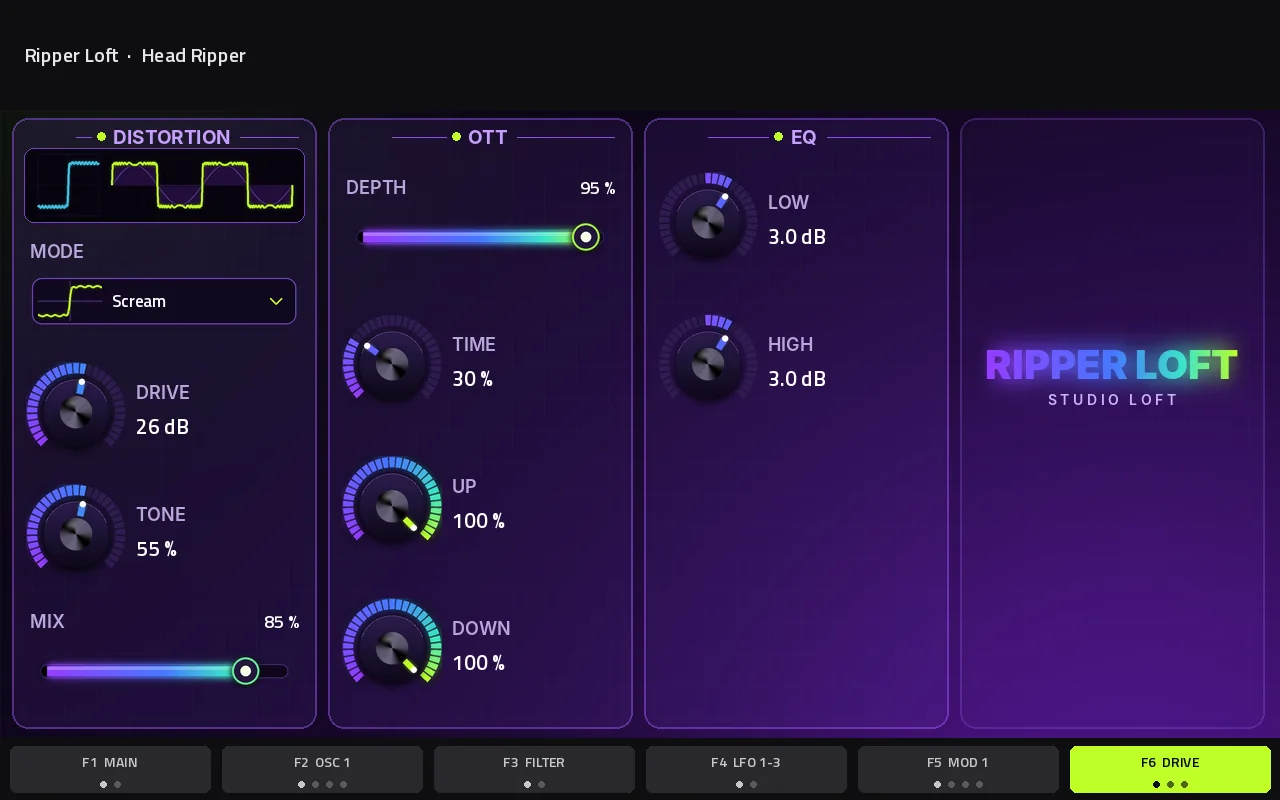
- DISTORTION — picture of the curve, MODE (Soft, Hard, Fold, Tube, Crush, Rectify, Scream), DRIVE , TONE , MIX .
- OTT — a three-band compressor that pushes quiet details up and loud peaks down: DEPTH , TIME , UP , DOWN .
- EQ — LOW and HIGH shelves (±12 dB).
Wofür es ist
The aggression page. Distortion first, then the compressor glues and lifts everything. Scream mode, DRIVE 20 dB, MIX 70 %, then OTT DEPTH 60 %: the bass stays loud and present even with heavy movement.
Tipp
Scream mode, DRIVE 20 dB, MIX 70 %, then OTT DEPTH 60 %: the bass stays loud and present even with heavy movement.
Effects Space and width
 1234
Was du siehst
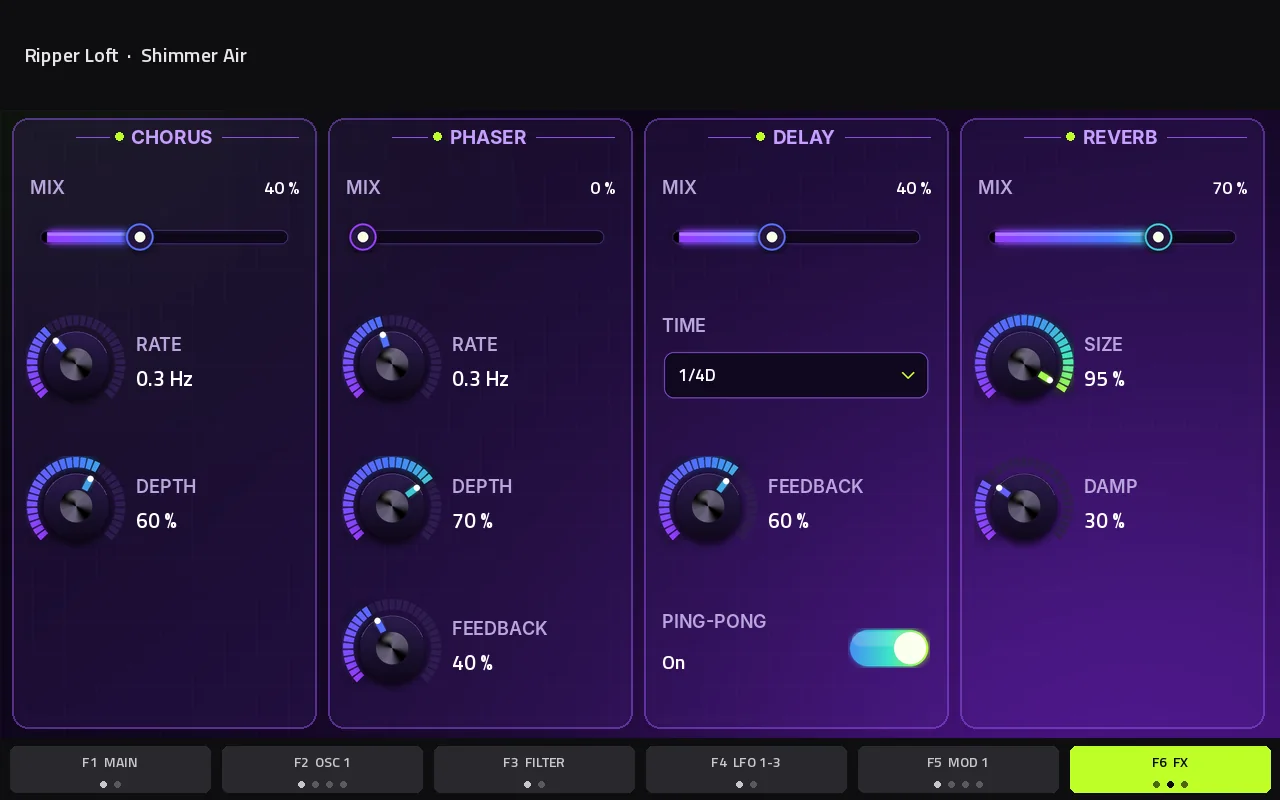
- CHORUS — MIX , RATE , DEPTH .
- PHASER — MIX , RATE , DEPTH , FEEDBACK .
- DELAY — MIX , TIME (tempo divisions), FEEDBACK , PING-PONG .
- REVERB — MIX , SIZE , DAMP .
Wofür es ist
Built-in effects, synced to your tempo, so a preset sounds finished straight away. On basses keep REVERB MIX low and use a 1/8D DELAY with PING-PONG on for width without mud.
Tipp
On basses keep REVERB MIX low and use a 1/8D DELAY with PING-PONG on for width without mud.
LISTS
Big lists, made for fingers.
Tap a list box (the one with the arrow) to open its list over the page. Tap a name to choose it: the list closes by itself. × CLOSE leaves it as it was. You can also turn the data wheel to step through the choices without opening the list.
SPECIFICATIONS
Ripper Loft at a glance
A wavetable synth for the MPC that turns heavy basses, wobbles and leads into something you play, not something you program.
FOR WHO, FOR WHAT
- Dubstep, riddim and bass music: wobbles, growls, talking basses.
- Drum & bass, garage and house: rolling basses, stabs, organ basses.
- Beat makers who want leads, pads, keys and plucks without a computer.
STRENGTHS
- One wobble rule across 33 presets: DIVISION = speed, LINK 1 = depth, LINK 2 = growl.
- Eight macros wired the same way in all 294 presets.
- 512 wavetables with live wave display, 11 warp modes, unison up to 16 per oscillator.
- Two filters with Formant and Comb types, in series or parallel.
- A Listen assistant: song key, transpose in one press, low-end and loudness checks.
- Big touch lists and Q-Links that always follow the columns.
IN NUMBERS
| Presets | 294 (Init + 14 folders) |
| Wavetables | 512, in 32 families |
| Sound engine | 3 wavetable oscillators, sub, noise |
| Voices | up to 8 (Poly), Mono, Legato; unison up to 16 per oscillator |
| Filters | 2 × 9 types, serial or parallel |
| Modulation | 3 envelopes, 6 tempo-synced LFOs (11 shapes), 16 links, 8 macros |
| Effects | distortion (7 modes), 3-band compressor, EQ, chorus, phaser, delay, reverb |
| Pages | 17 touch pages on 6 function keys |
| Size | about 92 MB on the drive |
| Runs on | MPC standalone, MPC OS 3.10.1 or later |
PRESETS
294 presets as you see them on the MPC
Init
Tekno Rolling · Hardtek Punch · Reverse Bass · Techno Rumble · Raw Screamer · Hardcore Gabber · Acid Tekno · Industrial Clang · Hard Techno Grind · Hardtek Reese · Kick Bass Boom · Raw Talker · Offbeat Tok · Hardcore Crush · Pumping Hard · Distorted Saw · Fold Grinder · Bitcrush Brute · Acid Brute 303 · Scream Bass · Rectified Pulse · Chebyshev Iron · Hardstyle Saws · Industrial · Glitch Hammer · Hardtek Rumble · Mad Biter
Warm Ladder · Round Triangle · Deep House Bass · Velvet Bass · Dub Roots · Funk Fretless · FM Soft Bass · Sine Glide · Soft Triangle · Classic Ladder · Deep Square · FM Rubber · Velvet Sine · Silk Chorus Bass · Hollow Wood · Funk Fingers · Upright Thump · Legato Fretless
Saw Pluck Bass · Square Pluck · FM Rubber · Phase Thump · Electro Zap · Hollow Thumb · Organ Pop · Sync Snap · Saw Pick · FM Pick · Square Blip · Comb String · Reso Sweep Hit · Vowel Pop · Future Bass · Random Byte
90s Organ Bass · Detroit Stab · Bassline UK · 2-Step Garage · Tech House Reese · Speed Garage Vox · Rave Piano Stab · Acid House 303 · Organ House · Deep House Stab · UK Garage Wob · Bassline Bounce · Speed Garage · Fifth Stab · Hollow Tech · Bassline Talker · Electro Stab · Minimal Bloop
Reese Classic · Neuro Reese · Dark Rolling Reese · Liquid Reese · Techstep Sync · Jump-Up Hollow · Jump-Up Bounce · Shifter DnB · Rave Driver · Neurofunk Twist · Rolling Sub · Hoover Bass · Wobble DnB · Sine Reese Liquid · Comb Reese · Neuro Twist · Talking Neuro · Jump-Up Hit · Jump-Up Dirty · Liquid Sub Glide · Neuro Metal
Wub Classic · Triplet Wobble · Yoi Talker · Yoi Stepper · Metal Wub 1-16 · Half-Time Wobble · Riddim Growl · Riddim Stab · Neuro Snarl · Bite Pluck · Talking Monster · Chaos Chew · FM Snarl · Metal Grinder · FM Glitch Bass · Glitch Stutter · Phase Pluck Bass · Tearout Screech · Robot Talk · Laser Riddim · Colour Bass Chords · Brostep Saw · Vowel Morph · Macro Monster · Head Ripper · Machine Gun 1-16 · Yoi Rise · Riddim Tear · Vowel Chewer · Dotted Sync Wub
Clean Sub · 808 Drive · Kick Sub Punch · Pumping Sub · 808 Long Glide · Distorted 808 · Triangle Sub · Rumble Sub · Square Sub · 808 Deep Glide · 808 Screamer · 808 Short Boom · Rumble Pulse · Grime Sub
Hoover Rave · Screech Lead · Supersaw Stack · Glide Lead · Digital Bleep · Saw Lead Mono · Square Chip · Sync Lead · Trance Lead · Acid 303 Lead · Acid Screamer · FM Lead · Whistle Sine · Hardstyle Lead · Rave Stab Lead · Arp Laser · Trance Saw · Square Solo · Sync Legato · FM Whistle · Vocal Lead · Euro Pluck Lead · Neuro Squeal · Chiptune Octave · Mini Mono Lead
Warm Analog · Supersaw Pad · Glass Pad · Dark Drone · Choir Dark · Shimmer Air · Evolving Digital · Strings · Hollow Wind · Phaser Pad · Sweep Pad · Lofi Tape Pad · Warm Strings · Silk Chorus Pad · Evolving Glass · Airy Organ · Slow Sweep · Wind Ghost · Uplifting Fifths · Vowel Morph · Shimmer Metal · Dark Cinema · Soft Lofi · Data Rain · Hollow Space
E-Piano FM · Organ Stab · Bell Keys · Digital Keys · House Organ · Clav Pluck · Vibes · Toy Piano · Warm Keys · Chord Stab · FM Electric Piano · Tine Tremolo · Reed Piano · Drawbar Organ · Rock Organ · Celesta · Toy Box · Kalimba Keys · Poly Synth Keys · Lofi Felt Keys · Digital Bell Keys · Funky Clav
Bell Pluck · Saw Pluck · Marimba · Kalimba · Harp Strum · Future Pluck · Glass Pluck · Synthwave Pluck · Pizzicato · Sync Arp · Saw Pluck Bright · Marimba Pop · Harp String · FM Glass · Future Pluck Wide · Blip Echo · Vowel Pluck · Lofi Kalimba · Random Glitch
Riser Noise · Downlifter Dive · Siren · Laser Zap · White Wash · Alarm · Drone Machine · Glitch Rain · Impact Boom · Sci-Fi Bubbles · Build Up 8 Bars · Alien Signal · Laser Drop · Impact Noise Tail · Sub Drop · Data Stutter · Jet Sweep · Siren Wail
Triple Beast · Screaming Yoi · Total Destruction · FM Shredder · Cyber Dragon · Broken Robot · 32 Voice Wall
Init Wobble · Fat Classic · Big Wub 1-4 · Triplet Grease · Half-Time Heavy · Square Chop 1-16 · Yoy Formant · Wow Saw Down · Reverse Yoy 1-4 · Talking Wobble · Comb Wobble · Notch Sweep · Dotted Groove · Stepper · Sync Screamer · FM Wobble · Metal Wub · Neuro Wobble · Deep Dub Sub · Rolling Reese Wob · Brostep Monster · Riddim Wob · Wobble Chords · Wobble Lead · Double Time · Gnarly Drive · PWM Wobble · Hollow Wob · Fold Wobble · Crush Wob · Bounce Wob · Random Wobble · Glide Wobble
GET STARTED
Three steps to your first wobble.
- Install. Copy the folder Studio Loft - VST - Ripper Loft into a folder named VST2 Plugins at the root of a drive of your MPC. On the MPC, open Preferences → Enhancements (Beta) and turn on Enable Enhancements and External Plugin Support.
- Load. Create a plugin track and choose Ripper Loft (Studio Loft). Pick a preset from the folders: Bass Dubstep, Wobble, Lead…
- Play. Play the pads or your keyboard, and shape the sound with the eight macros on F1 MAIN.
CREDITS
- Plugin framework: MPC Plugin Builder SDK, © 2026 inMusic Brands, Inc. — MIT licence.
- Licence check: Monocypher, by Loup Vaillant and contributors — CC0 1.0 or BSD-2-Clause.
- Fonts: Inter, © The Inter Project Authors — SIL Open Font License 1.1 (screen images and this guide). Screen captures show the MPC's own interface font, Titillium Web — SIL Open Font License 1.1.
- Sounds: all wavetables and presets are made by Studio Loft. No third-party samples.
- MPC is a trademark of inMusic Brands, Inc., named only to state compatibility. Studio Loft is not affiliated with inMusic.
LICENCE & ACTIVATION
Activate it, and it is yours.
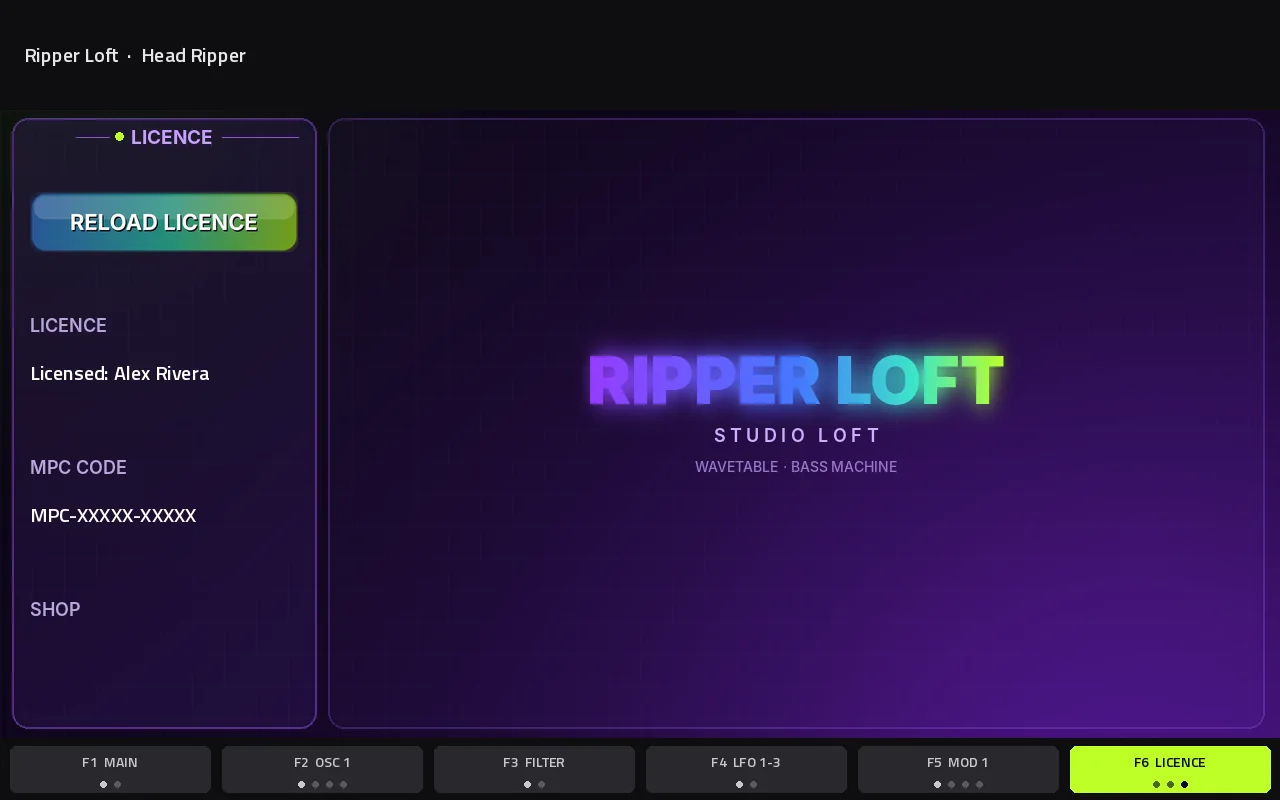
WHAT YOU SEE · F6 LICENCE
- 1LICENCE — RELOAD LICENCE (reads your licence files again), the licence status, MPC CODE (the code of this MPC, needed on loftplugins.ch) and SHOP (shows where to get a licence when none is found).
Come here once, when you activate Ripper Loft. Without a valid licence, Ripper Loft makes no sound.
- Activation: Ripper Loft writes your MPC code to Studio Loft Licences/MY MPC CODE.txt on the drive. Enter it on loftplugins.ch, copy the licence file you receive (.sllic) into that same folder, then press RELOAD LICENCE on F6 LICENCE (the last page).
- One purchase, two MPCs. No internet connection is needed on the MPC.
- Without a valid licence, Ripper Loft makes no sound.
Lizenz & Aktivierung
In drei Schritten deins.
Kaufen
Einmal auf dieser Seite zahlen. Dein persönlicher Link kommt per E-Mail und bleibt gültig.
Loft Hub installieren
MPC OS 3.10.1 oder neuer, mit aktivierten Enhancements und External Plugin Support in den Preferences. Kopiere Loft Hub einmal auf das MPC-Laufwerk.
Verbinden und spielen
In Loft Hub akzeptieren, MPC verbinden, und deine Plugins installieren sich von selbst. Funktioniert auf zwei MPC. Das war's.
Deins
Ripper Loft
Wavetable-Bässe für Dubstep und Drum and Bass. Fette Wobbles.
Einmal zahlen, für immer deins. Deine Lizenz gilt für zwei MPCs.