Instrument · Version 1.0.0
SymphoLoft
A WHOLE ORCHESTRA ON EIGHT LAYERS, RIGHT INSIDE YOUR MPC.
Most orchestral sounds give you one instrument at a time. SymphoLoft gives you a stage with eight chairs. Put violins on the first, cellos on the second, a horn on the fifth… One key, and the whole section answers.
3 = $993 Plugins nach Wahl für $99 →
A cinematic tutti: seven layers of strings, horns, trombones and flute swell through a minor-key progression in a concert hall.
Das Handbuch
Jeder Screen,
Seite für Seite.
Die komplette Anleitung, Screen für Screen, genau wie auf der MPC. Die Namen der Einstellungen bleiben die englischen Wörter des Screens.
The magic
Build your own orchestra. Layer by layer.
Most orchestral sounds give you one instrument at a time. SymphoLoft gives you a stage with eight chairs. Put violins on the first, cellos on the second, a horn on the fifth… One key, and the whole section answers.
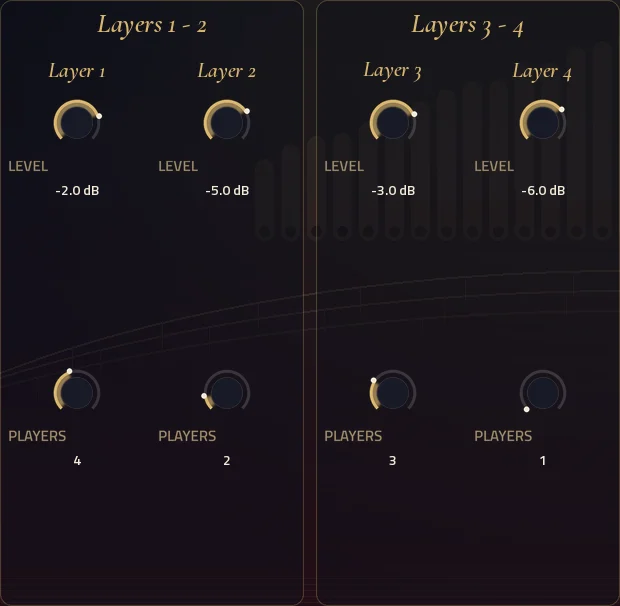
The Full Orchestra preset
| Layer | Instrument | Pan | Players | Level |
|---|---|---|---|---|
| 1 | Violins | L35 | 4 | -2.0 dB |
| 2 | Violas | R5 | 2 | -5.0 dB |
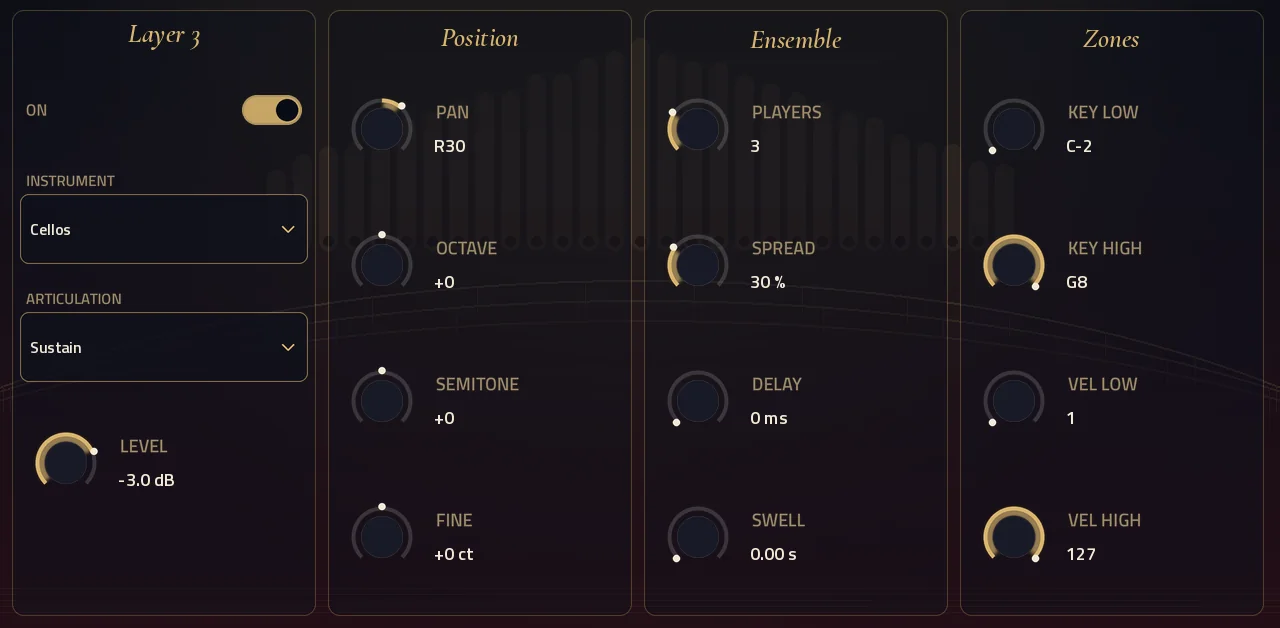
| 3 | Cellos | R30 | 3 | -3.0 dB |
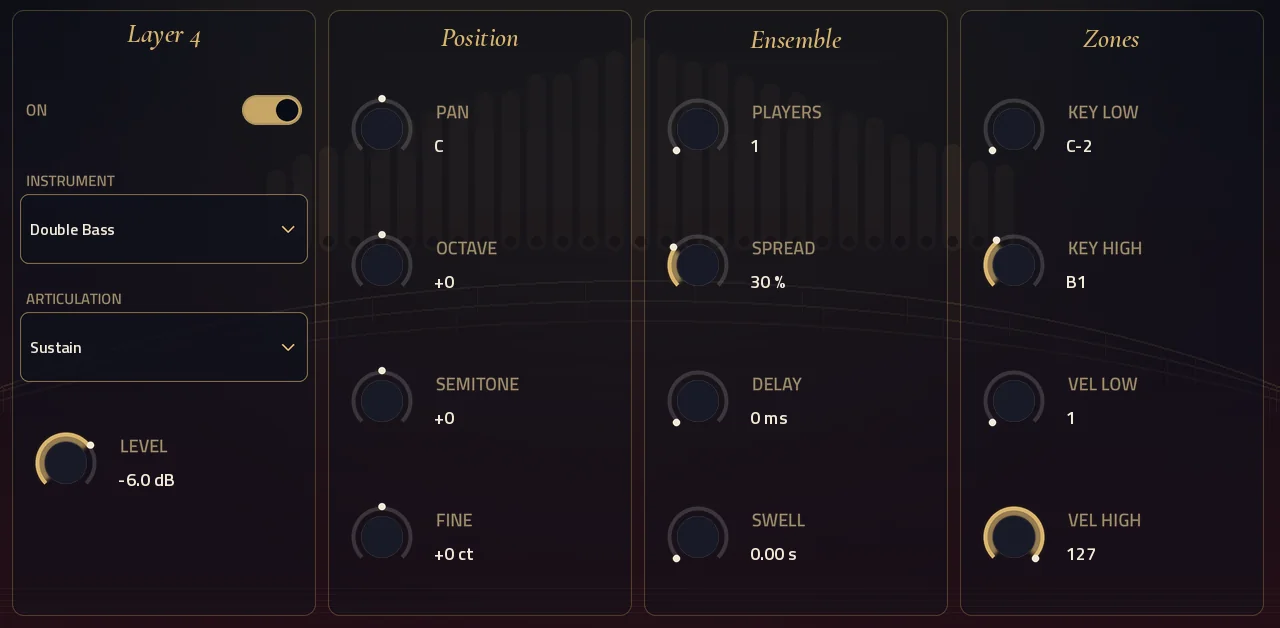
| 4 | Double Bass | C | 1 | -6.0 dB |
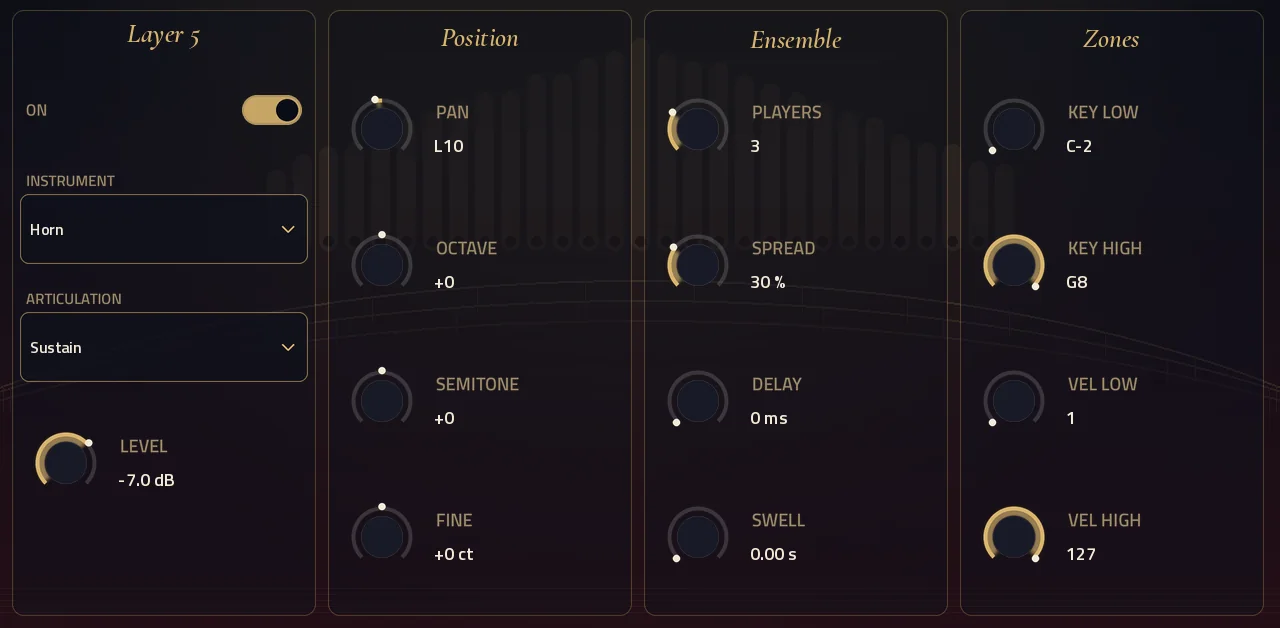
| 5 | Horn | L10 | 3 | -7.0 dB |
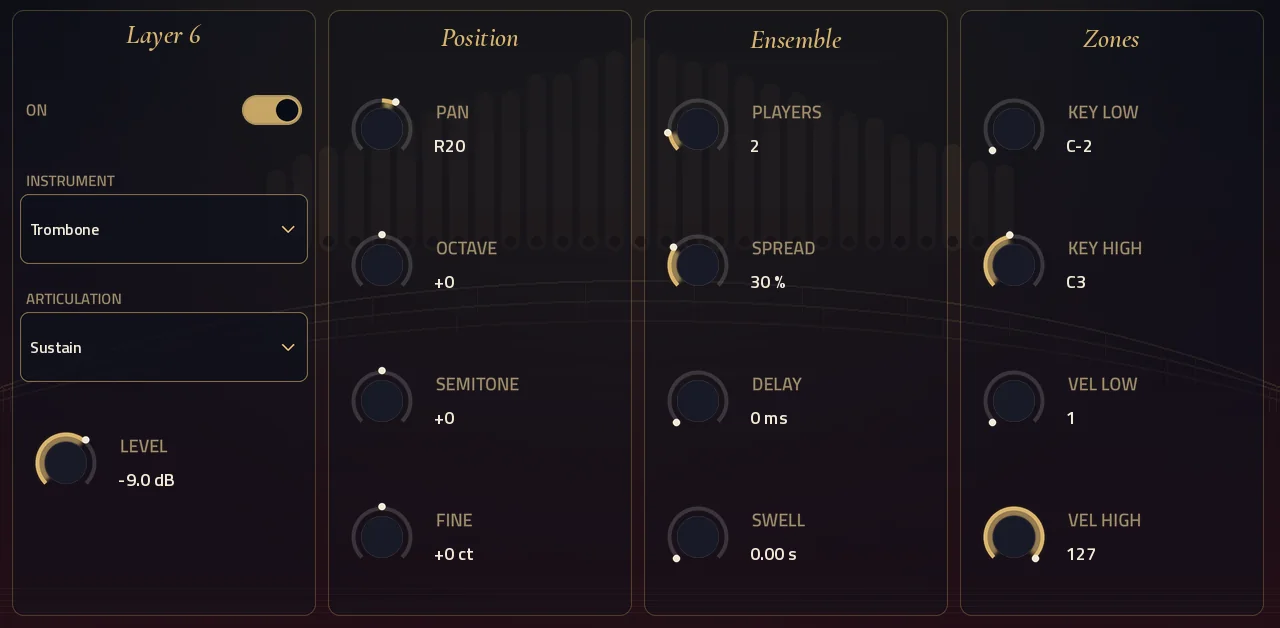
| 6 | Trombone | R20 | 2 | -9.0 dB |
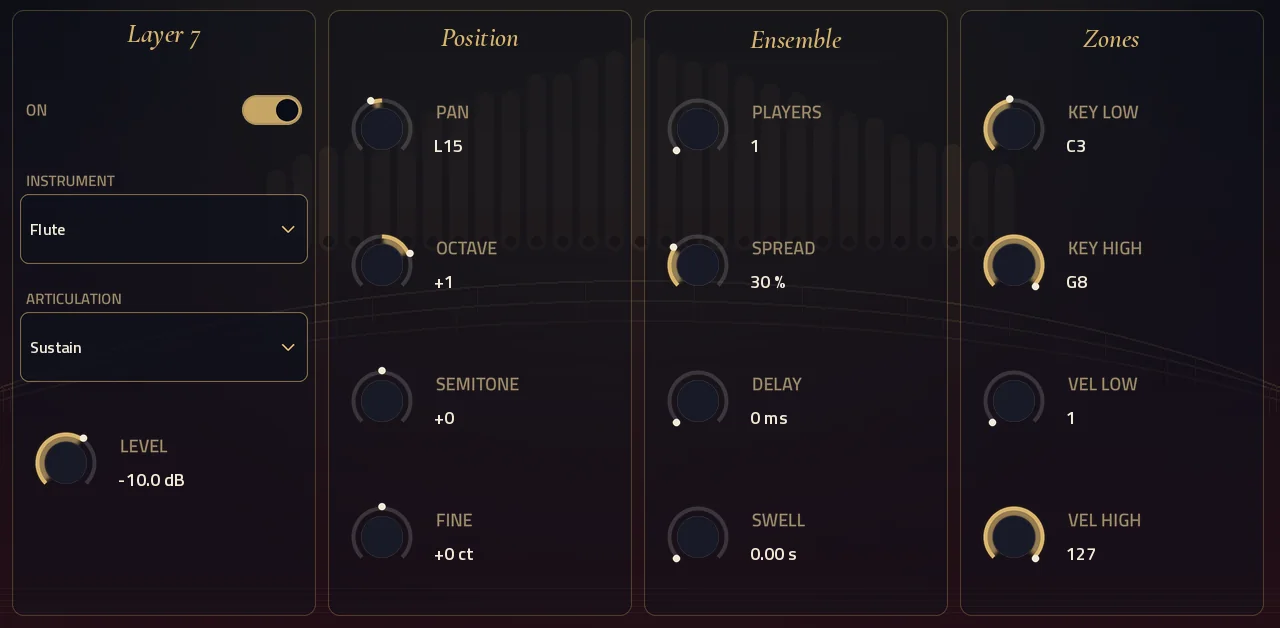
| 7 | Flute | L15 | 1 | -10.0 dB |
Seven layers, sixteen players. Hold a chord and you are in front of an orchestra.

The magic, part two
An orchestrator looking over your shoulder.
Real instruments have limits. A violin cannot play below G2. Put a low chord on a full orchestra and the violins are asked for notes they don't have. LISTEN sees it, says it, and fixes it with one tap.
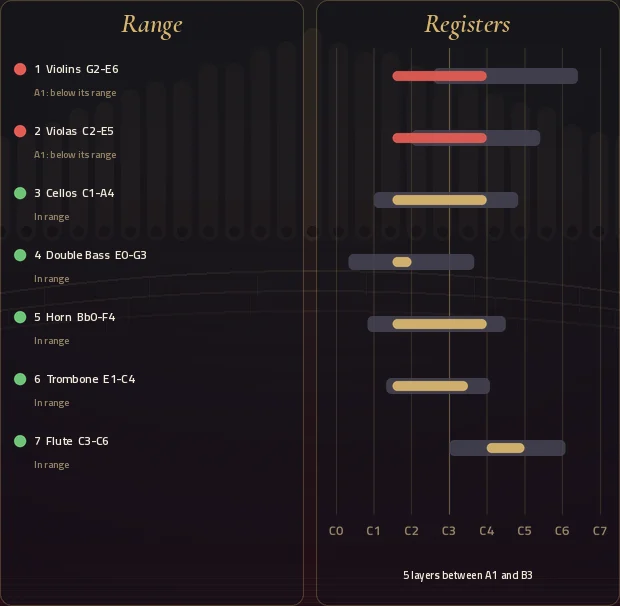
Before · A1 E2 A2 C3 E3 B3 held
After · one tap on APPLY
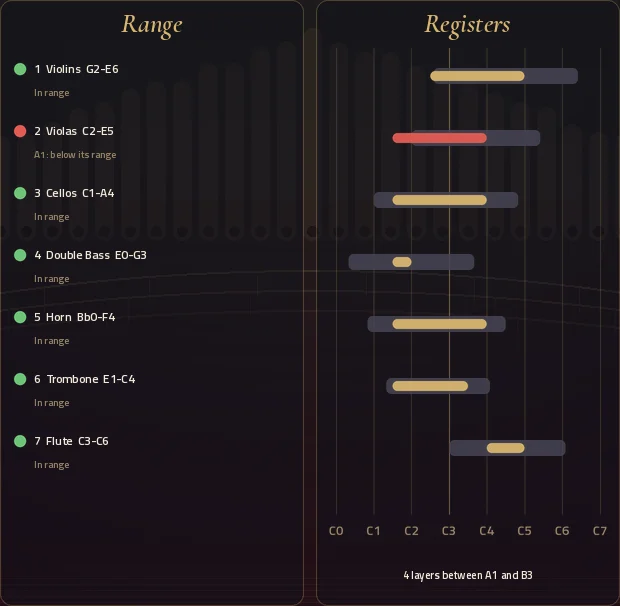
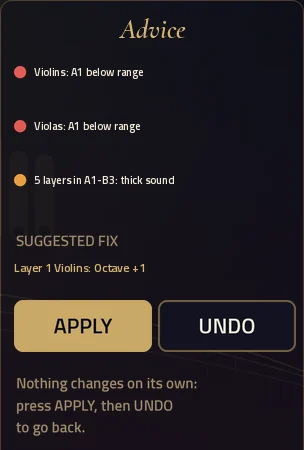
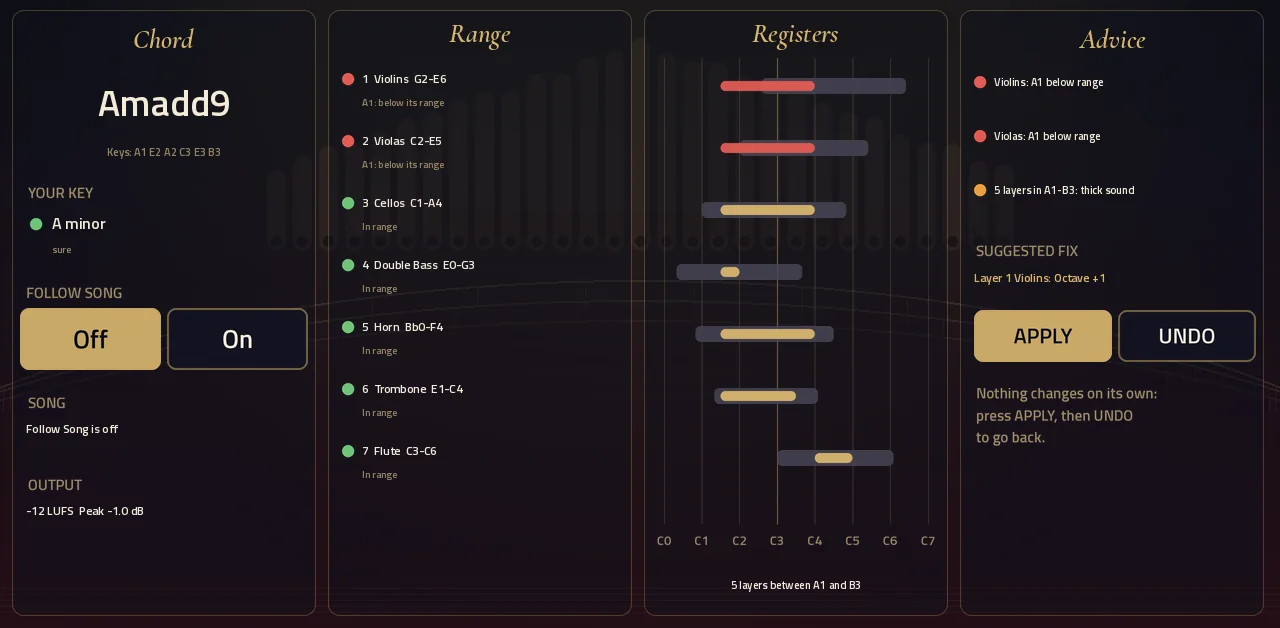
SymphoLoft names the chord (Amadd9), the key (A minor), flags Violins and Violas below their range and suggests Layer 1 Violins: Octave +1.
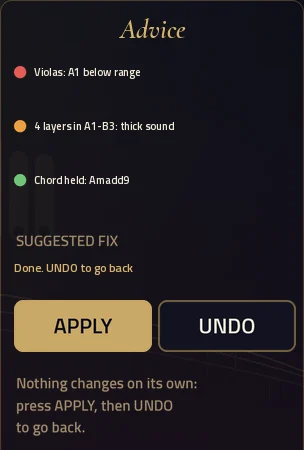
APPLY: the violins move up an octave, back in their range. Not convinced? UNDO puts them back. Nothing ever changes without your tap.
Welcome
Strings, brass, woodwinds and voices, on your MPC.
SymphoLoft is an orchestral instrument for the standalone MPC. Eight layers play at once; each one can be any of 21 instruments, in any of 10 articulations, with one to eight players. Stack them into a section, split them across the keys, or bring them in with velocity. And a LISTEN page checks every note against the real range of each instrument.
played together
in four families
ready to play
How it is organised
Press a function key again to reach its next page. On every page the 16 Q-Links follow the screen, column by column. LICENCE is always the last page (F6, third press); it is explained at the end of this guide.
The 21 instruments
Strings
Brass
Woodwinds
Voices
SOURCES
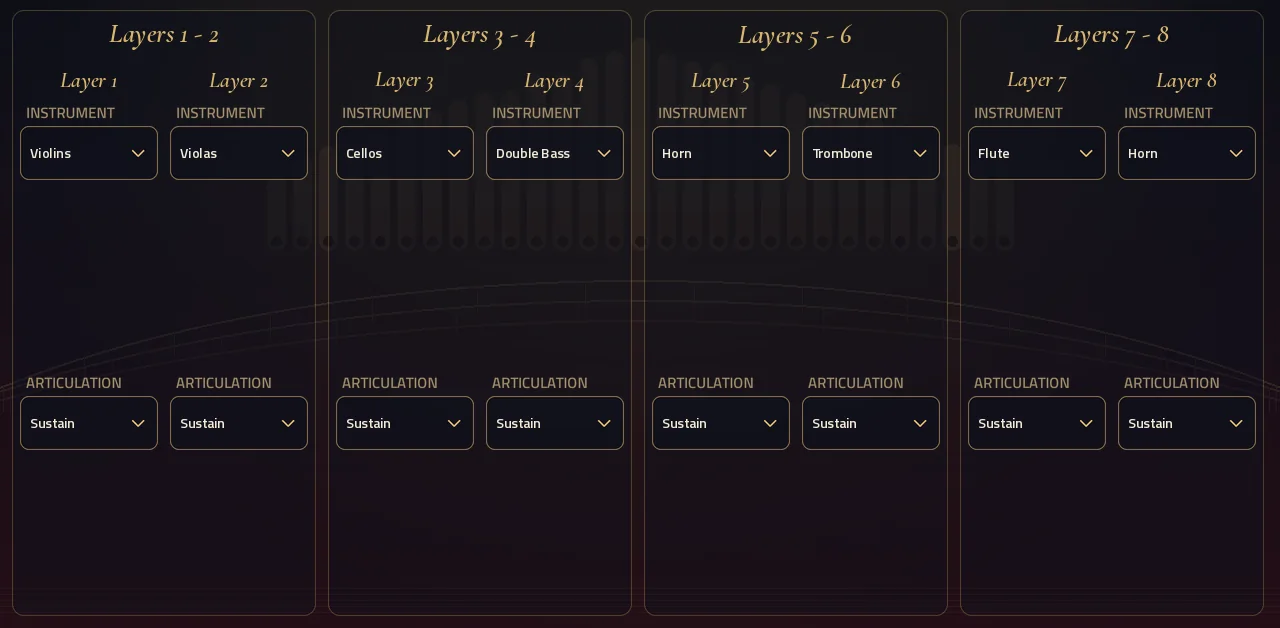
The eight layers side by side: which instrument plays on each one, and how it plays.
 1234
Was du siehst
- Layers 1 - 2 … 7 - 8 Four columns, two layers each. All eight layers on one page.
- INSTRUMENT Tap the field to open the list of 21 instruments, or turn its Q-Link to step through them.
- ARTICULATION Ten ways of playing: Sustain, Short, Pizzicato, Tremolo, No Vibrato, Vibrato, Muted, Wah, Growl, Fall.
- Missing articulation If an instrument does not have the one you pick, the field says so, for example “Pizzicato > Sustain”, and it plays its Sustain.
Wofür es ist
Come here first. Pick a preset, then change instruments and articulations until the section sounds like your scene.
Tipp
Cellos on Sustain in layer 1, Double Bass on Pizzicato in layer 2: a warm bed with a plucked pulse underneath, from one key.
MIX
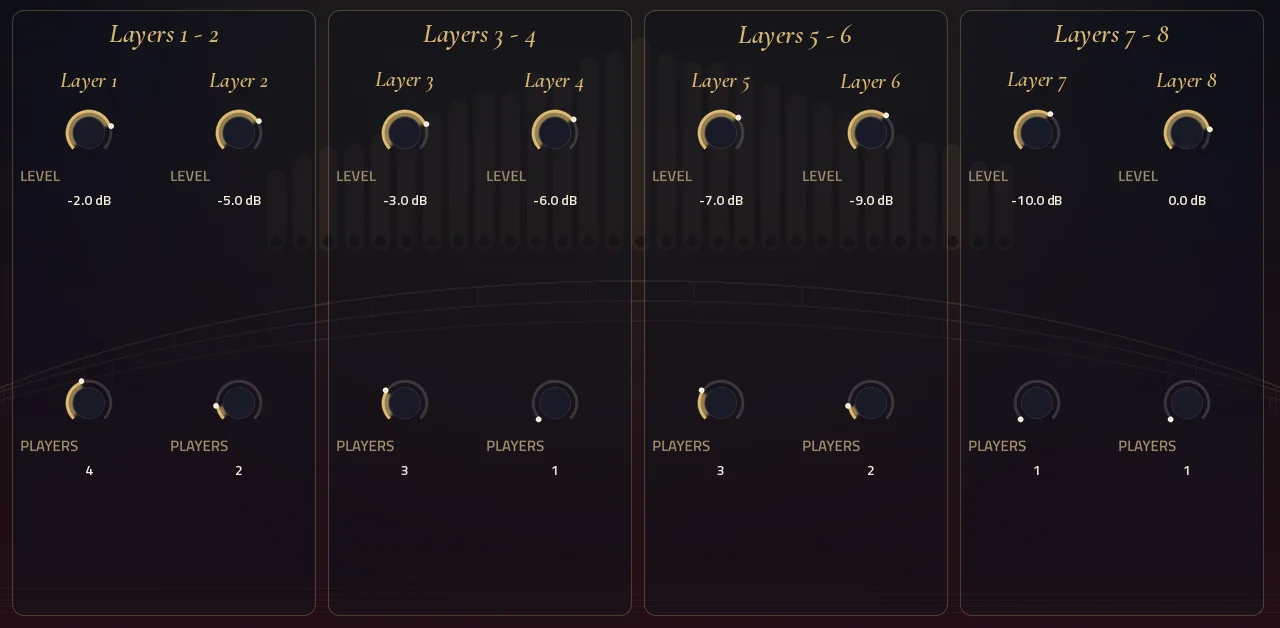
The level of each layer, and how many players are in it.
 123
Was du siehst
- LEVEL Volume of the layer in dB. Every layer has its own.
- PLAYERS From 1 (a soloist) to 8. Each player takes another recording or a neighbouring note, slightly detuned and placed apart.
- One column, two layers Same order as on SOURCES: layer 1 and 2 on the left, 7 and 8 on the right.
Wofür es ist
To make a layer sit in front or behind, and to turn one violin into a whole section.
Tipp
Two or three players sound like a chamber group; six to eight on Violins and Cellos give the big wall of a trailer.
ON / PAN
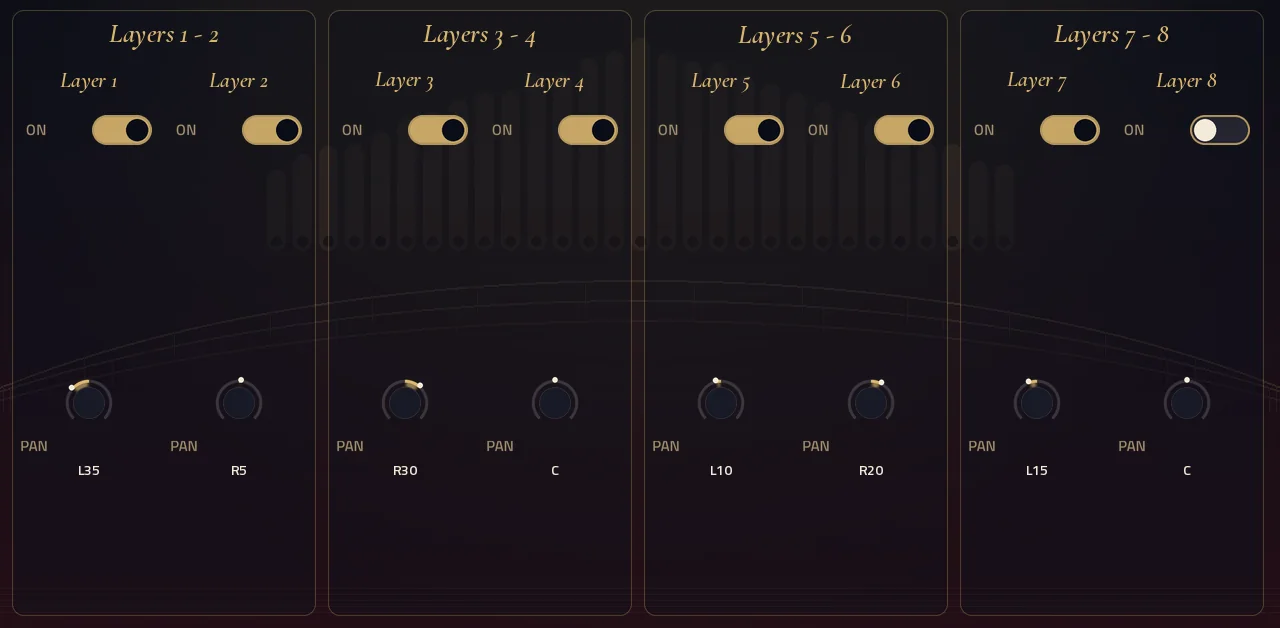
Switch layers on and off, and seat them in the stereo field.
 123
Was du siehst
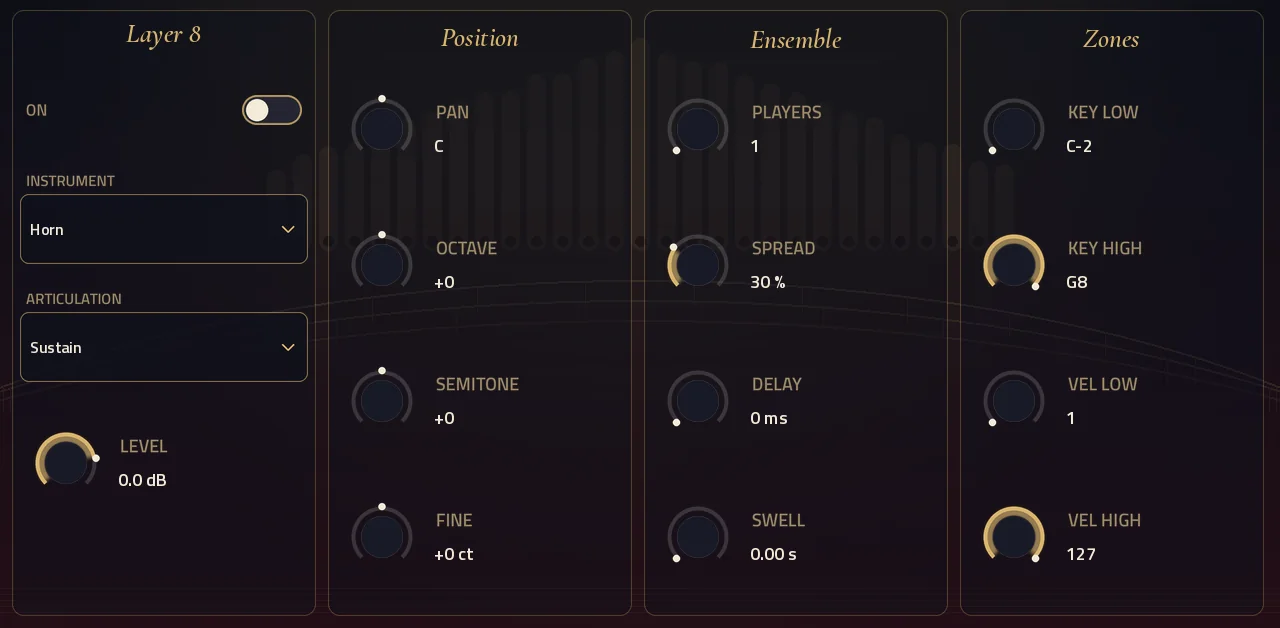
- ON Switches the layer on or off. An unused layer costs nothing.
- PAN From L100 to R100, C in the middle.
- Layer 8 Off In this preset only seven layers play: layer 8 is free for your own idea.
Wofür es ist
To try a layer alone, or to place the instruments like a real stage.
Tipp
Seat them like an orchestra: the Full Orchestra preset puts violins at L35, cellos at R30 and the double bass in the centre.
PLAY
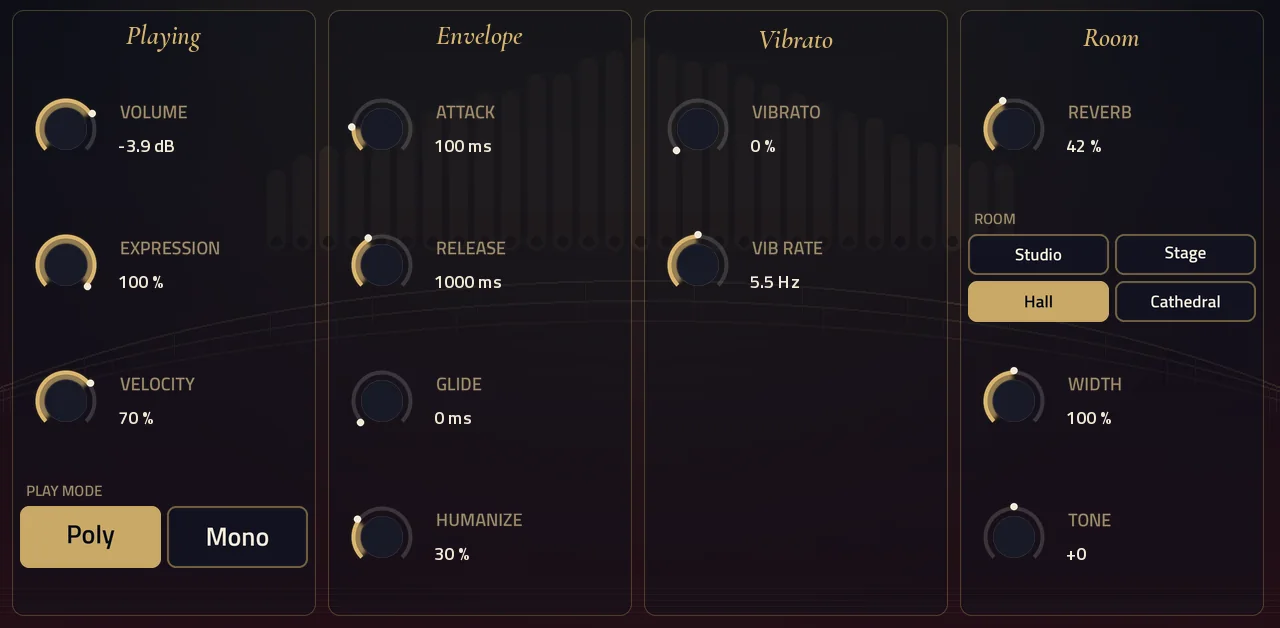
The settings shared by all eight layers: dynamics, envelope, vibrato and the room.
 123456789101112
Was du siehst
- VOLUME Master level.
- EXPRESSION The overall dynamic. CC11 and the mod wheel (CC1) ride it too, for swells by hand.
- VELOCITY How much your touch changes the level.
- PLAY MODE Poly for chords, Mono for a solo line that can glide.
- ATTACK · RELEASE How fast notes start and fade.
- GLIDE Slide between notes in Mono.
- HUMANIZE Small random differences of tuning and level on every note.
- VIBRATO · VIB RATE Extra vibrato depth, and its speed from 3 to 8 Hz.
- REVERB How much room you hear.
- ROOM Studio, Stage, Hall or Cathedral: tap one of the four.
- WIDTH Stereo width: 0 % is mono, 100 % as recorded, 200 % extra wide.
- TONE Darker or brighter, from -100 to +100.
Wofür es ist
Shape how the whole orchestra breathes. The sustain pedal (CC64) works too.
Tipp
For slow film strings: Attack around 300 ms, Release 1.5 s, Room on Hall. For staccato ostinatos: Attack at 0, Release short, Room on Studio.
LISTEN
SymphoLoft listens to what you play and checks it against the real range of every instrument.
 123456789
Was du siehst
- Chord The chord you hold, and the keys under it.
- YOUR KEY The key of what you play, with a dot: green when it is sure.
- FOLLOW SONG On: use the key shared by the other Studio Loft plugins of your project. SONG says where it came from.
- OUTPUT Loudness (LUFS) and peak of SymphoLoft's output.
- Range Each layer that plays, with its instrument's real range. Red: you play outside it.
- Registers Grey bar: the instrument's range. Gold: the notes it plays now. Red: out of range.
- Advice Up to three remarks, problems first: out of range, thick low register, nothing above C4…
- SUGGESTED FIX One concrete change, for example “Layer 1 Violins: Octave +1”.
- APPLY · UNDO APPLY makes that change. UNDO puts it back. Nothing changes on its own.
Wofür es ist
When a chord sounds muddy or a line sounds thin and you don't know why. Hold the chord and look.
Tipp
Write your voicing on pads first, then open LISTEN: if the low layers bunch up below C3, move one of them an octave up and the chord opens.
LAYER 1
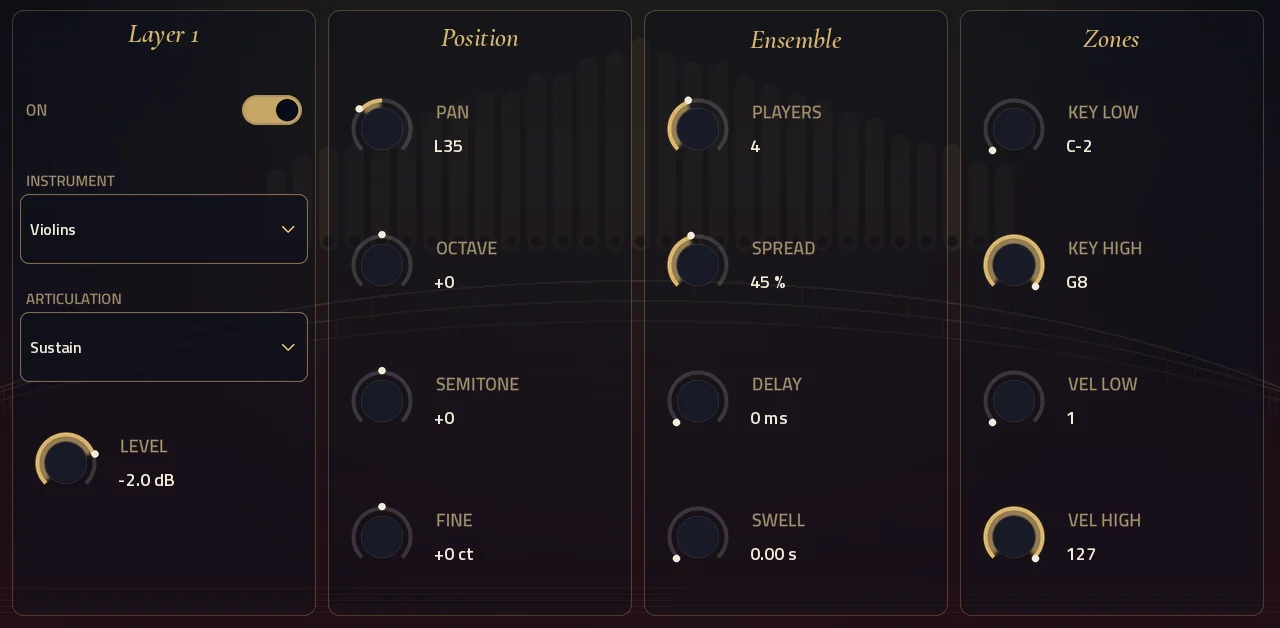
One page per layer: F3 for layers 1 and 2, F4 for 3 and 4, F5 for 5 and 6, F6 for 7 and 8. Press the key again for the second layer.
 12345678910
Was du siehst
- ON Layer on or off.
- INSTRUMENT · ARTICULATION The same fields as on SOURCES.
- LEVEL Volume of the layer.
- PAN Place in the stereo field.
- OCTAVE · SEMITONE · FINE Transpose by octaves, semitones and cents.
- PLAYERS · SPREAD How many players, and how far apart they are in tuning and in the stereo field.
- DELAY The layer starts later, up to 500 ms.
- SWELL A slow rise of this layer only, up to 4 s.
- KEY LOW · KEY HIGH The keys this layer answers to: for splits.
- VEL LOW · VEL HIGH The velocities it answers to: for accents that only come in when you play hard.
Wofür es ist
To build splits, accents and swells, layer by layer.
Tipp
Horn on layer 2 with Vel Low at 100: play softly and only the strings sound, hit hard and the horns join. Add Swell on the strings for a crescendo under every chord.
LAYERS 2 – 8
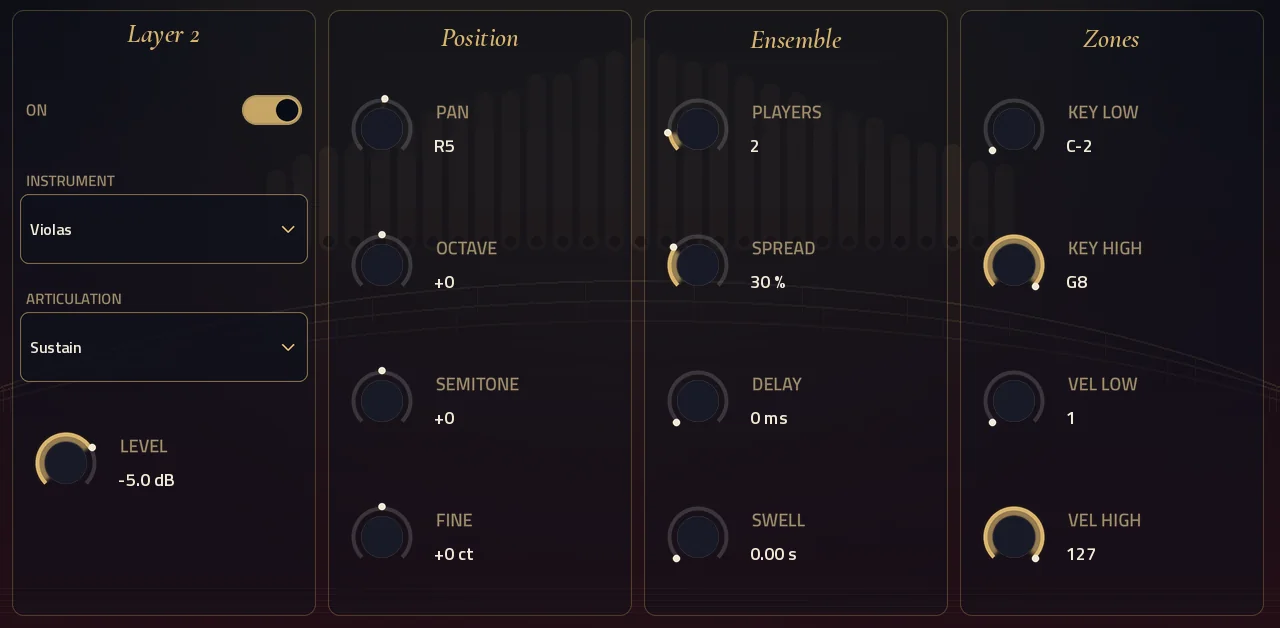
Every layer has the page you just saw, with the same sixteen settings in the same places. Only the title and the values change.
Instrument list
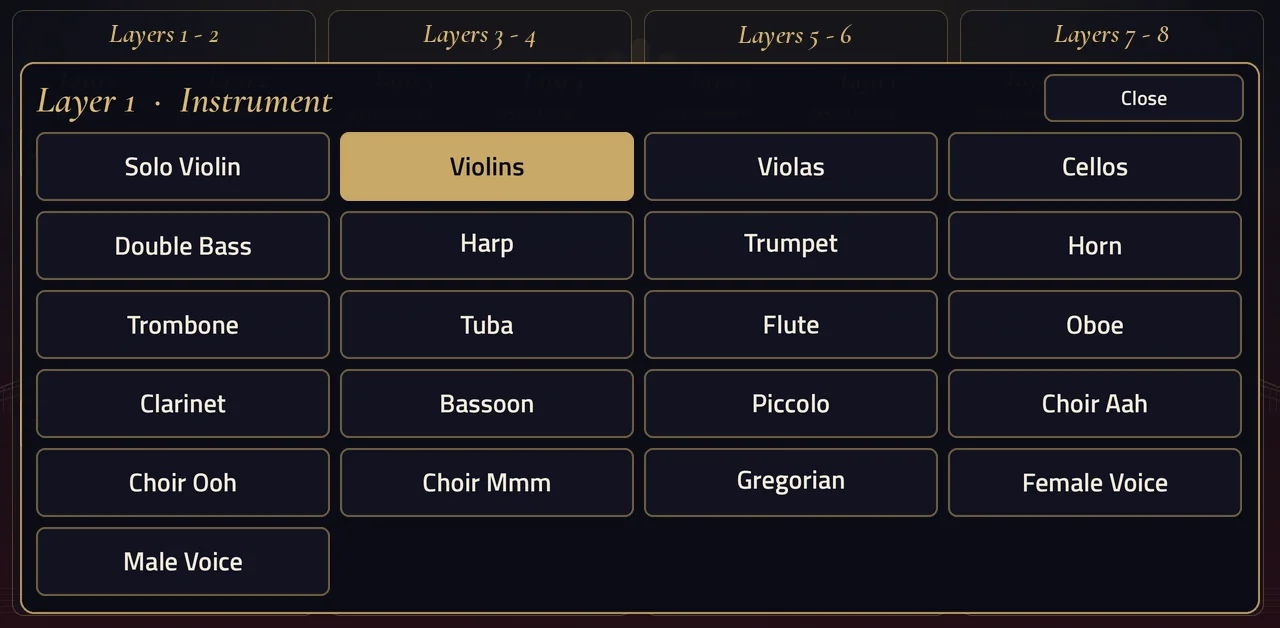
Tap an INSTRUMENT field: the 21 instruments, the current instrument in gold. Tap one to choose it, or Close.
Articulation list
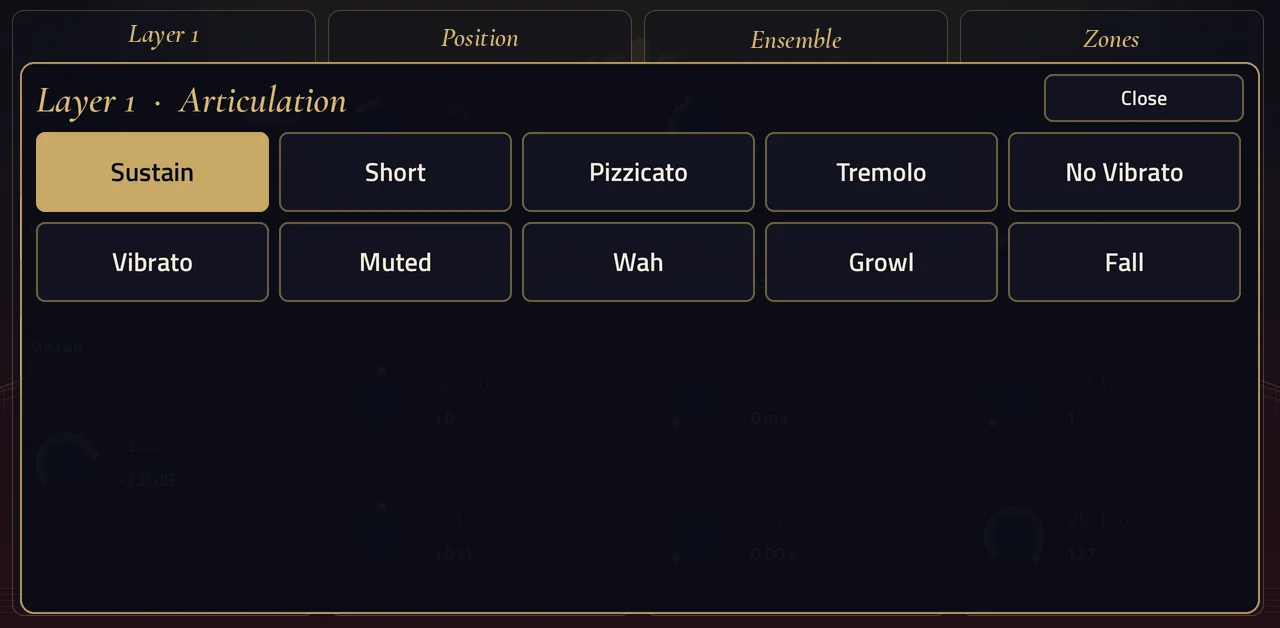
Tap an ARTICULATION field: the ten ways of playing, the current one in gold. Not every instrument has all ten: the technical sheet shows which ones each instrument plays.
Technical sheet
SymphoLoft at a glance
An eight-layer orchestra for the standalone MPC: 21 real-sounding instruments in 10 articulations, with an assistant that checks every note against each instrument's range.
For who, for what
- Hip-hop and trap producers who want strings, brass and choirs that sound like a section, not a single sample.
- Soundtrack and library music: tension beds, ostinatos, heroic brass, requiem choirs.
- Ballads, R&B and pop that need a real string pad or a solo violin line.
Strong points
- 8 layers, each any instrument and any articulation, from one key.
- Players (1 to 8) and Spread on every layer: a soloist or a full section.
- Key and velocity zones per layer for splits and accents.
- Four rooms: Studio, Stage, Hall, Cathedral.
- LISTEN: chord, key, real range of every layer, advice and a one-tap fix.
- Sounds are loaded only when a layer uses them.
Numbers
Instruments and articulations
| Solo Violin, Violins, Violas, Cellos | Sustain, Short, Pizzicato, Tremolo |
| Double Bass | Sustain, Short, Pizzicato, Tremolo, No Vibrato |
| Harp | Pizzicato (plucked) |
| Trumpet | Sustain, Short, Vibrato, Muted, Wah |
| Horn | Sustain, Short, Muted |
| Trombone | Sustain, Short, Vibrato, Growl, Fall |
| Tuba, Clarinet, Piccolo | Sustain, Short |
| Flute, Oboe, Bassoon | Sustain, Short, No Vibrato |
| Choirs and solo voices | Sustain |
Choose an articulation an instrument does not have and it plays its Sustain; the field shows it, for example “Tremolo > Sustain”.
Technical sheet
The 47 presets
As they appear in the MPC browser, in the Presets folder of the plugin.
Init
- 001Init
Strings
- 002Full Strings
- 003Solo Violin
- 004Violin Choir x8
- 005Warm Cellos
- 006Pizzicato Ensemble
- 007Spiccato Tension
- 008Dark Tremolo
- 009Slow Swell
- 010Octave Strings
- 011Bass Pizz
- 012Pizz & Spic Vel
- 013Harp & Strings
- 014Harp
Brass
- 015Brass Section
- 016Epic Horns
- 017Heroic Staccato
- 018Solo Trumpet
- 019Muted Brass
- 020Wah Mute Noir
- 021Low Brass
- 022Growl Trombones
Woodwinds
- 023Woodwind Choir
- 024Solo Flute
- 025Solo Oboe
- 026Clarinet
- 027Bassoon
- 028Staccato Winds
Hybrid
- 029Strings + Horns
- 030Trailer Ostinato
- 031Velocity Brass
- 042Strings + Choir
- 043Epic Choir & Brass
- 044Harp & Choir
- 045Requiem
Tutti
- 032Full Orchestra
- 033Cathedral Tutti
Choir
- 034Choir Aah
- 035Choir Ooh Pad
- 036Humming Choir
- 037Gregorian Chant
- 038Gregorian Drone
- 039Solo Soprano
- 040Solo Tenor
- 041Aah + Ooh
Splits
- 046Cellos Trumpet
- 047Pizz Bass Flute
Expansion presets, sold separately
8 presets per expansion, already in the Presets folder. They open once the expansion is bought for your MPC; until then the main page says which expansion is needed.
Matinee 74
- 048Silk Strings
- 049Soul Stabs
- 050Harp & Flute
- 051Lounge Trumpet
- 052Ooh & Strings
- 053Pizz Walk
- 054Flute Melody
- 055Matinee Tutti
Sub Pressure
- 056Trap Strings
- 057Dark Pizz
- 058Choir Stab
- 059Drill Flute
- 060Brass Hit
- 061Tremolo Menace
- 062Low Cellos
- 063Opera Loop
Halfstep 140
- 064Doom Brass
- 065War Choir
- 066Low Ostinato
- 067Tension Trem
- 068Falling Horns
- 069Dark Requiem
- 070Titan Tutti
- 071Spiccato Run
Technical sheet
Get started in 3 steps
Install
Copy the folder “Studio Loft - VST - SymphoLoft” into “VST2 Plugins” at the root of your MPC drive.
Load
On a track, load a plugin instrument and choose SymphoLoft. The 47 presets are in its Presets folder.
Play
Play the keys or pads. Then press F1 to change who plays, and F2 twice for LISTEN.
Good to know
- The first note after you change an instrument can stay silent for a moment while its sounds load (less than a second).
- Notes are named the MPC way: middle C (MIDI 60) is C3.
- The choirs and solo voices are synthesised by Studio Loft; the orchestral instruments are recordings.
- Without a valid licence SymphoLoft makes no sound: see the next page.
SymphoLoft
Eight chairs. Your orchestra.
Lizenz & Aktivierung
In drei Schritten deins.
Kaufen
Einmal auf dieser Seite zahlen. Dein persönlicher Link kommt per E-Mail und bleibt gültig.
Loft Hub installieren
MPC OS 3.10.1 oder neuer, mit aktivierten Enhancements und External Plugin Support in den Preferences. Kopiere Loft Hub einmal auf das MPC-Laufwerk.
Verbinden und spielen
In Loft Hub akzeptieren, MPC verbinden, und deine Plugins installieren sich von selbst. Funktioniert auf zwei MPC. Das war's.
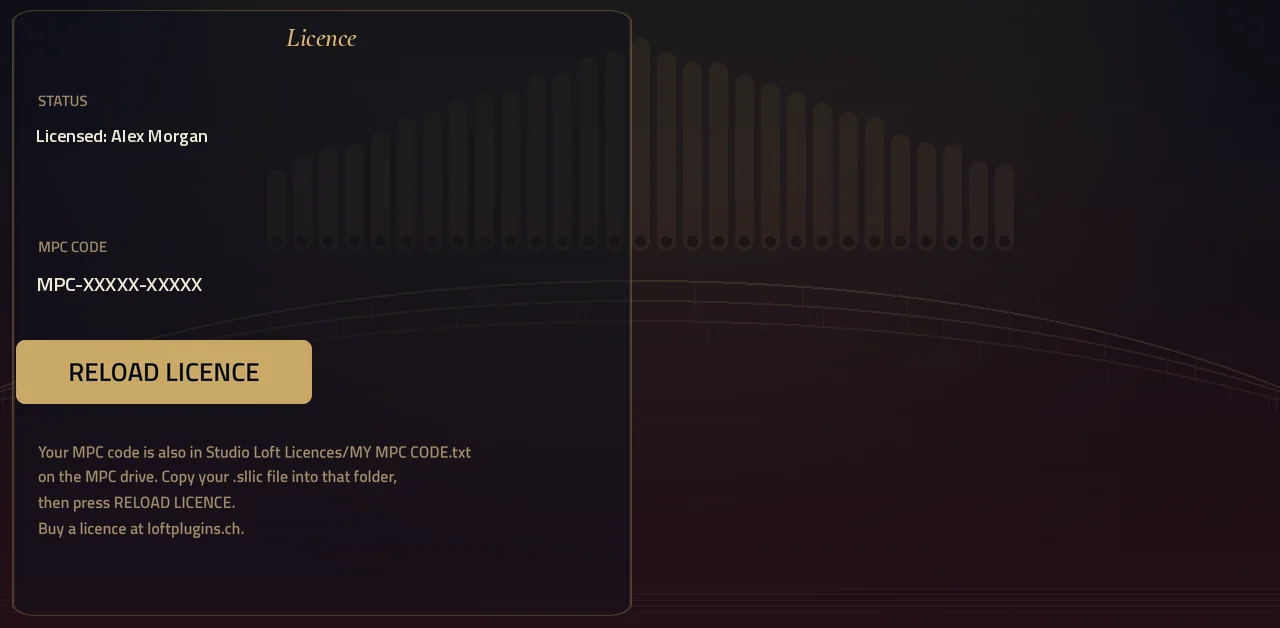
LICENCE
The state of your licence and the code of your MPC.
 1234
Was du siehst
- STATUS Licensed with your name, or no licence found.
- MPC CODE The code of this MPC. You give it on loftplugins.ch to receive your licence.
- RELOAD LICENCE Reads the licence file again, after you copied it to the MPC.
- Help text Where the code and the licence file live on the MPC drive, and where to buy.
Wofür es ist
Once, to activate. After that, only if you change MPC.
Tipp
Your code is also written in “Studio Loft Licences/MY MPC CODE.txt” on the MPC drive: copy it from a computer, no typing.
Deins
SymphoLoft
Ein Orchester mit acht Layern, von der Solovioline bis zum Chor.
Einmal zahlen, für immer deins. Deine Lizenz gilt für zwei MPCs.