Instrument · versión 1.2.0
Grain Loft
ANY SOUND BECOMES A PLAYABLE CLOUD. FOUR SLOTS, ALWAYS IN TUNE, MORPHING INTO EACH OTHER.
Put a piano in slot 1, a string ensemble in slot 2, a bell pad in slot 3 and a glass pad in slot 4. Grain Loft does not switch between them: it blends them. Move Morph X and Morph Y and you glide through every mix in between.
3 = $993 plugins a elegir por $99 →
Four held chords while two slow LFOs glide the sound from a grand piano to strings, bells and glass, never repeating.
El manual
Cada pantalla,
página a página.
La guía completa, pantalla por pantalla, igual que en la MPC. Los nombres de los ajustes se quedan en inglés, como en la pantalla.
Studio Loft · Granular instrument for MPC
GRAIN LOFT
Any sound becomes a playable cloud. Four slots, always in tune, morphing into each other.
sound slots playing at once
factory sounds in 118 banks
presets in 18 folders
voices, standalone on your MPC
The wow · 1
Four worlds, one sound.
Put a piano in slot 1, a string ensemble in slot 2, a bell pad in slot 3 and a glass pad in slot 4. Grain Loft does not switch between them: it blends them. Move Morph X and Morph Y and you glide through every mix in between.
- Slot 1 Vermeil Grand, a piano. Slot 2 Ensemble Dawn, strings. Slot 3 Bell Pad. Slot 4 Evolving Glass.
- Morph at 100: the X/Y position now decides the mix.
- LFO1 on Morph X at 0.06 Hz, LFO2 on Morph Y at 0.04 Hz. Two slow LFOs that never line up.
- Hold one chord. It starts as a piano, turns into strings, rings like a bell, then melts into glass. And it keeps going.
What it feels like
One held chord becomes a whole intro. You stop programming automation: the sound writes its own movement, and every take is a little different. Perfect under a beat, at the start of a song, or as a bed for a vocal.
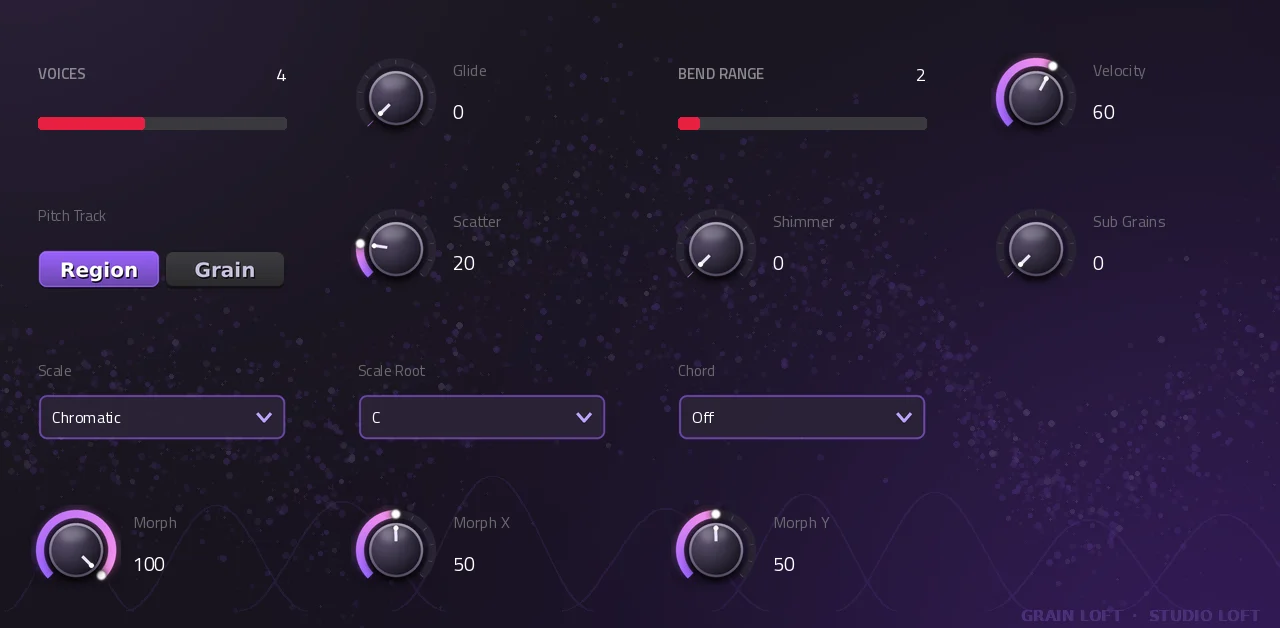
PLAY Morph 100, Morph X and Morph Y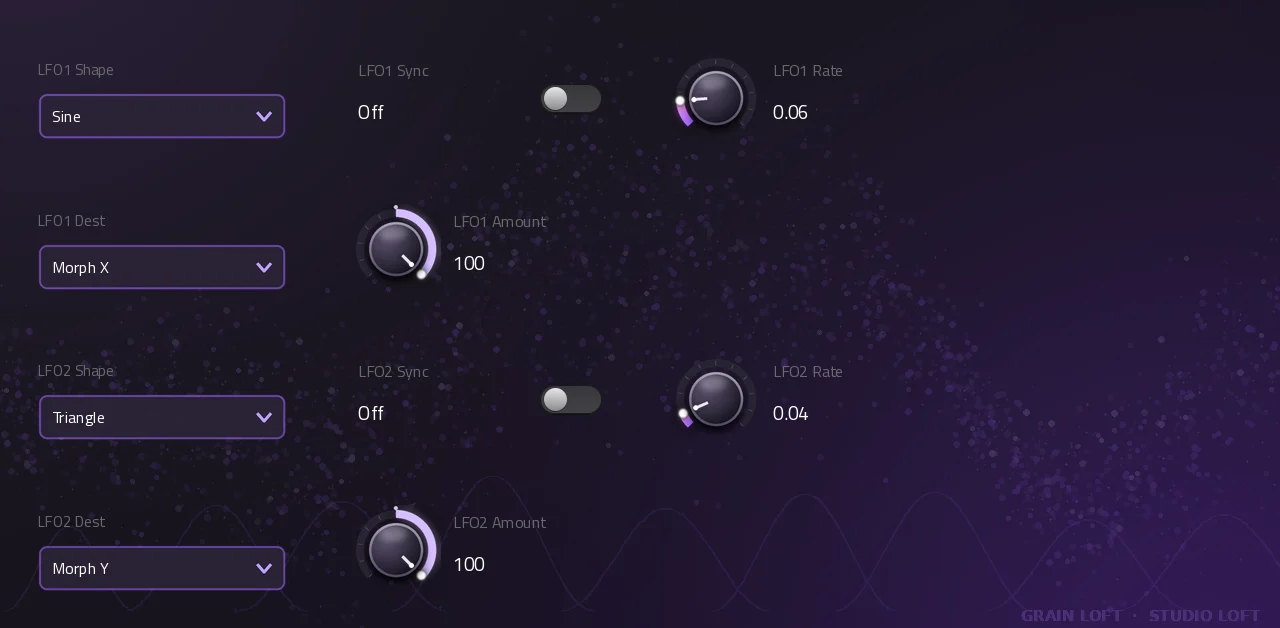 LFO LFO1 on Morph X, LFO2 on Morph Y
Grab Morph X and Morph Y on the Q-Links of the PLAY page and play them by hand while you record: your own morph, in real time.
The wow · 2
Any sound. In tune. As a chord.
Grain Loft measures the note of the part of the sound you choose, then replays every grain at the exact speed to land on the key you press. A voice, a guitar strum, the tail of a kick: it all becomes an instrument.
Key on Lock
The heart of Grain Loft. Each slot is tuned to the note you play, from its own measured note. Mix four very different sounds: the result still plays the right note.
Pitch Track on Grain
Each grain is corrected where it starts. Even a sound that slides, or a short melody, stays in tune.
Chord
Every grain picks a note of the chord: Major, Minor, Maj7, Min7, Add9, Sus4, Fifths, Octaves or Cluster. One finger plays a full, moving chord.
Scale + Pitch Jit
Grains are thrown at random pitches, but always inside your scale. Set Scale to Minor and Scale Root to A: the cloud can only play notes of A minor.
- Copy a vocal WAV into Content/User of Grain Loft, pick the User bank in slot 1.
- Key on Lock, Scan on Freeze, Size 250, Density 40.
- PLAY page: Chord Min7, Scale Minor, Pitch Jit of slot 1 at 12.
- Play one note: your voice becomes a minor-seven choir, always in key.
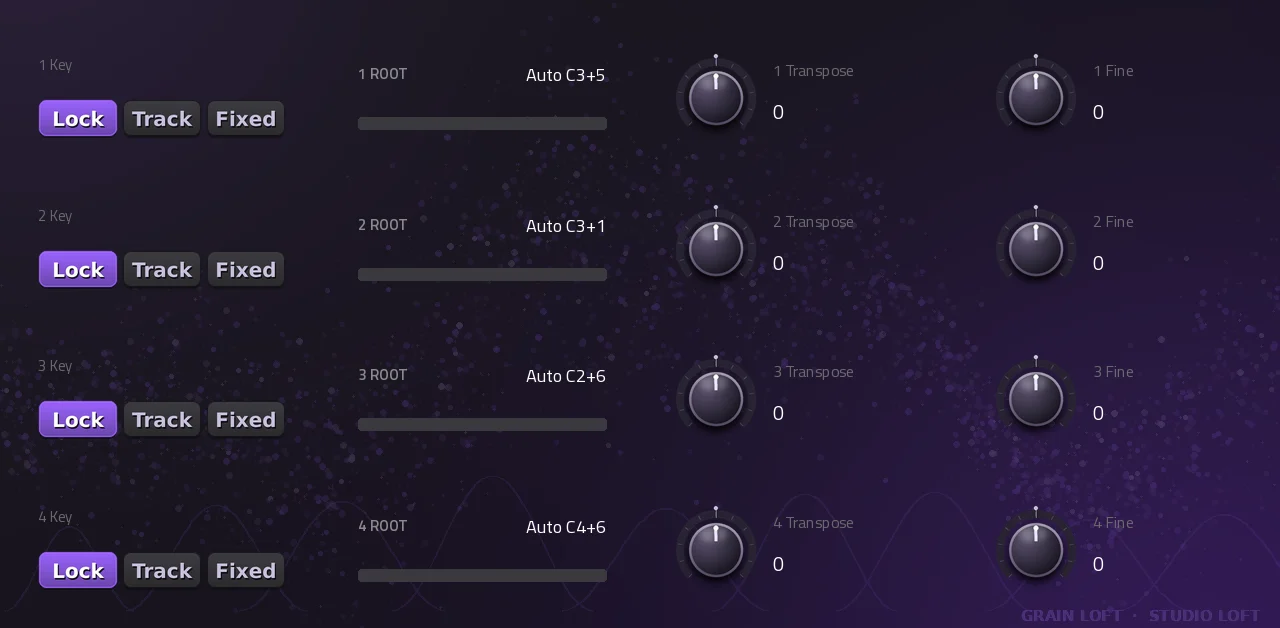
TUNE page (F5). One row per slot: Key on Lock, Root on Auto. "Auto C3+5" means Grain Loft measured C3, 5 cents sharp, and corrects it for you.
Name the file with its note in brackets, for example "Vocal [A2].wav", and Grain Loft uses that note instead of measuring it.
Find your way
Six keys, eleven pages.
Grain Loft uses the function keys of your MPC. Press a key again to reach the next page of that key. The 16 Q-Links follow the page you are on.
| F1 · F2 · F3 · F4 | SLOT 1, SLOT 2, SLOT 3, SLOT 4: the four sounds and their grains |
| F5 | TUNE, then PLAY on the second press |
| F6 | SOUND, then LFO, FX, LISTEN and LICENCE on the next presses |
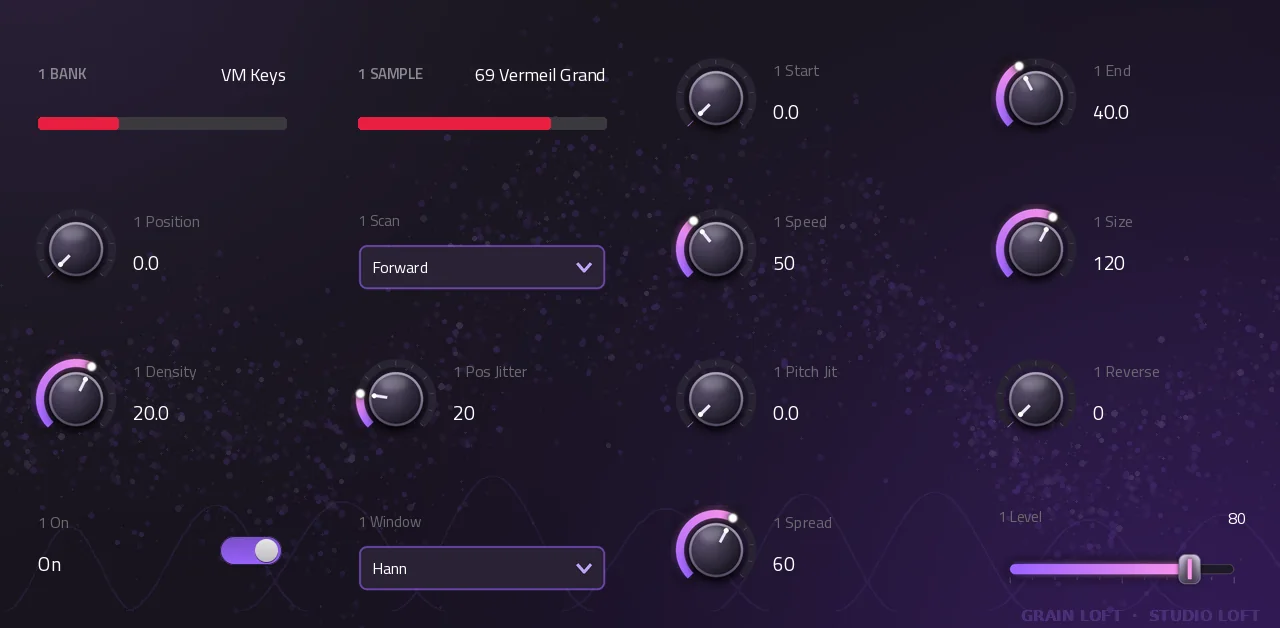 F1 · SLOT 1 where each sound is shapedF5 · PLAY harmony and morphF6 · LFO movement
 F6 · LISTEN the assistant
The grain engine
SLOT 1 F1
- 1Bank / Sample Bank is a family of sounds (118 factory banks, plus User for your own WAV files). Sample is the sound inside that bank.
- 2Start / End The zone of the sound the grains come from. Grain Loft measures the note of this zone, so it plays in tune.
- 3Position Where the play head starts inside the zone.
- 4Scan / Speed How the play head moves: Forward, Reverse, PingPong, Freeze (it stays put) or Random. Speed sets how fast.
- 5Size / Density Length of each grain (5 ms to 1 s) and number of grains per second (1 to 150).
- 6Pos Jitter / Pitch Jit / Reverse Random position, random pitch (in semitones, snapped to the Scale of the PLAY page) and the share of grains played backwards.
- 7On Switches the slot on or off.
- 8Window The shape of each grain: Hann, Smooth, Triangle, Perc, Swell or Rect. Perc is punchy, Swell is soft.
- 9Spread / Level Stereo width of the grains, and the volume of the slot.
For an endless pad: Scan on Freeze, Size around 200, Density above 30. Hold a note: it never ends and never stops moving.
The same controls, three more times
SLOT 2 · 3 · 4 F2 · F3 · F4
Slots 2, 3 and 4 work exactly like slot 1. In "Four Worlds Morph" they hold strings, a bell pad and a glass pad.
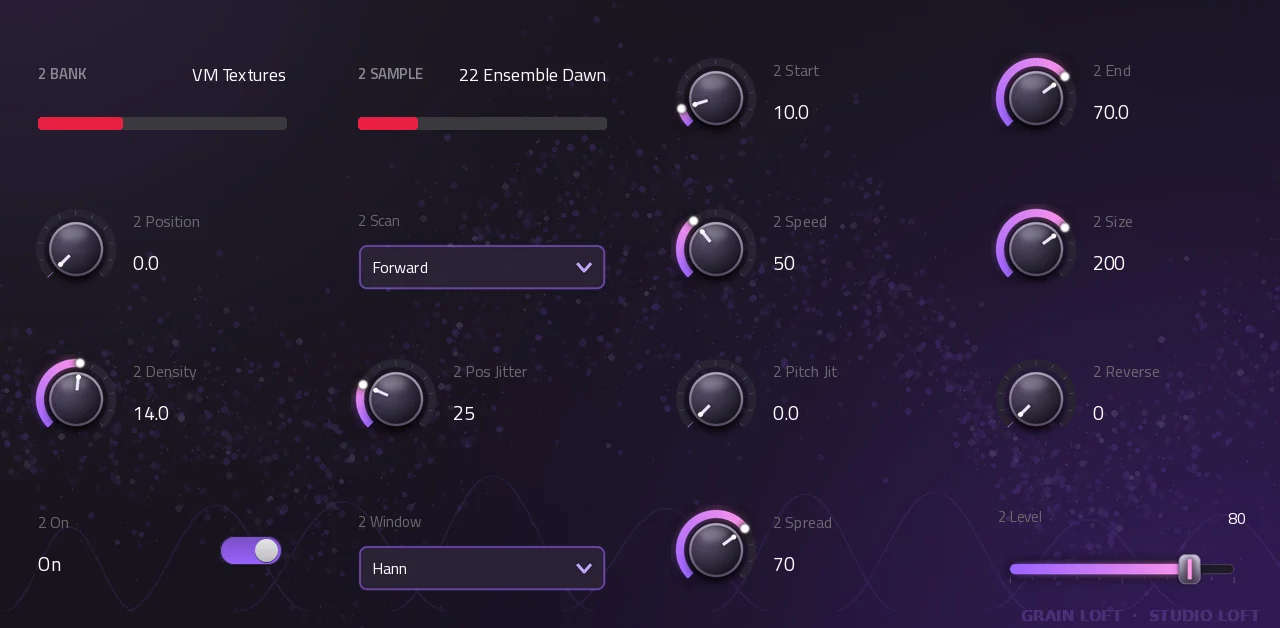 SLOT 2 VM Textures · Ensemble Dawn
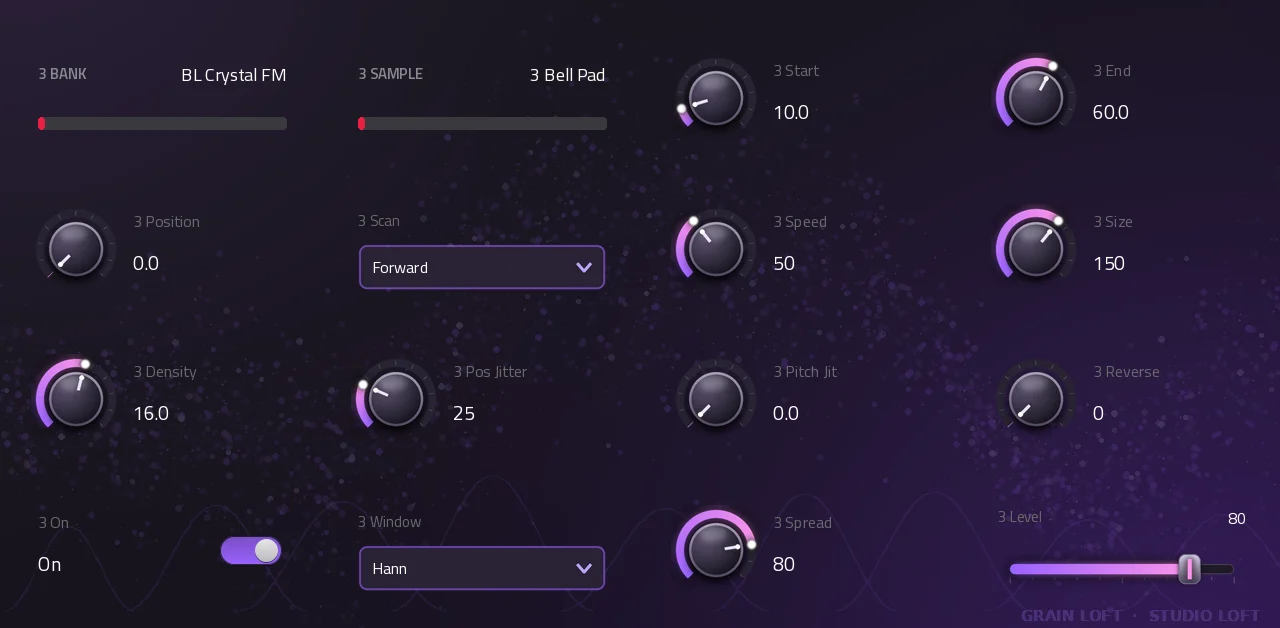 SLOT 3 BL Crystal FM · Bell Pad
The same controls, three more times
SLOT 4 F4
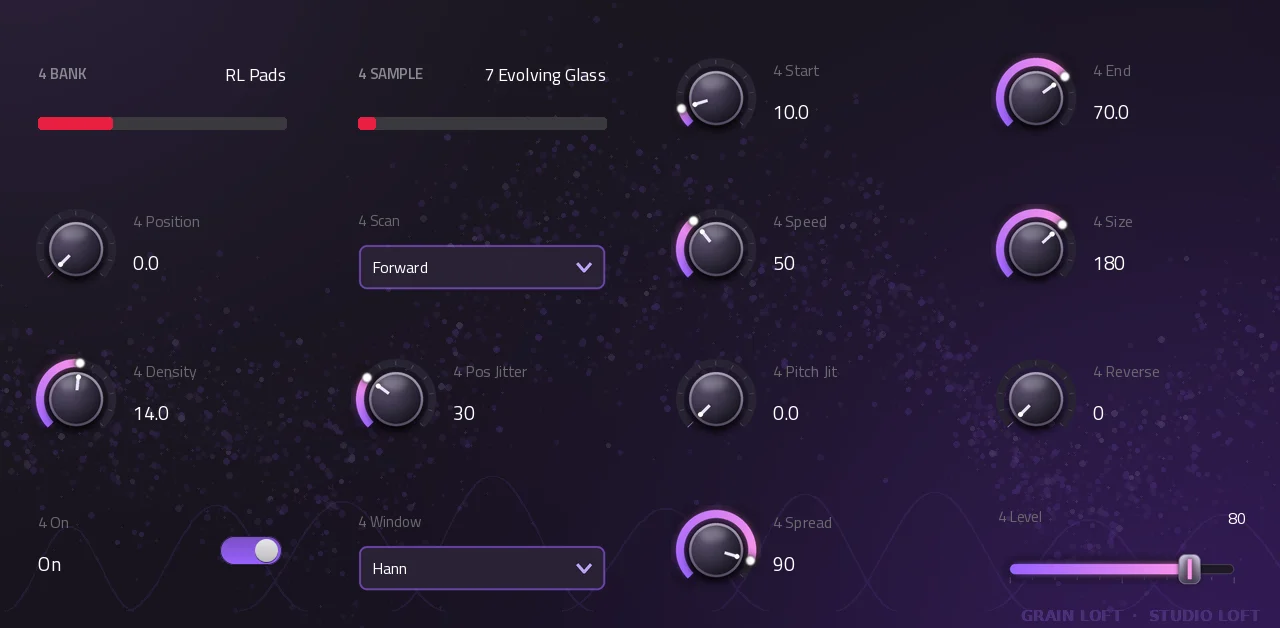 SLOT 4 RL Pads · Evolving Glass
Mix the four
Use the Level of each slot, or the Morph on the PLAY page, to decide who leads.
Switch a slot off
A slot set to Off makes no sound. Start with one or two slots, add the others later.
Same sound, twice
Load the same sample in two slots, one with Scan on Freeze, one on Forward: a still bed and a moving layer.
Different zones
Same sample, different Start and End: the attack of a sound in one slot, its tail in another.
Always in tune
TUNE F5
- 1Key Lock: the grains are tuned to the note you play, from the note measured in the zone. Track: classic sampler, C3 plays the sound as recorded. Fixed: the slot ignores the keyboard (good for noises and beds).
- 2Root Auto uses the note measured by Grain Loft (shown next to it, for example "Auto C3+5": C3, 5 cents sharp). You can also force a note.
- 3Transpose Moves the slot by semitones, from -36 to +36. Stack a slot one octave up for brightness.
- 4Fine Fine tuning in cents (-100 to +100). A few cents between slots gives a wide, chorus-like sound.
Put a drum hit or a noise in one slot with Key on Fixed: it stays as recorded while the other three slots play your melody.
Harmony and movement
PLAY F5 (2nd press)
- 1Voices How many notes play at once (1 to 8).
- 2Glide Time to slide from one note to the next (0 to 2 s).
- 3Bend Range Range of the pitch bend, in semitones.
- 4Velocity How much your touch changes the volume.
- 5Pitch Track Region: one pitch for the whole zone. Grain: each grain is corrected where it starts, so even a sliding sound or a melody stays in tune.
- 6Scatter Loosens the timing of the grains: 0 is regular, higher is more organic.
- 7Shimmer / Sub Grains Share of grains played one octave up (Shimmer) or one octave down (Sub Grains).
- 8Scale / Scale Root The scale used by Pitch Jit: Free, Chromatic, Major, Minor, Penta, Penta Min, Dorian, Harm Min, Whole Tone, Oct+5th, Octaves.
- 9Chord Each grain picks a note of the chord: Octaves, Fifths, Major, Minor, Sus4, Maj7, Min7, Add9, Cluster. One finger, a full chord.
- 10Morph / Morph X / Morph Y Morph sets how much the X/Y position decides the mix of the four slots. Each corner is one slot, the centre is all four.
Shimmer at 30 with a long Release on the SOUND page: an instant, airy pad from any sound.
Envelope, filter, panning
SOUND F6
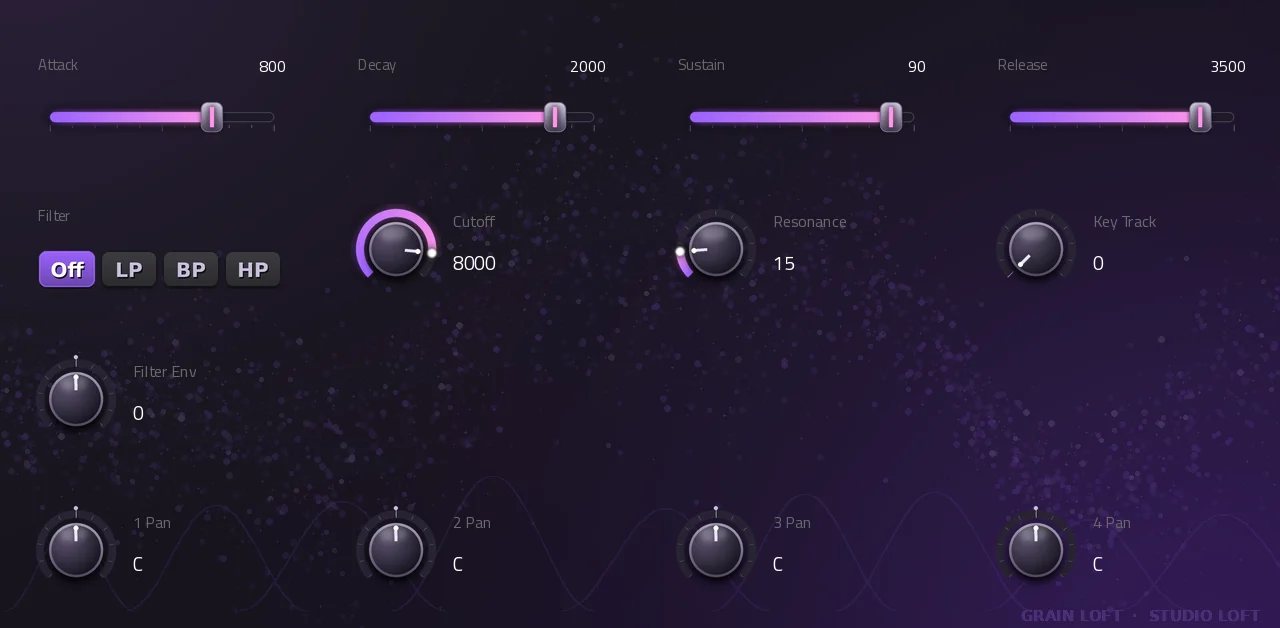
- 1Attack / Decay / Sustain / Release The volume envelope of each note. Long Attack and Release for pads, short for plucks.
- 2Filter Off, LP (low-pass), BP (band-pass) or HP (high-pass).
- 3Cutoff / Resonance Filter frequency and its emphasis.
- 4Key Track Opens the filter more on high notes.
- 5Filter Env How much the envelope moves the filter, up or down.
- 61 Pan to 4 Pan Place each slot left or right.
Filter on BP, Resonance 40, Filter Env +50 and a short Decay: the grains turn into a plucky, talking texture.
Two LFOs, eleven targets
LFO F6 (2nd press)
- 1Shape Sine, Triangle, Saw, Square, S&H or Drift.
- 2Sync Off: free speed. On: locked to the tempo of your song.
- 3Rate / Div Rate in Hz when Sync is Off; Div (from 1/64 to 2/1) when Sync is On.
- 4Dest Target: Position, Grain Size, Density, Pitch, Cutoff, Spread, Morph X, Morph Y, Volume, Scan Speed or Jitter.
- 5Amount Depth, from -100 to +100.
- 6LFO2 The same five controls for the second LFO.
LFO1 on Morph X and LFO2 on Morph Y, both slow and at different rates: the sound travels across your four slots and never loops.
Delay, reverb, volume
FX F6 (3rd press)
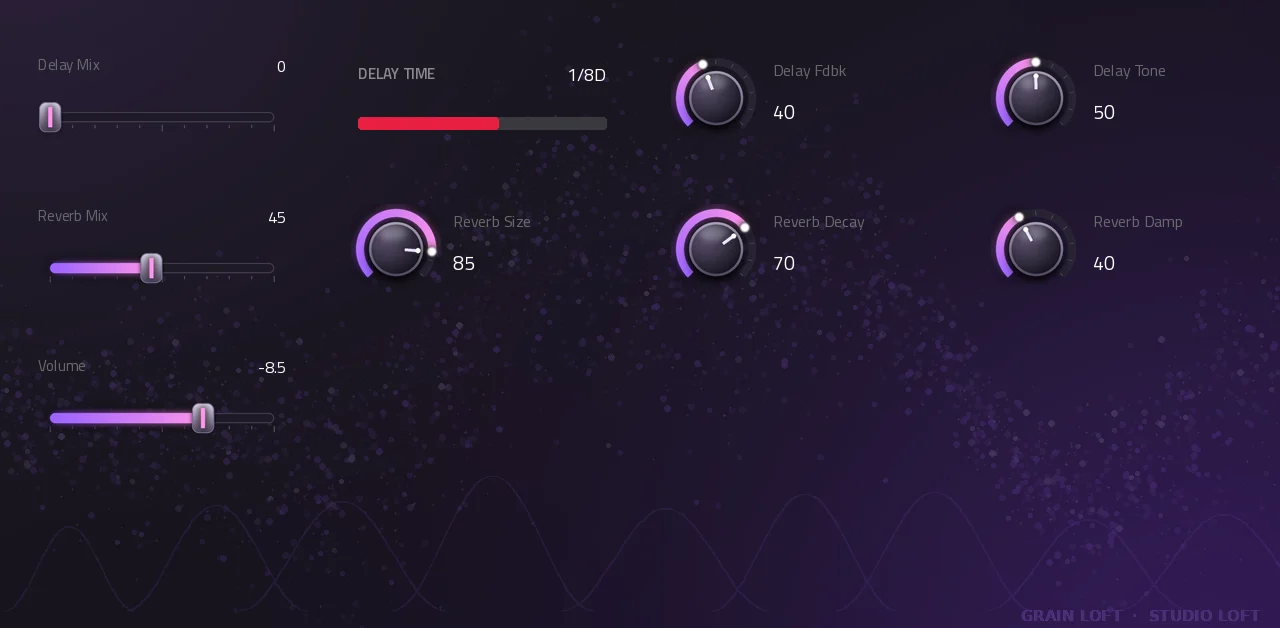
- 1Delay Mix Level of the delay.
- 2Delay Time Note value of the echo, in time with your song (from 1/64 to 2/1).
- 3Delay Fdbk / Delay Tone Number of repeats and brightness of the echoes.
- 4Reverb Mix / Size / Decay / Damp Level, room size, length and darkness of the reverb.
- 5Volume Master output of Grain Loft.
Delay Time 1/8D with Delay Fdbk around 40 under a frozen pad: a rhythmic shimmer that follows the tempo of your song.
Your sound assistant
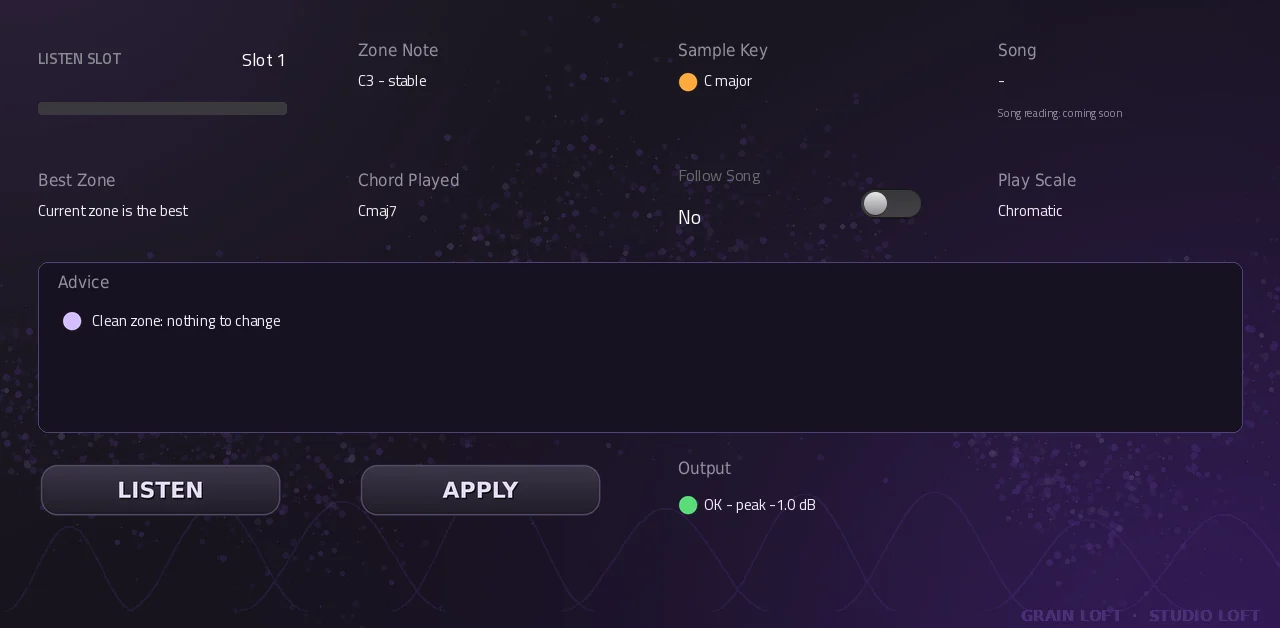
LISTEN F6 (4th press)
- 1Listen Slot The slot to listen to (Slot 1 to 4).
- 2LISTEN Starts the analysis of the zone between Start and End.
- 3Zone Note The note measured in the zone, and whether it is stable.
- 4Sample Key The key of the sound. The dot shows the confidence: green high, orange medium, red low.
- 5Best Zone Says if a steadier zone exists in the sound.
- 6APPLY / UNDO Moves Start and End to the better zone. Press again (UNDO) to go back.
- 7Chord Played Names the chord you are holding.
- 8Play Scale The scale set on the PLAY page.
- 9Advice Up to three short notes. Lilac: info, orange: tip, red: problem.
- 10Output Checks the output every two seconds: OK with the peak level, or a warning.
Song, Song Source and Follow Song are not used in this version.
Got a sound that wobbles out of tune? Press LISTEN, then APPLY: Grain Loft moves the zone to the steadiest part of it.
Big, clear menus
The lists
Touch a menu box (Scan, Window, Scale, Scale Root, Chord, LFO Shape, LFO Dest): the full list opens over the page. The current choice is lit. Touch a name to pick it, or × CLOSE to keep the current one.
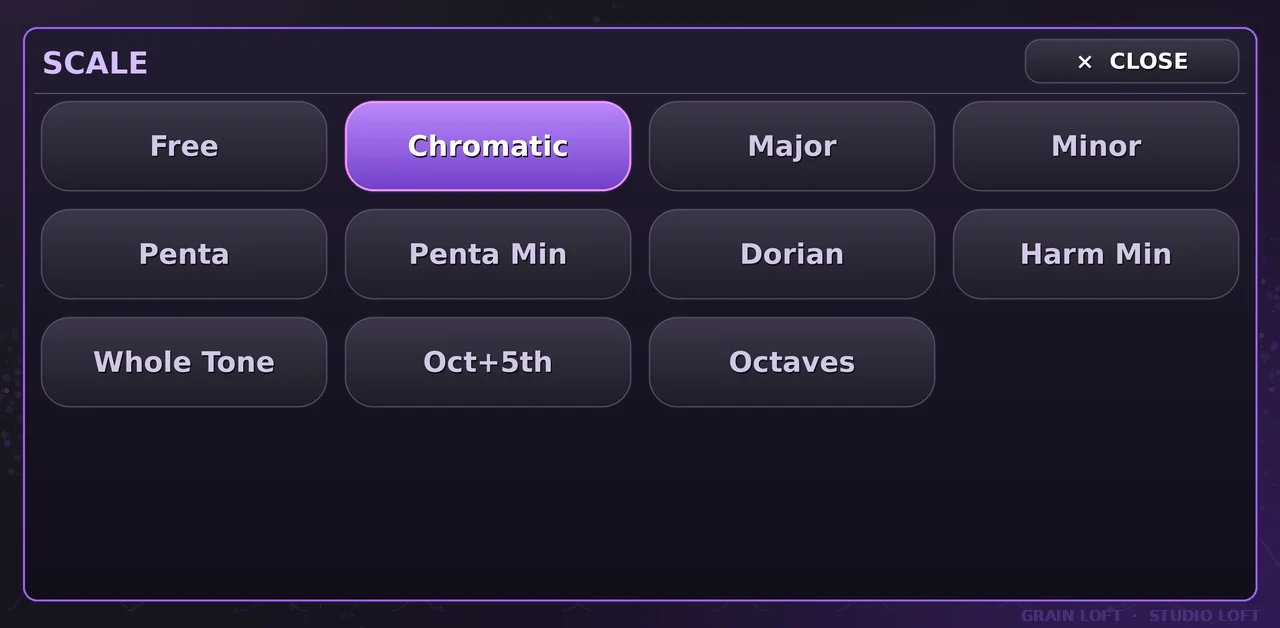 Scale PLAY page
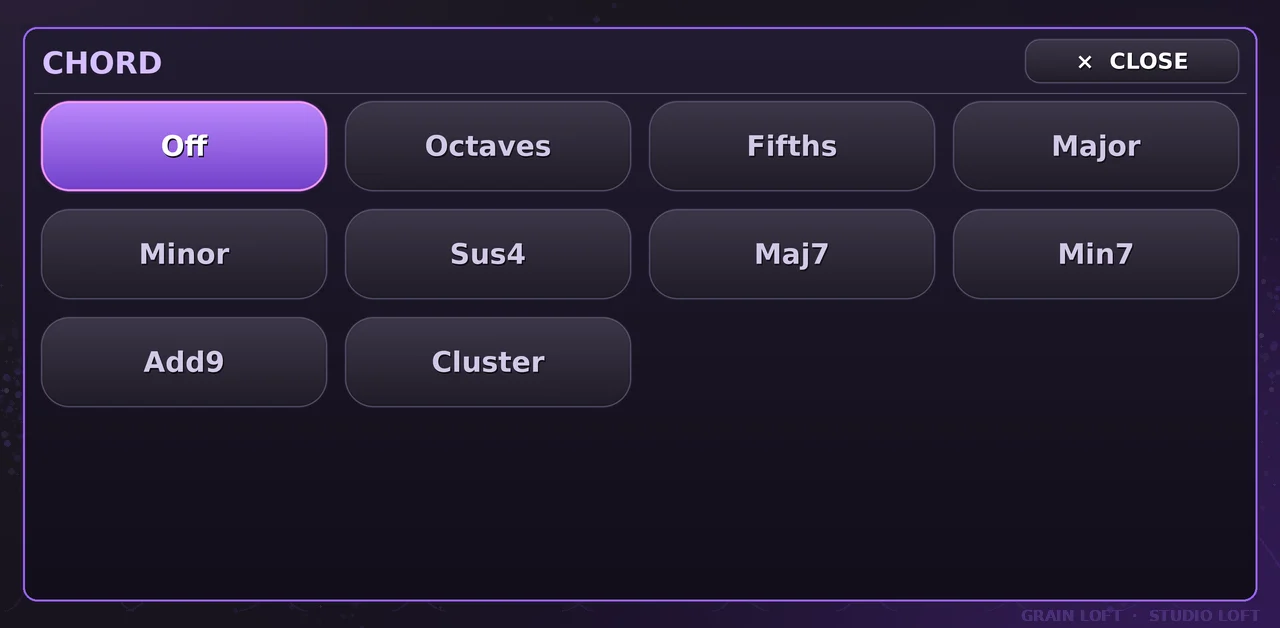 Chord PLAY page
 Scan SLOT pages
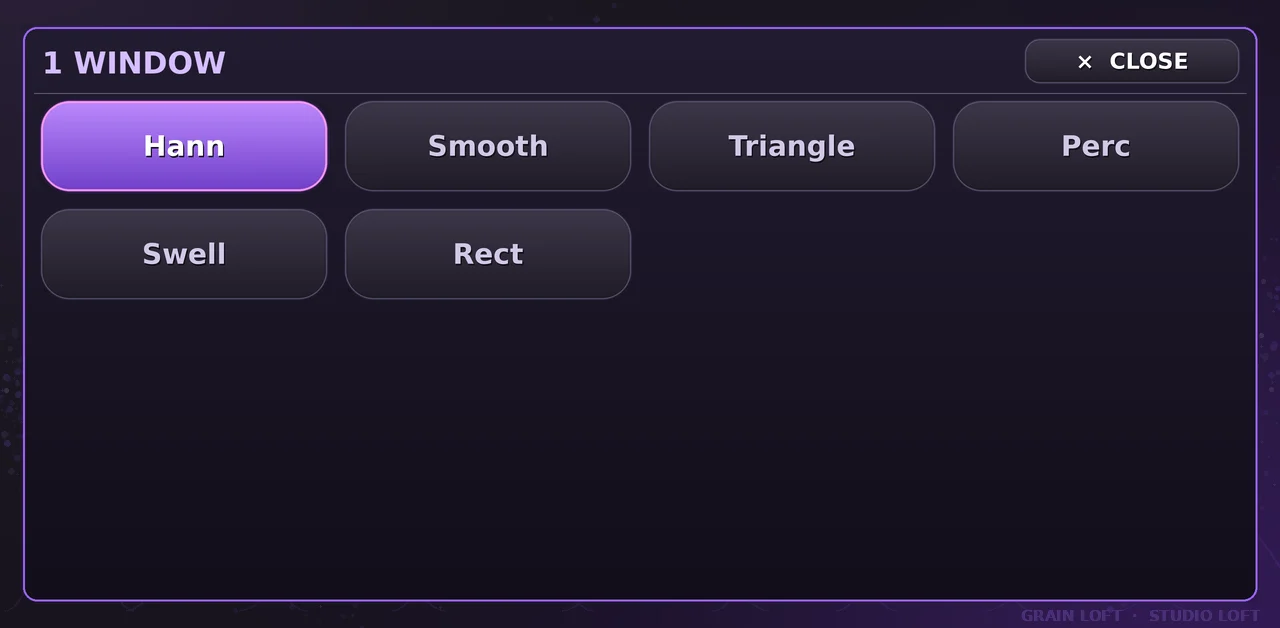 Window SLOT pages
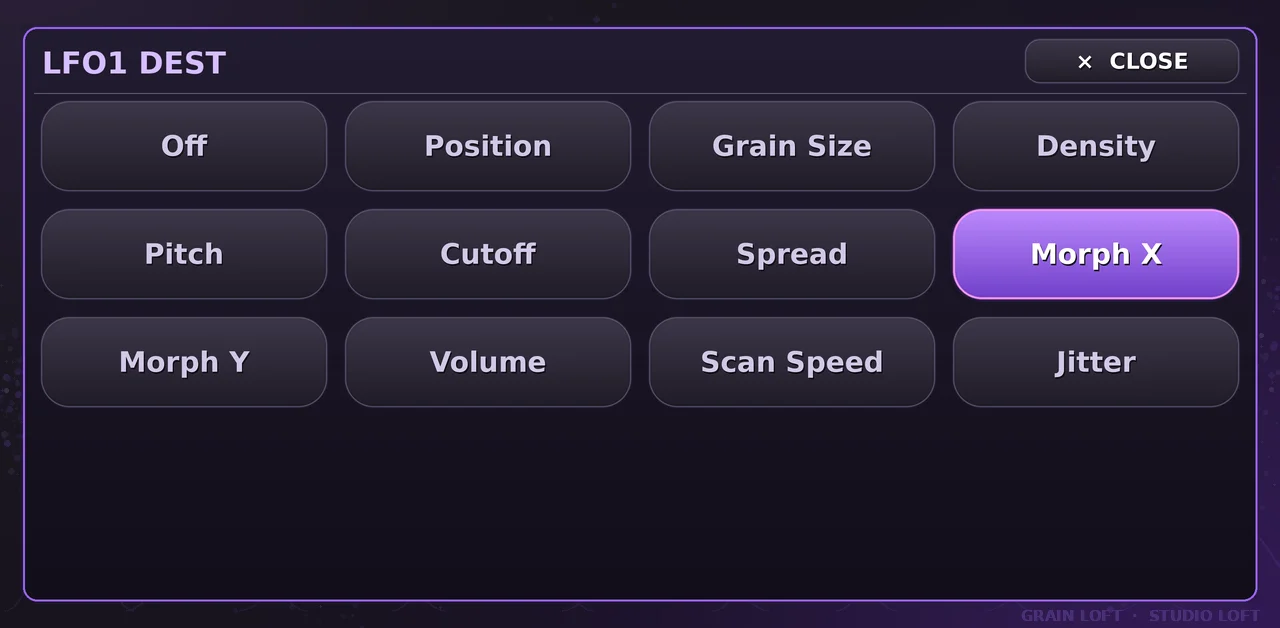 LFO Dest LFO page
Tech sheet
Grain Loft at a glance
- 1Always in tune. Every slot is measured and tuned to the note you play, even voices and noises.
- 2Four sounds, blended. Morph X/Y glides through every mix of your four slots.
- 3Chords from one key. Grains spread over a chord or a scale you choose.
- 4A huge bank inside. 2,364 sounds from the Studio Loft instruments, plus your own WAV files.
- 5An assistant that listens. Finds the note, the key and the steadiest zone of a sound.
| In one sentence | A granular instrument that turns any sound into a playable, always-in-tune cloud, mixing four sounds at once. |
| For | Ambient and cinematic pads · lo-fi and neo soul chords · electronic textures, risers and drones. |
| Engine | Granular, 4 slots, up to 8 voices. 5 scan modes, 6 grain windows, Key Lock / Track / Fixed per slot, Pitch Track Region or Grain. |
| Harmony | 11 scales with root, 9 chord types, Shimmer (+1 octave) and Sub Grains (-1 octave). |
| Movement | Morph X/Y across the four slots, 2 LFOs (6 shapes, free or synced) to 11 targets. |
| Finish | ADSR envelope, filter (low-pass, band-pass, high-pass) with key tracking and envelope, ping-pong delay synced to tempo, reverb. |
| Sounds | 2,364 factory sounds in 118 banks, recorded from the Studio Loft instruments, plus your own WAV files (up to 128 files, 90 s each). |
| Presets | 198, in 18 folders. |
| Assistant | LISTEN page: note and key of a sound, best zone with APPLY / UNDO, chord played, output check. |
| Size | About 1.5 GB (mostly the sound bank). |
| Runs on | MPC standalone, MPC OS 3.10.1. VST2 plugin. |
| Version | 1.2.0 |
198 presets · 18 folders
Presets
Open Grain Loft in Sounds mode: the presets are sorted in folders, with Init on top. Names exactly as on screen.
Pads · 24
Vermeil CloudsArctic Drift
Cathedral Of Grains
Abyss Bloom
Frozen Light
Granular Orchestra
Warm Haze
Endless Strings
Silk Fog
Sunset Haze
Polar Night
Vermeil Choirs
Tape Strings Cloud
Neon Fog
Organ Mist
Glass Ocean
Brass Clouds
Dark Cinema Air
Supersaw Heaven
Rotary Dream
Harmonium Haze
Morning Ensemble
Vermeil Silk Bed
Vowel Breath Cloud
Textures · 11
Shattered PianoCrystal Rain Dance
Robot Chatter
Ghost Whispers
Data Corruption
Steel Aurora
Pentatonic Sparks
Holy Grain Organ
Rave Dust
Alien Siren Choir
Backwards Lullaby
Freeze · 16
Frozen GrandSuspended Tines
Frozen Breath
Brass Freeze
Frozen Tines
Frozen Gospel
Frozen Marimba
Frozen Kalimba
Frozen Funk Keys
Frozen Bells
Frozen Acid
Frozen Siren
Frozen Vibes
Frozen Koto
Frozen Kick Tone
Frozen Wobble
Keys · 14
Grain Felt PianoKalimba Spray
Neo Soul Haze
Harp Chord Spray
Marimba Swarm
Toy Box Galaxy
Grain Upright
Grain Reed EP
Grain Suitcase
Grain Harpsichord
Grain Vibraphone
Grain Honky Tonk
Grain Felt Diary
Grain Synth Keys
Morph · 12
Four Worlds MorphNeon Morph Cycle
Wandering Ensemble
Bass Morph Monster
Keys To Strings
Organ To Choir
Acid To Glass
Four Synth Brothers
Bells And Voices
Flutes And Whistles
Plucks Kaleidoscope
Dark Quartet
Bass · 11
Grain Ladder BassReese Fog
Sub Grain Thump
Grain Funk Bass
Grain Acid Bass
Grain Detune
Grain Fretless
Grain Wob
Grain Garage Bass
Grain Hard Bass
Grain Kick Bass
Lead · 10
Euphoric Grain LeadBreathing Glass Lead
Acid Particles
Grain Sync Lead
Grain Whistle
Grain Solo Violin
Grain Screamer
Grain Chiptune
Grain Trance Lead
Grain Fifth Lead
Pulse · 12
Pulse MachineDub Grain Chords
Hardcore Particles
808 Grain Glide
House Chord Pulse
Detroit Grain Stab
Dub Organ Skank
Rave Piano Pump
Garage Shuffle
Arp Grain Machine
Tribe Pulse
Techno Rumble Grid
198 presets · 18 folders · continued
Presets
Every preset uses only the factory bank: it loads and plays straight away.
Chords · 15
Major Seven CloudFifths Horizon
Dorian Star Field
Harmonic Dread
Octave Fountain
Whole Tone Dream
Neo Soul Ninths
Lofi Minor Seven
Sus Horizon
Major Seven Glass
Minor Choir Chord
Octave Brass Wall
Fifth Supersaw
Cluster Strings
Gospel Major
Soundscape · 6
Howling ValleyLost Tape Memory
Night Factory
Monastery Drone
Glitter Storm
Sunken Piano
Shatter · 10
Broken CelestaBroken Grand
Shattered EP
Harp Fragments
Koto Shards
Steel Drum Splash
Toy Explosion
Gamelan Rain
Organ Splinters
Funk Keys Debris
Sparkle · 7
Snow SparksMusic Box Stars
Crystal Dust
Trap Bell Glitter
Mallet Fireflies
Pluck Constellation
Kalimba Fireworks
Reverse · 6
Reverse Grand SwellBackwards Bells
Reverse Tines
Reverse Guitar Pick
Inhale Strings
Reverse Kalimba Sky
Stretch · 7
Slow Motion PianoStretched Choir
Stretched Riser
Stretched Sweep
Stretched Cinema
Stretched Arp
Melting Vowels
Glitch · 7
Byte StormRobot Breakdown
Machine Gun Grains
Snare Confetti
Roll Shredder
Chip Glitch
Neuro Splinters
Drone · 7
Rust CathedralIron Lung
Deep Space Bed
Harmonic Field
Pedal Tone Abyss
Hardcore Drone
808 Thunder Bed
Tide · 6
Tidal StringsTidal Pads
Tidal Choir
Tidal Glass
Tidal Organ
Tidal Wavetable
Guitar · 16
GTR Nylon CloudGTR Steel Haze
GTR Frozen Strum
GTR Frozen Jazz Box
GTR Broken Bossa
GTR Harp Sparks
GTR Shoegaze Tide
GTR Reverse Twelve
GTR Slow Thumb
GTR Grain Nylon Keys
GTR Strum Morph
GTR Fuzz Drone
GTR Wah Glitch
GTR Blues Grain Lead
GTR Neo Soul Chords
GTR Skank Pulse
Warehouse 4AM · 8
WAR Warehouse ChordsWAR 4AM Stab Pulse
WAR Acid Warehouse
WAR Rumble Drone
WAR Hypnotic Organ
WAR Dub Techno Fog
WAR Glitch Machine
WAR Peak Time Lead
Hand & Body · 8
HAN Body Beat CloudHAN Kalimba Circle
HAN Marimba Market
HAN Rumba Strings
HAN Village Voices
HAN Thumb Piano Rain
HAN Earth Morph
HAN Breath Drone
Rollers 174 · 8
ROL Liquid ReeseROL Rolling Sub
ROL Liquid Chords
ROL Atmos Pad
ROL Neuro Glitch
ROL Jungle Stabs
ROL Hoover Dive
ROL Dark Drone
Get started
Three steps to the first sound.
- Install. Connect your MPC to your computer in computer mode. Copy the folder "Studio Loft - VST - Grain Loft" into the "VST2 Plugins" folder of your MPC drive.
- Load. On the MPC, create a plugin track and choose Grain Loft (Studio Loft).
- Play. Pick a preset in a folder, play your pads or keys, and move between pages with F1 to F6.
F1 the first page you seeScale touch a menu: the list opensYour own sounds go in "Content/User" inside the Grain Loft folder. Then pick the User bank in any slot.
Credits
Thanks
| Code | Grain Loft by Studio Loft. Built with the MPC Plugin Builder SDK (MIT licence). Licence check: Monocypher (CC0 / BSD 2-Clause). |
| Piano sounds | Salamander Grand Piano V3 by Alexander Holm, CC BY 3.0. Modified (rendered through Studio Loft instruments). |
| Voice sounds | VocalSet 1.2 by Julia Wilkins, Prem Seetharaman, Alison Wahl and Bryan Pardo, CC BY 4.0. Modified. |
| Other recordings | Orchestral, bass, guitar and field recordings released in the public domain (CC0 1.0), with thanks to their authors. |
| Synth sounds | Synthesised by Studio Loft. |
| Fonts | Titillium Web (SIL Open Font License 1.1) in this guide. DejaVu Sans in the screen images of the plugin. |
The full licence texts are in the "Licences" folder of Grain Loft. MPC is a trademark of its owner, used only to name the machines this plugin runs on. Studio Loft is not affiliated with it.
Your licence
LICENCE F6 (5th press)
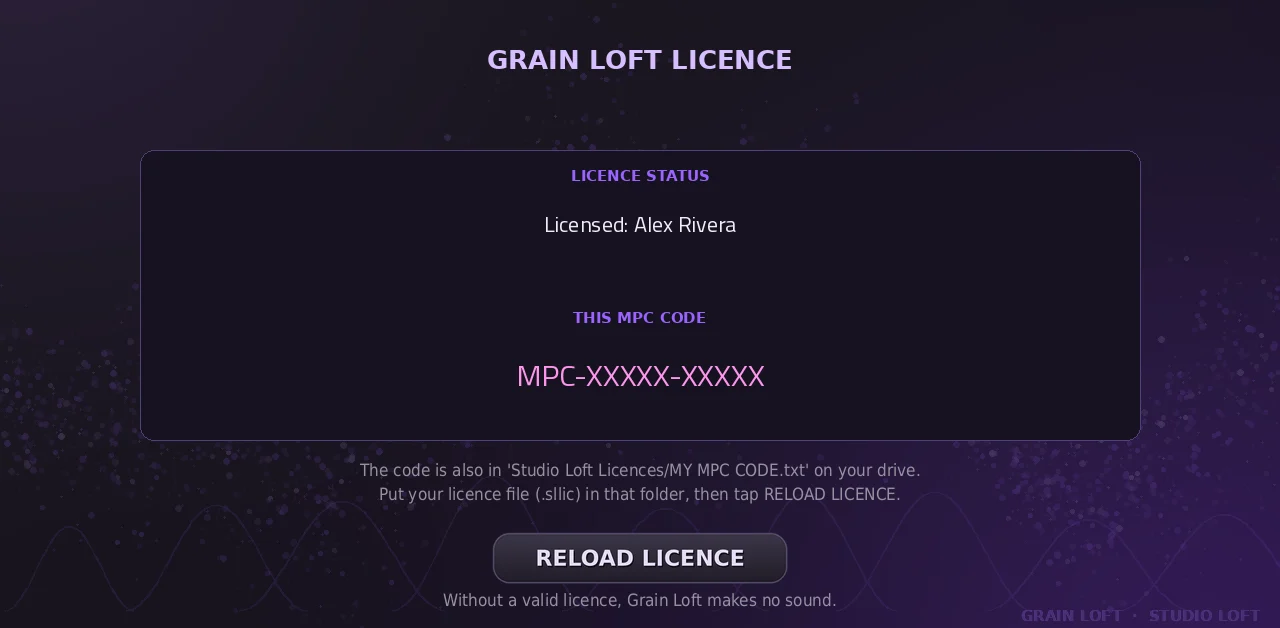
- 1Licence status Licensed, or why there is no valid licence (none found, other MPC).
- 2Shop line Shows "Get it at loftplugins.ch" when there is no valid licence.
- 3This MPC code The code of this MPC. It is also written in "Studio Loft Licences/MY MPC CODE.txt" on your drive.
- 4RELOAD LICENCE Reads the licence files again after you copy a new one.
Copy the code from MY MPC CODE.txt with your computer (MPC in computer mode): no typing from the screen.
Licence
Buy and activate
Buy, get your licence
Buy Grain Loft on loftplugins.ch and paste the code of your MPC on the My purchases page. Your licence arrives by e-mail.
2 MPCs per licence
One purchase activates Grain Loft on two MPCs of your own.
Your MPC code
Grain Loft writes it in "Studio Loft Licences/MY MPC CODE.txt" on your drive, and shows it on the LICENCE page (F6).
No sound?
Without a valid licence, Grain Loft makes no sound. The LICENCE page tells you why.
- Put your MPC in computer mode and open Studio Loft Licences/MY MPC CODE.txt.
- Paste the code on loftplugins.ch, page My purchases, after your purchase.
- Copy the licence file you receive (.sllic) into the Studio Loft Licences folder.
- Open Grain Loft, go to the LICENCE page (F6) and tap RELOAD LICENCE.
Licencia y activación
Tuyo en tres pasos.
Compra
Paga una vez en este sitio. Tu enlace personal llega por e-mail y sigue siendo válido.
Instala Loft Hub
MPC OS 3.10.1 o posterior, con Enhancements y External Plugin Support activados en Preferences. Copia Loft Hub una vez al disco de tu MPC.
Vincula y toca
En Loft Hub, acepta, vincula tu MPC y tus plugins se instalan solos. Funciona en dos MPC. Y ya está.
Tuyo
Grain Loft
Un synth granular de cuatro ranuras, cada grano afinado a la nota que tocas.
Un solo pago, tuyo para siempre. Tu licencia funciona en dos MPC.