Instrument · versión 1.6.0
Groove Loft
1,707 DRUM PATTERNS THAT PLAY WITH YOUR MPC.
You have a groove in your head. You don't know if it's boom bap, drill or garage. You just tap it on the pads.
3 = $993 plugins a elegir por $99 →
A swung 90s boom bap beat: heavy kick, crisp snare, steady hats. Then a busier take and a fill.
El manual
Cada pantalla,
página a página.
La guía completa, pantalla por pantalla, igual que en la MPC. Los nombres de los ajustes se quedan en inglés, como en la pantalla.
THE GROOVE LOFT MOMENT
Hum it with your fingers. Get the pattern.
You have a groove in your head. You don't know if it's boom bap, drill or garage. You just tap it on the pads.
Tap
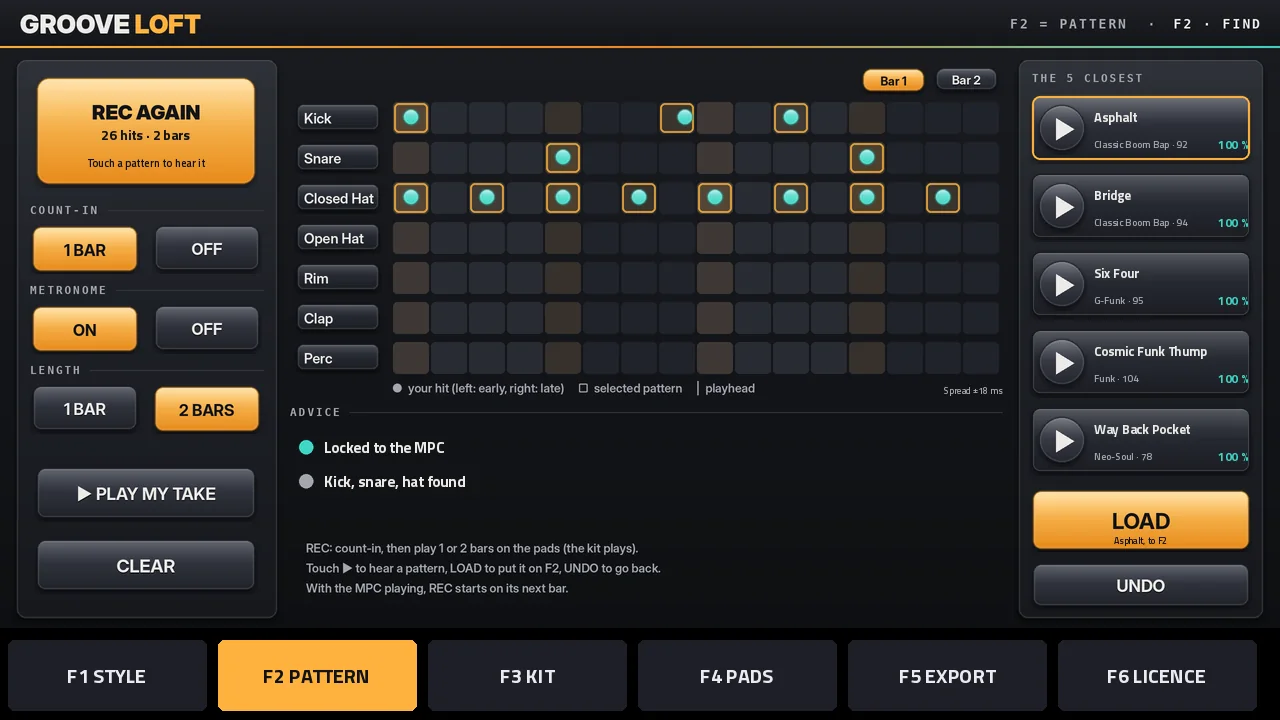
F2 twice, REC. One bar of count-in, then 2 bars of a simple beat: kick, snare on 2 and 4, eighth-note hats.
Listen
Groove Loft compares your take with all 1,707 patterns and shows the 5 closest. Touch ▶ to hear each one.
Load
LOAD puts it on F2, with its swing, ready to play with your song. UNDO if you change your mind.
Why it works
FIND reads the skeleton of what you play: where the kick, the snare and the hats fall. Small timing differences don't throw it off, and it tells you how your timing feels: early, late, or locked to the MPC.
AND THEN
It plays with your song. It leaves as a real MPC kit.
A kit that sounds like one instrument
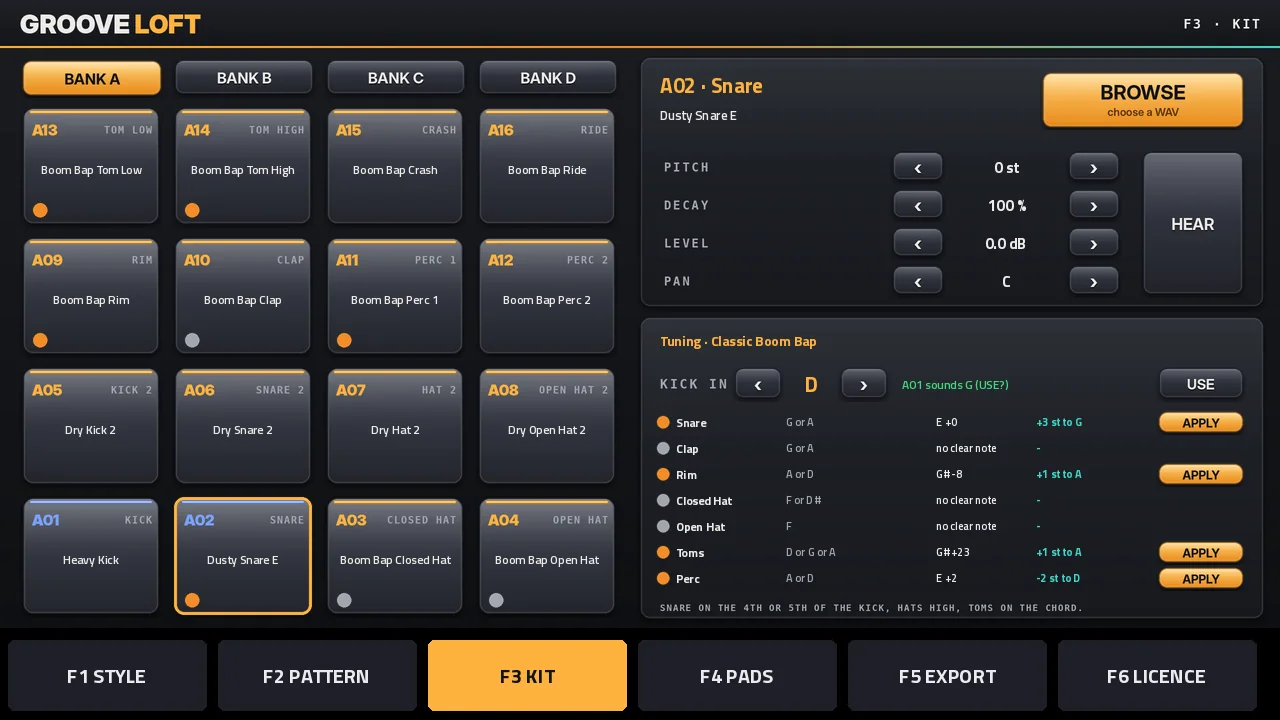
Set the key of your kick. The tuning sheet hears the note of every pad and tells you how far to move it: “+3 st to G”. One touch on APPLY and snare, toms and perc sit with your bassline.
From plugin to pads in one touch
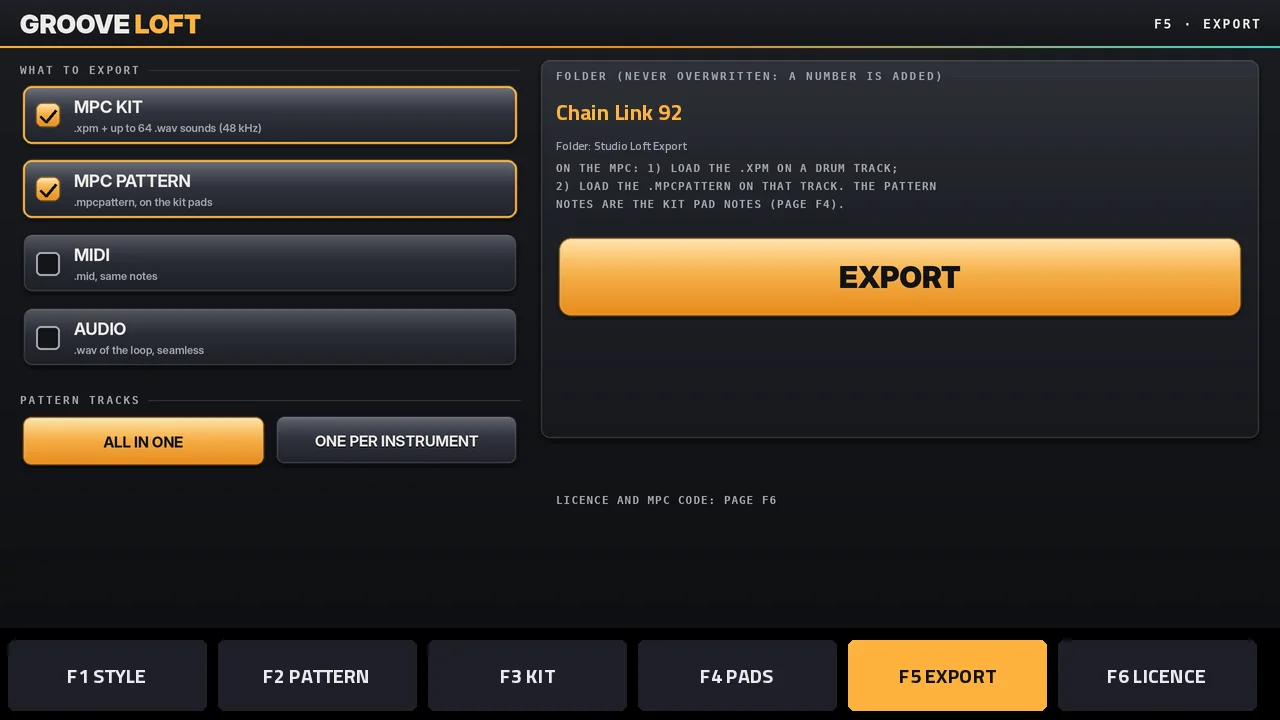
EXPORT writes a drum program (.xpm + WAVs) and the pattern on the same pads (.mpcpattern), plus MIDI or audio if you want. Load both on a drum track: every hit lands on the right pad.
Pick a world
Seven genres, 86 styles. Every style is a family of patterns with its own feel and tempo range.
 12345
Lo que ves
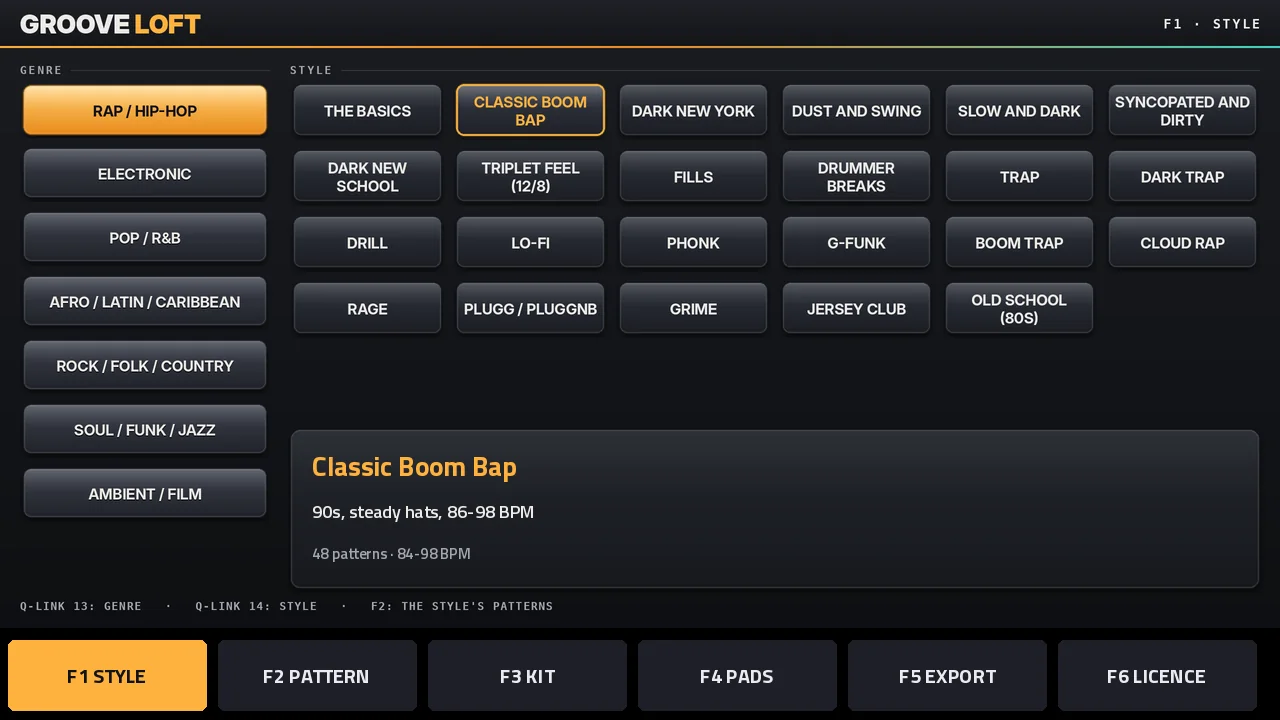
- GENRE The 7 genre buttons. Touching one shows its styles (Q-Link 13).
- STYLE The style tiles of that genre. The lit tile is the style you are in (Q-Link 14).
- Classic Boom Bap The selected style: its patterns are now on F2.
- Style card Name, one line on the feel, number of patterns and tempo range of the style.
- Q-LINK Which knob does what on this page.
Para qué sirve
Start here when you know the vibe of your track. One touch and the whole pattern list on F2 changes.
Consejo
Not sure? Open THE BASICS in Rap / Hip-Hop: it builds a groove layer by layer, from 4 steps to 32.
The 7 genres · styles in each
Hear it, shape it
Every pattern of the style, playing on the built-in kit, locked to the tempo of your MPC.
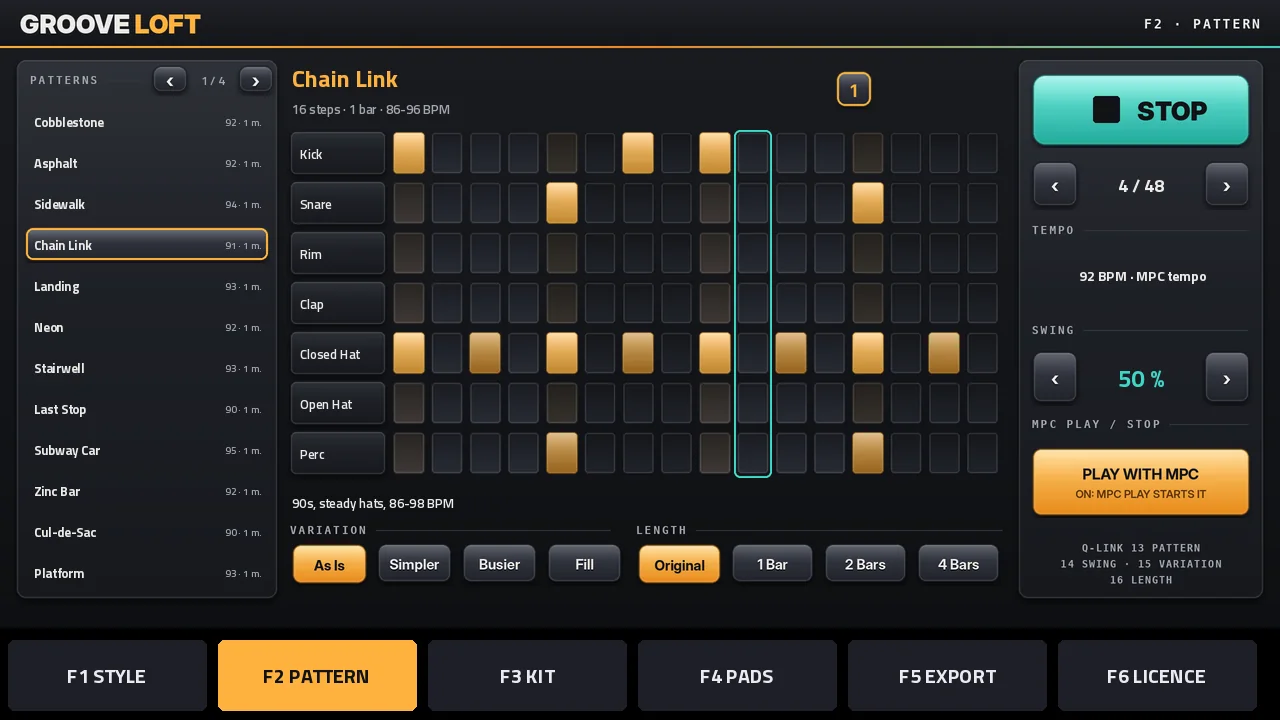 123456789101112
Lo que ves
- PATTERNS All patterns of the style, 12 per page; ‹ › turn the pages. Touch a name to hear it.
- Chain Link Pattern name, steps, bars and the tempo range it was made for.
- 1 2 3 4 The bar shown in the grid, for longer patterns.
- Grid 7 tracks per style (here Kick, Snare, Rim, Clap, Closed Hat, Open Hat, Perc). Brighter cell = harder hit. 16, 24 or 32 steps per bar.
- Playhead The step being played right now.
- PLAY / STOP Starts and stops the pattern.
- ‹ 4 / 48 › Previous / next pattern of the style (Q-Link 13).
- TEMPO Always the tempo of your MPC: the plugin never fights the song.
- SWING 50 to 75 % (Q-Link 14). Each pattern starts with its own swing.
- PLAY WITH MPC ON: the MPC's PLAY and STOP start and stop the pattern, in time with the song.
- VARIATION As Is, Simpler, Busier or Fill (Q-Link 15).
- LENGTH Original, 1 Bar, 2 Bars or 4 Bars (Q-Link 16).
Para qué sirve
Your audition room. Scroll, listen against your beat, keep the one that sits.
Consejo
Turn PLAY WITH MPC on, loop your melody on the MPC and flip patterns while it plays: you hear each groove inside your song, not alone.
Tap it. Find it.
Press F2 a second time. Play a rhythm on the pads and Groove Loft finds the 5 closest patterns out of 1,707.
123456789101112Lo que ves
- REC Count-in, then record 1 or 2 bars. After the search it reads REC AGAIN and shows what it heard.
- COUNT-IN 1 BAR or OFF. With the MPC playing, recording starts on its next bar.
- METRONOME A click on every beat while you record (not in the exports).
- LENGTH 1 BAR or 2 BARS to tap.
- PLAY MY TAKE Plays back what you tapped, on the kit, in a loop.
- CLEAR Starts over.
- Your take Dots = your hits. Left of center = early, right = late. Orange frames = the selected pattern.
- ADVICE Up to 3 lines: your timing (for example "A bit late (+20 ms)") and what was heard.
- ▶ Hear a proposal on its own. Touch it again to stop.
- THE 5 CLOSEST Name, match in %, style and tempo. Touch a row to see it over your take.
- LOAD Puts the selected pattern on F2.
- UNDO Back to the pattern you had before LOAD.
Para qué sirve
When you hear a groove in your head but don't know its name or style. Tap it and you are there.
Consejo
Tap only kick and snare first: the search reads the skeleton. Add hats later if two results are close.
While you play
The screen follows you during the take, so you always know where you are in the bar.
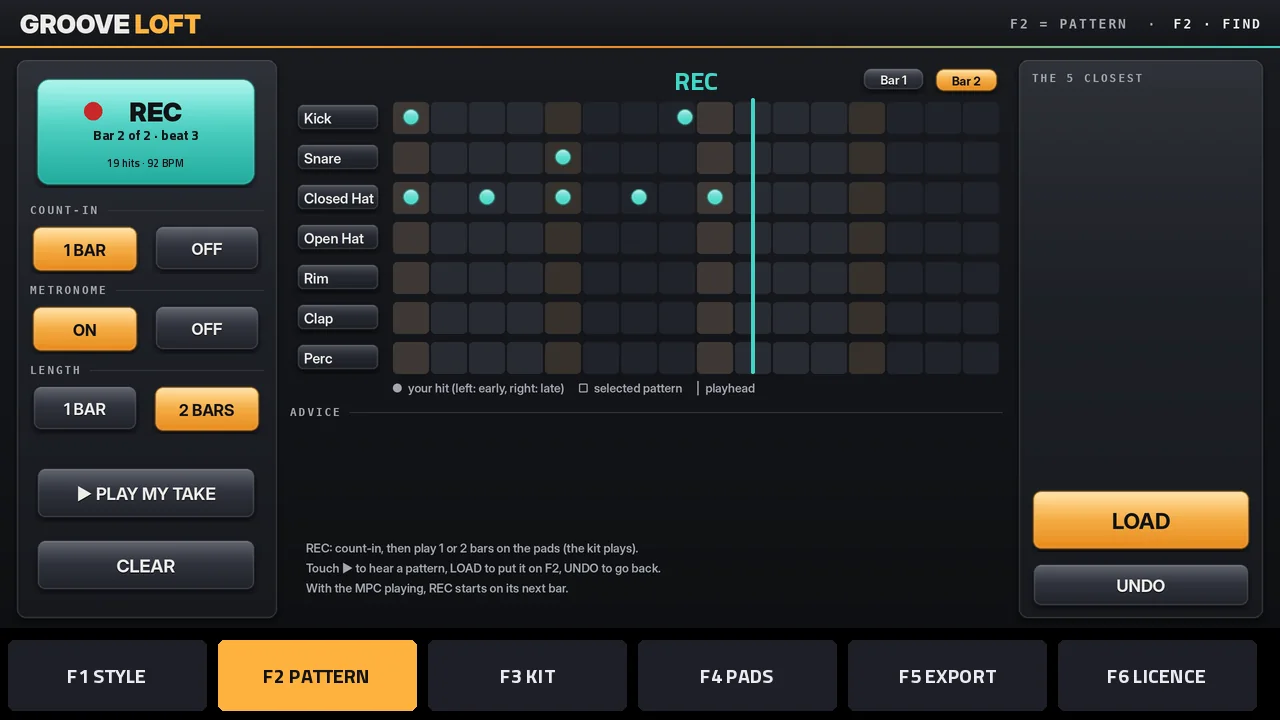 1234
Lo que ves
- REC REC lights up. Below: bar and beat, then hits so far and the tempo.
- 4 3 2 1 · REC 4, 3, 2, 1 during the count-in, then REC.
- Playhead Where you are in the bar.
- Hits Each pad you hit appears on its row: Kick, Snare, Closed Hat, Open Hat, Rim, Clap, Perc.
Para qué sirve
Just play. The search starts on its own at the end of the last bar.
Consejo
Play the way you would on a real kit: a little late or early is fine, FIND tells you by how much and whether it suits the style.
A take, step by step
Your sounds, in tune
64 pads in 4 banks. A built-in synth kit to start, your own WAVs whenever you want, and a tuning sheet.
1234567891011Lo que ves
- BANK A–D 4 banks of 16 pads, laid out like your MPC.
- A02 Touch a pad to select it and hear it. Bank A: Kick, Snare, Closed Hat, Open Hat on A01–A04.
- Tuning dot Green: in tune with the kick. Orange: worth moving. Grey: no clear note.
- A02 · Snare The selected pad and the sound on it.
- BROWSE Opens the big file browser to put a WAV on this pad.
- PITCH · DECAY · LEVEL · PAN ‹ › for the selected pad: ±24 semitones, 5–100 % length, −36 to +6 dB, pan.
- HEAR Plays the pad.
- KICK IN ‹ D ›: the key of your kick. The sheet follows it.
- A01 sounds… The note the plugin hears on A01. USE copies it as the kick key.
- Tuning sheet For snare, clap, rim, hats, toms and perc: the notes to aim for, the note heard, and the move.
- APPLY Moves that pad by the smallest step to land on a target.
Para qué sirve
Make the kit yours, and make it sound like one instrument instead of a pile of samples.
Consejo
Set KICK IN to the key of your song, then APPLY on snare and toms: the whole kit suddenly sits with your bassline.
Load a WAV in two touches
A full-screen browser with big rows, made for fingers.
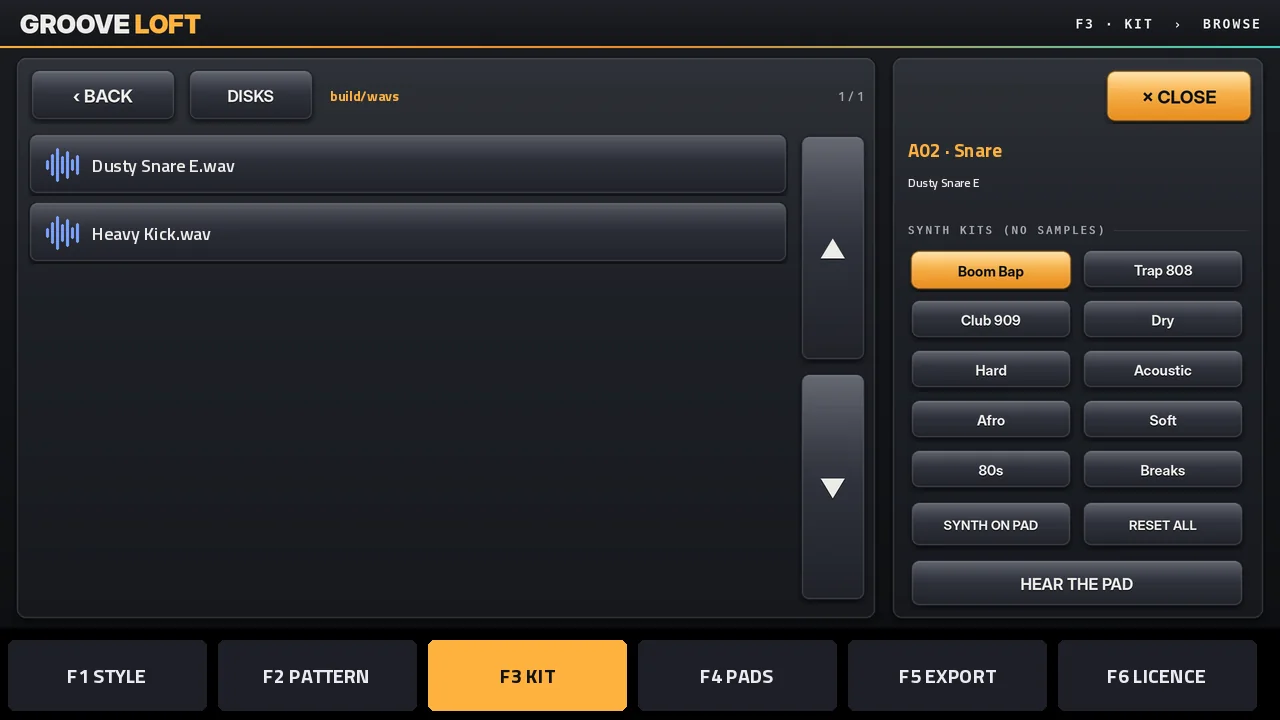 12345678
Lo que ves
- ‹ BACK Up one folder.
- DISKS The drives of your MPC.
- Rows Folders and WAV files. Touch a folder to open it, a WAV to load it on the pad and hear it.
- ▲ ▼ Previous / next page of the folder.
- × CLOSE Back to the kit.
- Synth kits 10 kits computed by the plugin, no samples: Boom Bap, Trap 808, Club 909, Dry, Hard, Acoustic, Afro, Soft, 80s, Breaks.
- SYNTH ON PAD · RESET ALL Put the synth sound back on this pad (bank A; B–D pads are emptied), or reset all pads to the synth kit.
- HEAR THE PAD Plays the selected pad.
Para qué sirve
Bring your own drums. Groove Loft remembers the files with your project.
Consejo
Load your favourite kick on A01 first: the tuning sheet then reads its note and gives targets for the rest.
Good to know
Groove Loft remembers the WAV files you loaded with your project. If a file has moved, the screen tells you how many are missing and the synth sound comes back on those pads.
Every track on the right pad
Choose which pad each pattern track plays, and what the MPC pads do.
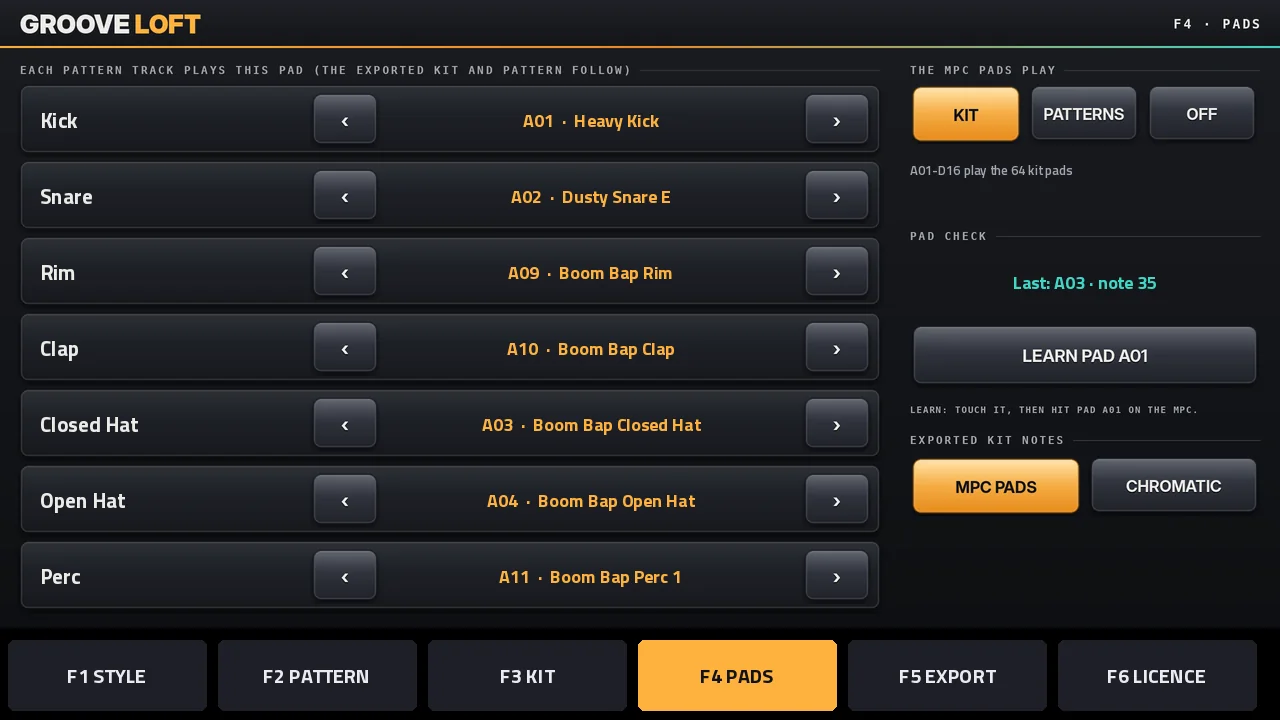 123456
Lo que ves
- Kick · Snare… The 7 tracks: Kick, Snare, Rim, Clap, Closed Hat, Open Hat, Perc.
- ‹ A01 · Heavy Kick › The pad (and sound) that track plays. The exported kit and pattern follow.
- THE MPC PADS PLAY KIT: your pads play the 64 sounds. PATTERNS: A01 = pattern 1 … D16 = pattern 64. OFF.
- PAD CHECK The last pad you hit on the MPC and its note: check that the pads land where you expect.
- LEARN PAD A01 Touch it, then hit A01 on the MPC: the pads line up.
- EXPORTED KIT NOTES MPC PADS (the notes of a new MPC drum program) or CHROMATIC.
Para qué sirve
When you want the clap on its own pad, or the hats on the pads you always use.
Consejo
Switch THE MPC PADS PLAY to PATTERNS during a jam: each pad of the MPC launches a different pattern of the style.
Bank A layout · same as the MPC pads (A13–A16 on top)
Straight into your MPC
One touch writes a real MPC drum program and the pattern on the same pads.
1234567Lo que ves
- MPC KIT .xpm drum program + up to 64 WAV files, 48 kHz.
- MPC PATTERN .mpcpattern that plays the pads of that kit.
- MIDI .mid file with the same notes.
- AUDIO .wav of the loop, seamless.
- PATTERN TRACKS ALL IN ONE or ONE PER INSTRUMENT.
- Chain Link 92 Pattern name + tempo, in Studio Loft Export. Nothing is ever overwritten: a number is added.
- EXPORT Writes everything you ticked.
Para qué sirve
When the groove is right: take it out of the plugin and keep working with the MPC's own tools.
Consejo
Export ONE PER INSTRUMENT, then process kick, snare and hats on their own tracks: compress the kick, add room to the snare.
On the MPC
Groove Loft in one sentence
A drum pattern instrument for the MPC: 1,707 patterns in 86 styles that play in time with your song, a tunable 64-pad kit, and a one-touch export to a real MPC drum program and pattern.
For who, for what
- Hip-hop and trap producers who want a solid drum bed fast, then tweak it on the pads.
- Electronic, Afro and Latin producers looking for the right groove family: house, garage, amapiano, reggaeton…
- Songwriters and players who know the feel they want but not its name: tap it, FIND it.
Strong points
- 1,707 patterns written by Studio Loft, each with its own swing and tempo range.
- FIND: tap a rhythm, get the 5 closest patterns and timing advice in ms.
- Follows the MPC's PLAY, STOP and tempo.
- 64 pads, your own WAVs, a tuning sheet that hears every pad.
- Exports a real drum program and the pattern on the same pads, plus MIDI and audio.
Numbers
- 1,707 patterns · 86 styles · 7 genres
- 97 presets · 10 synth kits
- 64 pads in 4 banks · 7 pattern tracks
- 16, 24 or 32 steps · 1 to 4 bars
- About 13 MB installed
- MPC standalone · MPC OS 3.10.1
Get started in 3 steps
- Install. Copy the folder “Studio Loft - VST - Groove Loft” into “VST2 Plugins” on your MPC drive.
- Load. On a plugin track, load Groove Loft from the plugin list, then a preset from the genre folders.
- Play. Press PLAY on the MPC (PLAY WITH MPC is on), or F2 › PLAY.
In the folder
- VST: the plugin for MPC (32 and 64 bit).
- Plugin Skins: the screens.
- Presets: 97 presets in 9 folders.
- Licences: credits and licence texts.
97 presets, one door per style
Each style preset opens its style on the first pattern, with its swing, its kit and the tracks on the usual pads. From there, F2 shows every pattern of the style.
Root
Init
Kits
KIT - Boom Bap
KIT - Trap 808
KIT - Club 909
KIT - Dry
KIT - Hard
KIT - Acoustic
KIT - Afro
KIT - Soft
KIT - 80s
KIT - Breaks
Hip Hop 23
The Basics
Classic Boom Bap
Dark New York
Dust and Swing
Slow and Dark
Syncopated and Dirty
Dark New School
Triplet Feel (12/8)
Fills
Drummer Breaks
Trap
Dark Trap
Drill
Lo-Fi
Phonk
G-Funk
Boom Trap
Cloud Rap
Rage
Plugg / Pluggnb
Grime
Jersey Club
Old School (80s)
Electronic 28
House
Deep House
Tech House
Techno
Melodic Techno
Hard Techno
Hardtek / Tekno
EDM (Big Room)
Trance
Drum & Bass
Dubstep
Build-Ups
Afro House
Afro Tech
Progressive House
Minimal / Micro-House
Nu-Disco / French Touch
Bass House
UK Garage / 2-Step
Acid House / Techno
Hardstyle
Psytrance
Hardcore / Gabber
Electro (Detroit)
Breakbeat / Breaks
Jungle
Future Bass
Synthwave
Pop RnB 5
Pop
R&B
Hyperpop
K-Pop
Synth-Pop 80s
Afro Latin 11
Afrobeats
Amapiano
Afro-Trap
Coupe-Decale
Baile Funk
Kompa / Zouk
Reggaeton
Dancehall
Reggae
Dub
Cumbia
Rock Folk 7
Folk
Rock
Indie Rock
Metal
Punk / Pop-Punk
Blues
Country
Soul Funk Jazz 7
Soul
Funk
Jazz
Gospel
Neo-Soul
Disco
Bossa Nova
Ambient Film 5
Ambient
Dark Ambient
Film Score
Trip-Hop
Downtempo / Chill
Licencia y activación
Tuyo en tres pasos.
Compra
Paga una vez en este sitio. Tu enlace personal llega por e-mail y sigue siendo válido.
Instala Loft Hub
MPC OS 3.10.1 o posterior, con Enhancements y External Plugin Support activados en Preferences. Copia Loft Hub una vez al disco de tu MPC.
Vincula y toca
En Loft Hub, acepta, vincula tu MPC y tus plugins se instalan solos. Funciona en dos MPC. Y ya está.
Licence & activation
The licence has its own page, always the last one: F6 LICENCE. Here is how to get started and what each line means.
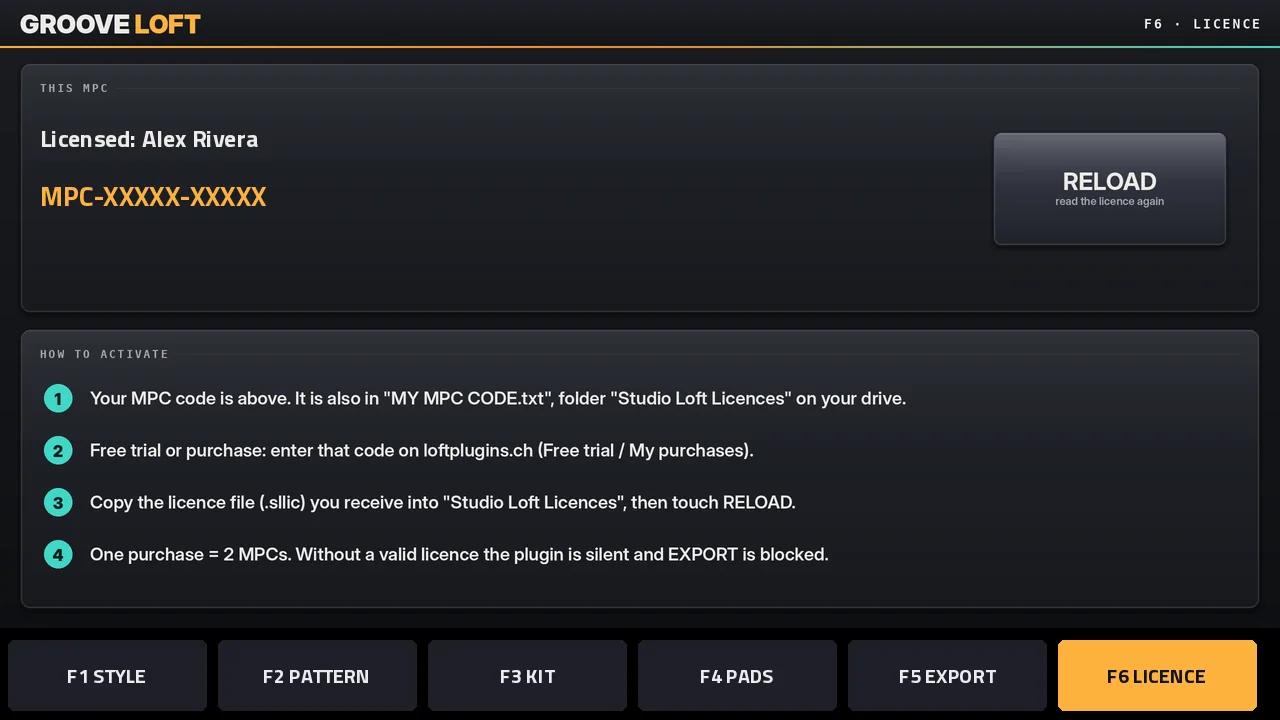 1234
Lo que ves
- Licence status: who the plugin is licensed to. Until a licence is bought, “Get it at loftplugins.ch” shows below.
- The code of this MPC (shown here with a demo name and code).
- RELOAD reads the licence files again, right after you copy one.
- How to activate, in 4 lines, right on the MPC.
Good to know
- 2 MPCs per purchase. Without a valid licence the plugin is silent and EXPORT is blocked.
- Your patterns, kits and exports stay yours.
What the status line can say
| Licensed: <name> | Bought and active on this MPC. |
| Licence is for another MPC | The licence file was made for a different MPC code. |
| Checking licence... | Reading the licence files. |

When the plugin is silent. No licence, or a licence for another MPC: every instrument page shows a short line at the top that tells you where to go. It disappears as soon as the licence is valid.
Tuyo
Groove Loft
1707 patrones de batería en 77 estilos, tocados desde tus pads.
Un solo pago, tuyo para siempre. Tu licencia funciona en dos MPC.