Instrument · versión 1.5.0
Halo Loft
REAL SINGERS, MEASURED AND TUNED NOTE BY NOTE.
Halo Loft plays real human voices: choirs, soloists, opera singers, breaths, whispers, syllables, chants and spoken phrases. Every recording was measured to the cent, so the note you play is the note you hear, all over the keyboard.
3 = $993 plugins a elegir por $99 →
A full mixed choir from one key: three layers of real singers (mixed, women, men) on a slow A minor progression.
El manual
Cada pantalla,
página a página.
La guía completa, pantalla por pantalla, igual que en la MPC. Los nombres de los ajustes se quedan en inglés, como en la pantalla.
Welcome
A choir in your MPC
Halo Loft plays real human voices: choirs, soloists, opera singers, breaths, whispers, syllables, chants and spoken phrases. Every recording was measured to the cent, so the note you play is the note you hear, all over the keyboard.
Three layers, A, B and C, each play one voice in one of four modes. Then the voices go through a filter, a vowel filter, a tempo-synced chop, saturation, chorus, delay and a reverb with shimmer. A Listen page watches what you play and gives advice.
Find your way
Fifteen pages on the six function keys. Press a key again to reach the next page under it.
VOICE B
VOICE C
GRAINS
VOWEL
MATRIX
CHOP
SPACE
LISTEN
LICENCE
Load a preset with the browser of your MPC, play a chord, then go to F1 MAIN and turn Halo. Most presets come alive with that one knob.
The wow
One key. A whole choir.
Hold one chord. Three sections of real singers answer at once: a mixed choir, a women's choir and a men's choir. No sampling session, no editing, no tuning: it is all done.
That is the preset CHOIR - Full Ensemble. On the Listen page you see what Halo hears: the chord Am9, the key A minor, and an honest warning that two layers sing a note 7 semitones above where those singers recorded it.
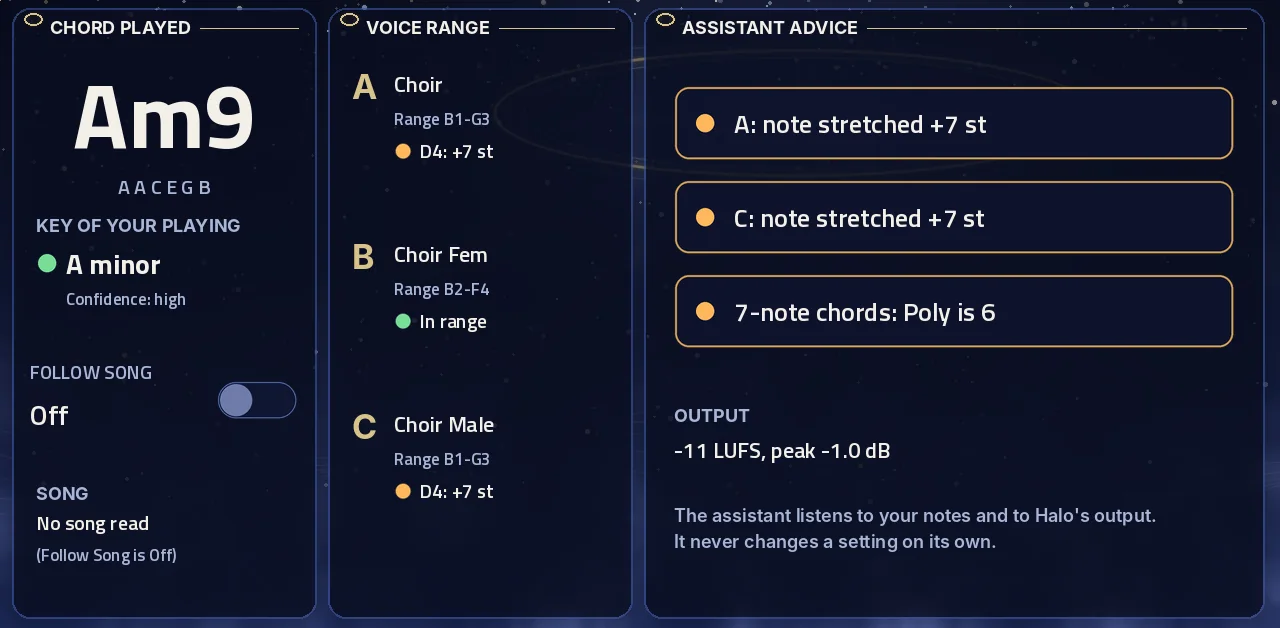
You stop thinking about samples. You play voicings, and the choir follows your hands: open chords sound like a church, close chords like a gospel group, one low note like a monastery.
The wow, part two
Tuned to the cent. Then bent.
Each of the 117 recordings was measured, note by note. In Voice mode Halo keeps the real throat of the singer while you play anywhere on the keyboard: no chipmunk effect at the top, no monster at the bottom.
Voice
The singer, in tune everywhere. Formant makes the throat bigger or smaller without moving the note.
Cloud
The same voice as a cloud of grains: pads, textures, shimmering air.
Freeze
One instant of a voice, held forever. Move Position to pick the vowel you love.
And then, chop it
The CHOP page cuts any voice in rhythm with your MPC tempo. With Chop Jump on Random, every step plays another syllable: a vocal chop in one gesture.
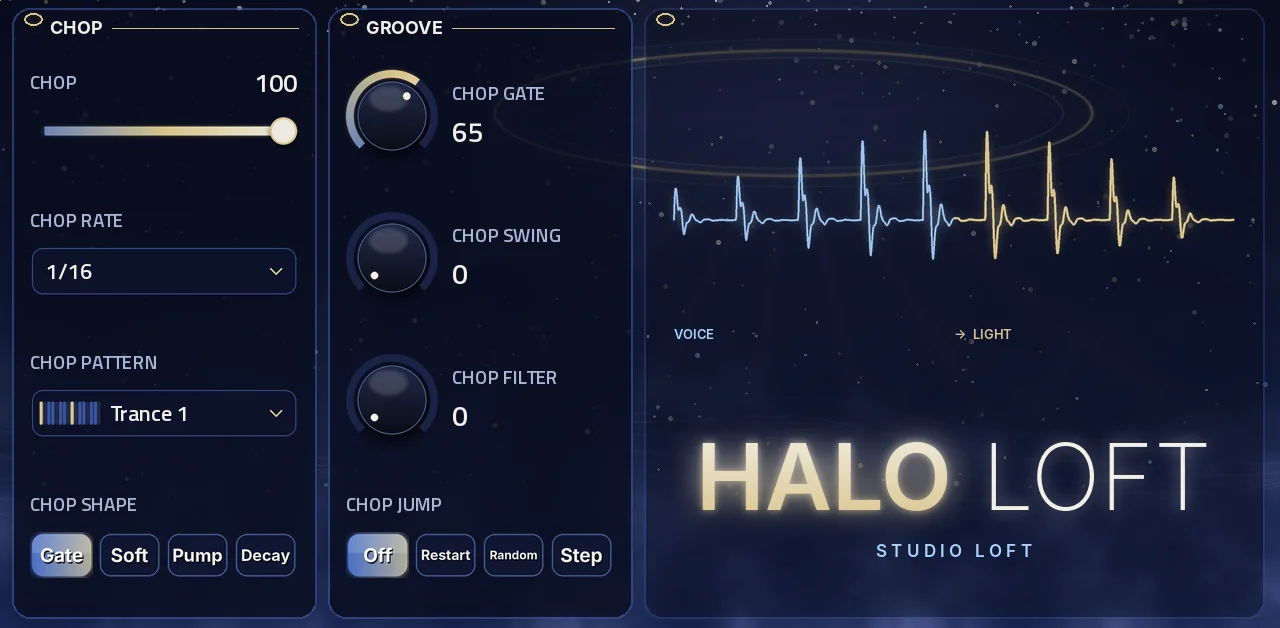
Preset CHOP - Syllable Run, hold one note, then change Chop Rate from 1/16 to 1/8T. Same voice, a new groove every time.
Screen
MAIN
VOICE
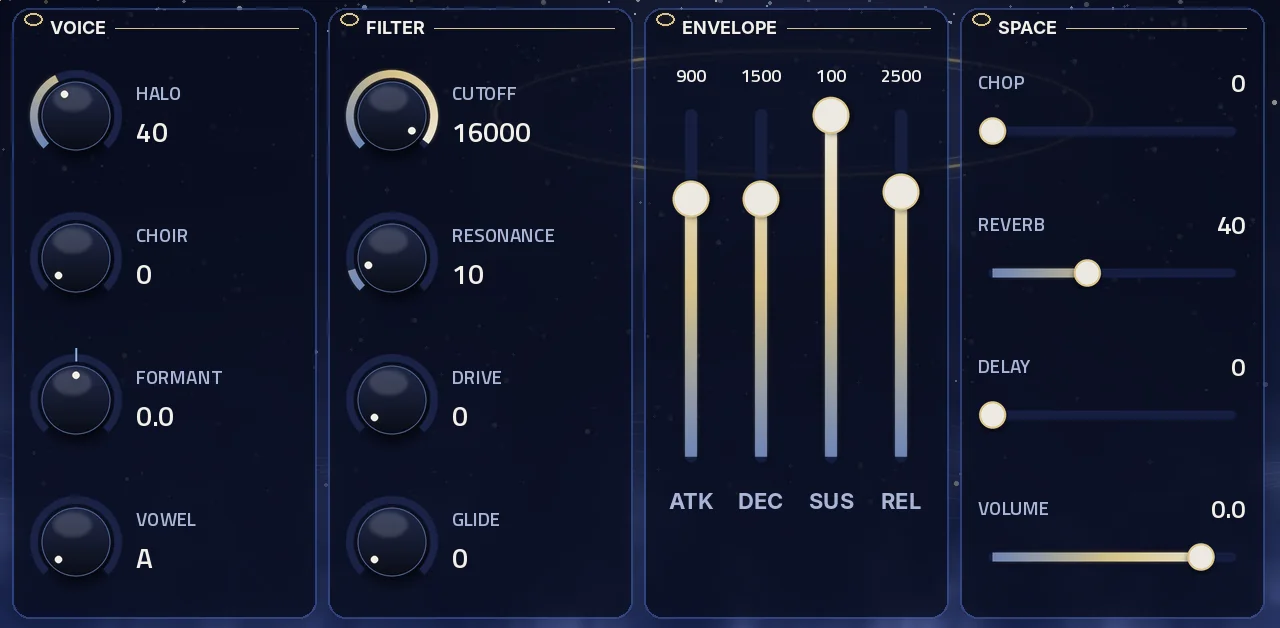
Halo opens the space: bigger, longer reverb, shimmer, air and a few more singers. Choir adds singers to every layer, more detuned and wider. Formant makes all voices darker or brighter without changing the note. Vowel morphs the sound through A, E, I, O, U.
FILTER
Cutoff, Resonance and Drive of the filter (its type is on the FILTER page). Glide slides from one note to the next.
ENVELOPE
The volume shape of each note: ATK (Attack), DEC (Decay), SUS (Sustain), REL (Release).
SPACE
Chop cuts the sound in rhythm with your tempo. Reverb and Delay amounts. Volume of the whole plugin.
What it's for. The page you play from. Sixteen controls cover 90% of what you will touch after loading a preset.
Load a choir, then push Halo slowly to 60. The room grows, the singers multiply, the sound lifts off. Pull Formant down by 2 or 3 for a darker, more solemn choir.
Screen
VOICE A
VOICE A · SOURCE
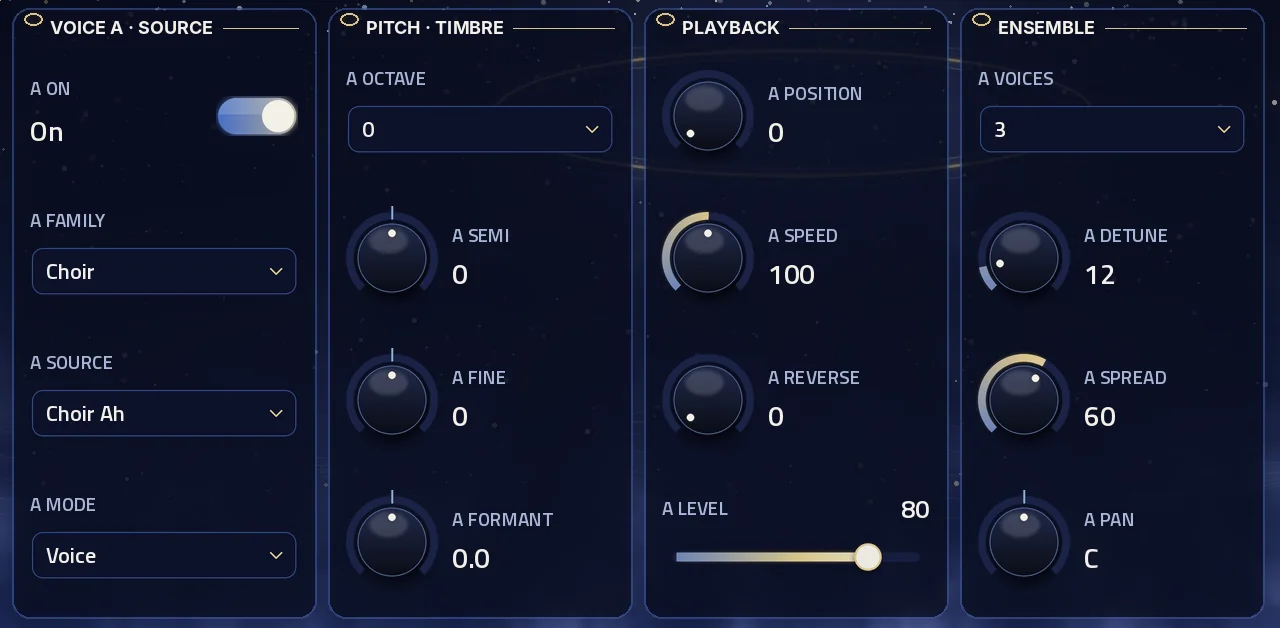
A On switches the layer on. A Family picks the kind of voice (11 families, list below). A Source picks the recording inside the family. A Mode: Voice plays the singer in tune on the whole keyboard, Cloud turns it into a cloud of grains, Tape plays the recording as it is, Freeze holds one moment of it forever.
PITCH · TIMBRE
A Octave, A Semi and A Fine tune the layer. A Formant changes the size of the singer's throat: lower sounds bigger, higher sounds younger.
PLAYBACK
A Position: where the recording starts. A Speed: how fast it moves (100 = natural, 0 = frozen). A Reverse: share of grains played backwards. A Level: volume of the layer.
ENSEMBLE
A Voices: up to 6 singers on one layer. A Detune and A Spread make them sound like different people placed across the stereo field. A Pan places the layer.
What it's for. Each of the three layers is a full singer section. Pages VOICE B and VOICE C are identical.
Touch the A FAMILY box to open the list of families, then touch one. Change Source to hear the other recordings of the same family.
Screen
VOICE B
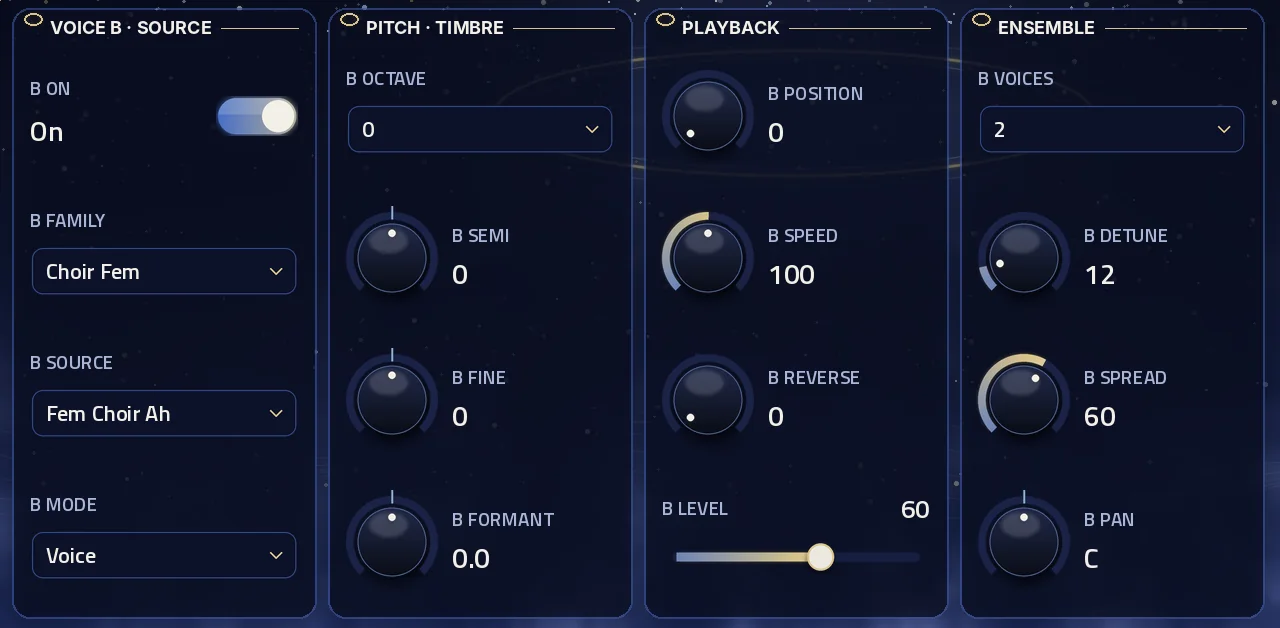
VOICE B · SOURCE
Same controls as layer A. In this preset, layer B sings with a female choir (Choir Fem).
PITCH · TIMBRE
B Octave stays at 0 here. Set it to +1 for a bright upper part floating over layer A.
PLAYBACK
B Level at 60 keeps the upper part behind the main choir.
ENSEMBLE
Two singers, slightly detuned: a small section rather than a soloist.
What it's for. The second section of your choir. Use it for another register, another vowel or a breath layer.
Put a whisper or breath source on B in Cloud mode at a low level: the choir instantly sounds closer and more human.
Screen
VOICE C
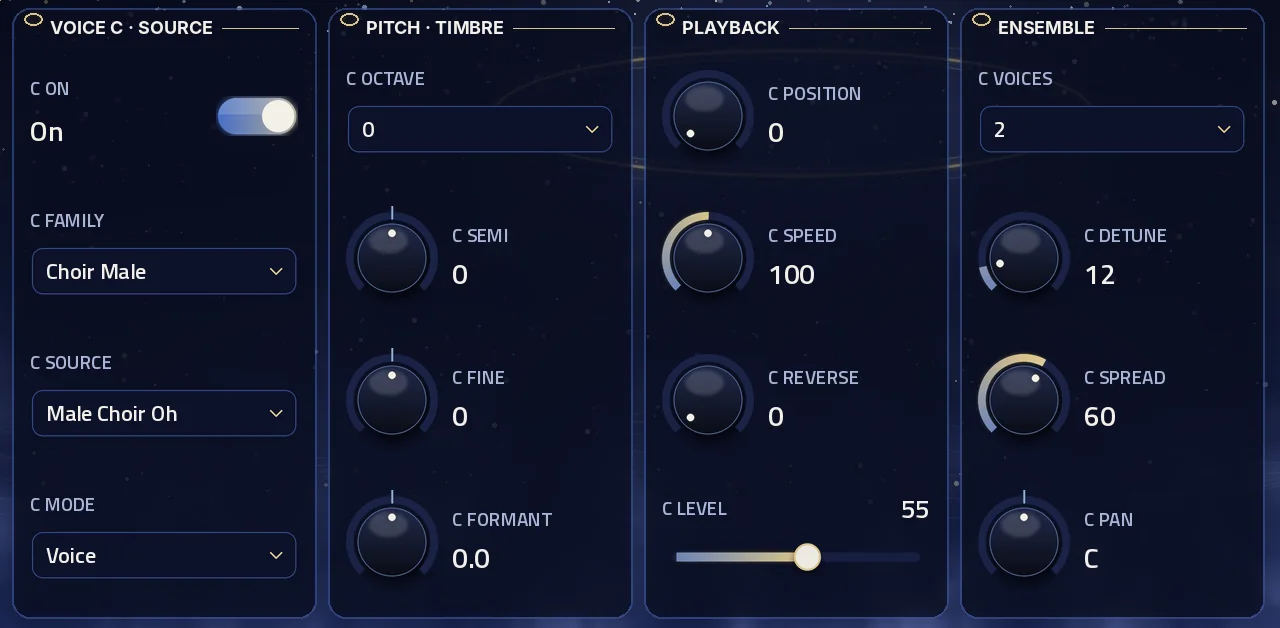
VOICE C · SOURCE
Layer C here: Choir Male, source Male Choir Oh.
PITCH · TIMBRE
Leave Octave at 0 and let the male choir carry the low end.
PLAYBACK
C Level 55: a bed under the two other layers.
ENSEMBLE
Two voices again. With the Choir macro on MAIN, each layer can grow to 6.
What it's for. Three layers together make a full mixed choir from one key press.
Switch C off and on while a chord rings: you hear exactly what the low voices bring.
Screen
GRAINS
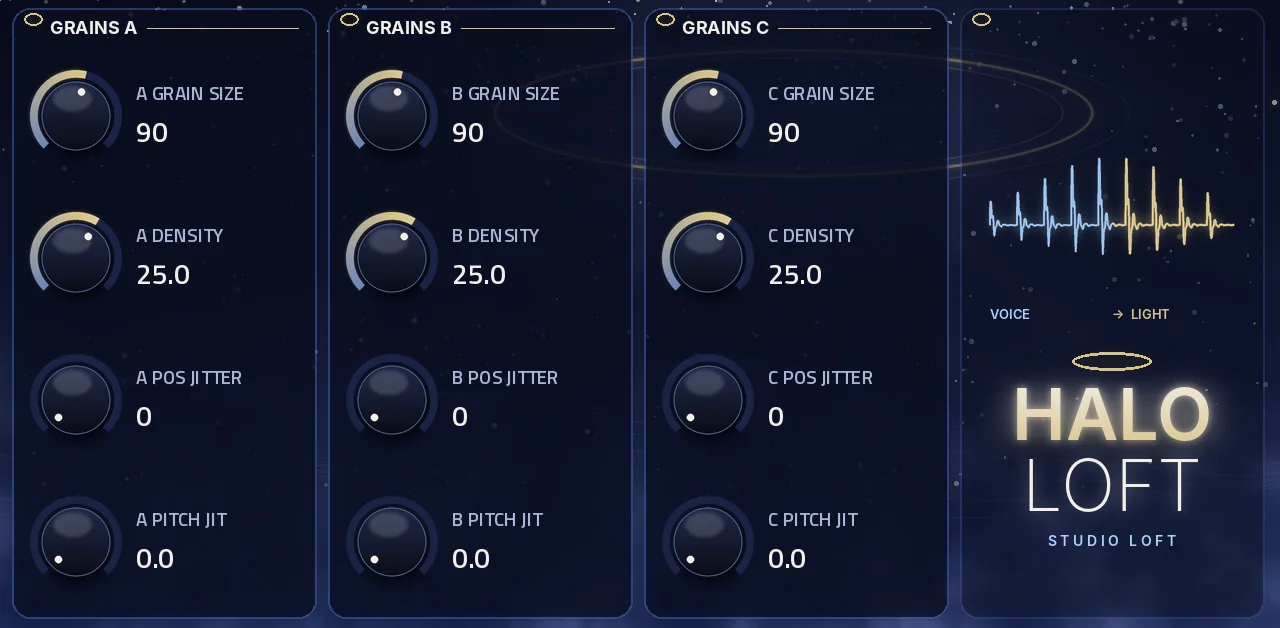
GRAINS A
A Grain Size: length of each tiny piece of voice. A Density: how many grains per second. A Pos Jitter: random jumps in the recording. A Pitch Jit: random pitch per grain, in semitones.
GRAINS B
The same four controls for layer B.
GRAINS C
The same four controls for layer C.
What it's for. These controls shape the layers in Cloud mode (and the grain feel of Voice and Freeze).
For a shimmering pad: Grain Size 200, Density 15, Pos Jitter 40, Pitch Jit 0. For glitter: Grain Size 30, Density 80, Pitch Jit 12.
Screen
FILTER
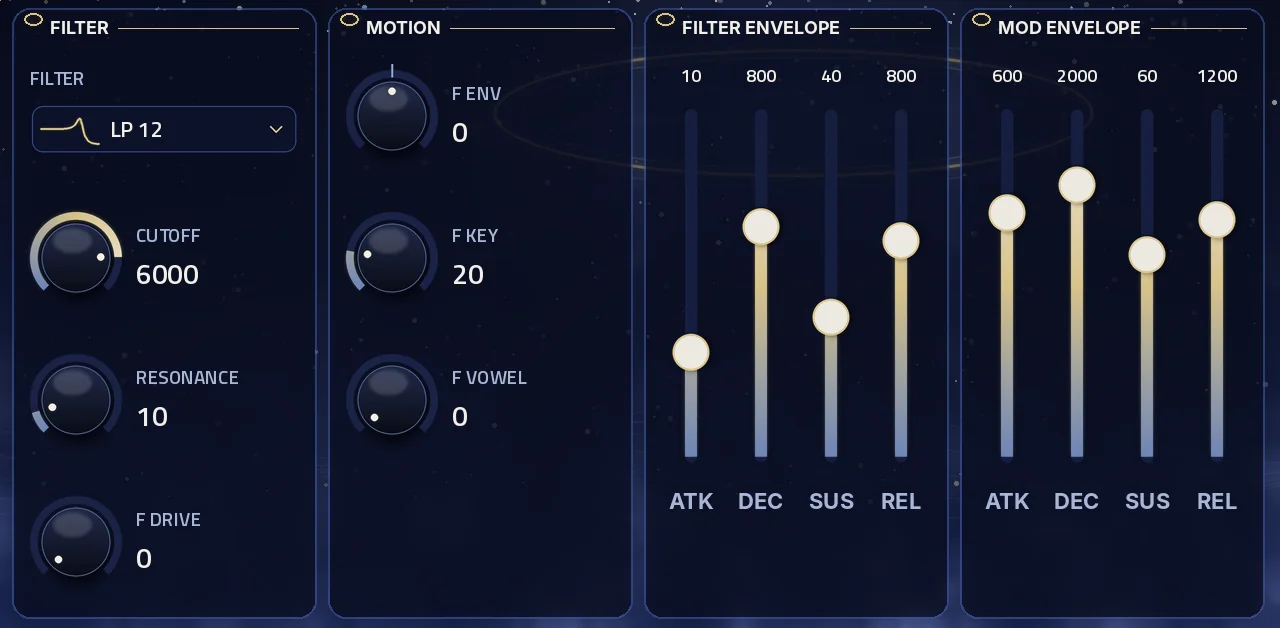
FILTER
Filter type: Off, LP 12, LP 24, Ladder, Band, High, Notch, Comb +, Comb -, Formant. Then Cutoff, Resonance and F Drive.
MOTION
F Env: how much the filter envelope opens (or closes) the filter. F Key: the filter follows the notes you play. F Vowel: the vowel macro also moves the filter.
FILTER ENVELOPE
ATK, DEC, SUS, REL of the filter envelope.
MOD ENVELOPE
A free envelope you can send anywhere from the MATRIX page.
What it's for. Shape the brightness of the voices, from a muffled choir behind a wall to a bright, edgy lead.
Comb + with high Resonance turns breaths and whispers into tuned, metallic ghosts. Try it on a Breath source.
Screen
VOWEL
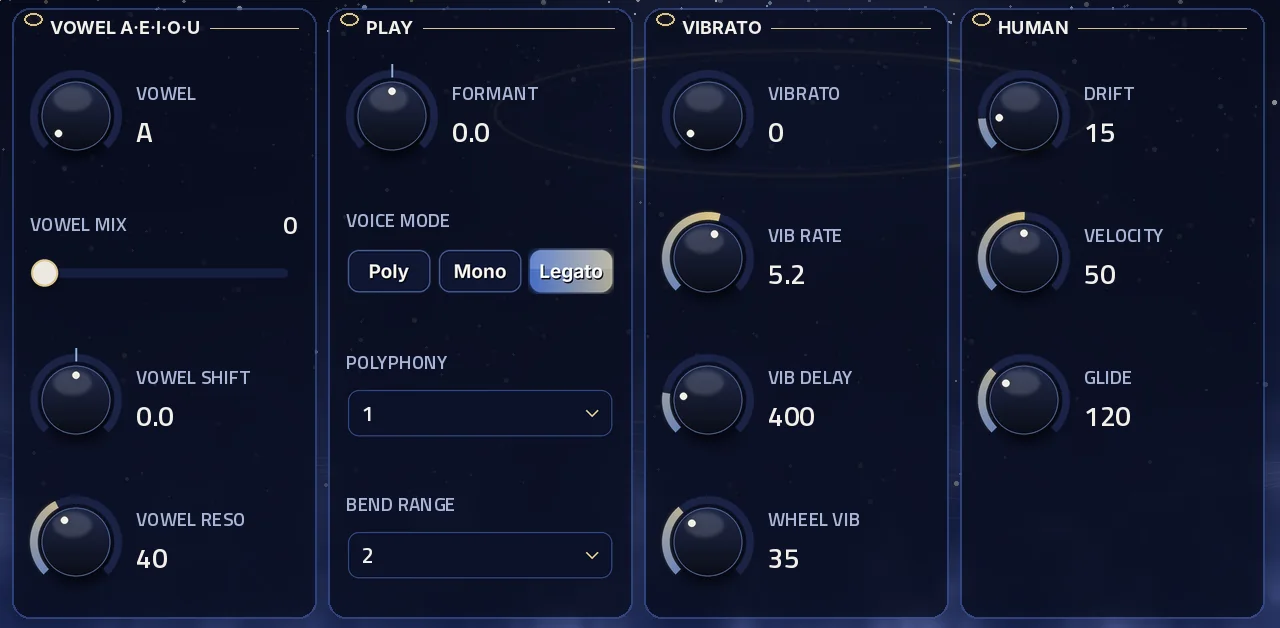
VOWEL A·E·I·O·U
Vowel chooses the vowel, Vowel Mix how much of the vowel filter you hear. Vowel Shift moves the vowel up or down, Vowel Reso makes it sharper.
PLAY
Formant of all layers. Voice Mode: Poly, Mono or Legato. Polyphony: up to 8 notes. Bend Range of the pitch wheel.
VIBRATO
Vibrato depth, Vib Rate, Vib Delay (vibrato that arrives after the note starts, like a real singer) and Wheel Vib (vibrato added by the mod wheel).
HUMAN
Drift: each note slightly out of tune, like real people. Velocity: how much your playing strength changes the level. Glide.
What it's for. Make the voices speak and sing like people: vowels, vibrato, legato.
For a soloist: Voice Mode Legato, Glide 120, Vib Delay 400. Play legato lines and the singer slides between notes.
Screen
LFO
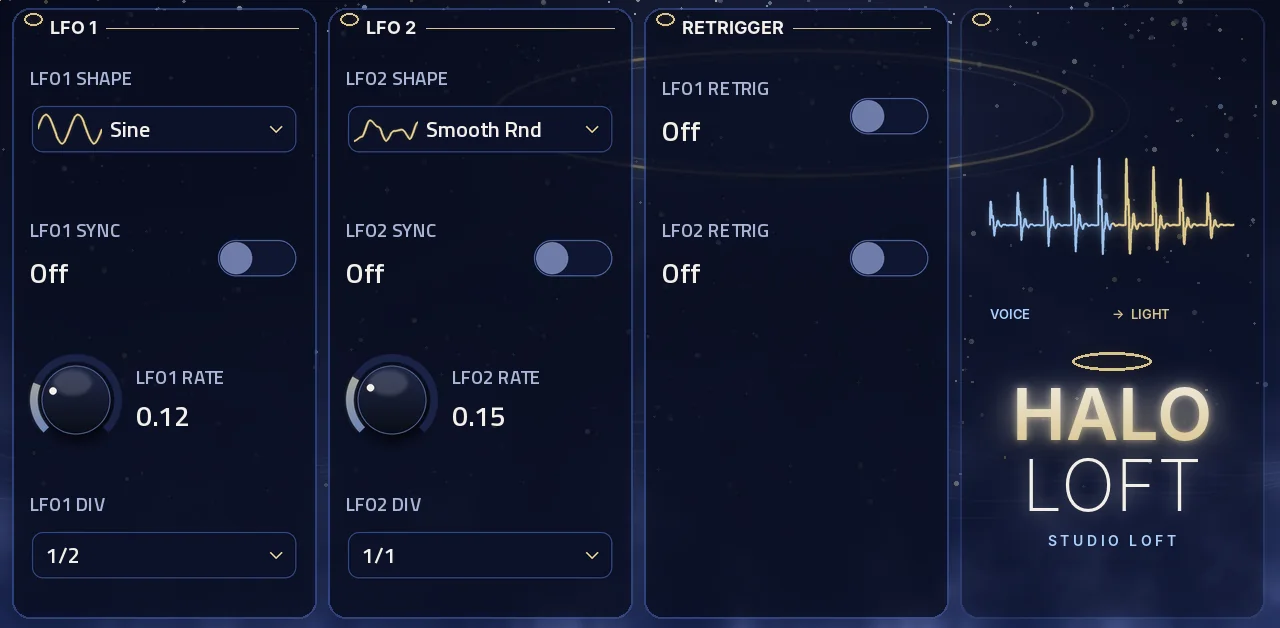
LFO 1
LFO1 Shape (Sine, Triangle, Saw Up, Saw Down, Square, S&H, Smooth Rnd), LFO1 Sync to the tempo, LFO1 Rate in Hz, or LFO1 Div in note values when synced.
LFO 2
The same for the second LFO.
RETRIGGER
LFO1 Retrig and LFO2 Retrig: restart the LFO at each new note.
What it's for. Two slow or fast movements to send anywhere from the MATRIX page.
LFO1 synced at 1/2 on Vowel: the choir sings Ee-Oh-Ee-Oh in time with your beat.
Screen
MATRIX
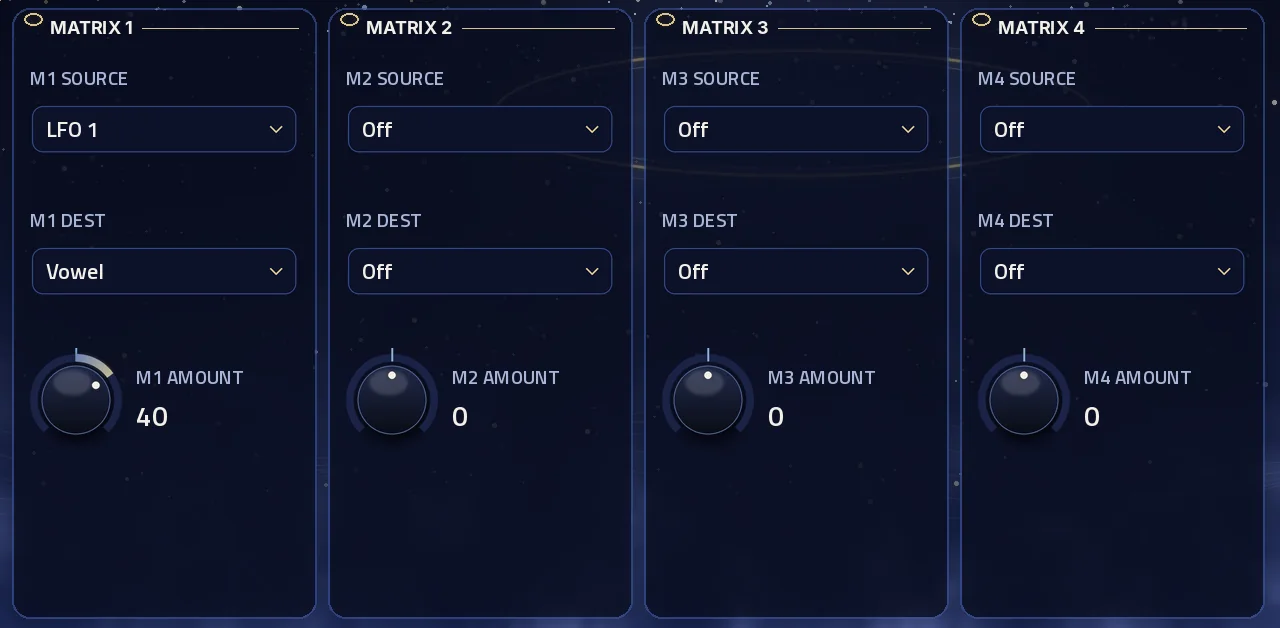
MATRIX 1
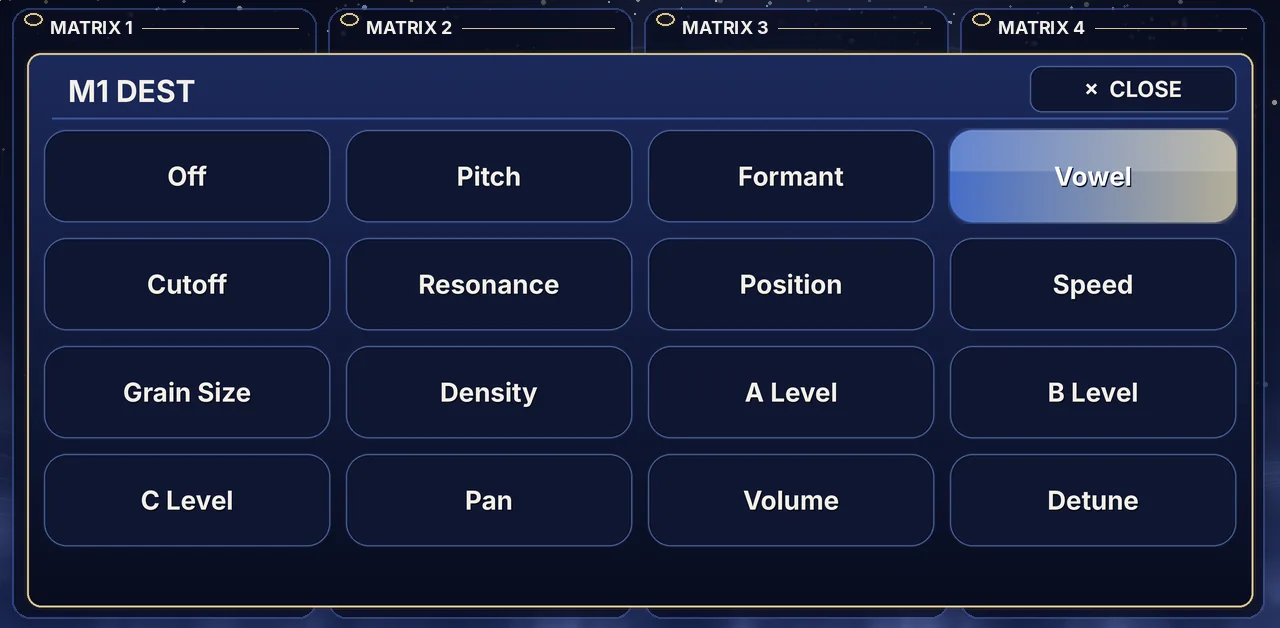
M1 Source: LFO 1, LFO 2, Mod Env, Filter Env, Velocity, Mod Wheel, Aftertouch, Key, Random or Chop. M1 Dest: Pitch, Formant, Vowel, Cutoff, Resonance, Position, Speed, Grain Size, Density, A/B/C Level, Pan, Volume or Detune. M1 Amount: how much, positive or negative.
MATRIX 2
A second connection.
MATRIX 3
A third one.
MATRIX 4
And a fourth.
What it's for. Connect anything to anything: this is where a static pad starts to breathe.
Mod Wheel to Formant at -40: one hand on the wheel turns a soprano choir into a choir of giants.
Screen
CHOP
CHOP
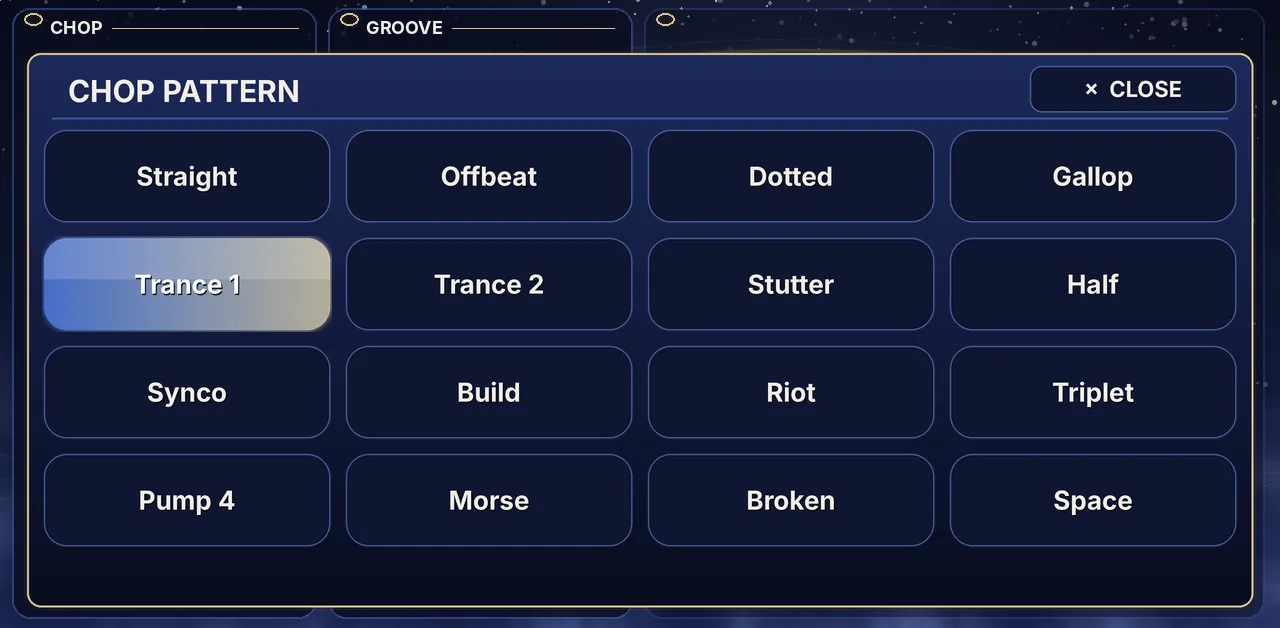
Chop amount, Chop Rate (1/32 to 4 bars, triplets and dotted), Chop Pattern (16 rhythms: Straight, Offbeat, Dotted, Gallop, Trance 1 and 2, Stutter, Half, Synco, Build, Riot, Triplet, Pump 4, Morse, Broken, Space) and Chop Shape (Gate, Soft, Pump, Decay).
GROOVE
Chop Gate: length of each hit. Chop Swing. Chop Filter: the filter opens on each hit. Chop Jump: Off, Restart, Random or Step, to jump to another syllable on each hit.
What it's for. Turn a long choir note into a rhythmic part, locked to the tempo of your MPC.
Load a Syllables source, set Chop Jump to Random and play one long chord: instant vocal chop, a different syllable on every step.
Screen
COLOR
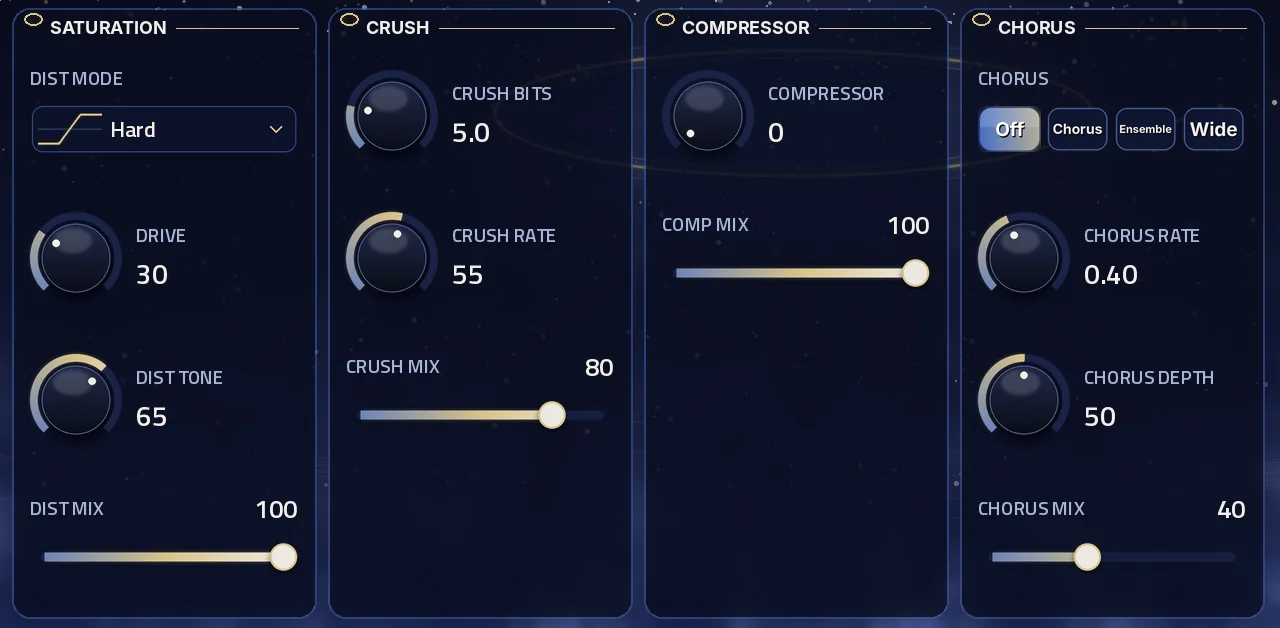
SATURATION
Dist Mode (Soft, Hard, Fuzz, Tube, Fold, Rectify, Scream), Drive, Dist Tone, Dist Mix.
CRUSH
Crush Bits and Crush Rate for a lo-fi, digital grain, and Crush Mix.
COMPRESSOR
Compressor amount and Comp Mix (parallel compression).
CHORUS
Chorus: Off, Chorus, Ensemble or Wide. Chorus Rate, Chorus Depth, Chorus Mix.
What it's for. Dirt, warmth and width, from a clean choir to a destroyed diva.
Tube at Drive 25 with Dist Mix 40 adds warmth to a solo voice without making it sound distorted.
Screen
SPACE
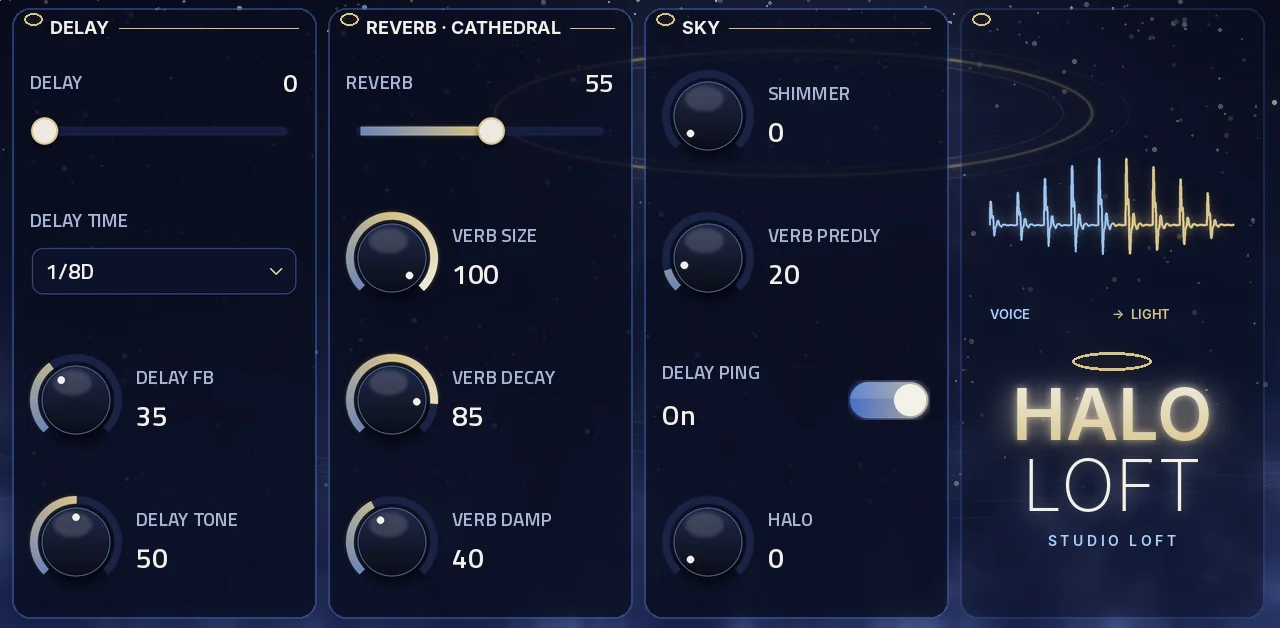
DELAY
Delay amount, Delay Time in note values, Delay Fb (repeats) and Delay Tone.
REVERB · CATHEDRAL
Reverb amount, Verb Size, Verb Decay, Verb Damp (darker tail).
SKY
Shimmer: an octave-up halo inside the reverb. Verb PreDly, Delay Ping (ping-pong between left and right) and Halo, the same macro as on MAIN.
What it's for. Place the singers in a room, a hall or a cathedral that never ends.
Shimmer at 40 on a soft female choir, Verb Decay at 85: the classic heavenly pad, in two moves.
Screen
MASTER
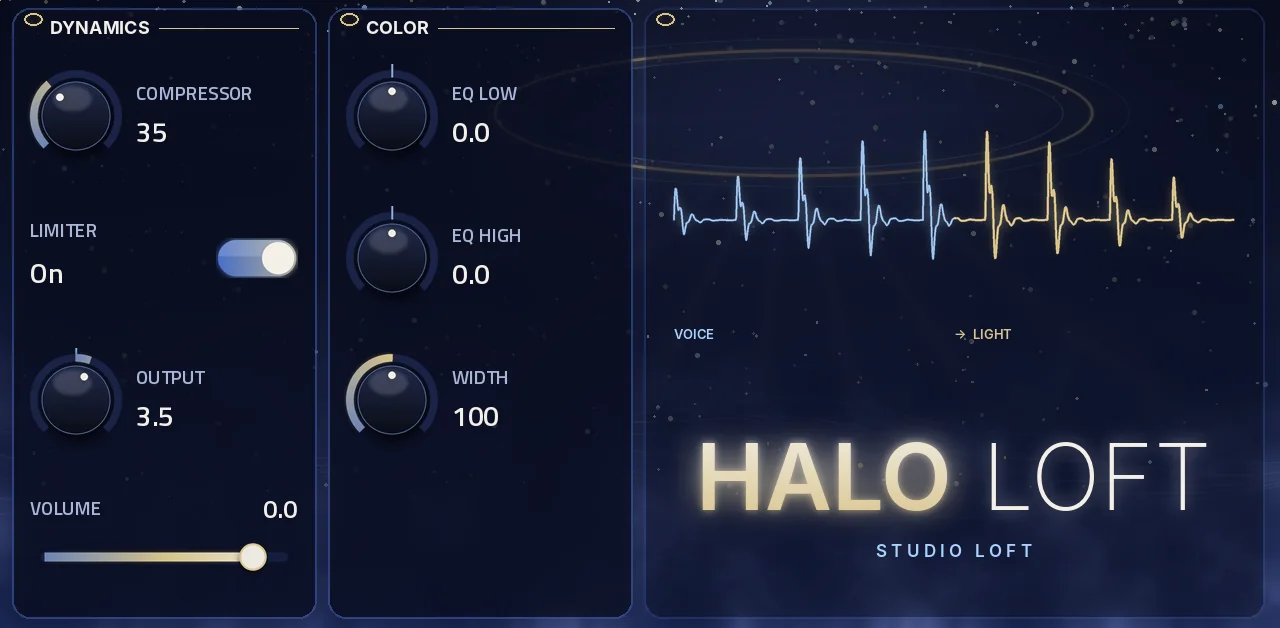
DYNAMICS
Compressor, Limiter (keeps the output safe), Output gain in dB and Volume.
COLOR
EQ Low and EQ High shelves in dB, and Width of the stereo image.
What it's for. The final touch before the sound leaves Halo.
Keep Limiter on. If a big choir feels too wide in your mix, bring Width down to 70.
Screen
LISTEN
CHORD PLAYED
The name of the chord you hold, and its notes underneath.
KEY OF YOUR PLAYING
The key Halo hears in what you play, with a colored dot for its confidence (red, orange, green).
FOLLOW SONG
In this version Halo does not read a song file: the advice comes from what you play and from Halo's own output.
SONG
Tells you that no song is read.
VOICE RANGE
For each layer: the range the singers really recorded, and where your last note falls. Green: in range. Orange: the note is stretched. Red: too high or too low for this voice.
ASSISTANT ADVICE
Up to three pieces of advice, problems first. For example A: note stretched +7 st, 7-note chords: Poly is 6, Clipping: lower the volume.
OUTPUT
Loudness (LUFS) and peak of Halo's output.
What it's for. A second pair of ears. It listens and gives advice; it never changes a setting on its own.
If a layer turns orange, move its Octave so the voice sings where it was recorded: the sound becomes instantly more natural.
Lists
Every choice, one touch away
Touch a list box (Family, Mode, Filter, LFO Shape, Matrix, Chop Rate and Pattern, Dist Mode, Delay Time): Halo opens the full list over the page. Touch a choice and the list closes. Turning the data wheel also steps through the choices.
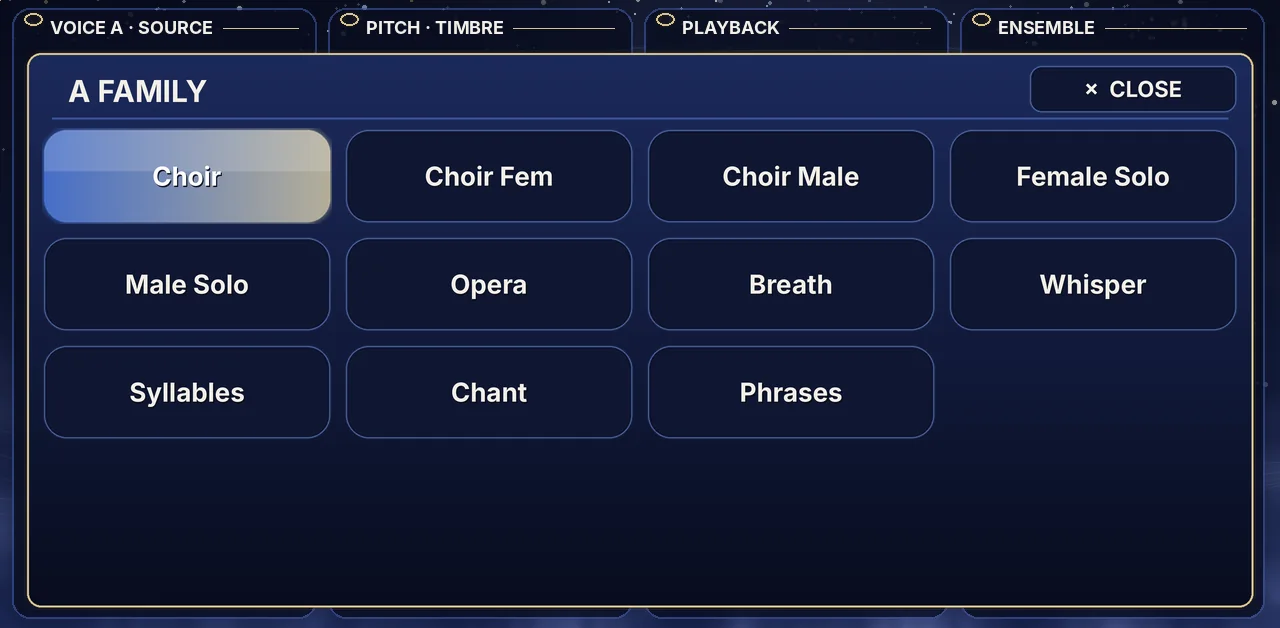
VOICE A
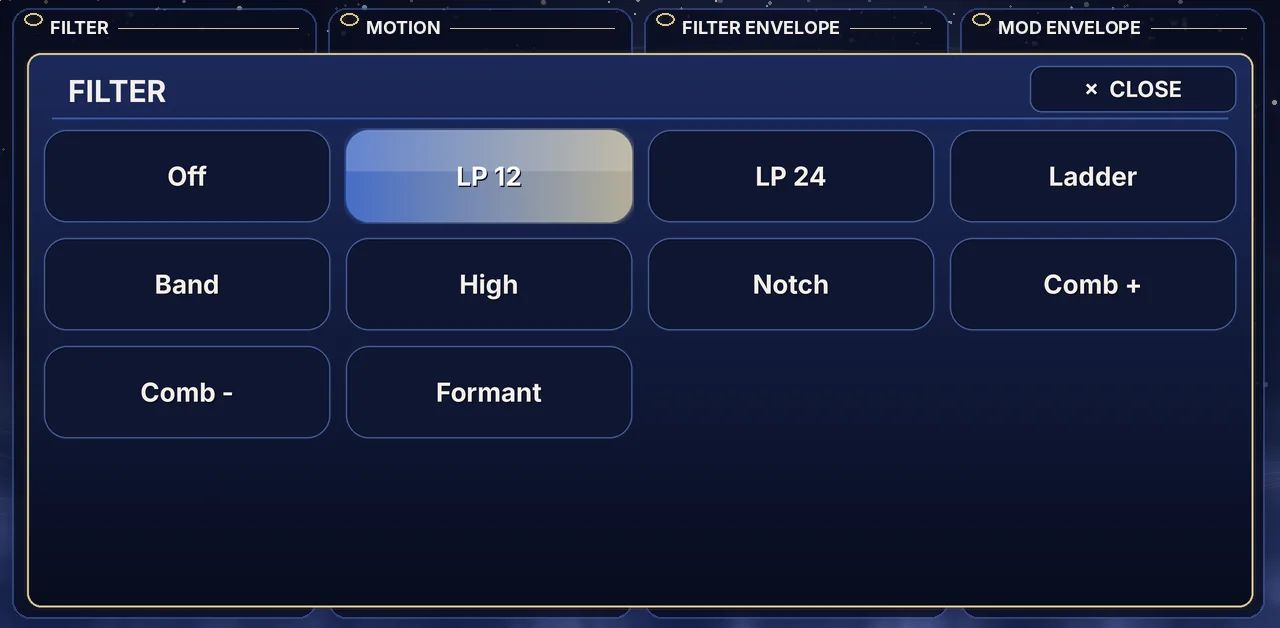
FILTER
MATRIX
CHOP
Specifications
Halo Loft at a glance
A voice synth for MPC that plays real, tuned singers in three layers, from soft choirs to chopped vocal hooks.
For whom, for what
- Film, ambient and trailer music: heavenly pads, dark monk choirs, risers.
- Hip-hop, R&B and lo-fi: soul choir stabs, airy hooks, dusty vocal textures.
- Electronic and trance: gated choirs, vocal chops synced to the tempo.
Strong points
- 117 real voice recordings in 11 families: Choir (8), Choir Fem (8), Choir Male (8), Female Solo (12), Male Solo (12), Opera (9), Breath (12), Whisper (9), Syllables (13), Chant (16), Phrases (10).
- Every recording measured and tuned, playable in tune over the whole keyboard (Voice mode).
- 3 layers, each with 4 modes (Voice, Cloud, Tape, Freeze) and up to 6 singers per layer.
- Tempo-synced chop with 16 patterns and syllable jumps.
- Full sound chain: 10 filter types, vowel filter, 7 saturation modes, crush, compressor, chorus, delay, reverb with shimmer.
- Listen page: chord, key and voice range of what you play, with advice. It never changes a setting by itself.
In numbers
- 178 presets in 10 banks · 207 parameters · 15 pages · 2 LFOs · 4-slot modulation matrix.
- Polyphony up to 8 notes, 3 layers of up to 6 singers each.
- About 80 MB installed (voice bank 67 MB).
- MPC standalone, MPC OS 3.10.1 or newer.
Get started in 3 steps
Install. With your MPC in computer mode, copy the folder Studio Loft - VST - Halo Loft into VST2 Plugins on its drive.
Load. On a track, choose Halo Loft as the plugin, then pick a preset in the browser.
Play. Hold a chord, then turn Halo and Choir on F1 MAIN.
Presets
178 presets, 10 banks
In the MPC browser, each bank is a folder. Names as shown on screen.
Solo Voice
Cloud
Mixed Eh
Bright Ee
Warm Oh
Hushed Oo
Velvet Oo
Vibrato Hall
Breath Choir
Sopranos Ah
Sopranos Eh
Sopranos Ee
Altos Oh
Altos Oo
Soft Ladies
Ladies Vibrato
Airy Ladies
Basses Ah
Tenors Eh
Tenors Ee
Monks Oh
Basses Oo
Soft Men
Men Vibrato
Airy Men
Full Ensemble
Requiem
Gospel Stack
Chapel Oo
Hymn Ee Oh
Village Voices
Song Eh
Bright Ee
Round Oh
Flute Oo
Torch Singer
Lullaby Oo
Breathy Girl
Belter
Whisper Ee
Swell Voice
Power Oh
Baritone Ah
Folk Eh
Tenor Ee
Warm Oh Man
Hollow Oo
Crooner
Swell Oh Man
Breathy Man
Rock Belt
Soft Oo Man
Long Swell
Shout Ah
Diva Oh
Tenor Aria
Tenor Oh
Diva Crescendo
Tenor Crescendo
Diva Trillo
Trill Queen
Tenor Trill
Duet
Phantom Hall
Silk Choir
Morning Mist
Ocean Ahs
Glass Voices
Velvet Room
Slow Sunrise
Frozen Hymn
Lush Ensemble
Air Cathedral
Hollow Moon
Warm Blanket
Shimmer Oo
Evolving Vowels
Lo-Fi Choir
Tape Angels
Dream Layers
Endless Ah
Monastery
Soft Focus
Northern Lights
Grain Choir
Vowel Morph Pad
Wide Sky
Formant Drift
Presets
Presets, continued
In the MPC browser, each bank is a folder. Names as shown on screen.
Halo Light
Heaven Gate
Choirboy Air
Angel Note
Ether Rise
Celestia
Glory
Light Beam
Feather
Starlight Oo
Grace
Paradise
Cloud Nine
Wings
Black Mass
Crypt Oo
Throat Demon
Low Chant Ritual
Mongol Night
Shadow Choir
Doom Tenor
Cave Breath
Fry Monster
Dark Matter
Haunted Hall
Iron Monks
Bass Drone Om
Grim Whisper
Offbeat Ahs
Trance Gate
Syllable Run
Dona Stutter
Caro Slices
Hoo Hee Beat
Mbbb Machine
Row Chop
Men Pulse
Pump Choir
Glitch Diva
Spoken Cuts
Triplet Voices
Morse Whisper
Broken Phrase
Synco Ladies
Build Up
Half Time Ahs
Riot Voices
Breath Field
Phrase Fog
Frozen Prayer
Grain Monks
Crowd Murmur
Sigh Swarm
Vowel Dust
Granular Diva
Spoken Sand
Hum Particles
Ghost Grains
Lip Rattle
Fry Crackle
Harmony Haze
Synth Whispers
Inhale Cloud
Caro Mist
Breath Puffs
Choir Smear
Reverse Choir
Robot Choir
Alien Formants
Chipmunk Choir
Giant Voice
Whisper Delay
Crushed Diva
Breath Riser
Vocal Siren
Throat Engine
Comb Spirits
Frozen Scream
Talk Box
Ghost Choir Tape
Screen
LICENCE
STATUS
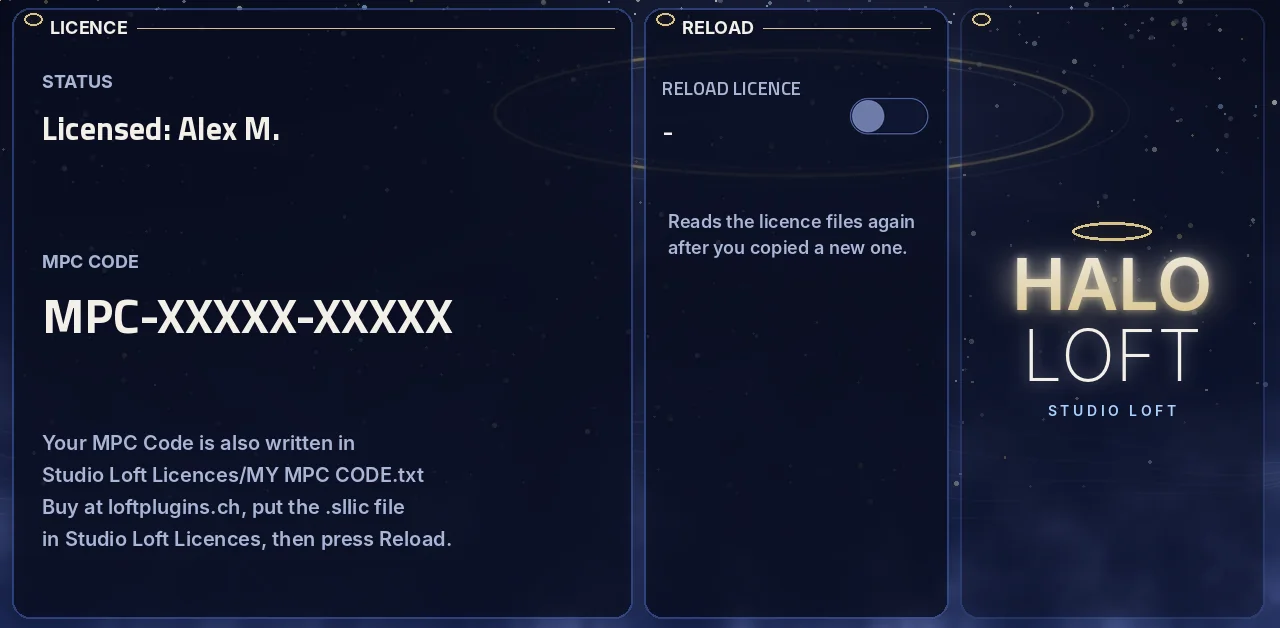
Licensed: name, or what is missing. Without a valid licence Halo is silent, and the page shows where to get one.
MPC CODE
The code of your MPC. You give it when you buy, so your licence works on your machine.
Help
Where to find your code as a file, and where to put your licence file.
RELOAD
Reload Licence reads the licence files again, right after you copied a new one.
What it's for. Check your licence and find your MPC Code. When Halo is silent, the MAIN page shows a short line under ENVELOPE, such as No licence - see F6 LICENCE, that sends you here.
The same code is written in Studio Loft Licences/MY MPC CODE.txt on your MPC drive: copy it from your computer instead of typing it.
Licence and activation
Buy it, play it
- Activation: your MPC Code is on the LICENCE page (F6) and in Studio Loft Licences/MY MPC CODE.txt. Give it when you buy at loftplugins.ch, then copy the licence file you receive into Studio Loft Licences and press Reload Licence.
- One purchase, two MPCs. No internet connection needed on the MPC.
- Without a valid licence, Halo Loft is silent.
Licencia y activación
Tuyo en tres pasos.
Compra
Paga una vez en este sitio. Tu enlace personal llega por e-mail y sigue siendo válido.
Instala Loft Hub
MPC OS 3.10.1 o posterior, con Enhancements y External Plugin Support activados en Preferences. Copia Loft Hub una vez al disco de tu MPC.
Vincula y toca
En Loft Hub, acepta, vincula tu MPC y tus plugins se instalan solos. Funciona en dos MPC. Y ya está.
Tuyo
Halo Loft
Voces reales, afinadas y superpuestas en coros, pads y nubes.
Un solo pago, tuyo para siempre. Tu licencia funciona en dos MPC.