Effect · versión 1.5.2
Retrox Loft
SEVENTY YEARS OF RECORDED SOUND IN ONE EFFECT.
Retrox Loft is a retro and lo-fi colour effect for your MPC. Put it on a drum bus, a sample, a vocal, a synth or your whole beat, and give it the life of an old record, a worn cassette, an AM radio or a vintage sampler.
El manual
Cada pantalla,
página a página.
La guía completa, pantalla por pantalla, igual que en la MPC. Los nombres de los ajustes se quedan en inglés, como en la pantalla.
Make it sound lived-in.
Retrox Loft is a retro and lo-fi colour effect for your MPC. Put it on a drum bus, a sample, a vocal, a synth or your whole beat, and give it the life of an old record, a worn cassette, an AM radio or a vintage sampler.
Eight modules, in the order the sound goes through them. LIFE makes them all move, a little, all the time.
One tap: MEDIA
Pick Vinyl, Cassette, VHS, AM Radio, a 12-bit sampler… and every module is set for you.
One knob: AGE
Turn it and watch the year roll back from NEW to 1950. The sound ages with it.
One button: LISTEN
Retrox listens to your sound for 15 seconds and gives up to three clear tips. APPLY or UNDO in one tap.
How it is organised
Six pages, on the function keys F1 to F6. The top of the screen (curve, media, year, module switches, LISTEN) stays the same on every page. Below it, four columns of controls. Each column matches the Q-Link knobs under it: turn the knobs, the column follows, from top to bottom.
| F1 | RETROX | the main page: media, intensity, age, the 8 module amounts, output |
|---|---|---|
| F2 | HEAT+CRUSH | saturation and the sampler |
| F3 | WARBLE | wow, flutter, warp and motion |
| F4 | DUST | vinyl, hiss, hum, room, VHS and radio noise |
| F5 | OXIDE+ECHO | tape wear and vintage reverbs and echoes |
| F6 | LIFE+TONE | random motion and the final filters |
| F6 | LICENCE | press F6 a second time: your licence, the code of your MPC, RELOAD LICENCE |
Your first 30 seconds
Put Retrox Loft on a loop or a drum bus and press play.
Tap Media and pick Cassette. Everything is set at once.
Turn AGE until the year feels right. Then LISTEN.
One knob, seventy years.
This is the knob people play with first. AGE takes your sound back in time, from today to the early fifties. The year on the display rolls back as you turn it.

NEW
Age at zero: only what the modules do. Your sound, coloured but modern.
Around 1996
Highs soften, a light hiss and a few crackles appear, the pitch starts to float, the saturation warms up.
1950
The band narrows like an old speaker, the surface noise and dropouts are there, the stereo folds towards mono. Hello, shellac.
What it feels like
Load a clean piano loop. Choose MEDIA: Cassette. Now sweep AGE slowly while the loop plays: the cassette gets older under your fingers, the year counts down, and at some point the loop just sounds like a memory. Stop there. That is your year.
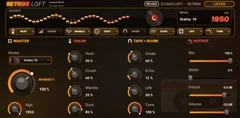
AGE stacks on top of everything else and follows INTENSITY. For a subtle "old record" feel on a full beat, keep INTENSITY around 60 % and AGE around 30 %. For a sample that should sound found in a dusty crate, push both.
Eleven media, one tap.
MEDIA is the quickest way to a character. One tap and all eight modules are set to sound like that medium: the switches, the amounts, the noise, the wobble, the filters. Then you take it from there.
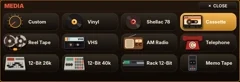
MEDIA is a starting point, not a cage. It sets the modules only at the moment you pick it: change anything you like afterwards, your changes stay until you pick a medium again. Each medium has its own animated picture on the display: the reels turn and the record spins while the sound plays.
The main page
F1 RETROX
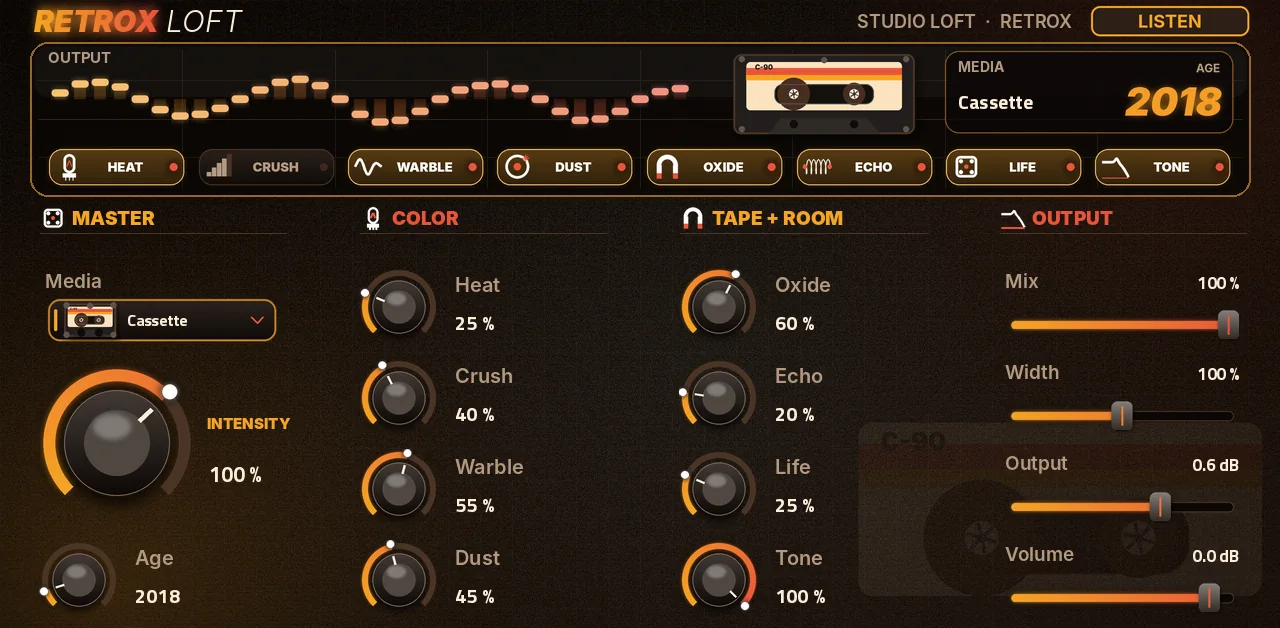 12345678910
Lo que ves
- OUTPUT curve 1 The sound coming out of Retrox, drawn live.
- Media picture 2 The current medium, animated while the sound plays.
- MEDIA and AGE 3 The medium in use and the year set by AGE (NEW to 1950).
- Module switches 4 HEAT, CRUSH, WARBLE, DUST, OXIDE, ECHO, LIFE, TONE. Tap one to turn the module on or off. The dot lights when it is on.
- LISTEN 5 Opens the listen assistant (page 13). It is on every page.
- Licence line 6 Empty when your licence is valid. When Retrox is silent, it says why and sends you to the LICENCE page (F6, second press, page 17).
- MASTER 7 Media opens the media list. Intensity scales all modules at once (0 to 150 %). Age adds years.
- COLOR 8 How much Heat , Crush , Warble and Dust you hear.
- TAPE + ROOM 9 How much Oxide , Echo , Life and Tone .
- OUTPUT 10 Mix blends dry and processed sound, Width narrows or widens the stereo (0 to 200 %), Output sets the level after the effect, Volume is your final level.
Consejo
TIP Volume is yours: presets never change it. Use Output to match the level before and after Retrox, and Mix at 40 to 60 % on drums to keep the punch of the dry hits under the grit.
Heat and Crush
F2 HEAT+CRUSH
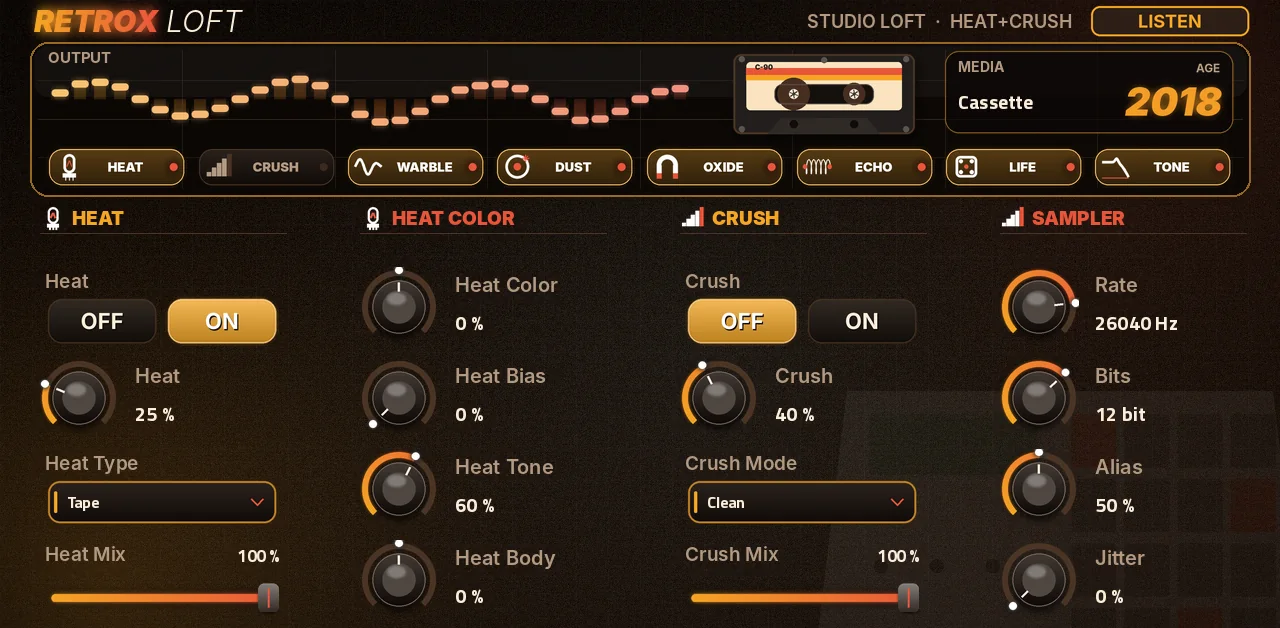 12345
Lo que ves
- Module switches 1 The same switches as on every page: the dot shows what is on.
- HEAT 2 Heat On turns the saturation on. Heat sets the drive. Heat Type picks the character (8 types, page 12). Heat Mix blends it with the clean sound.
- HEAT COLOR 3 Heat Color makes the grit brighter (+) or darker (-). Heat Bias adds the warm, uneven harmonics of a biased circuit. Heat Tone rounds off the top after the drive. Heat Body adds or removes low end before the drive.
- CRUSH 4 Crush On turns the sampler on. Crush sets how much. Crush Mode picks the sampler character (8 modes). Crush Mix blends it.
- SAMPLER 5 Rate : sample rate, 2 to 48 kHz. Bits : 4 to 16 bits. Alias : 0 keeps it clean, 100 lets the metallic folding through. Jitter : an unsteady clock for a less perfect sampler.
Consejo
TIP For drums that hit harder: Heat Type Tape or Console, Heat around 40 %, Heat Body +20 %. For the classic sampled-break sound, Crush Mode 12-Bit 26k with Alias around 60 %.
Warble
F3 WARBLE
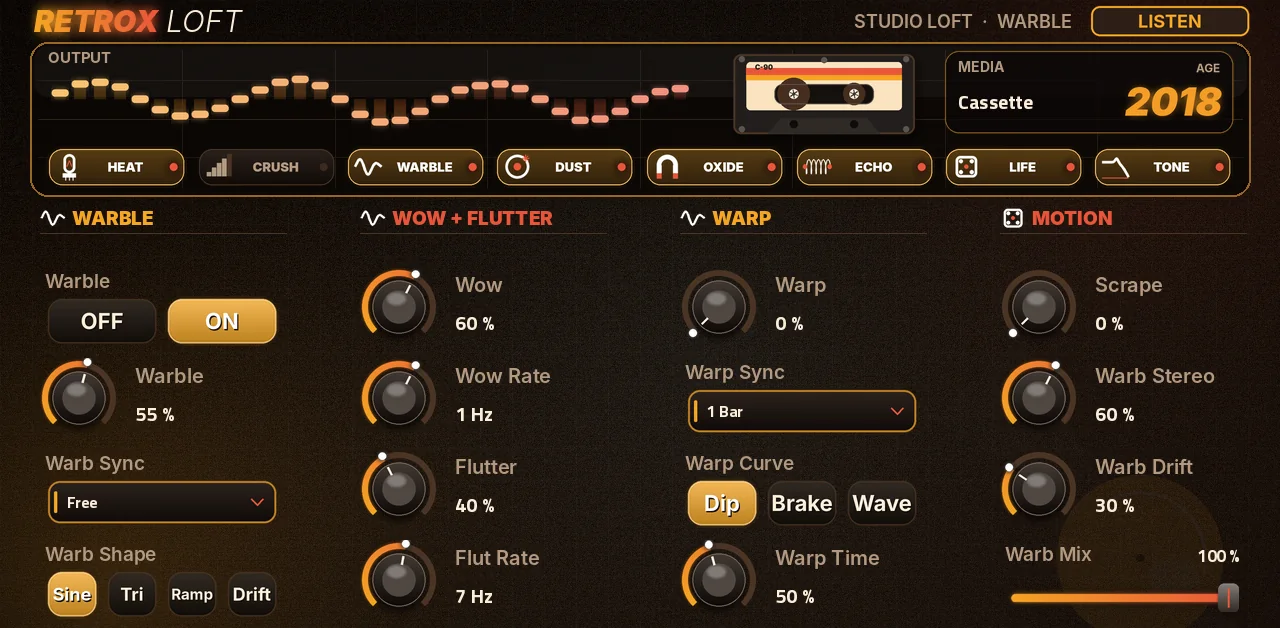 12345
Lo que ves
- Module switches 1 The same switches as on every page: the dot shows what is on.
- WARBLE 2 Warble On and Warble turn the pitch motion on and set its depth. Warb Sync locks the slow wobble to the tempo (Free, 1/16 to 4 Bars). Warb Shape : Sine, Tri, Ramp or Drift (random).
- WOW + FLUTTER 3 Wow : the slow pitch drift of a turntable or a tape, Wow Rate its speed (0.1 to 4 Hz). Flutter : the fast shiver of a tape motor, Flut Rate its speed (2 to 20 Hz).
- WARP 4 Warp : the record slows down and catches up. Warp Sync : every 1/2 to 8 bars, or Random. Warp Curve : Dip (slow down, catch up), Brake (slows to a stop), Wave (always moving). Warp Time : how much of the cycle it lasts.
- MOTION 5 Scrape : tiny fast scraping of a worn tape path. Warb Stereo : left and right move differently. Warb Drift : the wobble never repeats exactly. Warb Mix : blend with the dry sound (low values give a chorus-like shimmer).
Consejo
TIP Set Warp Sync to 4 Bars and Warp Curve to Dip on a chord loop: every four bars the record sags and comes back. Instant lo-fi movement that grooves with your beat.
Dust
F4 DUST
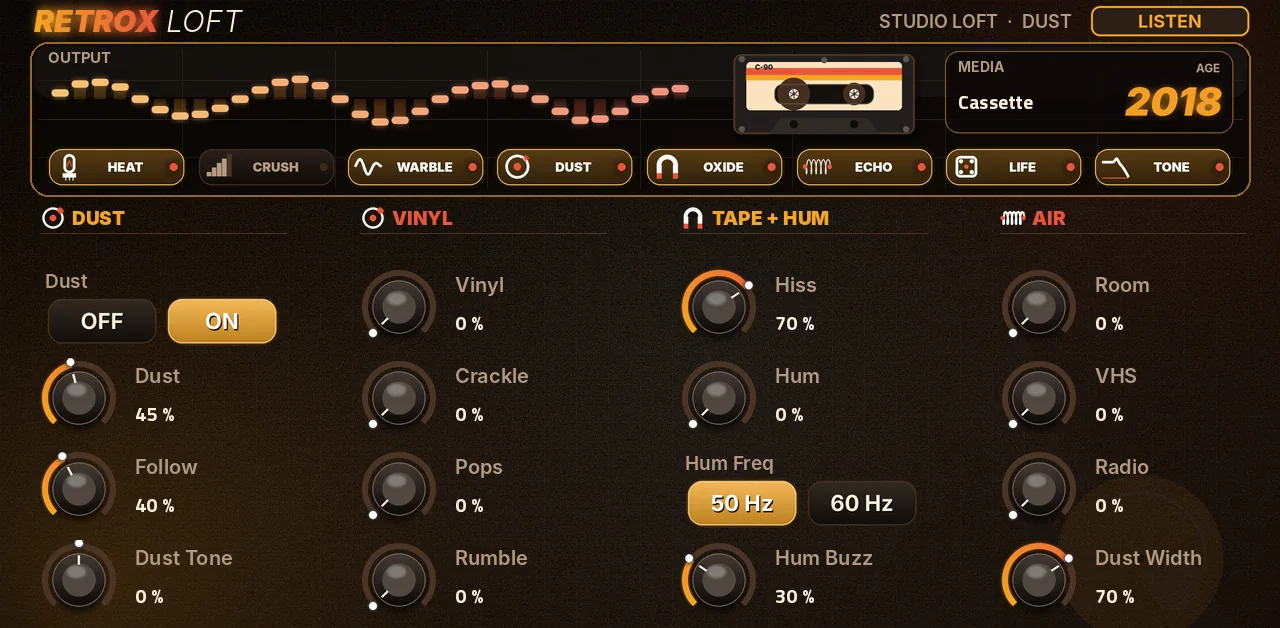 12345
Lo que ves
- Module switches 1 The same switches as on every page: the dot shows what is on.
- DUST 2 Dust On and Dust turn all the noise on and set its level. Follow : at 0 the noise is constant, at 100 it only plays with your sound. Dust Tone : darker (-) or brighter (+) noise.
- VINYL 3 Vinyl : the surface of the record. Crackle : small clicks. Pops : bigger pops. Rumble : the low rumble of a turntable motor.
- TAPE + HUM 4 Hiss : cassette hiss. Hum : mains hum, at Hum Freq 50 Hz or 60 Hz. Hum Buzz : adds the buzzy harmonics of a ground loop.
- AIR 5 Room : the tone of an empty room. VHS : the whine and noise of a video tape. Radio : radio static that comes and goes. Dust Width : how wide the noise sits in the stereo.
Consejo
TIP On a full beat, raise Follow to 70 % or more: the crackle sits inside the music and the breaks stay quiet. In the listen assistant, FOLLOW LEVEL goes one step further (page 13).
Oxide and Echo
F5 OXIDE+ECHO
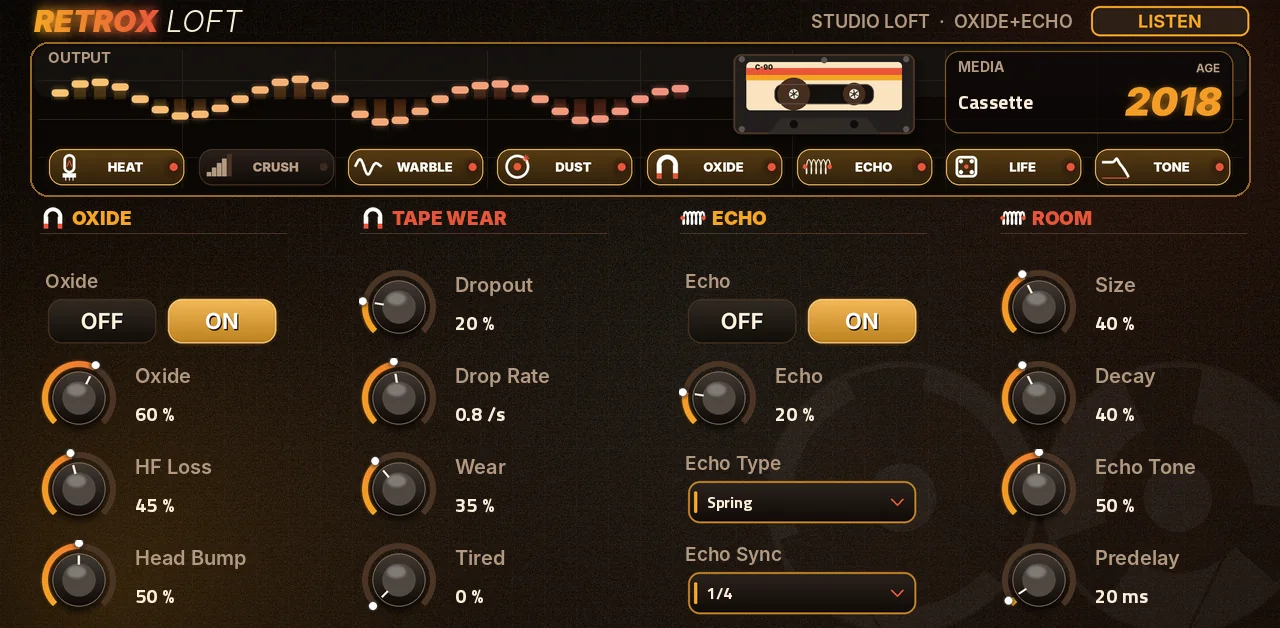 12345
Lo que ves
- Module switches 1 The same switches as on every page: the dot shows what is on.
- OXIDE 2 Oxide On and Oxide turn the tape wear on and set it. HF Loss : the top end a tired tape loses. Head Bump : the low-end lift of a tape head.
- TAPE WEAR 3 Dropout : short drops in level, Drop Rate how often (0.1 to 8 per second). Wear : a crinkled tape, uneven and crackly. Tired : a soft, saturated, breathing tape.
- ECHO 4 Echo On and Echo turn the space on and set how much. Echo Type : Plate, Spring, Room, Chamber, Tape Echo, Cassette Echo. Echo Sync : echo time on the tempo (Free, 1/16 to 1/2, with triplets and dotted).
- ROOM 5 Size and Decay : size and length of the space. Echo Tone : darker or brighter repeats. Predelay : delay before the reverb; with Echo Sync on Free, it is also the echo time (0 to 500 ms).
Consejo
TIP For a dub vocal throw: Echo Type Tape Echo, Echo Sync 1/8D, Decay around 60 %, Echo Tone low. Add a touch of Dropout and the repeats sound like they come from an old machine.
Life and Tone
F6 LIFE+TONE
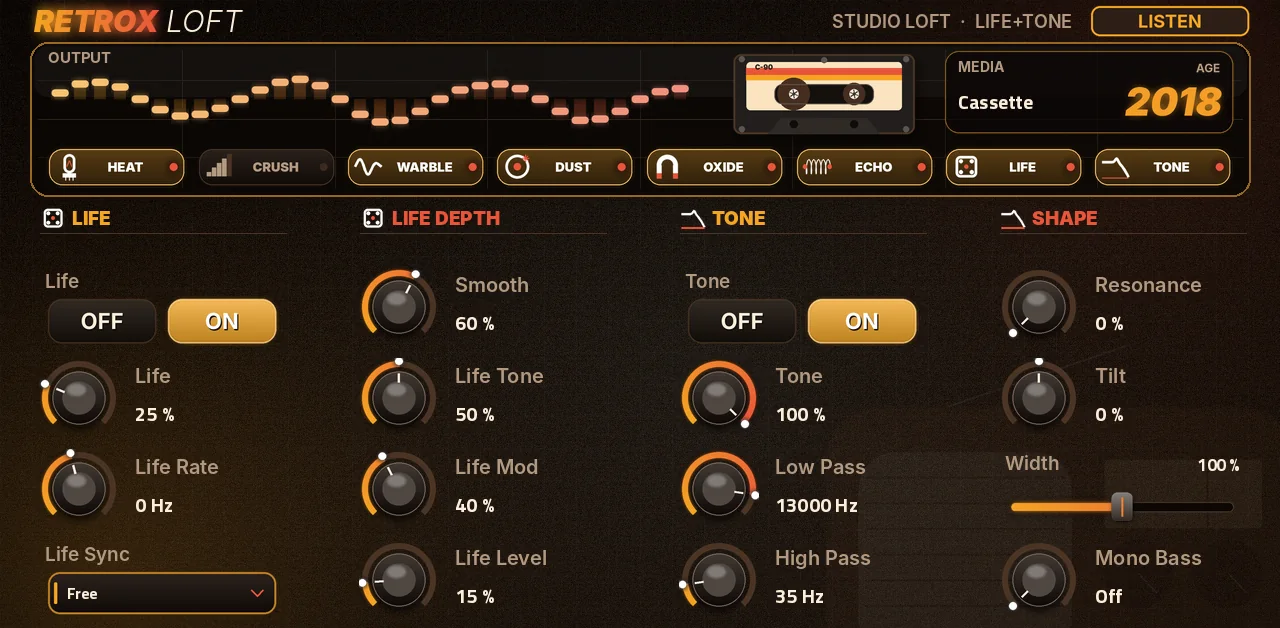 12345
Lo que ves
- Module switches 1 The same switches as on every page: the dot shows what is on.
- LIFE 2 Life On and Life : seven slow random movers make the other modules drift. Life Rate : how fast (0.05 to 8 Hz), or Life Sync to lock it to the tempo.
- LIFE DEPTH 3 Smooth : gentle glides or sudden changes. Life Tone : how much the filter moves. Life Mod : how much dust, warble, heat, crush and oxide move. Life Level : how much the volume moves.
- TONE 4 Tone On and Tone turn the final filters on and set how much of them you hear. Low Pass (800 Hz to 20 kHz) and High Pass (20 Hz to 1 kHz) shape the band.
- SHAPE 5 Resonance : a resonant peak on the filters. Tilt : darker or brighter in one move. Width : stereo width. Mono Bass : everything below this frequency becomes mono (Off to 500 Hz).
Consejo
TIP On a master or a bus, Mono Bass at 120 Hz keeps the low end solid under all the wobble. Life Level at 10 to 20 % gives a loop the slow breathing of an old tape.
Choosing from a list
F1 THE LISTS
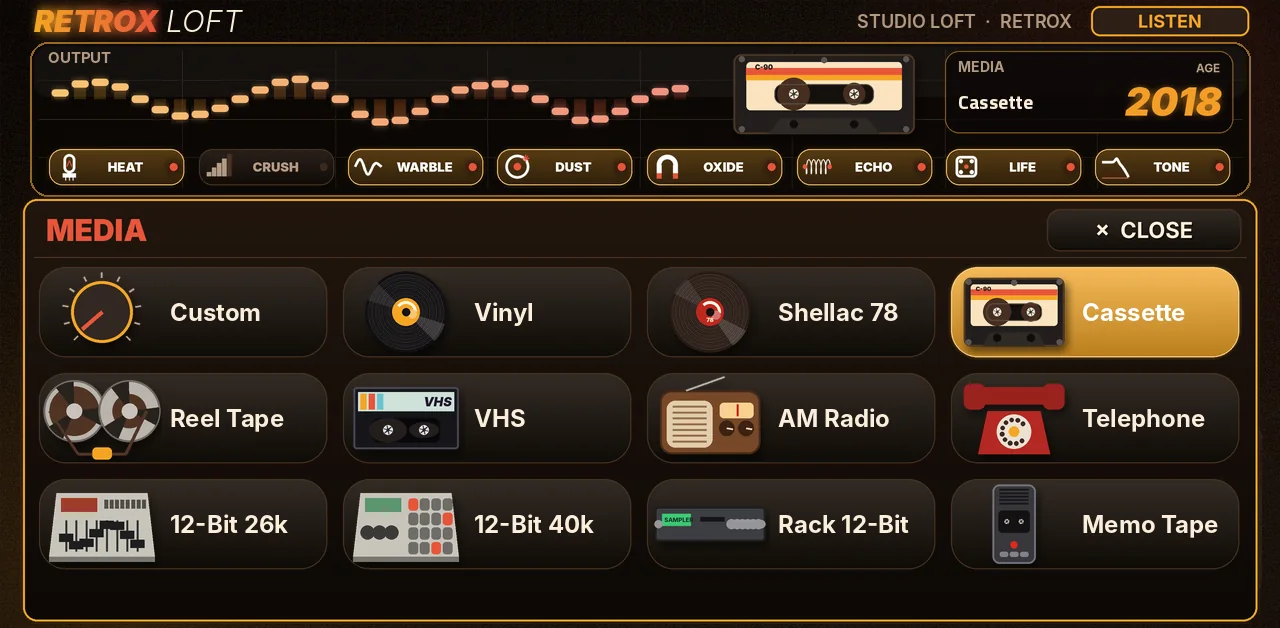 123
Lo que ves
- MEDIA title 1 The name of the setting you are choosing.
- CLOSE 2 Closes the list without changing anything.
- Current choice 3 Highlighted in amber. Tap any other box to choose it.
Consejo
TIP Choices with up to four options (Warb Shape, Warp Curve, Hum Freq and the On switches) are shown as buttons right on the page: one tap and you are done.
All the other lists
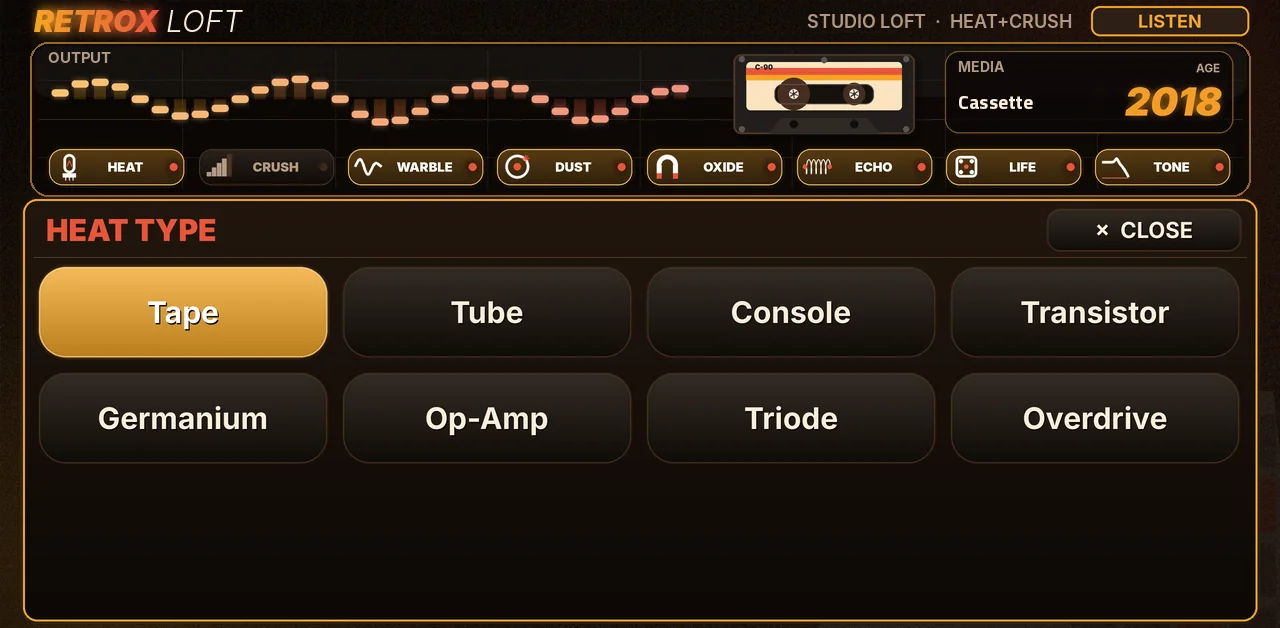
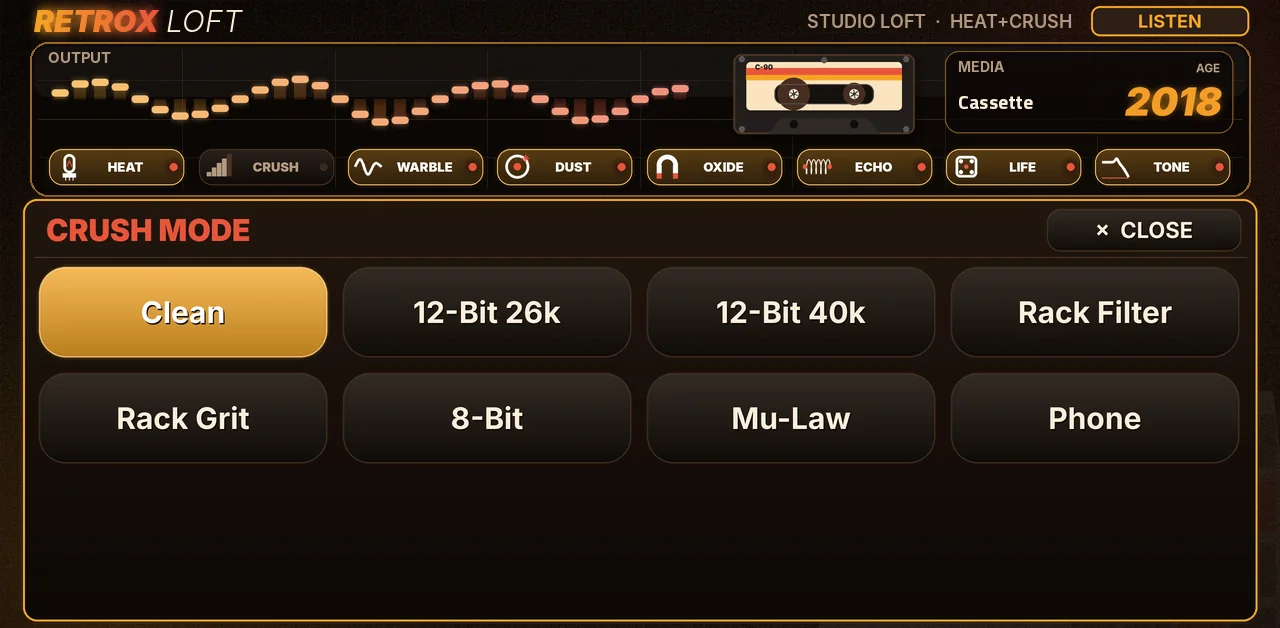
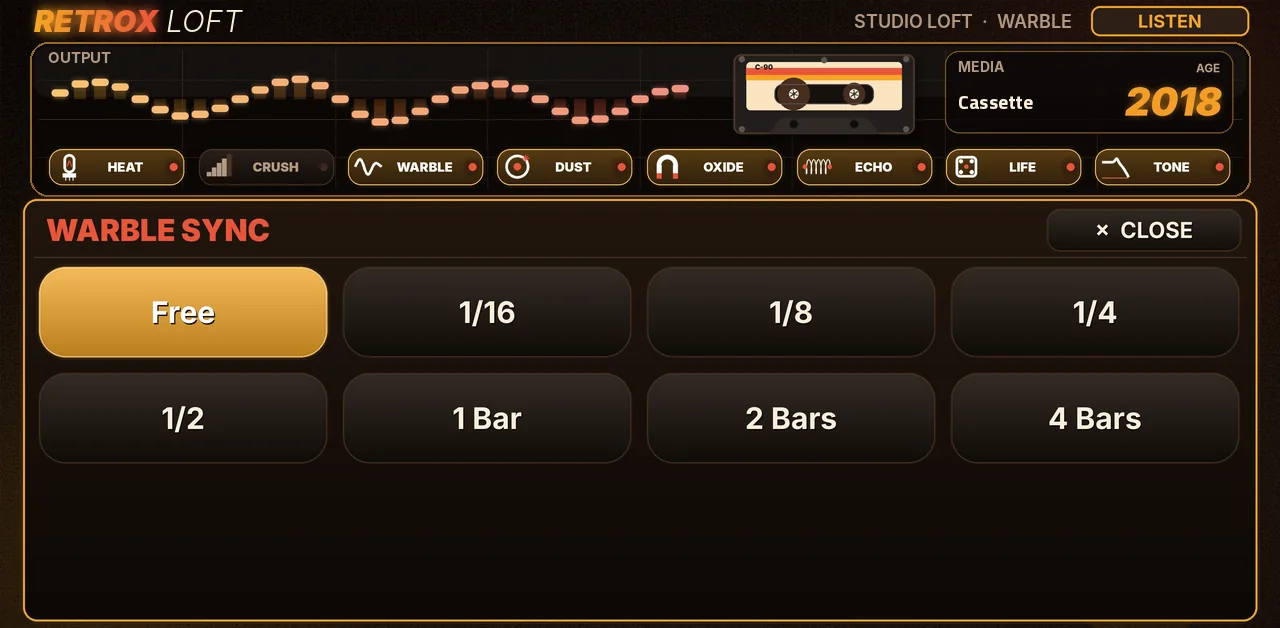
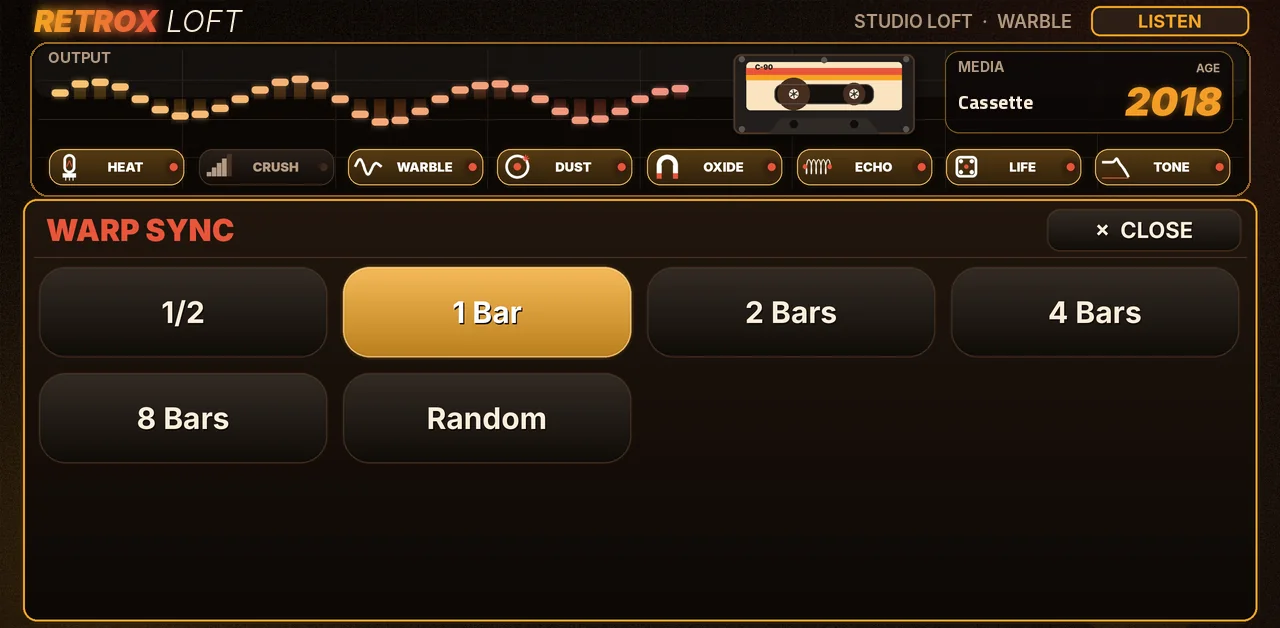
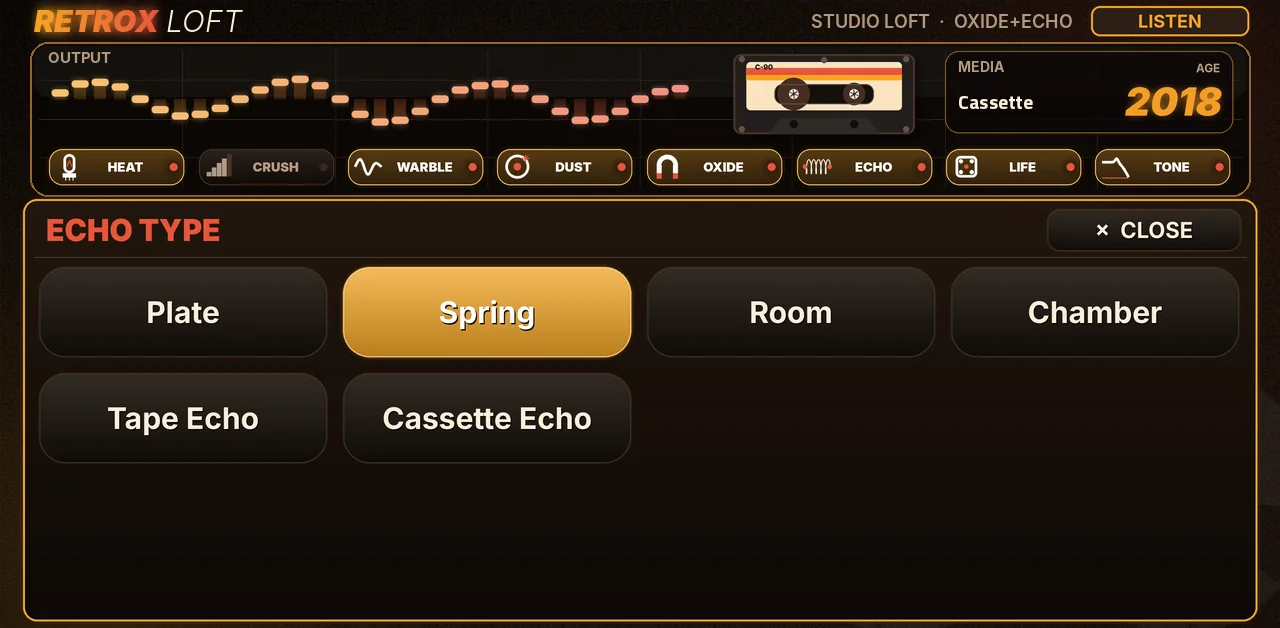
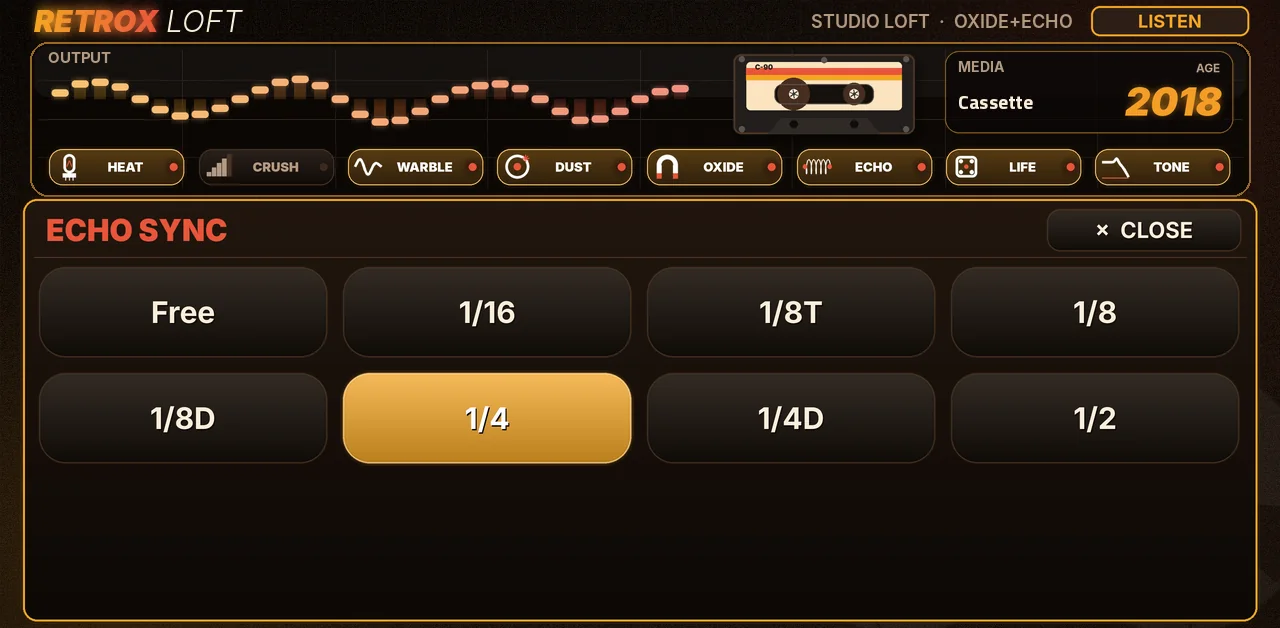
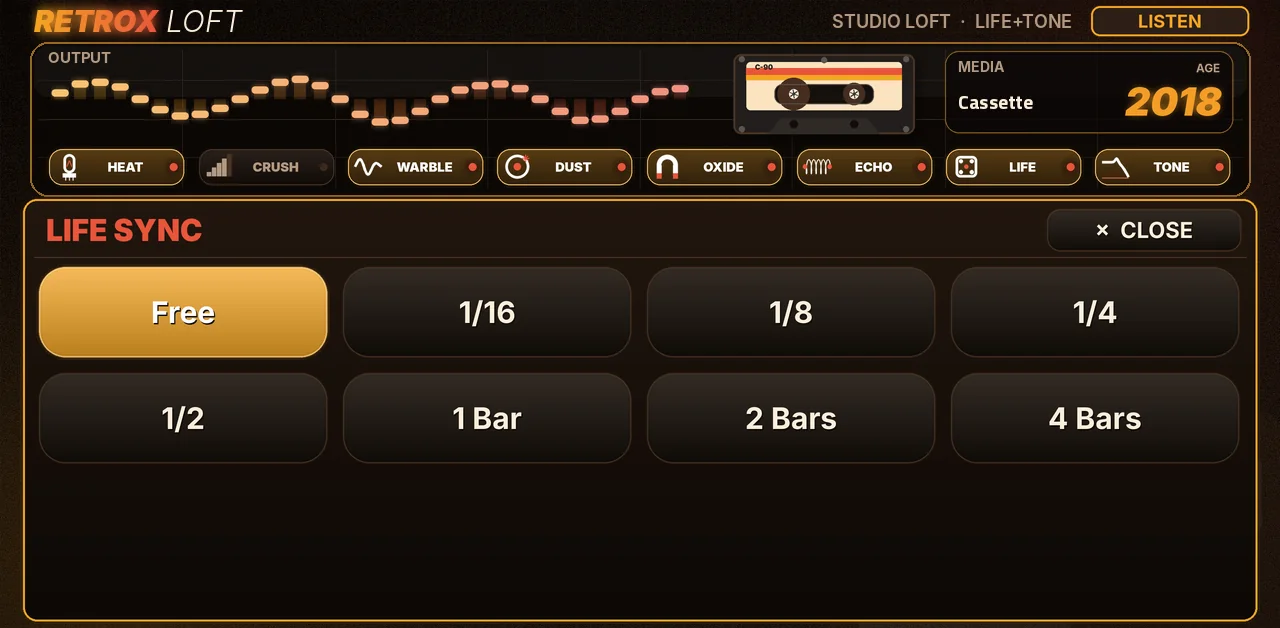
Free means the module runs on its own rate knob. Any other value follows the tempo of your MPC, and stays in time when you play the sequence.
The listen assistant
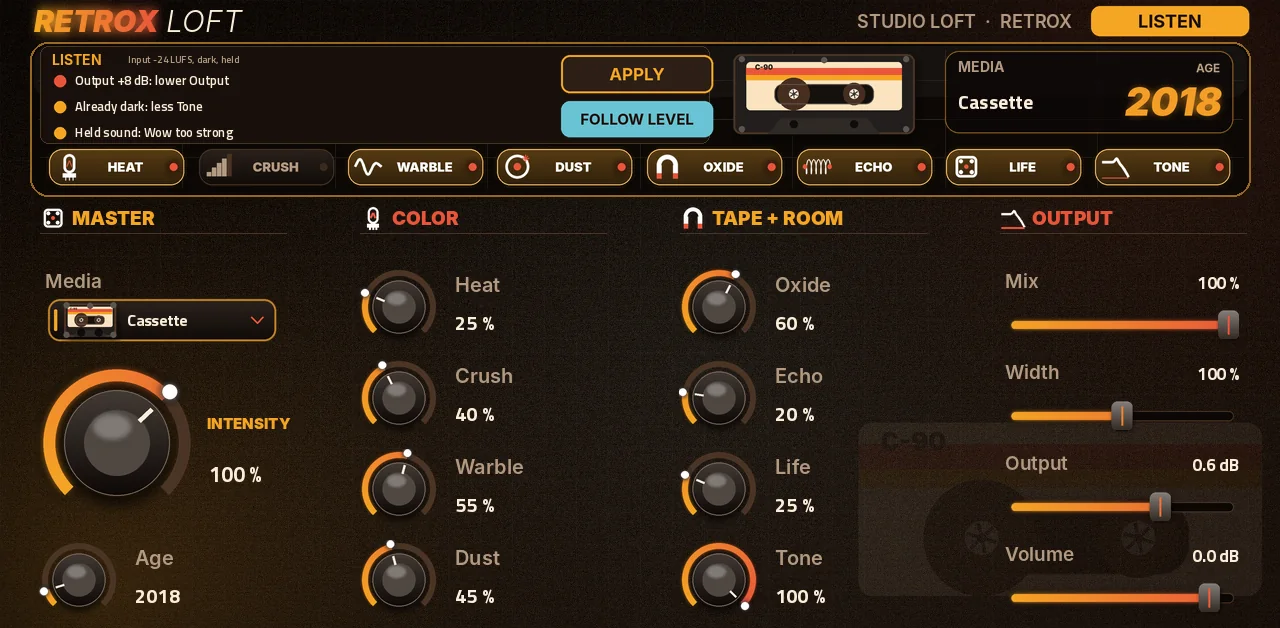
Not sure what your sound needs? Tap LISTEN , play your sound, and Retrox measures it for 15 seconds: input and output, level, brightness, low end, noise. Then it tells you, in plain words, what it would change.
 12345
Lo que ves
- Listen line 1 What was measured: loudness of the input and its character (dark, bright, neutral, held, punchy).
- Advice 2 Up to three lines, each with a coloured dot.
- Action button 3 STOP, APPLY, UNDO or LISTEN AGAIN, depending on the step.
- FOLLOW LEVEL 4 When on, the dust follows the level of your input: quieter sound, quieter dust.
- LISTEN 5 Opens and closes the panel.
Listen, step by step
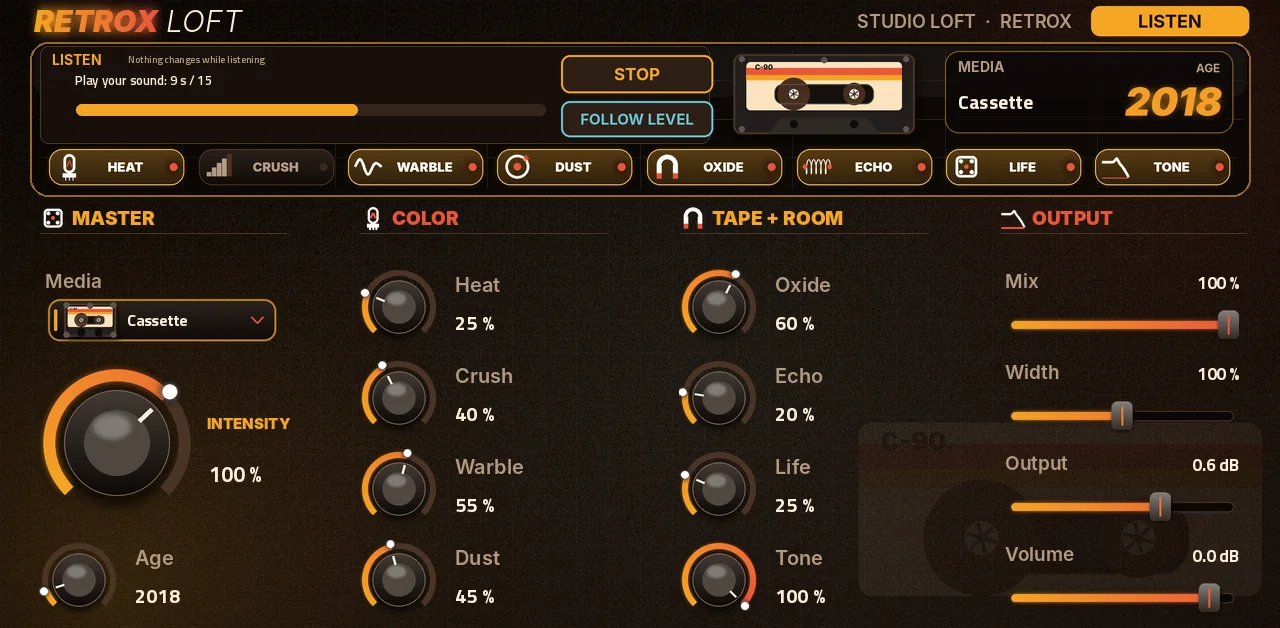
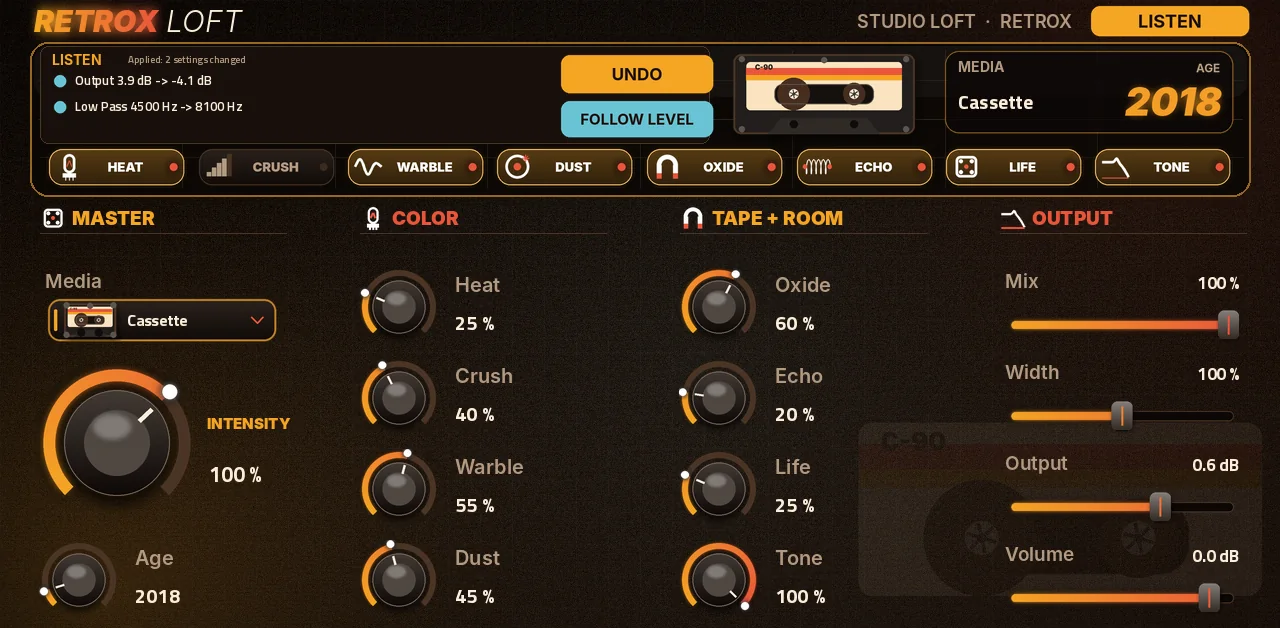
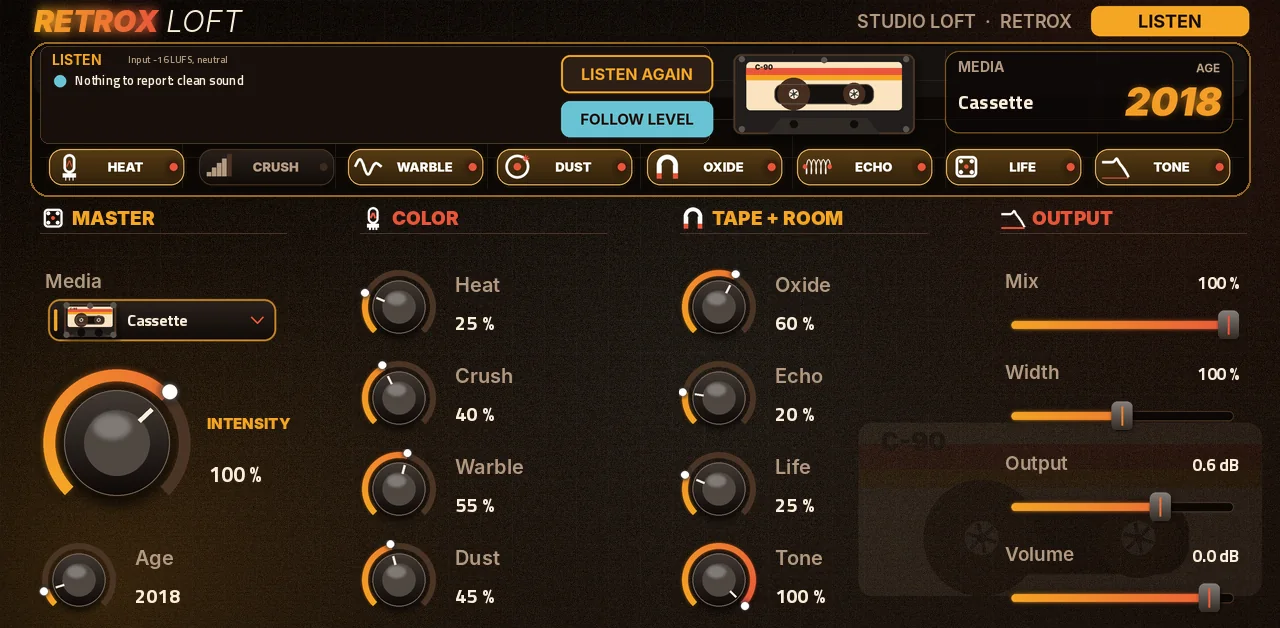
What it feels like
You have pushed AGE and DUST on a sample and the mix suddenly feels loud and muddy. LISTEN, play eight bars, and Retrox tells you: "Output +8 dB: lower Output". APPLY. The level is matched, you hear the colour, not the volume. That is the point: judge the vibe, not the loudness.
Run LISTEN after big moves (a new medium, AGE pushed far, a lot of HEAT). It catches the classic traps: too loud after the effect, lows that spread in stereo, hiss louder than the music, a sound already dark that gets darker.
Fact sheet
For who, for what
- Lo-fi and chill beats: tape hiss, vinyl crackle and wobbly keys in seconds.
- Boom bap and sampling: 12-bit grit, dusty breaks, sounds that feel dug from a crate.
- Bus and master colour: gentle tape and console warmth, mono lows, a vintage sheen.
Strengths
- Eight modules in a real signal chain, each with its own switch and amount.
- MEDIA sets the whole chain to one of 11 media in one tap.
- AGE: one knob from today to 1950, with the year on the display.
- Warble, warp, echo and motion lock to the tempo of the MPC.
- LIFE keeps every module slowly moving, so the sound never freezes.
- LISTEN measures your sound and fixes level and balance traps in one tap.
Numbers
| Modules | 8 + LIFE motion |
| Media | 11 (+ Custom) |
| Presets | 118 in 14 categories |
| Sound settings | 87 |
| Saturation types | 8 |
| Sampler modes | 8 |
| Spaces | 6 reverbs and echoes |
| Pages | 6 (F1 to F6) + LICENCE |
| Type | Stereo effect |
| Size | 19 MB installed |
| Runs on | MPC standalone, MPC OS 3.10.1 or later |
Get started
- Install: copy the folder Studio Loft - VST - Retrox Loft into VST2 Plugins on your MPC drive. In Preferences, enable external plugin support.
- Load: add Retrox Loft as an insert effect on a track, a pad, a bus or the master.
- Play: pick a MEDIA, set INTENSITY, turn AGE. Then LISTEN.
118 presets
118 presets in 14 categories, from subtle bus colour to full sound design. On the plugin they show as CATEGORY - Name.
INIT 1
- Init
DRUMS 10
- Dusty Bus
- 12-Bit Punch
- Crushed Room
- Tape Smack
- Lo Kit
- Breakbeat 70s
- Spring Snare
- Mono Funk
- Bit Grit
- Wobbly Hats
BOOMBAP 10
- Basement Dust
- 26k Swing
- Pad Thump
- Basement Tape
- Golden Era
- Grimy Loop
- Jazz Digger
- Queens Bridge
- Head Nod
- Dirt Nails
LOFI 12
- Study Tape
- Rainy Window
- Warped Keys
- Sleepy Vinyl
- Bedroom Beat
- Faded Photo
- Chill Drift
- Melting Tape
- Cozy Hiss
- Night Bus
- Instant Photo
- Dreamy Wash
SAMPLE 10
- Crate Find
- Rack Filter
- 26k Resample
- 40k Feel
- Pitched Down
- Soul Chop
- Library LP
- 8-Bit Sampler
- Mono Archive
- Dirty Chop
KEYS 9
- E-Piano Tape
- Reed Warble
- Upright Dust
- Wonky Piano
- Toy Piano Bits
- Organ Spring
- Cassette Keys
- Synth Seasick
- Felt Memory
VOX 8
- AM Singer
- Telephone
- Old Crooner
- Tape Double
- Megaphone Lo
- Memo Tape
- Ghost Echo
- Radio Host
BASS 7
- Tape Warmth
- Vinyl Sub
- 12-Bit Low
- Fuzz Box
- Dub Wobble
- Mono Console
- Crushed 808
PAD 8
- Faded Strings
- VHS Dream
- Tape Choir
- Underwater
- Drifting Haze
- Broken Reel
- Space Cassette
- Old Film
MASTER 9
- Gentle Tape
- Glue Console
- Vintage Sheen
- Lo-Fi Bus
- Vinyl Master
- Mono Below 120
- Analog Sum
- Half Inch
- Warm Glow
TAPE 9
- Cassette
- Reel to Reel
- Chewed Tape
- Tired Ferric
- Low Battery
- Dropouts
- Saturated 15ips
- Answering Mach
- Echo Chamber
VINYL 9
- Clean Pressing
- Worn 45
- Shellac 78
- Dusty Groove
- Warped Record
- Turntable Stop
- Crackle Only
- Jazz Record
- Gramophone
RADIO 6
- AM Station
- Tuning Static
- Walkie Talkie
- Old Wireless
- Party Line
- Shortwave
FX 10
- Time Machine
- 1950 Broadcast
- Tape Stop Loop
- Seasick
- Bit Rot
- Haunted Spring
- Glitchy VHS
- Underwater Radio
- Dying Battery
- Infinite Echo
Licencia y activación
Tuyo en tres pasos.
Compra
Paga una vez en este sitio. Tu enlace personal llega por e-mail y sigue siendo válido.
Instala Loft Hub
MPC OS 3.10.1 o posterior, con Enhancements y External Plugin Support activados en Preferences. Copia Loft Hub una vez al disco de tu MPC.
Vincula y toca
En Loft Hub, acepta, vincula tu MPC y tus plugins se instalan solos. Funciona en dos MPC. Y ya está.
Licence and activation
F6 · 2× LICENCE
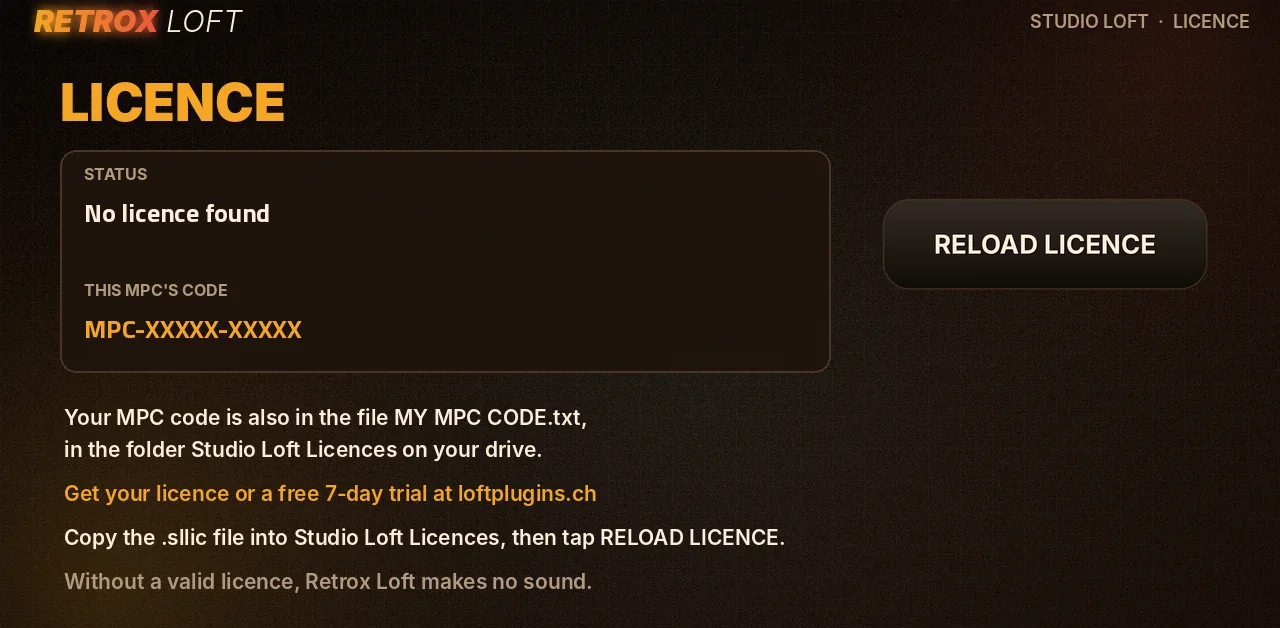 1234
Lo que ves
- STATUS 1 No licence found, Licensed: your name.
- THIS MPC'S CODE 2 The code of this MPC (here a fake one). You need it on the website.
- RELOAD LICENCE 3 Reads the licence files again, right after you copy a new one. Tap it or click the data wheel.
- Help lines 4 Where to find your code, where to get a licence, what to do with it.
Consejo
One purchase works on 2 MPCs . Without a valid licence Retrox is silent, and a red line at the top of every page says why and where to go, for example No licence: see LICENCE page . No internet connection is needed on the MPC.
Tuyo
Retrox Loft
Calor, crush, ondulación, polvo y óxido para cualquier sonido.
Un solo pago, tuyo para siempre. Tu licencia funciona en dos MPC.