Instrument · versione 1.5.1
Bass Loft
REAL ELECTRIC BASSES, PLAYED THE WAY A BASSIST PLAYS THEM.
Hit a pad softly and the finger barely touches the string: a ghost note. Hit it normally and you get a round finger note. Hit it hard and the string snaps. With Technique on Auto , your velocity is the technique.
3 = $993 plugin a scelta a $99 →
A funk line where soft hits turn into ghost notes and hard hits pop, with a hammer-on and a slide into each turnaround.
Il manuale
Ogni schermata,
pagina per pagina.
La guida completa, schermata per schermata, esattamente come sulla MPC. I nomi dei parametri restano le parole inglesi dello schermo.
The thing you feel first
It plays like a bassist. Not like a sample.
Hit a pad softly and the finger barely touches the string: a ghost note. Hit it normally and you get a round finger note. Hit it hard and the string snaps. With Technique on Auto, your velocity is the technique.
soft hits
Legato that slides
Play two notes that overlap: Bass Loft links them. A tone or less becomes a hammer-on, a bigger jump becomes a slide, with the finger noise on the string.
A hand on a neck
Each note is placed on a string like a bassist would, near where the hand already is. High on the neck the sound gets rounder.
Never twice the same
Several takes per note, two velocity layers blended, and Humanize adds the small changes of a real player.
Program a simple one-bar line, play the in-between notes softly, overlap two notes before the turnaround. Hit play. It grooves like a player sitting in the room, and you did not touch a single setting.
Try this first
Load FUNK - Ghost Pocket, play octaves A1 / A2 on two pads and add soft hits on a third pad in between. Then try SOUL - Fretless Dream with long overlapping notes.
Listen
It listens. And tells you.
Press F6 twice to open LISTEN. It follows what you play and what comes out of Bass Loft. It never changes anything by itself, it just tells you what it notices, in plain words.
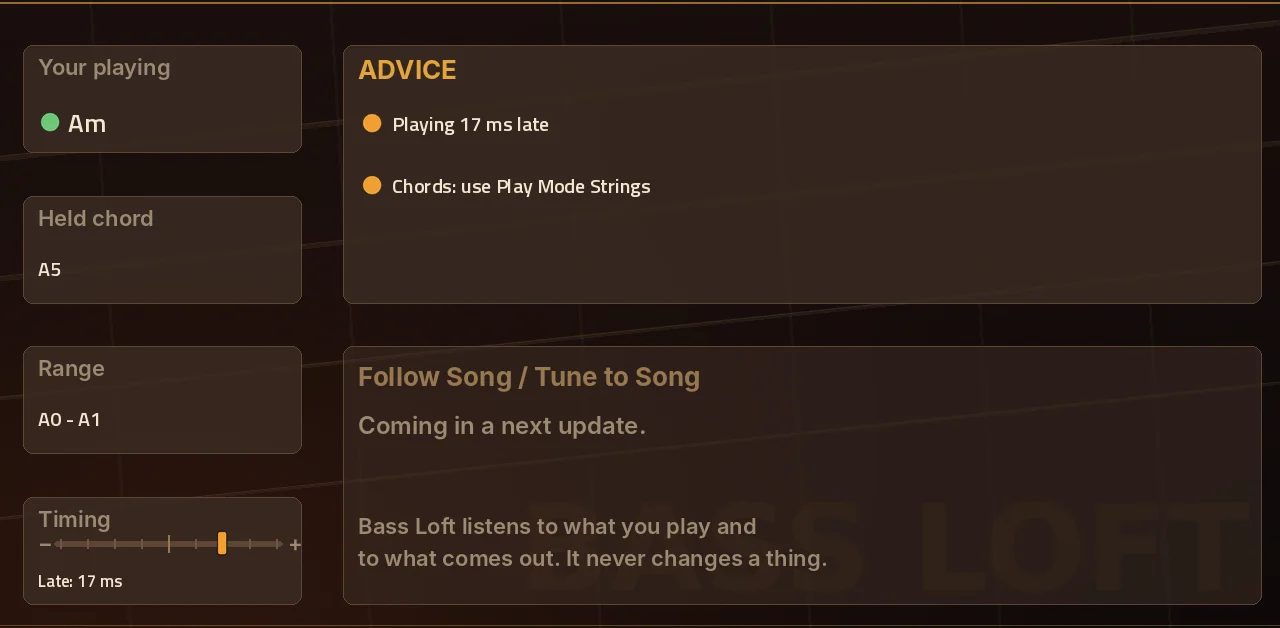
It also tells you the key you play in, the chord you hold, the range you use, and checks the output: clipping, too loud, lows not mono.
The sound
The signal chain
Every bass is a recorded instrument, note by note, with its own string count and character.
Round Twin
Two single-coil pickups, round-wound strings. The all-rounder.
Funk, rock, anything
Five Dark
Low B string, real ghost notes, staccato and behind-the-bridge attacks.
Modern funk, neo-soul, R&B, rap
Flat Soul
Old flatwound strings, neck pickup, warm and short.
Sixties soul, boom bap
Muted Pick
Baritone bass, picked, muted with foam.
Session soul, garage
Flat Finger
Baritone bass, flatwounds, played with fingers.
Sixties soul, jazz rap
Rock Pick
Baritone bass, flatwounds, picked near the bridge.
Rock, punk, new wave
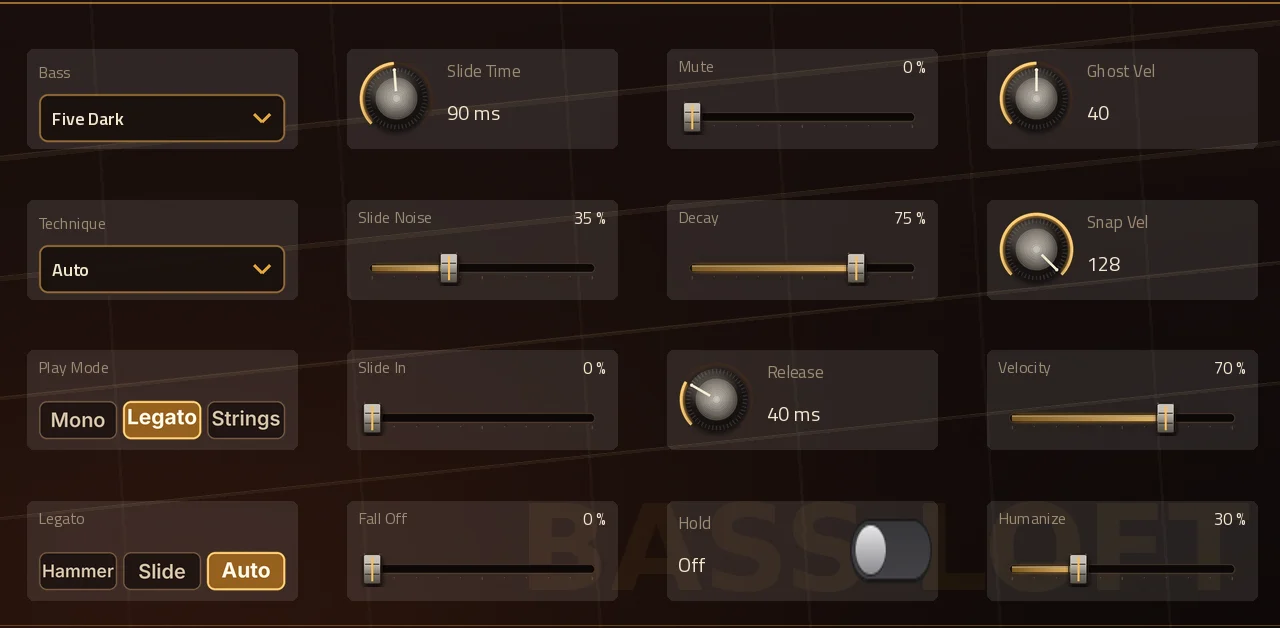
Six pages of sound controls, laid out in columns of four: each column is one bank of Q-Links, so what you see is what you turn.
What you see
 12345678910111213141516
A cosa serve
Your home page. Choose the bass and how it is played: technique, legato, attack and release. This is where a bass line starts to feel human.
Consiglio
For a funk line that breathes, keep Technique on Auto, set Ghost Vel around 35 and play the in-between notes softly: they turn into real ghost notes.
- 1Bass Picks one of the six recorded basses. Touch it for the list.
- 2Slide Time How long a legato slide takes, 15 to 600 ms.
- 3Mute Palm on the strings: shorter, rounder notes.
- 4Ghost Vel With Technique on Auto: hits at or below this velocity become ghost notes.
- 5Technique How the string is played: Finger, Staccato, Ghost, Palm Mute, Snap, or Auto (velocity decides).
- 6Slide Noise Finger noise on the wound string during a slide.
- 7Decay How long a held note rings before it fades.
- 8Snap Vel With Technique on Auto: hits at or above this velocity become snapped attacks.
- 9Play Mode Mono, Legato (linked notes become hammer-ons or slides) or Strings (one note per string, chords ring).
- 10Slide In Strong notes slide in from below, like a bassist reaching for them.
- 11Release How fast the note stops when you let go of the pad.
- 12Velocity How much your playing strength changes the level.
- 13Legato In Legato mode: Hammer, Slide, or Auto (a tone or less is a hammer-on, more is a slide).
- 14Fall Off The pitch drops a little when the note is released.
- 15Hold On: the note sustains almost forever (pads, drones, long tails).
- 16Humanize Small changes in timing, strength and tuning from note to note.
Menus
Pick from a list
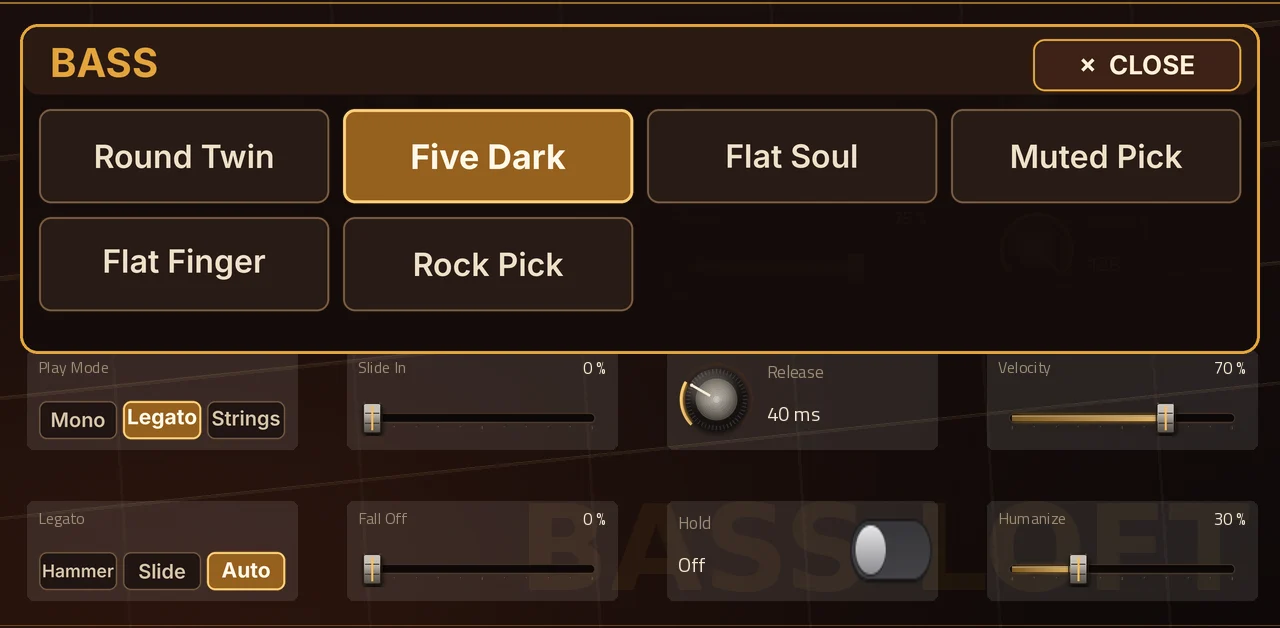
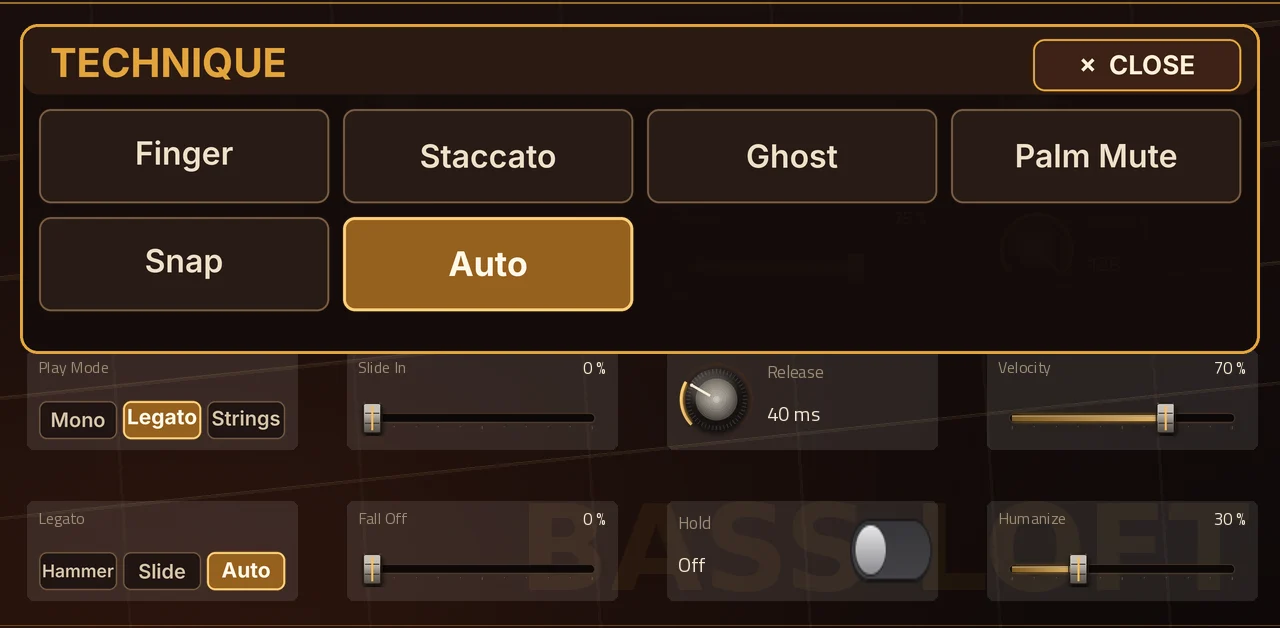
Every menu of Bass Loft opens its own page of large buttons: 1 the list name, 2 the choices (the current one is lit), 3 CLOSE.
Bass list
Touch Bass on the PLAY page, or click the data wheel on it: the six basses appear as large buttons. Touch one to load it, or CLOSE.
Technique list
Same gesture on Technique. Auto lets your velocity choose between ghost notes, fingers and snaps.
Menus
Pick from a list
Every menu of Bass Loft opens its own page of large buttons: 1 the list name, 2 the choices (the current one is lit), 3 CLOSE.
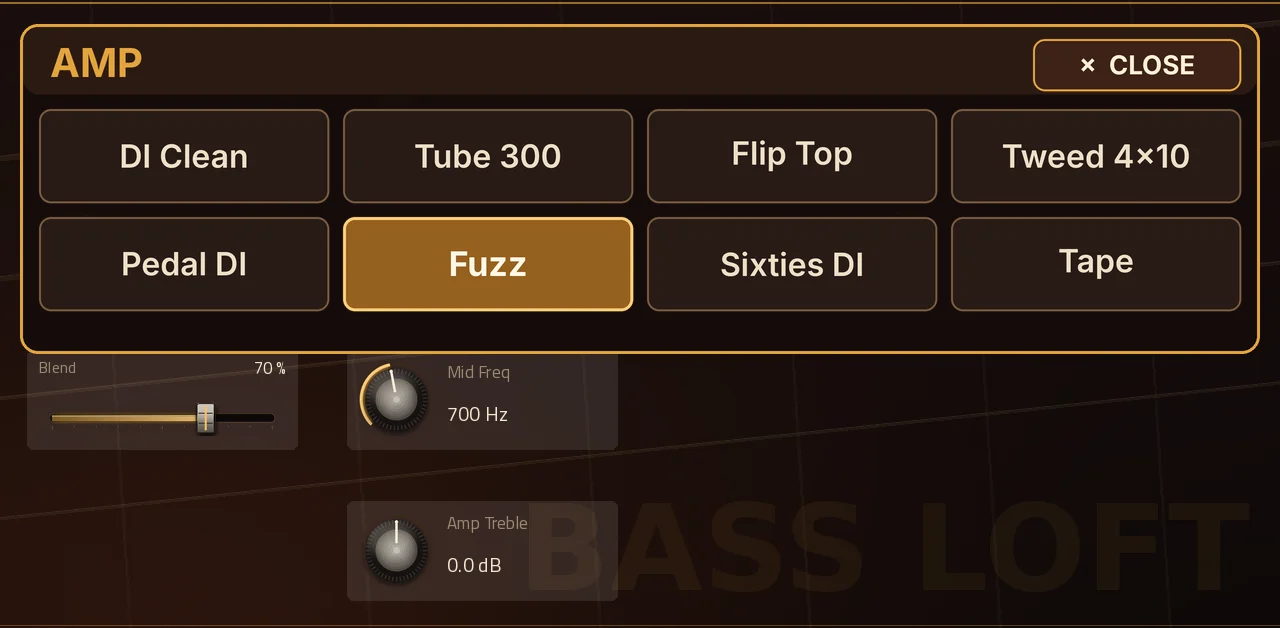
Amp list
The eight amp models, from the clean DI to the fuzz and the tape machine.
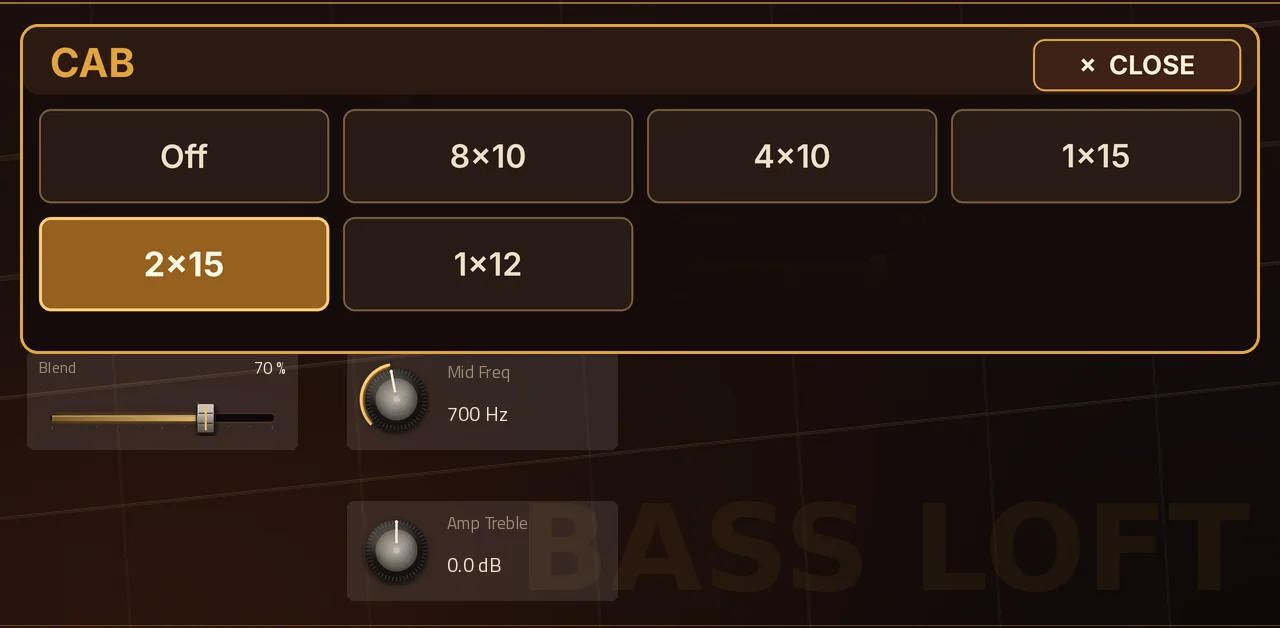
Cab list
Five cabinets, or Off for a pure DI sound.
Menus
Pick from a list
Every menu of Bass Loft opens its own page of large buttons: 1 the list name, 2 the choices (the current one is lit), 3 CLOSE.
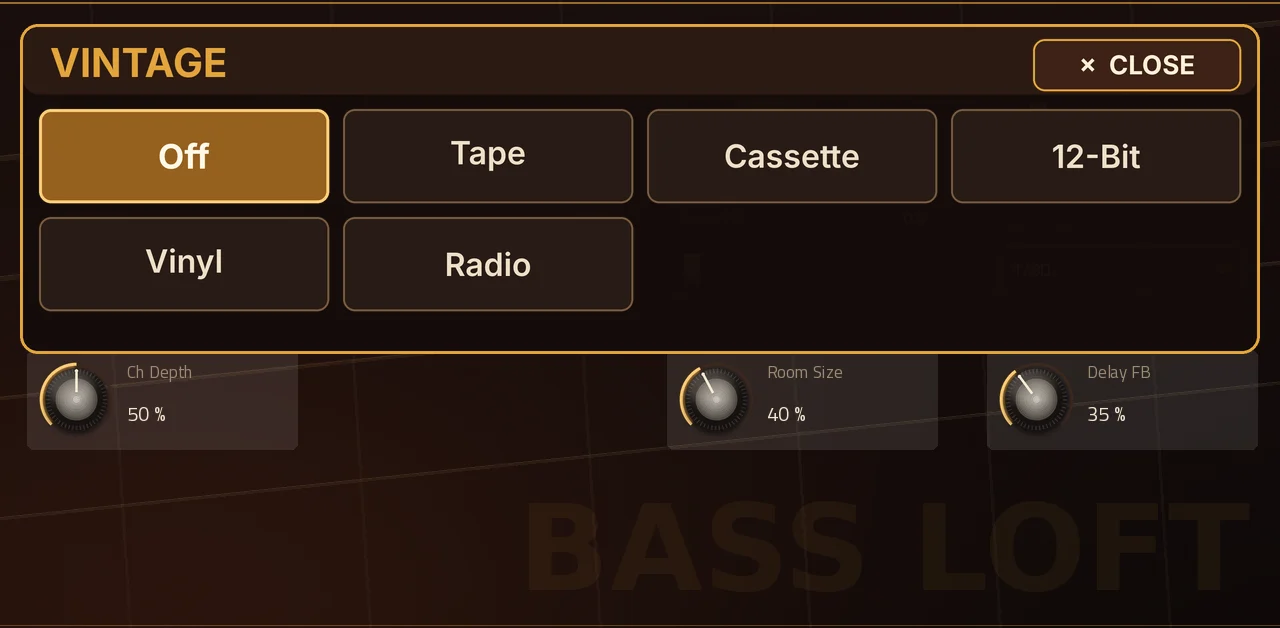
Vintage list
Five kinds of character: Tape, Cassette, 12-Bit, Vinyl and Radio.
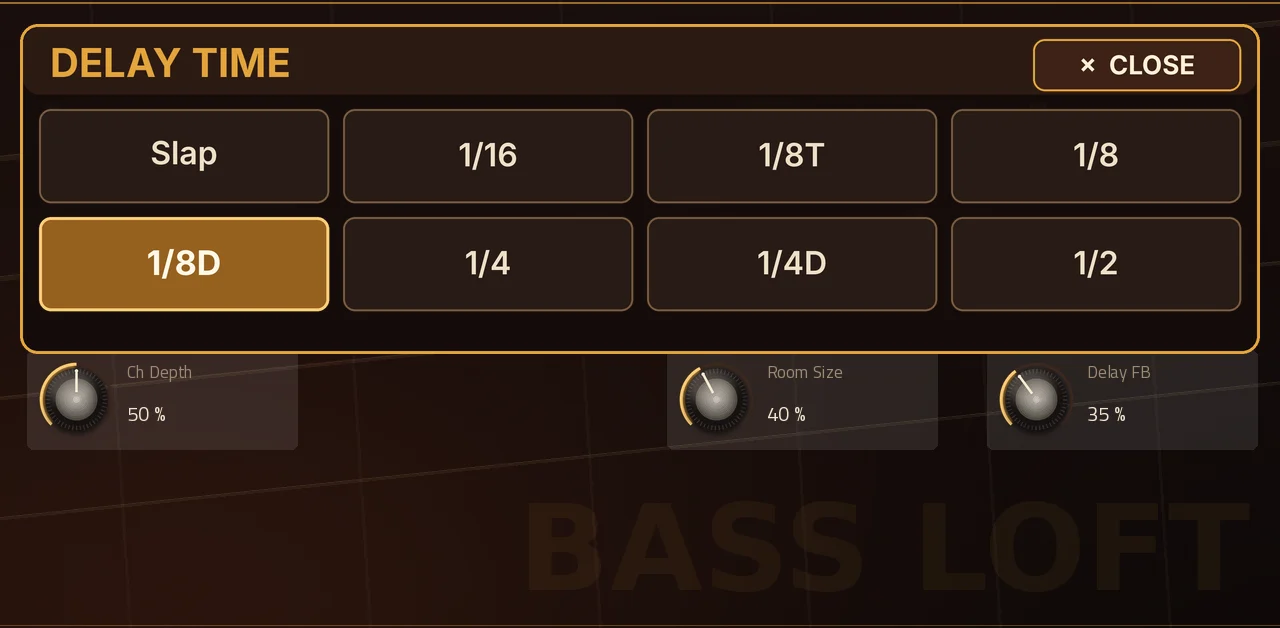
Delay Time list
Echo times locked to the tempo of your MPC.
What you see
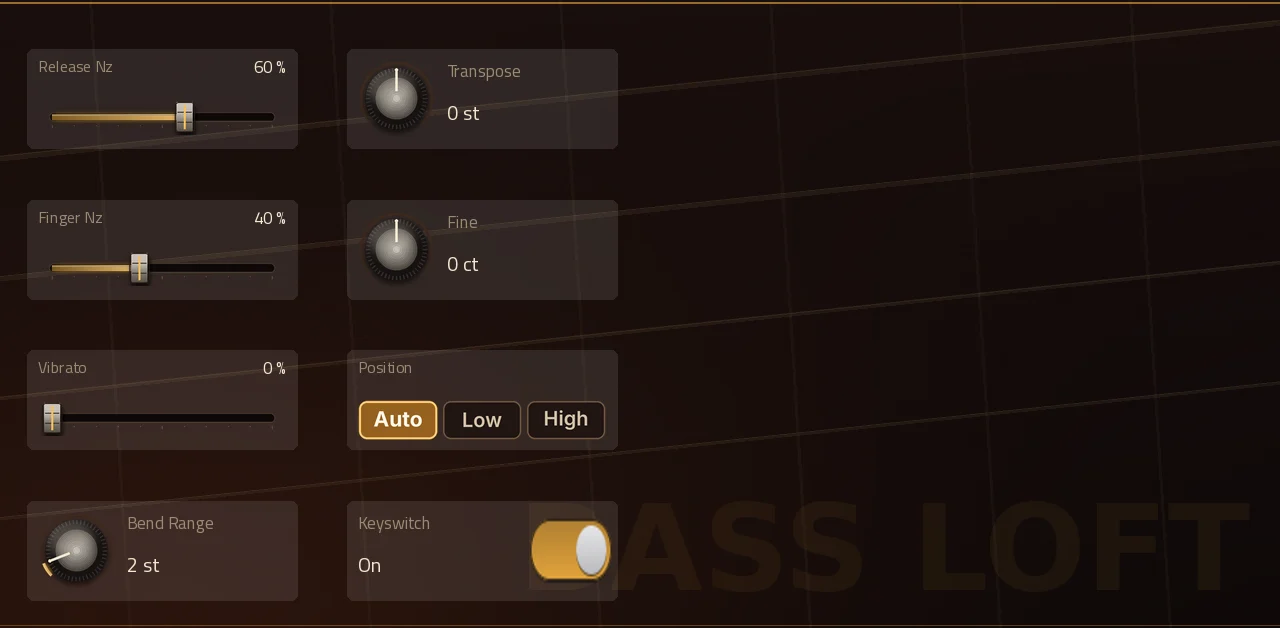 12345678
A cosa serve
The details of a real performance: string and finger noises, vibrato, pitch bend, tuning, hand position and keyswitches.
Consiglio
Turn Keyswitch on and record C0 to F0 on a spare pad row: you can switch from Finger to Palm Mute inside the same pattern.
- 1Release Nz The real sound of the string being let go.
- 2Transpose Moves every note up or down, -24 to +24 semitones.
- 3Finger Nz The finger touching the string before the note.
- 4Fine Fine tuning, -50 to +50 cents.
- 5Vibrato Vibrato amount. The mod wheel and aftertouch add more.
- 6Position Where the hand sits on the neck: Auto, Low (open, punchy) or High (rounder, softer).
- 7Bend Range Pitch bend range, 1 to 12 semitones.
- 8Keyswitch On: the low notes C0 to F0 switch the technique while you play (C0 Finger to F0 Auto).
What you see
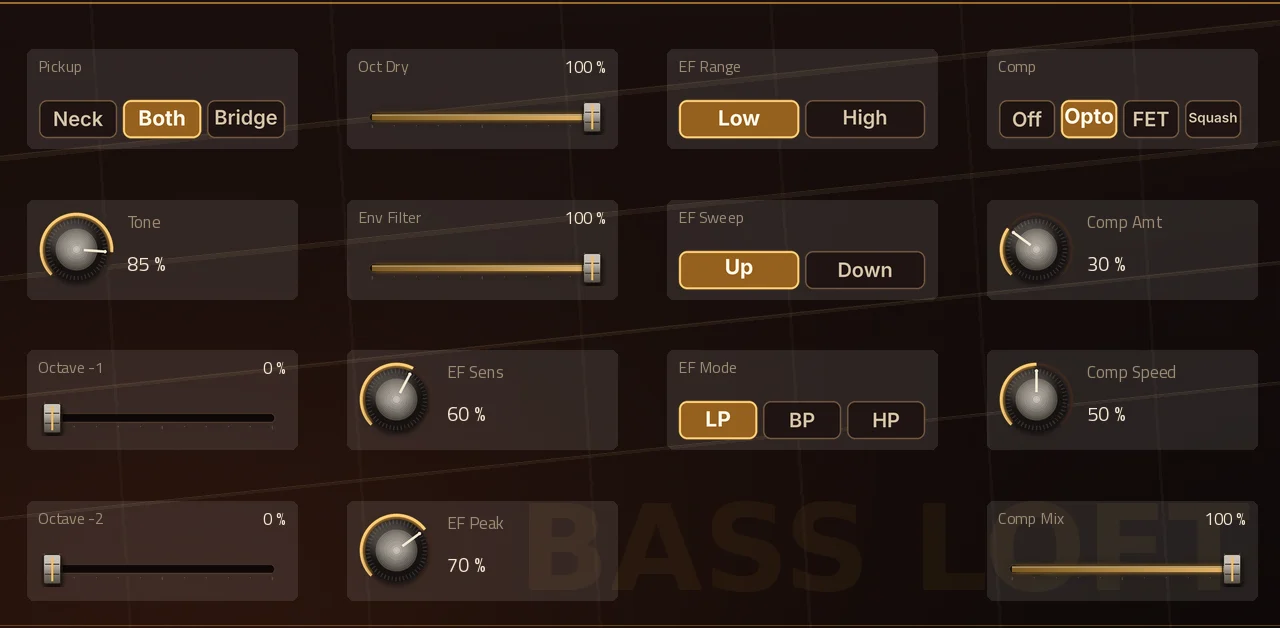 123456789101112131415
A cosa serve
Shape the sound before the amp: pickup and tone, the octave pedal, the envelope filter and the compressor.
Consiglio
For a bouncy funk quack, raise Env Filter, keep EF Mode on LP and play with strong velocity changes: the filter follows every hit.
- 1Pickup Neck (round), Both (balanced) or Bridge (tight and nasal).
- 2Oct Dry Level of the original note next to the octaves.
- 3EF Range Low or High sweep range.
- 4Comp Compressor type: Off, Opto (smooth), FET (fast and punchy), Squash (heavy).
- 5Tone The passive tone knob of the bass: lower is darker.
- 6Env Filter Mix of the envelope filter, the funky "quack" that follows your attack.
- 7EF Sweep The filter opens Up or Down when you hit harder.
- 8Comp Amt How much the compressor holds the notes together.
- 9Octave -1 Adds a voice one octave below.
- 10EF Sens How strongly your playing opens the filter.
- 11EF Mode Low-pass (LP), band-pass (BP) or high-pass (HP) filter.
- 12Comp Speed How fast the compressor reacts.
- 13Octave -2 Adds a voice two octaves below.
- 14EF Peak Resonance of the filter: higher is more vocal.
- 15Comp Mix Blend of compressed and uncompressed sound.
What you see
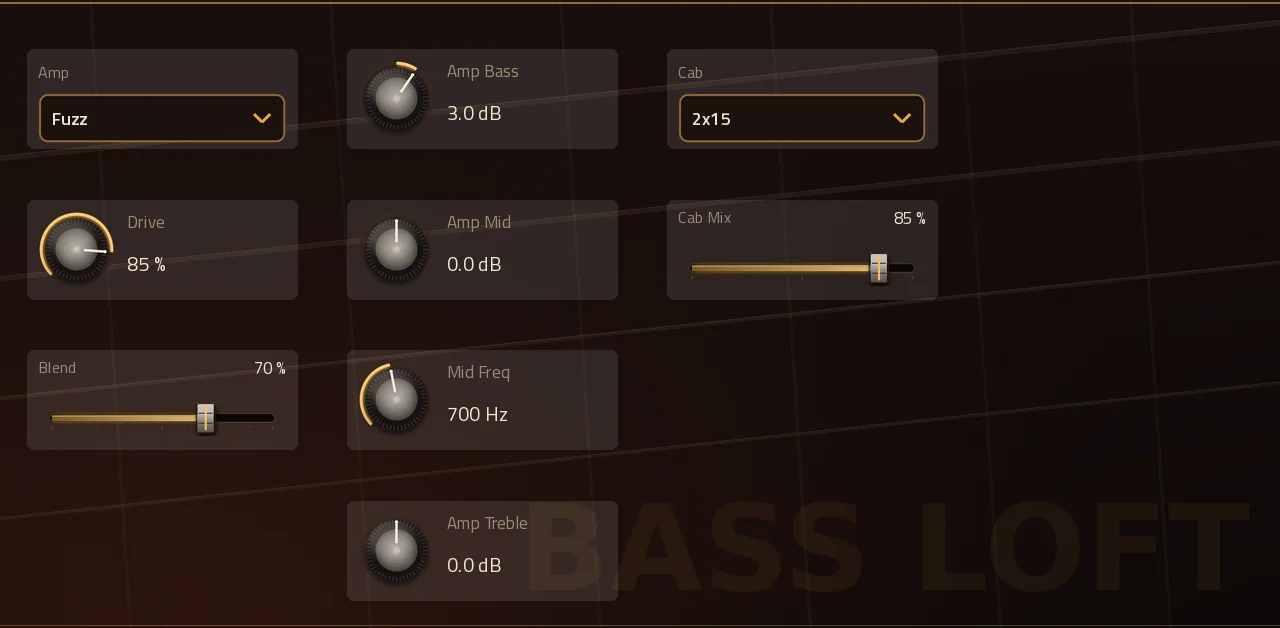 123456789
A cosa serve
The amp and the speaker cabinet, with a three-band tone stack and a movable mid control.
Consiglio
To cut through a dense mix, push Amp Mid up 3 to 5 dB with Mid Freq near 800 Hz rather than raising the volume.
- 1Amp Amp model: DI Clean, Tube 300, Flip Top, Tweed 4x10, Pedal DI, Fuzz, Sixties DI or Tape.
- 2Amp Bass Low tone control of the amp, -12 to +12 dB.
- 3Cab Speaker cabinet: Off, 8x10, 4x10, 1x15, 2x15 or 1x12.
- 4Drive How hard the amp is pushed.
- 5Amp Mid Mid tone control of the amp, -12 to +12 dB.
- 6Cab Mix Blend of the cabinet with the direct amp sound.
- 7Blend Mix of the amp with the clean bass (100 % = amp only).
- 8Mid Freq Where Amp Mid works, 200 Hz to 3 kHz.
- 9Amp Treble High tone control of the amp, -12 to +12 dB.
What you see
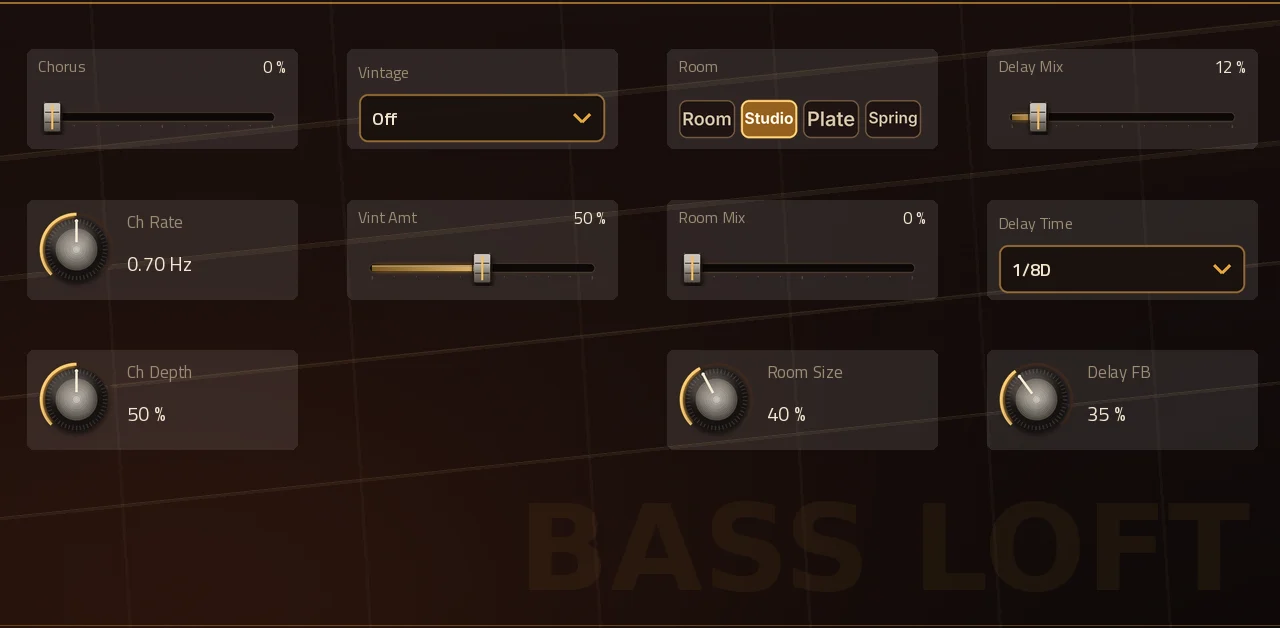 1234567891011
A cosa serve
Colour and space: bass chorus, vintage character, rooms and a tempo-locked delay.
Consiglio
For a dub feel, Delay Time on 1/4D, Delay FB around 35 % and a touch of Vintage Tape: the echoes sit behind the groove.
- 1Chorus Bass chorus. The low end stays in the centre.
- 2Vintage Character: Off, Tape, Cassette, 12-Bit, Vinyl or Radio.
- 3Room Space type: Room, Studio, Plate or Spring.
- 4Delay Mix Level of the echo.
- 5Ch Rate Speed of the chorus, 0.1 to 5 Hz.
- 6Vint Amt How strong the vintage character is.
- 7Room Mix How much space you hear.
- 8Delay Time Echo time, locked to the MPC tempo: Slap, 1/16 to 1/2.
- 9Ch Depth Depth of the chorus.
- 10Room Size Size of the space.
- 11Delay FB How many repeats.
What you see
 1234567
A cosa serve
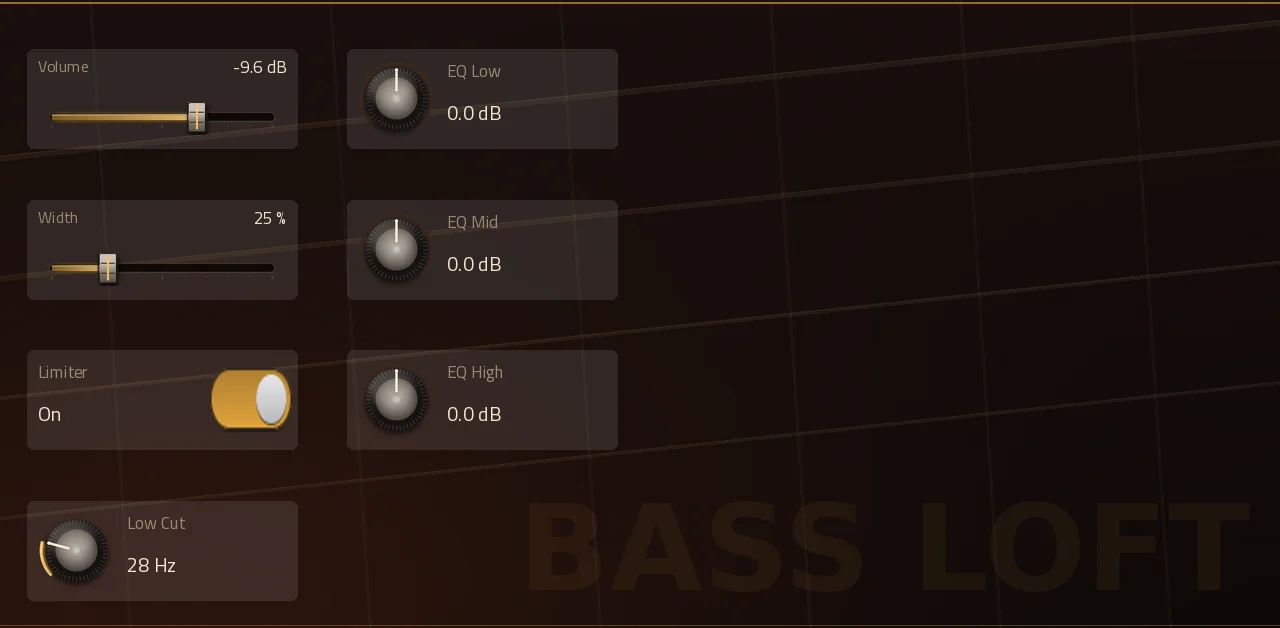
The last stage: volume, low cut, final EQ, stereo width of the effects and the safety limiter.
Consiglio
On a busy beat with a heavy kick, set Low Cut to 40 or 50 Hz: the bass stays big but leaves room for the kick.
- 1Volume Output level of Bass Loft.
- 2EQ Low Final low EQ, -12 to +12 dB.
- 3Width Stereo width of the effects. The bass itself stays centred.
- 4EQ Mid Final mid EQ, -12 to +12 dB.
- 5Limiter On: the output never goes above -1 dBFS.
- 6EQ High Final high EQ, -12 to +12 dB.
- 7Low Cut Removes rumble below this frequency, 15 to 250 Hz.
What you see
12345A cosa serve
Bass Loft listens to what you play and to what comes out, and tells you what it notices. It never changes a setting by itself.
Consiglio
Play your line with the MPC running, then watch Timing: if the marker sits on the + side, your part drags. Re-record it, or use it on purpose for a laid-back feel.
- 1Your playing The key of what you play, found from your notes. The dot shows how sure it is: red, orange, green.
- 2Held chord The chord of the notes you hold right now (Transpose included).
- 3Range The lowest and the highest note you played.
- 4Timing When the MPC plays: are you early or late against the 16th grid? Centre = on time.
- 5Advice Three lines, problems first (red), then tips (orange) and information (grey).
Spec sheet
Bass Loft in short
Six recorded electric basses that play like a bassist, with a full bass rig behind them, for the MPC standalone.
For who, for what
- Funk and neo-soul grooves with ghost notes
- Boom bap, jazz rap and lo-fi bass lines
- Soul, rock and punk parts played live on the pads
Strong points
- Velocity chooses ghost, finger or snap (Auto)
- Legato hammer-ons and slides with real string noise
- Keyswitches C0 to F0 to change technique in a pattern
- Octaver, envelope filter, 3 compressors, 8 amps, 5 cabs
- Tempo-locked delay, chorus, rooms, vintage colours
- LISTEN page: key, chord, range, timing and advice
Figures
- 6 basses (4, 5 and 6 strings), 122 presets in 5 banks
- 66 sound controls on 6 pages, plus LISTEN and LICENCE
- 14 voices; sample bank shared by all instances
- About 107 MB installed
- MPC standalone, MPC OS 3.10.1 or later
Licence
- Buy once at loftplugins.ch
- One purchase = 2 MPCs
- Activation details at the end of this guide
Get going
Start in 3 steps
From the box to your first groove in a few minutes.
Install. Copy the folder Studio Loft - VST - Bass Loft into VST2 Plugins on your MPC drive. On the MPC: Preferences → Enhancements (Beta) → Enable Enhancements and External Plugin Support.
Load. On a plugin track, choose Bass Loft in the plugin list, then a preset from the Presets folders (Funk, Soul, Rock, Rap).
Play. Play softly and hard, overlap notes for slides. Turn the Q-Links to shape the sound, F6 for LISTEN.
What you need
- An MPC standalone with MPC OS 3.10.1 or later
- External Plugin Support switched on (step 1)
- About 107 MB free on the MPC drive
Your first minute
- Load FUNK - Ghost Pocket
- Play one note softly, then hard: hear the ghost note and the snap
- Hold a note and play the next one: hear the slide
Presets
122 presets
Names as they appear on the MPC. Init presets are a clean start for each main bass.
INIT 3
- INIT - Round Twin
- INIT - Five Dark
- INIT - Flat Soul
FUNK 32
- FUNK - Tight Fingers
- FUNK - Ghost Pocket
- FUNK - Snap Thumb
- FUNK - Pop Pocket
- FUNK - Envelope Quack
- FUNK - Space Bass
- FUNK - Octave Wah
- FUNK - Disco Octave
- FUNK - Minneapolis
- FUNK - Boogie Chorus
- FUNK - Squash Comp
- FUNK - Five String
- FUNK - Talk Box
- FUNK - Party Thump
- FUNK - Bridge Bite
- FUNK - Fuzz Filter
- FUNK - Neo Pocket
- FUNK - Chicken Mute
- FUNK - Staccato Stabs
- FUNK - Bright Snap
- FUNK - Fat Octave
- FUNK - Slide Groove
- FUNK - Down Sweep
- FUNK - Studio 77
- FUNK - Clack Bass
- FUNK - Cosmic Synthy
- FUNK - Hammer Licks
- FUNK - Live Stage
- FUNK - Rubber Band
- FUNK - Wah Pick
- FUNK - Dry Pocket DI
- FUNK - Octave Pop
SOUL 30
- SOUL - Sixties Flats
- SOUL - Hook Finger
- SOUL - Session Pick
- SOUL - Southern Thump
- SOUL - Philly Smooth
- SOUL - Neo Soul
- SOUL - Voodoo
- SOUL - Gospel Runs
- SOUL - Muscle Shoals
- SOUL - Ballad Sustain
- SOUL - Fretless Dream
- SOUL - Quiet Storm
- SOUL - 70s Tape
- SOUL - Vinyl Flats
- SOUL - Lovers Dub
- SOUL - Northern Pick
- SOUL - Sweet Sixties
- SOUL - Deep Pocket
- SOUL - Hammer Grooves
- SOUL - Brass Section
- SOUL - Late Night
- SOUL - Chorus Silk
- SOUL - Slide Up Hook
- SOUL - Muted Felt
- SOUL - Gospel Organ Low
- SOUL - Stack Warmth
- SOUL - Radio Single
- SOUL - Two Feel
- SOUL - R&B Five
- SOUL - Spring Room
ROCK 25
- ROCK - Pick Drive
- ROCK - Classic Fingers
- ROCK - Punk Pick
- ROCK - Grunge Fuzz
- ROCK - Stoner Fuzz
- ROCK - Garage Muted
- ROCK - British Bite
- ROCK - Prog Clank
- ROCK - Hard Rock 8x10
- ROCK - Indie Chorus
- ROCK - 70s Tape Rock
- ROCK - Doom Octave
- ROCK - Power Ballad
- ROCK - Growl Bridge
- ROCK - New Wave Pick
- ROCK - Surf Spring
- ROCK - Blues Shuffle
- ROCK - Metal Clank
- ROCK - Stadium Wide
- ROCK - Garage Fuzz Pick
- ROCK - Country Pick
- ROCK - Alt Fingers
- ROCK - Desert Drive
- ROCK - Slide Fills
- ROCK - Clean Pick DI
RAP 32
- RAP - Boom Bap Thump
- RAP - Dusty Loop
- RAP - Lo-Fi Fingers
- RAP - G-Funk Slide
- RAP - Real 808
- RAP - Trap Real Bass
- RAP - Drill Glide
- RAP - Jazz Rap
- RAP - West Coast
- RAP - Drunk Wobble
- RAP - Memphis Tape
- RAP - Phonk Fuzz
- RAP - RnB Smooth
- RAP - Sample Flip
- RAP - Underground Fuzz
- RAP - Crate Digger
- RAP - Gangsta Glide
- RAP - Cloud Bass
- RAP - Neo Boom Bap
- RAP - Detroit Dark
- RAP - Old School Live
- RAP - Dark Octave
- RAP - Sub Fingers
- RAP - Short Stabs
- RAP - Dead Note Groove
- RAP - Radio Sample
- RAP - Dub Echo
- RAP - Grime Pick
- RAP - Soul Sample Bass
- RAP - Fall Off Hook
- RAP - Wobble Filter
- RAP - Lofi Pick
Credits
Credits
Sounds
- Bass samples: Growlybass, Swagbass, Black And Blue Basses and Pastabass by Karoryfer Samples, released under CC0 1.0 (public domain).
Fonts
- Inter (SIL Open Font License 1.1): this guide and the screen images
- Liberation (SIL Open Font License 1.1) and DejaVu: screen images
Code
- MPC plugin kit, MIT licence
- Monocypher (CC0 / BSD-2), for the licence check
Full texts
- All licence texts are in the Licences folder of the plugin.
Studio Loft is an independent developer and is not affiliated with the maker of the MPC.
What you see
 123
A cosa serve
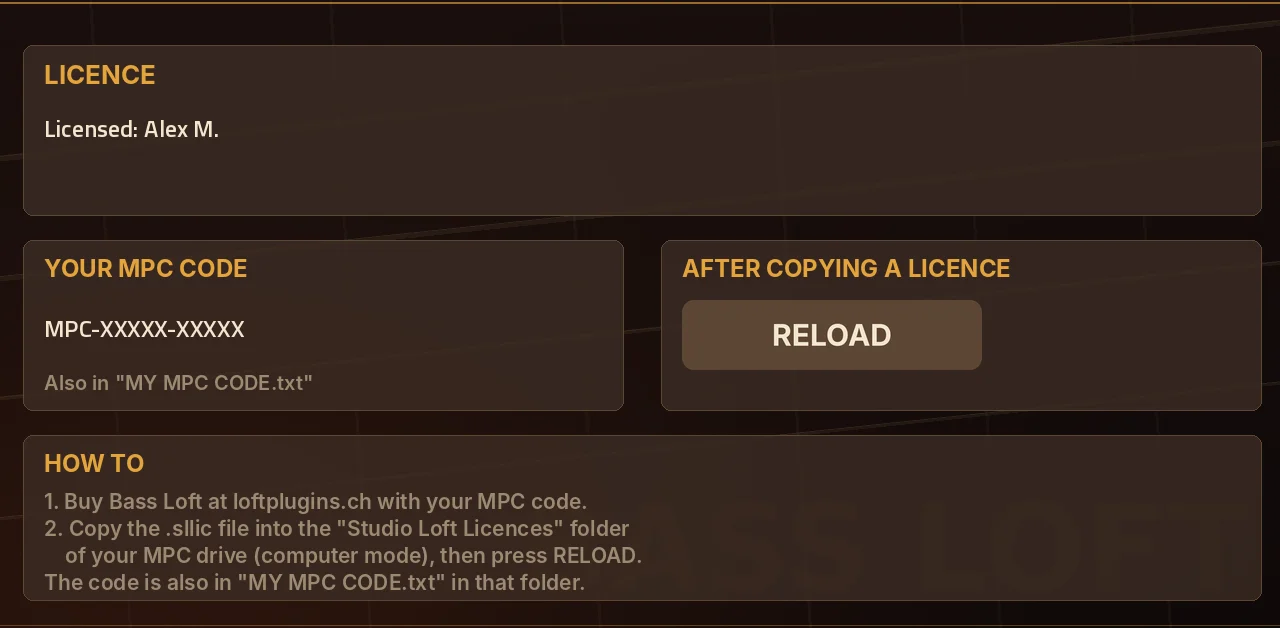
Everything about your licence in one place: its state, the code of your MPC and the RELOAD button.
Consiglio
Keep a copy of your .sllic file on your computer: after a factory reset of the MPC, copy it back and press RELOAD.
- 1Licence The state of your licence: who it is for, or why the sound is muted.
- 2Your MPC code The code to give when you buy. It is also written in "MY MPC CODE.txt".
- 3Reload After copying a licence file, press RELOAD (or click the data wheel on it).
Licence
Buy it, then activate it
Buy Bass Loft at loftplugins.ch: your licence arrives by e-mail. One licence covers two MPCs.
Your code. Open the LICENCE page (F6, press 3): your MPC code is there. It is also in Studio Loft Licences/MY MPC CODE.txt on the MPC drive.
Buy. At loftplugins.ch, enter that code on the My purchases page. You receive by e-mail a small licence file ending in .sllic.
Activate. MPC in computer mode: copy the file into Studio Loft Licences. Back on the MPC, press RELOAD. Done, no internet needed on the MPC.
Good to know
Without a valid licence, Bass Loft stays silent: a red line at the top of PLAY says so, and the LICENCE page (the last page) tells you why. Your projects and settings are kept. The licence is checked on the MPC itself: it never needs the internet.
Bass Loft · version 1.5.1
Studio Loft
loftplugins.ch
Licenza e attivazione
Tuo in tre passi.
Acquista
Paga una volta su questo sito. Il tuo link personale arriva via e-mail e resta valido.
Installa Loft Hub
MPC OS 3.10.1 o successivo, con Enhancements ed External Plugin Support attivati nelle Preferences. Copia Loft Hub una volta sul disco della MPC.
Collega e suona
In Loft Hub accetta, collega la tua MPC e i plugin si installano da soli. Funziona su due MPC. Tutto qui.
Tuo
Bass Loft
Bassi suonati a mano per funk, soul, rock e rap.
Un solo pagamento, tuo per sempre. La tua licenza funziona su due MPC.