Instrument · バージョン 1.4.0
808 Loft
A REAL 808, SYNTHESIZED FROM SCRATCH. TUNED TO THE NOTE. MADE FOR THE MPC.
An 808 a semitone off ruins a beat, and on small speakers you can't even hear it. 808 Loft shows the exact note you play with its frequency, listens to your playing, and tells you how to match the song. One tap, and you are in key.
A deep, dark 808 that rings for seconds and slides slowly up the octave.
マニュアル
すべての画面を、
ページごとに。
MPCの画面そのままに、一画面ずつ解説した完全ガイド。設定名は画面どおり英語のままです。
ALWAYS IN KEY
An 808 a semitone off ruins a beat, and on small speakers you can't even hear it. 808 Loft shows the exact note you play with its frequency, listens to your playing, and tells you how to match the song. One tap, and you are in key.
Play
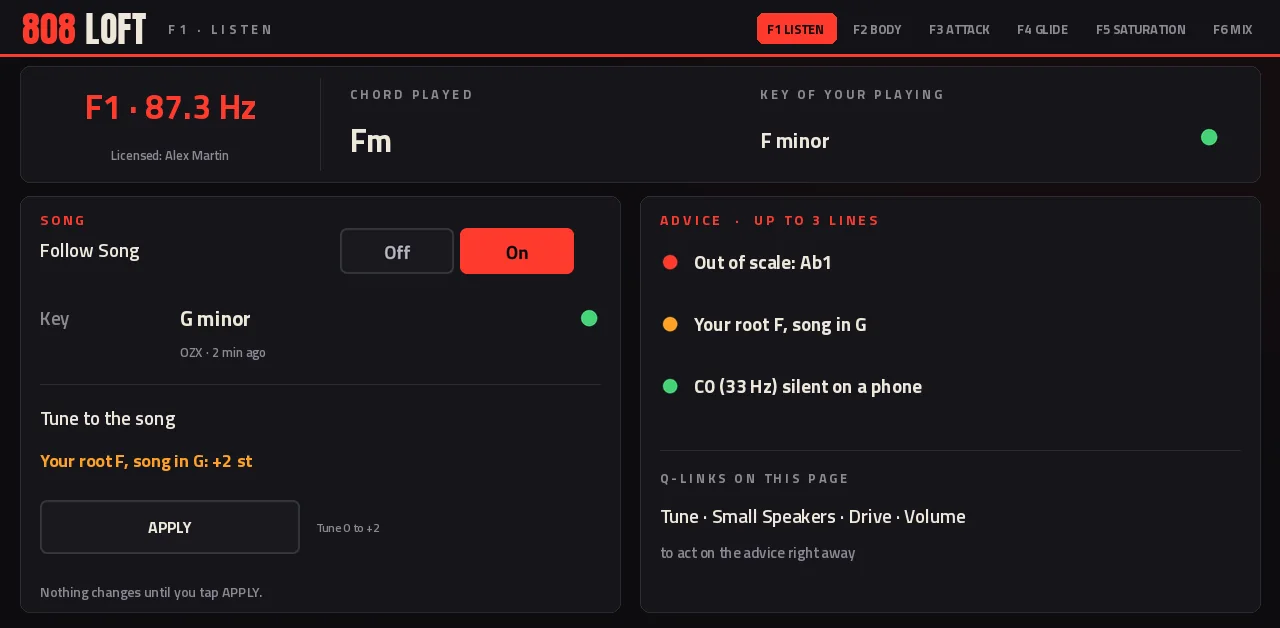
Play your bass line. The display reads F1 · 87.3 Hz, the page hears F minor.
Read
The song is in G minor. Advice: Out of scale: Ab1. Proposal: Your root F, song in G: +2 st.
APPLY
Tune moves to +2 st. Your pattern now sits on the song's root. Changed your mind? UNDO.
How it feels
No more nudging Tune by ear for ten minutes. You stay on the music, and the 808 lands where it should, every time, down to a twentieth of a cent.
SLIDES ON THE GRID
Set Sync to Tempo and the Glide knob becomes a note value: 1/32, 1/16, 1/8 triplet, 1 Bar. Change the BPM and the slides stretch with it. Add Overshoot for a rubbery landing, or Drop to bend the tail down.
Load
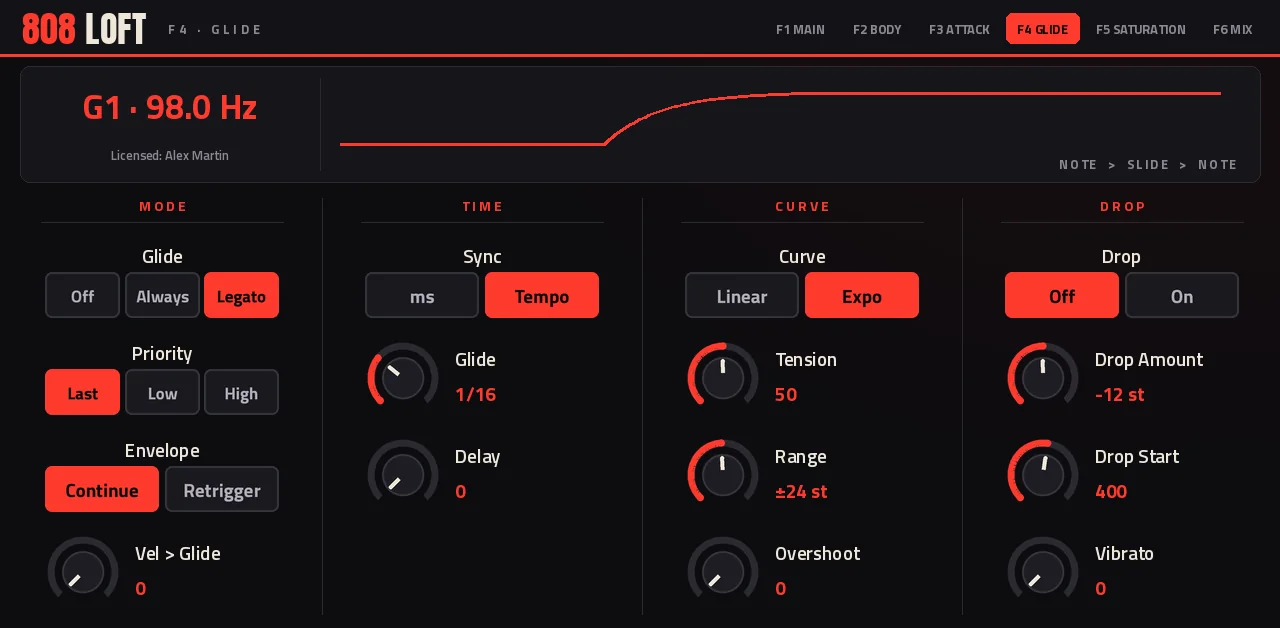
GLIDE · Tempo Slide: Legato glide, Sync on Tempo, 1/16.
Overlap
Play two notes that overlap. The slide takes exactly a sixteenth, at any tempo.
Shape
Turn Glide to 1/8 for lazy slides, raise Tension and Overshoot for bounce.
How it feels
Slides that groove with the drums instead of fighting them, and that still land exactly on the next note. Twelve GLIDE presets are ready to start from.
MAIN
 12345
画面の内容
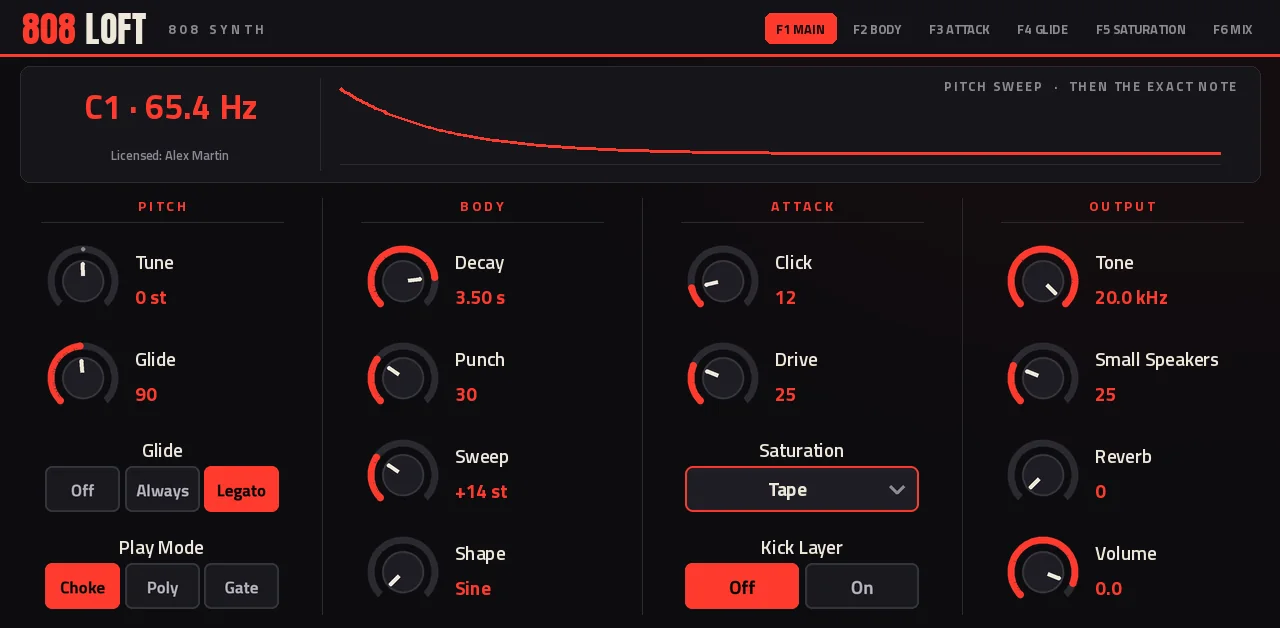
- C1 · 65.4 Hz Note display The note you are playing and its real frequency ( ). Under it, the licence status.
- Tune PITCH in semitones, Glide time, the Glide mode (Off, Always, Legato) and Play Mode : Choke (one note cuts the last, like an MPC pad), Poly, Gate (the note lasts while you hold the pad).
- Decay BODY up to 10 s, Punch (a short pitch kick at the start), Sweep (how far above the note it starts) and Shape from Sine to Square.
- Click ATTACK on top, Drive into the Saturation type (Tape, Tube, Round, Hard, Fold, Bitcrush) and the Kick Layer switch.
- Tone OUTPUT (low-pass), Small Speakers , Reverb and Volume .
用途
The 16 controls you reach for 90% of the time. Load a preset, then shape it here without leaving the page. The four Q-Link columns follow the four columns on screen.
ヒント
For a long trap 808 that still cuts through: Decay around 3 s, Sweep +12 to +14 st, Glide on Legato, then raise Small Speakers until you hear the bass on a phone.
LISTEN
12345678画面の内容
- Note display The note you play right now, with its frequency.
- Fm CHORD PLAYED The chord or note the plugin hears from your pads or keyboard ( ).
- F minor KEY OF YOUR PLAYING The key of what you are playing ( ). The dot shows how sure it is: grey, red, orange, green.
- SONG · Follow Song Off / On. When On, 808 Loft reads the song key shared by another Studio Loft plugin on the same MPC, such as OZX Loft.
- G minor Key The song key ( ) and where it comes from, with its age ( OZX · 2 min ago ).
- Your root F, song in G: +2 st Tune to the song · APPLY A ready-made fix ( ). APPLY sets Tune for you, UNDO puts it back. Nothing changes until you tap APPLY.
- ADVICE Up to three short lines with a coloured dot: notes out of scale, notes too low for a phone, peaks, a clean output.
- Q-LINKS ON THIS PAGE Tune · Small Speakers · Drive · Volume, to act on the advice right away.
用途
Come here when the 808 sounds wrong against the track and you cannot tell why. It names the problem in plain words and proposes one tap to fix it.
ヒント
Play the root of your bass line for a few seconds before reading the page: the key gets a green dot faster, and the Tune proposal is spot on.
BODY
 1234
画面の内容
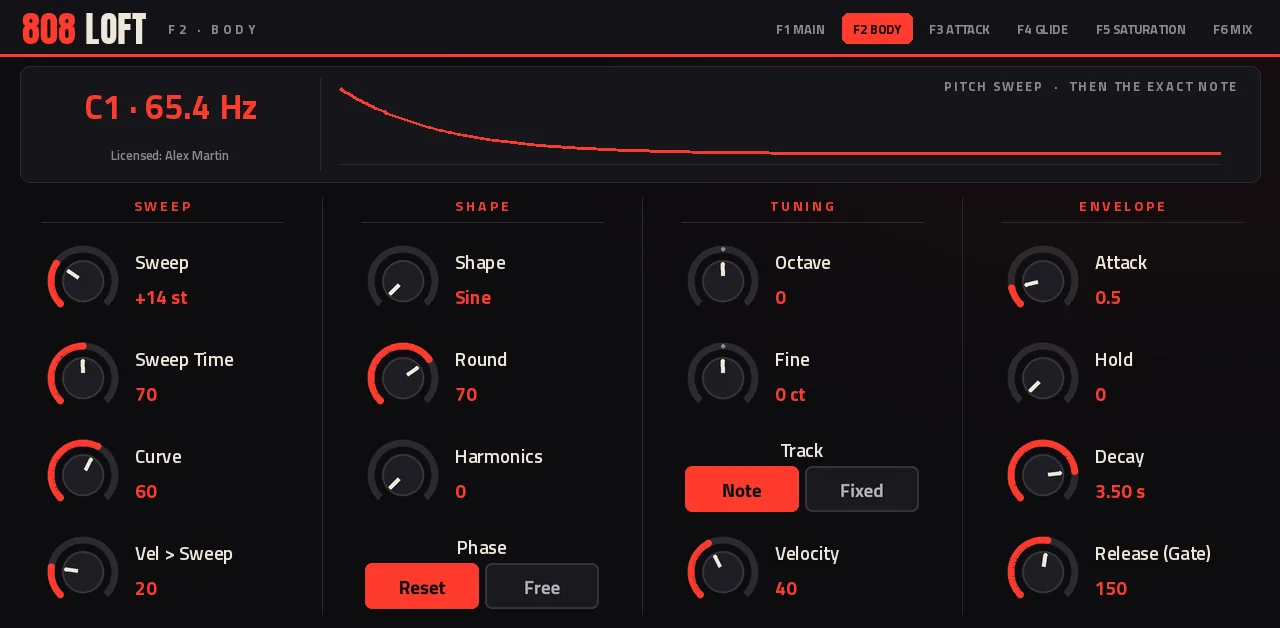
- Sweep SWEEP (start pitch above the note), Sweep Time (how long the fall lasts), Curve (straight or bending) and Vel > Sweep (hit harder, sweep further).
- Shape SHAPE morphs Sine, Triangle, Square. Round softens the square edges. Harmonics adds upper partials. Phase : Reset (every hit starts the same) or Free.
- Octave TUNING , Fine in cents, Track : Note (follows the pad) or Fixed (one pitch for every pad), and Velocity sensitivity.
- Attack ENVELOPE , Hold , Decay , and Release (Gate) , used when Play Mode is Gate.
用途
Where you decide if the 808 is a clean sine sub, a warm rounded bass or a buzzy square. The pitch stays exact whatever the shape.
ヒント
For a punchy, short boom bap 808: Decay under 1 s, Sweep +20 st with a short Sweep Time, Shape a little toward Triangle, Phase on Reset.
ATTACK
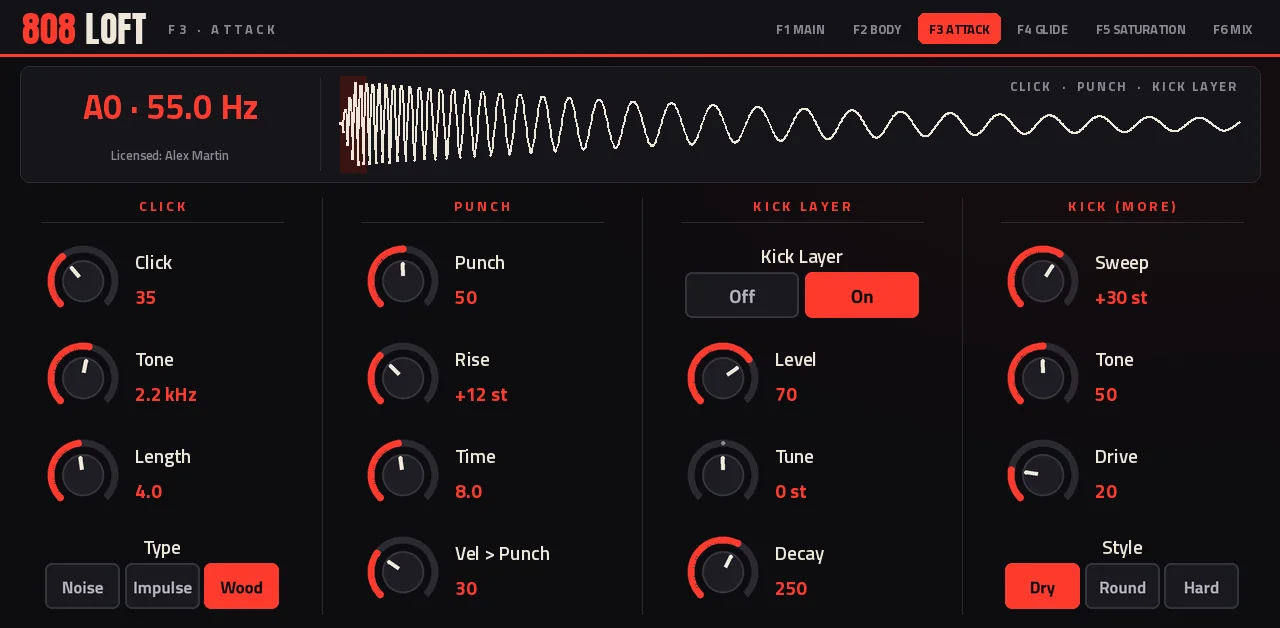 1234
画面の内容
- Click CLICK level, Tone (its pitch), Length in ms and Type : Noise, Impulse or Wood.
- Punch PUNCH amount, Rise (how many semitones it jumps), Time and Vel > Punch .
- Level KICK LAYER Off / On, then , Tune and Decay of a kick under the 808.
- Sweep KICK (MORE) , Tone , Drive and Style (Dry, Round, Hard) of that kick.
用途
Everything that happens before the bass note settles. This is what makes an 808 audible in a busy mix, and what lets one pad play kick and bass together.
ヒント
For a kick that snaps: raise Click, set Type to Wood, keep Length short, and switch on the Kick Layer with a short Decay (200 to 300 ms).
GLIDE
1234画面の内容
- Glide MODE : Off, Always (from the last note) or Legato (only between overlapping notes). Priority : Last, Low, High. Envelope : Continue or Retrigger on a slide. Vel > Glide .
- Sync TIME : ms or Tempo. Glide is the slide time; in Tempo mode the same knob picks a note value from 1/64 to 1 Bar (here 1/16 ). Delay holds the old pitch before sliding.
- Curve CURVE Linear or Expo, Tension , Range (slides only between notes closer than this) and Overshoot past the target.
- Drop DROP Off / On bends the note down at the end: Drop Amount , Drop Start and Vibrato .
用途
The page that gives drill and trap 808s their movement. Every slide lands exactly on the next note.
ヒント
For drill slides that stay on the grid at any tempo: Glide on Legato, Sync on Tempo, turn Glide to 1/16, Curve on Expo, then play overlapping notes.
SATURATION
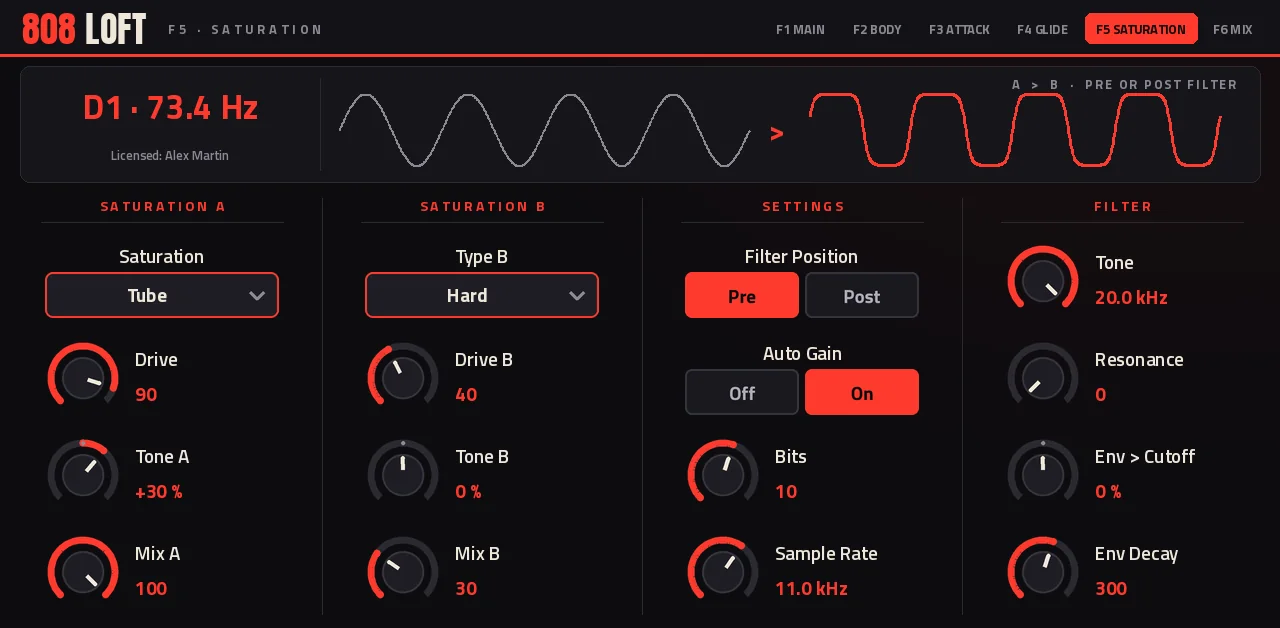 1234
画面の内容
- Saturation SATURATION A type, Drive , Tone A (darker or brighter) and Mix A .
- Type B SATURATION B A second stage after the first: , Drive B , Tone B , Mix B .
- Filter Position SETTINGS : Pre (saturation, then filter) or Post (filter first). Auto Gain keeps the level steady when you push Drive. Bits and Sample Rate for the Bitcrush type.
- Tone FILTER (cutoff), Resonance , Env > Cutoff and Env Decay for a filter that closes after each hit.
用途
From a touch of warmth to a torn speaker. With Auto Gain on, you can compare drive settings without being fooled by loudness.
ヒント
Stack Tube on A and Hard on B with Mix B around 30: the 808 stays round underneath and gets a gritty edge on top.
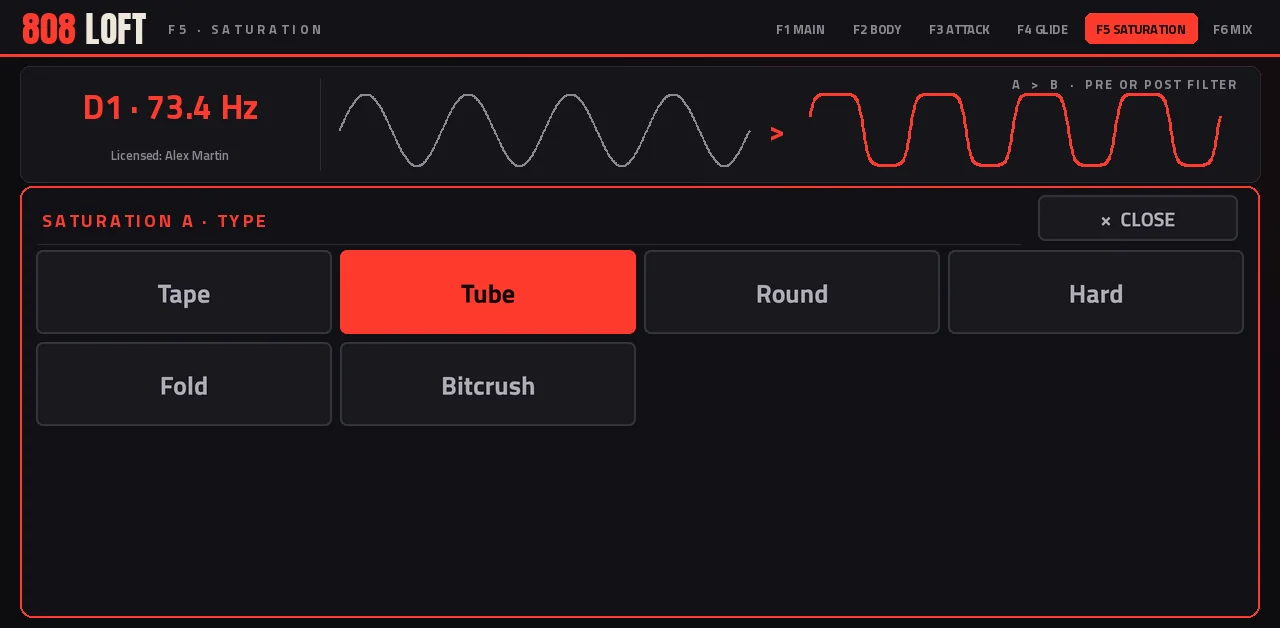
Tap the Saturation or Type B box: the list opens on screen. Tap a type, or × CLOSE.
MIX
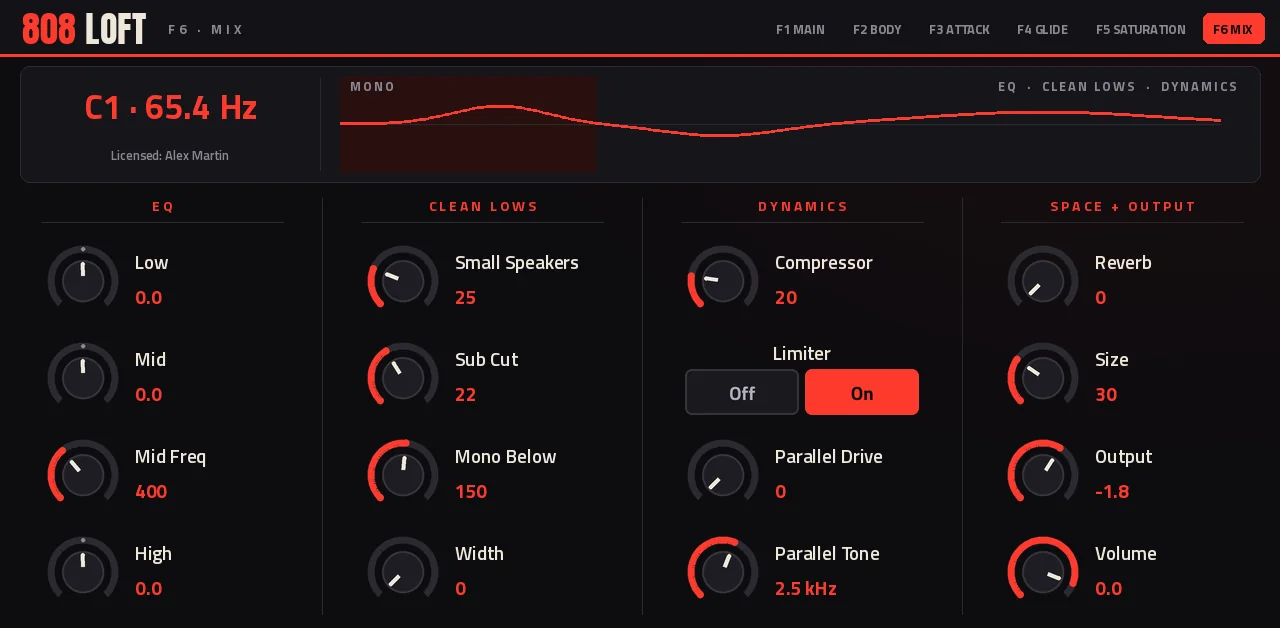 1234
画面の内容
- Low EQ , Mid with Mid Freq , and High .
- Small Speakers CLEAN LOWS adds harmonics so the bass is heard on phones and laptops. Sub Cut removes rumble below the note, Mono Below keeps the lows centred, Width only opens the highs.
- Compressor DYNAMICS , Limiter (On by default, protects the output), Parallel Drive and Parallel Tone for a distorted copy blended under the clean bass.
- Reverb SPACE + OUTPUT and Size (on the highs only, the sub stays dry), Output and Volume .
用途
The finishing page: no extra plugin needed on the track for a clean, loud, mono-safe 808.
ヒント
If the 808 disappears on a phone, raise Small Speakers before touching the EQ. If it rumbles, raise Sub Cut until the note itself starts to thin, then back off a little.
808 LOFT
A fully synthesized 808 bass for MPC standalone, with exact tuning, tempo-synced glide, two saturation stages, mix tools and a page that keeps your bass in key with the song.
For
- Trap, drill and rage: long slides, drops, hard drive.
- Boom bap, lo-fi and phonk: short warm booms, tape and cassette colour.
- RnB, afro and log drum grooves: round subs and wooden attacks.
Strengths
- Pitch shown with its frequency, accurate to a twentieth of a cent.
- Glide in ms or locked to tempo (1/64 to 1 Bar), with curve, range, overshoot and end drop.
- Click, punch and a full kick layer: kick and 808 on one pad.
- Two saturation stages (Tape, Tube, Round, Hard, Fold, Bitcrush) with Auto Gain.
- Small Speakers, Sub Cut and Mono Below: an 808 that survives phones and clubs.
- Listen page: chord and key of your playing, song key, out-of-scale notes, one-tap Tune fix.
Works on
MPC standalone with MPC OS 3.10.1 or later.
Turn on Preferences › Enhancements (Beta) › Enable Enhancements and External Plugin Support.
Presets are level-matched, the limiter is on by default.
Getting started
- Install: copy the folder Studio Loft - VST - 808 Loft into VST2 Plugins at the root of your MPC drive.
- Load: on a plugin track, choose Studio Loft › 808 Loft, then a preset (start with TRAP · Long Classic).
- Play: play the pads or a keyboard. Tweak on MAIN, fine-tune on the other pages.
157 SOUNDS
INIT 1
Init
TRAP 12
Long Classic · Night Drive · Trunk Rattle · Iced Out · Smoke Ring · Penthouse · Gold Teeth · Slow Motion · Heavy Chain · Late Show · Street Lights · Bando Sub
DRILL 12
Cold Steel · Grey Block · Rain Slide · Fog Line · Ice Slide · Night Bus · Concrete · Corner Slide · Dark Estate · Wet Pavement · Bus Stop · Hood Bounce
BOOMBAP 12
Dusty Sub · Short Boom · Crate Kick · Tape Boom · Basement · Vinyl Sub · Round Boom · Thump · Old Tape · Knock · Cypher · Head Nod
PHONK 12
Drift Sub · Smoke Drift · Red Lights · Burnt Rubber · Night Racer · Haze · Cold Phonk · Brake Lights · Lowrider · Asphalt · Neon Drift · Rust
MEMPHIS 12
Tape Hiss Sub · Cassette 808 · Dark Room · Low Hum · Ghost Tape · Cellar · Back Alley · Murky · Basement Tape · Grim · Shadow · Fog Tape
PLUGG 12
Soft Plugg · Bubble · Dreamy Sub · Cloud Bass · Pink Sky · Candy · Glass Sub · Pillow · Sweet Slide · Pastel · Floaty · Soft Knock
RAGE 12
Blown Out · Mosh Sub · Siren · Torn Speaker · Hyper · Stage Dive · Red Zone · Overdrive · Distort Wall · Crowd Surf · Chaos · Lightning
LOFI 12
Warm Tape · Soft Sub · Rainy Day · Bedroom · Faded · Sleepy · Muffled · Old Radio · Cozy · Wool · Dim Lamp · Sunday
RNB 12
Silk Sub · Smooth · Late Call · Candle · Slow Jam · Satin · Midnight · Soft Glide · Pearl · Warm Room · Honey · Glow
AFRO 12
Log Drum · Wood Log · Sun Sub · Bounce Log · Palm · Dance Log · Heat Wave · Sway · Groove Sub · Dust Road · Short Log · Bright Log
HARD 12
Crushed · Fold Sub · Bit Sub · Clipped · Grind · Hammer · Tube Burn · Broken · Square Sub · Destroyer · Gravel · Steel Wool
GLIDE 12
Slide Up · Slide Down · Octave Slide · Long Slide · Fast Slide · Tempo Slide · Overshoot · Drop Tail · Wobble Slide · Elastic · Rubber Band · Yo Yo
SUB 12
Pure Sub · Clean Sub · Deep Sine · Tight Sub · Long Sine · Phone Sub · Studio Sub · Mono Sub · Round Sine · Short Sub · Sub Kick · Warm Sine
808 LOFT
Studio Loft — loftplugins.ch
Version 1.3.0
ライセンスとアクティベーション
3ステップであなたのものに。
購入
このサイトで一度お支払い。個人用リンクがメールで届き、ずっと有効です。
Loft Hubをインストール
MPC OS 3.10.1以降で、PreferencesのEnhancementsとExternal Plugin Supportをオンにします。Loft HubをMPCドライブに一度コピーするだけです。
リンクして演奏
Loft Hubで同意してMPCをリンクすると、プラグインが自動でインストールされます。2台のMPCで使えます。以上です。
LICENCE
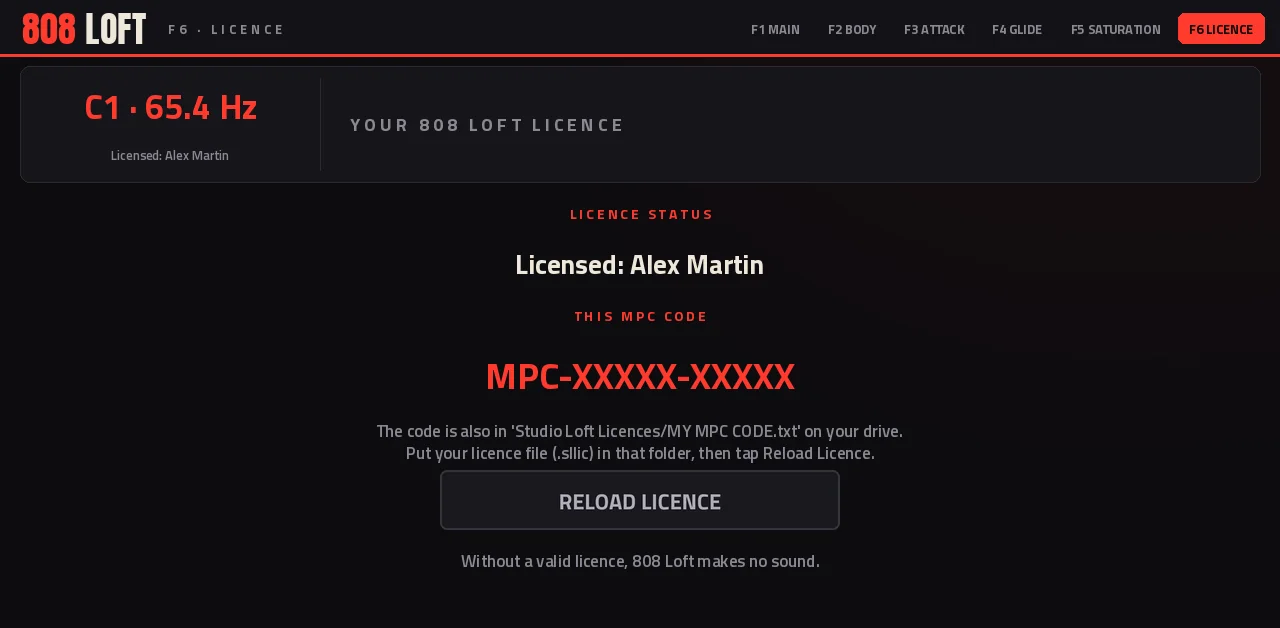 123
画面の内容
- LICENCE STATUS Licensed, or no licence.
- MPC-XXXXX-XXXXX THIS MPC CODE The code of your MPC ( ). You give it once to get your licence file. It is also in Studio Loft Licences/MY MPC CODE.txt on your drive.
- .sllic RELOAD LICENCE After copying your file into that folder, tap here. No restart needed.
用途
Only needed once, to activate. Without a valid licence, 808 Loft makes no sound.
ヒント
Keep a copy of your .sllic file on your computer: if you reformat the drive, copy it back and tap Reload Licence.
Activation
Buy
At loftplugins.ch, give the code shown under THIS MPC CODE. One purchase activates 2 MPCs, for life.
Activate
Copy your .sllic file to Studio Loft Licences on your drive, then tap Reload Licence.
あなたのものに
808 Loft
本物の808シンセ:グライド、6種のサチュレーション、届く低音。
一度の支払いでずっとあなたのもの。ライセンスは2台のMPCで使えます。