インストゥルメント · 80年代シンセ · バージョン 1.5.0
Nightloft
ダークな心を持つ80年代シンセ
パルス、冷たいパッド、不穏なベース、ガラスのようなFMベル。揺らぐ3基のアナログ・オシレーター、4オペレーターFMエンジンとウェーブテーブル、16ステップのパルス・シーケンサー、そしてすべてを一度に暗くするNIGHTノブ。F6では、10種類の映画音楽スタイルのコード進行がMPCに同期してひとりでに鳴ります。
シンセウェイヴの夜のドライブ:アルペジエーターが80年代の広いコーラスで各コードを巡ります。
NIGHTノブ
ノブひとつで、もっと暗く。
MAINページの大きなノブ。テイク中に回せば、ひと回しで曲がより不気味になります。
- フィルターカットオフが下がり、レゾナンスと揺らぎが増える。
- サブサブベースが音の下から持ち上がる。
- 空間リバーブがより大きく暗くなり、ディレイが戻ってくる。
- 高域夜に聴くテープのように高域が丸くなる。
マニュアル
すべての画面を、
ページごとに。
MPCの画面そのままに、一画面ずつ解説した完全ガイド。設定名は画面どおり英語のままです。
★ ここで試す
スタイルを選んで、再生。
プラグインの本物の進行を、Nightloftと同じ鳴らし方で:パルス、アルペジオ、スタブ、ホールド、バラード。パターン、MIDI、WAVとしてMPCに書き出すのはプラグインで。
試聴のみ。書き出し・ダウンロードはできません。
Welcome to the night.
Nightloft is a complete 80s synthesizer that lives inside your MPC. Three drifting analog oscillators, a 4-operator FM engine and a wavetable engine, 8 filters with character, a 16-step pulse sequencer and an arpeggiator, chorus, tempo delay and gated reverb. Then one knob, NIGHT, that turns everything darker at once.
On F6, Loft Chords gives you a wealth of chord progressions in 10 film-score styles. Pick a style, press PLAY, and Nightloft plays the progression with its own sounds and its own sequencer, locked to your MPC. Rework it, then export it as an MPC pattern, a MIDI file or a WAV.
Six keys, eighteen pages
MAIN · VOICE
OSC 1+2 · OSC 3+MIX · FM · WAVE
FILTER · FX
LFO · ENV
PULSE · NOTES · ACCENTS · LENGTHS
STYLE · CHORDS · LISTEN · LICENCE
Press a function key to open its first page; press it again to go to the next page of that key.
The wow
Stuck on a blank pattern? Press one style.
Tap NEON. The key, the scale, the tempo and three matching sounds are set for you. Press LISTEN: the progression Highway – Am – F – C – G – rolls out as a synthwave arpeggio over a cold pad, at 100 BPM. Thirty seconds, and you have the backbone of a night-drive track.
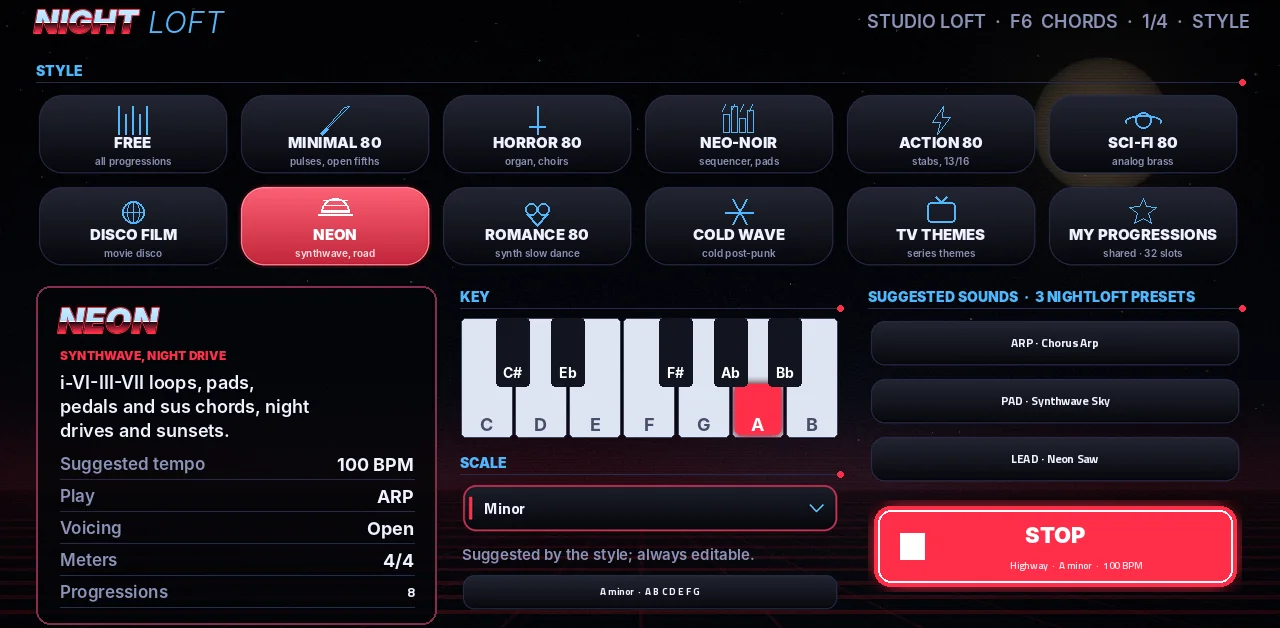
10 styles of 80s film music. Every style knows its scale, its tempo, how to play (held, stab, arpeggio, pulse, ballad) and its 3 best Nightloft sounds.
Move, swap, replace a chord with 8 smart suggestions (darker, brighter, borrowed, relative...), change lengths, add slots. UNDO and ORIGINAL are always there.
EXPORT writes an MPC pattern, a MIDI file and a WAV with Nightloft's own sound. KEEP stores it in My Progressions, shared with the other Studio Loft synths.
10 styles. A wealth of progressions. All in your key.
Every progression is written in the scale of its style and follows the key you choose on the STYLE page. Odd meters included: Blade in the Night walks in 5/4, Clockwork Heart ticks in 13/16 – and the pulse sequencer, the pattern export and the MIDI file all respect them.
| Style | Scale · tempo · play | First progression |
|---|---|---|
| MINIMAL 80Minimalist Horror | minor · 120 BPM · PULSE | Blade in the Night 5/4 Am – Am – Bb/A – Am |
| HORROR 80Italian And American | harmonic minor · 80 BPM · ARP | Cathedral 4/4 Am – Dm/A – E/G# – Am |
| NEO-NOIRUrban Crime | dorian · 100 BPM · PULSE | Berlin Loop 4/4 Am – Am – Gsus2 – Gsus2 |
| ACTION 80Heroic In Minor | minor · 128 BPM · Stab | Car Chase 4/4 Am – F – G – Am |
| SCI-FI 80Analog Brass | major · 70 BPM · Held | Wet Rooftops 4/4 F – C – F – C |
| DISCO FILMFilm Disco | minor · 124 BPM · PULSE | Bazaar 4/4 E – F – G – F |
| NEONSynthwave, Night Drive | minor · 100 BPM · ARP | Highway 4/4 Am – F – C – G |
| ROMANCE 80Synth Slow Dance | major · 76 BPM · Ballad | Prom Slow Dance 4/4 C – G/B – Am – F |
| COLD WAVECold Post-Punk | minor · 132 BPM · Stab | Winter 4/4 Am – Fmaj7 – Am – Fmaj7 |
| TV THEMESSeries Themes | major · 118 BPM · Stab | Series Hero 4/4 C – Bb – F – C |
In PULSE play, the preset's own 16-step pattern is transposed onto the bass of each chord. Load Night Siege, choose MINIMAL 80 and press LISTEN: the sequencer does the scaring, the chords do the story.
The wow, part two
Play it. It answers.
Hold a key: the PULSE sequencer turns it into a hypnotic 16-step line, locked to your MPC's tempo and position. Hold a chord: the whole chord pulses. Pick one of 15 patterns – Root Pulse, Tritone Dread, Gallop, Heartbeat, Siren Fall, Dorian Run – then rewrite any step on F5.
One big knob on the MAIN page. It lowers the filter, adds resonance and drift, raises the sub, makes the reverb bigger and darker, brings the delay back and rounds off the highs – all at once. Ride it during a take: the track gets scarier in one move.
F6, third page. Nightloft hears what you play: the key of your playing or of a WAV, the chord you hold and its degree, and short advice on its own output (clipping, DC offset, notes out of scale). One tap on APPLY sets the key of the STYLE page.
MAIN
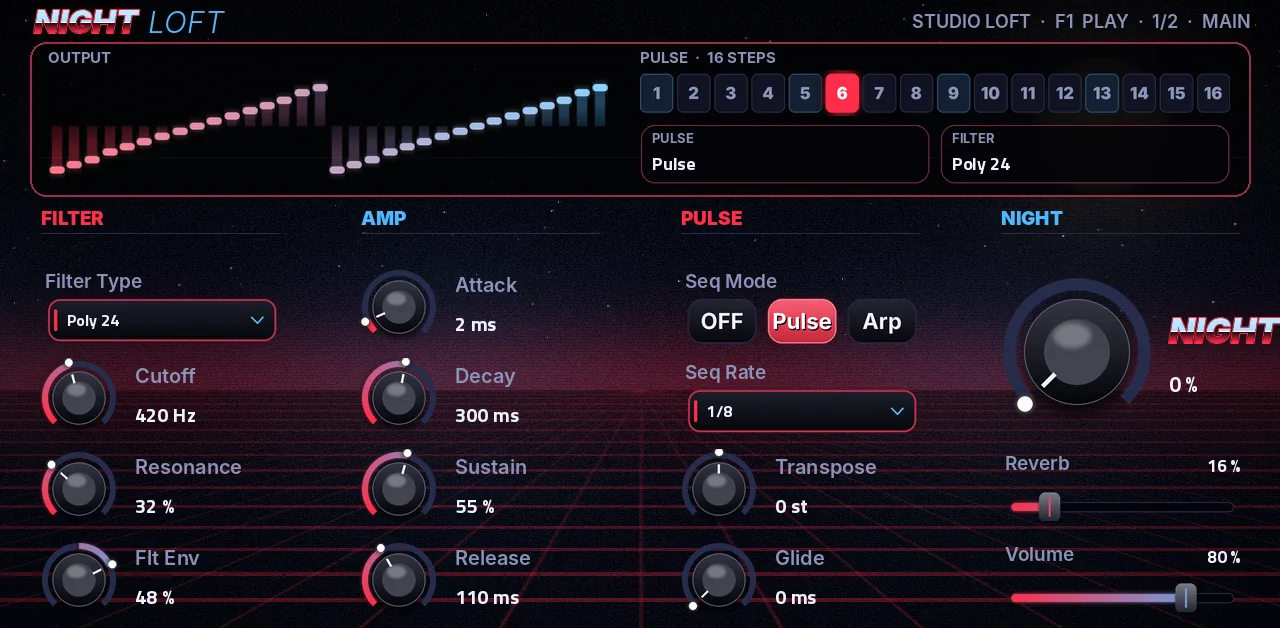
The home page: the 15 controls you touch most, and the big NIGHT knob. Most presets are finished here.
12345ヒント
For a horror pulse that creeps in, start with Night Siege, turn NIGHT to 40 % and pull Cutoff down while it plays.
What it's for
What you see
Display
the moving waveform of the sound and the 16 PULSE steps (the playing step lights up); PULSE and FILTER at a glance.
FILTER
- Filter Type 8 filter characters: 3 warm 24 dB ladders, 4 state-variable 12 dB, 1 soft low-pass
- Cutoff brightness of the sound
- Resonance the whistle at the cutoff
- Flt Env how far ENV 2 opens the filter
AMP
- Attack fade-in of each note
- Decay time to fall to the sustain level
- Sustain level while the key is held
- Release fade-out after the key is let go
PULSE
- Seq Mode Off, Pulse (16-step sequencer) or Arp
- Seq Rate speed of the steps, 1/4 to 1/32, triplets and dotted
- Transpose moves the whole pattern up or down
- Glide slide time between notes
NIGHT
- NIGHT one big knob that makes everything darker
- Reverb reverb amount
- Volume master level
VOICE
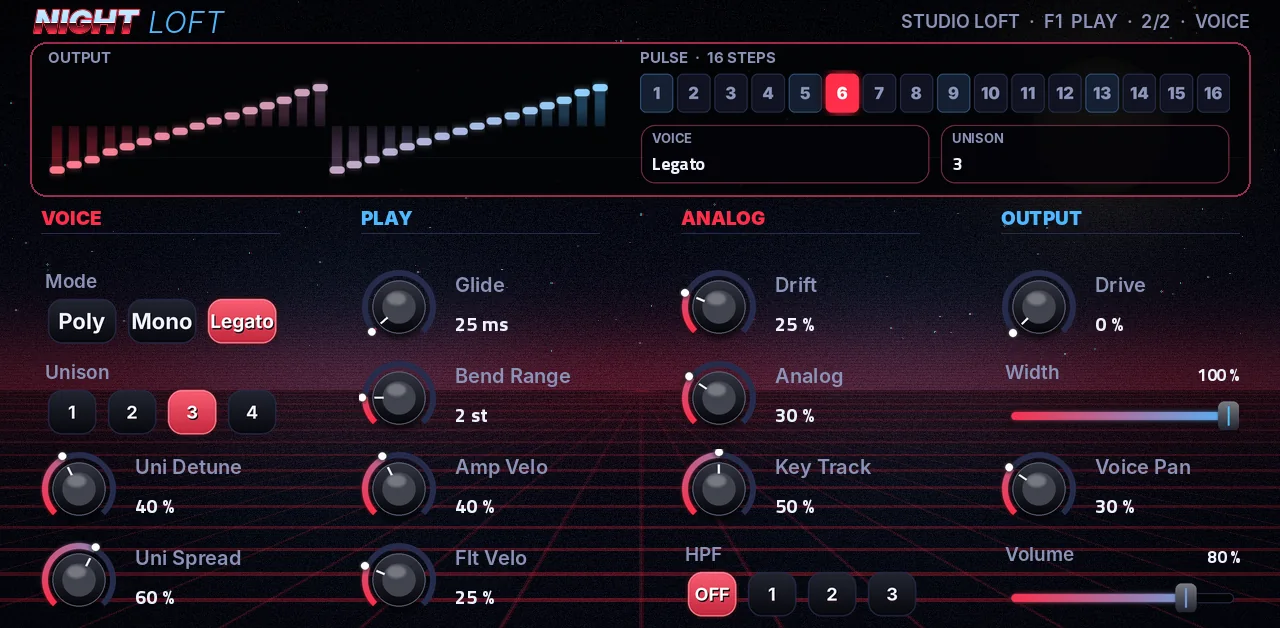
How the notes are played: poly or mono, unison stack, glide, velocity, and the 'analog' feel.
 12345
ヒント
For a fat lead, set Mode to Legato, Unison to 3, Uni Detune near 30 % and a short Glide.
What it's for
What you see
Display
the moving waveform of the sound and the 16 PULSE steps (the playing step lights up); VOICE and UNISON at a glance.
VOICE
- Mode Poly, Mono or Legato
- Unison 1 to 4 stacked voices per note
- Uni Detune spread in pitch of the stack
- Uni Spread spread of the stack across the stereo field
PLAY
- Glide slide time between notes
- Bend Range pitch-bend range in semitones
- Amp Velo how much velocity changes the level
- Flt Velo harder hits open the filter more
ANALOG
- Drift slow pitch wander, voice by voice
- Analog small fixed differences between voices
- Key Track higher notes, brighter filter
- HPF low cut: Off, 1, 2, 3
OUTPUT
- Drive warm overdrive before the effects
- Width stereo width
- Voice Pan spreads the voices left and right
- Volume master level
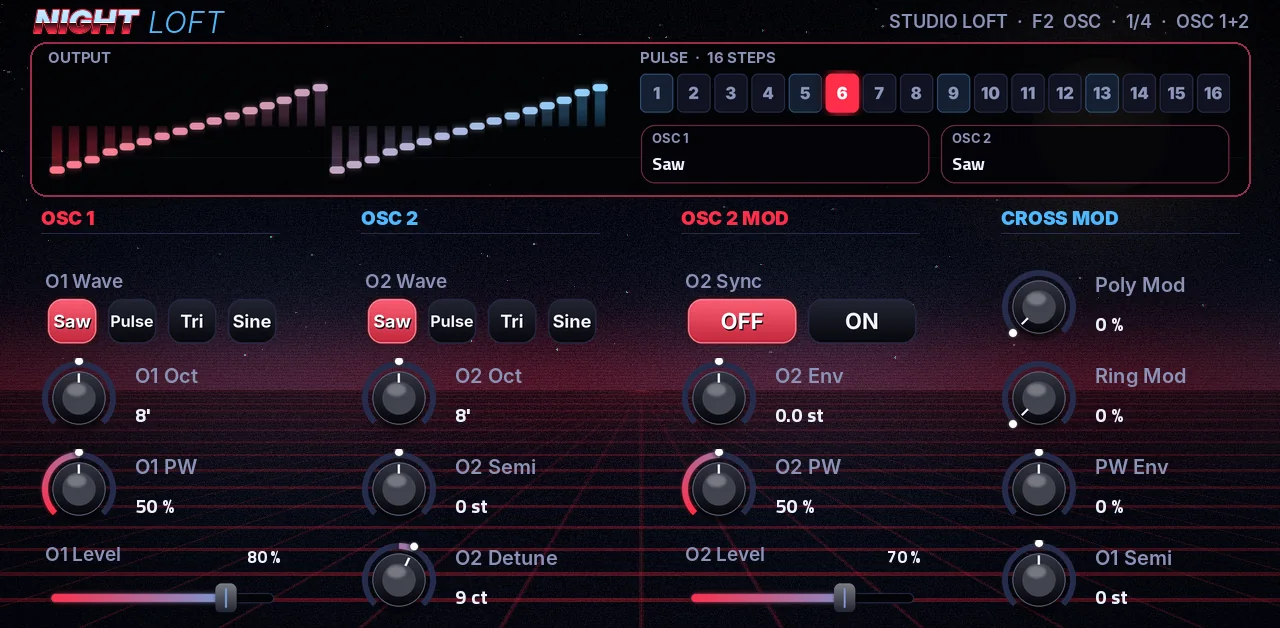
OSC 1+2
The two main analog oscillators and the classic tricks between them: sync, poly mod, ring mod.
 12345
ヒント
Sync scream: O2 Sync ON, O2 Semi at +7, then raise O2 Env. Every note now sweeps like a siren.
What it's for
What you see
Display
the moving waveform of the sound and the 16 PULSE steps (the playing step lights up); OSC 1 and OSC 2 at a glance.
OSC 1
- O1 Wave Saw, Pulse, Tri or Sine
- O1 Oct octave in feet, 32' to 2'
- O1 PW pulse width (Pulse wave)
- O1 Level level of oscillator 1
OSC 2
- O2 Wave Saw, Pulse, Tri or Sine
- O2 Oct octave in feet
- O2 Semi pitch in semitones
- O2 Detune fine detune in cents, for thickness
OSC 2 MOD
- O2 Sync hard-syncs OSC 2 to OSC 1
- O2 Env ENV 2 sweeps the pitch of OSC 2: the sync scream
- O2 PW pulse width of OSC 2
- O2 Level level of oscillator 2
CROSS MOD
- Poly Mod OSC 2 bends the pitch of OSC 1
- Ring Mod metallic ring modulation of OSC 1 and 2
- PW Env ENV 2 moves the pulse width
- O1 Semi pitch in semitones
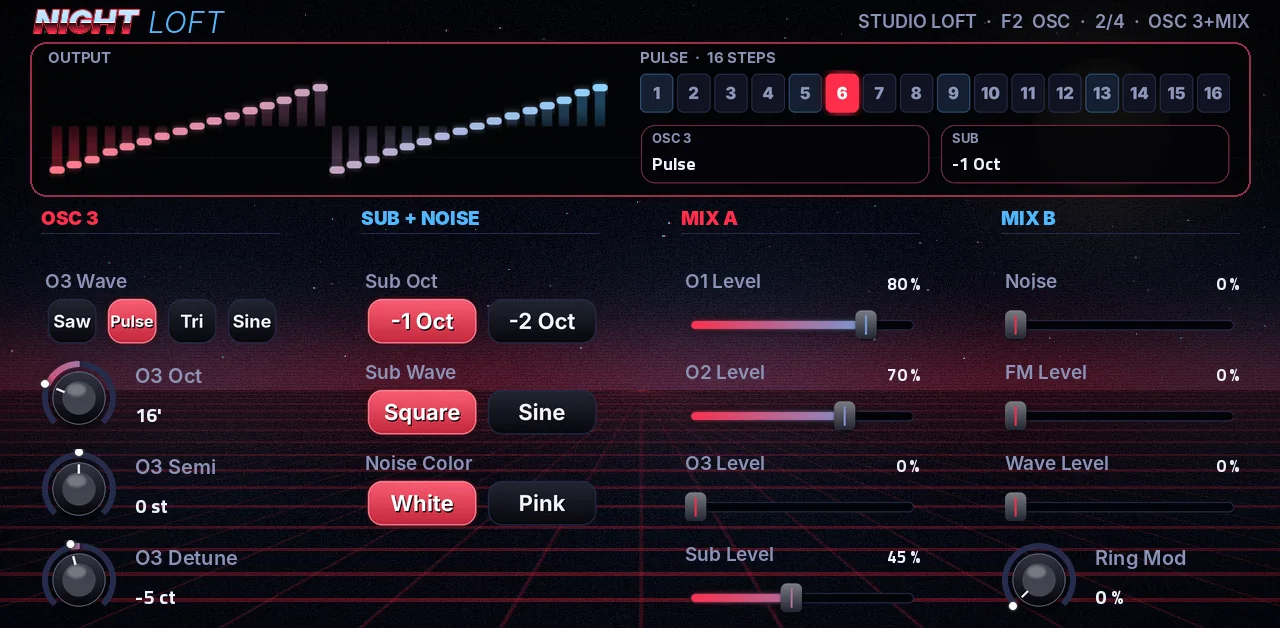
OSC 3+MIX
The third oscillator, the sub and the noise, and the mixer of all the sources.
 12345
ヒント
Bass that moves the room: Sub Oct -1 Oct, Sub Wave Sine, Sub Level 60 %.
What it's for
What you see
Display
the moving waveform of the sound and the 16 PULSE steps (the playing step lights up); OSC 3 and SUB at a glance.
OSC 3
- O3 Wave Saw, Pulse, Tri or Sine
- O3 Oct octave in feet
- O3 Semi pitch in semitones
- O3 Detune fine detune in cents
SUB + NOISE
- Sub Oct sub oscillator 1 or 2 octaves down
- Sub Wave Square or Sine
- Noise Color White or Pink
MIX A
- O1 Level level of oscillator 1
- O2 Level level of oscillator 2
- O3 Level level of oscillator 3
- Sub Level level of the sub oscillator
MIX B
- Noise noise level
- FM Level level of the FM engine
- Wave Level level of the wavetable engine
- Ring Mod metallic ring modulation of OSC 1 and 2
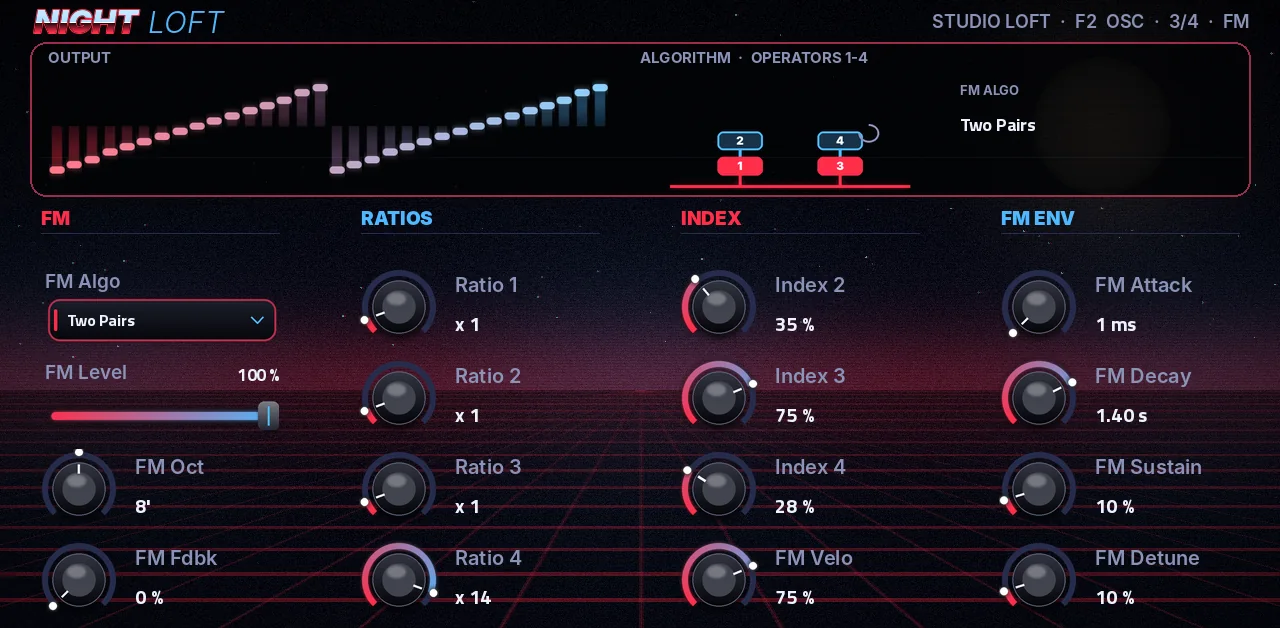
FM
The 4-operator FM engine: glassy keys, bells and slap basses. The algorithm is drawn at the top.
 12345
ヒント
For a classic electric piano, keep Ratio 1 and 2 at x 1, Index 2 near 35 % and a short FM Decay.
What it's for
What you see
Display
the moving waveform and the drawing of the current FM algorithm; ALGORITHM and RATIO 2 at a glance.
FM
- FM Algo 8 ways to connect the 4 operators (drawn on screen)
- FM Level level of the FM engine
- FM Oct octave of the FM engine
- FM Fdbk feedback of operator 4: from pure to gritty
RATIOS
- Ratio 1 frequency ratio of operator 1
- Ratio 2 frequency ratio of operator 2
- Ratio 3 frequency ratio of operator 3
- Ratio 4 frequency ratio of operator 4
INDEX
- Index 2 how hard operator 2 modulates
- Index 3 how hard operator 3 modulates
- Index 4 how hard operator 4 modulates
- FM Velo harder hits, brighter FM
FM ENV
- FM Attack attack of the FM brightness
- FM Decay how fast the FM brightness falls
- FM Sustain FM brightness while held
- FM Detune detune between operators
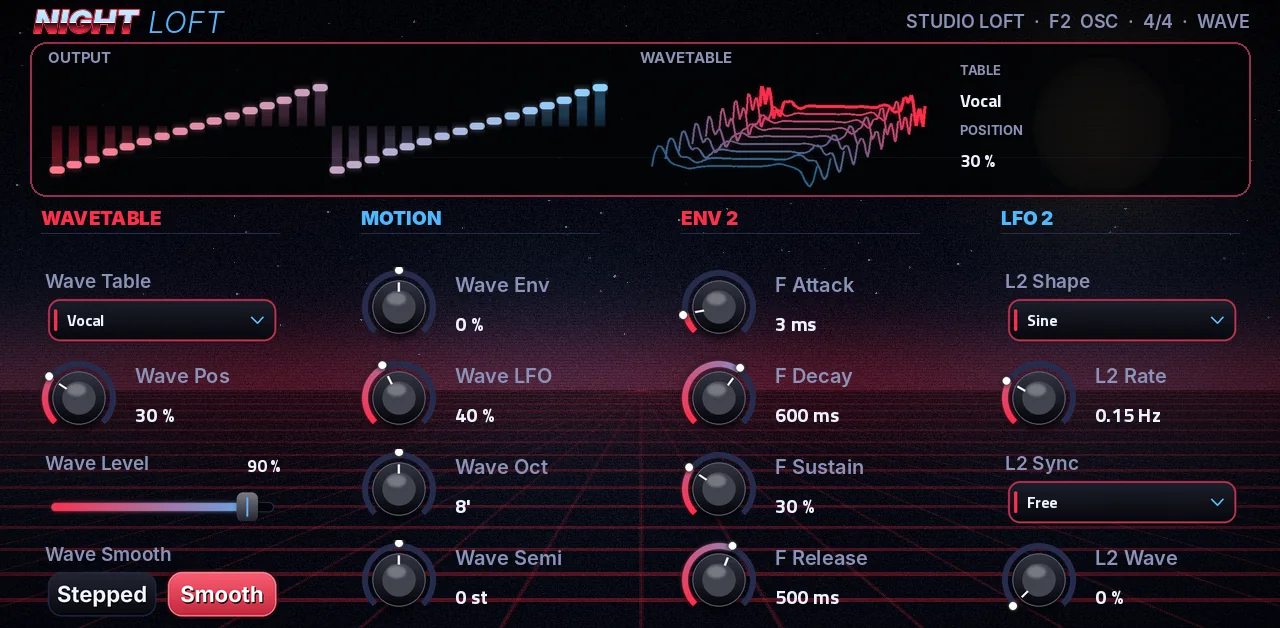
WAVE
The wavetable engine: 8 tables of 16 waves, scanned by ENV 2 or LFO 2. The table is drawn in 3D.
 12345
ヒント
Set Wave Smooth to Stepped and give Wave Env 40 %: you get the grainy sweep of early digital synths.
What it's for
What you see
Display
the moving waveform and the current wavetable in 3D; TABLE and POSITION at a glance.
WAVETABLE
- Wave Table 8 tables: Resonant, Vocal, Digi Bells, Harmonic, Pulse Bank, Glass, Metal, Choir
- Wave Pos position in the table
- Wave Level level of the wavetable engine
- Wave Smooth Stepped (the gritty 80s steps) or Smooth
MOTION
- Wave Env ENV 2 scans the table
- Wave LFO LFO 2 scans the table
- Wave Oct octave of the wavetable
- Wave Semi pitch in semitones
ENV 2
- F Attack ENV 2 attack
- F Decay ENV 2 decay
- F Sustain ENV 2 sustain
- F Release ENV 2 release
LFO 2
- L2 Shape Sine, Triangle, Saw Up/Down, Square, S&H
- L2 Rate speed in Hz
- L2 Sync Free, or locked to tempo
- L2 Wave LFO 2 scans the wavetable
FILTER
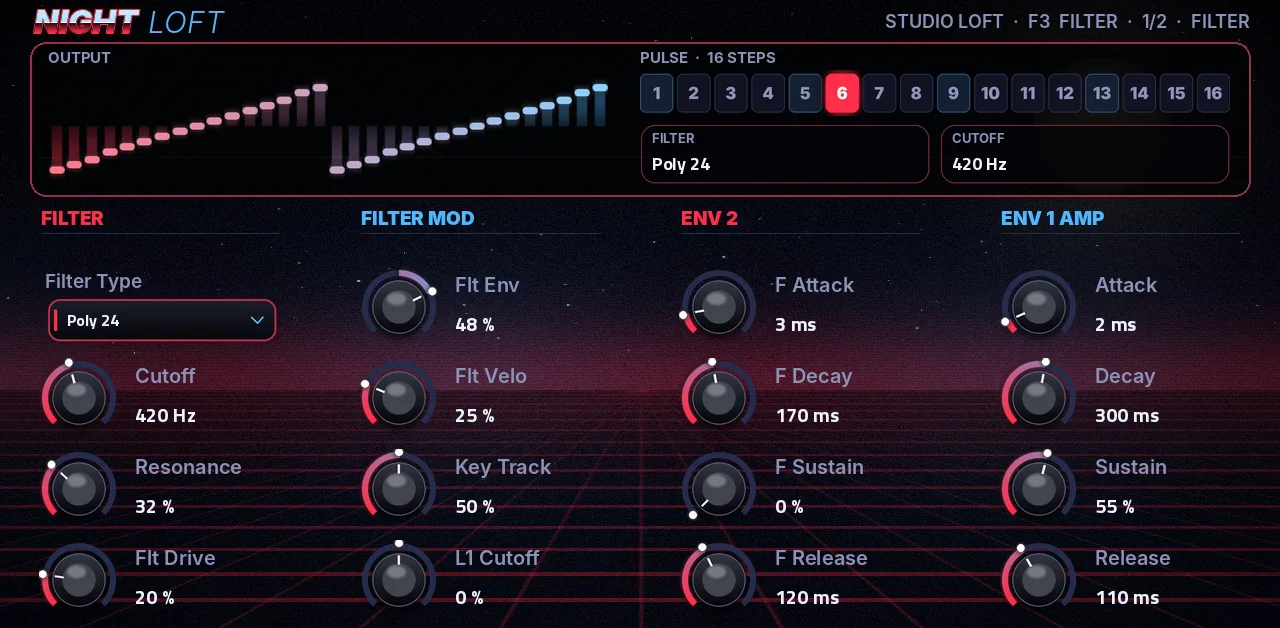
The filter and its two envelopes: ENV 2 shapes the filter, ENV 1 the volume.
 12345
ヒント
Acid line: Ladder 24, Resonance 70 %, Flt Env 70 %, F Decay around 170 ms. Then play with Cutoff.
What it's for
What you see
Display
the moving waveform of the sound and the 16 PULSE steps (the playing step lights up); FILTER and CUTOFF at a glance.
FILTER
- Filter Type 8 filter characters: 3 warm 24 dB ladders, 4 state-variable 12 dB, 1 soft low-pass
- Cutoff brightness of the sound
- Resonance the whistle at the cutoff
- Flt Drive saturation inside the filter
FILTER MOD
- Flt Env how far ENV 2 opens the filter
- Flt Velo harder hits open the filter more
- Key Track higher notes, brighter filter
- L1 Cutoff LFO 1 moves the filter
ENV 2
- F Attack ENV 2 attack
- F Decay ENV 2 decay
- F Sustain ENV 2 sustain
- F Release ENV 2 release
ENV 1 AMP
- Attack fade-in of each note
- Decay time to fall to the sustain level
- Sustain level while the key is held
- Release fade-out after the key is let go
FX
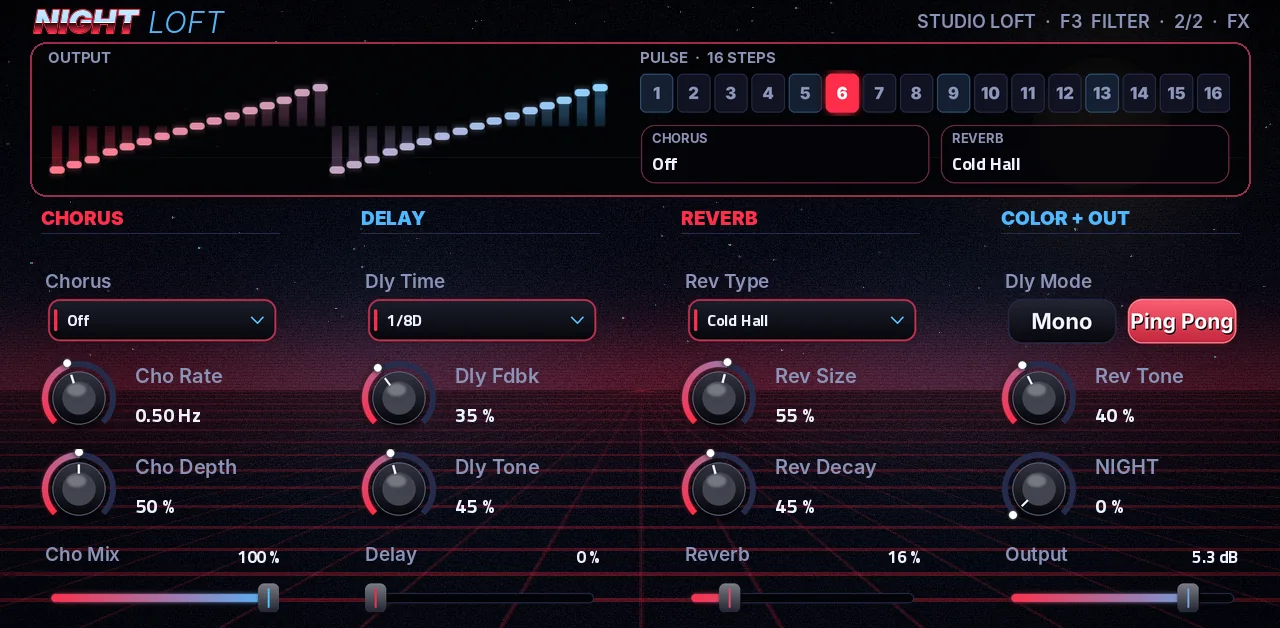
The 80s effects chain: chorus, tempo delay, reverb (Gated, Room, Plate, Cold Hall, Abyss).
 12345
ヒント
Gated reverb on a stab or a snare-like hit: Rev Type Gated, Reverb 25 %, Rev Size 60 %.
What it's for
What you see
Display
the moving waveform of the sound and the 16 PULSE steps (the playing step lights up); CHORUS and REVERB at a glance.
CHORUS
- Chorus Off, Chorus I, Chorus II, Chorus I+II, Stereo, Ensemble
- Cho Rate chorus speed
- Cho Depth chorus depth
- Cho Mix chorus amount
DELAY
- Dly Time 1/16 to 1 Bar, dotted and triplets
- Dly Fdbk number of repeats
- Dly Tone darker or brighter repeats
- Delay delay amount
REVERB
- Rev Type Gated, Room, Plate, Cold Hall, Abyss
- Rev Size size of the space
- Rev Decay length of the tail
- Reverb reverb amount
COLOR + OUT
- Dly Mode Mono or Ping Pong
- Rev Tone darker or brighter reverb
- NIGHT one big knob that makes everything darker
- Output output gain in dB
LFO
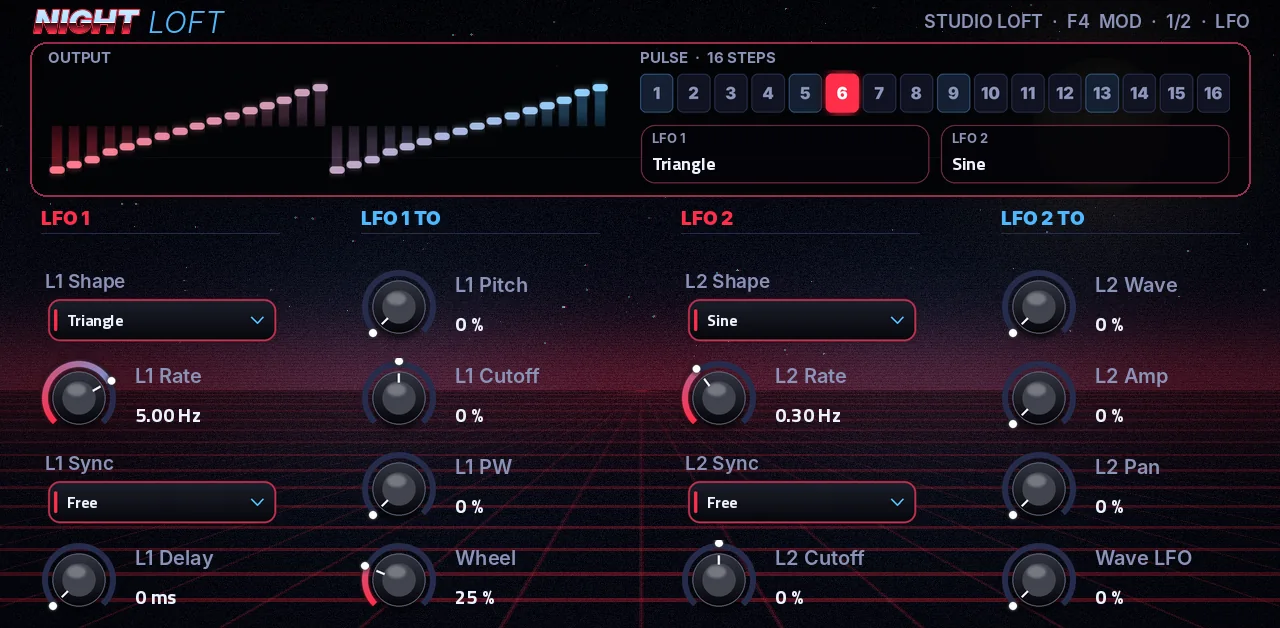
Two LFOs, free or locked to the tempo. LFO 1 for vibrato and filter, LFO 2 for the wavetable, tremolo and pan.
 12345
ヒント
Vibrato that arrives late, like a real player: L1 Pitch 12 %, L1 Delay 800 ms.
What it's for
What you see
Display
the moving waveform of the sound and the 16 PULSE steps (the playing step lights up); LFO 1 and LFO 2 at a glance.
LFO 1
- L1 Shape Sine, Triangle, Saw Up/Down, Square, S&H
- L1 Rate speed in Hz
- L1 Sync Free, or locked to tempo (4 Bars to 1/32)
- L1 Delay vibrato that arrives after a while
LFO 1 TO
- L1 Pitch vibrato depth
- L1 Cutoff LFO 1 moves the filter
- L1 PW LFO 1 moves the pulse width
- Wheel vibrato added by the mod wheel
LFO 2
- L2 Shape Sine, Triangle, Saw Up/Down, Square, S&H
- L2 Rate speed in Hz
- L2 Sync Free, or locked to tempo
- L2 Cutoff LFO 2 moves the filter
LFO 2 TO
- L2 Wave LFO 2 scans the wavetable
- L2 Amp tremolo
- L2 Pan auto-pan
- Wave LFO LFO 2 scans the table
ENV
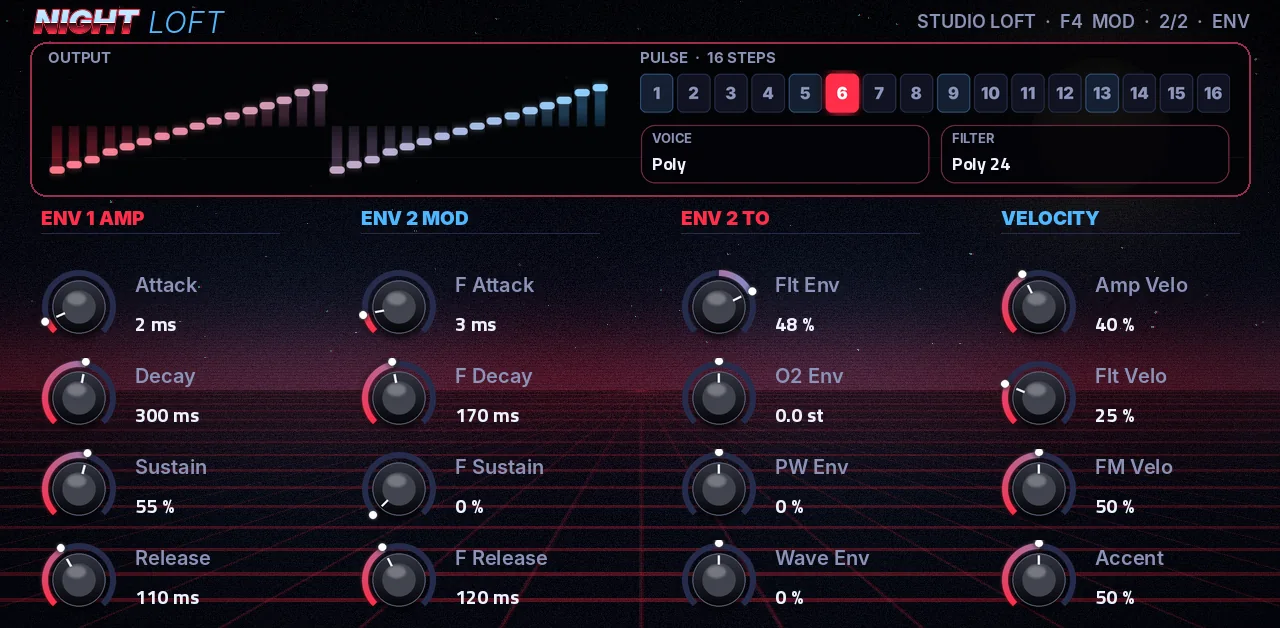
Both envelopes on one page, where ENV 2 goes, and everything that reacts to velocity.
 12345
ヒント
For pads that bloom: Attack 600 ms, Release 1.5 s, and F Attack a little longer than Attack.
What it's for
What you see
Display
the moving waveform of the sound and the 16 PULSE steps (the playing step lights up); VOICE and FILTER at a glance.
ENV 1 AMP
- Attack fade-in of each note
- Decay time to fall to the sustain level
- Sustain level while the key is held
- Release fade-out after the key is let go
ENV 2 MOD
- F Attack ENV 2 attack
- F Decay ENV 2 decay
- F Sustain ENV 2 sustain
- F Release ENV 2 release
ENV 2 TO
- Flt Env how far ENV 2 opens the filter
- O2 Env ENV 2 sweeps the pitch of OSC 2: the sync scream
- PW Env ENV 2 moves the pulse width
- Wave Env ENV 2 scans the table
VELOCITY
- Amp Velo how much velocity changes the level
- Flt Velo harder hits open the filter more
- FM Velo harder hits, brighter FM
- Accent how much accented steps stand out
PULSE
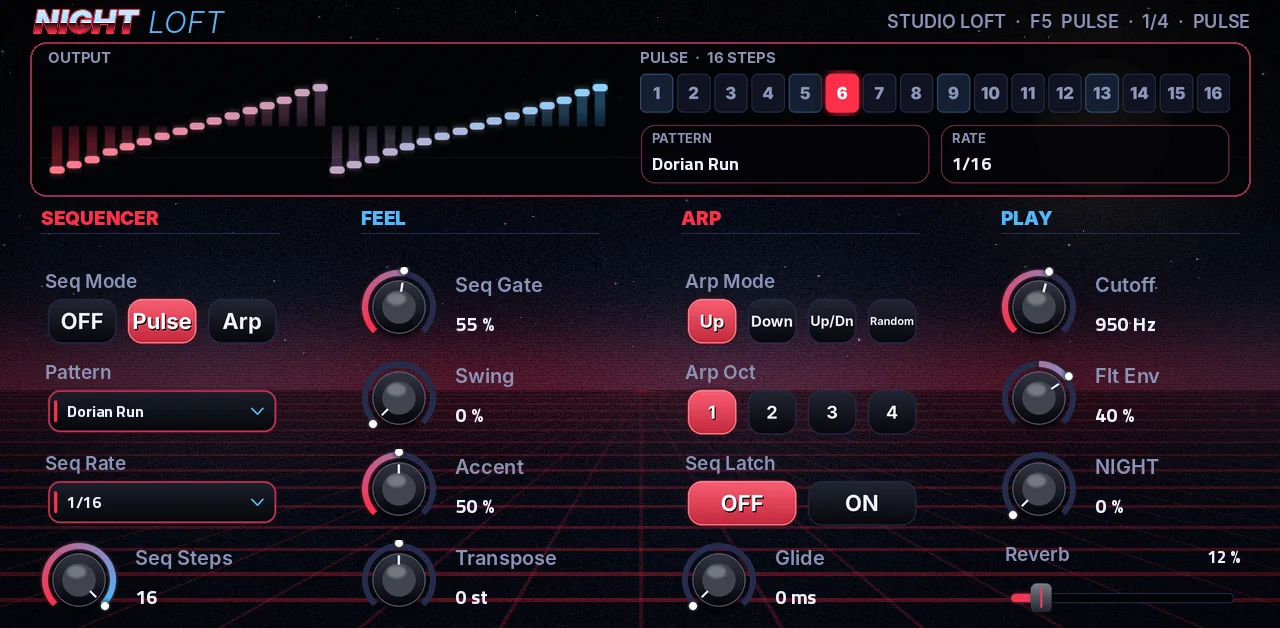
The heart of Nightloft: the 16-step pulse sequencer and the arpeggiator, played by the keys you hold.
12345ヒント
Hold one key, choose the pattern Tritone Dread, Seq Rate 1/16. Hold a chord instead: the whole chord pulses.
What it's for
What you see
Display
the moving waveform of the sound and the 16 PULSE steps (the playing step lights up); PATTERN and RATE at a glance.
SEQUENCER
- Seq Mode Off, Pulse (16-step sequencer) or Arp
- Pattern 15 ready patterns that write the 16 steps
- Seq Rate speed of the steps, 1/4 to 1/32, triplets and dotted
- Seq Steps length of the pattern, 1 to 16
FEEL
- Seq Gate length of each step
- Swing shuffle feel
- Accent how much accented steps stand out
- Transpose moves the whole pattern up or down
ARP
- Arp Mode Up, Down, Up/Dn, Random
- Arp Oct 1 to 4 octaves
- Seq Latch the pattern keeps playing after you let go
- Glide slide time between notes
PLAY
- Cutoff brightness of the sound
- Flt Env how far ENV 2 opens the filter
- NIGHT one big knob that makes everything darker
- Reverb reverb amount
NOTES
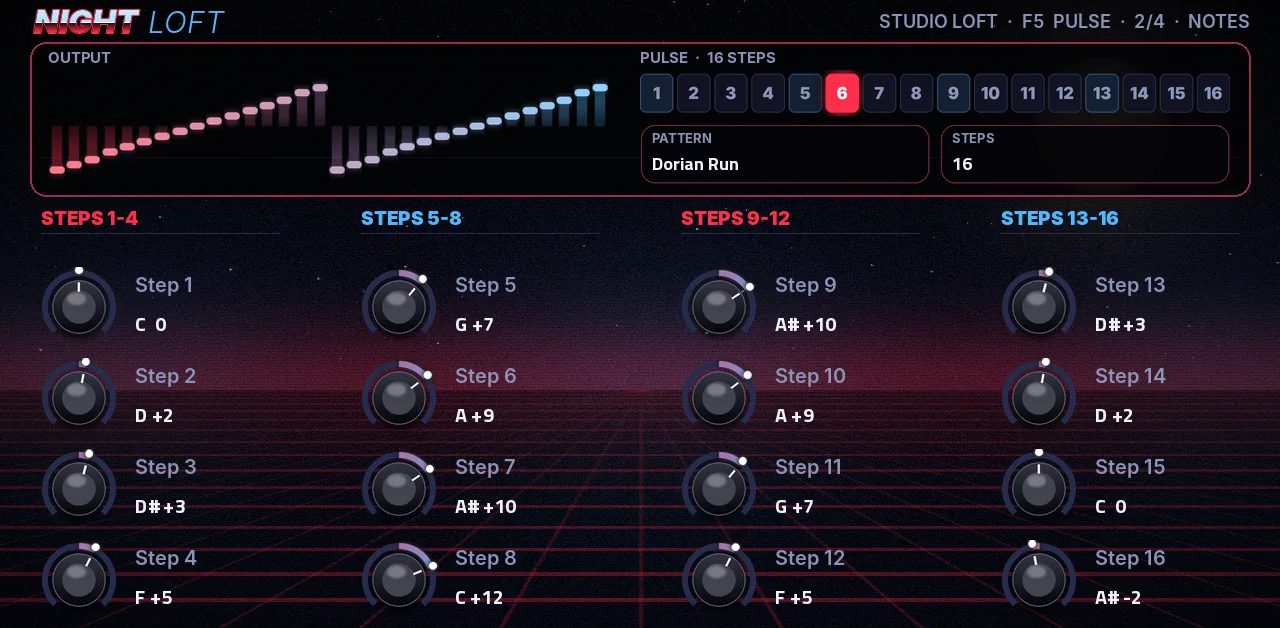
The pitch of each of the 16 steps, in semitones from the key you hold (shown as notes).
 12345
ヒント
Choose a pattern first, then change one or two steps: it stays yours and keeps its groove.
What it's for
What you see
Display
the moving waveform of the sound and the 16 PULSE steps (the playing step lights up); PATTERN and STEPS at a glance.
STEPS 1-4
- Step 1 pitch of step 1, in semitones from the key you hold
- Step 2 pitch of step 2, in semitones from the key you hold
- Step 3 pitch of step 3, in semitones from the key you hold
- Step 4 pitch of step 4, in semitones from the key you hold
STEPS 5-8
- Step 5 pitch of step 5, in semitones from the key you hold
- Step 6 pitch of step 6, in semitones from the key you hold
- Step 7 pitch of step 7, in semitones from the key you hold
- Step 8 pitch of step 8, in semitones from the key you hold
STEPS 9-12
- Step 9 pitch of step 9, in semitones from the key you hold
- Step 10 pitch of step 10, in semitones from the key you hold
- Step 11 pitch of step 11, in semitones from the key you hold
- Step 12 pitch of step 12, in semitones from the key you hold
STEPS 13-16
- Step 13 pitch of step 13, in semitones from the key you hold
- Step 14 pitch of step 14, in semitones from the key you hold
- Step 15 pitch of step 15, in semitones from the key you hold
- Step 16 pitch of step 16, in semitones from the key you hold
ACCENTS
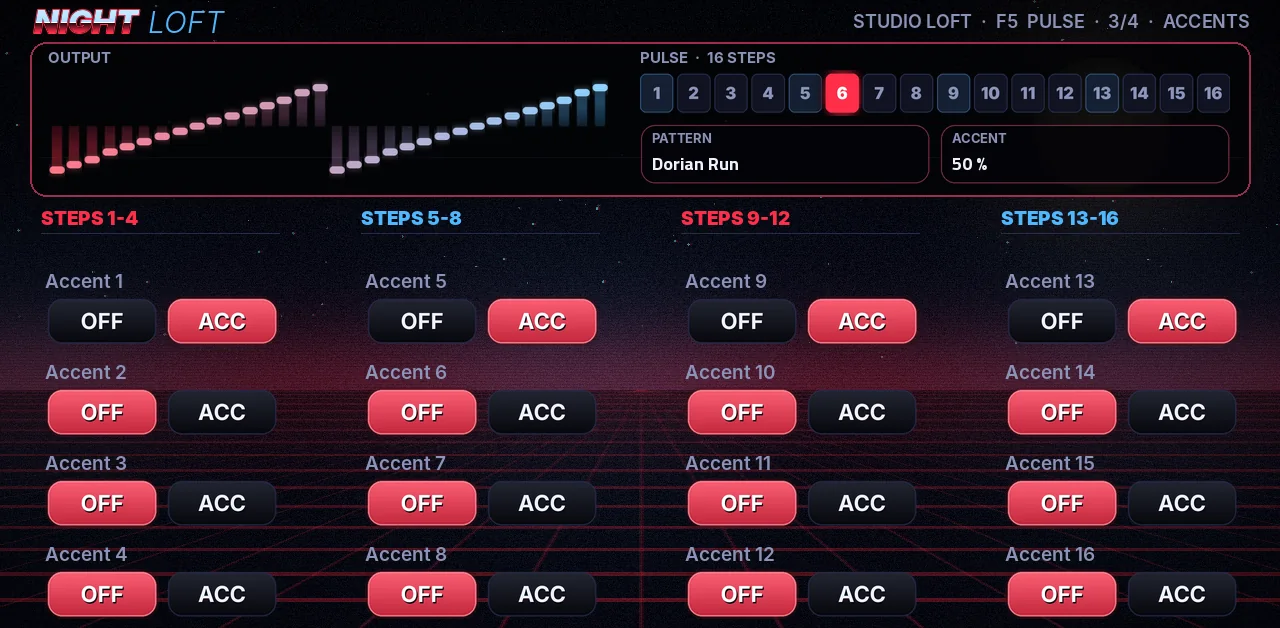
Which steps are accented: louder, and brighter through the filter.
 12345
ヒント
Accent on steps 1, 4, 7, 11 and 14 gives a rolling, galloping feel.
What it's for
What you see
Display
the moving waveform of the sound and the 16 PULSE steps (the playing step lights up); PATTERN and ACCENT at a glance.
STEPS 1-4
- Accent 1 OFF or ACC (accented) for step 1
- Accent 2 OFF or ACC (accented) for step 2
- Accent 3 OFF or ACC (accented) for step 3
- Accent 4 OFF or ACC (accented) for step 4
STEPS 5-8
- Accent 5 OFF or ACC (accented) for step 5
- Accent 6 OFF or ACC (accented) for step 6
- Accent 7 OFF or ACC (accented) for step 7
- Accent 8 OFF or ACC (accented) for step 8
STEPS 9-12
- Accent 9 OFF or ACC (accented) for step 9
- Accent 10 OFF or ACC (accented) for step 10
- Accent 11 OFF or ACC (accented) for step 11
- Accent 12 OFF or ACC (accented) for step 12
STEPS 13-16
- Accent 13 OFF or ACC (accented) for step 13
- Accent 14 OFF or ACC (accented) for step 14
- Accent 15 OFF or ACC (accented) for step 15
- Accent 16 OFF or ACC (accented) for step 16
LENGTHS
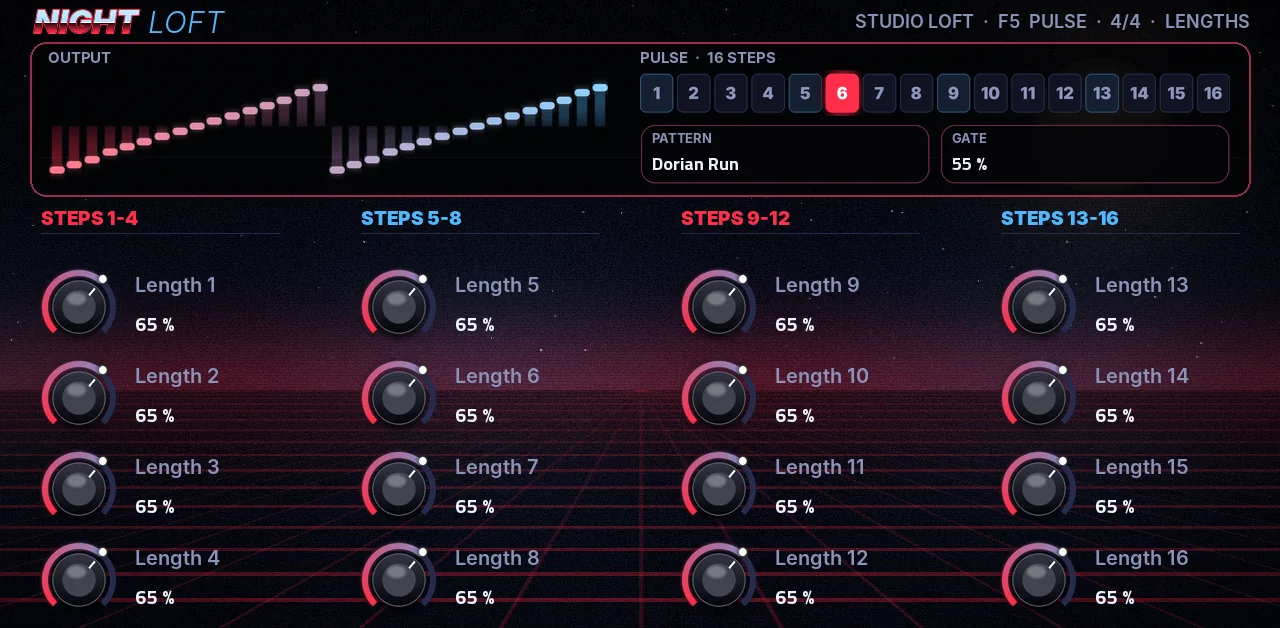
The length of each step: 0 % is a rest, 100 % ties to the next step.
 12345
ヒント
Short lengths (40 %) on a bass pattern make it tight and nervous; ties make it glide.
What it's for
What you see
Display
the moving waveform of the sound and the 16 PULSE steps (the playing step lights up); PATTERN and GATE at a glance.
STEPS 1-4
- Length 1 length of step 1: 0 % is a rest, 100 % a tie
- Length 2 length of step 2: 0 % is a rest, 100 % a tie
- Length 3 length of step 3: 0 % is a rest, 100 % a tie
- Length 4 length of step 4: 0 % is a rest, 100 % a tie
STEPS 5-8
- Length 5 length of step 5: 0 % is a rest, 100 % a tie
- Length 6 length of step 6: 0 % is a rest, 100 % a tie
- Length 7 length of step 7: 0 % is a rest, 100 % a tie
- Length 8 length of step 8: 0 % is a rest, 100 % a tie
STEPS 9-12
- Length 9 length of step 9: 0 % is a rest, 100 % a tie
- Length 10 length of step 10: 0 % is a rest, 100 % a tie
- Length 11 length of step 11: 0 % is a rest, 100 % a tie
- Length 12 length of step 12: 0 % is a rest, 100 % a tie
STEPS 13-16
- Length 13 length of step 13: 0 % is a rest, 100 % a tie
- Length 14 length of step 14: 0 % is a rest, 100 % a tie
- Length 15 length of step 15: 0 % is a rest, 100 % a tie
- Length 16 length of step 16: 0 % is a rest, 100 % a tie
STYLE
Where every idea starts: choose the mood, the key and the sound in a few taps.
123456ヒント
Change only the key and press LISTEN again: the whole progression follows, voicing and sequencer included.
What it's for
What you see
STYLE
FREE (every progression that fits the scale), the 10 film-score styles, and MY PROGRESSIONS (32 slots shared by all Studio Loft synths).
Style card
the style in a few words, with its suggested tempo, way of playing, voicing, meters and number of progressions.
KEY
12 keys; the key lights up in neon red. Suggested by the style, always yours to change.
SCALE
opens the scale list (Major, Minor, Dorian, Phrygian, Lydian, Mixolydian, Harmonic Minor, Melodic Minor). The notes of the scale are shown under it.
SUGGESTED SOUNDS
3 Nightloft presets chosen by hand for the style. One tap loads the sound.
LISTEN / STOP
plays the current progression, with its name, key and tempo.
CHORDS
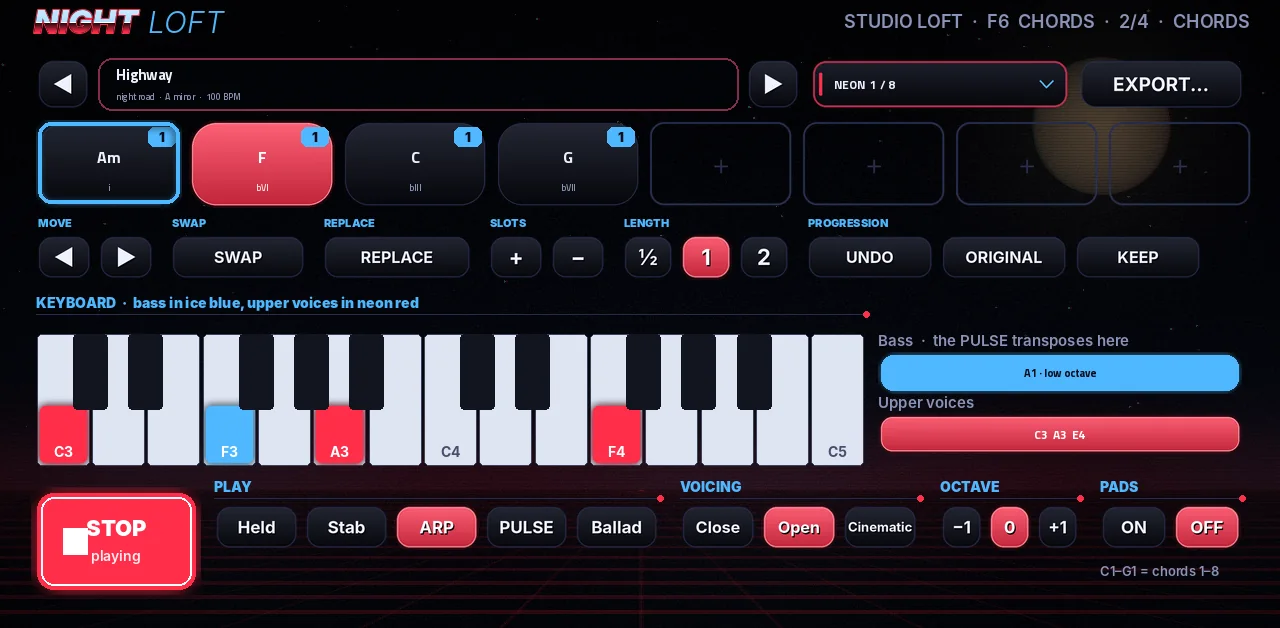
Where you make the progression yours, hear it with your sound, and get it out of the plugin.
 123456789
ヒント
Choose ARP play with an ARP preset loaded: Nightloft's arpeggiator plays each chord, with the preset's own speed and octaves.
What it's for
What you see
Progression bar
◀ ▶ step through the progressions of the style; the name, mood, key and tempo are shown.
List
opens the list of the progressions of the style, page by page.
EXPORT...
opens the EXPORT window: pattern, MIDI and WAV.
Chord slots
up to 8 chords with their degree and length badge. The playing chord lights up in red; tap a slot to select it.
Tools
MOVE ◀ ▶, SWAP, REPLACE, SLOTS + −, LENGTH ½ 1 2, and for the whole progression UNDO, ORIGINAL, KEEP.
KEYBOARD
the notes of the current chord: bass in ice blue, upper voices in neon red.
Bass · Upper voices
the bass note (the PULSE transposes here) and the upper notes, in words.
PLAY / STOP
loops the progression, locked to the MPC's tempo and position when it plays.
PLAY · VOICING · OCTAVE · PADS
how to play it: Held, Stab, ARP, PULSE, Ballad; voicing Close, Open, Cinematic; octave −1 0 +1; PADS ON plays chords 1–8 from C1–G1.
LISTEN
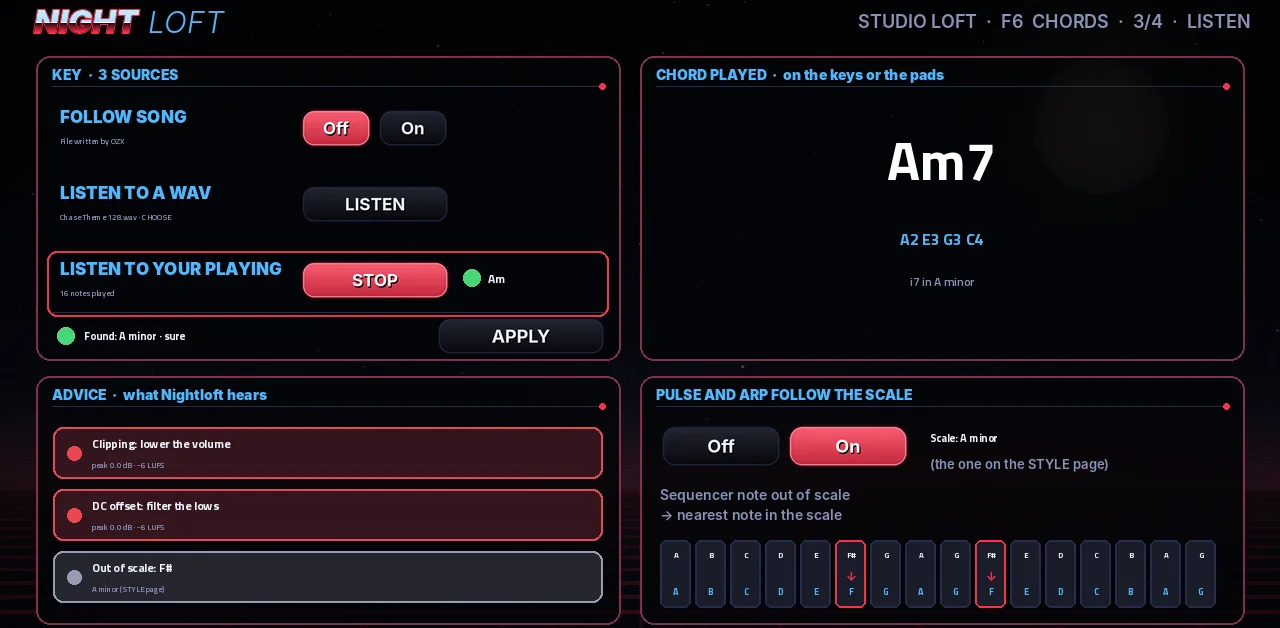
A second pair of ears. Find the key of a sample, check your playing, keep the sequencer in key.
 1234567
ヒント
Sampled a loop and don't know its key? Copy the WAV into Studio Loft Export / Listen, LISTEN, APPLY: the chord progressions are now in its key.
What it's for
What you see
FOLLOW SONG
the switch for a song key shared between Studio Loft plugins. In this version it is not read yet: it shows a dash. Use the two other sources.
LISTEN TO A WAV
choose a WAV in Studio Loft Export / Listen; Nightloft finds its key and tempo.
LISTEN TO YOUR PLAYING
play 8 notes or more; Nightloft finds the key and how well you sit on the grid.
Found · APPLY
the key found, with a confidence dot (red, orange, green). APPLY sets it on the STYLE page; UNDO puts it back.
CHORD PLAYED
the chord you hold on the keys or the pads, its notes and its degree in the key of the STYLE page.
ADVICE
what Nightloft hears on its own output: clipping, DC offset, notes out of scale. Problems first.
PULSE AND ARP FOLLOW THE SCALE
On: any sequencer note out of the scale moves to the nearest note in it. The 16 steps show written and played notes.
FILTER TYPE
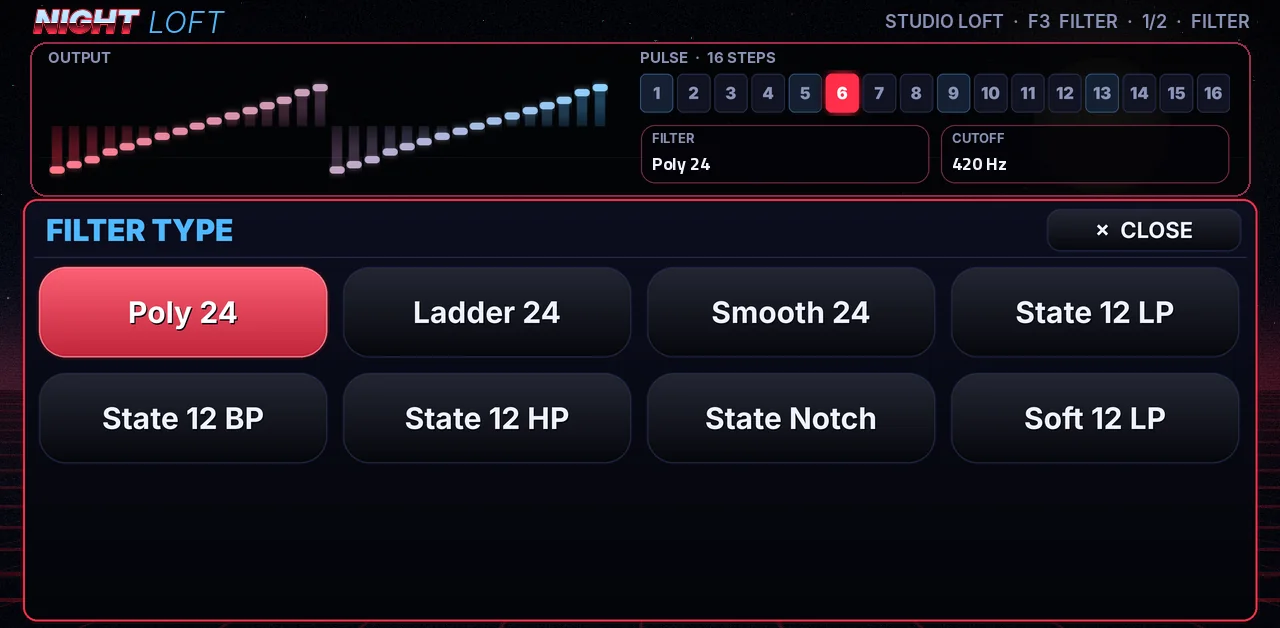
Tap the Filter Type box (or click the data wheel on it). Tap a name: the list closes. × CLOSE closes without changing.
PULSE PATTERN
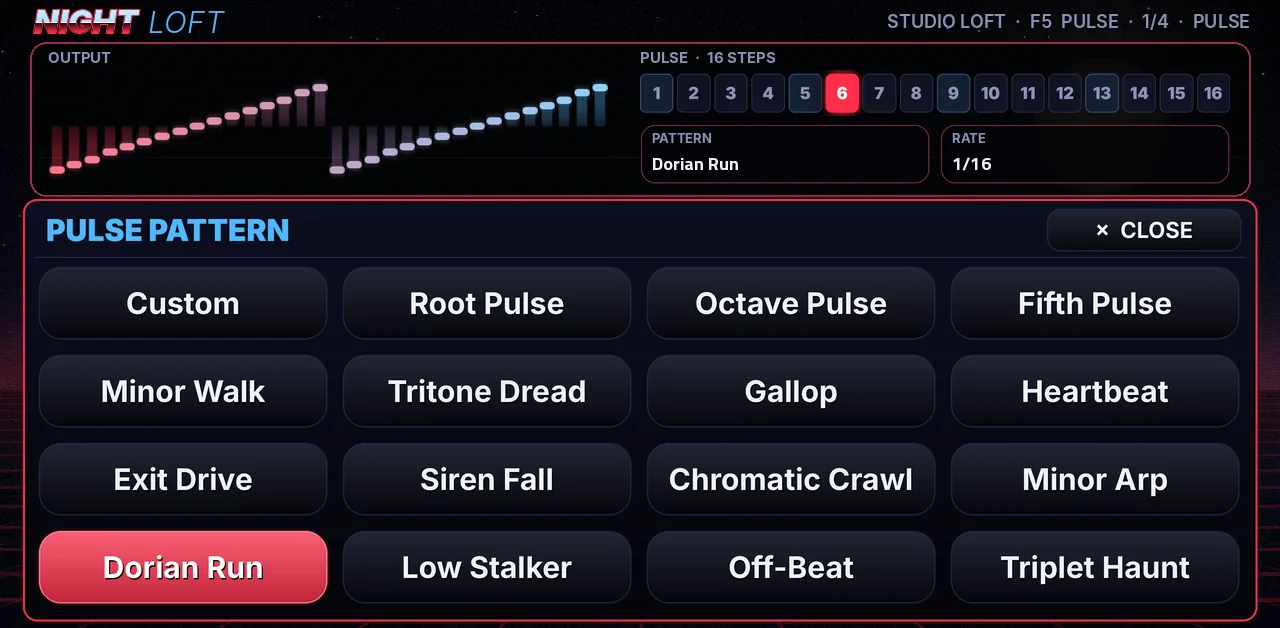
15 ready patterns. Choosing one writes the notes, accents and lengths of the 16 steps; edit them on NOTES, ACCENTS, LENGTHS.
WAVE TABLE
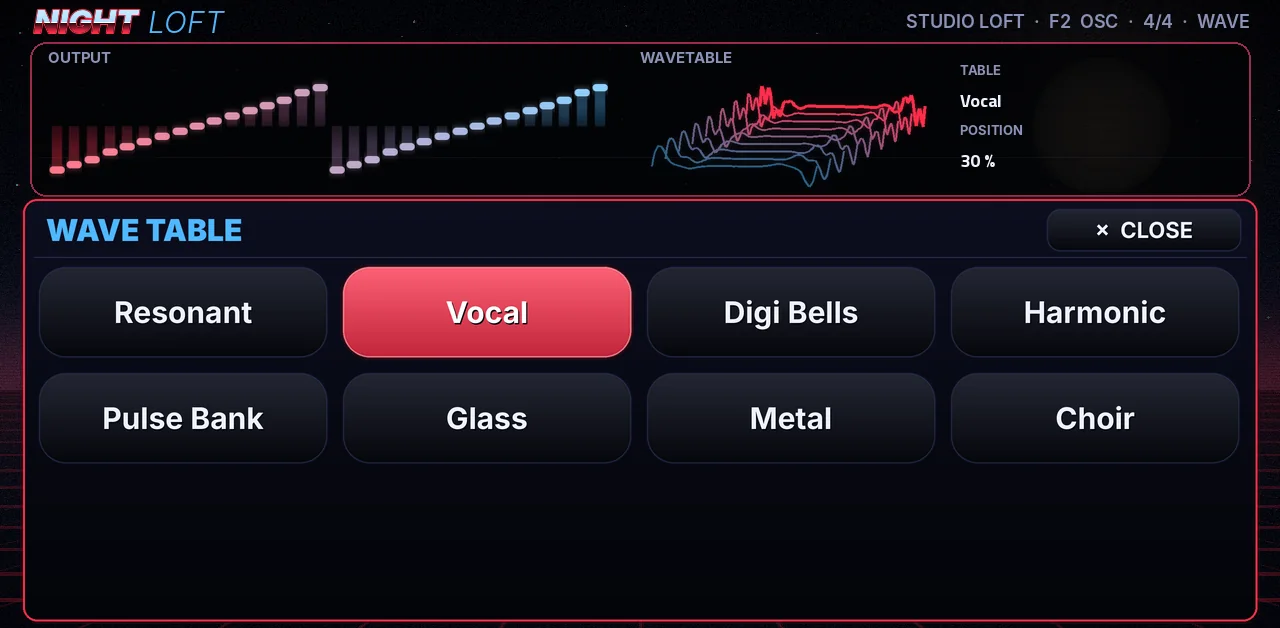
8 tables of 16 waves each. Vocal and Choir for breathy pads, Digi Bells and Glass for chimes, Metal for hard leads.
REVERB TYPE
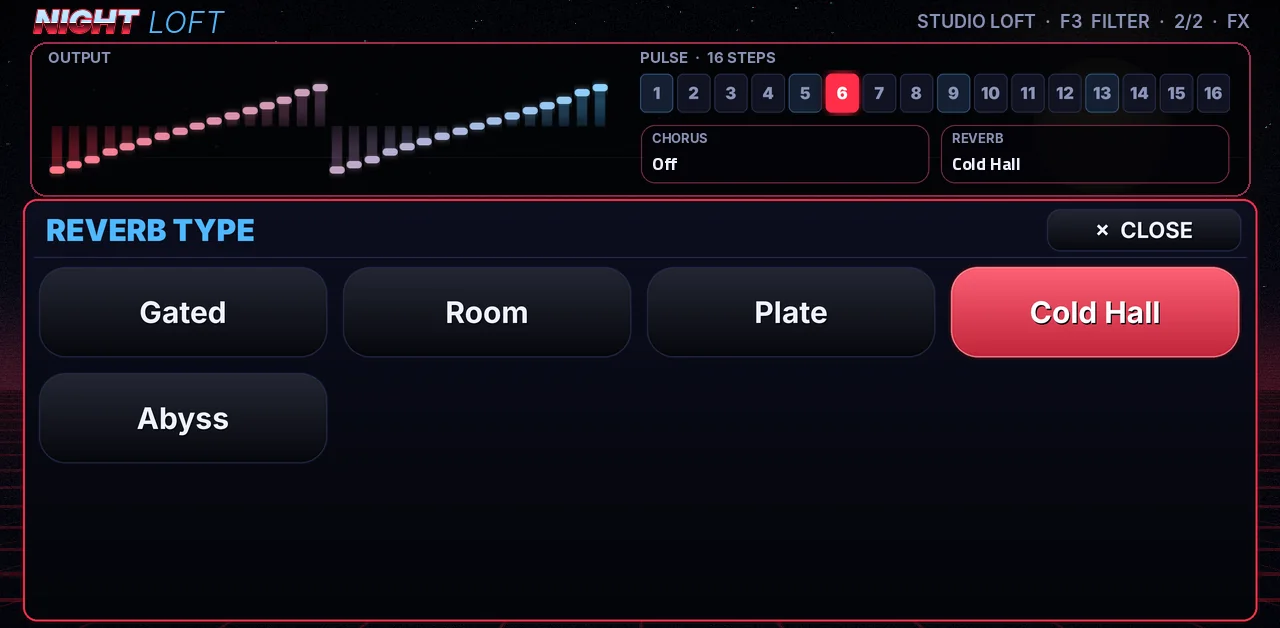
Gated (cut short, very 80s), Room, Plate, Cold Hall (a big cold space) and Abyss (huge and dark).
SCALE
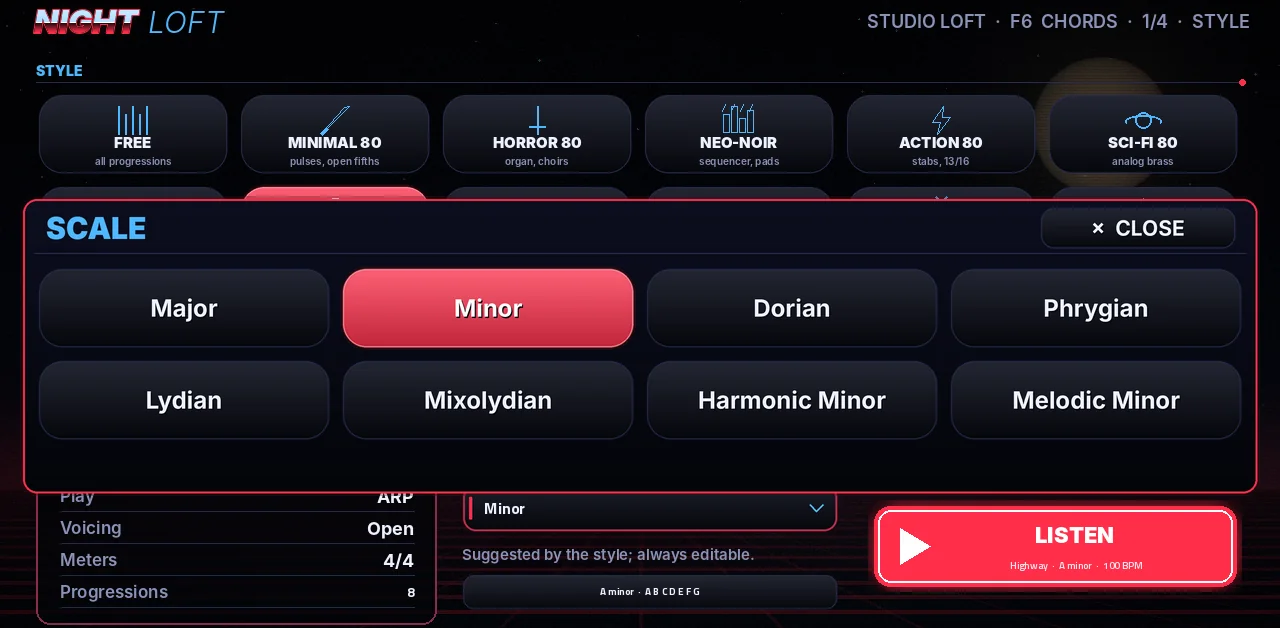
The 8 scales of the STYLE page. The chords of FREE and the out-of-scale check of LISTEN follow this choice.
PROGRESSIONS
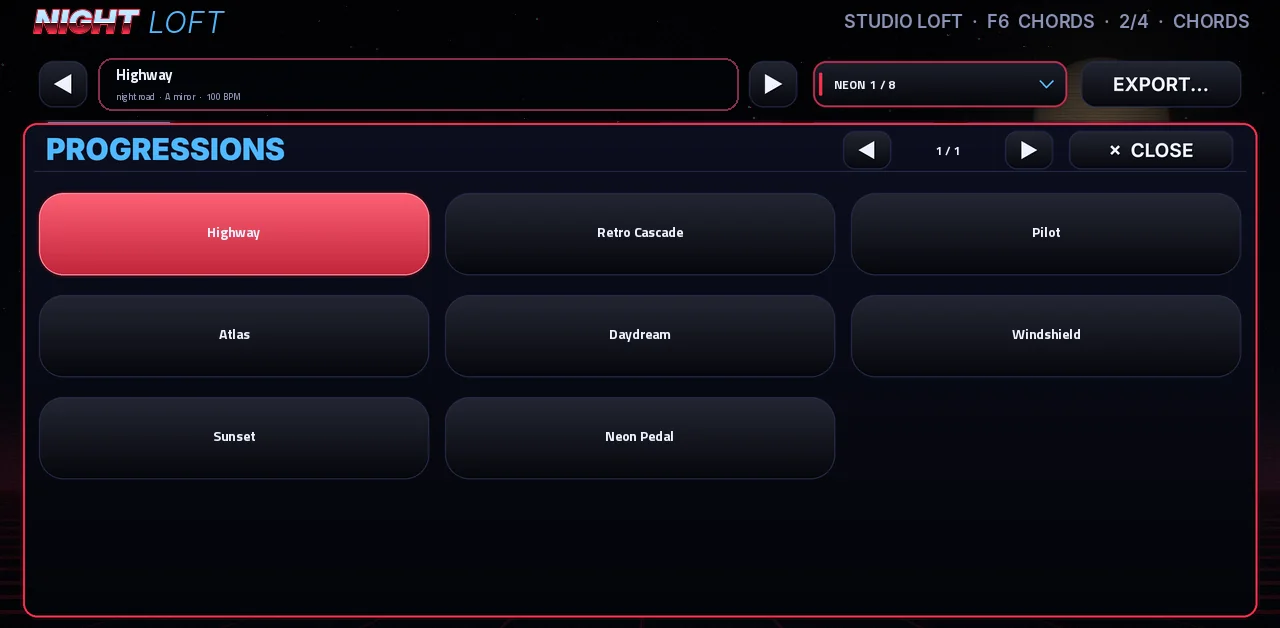
All the progressions of the style, page by page. The playing one is highlighted.
REPLACE
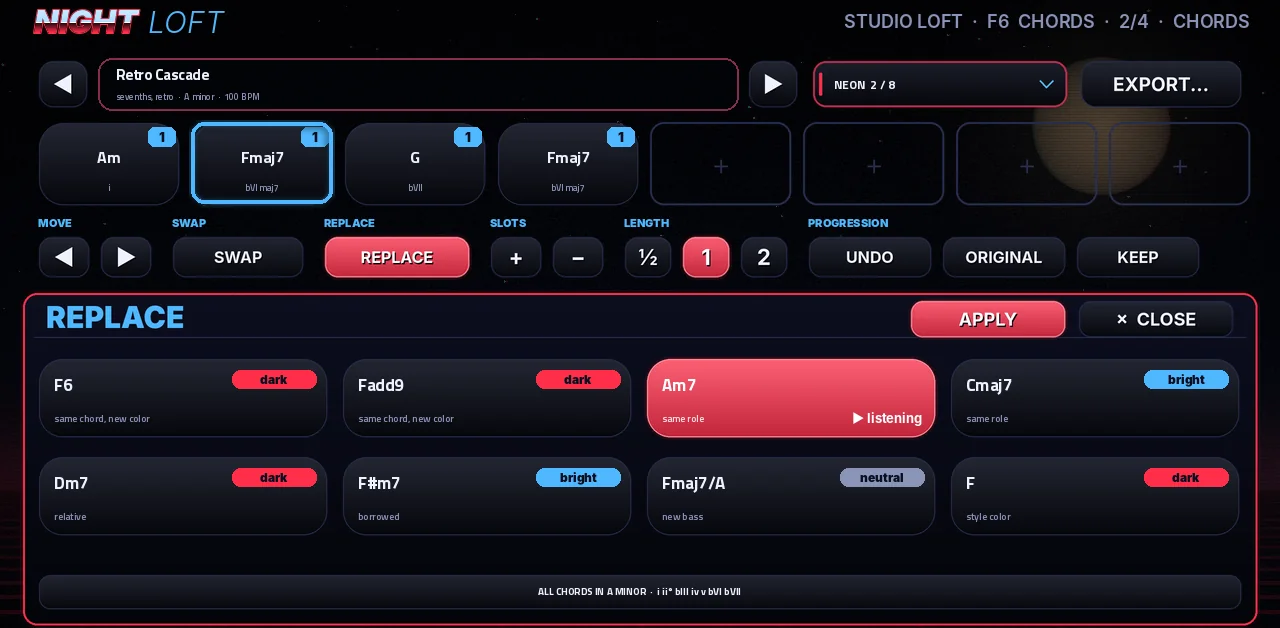
8 suggestions for the selected chord, each with its role and colour (neutral, dark, bright). Tap to hear it in place, APPLY to keep it. The bonus line lists all chords of the key.
EXPORT
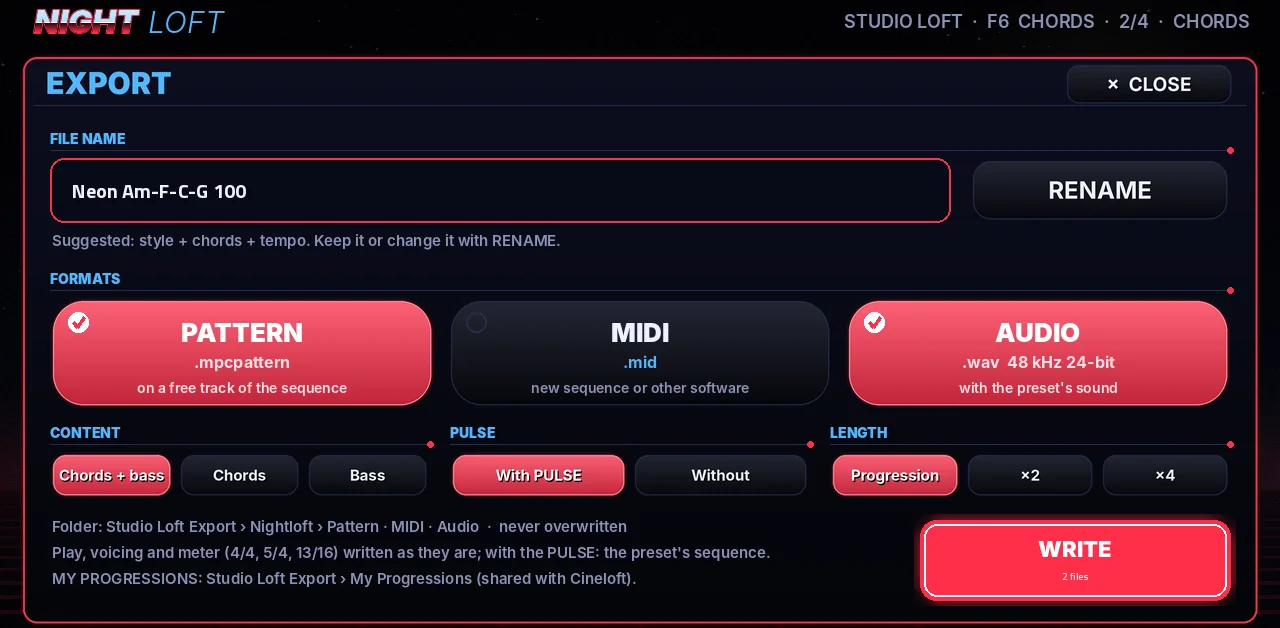
File name (suggested: style + chords + tempo, RENAME to change it), formats PATTERN / MIDI / AUDIO, content, with or without the PULSE, length. WRITE saves into Studio Loft Export / Nightloft. Files are never overwritten.
NAME
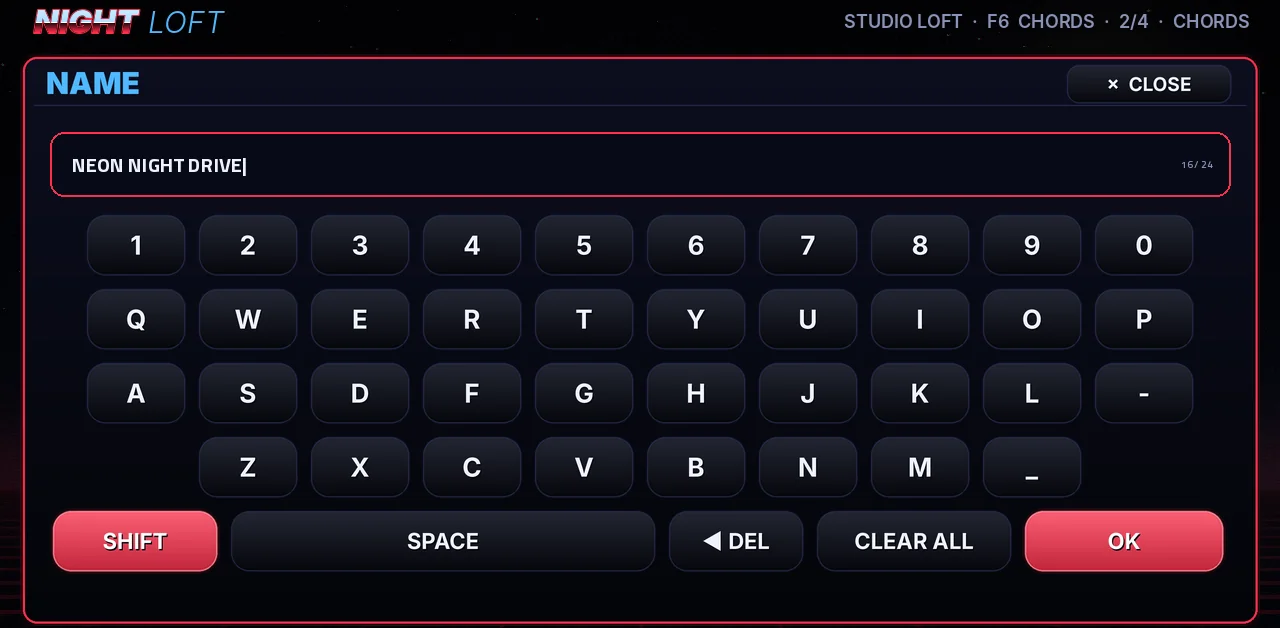
The keyboard to rename a file or a kept progression. SHIFT for lower case, SPACE, ◀ DEL, CLEAR ALL, OK.
CHOOSE A WAV
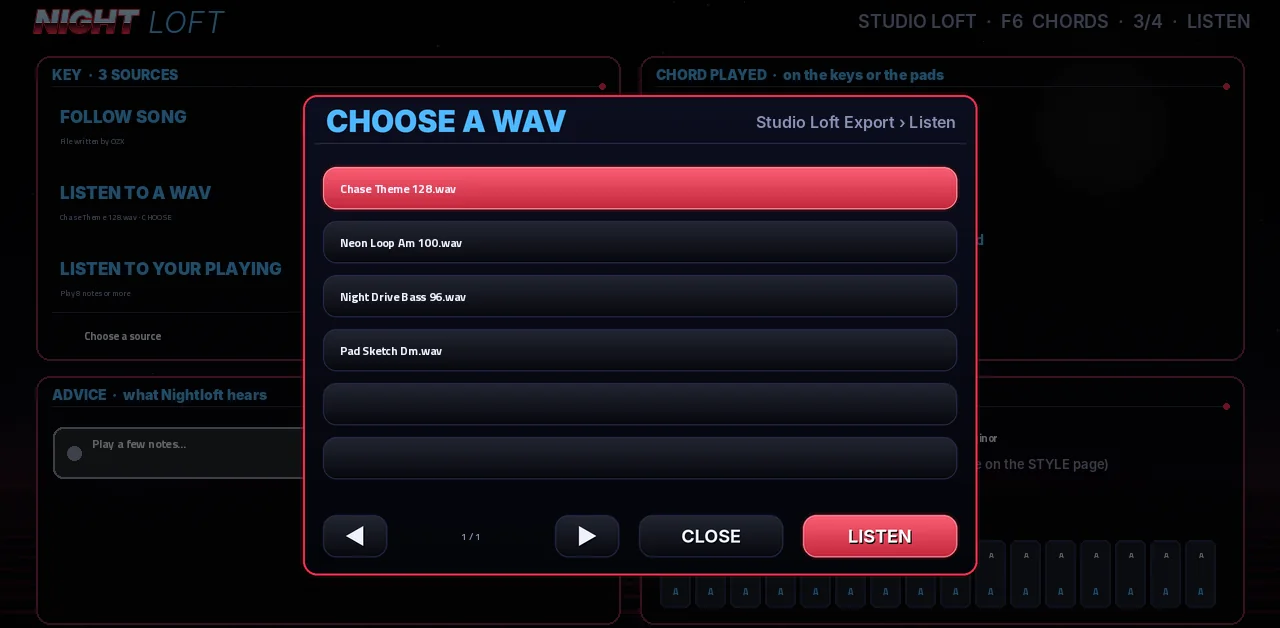
The WAV files of Studio Loft Export / Listen, 6 per page. Tap one, then LISTEN.
Technical sheet
In one sentence: Nightloft is an 80s polyphonic synthesizer for MPC with a built-in pulse sequencer, film-score chord progressions and a listening assistant.
Pulses, drones, bells, choirs, gated hits.
Arps, saw leads, wide pads, brass.
Driving basses, icy chords, odd meters.
Strong points
- Seven sound sources per voice: 3 analog oscillators with sync, poly mod and ring mod, a sub, noise, 4-operator FM and a wavetable engine.
- A real 16-step pulse sequencer and arpeggiator inside the synth, locked to the MPC's tempo and song position.
- Loft Chords: a wealth of progressions in 10 film-score styles, editable, exported as MPC pattern, MIDI or WAV.
- NIGHT: one macro knob that darkens filter, drift, sub, reverb, delay and tone together.
- LISTEN: key detection from your playing or a WAV, chord naming, output advice, sequencer kept in key.
- 155 presets in 13 categories, and every page reachable with the Q-Links.
Numbers
| Presets | 155 in 13 categories | Voices | 8, unison 1 to 4 |
| Engines | 3 analog osc, sub, noise, FM 4-op (8 algorithms), wavetable (8 tables) | Filters | 8 types |
| Sequencer | 16 steps, 15 patterns, arpeggiator | Effects | chorus (5 modes), delay, reverb (5 types), drive, NIGHT |
| Loft Chords | 10 styles, 8 scales | Export | MPC pattern, MIDI, WAV 48 kHz 24-bit |
| Pages | 18 pages on F1–F6 | Size | about 36 MB (no samples: every sound is computed) |
| Runs on | MPC standalone, MPC OS 3.10.1 or later | Format | plugin for the MPC's VST2 Plugins folder |
The 155 presets
As shown on the MPC: category · name.
INIT 1
Init
PULSE 18
Night Siege · Octave Run · Fog Pulse · Exit Grid · Tritone Dread · Heartbeat · Gallop Chase · Minor Walk · Stalker · Siren Fall · Crawl · Night Drive · Chord Pulse · Triplet Haunt · Off-Beat · Dorian Run · FM Pulse · Digi Pulse
BASS 16
Poly Low · Ladder Fat · Chorus Sub · FM Slap · FM Wood · Brute Growl · Menace · Sync Bite · Acid 84 · Sine Pressure · Digi Growl · Unison Monster · Pluck Low · Ring Dread · CS Brass Bass · Glide Lurk
PAD 16
Cold Strings · Wide Sweep · Neon Rain · Chorus Glass · Digi Vox · Sampler Air · Night Shift · Poly Warm · FM Bright Pad · Haunted Halls · Ice Field · Neon Haze · Synthwave Sky · Dark Matter · Slow Siren · Memory Tape
LEAD 14
Sync Scream · CS Brass Lead · Chorus Square · Mono Bite · FM Whistle · Digi Lead · Neon Saw · Night Cruiser · Theremin Fog · Ladder Solo · Poly Mod Howl · Chase Lead · Ring Lead · Fat Lead
BRASS 12
Anthem · Poly Brass · Sky Fanfare · Chorus Horns · FM Brass · Soft Swell · Dark Fanfare · Synth Section · Bright 84 · Low Horns · Stadium · Velvet Horns
KEYS 14
FM E-Piano · Tine Ballad · FM Funk Keys · Chorus Piano · Poly Organ · Hollow Organ · Reed Dream · Glass Piano · Marimba FM · Harpsi 80 · Toy Piano · Dark Tines · Pluck Keys · Vibes
BELLS 12
FM Tubular · Fog Bell · Glass Chimes · Church Night · Music Box Dread · Digi Bells · Ring Bell · Ice Bell · Cathedral · Clock Tower · Haunt Bell · Celesta 80
ARP 12
Up Minor · Chorus Arp · Random Stars · Down Spiral · Exit Arp · Glass Arp · Fast 32 · Triplet Arp · Dark Arp · Sync Arp · Pluck Arp · Hold Arp
DRONE 10
Dread Hum · Fog Wall · Tritone Drone · Cave · Signal · Abyss · Engine Room · Cold Static · Organ of Doom · Black Sun
STAB 10
Hit 1983 · Gated Chord · Chorus Stab · FM Stab · Shock · Dark Hit · Organ Stab · Poly Pluck · Brass Hit · Noise Hit
CHOIR 10
Sampler Ah · Vox Pad · Phantom Choir · Ooh Dark · Angel Glass · Mass · Whisper · Cathedral Vox · Digital Monks · Space Choir
FX 10
Siren · Alarm · Laser · Wind · Radio Static · UFO · Pulse Beat · Thunder · Sonar · Riser
Get started in 3 steps
Unzip and copy the folder Studio Loft - VST - Nightloft into the VST2 Plugins folder of your MPC drive. On the MPC (MPC OS 3.10.1 or later): Preferences > Enhancements (Beta) > turn on Enhancements and External Plugin Support.
Create a plugin track and choose Studio Loft > Nightloft. Browse the presets with the MPC's preset browser.
Play the pads or a keyboard. Then press F6 and tap a style: LISTEN, and you have a progression to build on.
Credits
Inter typeface © The Inter Project Authors, SIL Open Font License 1.1 (screen images and this guide). Text written by the MPC itself uses its Titillium Web font (SIL Open Font License 1.1). Built with the MPC Plugin Builder SDK © inMusic Brands, Inc., MIT licence. Licence check with Monocypher 4 by Loup Vaillant, CC0 / BSD-2-Clause. No recorded samples: all sounds, the 155 presets and the chord progressions are Studio Loft creations. MPC is a trademark of inMusic Brands, Inc., named only to state compatibility; Studio Loft is not affiliated with inMusic. Full texts in the plugin's Licences folder.
Licence and activation
Copy your MPC code (page LICENCE, or the file MY MPC CODE.txt) on loftplugins.ch, download your licence file and copy it into Studio Loft Licences on the MPC drive. Press RELOAD LICENCE. No internet needed on the MPC.
One purchase activates Nightloft on two MPCs. Your projects keep all their settings.
Without a valid licence Nightloft is silent and EXPORT is off.
ライセンスとアクティベーション
3ステップであなたのものに。
購入
このサイトで一度お支払い。個人用リンクがメールで届き、ずっと有効です。
Loft Hubをインストール
MPC OS 3.10.1以降で、PreferencesのEnhancementsとExternal Plugin Supportをオンにします。Loft HubをMPCドライブに一度コピーするだけです。
リンクして演奏
Loft Hubで同意してMPCをリンクすると、プラグインが自動でインストールされます。2台のMPCで使えます。以上です。
LICENCE
Activation, once. Nightloft needs a licence to make sound and to export.
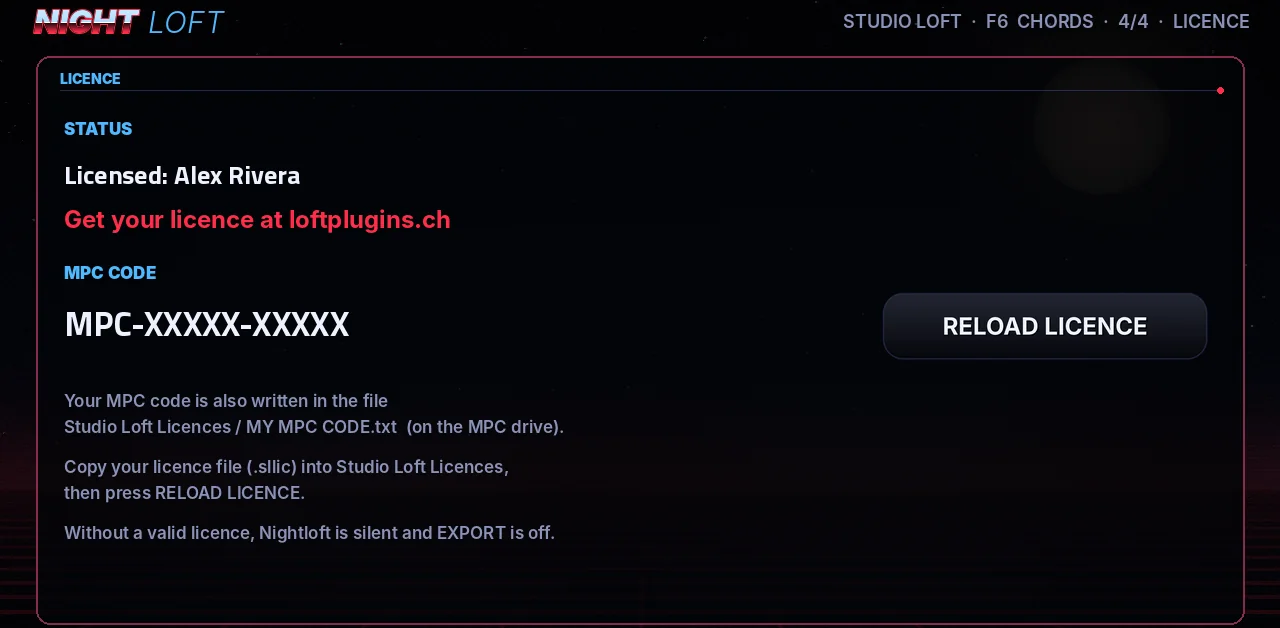 1234
ヒント
Put your MPC in computer mode, open the drive: the file Studio Loft Licences / MY MPC CODE.txt holds the code. Copy-paste it, no typing.
What it's for
What you see
STATUS
the state of your licence: licensed (with the name), or none found. Without a valid licence, a short red line at the top of the MAIN page sends you here.
MPC CODE
RELOAD LICENCE
reads the licence files again after you copied a new one.
Help text
where the code file is and where licence files go.
あなたのものに
Nightloft
80年代のダークなシンセ:パルス、威圧的なベース、冷たいパッド。
一度の支払いでずっとあなたのもの。ライセンスは2台のMPCで使えます。