Instrument · バージョン 1.5.0
Riot Loft
A REAL ORCHESTRA, PLUGGED INTO A SCREAMING SYNTH.
Riot Loft takes real recordings of strings, brass and woodwinds and runs them through a synth that has no manners: screaming filters, seven distortions, a chopper locked to your tempo, and one knob called RIOT that pushes everything at once.
Hold four chords and the Pulse turns violins and trumpets into a screaming, tempo-locked riff.
マニュアル
すべての画面を、
ページごとに。
MPCの画面そのままに、一画面ずつ解説した完全ガイド。設定名は画面どおり英語のままです。
Welcome
Orchestra in. Riot out.
Riot Loft takes real recordings of strings, brass and woodwinds and runs them through a synth that has no manners: screaming filters, seven distortions, a chopper locked to your tempo, and one knob called RIOT that pushes everything at once.
It does not try to sound like a polite orchestra. It sounds like an orchestra that walked into your beat.
16 strings · 15 brass · 13 winds
plus a sub oscillator and noise
chopping in time with your beat
ready to play
How to read this guide
Each screen gets its own page: the capture first, then numbered markers that match the explanations below it, and a Tip from the studio. The screens are in the order of the function keys.
What makes it different · 1
One chord. A whole riot.
Load RIOT · Riot Pulse, hold a chord, and press play on your beat. Five detuned violins and three trumpets are chopped in sixteenths by the Pulse, screamed through the distortion, and squashed so every step hits. You did not program a single note of that rhythm.
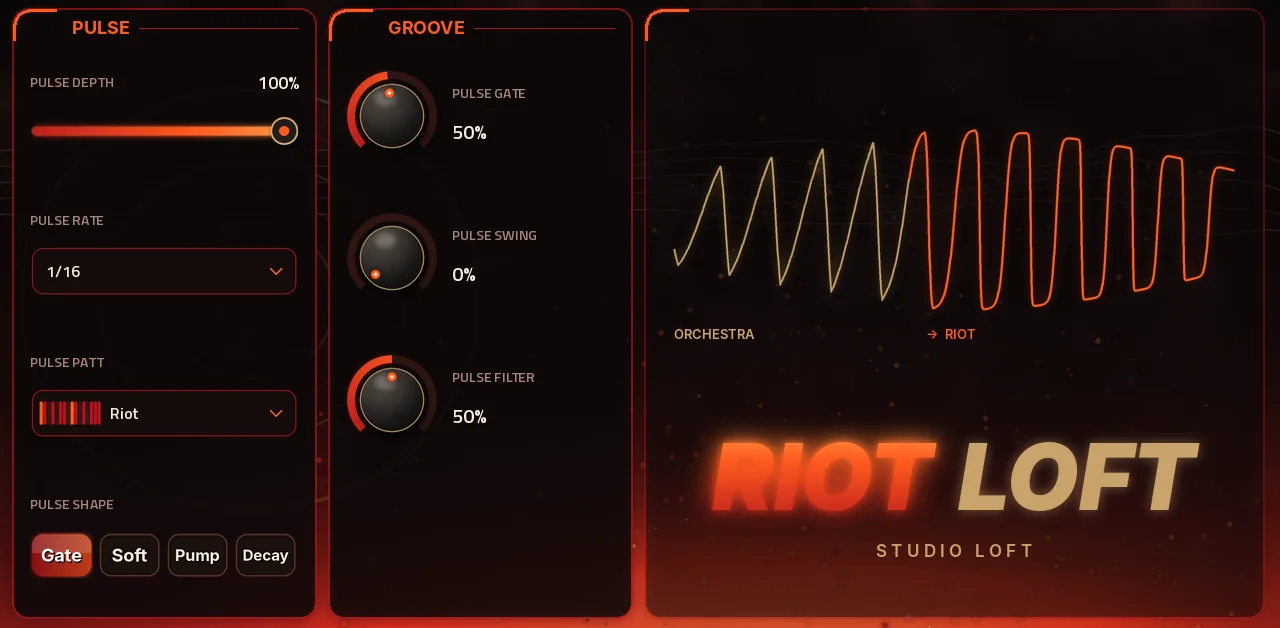
The recipe, as it is on screen
What it feels like: you hold one chord and the section plays a riff for you. Change the chord on the next bar and the riff follows. Switch PULSE PATT to Gallop, Synco or Broken and the same chord gets a new groove. It is the fastest way from an empty pattern to something that moves.
What makes it different · 2
From concert hall to warehouse.
Every voice goes through the same chain. Each block is on its own page, so you always know where a sound comes from.
- pushes the distortion drive
- pushes the Squash compressor
- drives both filters harder
- adds resonance to Filter 1
- widens the unison detune
Start any preset at RIOT 0% and turn it slowly while you play: the same instruments go from clean to furious. Map it to a Q-Link and ride it into the drop.
Find your way
14 pages. Six keys.
The MPC has six function keys. Press a key once for its first page; press it again for the next page of the same group. The LICENCE page (F6, 3rd press) is explained at the end of this guide.
Q-Links follow the page
On every page, the Q-Link knobs are mapped to the controls shown on screen, column by column. Change page and the knobs change with it, so you can play each page by hand.
Touch, turn, open
Touch a control to select it and turn the data wheel. Touch a box with an arrow to open its list. Switches flip with one touch.
MAIN
 1234
用途
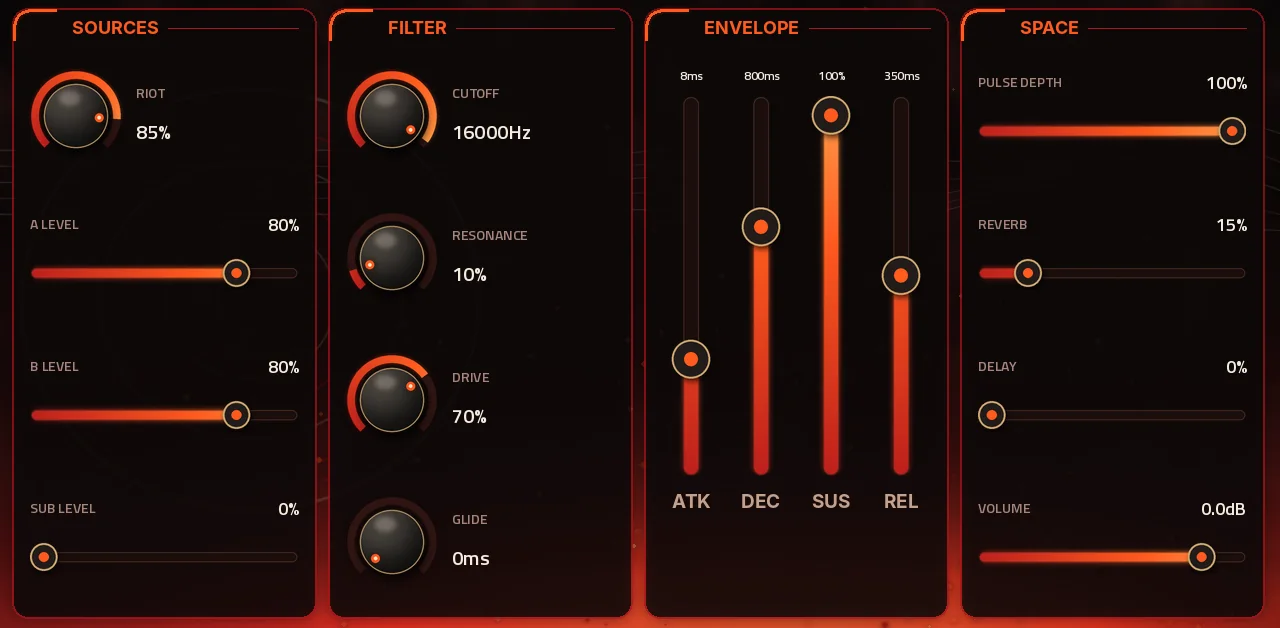
What it's for Your home page. The sixteen controls you reach for most, one press away: how loud each layer is, how dark or bright, how the note starts and ends, and how much space around it.
ヒント
Tip For a stab that punches through a beat: ATK all the way down, DEC around 300 ms, SUS at 0%, then turn RIOT up to 60%.
- 1
SOURCES
RIOT is the one-knob attitude control (see page 4). A LEVEL, B LEVEL and SUB LEVEL mix the two orchestral layers and the sub oscillator.
- 2
FILTER
CUTOFF and RESONANCE shape Filter 1. DRIVE sets the distortion amount. GLIDE slides from one note to the next.
- 3
ENVELOPE
Four faders for the volume envelope: ATK (Attack), DEC (Decay), SUS (Sustain), REL (Release). The value sits above each fader.
- 4
SPACE
PULSE DEPTH brings in the tempo-synced chopper. REVERB and DELAY are the send amounts. VOLUME is the final level.
On this capture: values from the preset RIOT · Riot Pulse.
SOURCE A
 123
用途
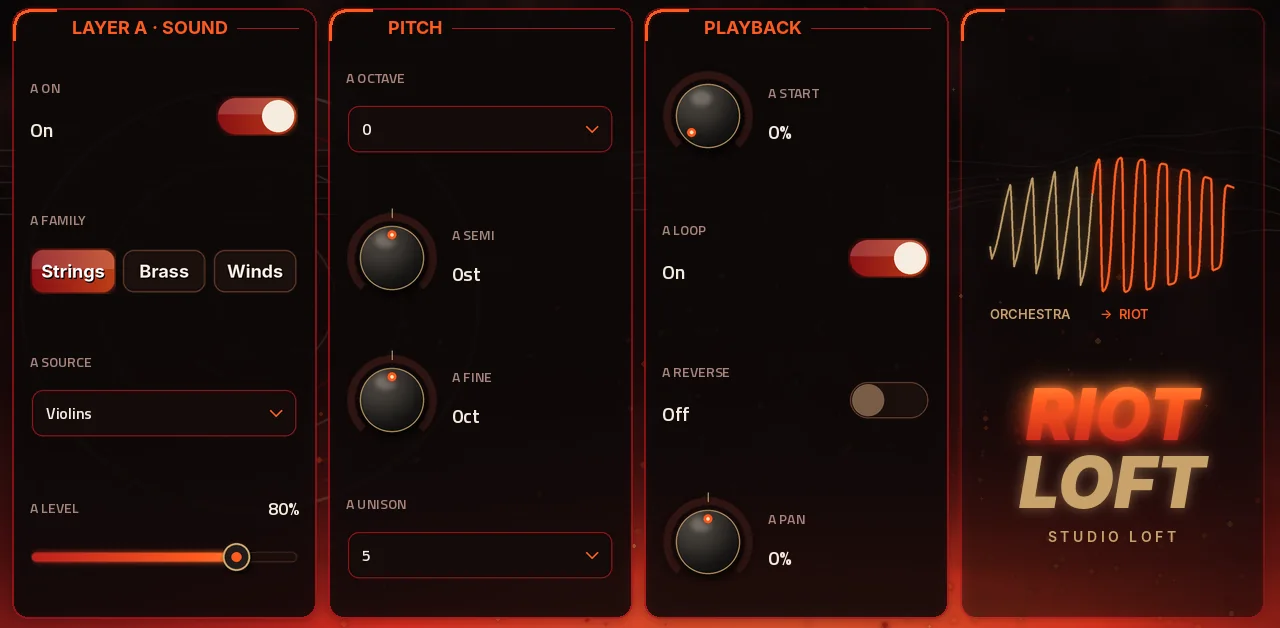
What it's for Pick the first orchestral instrument and how it is played back. Layer A is the heart of every preset.
ヒント
Tip Want a pad from a bowed sound? Pick Violins, set A START to 15% to skip the bow attack, and raise ATK on MAIN to 600 ms.
- 1
LAYER A · SOUND
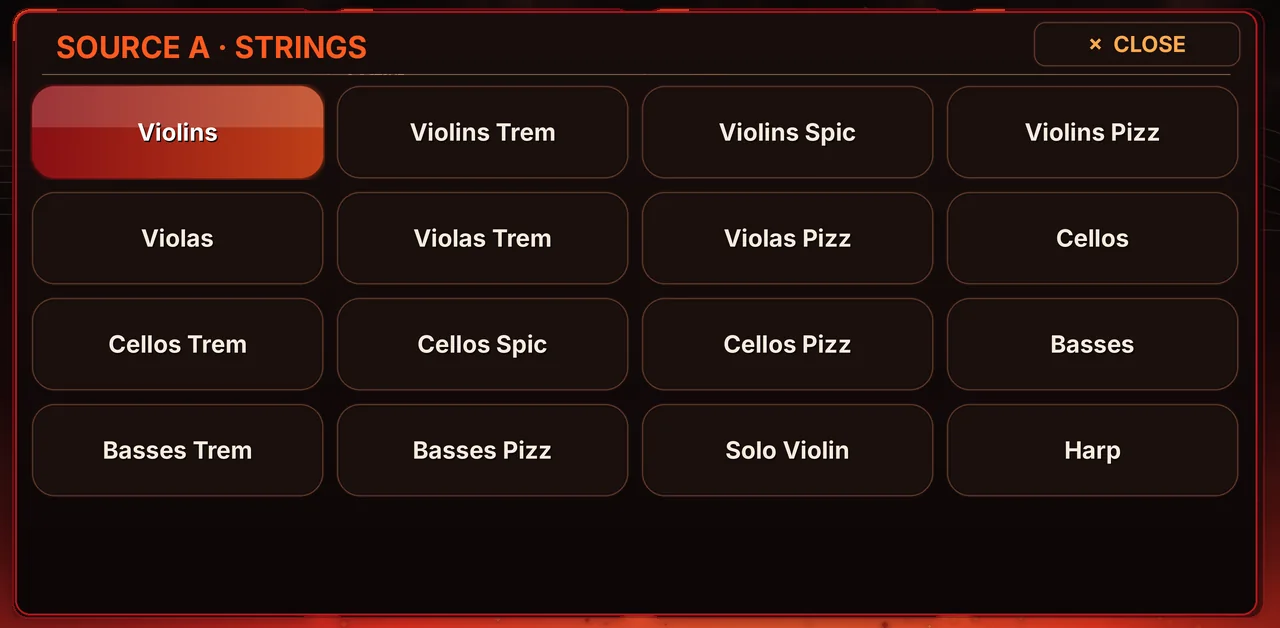
A ON switches the layer. A FAMILY picks Strings, Brass or Winds. A SOURCE opens the list of real recordings for that family (page 20). A LEVEL sets its volume.
- 2
PITCH
A OCTAVE (−3 to +3), A SEMI (semitones) and A FINE (cents) tune the layer. A UNISON stacks 1 to 5 detuned copies for a bigger section.
- 3
PLAYBACK
A START skips into the recording, A LOOP holds long notes for as long as you hold the pad, A REVERSE plays it backwards, A PAN places it left or right.
- i
ON THIS CAPTURE
Values from the preset RIOT · Riot Pulse. The panel with the big logo has nothing to set.
SOURCE B
 123
用途
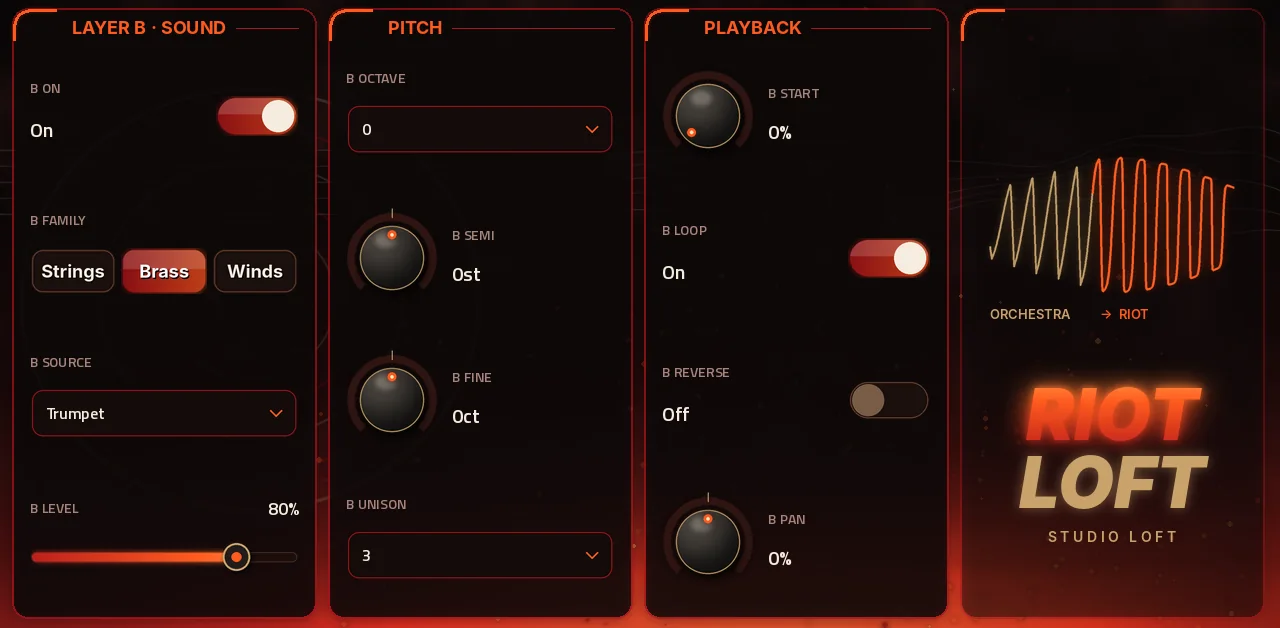
What it's for The second layer, with exactly the same controls as Layer A. Mix two families, double an octave, or put a bite on top of a smooth bed.
ヒント
Tip Classic hybrid: Cellos on A at Octave 0, Horns on B at Octave +1, A PAN at −30% and B PAN at +30%. Wide, warm, and the horns cut through.
- 1
LAYER B · SOUND
B ON, B FAMILY, B SOURCE and B LEVEL: the second instrument and its volume.
- 2
PITCH
B OCTAVE, B SEMI, B FINE and B UNISON, as on Layer A.
- 3
PLAYBACK
B START, B LOOP, B REVERSE and B PAN.
- i
ON THIS CAPTURE
Values from the preset RIOT · Riot Pulse. The panel with the big logo has nothing to set.
SUB
 1234
用途
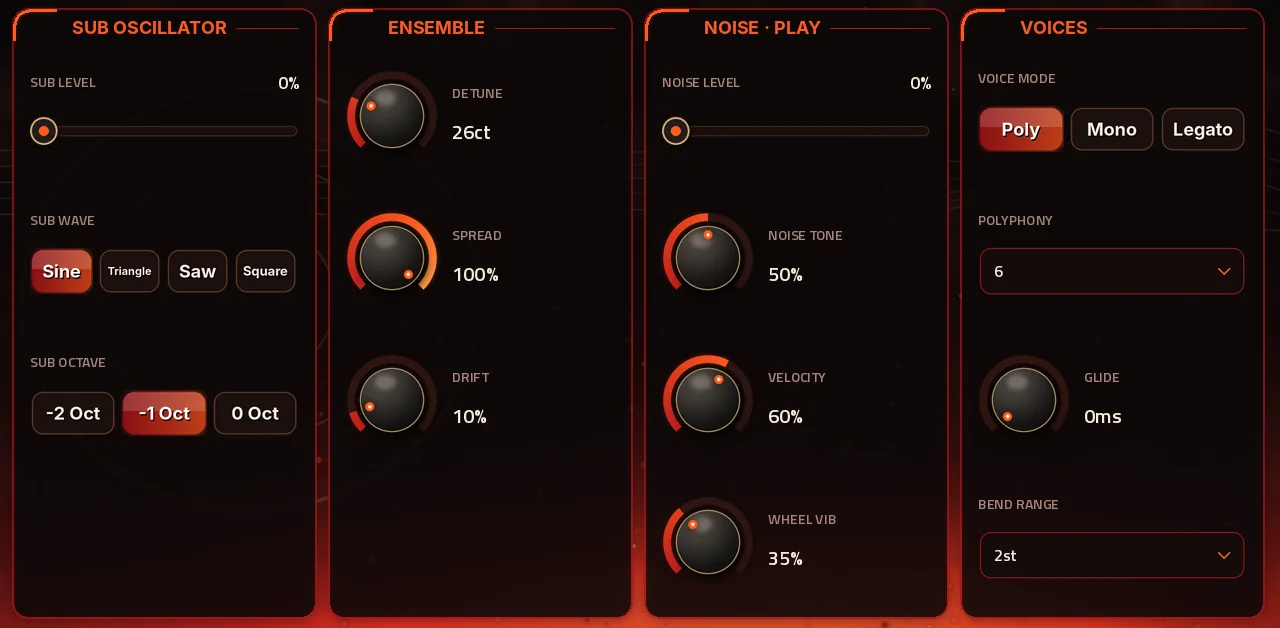
What it's for Everything that is not a recording: a sub oscillator for weight, a noise layer for air, the unison spread, and how the voices are played.
ヒント
Tip For a bass that holds the low end even when the strings are distorted: SUB WAVE Sine, SUB OCTAVE −1 Oct, SUB LEVEL around 40%.
- 1
SUB OSCILLATOR
SUB LEVEL, SUB WAVE (Sine, Triangle, Saw, Square) and SUB OCTAVE (−2, −1 or 0 octave).
- 2
ENSEMBLE
DETUNE spreads the unison copies in cents, SPREAD opens them in stereo, DRIFT adds slow, human pitch movement.
- 3
NOISE · PLAY
NOISE LEVEL and NOISE TONE add bow or breath noise. VELOCITY sets how much your pad strength changes the volume. WHEEL VIB is the vibrato depth on the mod wheel.
- 4
VOICES
VOICE MODE: Poly, Mono or Legato. POLYPHONY: 1 to 8 notes. GLIDE: slide time. BEND RANGE: pitch-bend range in semitones.
On this capture: values from the preset RIOT · Riot Pulse.
FILTER 1
 123
用途
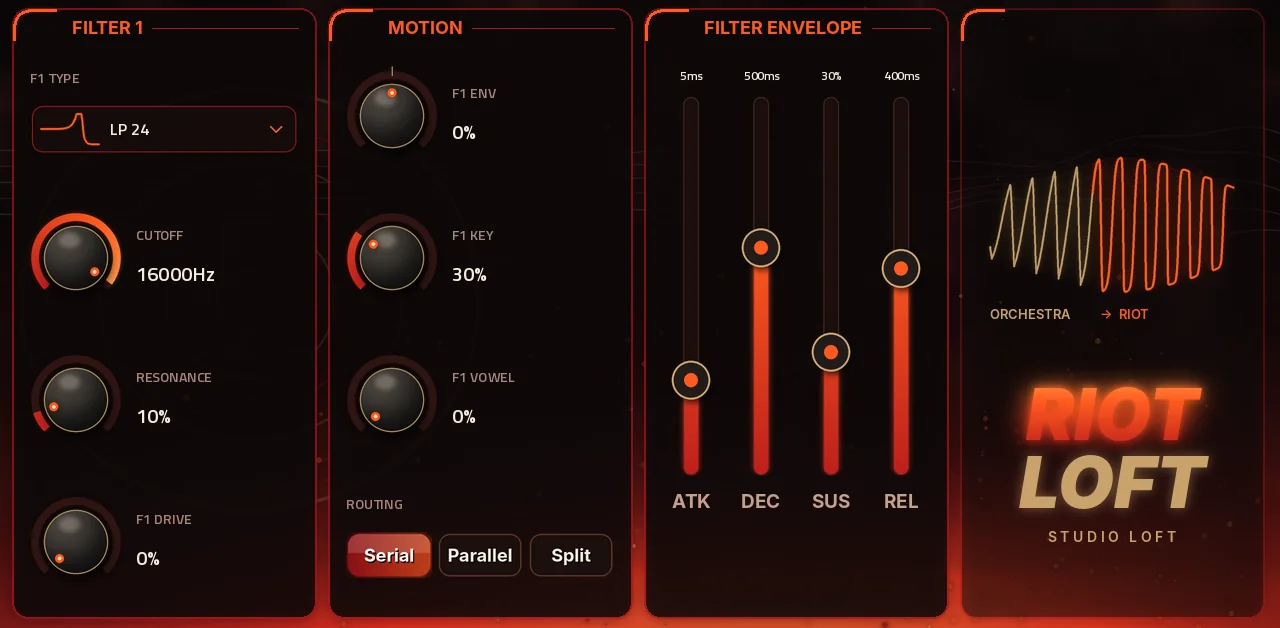
What it's for The main filter, with its own envelope. This is where a polite section turns into a growl.
ヒント
Tip Ladder, RESONANCE 45%, F1 ENV +40%, filter DEC 700 ms, SUS 30%: every note gets a vocal 'wow' at the start.
- 1
FILTER 1
F1 TYPE opens the list of 9 filters (page 20). CUTOFF, RESONANCE and F1 DRIVE (saturation inside the filter).
- 2
MOTION
F1 ENV sets how much the filter envelope opens the filter (it can go negative). F1 KEY makes high notes brighter. F1 VOWEL moves the Formant filter through A, E, I, O, U. ROUTING: Serial, Parallel or Split.
- 3
FILTER ENVELOPE
ATK, DEC, SUS, REL of the filter envelope.
- i
ON THIS CAPTURE
Values from the preset RIOT · Riot Pulse. The panel with the big logo has nothing to set.
FILTER 2
 123
用途
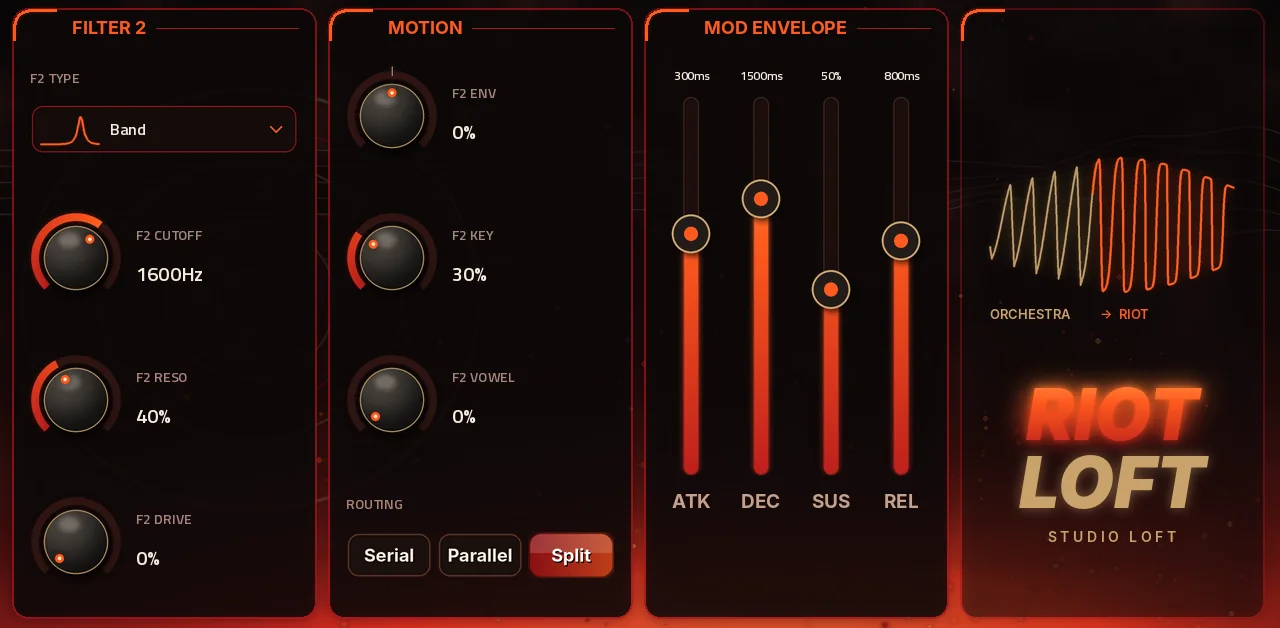
What it's for A second filter, off by default. Use it in series for a steeper sound, in parallel for two colours at once, or in Split so each layer gets its own filter. Its page also holds the modulation envelope.
ヒント
Tip Routing Split with a low-pass on Filter 1 and a band-pass on Filter 2: the strings stay dark and the brass bites through.
- 1
FILTER 2
F2 TYPE (Off plus the 9 filters), F2 CUTOFF, F2 RESO, F2 DRIVE.
- 2
MOTION
F2 ENV, F2 KEY, F2 VOWEL, and the same ROUTING switch as on Filter 1. Split sends Layer A and the sub to Filter 1, Layer B and the noise to Filter 2.
- 3
MOD ENVELOPE
ATK, DEC, SUS, REL of a free envelope you can send anywhere from the MATRIX page.
- i
ON THIS CAPTURE
Values from the preset HYB · Split Filters. The panel with the big logo has nothing to set.
LFO
 123
用途
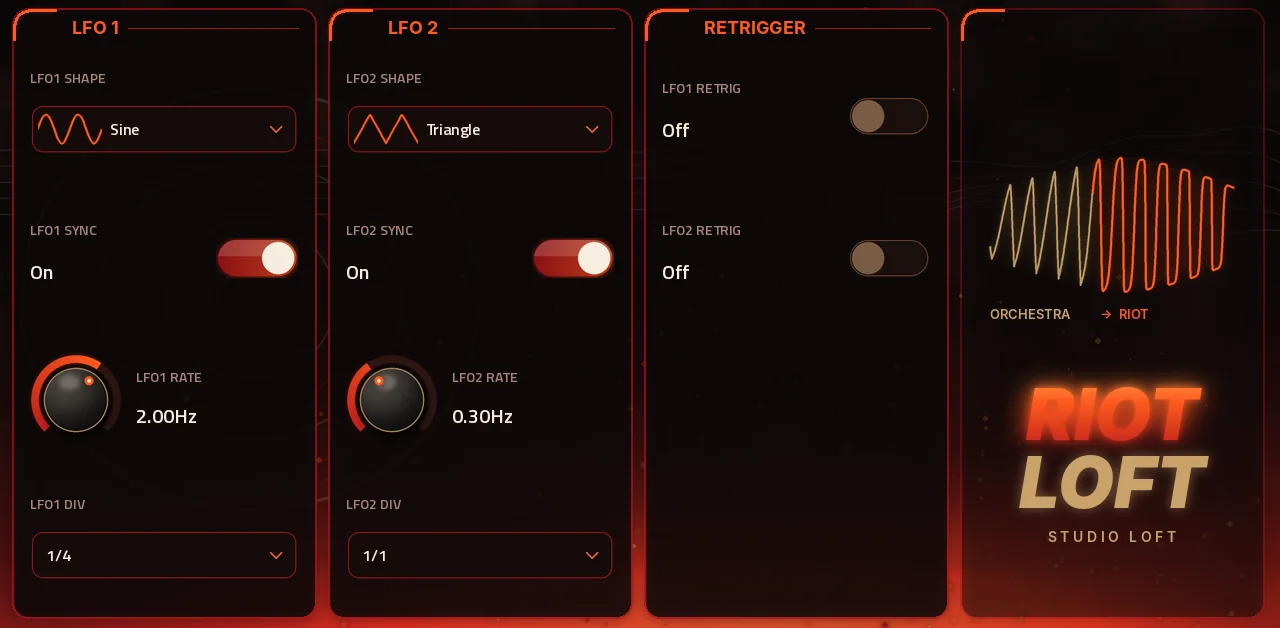
What it's for Two low-frequency oscillators, free or locked to your tempo. On their own they do nothing: route them on the MATRIX page.
ヒント
Tip LFO 1 on S&H, Sync On, 1/16, routed to Cutoff 1 at +40%: a random, in-time filter pattern on any held chord.
- 1
LFO 1
LFO1 SHAPE (7 shapes, page 21), LFO1 SYNC On to follow the tempo, LFO1 RATE in Hz when Sync is Off, LFO1 DIV (1/32 to 4/1) when Sync is On.
- 2
LFO 2
The same four controls for LFO 2.
- 3
RETRIGGER
LFO1 RETRIG and LFO2 RETRIG: On restarts the LFO with every new note.
- i
ON THIS CAPTURE
Values from the preset RIOT · Riot Pulse. The panel with the big logo has nothing to set.
PULSE
12用途
What it's for The rhythmic chopper that makes Riot Loft groove. It cuts the sound in time with your beat, with 16 patterns to choose from.
ヒント
Tip PULSE SHAPE Pump with PULSE RATE 1/4 gives you that ducking, side-chained feel on pads, with no compressor.
- 1
PULSE
PULSE DEPTH (0% = off), PULSE RATE (step length, page 21), PULSE PATT (16 patterns, drawn in the list) and PULSE SHAPE: Gate, Soft, Pump or Decay.
- 2
GROOVE
PULSE GATE sets how long each step stays open. PULSE SWING delays every other step. PULSE FILTER makes the steps open the filter as well as the volume.
On this capture: values from the preset RIOT · Riot Pulse. The panel with the big logo has nothing to set.
MATRIX
 1234
用途
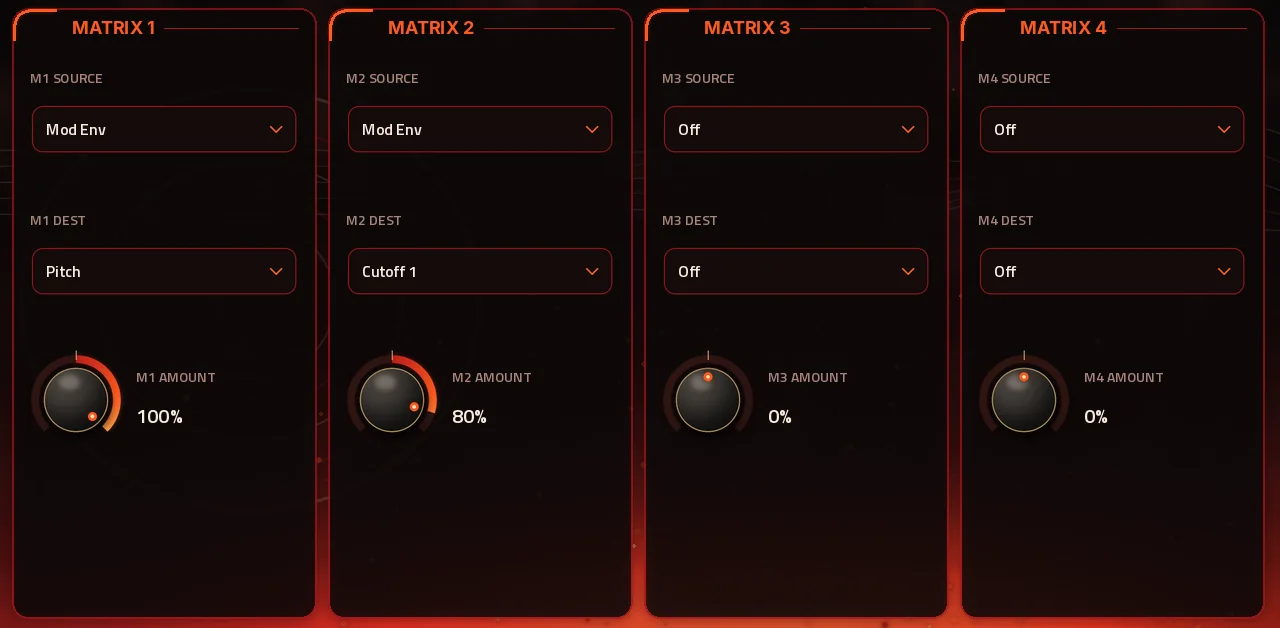
What it's for Four modulation slots. Each one connects a source (what moves) to a destination (what gets moved), with an amount that can be positive or negative.
ヒント
Tip Mod Wheel → Cutoff 1 at +60%: your mod wheel becomes a swell. On the capture, the mod envelope bends the pitch and opens the filter for a riser.
- 1
MATRIX 1
M1 SOURCE (11 sources, page 22), M1 DEST (15 destinations, page 22), M1 AMOUNT from −100% to +100%.
- 2
MATRIX 2
M2 SOURCE, M2 DEST, M2 AMOUNT.
- 3
MATRIX 3
M3 SOURCE, M3 DEST, M3 AMOUNT.
- 4
MATRIX 4
M4 SOURCE, M4 DEST, M4 AMOUNT.
On this capture: values from the preset FX · Riser.
DIST
 123
用途
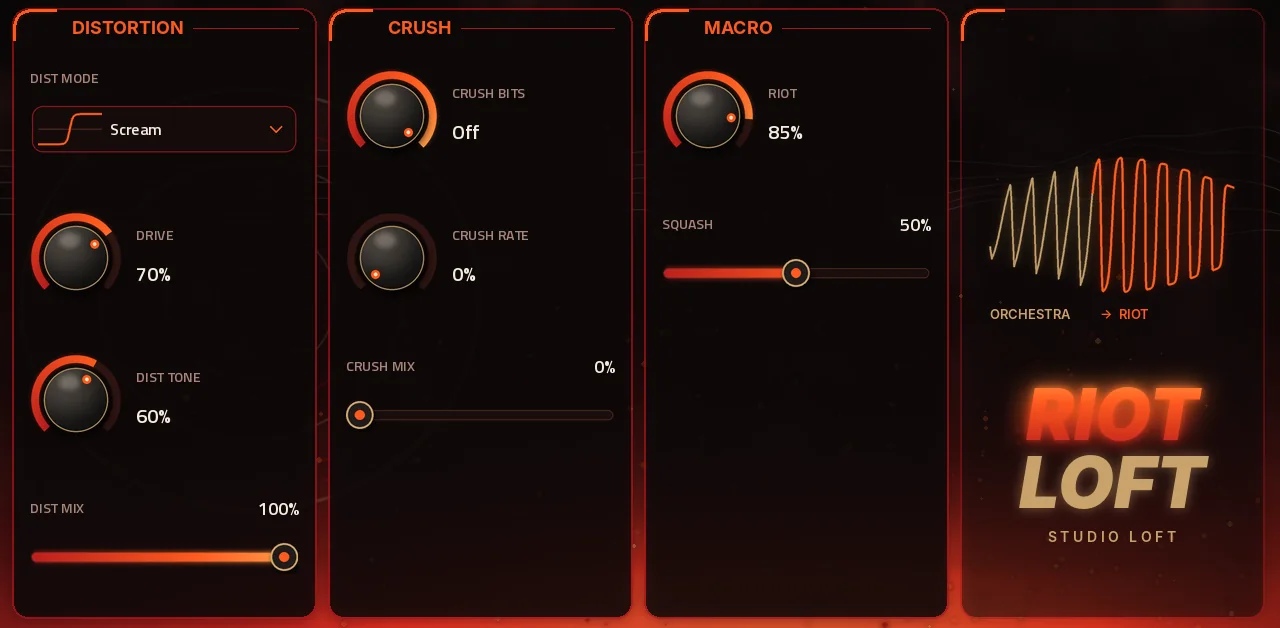
What it's for The riot itself: seven distortion characters, a bit crusher, and the RIOT macro next to the Squash compressor.
ヒント
Tip Fold on woodwinds sounds like a broken synth. Keep DIST MIX near 50% so the real instrument stays audible underneath.
- 1
DISTORTION
DIST MODE (Soft, Hard, Fuzz, Tube, Fold, Rectify, Scream; page 22), DRIVE, DIST TONE (dark to bright), DIST MIX (dry to fully distorted).
- 2
CRUSH
CRUSH BITS (Off at 16 bits, down to 2), CRUSH RATE (lower sample rate), CRUSH MIX.
- 3
MACRO
RIOT, the same macro as on MAIN, and SQUASH, the three-band compressor that brings up the detail.
- i
ON THIS CAPTURE
Values from the preset RIOT · Riot Pulse. The panel with the big logo has nothing to set.
MOD FX
 12
用途
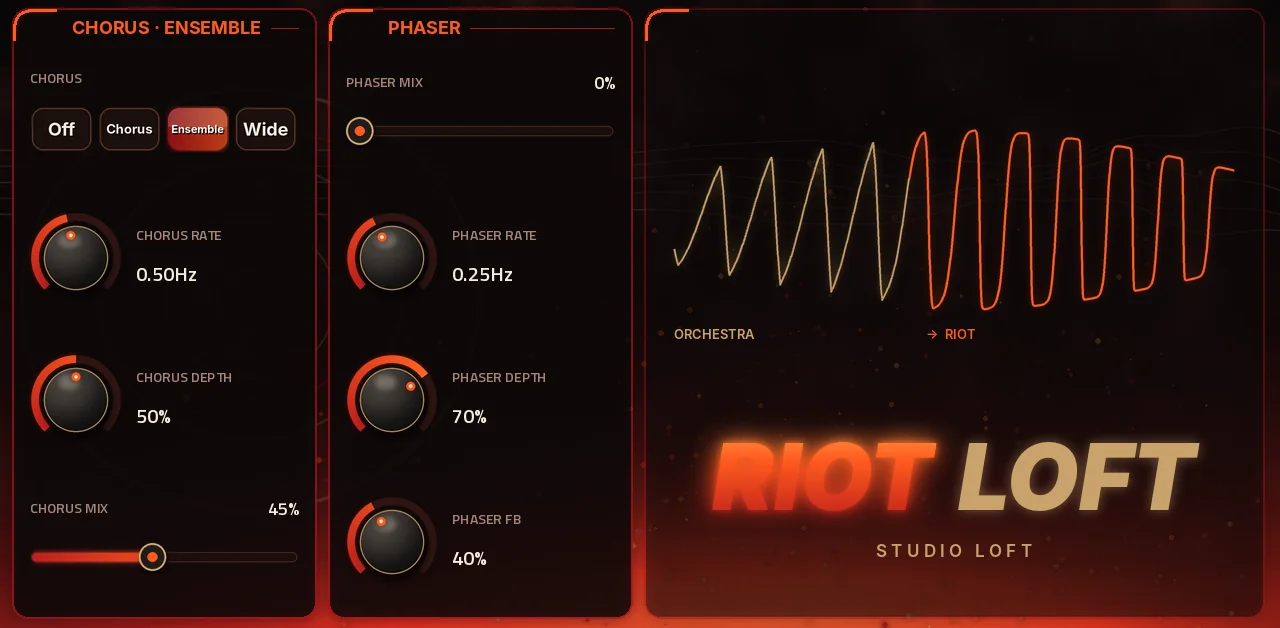
What it's for Movement and width: chorus in three flavours, and a six-stage phaser.
ヒント
Tip Ensemble on a Solo Violin turns one player into a small section.
- 1
CHORUS · ENSEMBLE
CHORUS: Off, Chorus, Ensemble or Wide. CHORUS RATE, CHORUS DEPTH, CHORUS MIX.
- 2
PHASER
PHASER MIX (0% = off), PHASER RATE, PHASER DEPTH, PHASER FB (feedback).
On this capture: values from the preset HYB · Split Filters. The panel with the big logo has nothing to set.
SPACE
 123
用途
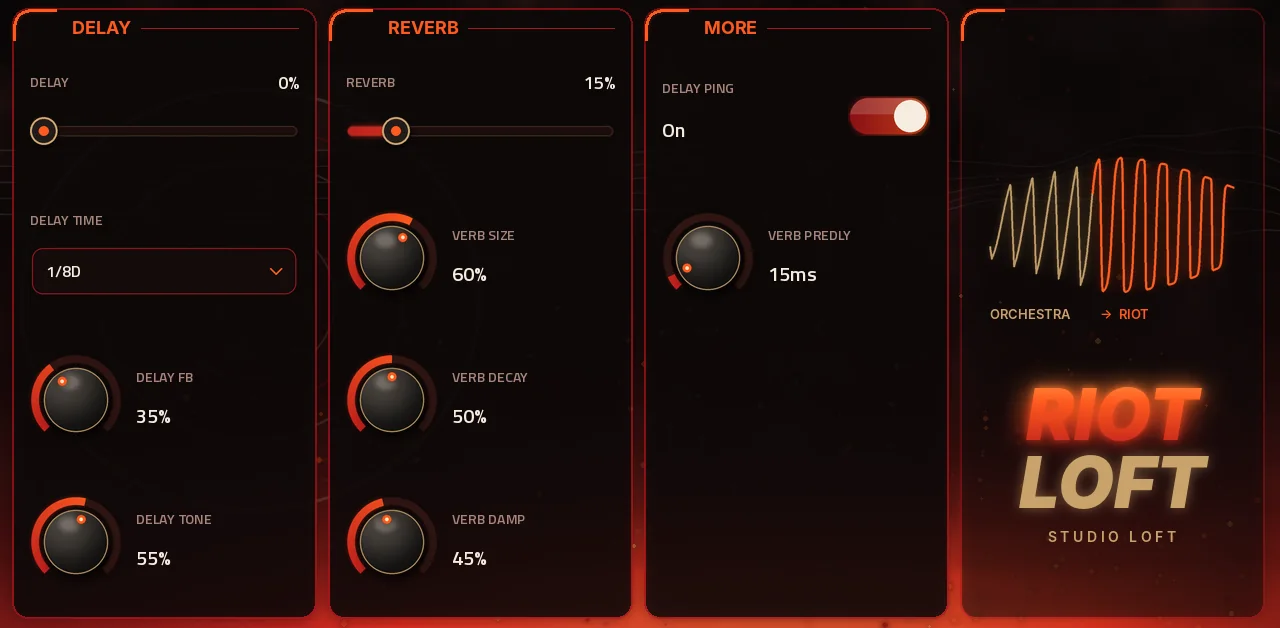
What it's for A tempo-synced ping-pong delay and a smooth reverb.
ヒント
Tip On brass stabs: DELAY TIME 1/8D, DELAY PING On, DELAY FB 35%, DELAY 25%. Instant bounce that sits in the groove.
- 1
DELAY
DELAY (amount), DELAY TIME (1/32 to 4/1, page 22), DELAY FB (repeats), DELAY TONE (darker repeats to the left).
- 2
REVERB
REVERB (amount), VERB SIZE, VERB DECAY, VERB DAMP (softens the highs of the tail).
- 3
MORE
DELAY PING: On bounces the repeats left and right. VERB PREDLY: a short gap before the reverb, so the attack stays clear.
- i
ON THIS CAPTURE
Values from the preset RIOT · Riot Pulse. The panel with the big logo has nothing to set.
MASTER
 12
用途
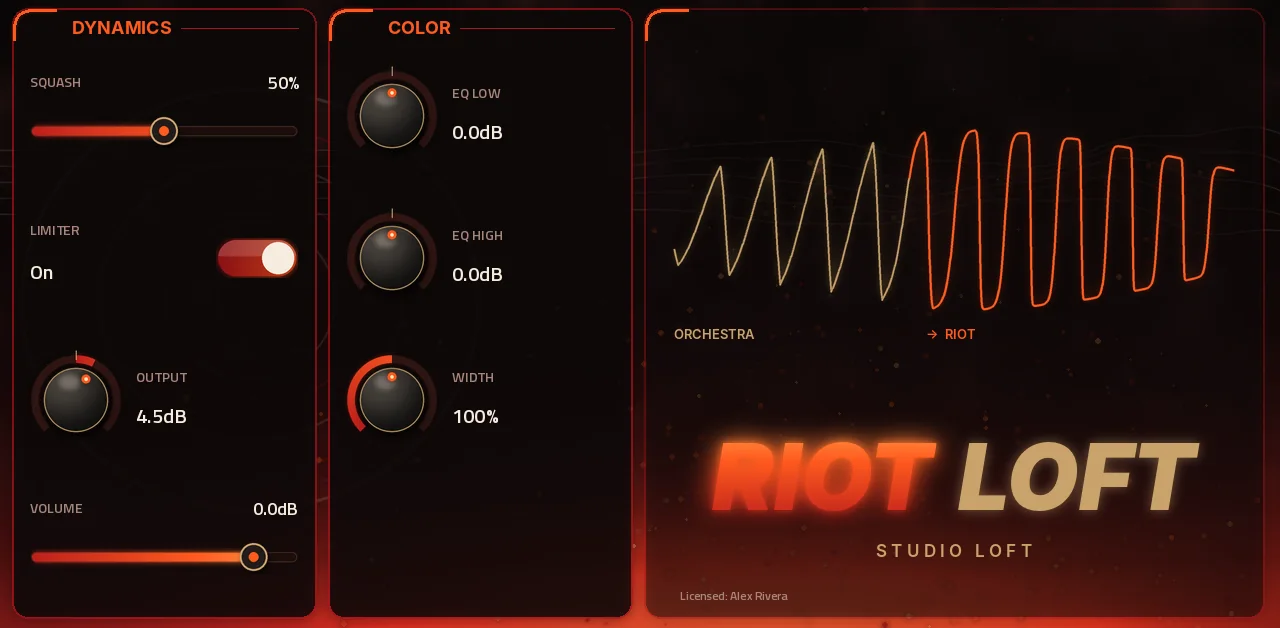
What it's for The last stage before the sound leaves the plugin: dynamics, tone and stereo width. The small line under the big logo shows your licence status.
ヒント
Tip Sitting with a heavy kick? Take EQ LOW down 3 dB. If the limiter works too hard, lower OUTPUT rather than VOLUME.
- 1
DYNAMICS
SQUASH (three-band compression), LIMITER (On keeps the peaks safe), OUTPUT (the level of the preset) and VOLUME.
- 2
COLOR
EQ LOW and EQ HIGH (±12 dB), WIDTH (0% mono, 100% normal, up to 200%).
On this capture: values from the preset RIOT · Riot Pulse.
LISTEN
 123
用途
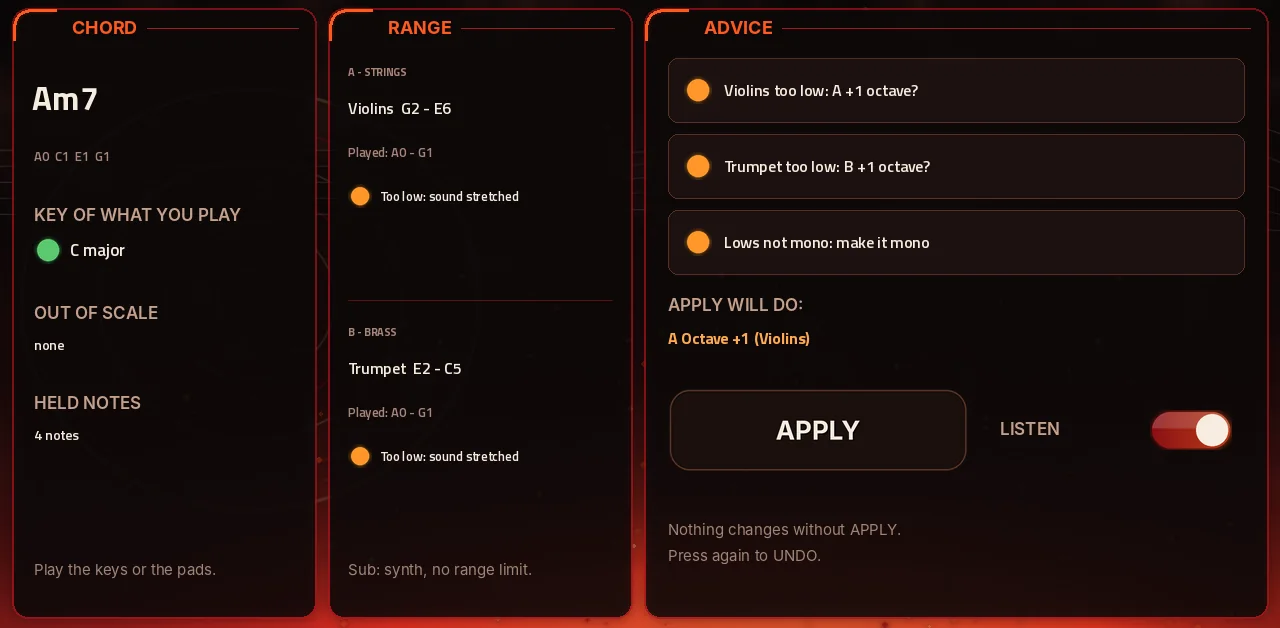
What it's for Your assistant. Play a chord: Riot Loft names it, tells you the key, checks that each instrument plays where it really can, and gives short advice. Nothing changes until you press APPLY.
ヒント
Tip Here an Am7 was played very low: both layers are out of range, and APPLY would move Layer A up one octave. Press it, listen, press again to undo.
- 1
CHORD
The chord you hold and its notes, KEY OF WHAT YOU PLAY with a coloured dot (green = sure), OUT OF SCALE notes and HELD NOTES.
- 2
RANGE
For each layer: the real range of the chosen instrument, the notes you played, and a dot: green in range, orange out of range (the recording gets stretched).
- 3
ADVICE
Up to three lines, problems first. APPLY WILL DO says what APPLY changes; APPLY fixes it, press again to UNDO. LISTEN turns the assistant on or off.
- i
ON THIS CAPTURE
Values from the preset RIOT · Riot Pulse.
Tech sheet
Riot Loft in one page.
A plugin instrument that plays real orchestral recordings through an aggressive synth engine, with a tempo-locked chopper and a built-in assistant.
For who, for what
- Trap and drill: distorted brass stabs, gallop strings, dark pizzicato basses.
- Hybrid trailer music and game cues: risers, pulses, tremolo storms.
- Electronic and bass music: orchestral leads, formant basses, gated pads.
Strong points
- 44 real recordings of strings, brass and woodwinds, two layers at once.
- Pulse: 16 tempo-locked patterns with 4 shapes, swing and filter.
- Two filters with 9 types each, including formant vowels and combs, in Serial, Parallel or Split.
- Seven distortions, bit crusher and three-band Squash, all pushed by one RIOT knob.
- LISTEN assistant: chord, key, instrument range and advice, one press to fix, one press to undo.
- Every list drawn on screen, every page mapped to the Q-Links.
Numbers
| Presets | 208 in 11 categories |
| Sound sources | 44 orchestral recordings · sub oscillator (4 waves) · noise |
| Layers | 2 sample layers + sub, unison up to 5 per layer |
| Voices | 1 to 8 · Poly, Mono, Legato |
| Filters | 2 × 9 types · 3 routings |
| Modulation | 2 LFO (7 shapes) · filter env · mod env · 4-slot matrix, 11 sources × 15 destinations |
| Effects | Pulse · 7 distortions · crush · Squash · chorus (3 modes) · phaser · delay · reverb · EQ · width · limiter |
| Sound controls | 127, on 14 pages + LICENCE |
| Size | about 77 MB installed (sound bank 62 MB) |
| Runs on | MPC standalone, MPC OS 3.10.1 |
The 208 presets
Names as they appear on screen
Init 2
- INIT · Riot
- INIT · Orchestra Dry
Strings 35
- STR · Electric Violins
- STR · Analog Sections
- STR · Cello Fuzz
- STR · Trem Storm
- STR · Viola Ladder
- STR · Basses Grind
- STR · Solo Wire
- STR · Trem Furnace
- STR · Violas Dream
- STR · Bow Wrecker
- STR · Glass Violins
- STR · Strings 80s
- STR · Dark Section
- STR · Trem Phaser
- STR · Comb Strings
- STR · Formant Cellos
- STR · Violins Fold
- STR · Sawtooth Orch
- STR · Riot Quartet
- STR · Wire Basses
- STR · Tape Strings
- STR · Mega Unison
- STR · Cello Scream
- STR · Pizz Laser
- STR · Spic Machine
- STR · Pizz Crusher
- STR · Spic Fuzz
- STR · Harp Wires
- STR · Harp Riot
- STR · Viola Fuzz
- STR · Violin Tube
- STR · Cello Rectify
- STR · Trem Scream
- STR · Basses Fold
- STR · Viola Trem Fuzz
Brass 29
- BRS · Electric Horns
- BRS · Trumpet Fuzz
- BRS · Brass Riot
- BRS · Tuba Grind
- BRS · Mute Ladder
- BRS · Wah-Wah Trumpet
- BRS · Horn Wall
- BRS · Bone Buzz
- BRS · Vib Trumpet
- BRS · Formant Brass
- BRS · Horn Phase
- BRS · Section Scream
- BRS · Fold Trombone
- BRS · Tuba Sub
- BRS · Mute Comb
- BRS · Brass 1984
- BRS · Trumpet Rectify
- BRS · Bone Vibrato
- BRS · Brass Stab
- BRS · Horn Hit
- BRS · Bone Stab
- BRS · Fall Down
- BRS · Crushed Fanfare
- BRS · Horn Fuzz
- BRS · Trombone Tube
- BRS · Mute Scream
- BRS · Wah Mute Fold
- BRS · Tuba Rectify
- BRS · Trumpet Hard
Winds 24
- WND · Electric Flute
- WND · Flute Fuzz
- WND · Clarinet Ladder
- WND · Oboe Scream
- WND · Bassoon Grind
- WND · Piccolo Laser
- WND · Breath Machine
- WND · Wind Section
- WND · Formant Oboe
- WND · Reed Fold
- WND · Bassoon Sub
- WND · Flute Phaser
- WND · Woodwind Riot
- WND · Clarinet Crush
- WND · Flute Stabs
- WND · Reed Hits
- WND · Piccolo Chirp
- WND · Hollow Winds
- WND · Flute Tube
- WND · Oboe Fuzz
- WND · Clarinet Scream
- WND · Bassoon Fold
- WND · Piccolo Hard
- WND · Oboe Rectify
Hybrid 19
- HYB · Strings + Brass
- HYB · Cello Trumpet
- HYB · Flute Violins
- HYB · Brass Reeds
- HYB · Split Filters
- HYB · Parallel Riot
- HYB · Tutti Machine
- HYB · Pizz + Horn
- HYB · Oboe Strings
- HYB · Dark Choir
- HYB · Trem + Mute
- HYB · Bass Section
- HYB · Air Brass
- HYB · Stab Orchestra
- HYB · Comb Duo
- HYB · Detuned Tutti
- HYB · Brass Strings Pad
- HYB · Reed Strings
- HYB · Tuba Cello Duo
Pulse 26
- PULSE · Straight 16
- PULSE · Trance Gate
- PULSE · Pump Strings
- PULSE · Gallop Brass
- PULSE · Offbeat Cellos
- PULSE · Stutter Trem
- PULSE · Synco Horns
- PULSE · Dotted Winds
- PULSE · Riot Gate
- PULSE · Soft Pulse
- PULSE · Decay Chops
- PULSE · Triplet Pump
- PULSE · Build Up
- PULSE · Morse Brass
- PULSE · Broken Bows
- PULSE · Half Time
- PULSE · Swing Section
- PULSE · Space Pump
- PULSE · Filter Only
- PULSE · Gabber Strings
- PULSE · Wind Machine
- PULSE · Pizz Sequence
- PULSE · Cello Gallop
- PULSE · Brass Trance
- PULSE · Winds Offbeat
- PULSE · Trem Synco
Bass 18
- BASS · Cello Mono
- BASS · Tuba Sub
- BASS · Contrabass Fuzz
- BASS · Bone Growl
- BASS · Bassoon Acid
- BASS · Pizz Bass
- BASS · Tuba Riot
- BASS · Cello Reese
- BASS · Horn Bass
- BASS · Trombone Wobble
- BASS · Comb Bass
- BASS · Formant Bass
- BASS · Spic Bass
- BASS · Dark Basses
- BASS · Fold Bass
- BASS · Legato Tuba
- BASS · Sub Orchestra
- BASS · Rectify Bass
Lead 14
- LEAD · Violin Scream
- LEAD · Trumpet Fuzz
- LEAD · Oboe Laser
- LEAD · Flute Hero
- LEAD · Clarinet Saw
- LEAD · Horn Lead
- LEAD · Mute Wah
- LEAD · Cello Solo
- LEAD · Piccolo Shred
- LEAD · Formant Lead
- LEAD · Unison Brass
- LEAD · Fold Violin
- LEAD · Riot Lead
- LEAD · Crush Flute
Pad 14
- PAD · Orchestra Haze
- PAD · Frozen Strings
- PAD · Brass Cloud
- PAD · Reverse Swell
- PAD · Flute Mist
- PAD · Dark Cathedral
- PAD · Phase Orchestra
- PAD · Comb Choir
- PAD · Trem Horizon
- PAD · Warm Analog
- PAD · Lofi Orchestra
- PAD · Wind Breath
- PAD · Distant Riot
- PAD · Mod Wheel Pad
FX 14
- FX · Bone Fall Riot
- FX · Reverse Brass
- FX · S&H Strings
- FX · Vowel Machine
- FX · Bit Orchestra
- FX · Siren Violin
- FX · Comb Rain
- FX · Pitch Dive
- FX · Riser
- FX · Phaser Storm
- FX · Glitch Pizz
- FX · Alarm Brass
- FX · Wind Tunnel
- FX · Rectified Hits
Riot 13
- RIOT · Full Riot
- RIOT · Orchestra Pit
- RIOT · Brass Monster
- RIOT · Violent Bows
- RIOT · Woodwind Mayhem
- RIOT · Fold Apocalypse
- RIOT · Crushed Empire
- RIOT · Scream Section
- RIOT · Tuba Destroyer
- RIOT · Riot Pulse
- RIOT · Rectified Tutti
- RIOT · Comb Carnage
- RIOT · Last Stand
Get going
Three steps. Then play.
- InstallCopy the folder Studio Loft - VST - Riot Loft into the VST2 Plugins folder of your MPC drive, then restart the MPC.
- LoadOn a plugin track, choose Studio Loft > Riot Loft, then pick a preset from the plugin's preset list. Start with RIOT · Riot Pulse or STR · Electric Violins.
- PlayPlay the pads or a keyboard. Press play on your beat to hear the Pulse lock to the tempo. Turn the RIOT knob.
RIOT LOFT
Orchestra in. Riot out.
ライセンスとアクティベーション
3ステップであなたのものに。
購入
このサイトで一度お支払い。個人用リンクがメールで届き、ずっと有効です。
Loft Hubをインストール
MPC OS 3.10.1以降で、PreferencesのEnhancementsとExternal Plugin Supportをオンにします。Loft HubをMPCドライブに一度コピーするだけです。
リンクして演奏
Loft Hubで同意してMPCをリンクすると、プラグインが自動でインストールされます。2台のMPCで使えます。以上です。
LICENCE
 1
用途
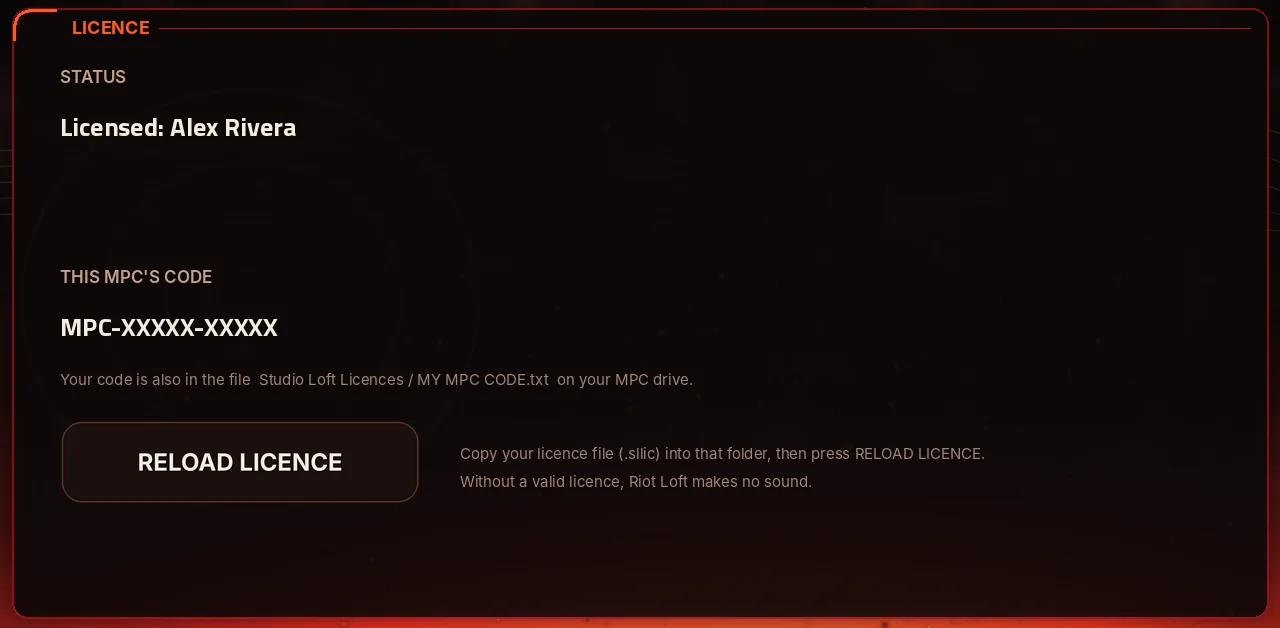
What it's for Shows whether Riot Loft is licensed on this MPC, and the code you need to get your licence.
ヒント
Tip Your code is also written in the file Studio Loft Licences / MY MPC CODE.txt on your MPC drive. Keep it handy when you buy.
Licence and activation
- 1
LICENCE
STATUS: licensed, or no licence.THIS MPC'S CODE: the code to give when you buy. RELOAD LICENCE: reads the licence file again after you copy it in.
- i
ON THIS CAPTURE
Values from the preset RIOT · Riot Pulse.
Licence
- Activation: buy on loftplugins.ch with the code shown on the LICENCE page (also in Studio Loft Licences / MY MPC CODE.txt). Copy the licence file you receive into the Studio Loft Licences folder of your MPC drive and press RELOAD LICENCE.
- 2 MPCs per purchase. No internet connection needed on the MPC.
- Without a valid licence, Riot Loft makes no sound, and a short orange line under the envelope on MAIN tells you why: for example No licence: see LICENCE page or .
あなたのものに
Riot Loft
弦、金管、木管を荒ぶるシンセに通して。
一度の支払いでずっとあなたのもの。ライセンスは2台のMPCで使えます。