Effect · バージョン 1.6.1
TRONX Loft
TELL IT WHAT THE TRACK IS. IT LISTENS, THEN MIXES IT.
Cyan bars: your sound. Pink dots: the target for a boom bap snare. After AUTO, the sound sits on the target.
マニュアル
すべての画面を、
ページごとに。
MPCの画面そのままに、一画面ずつ解説した完全ガイド。設定名は画面どおり英語のままです。
Three moves. One mixed snare.
Element
Snare
Style
Boom bap
Press
AUTO
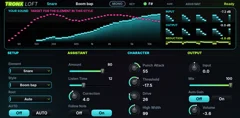
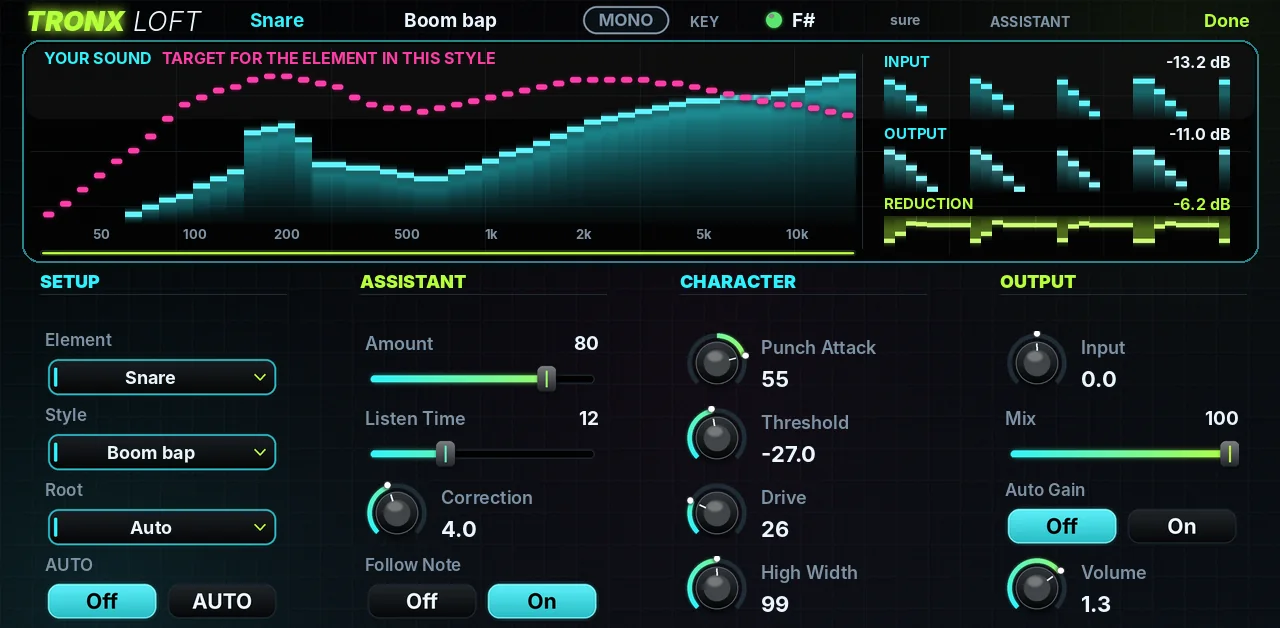
Cyan bars: your sound. Pink dots: the target for a boom bap snare. After AUTO, the sound sits on the target.
What AUTO did on this snare (real values from the plugin)
- Found a ring at 8.2 kHz and put a dynamic band on it: −6 dB, only when it rings.
- Reshaped the EQ toward the target: low shelf +0.9 → +4.9 dB, presence and top trimmed.
- Set the compressor from the measured level: threshold −17.5 → −27 dB.
- Set the gate under the real noise floor: −36 → −46 dB.
- Re-balanced the output volume, so you can compare without being fooled by loudness.
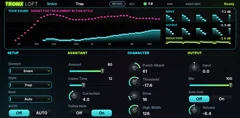
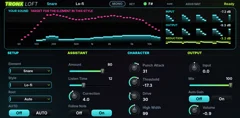
Same snare. Three styles. Three targets.
Turn Style and the pink target moves. TRONX does not mix a lo-fi snare like a trap snare.
How it feels
You load a drum bus, pick the style of the beat, press AUTO, and within seconds you are listening to a mix that already makes sense. You spend your time on the music, then fine-tune with your ears.
A whole mixing desk channel. With ears.
TRONX Loft sits on a track or a bus of your MPC. Inside: a full channel strip, plus an assistant that listens to the sound and sets it up for what it is and the style you make.
It knows the parts
Kick, snare, 808, rap vocal, piano, strings, drum bus, mix bus… 96 elements, each with its own target sound.
It knows the styles
Boom bap, trap, lo-fi, drill, house, afro, rock, cinematic… 40 styles. The same snare is not mixed the same way in each.
It listens first
Press AUTO: TRONX hears 8 to 20 seconds of your track, then fits the recipe to the real sound. No guesswork, just measurement and targets.
Good to know
TRONX hears only the track it sits on. It does not change anything on its own: you press AUTO, and you can tweak every value afterwards. No latency, 2 in / 2 out.
MAIN
- 1
Element · Style
What TRONX thinks the track is, and the style it mixes for. Shown on every page.
- 2
MONO
Sums the output to mono (left = right). Touch again to go back to stereo.
- 3
KEY
The root note TRONX found. Green dot: sure. Orange: check it. Red: not sure, pick the Root yourself.
- 4
Status
What the assistant is doing: Ready, Listening, Done.
- 5
YOUR SOUND / TARGET
Cyan bars: the spectrum of your sound. Pink dots: the target for this element in this style.
- 6
INPUT · OUTPUT · REDUCTION
Level going in, level coming out, and how much the compressor is pulling down, over time.
- 7
SETUP
Element, Style, Root (Auto or a note) and AUTO, the one-press mix.
- 8
ASSISTANT
Amount: how much of the correction is applied. Listen Time: 8 to 20 s. Correction: the most any EQ band may move (1 to 8 dB). Follow Note: bands locked to a note follow the root.
- 9
CHARACTER
Four shortcuts: Punch Attack, compressor Threshold, saturation Drive, High Width.
- 10
OUTPUT
Input gain, Mix (dry / processed), Auto Gain (keeps the output as loud as the input) and Volume.
What it's for
Your home page. Pick the element and the style, press AUTO, then use the four columns to adjust. Most of the time you never need another page.
Tip
Start with Amount at 80. If the result is too polished for your style, bring it down to 50: you keep the character of the original sound.
LISTEN
- 1
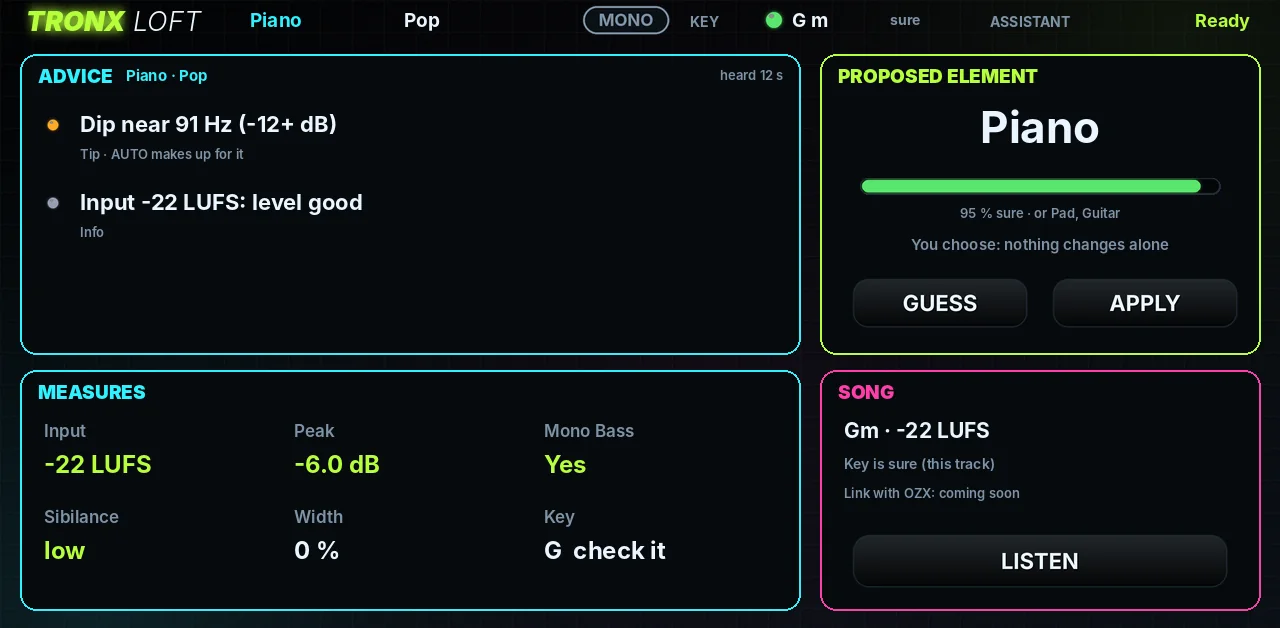
ADVICE title
The element and style you are judged against, and how long TRONX listened.
- 2
Advice lines
Up to three notes, problems first. Red dot: problem. Orange: tip. Grey: info.
- 3
PROPOSED ELEMENT
What the sound looks like to TRONX, how sure it is (bar) and two other guesses.
- 4
GUESS
Listens to the track and proposes an element.
- 5
APPLY
Sets the proposed element. Press again (UNDO) to go back. Nothing else changes.
- 6
MEASURES
Input loudness (LUFS), Peak, Mono Bass, Sibilance, Width and Key.
- 7
SONG
Key and loudness TRONX hears on this track.
- 8
LISTEN
Listens for the Listen Time without changing the sound, then fills the page.
What it's for
A second opinion before you touch anything. Press LISTEN, play your part, read the advice. Nothing changes until you decide.
Tip
Not sure if a sample is a kick or an 808? Press GUESS. It is a proposal: kick and 808, snare and clap can look alike.
EQ · BANDS 1-4 and 5-8
- 1
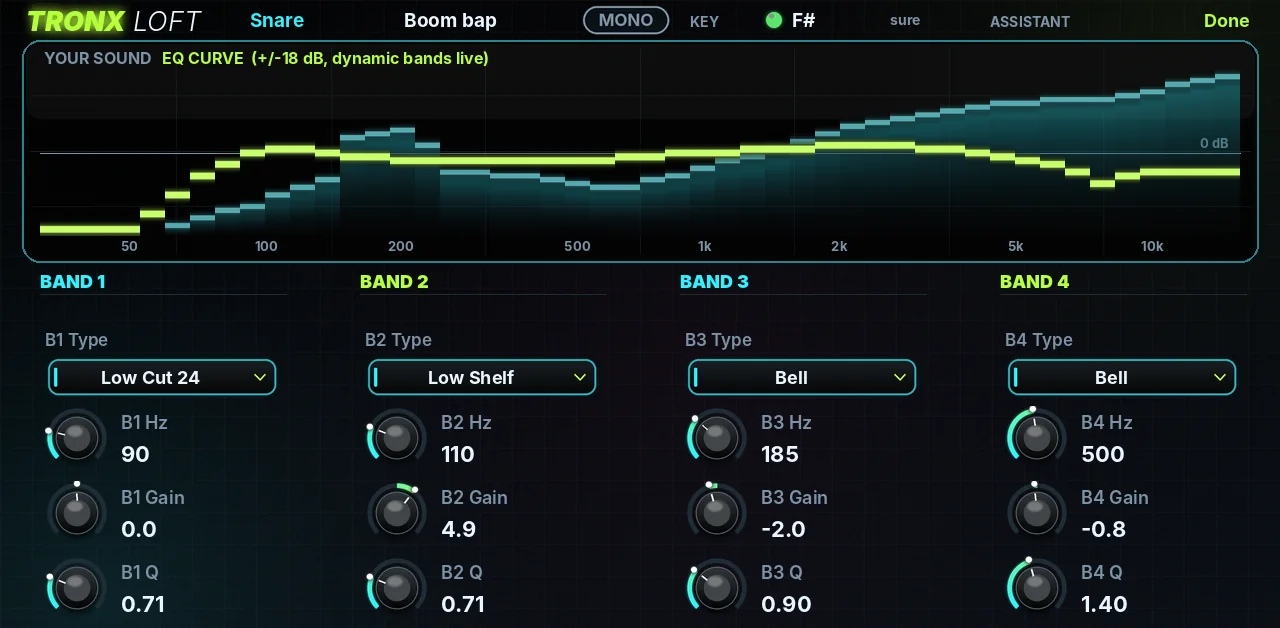
EQ CURVE
Lime: the curve of the EQ, live, dynamic bands included. Behind it, your sound. 0 dB is the middle line.
- 2
BAND title
Each column is one band. Page EQ 1-4 shows bands 1 to 4, a second press shows bands 5 to 8 (same layout).
- 3
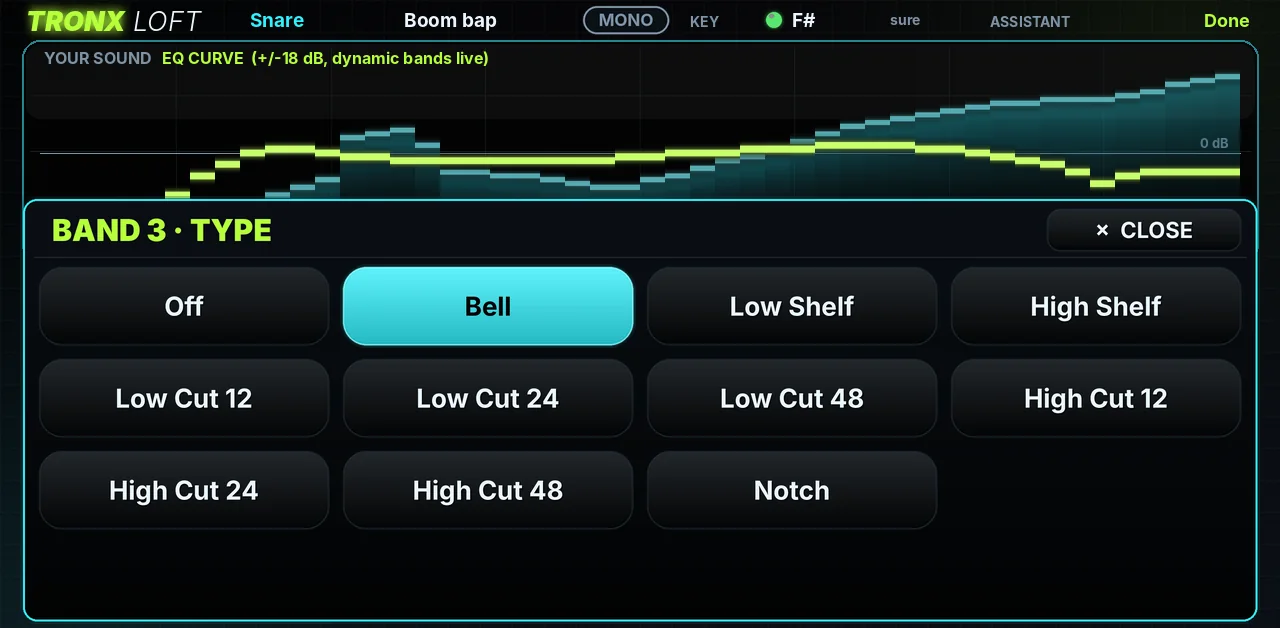
Type
Off, Bell, Low Shelf, High Shelf, Low Cut 12 / 24 / 48, High Cut 12 / 24 / 48, Notch.
- 4
Hz · Gain
Frequency of the band (20 Hz to 20 kHz) and its boost or cut (±18 dB).
- 5
Q
Width of the band: low Q is wide and gentle, high Q is narrow and surgical.
- 6
Bands 5-8
Same controls for bands 5 to 8: press F2 again.
What it's for
Eight bands for shaping the tone by hand, or for checking what AUTO did.
Tip
Muddy snare? Try a Bell around 400 to 500 Hz, −2 dB, Q 1.4. Then raise the band near 2.5 kHz for crack.
NOTE · DYN
- 1
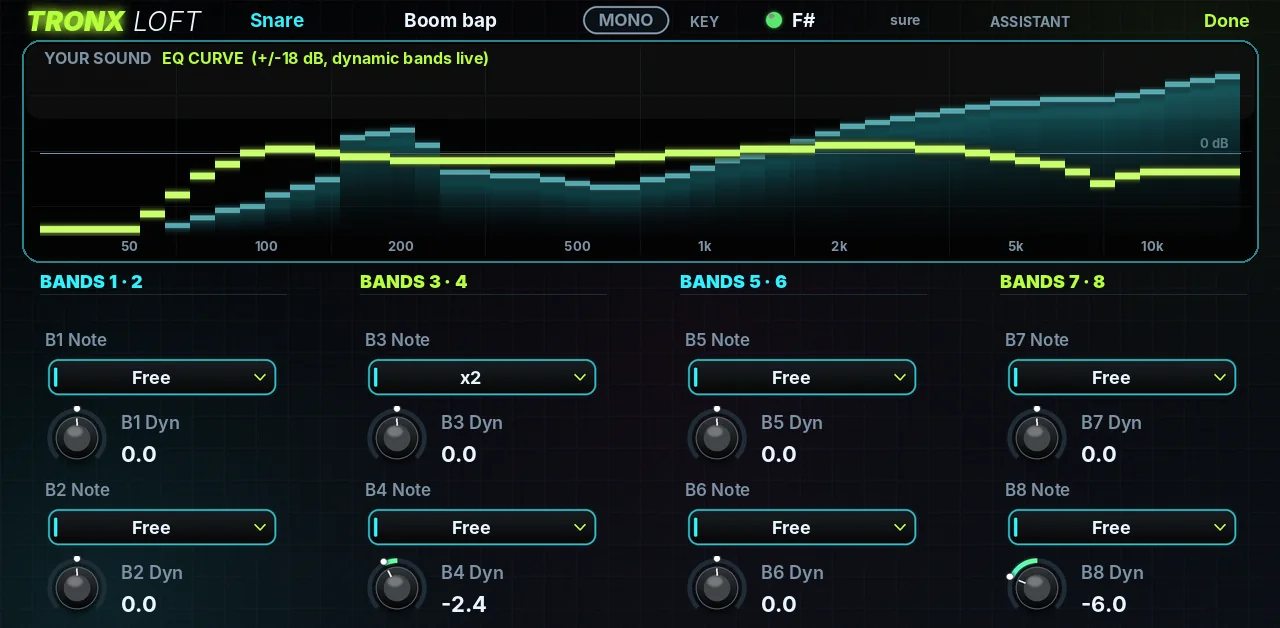
EQ CURVE
The live EQ curve: you see dynamic bands move as the sound plays.
- 2
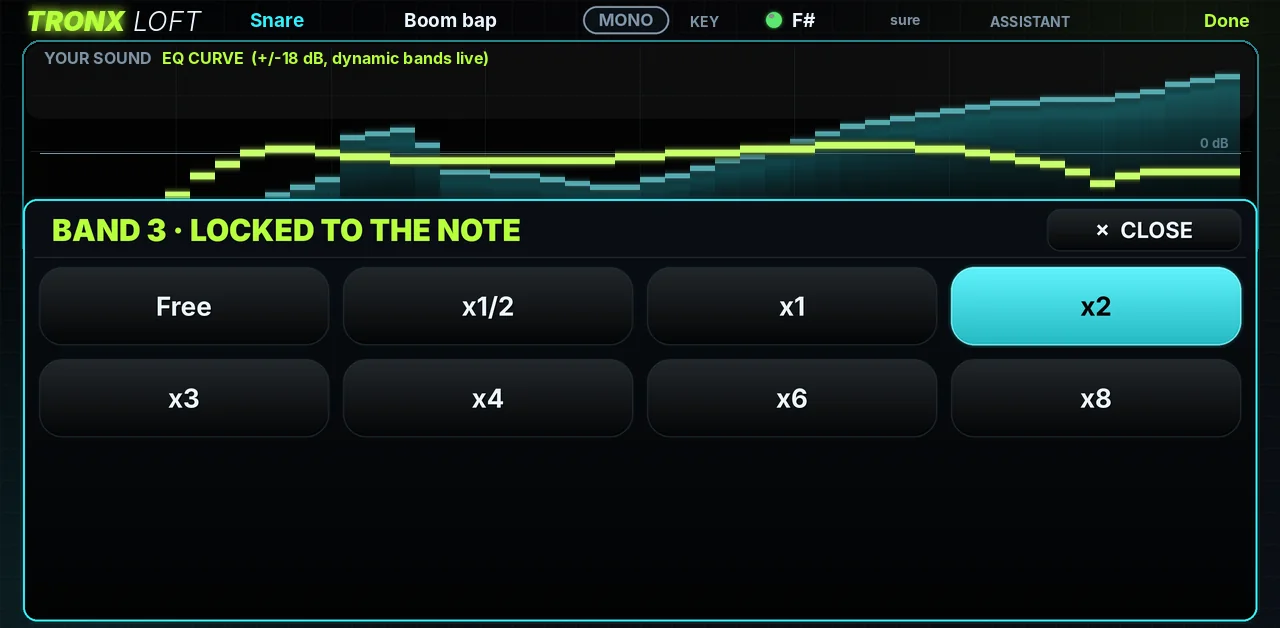
B1 Note … B8 Note
Locks a band to the key: Free, or x1/2, x1, x2, x3, x4, x6, x8 of the root. x1 is the root between 65 and 123 Hz.
- 3
B1 Dyn … B8 Dyn
Makes the band dynamic: it moves by this amount (±12 dB) only when its zone gets louder than usual.
- 4
x2 on band 3
Example from the snare: band 3 follows twice the root note, so the body of the snare stays in tune with the beat.
- 5
Dyn on band 4
−2.4 dB that only acts when the boxy zone pops out.
What it's for
Two powers in one page: EQ that follows the key of the track, and EQ that only acts when needed.
Tip
808 that changes note? Lock the low band to x1 and keep Follow Note on: the boost follows every note.
COMPRESSOR
- 1
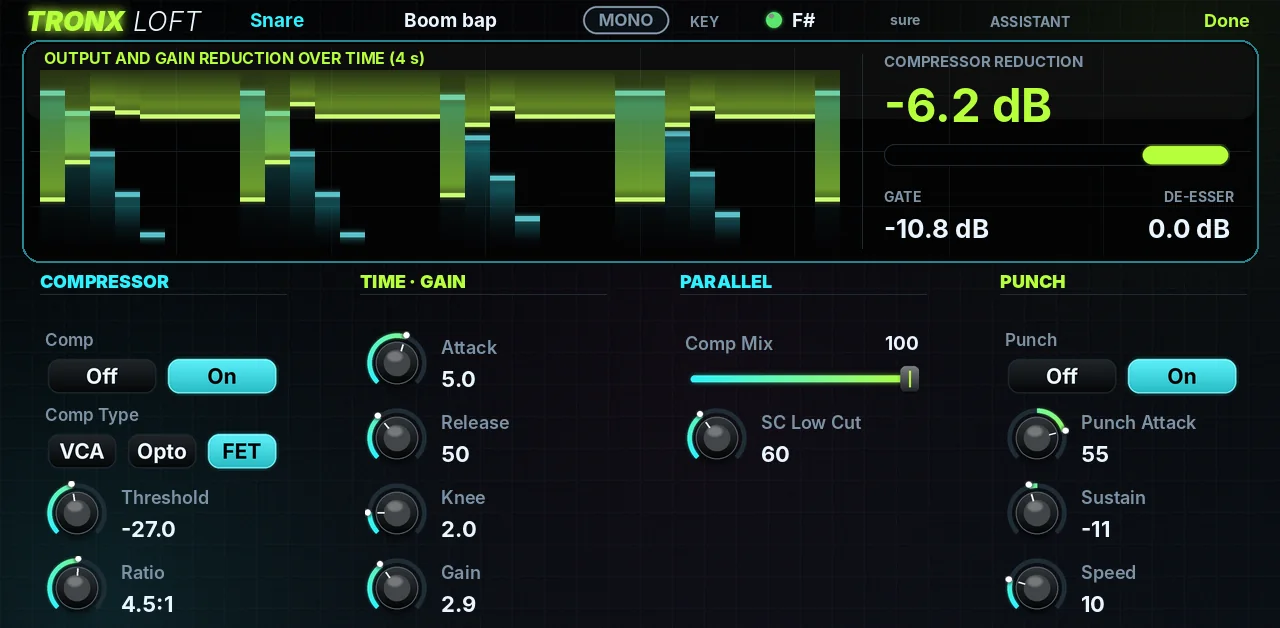
OUTPUT AND GAIN REDUCTION
4 seconds of output (cyan) and gain reduction (lime): you see each hit get squeezed.
- 2
COMPRESSOR REDUCTION
Gain reduction right now, in dB, with a bar.
- 3
GATE · DE-ESSER
How much the gate and the de-esser are pulling down.
- 4
COMPRESSOR
Comp on/off, Comp Type (VCA clean and precise, Opto smooth, FET fast and aggressive), Threshold, Ratio.
- 5
TIME · GAIN
Attack, Release, Knee (hard or soft start) and make-up Gain.
- 6
PARALLEL
Comp Mix blends compressed and dry signal. SC Low Cut keeps the bass from driving the compressor.
- 7
PUNCH
Transient shaper: Punch on/off, Punch Attack (more or less hit), Sustain (more or less tail), Speed.
What it's for
Control and energy. The compressor holds the level, the punch section shapes the hit.
Tip
For a snare that cracks: FET, Attack 5 ms so the hit passes, Release 50 ms, then Punch Attack up and Sustain down.
COLOR
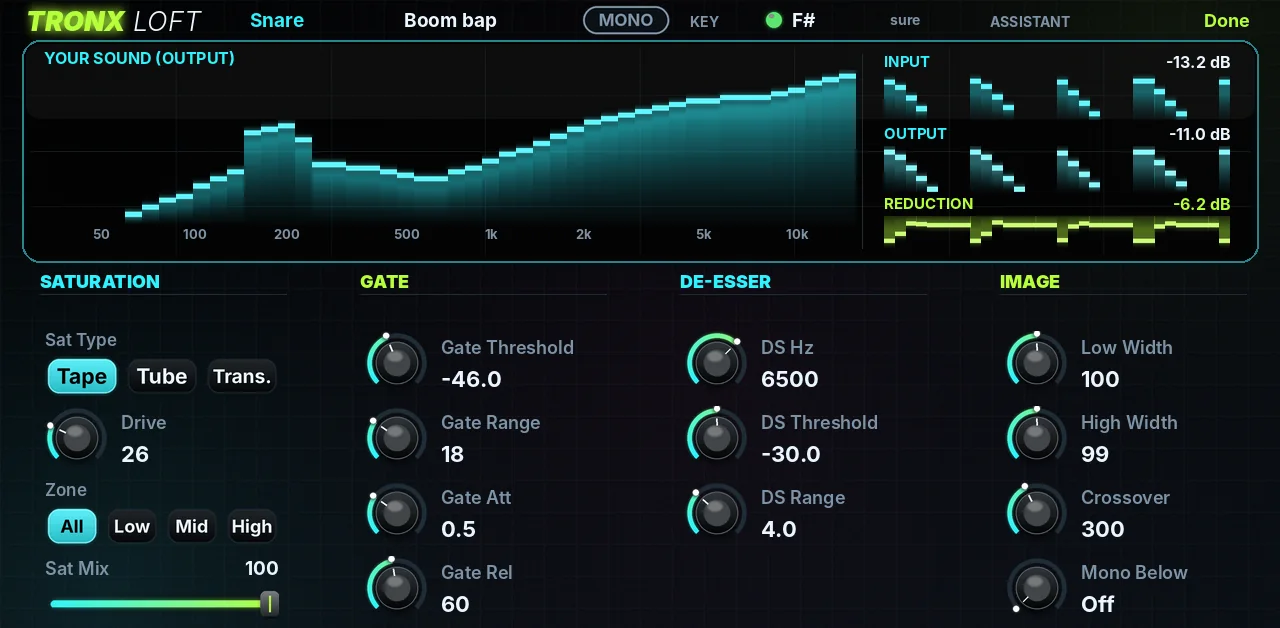
- 1
YOUR SOUND (OUTPUT)
The spectrum after all processing, with input, output and reduction meters on the right.
- 2
SATURATION
Sat Type: Tape, Tube, Trans. (transistor). Drive, Zone (All, Low, Mid, High) and Sat Mix.
- 3
GATE
Gate Threshold, Gate Range (how deep it closes), Gate Att and Gate Rel.
- 4
DE-ESSER
DS Hz (where the hiss is), DS Threshold, DS Range (the most it may cut).
- 5
IMAGE
Low Width and High Width on both sides of the Crossover, and Mono Below for a solid low end.
What it's for
Colour, cleaning and space: warm it up, remove what you don't want, place it in the stereo field.
Tip
Saturation only on the High zone brings a vocal forward without thickening the low end. On a drum bus, try Tape, Drive 25.
MODULES
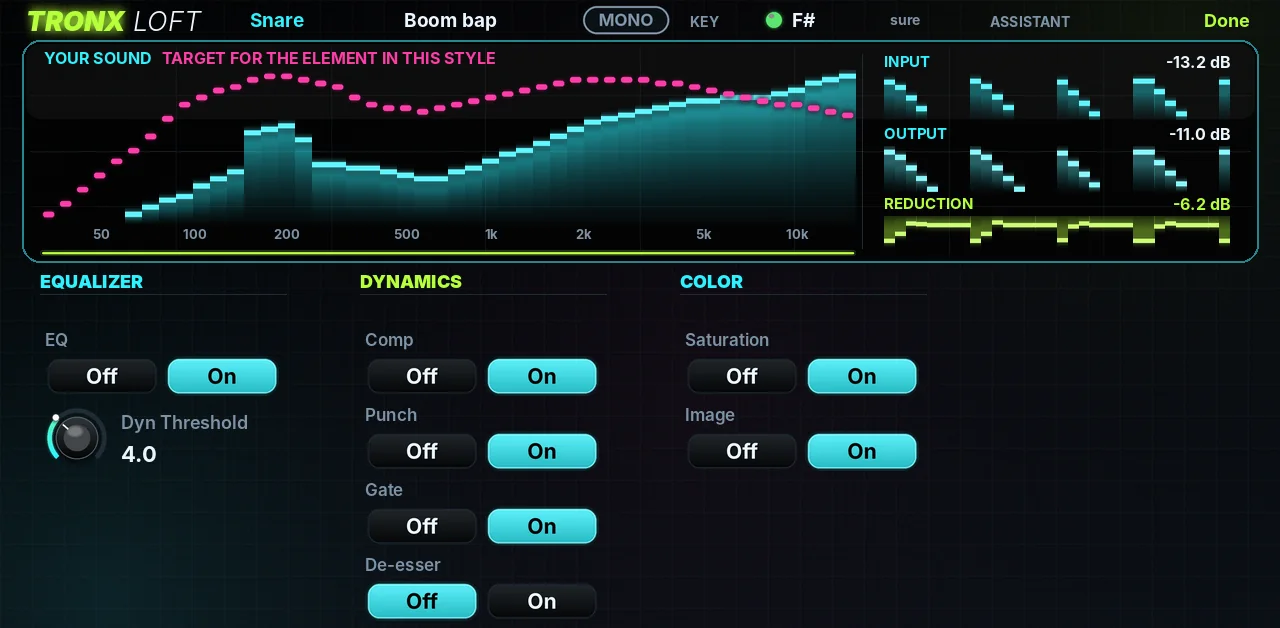
- 1
EQUALIZER
EQ on/off and Dyn Threshold: how far above its average a zone must rise before dynamic bands act.
- 2
DYNAMICS
Comp, Punch, Gate, De-esser: switch each module on or off.
- 3
COLOR
Saturation and Image on/off.
What it's for
Switch whole sections in and out to hear what each one brings.
Tip
A/B in one touch: switch Comp off and on while the loop plays. If you can't hear the difference, you probably don't need it.
Lists that open full screen
Touch a list and it opens over the page. Touch a choice, or CLOSE. Tip: on every page, the four columns follow the four columns of Q-Links, top to bottom.
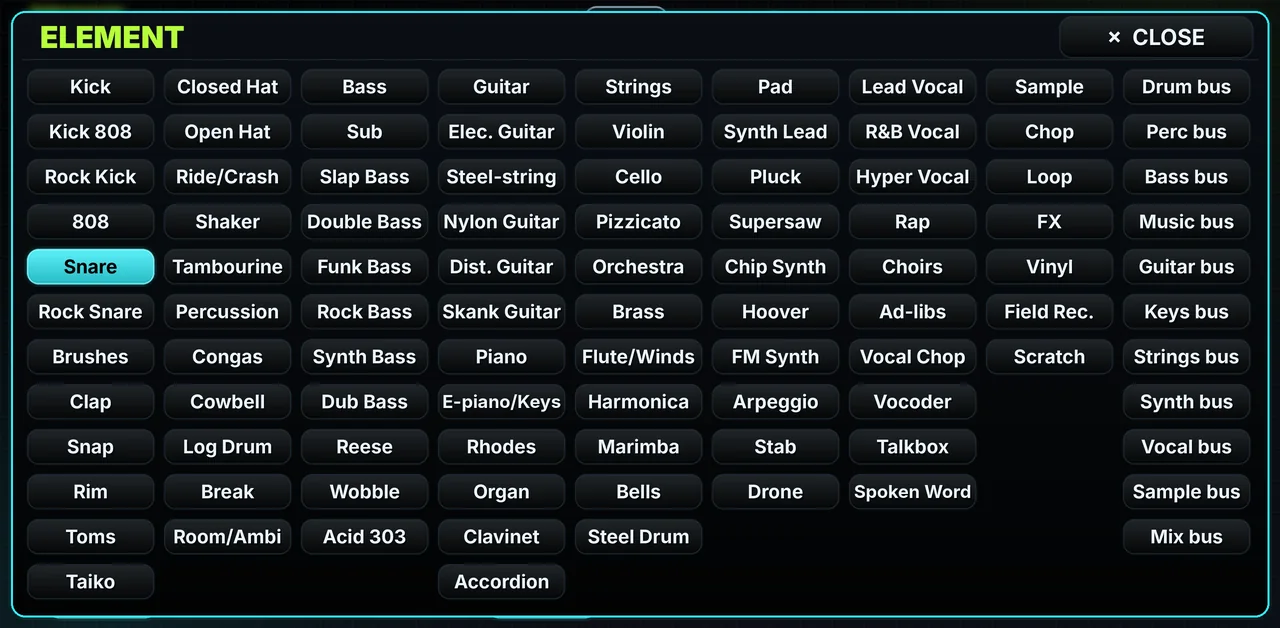
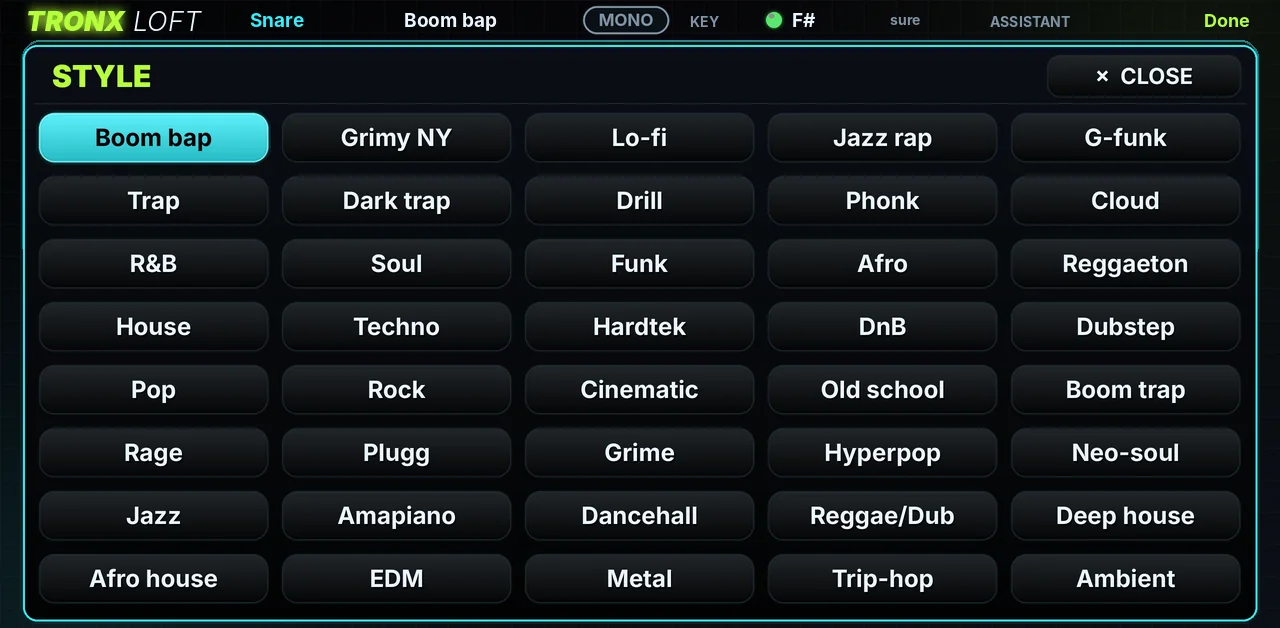
121 presets, one per element
Each preset is the recipe of one element in the style that suits it best. Load it, then turn Style to hear the same element in any of the 40 styles. Init starts from a clean, neutral strip.
Drums 23
Kick · Kick 808 · Rock Kick · 808 · Snare · Rock Snare · Brushes · Clap · Snap · Rim · Closed Hat · Open Hat · Ride and Crash · Shaker · Tambourine · Percussion · Congas · Cowbell · Log Drum · Toms · Taiko · Break · Room and Ambience
Bass 11
Bass · Sub · Slap Bass · Double Bass · Funk Bass · Rock Bass · Synth Bass · Dub Bass · Reese · Wobble · Acid 303
Vocals 10
Lead Vocal · R&B Vocal · Hyperpop Vocal · Rap · Choirs · Ad libs · Vocal Chop · Vocoder · Talkbox · Spoken Word
Instruments 33
Piano · Keys · Rhodes · Organ · Clavinet · Accordion · Marimba · Bells · Steel Drum · Guitar · Electric Guitar · Steel String Guitar · Nylon Guitar · Distorted Guitar · Skank Guitar · Strings · Violin · Cello · Pizzicato · Orchestra · Brass · Flute and Winds · Harmonica · Pad · Synth Lead · Pluck · Supersaw · Chip Synth · Hoover · FM Synth · Arpeggio · Stab · Drone
Samples and FX 7
Sample · Chop · Loop · FX · Vinyl · Field Recording · Scratch
Buses 12
Drum Bus · Drum Bus Parallel · Perc Bus · Bass Bus · Music Bus · Guitar Bus · Keys Bus · Strings Bus · Synth Bus · Vocal Bus · Sample Bus · Mix Bus
Expansions 24
B94 Basement Bus · B94 Crate Glue · MAT Tape Funk · MAT Velvet Kit · NEO Gated Neon · NEO Night Drive · BRU Brush Glue · BRU Late Club · RUS Factory Room · RUS Big Iron · GAR Garage Crush · GAR Raw Rehearsal · WAR 4AM Pump · WAR Warehouse Glue · SUB Heavy Bus · SUB Dark Knock · ROL Roller Bus · ROL Tight Breaks · HAL Halfstep Smash · HAL Heavy Snare Bus · HAN Warm Hands · HAN Body Groove · SNA Crack Bus · SNA Fat Snare Bus
TRONX Loft in short
A mixing effect for MPC that listens to a track and sets a full channel strip for what it is and the style you make.
For
- Beatmakers mixing drums, 808s and samples on the MPC
- Rap and R&B vocals, recorded or sampled
- Bus and mix-bus finishing, from boom bap to house
Strengths
- AUTO: listens 8 to 20 s, then sets EQ, compressor, gate, de-esser and output level
- 96 elements × 40 styles, each with its own target curve
- 8-band EQ, every band can be dynamic or locked to the key
- 3 compressor types, punch, 3 saturation types, stereo image
- LISTEN page: advice, measures and a proposed element
- No latency
| Format | MPC plugin, effect, 2 in / 2 out |
| Runs on | MPC standalone, MPC OS 3.10.1 |
| Size | 10.5 MB download, 18 MB installed |
| Version | 1.5.1 |
Up and running in 3 steps
Install
Copy the folder Studio Loft - VST - TRONX Loft into the VST2 Plugins folder of your MPC drive.
Load
Insert TRONX Loft as an effect on a track, a program or a bus, then load a preset from its bank.
Play
Play your part, check Element and Style, press AUTO. Listen, then fine-tune.
Credits
- Built with inMusic's MPC Plugin Builder SDK (MIT licence).
- Licence check: Monocypher by Loup Vaillant and contributors (CC0 / BSD-2).
- Font in the screens and in this guide: Inter (SIL Open Font License 1.1). Titillium Web is displayed by the MPC itself.
- Sounds: none. TRONX Loft is an effect and contains no recorded audio. Settings, targets and presets by Studio Loft.
- MPC is a trademark of Akai Professional, named only to say which machines this plugin runs on. Studio Loft is not affiliated with Akai Professional or inMusic.
Licence and activation
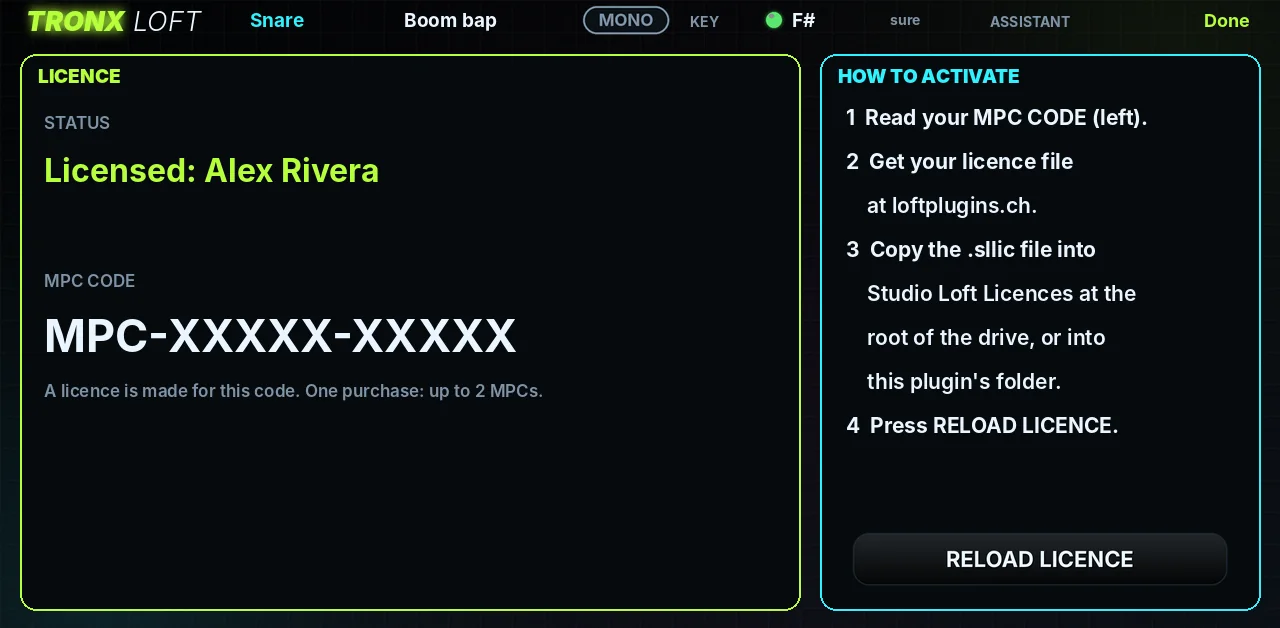
- 1
STATUS
Licence status: the name of the owner when it is valid. Without a licence: Get it at loftplugins.ch.
- 2
MPC CODE
The code of this MPC. Your licence is made for it.
- 3
HOW TO ACTIVATE
The four steps, right on the screen.
- 4
RELOAD LICENCE
Reads the licence files again, right after you copied a new one. No restart.
Buy and receive
Buy TRONX at loftplugins.ch. Your licence arrives by e-mail, made for your MPC code.
Activation
Copy your licence file into the folder Studio Loft Licences at the root of your MPC drive, or into the plugin folder, then press RELOAD LICENCE.
2 MPCs per purchase
One purchase works on up to two of your MPCs.
Without a licence
TRONX stays silent, and the MAIN page tells you where to go:
ライセンスとアクティベーション
3ステップであなたのものに。
購入
このサイトで一度お支払い。個人用リンクがメールで届き、ずっと有効です。
Loft Hubをインストール
MPC OS 3.10.1以降で、PreferencesのEnhancementsとExternal Plugin Supportをオンにします。Loft HubをMPCドライブに一度コピーするだけです。
リンクして演奏
Loft Hubで同意してMPCをリンクすると、プラグインが自動でインストールされます。2台のMPCで使えます。以上です。
あなたのものに
TRONX Loft
1トラックをミックス:音程を理解するEQ、コンプレッサー、要素別のAUTO。
一度の支払いでずっとあなたのもの。ライセンスは2台のMPCで使えます。