Instrument · version 1.4.1
Chordz Loft
PICK A STYLE. GET THE CHORDS. DROP THE PATTERN.
A chord progression generator for MPC standalone: 34 styles, chords, bass and arp written as patterns for any track.
Lazy neo-soul on electric piano and sub bass: ninth and eleventh chords, a passing chord and an early chord.
The manual
Every screen,
page by page.
The full user guide, screen by screen, exactly as on the MPC. Setting names stay the English words of the screen.
THE BIG IDEA
Blank page? T a p a s t y l e .
Chordz knows how each style writes its chords. Choose NEO-SOUL, TRAP or FILM 70s: Chordz loads a real, typical progression of that style, in a good key, at the right tempo, with a rhythm, a bass line and sounds that suit it. Tap play. No theory needed: you listen, you keep it, or you tap ▶ for the next one.
MAKE IT YOURS
Thirty seconds f r o m t y p i c a l t o p e r s o n a l .
Here is Sunday Velvet, the first NEO-SOUL progression, exactly as Chordz loads it: eight bars, a passing chord in bar one, an early chord in bar three, chords that last two bars. Every one of these details is a tap away on the CHORDS page.
8 chords that could take this place, from the closest to the most colourful. Tap to hear each one in context.
A quarter-bar chord that leads into the next one: secondary dominant, diminished, approach, tritone substitution.
Push a chord an 8th or a 16th before the bar. The loop suddenly leans forward.
¼, ½, 1, 2 or 4 bars per chord. Progressions breathe instead of marching.
One tap adds 7ths, 9ths, 11ths and 13ths everywhere, or brings it all back to triads.
Smooth voices: each chord picks the inversion closest to the one before.
IT LISTENS
Already have a sample? C h o r d z f i n d s t h e c h o r d s t h a t f i t .
Drop a loop in a folder, play your song, or just play a few notes: LISTEN finds the key and the tempo, then picks matching progressions in every style. HARMONIZE goes the other way: play a melody, and each bar gets a chord that holds your notes.
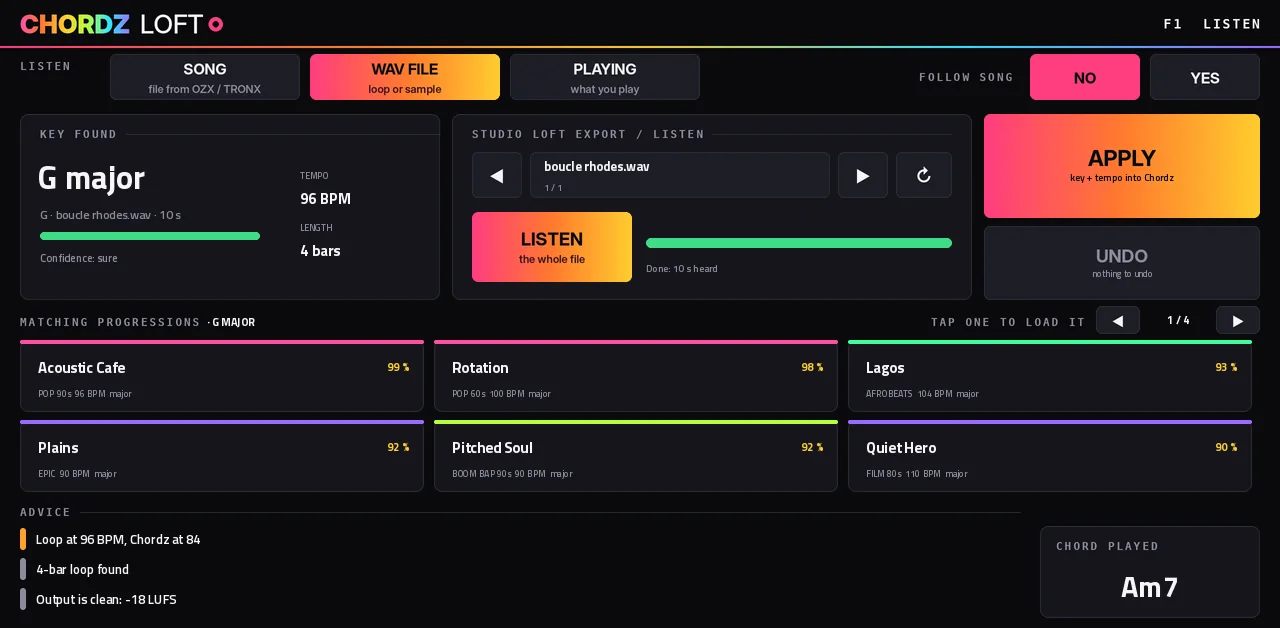
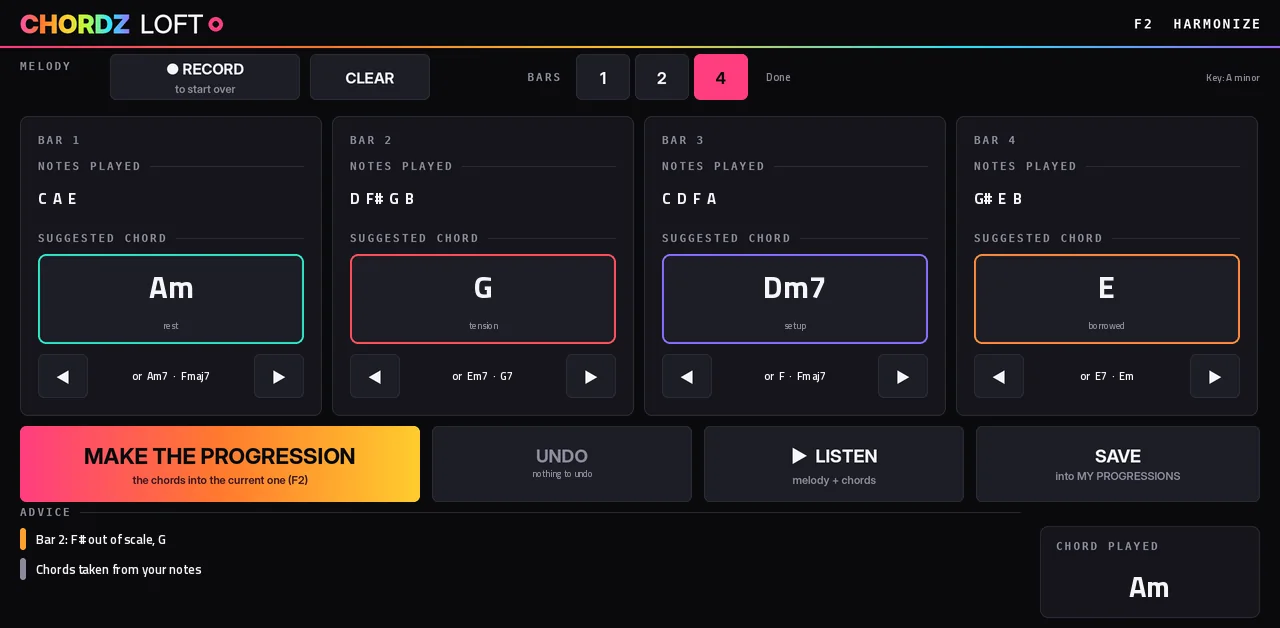
“I have a loop and no idea what goes under it” becomes a list of progressions that already fit, in the right key. Pick one, export, keep cooking.
HOW IT WORKS
It writes. Y o u r t r a c k s p l a y .
Chordz is a writer, not a sound module. Its preview sounds let you hear what you are building; what you export are patterns, so the final sound is the one of the track you drop them on. Your keys, your bass, your mix.
A family, a style, a key. Listen to the progressions with ◀ ▶.
Edit the chords in F2, choose rhythm, bass and arp in F3 and F4.
Export patterns in F6 and put them on any MPC track.
The screens, key by key
Press a function key once for its first page, again for the next one.
On F3 RHYTHM, set MPC PLAY to WITH SONG: Chordz then starts and stops with the PLAY key of the MPC, in time with your sequence, even when you start in the middle.
Style
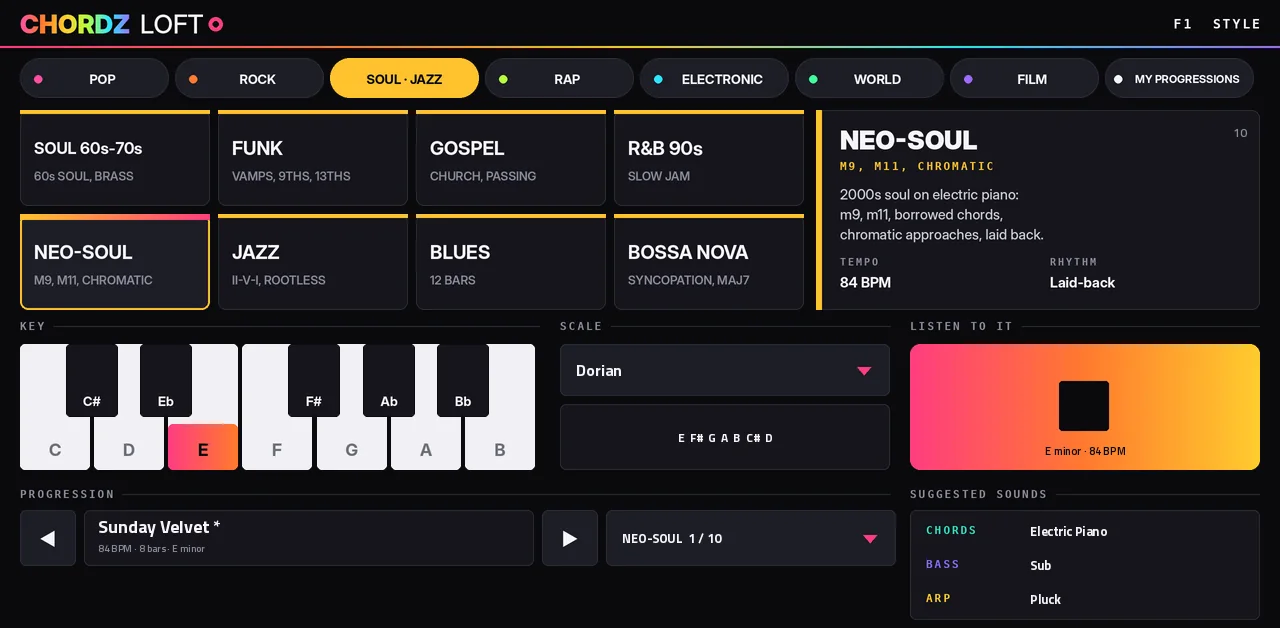 123456789
What you see
- Families POP, ROCK, SOUL · JAZZ, RAP, ELECTRONIC, WORLD, FILM, and MY PROGRESSIONS for the ones you saved.
- Style cards The styles of the family, each with its signature (NEO-SOUL: M9, M11, CHROMATIC).
- Style sheet What the style does, its tempo and its rhythm.
- KEY Tap a note: the whole progression moves to that key.
- SCALE The scale and its notes. Tap it to open the list of 8 scales.
- LISTEN TO IT Play / stop with the rhythm, bass and sounds of the style. Shows the key and the tempo.
- PROGRESSION ◀ ▶ walk through the progressions of the style. A * means you have edited this one.
- List Opens every progression of the style on one screen.
- SUGGESTED SOUNDS The preview sounds the style picks for chords, bass and arp (change them in F5).
Tip
TIP Stuck on a beat? Stay in one style and tap ▶ while it plays: a new progression every few bars, until one fits your drums.
WHAT IT'S FORYour starting point. Pick a family and a style: Chordz loads a typical progression of that style with its scale, tempo, rhythm, bass, voicing and preview sounds. Hit play and you are already writing.
Style: the lists
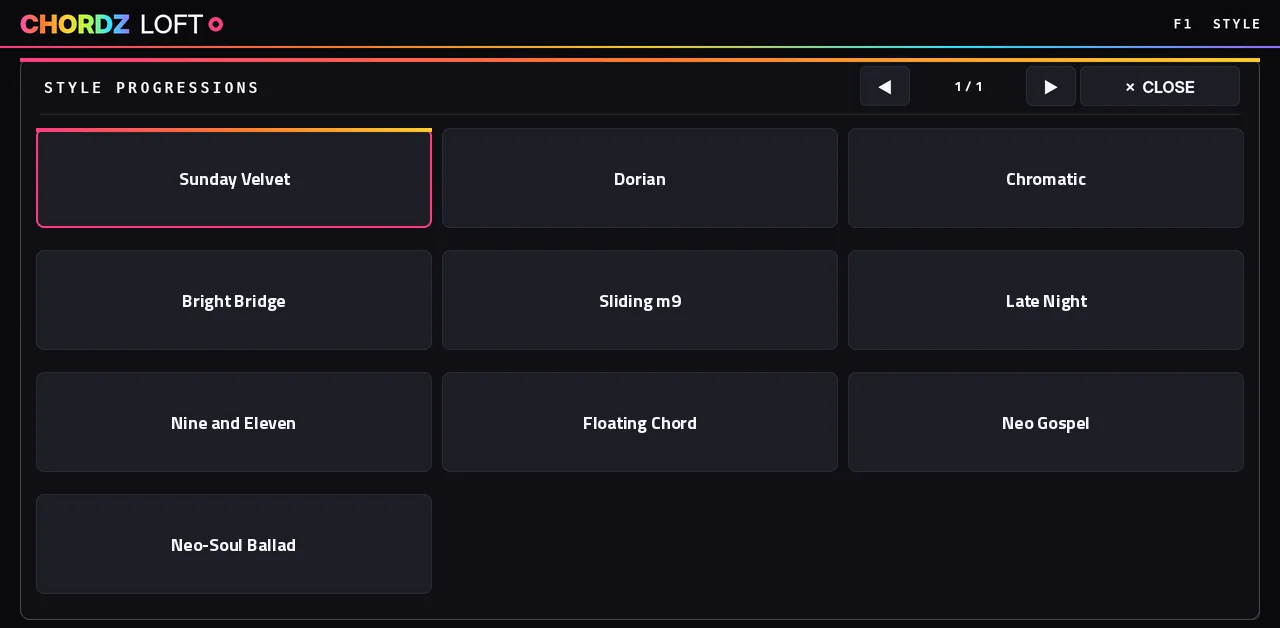 123
Tip
TIP A list opens from the progression name or the scale. Changing the scale recolours the whole progression: Dorian sounds warmer than Minor, Harmonic Minor darker.
- 1Progressions Every progression of the style. Tap one to load it.
- 2Pages ◀ ▶ when there are more than 12.
- 3CLOSE Back to the page.
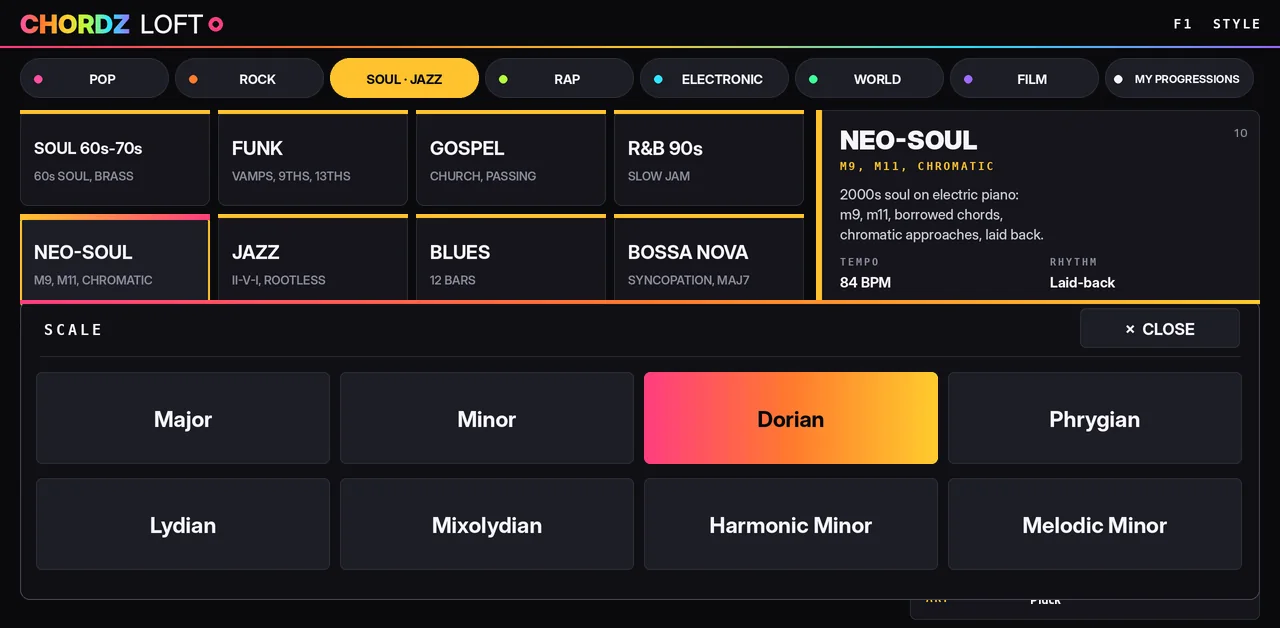
- 18 scales Major, Minor, Dorian, Phrygian, Lydian, Mixolydian, Harmonic Minor, Melodic Minor.
- 2CLOSE Back to the page.
My Progressions
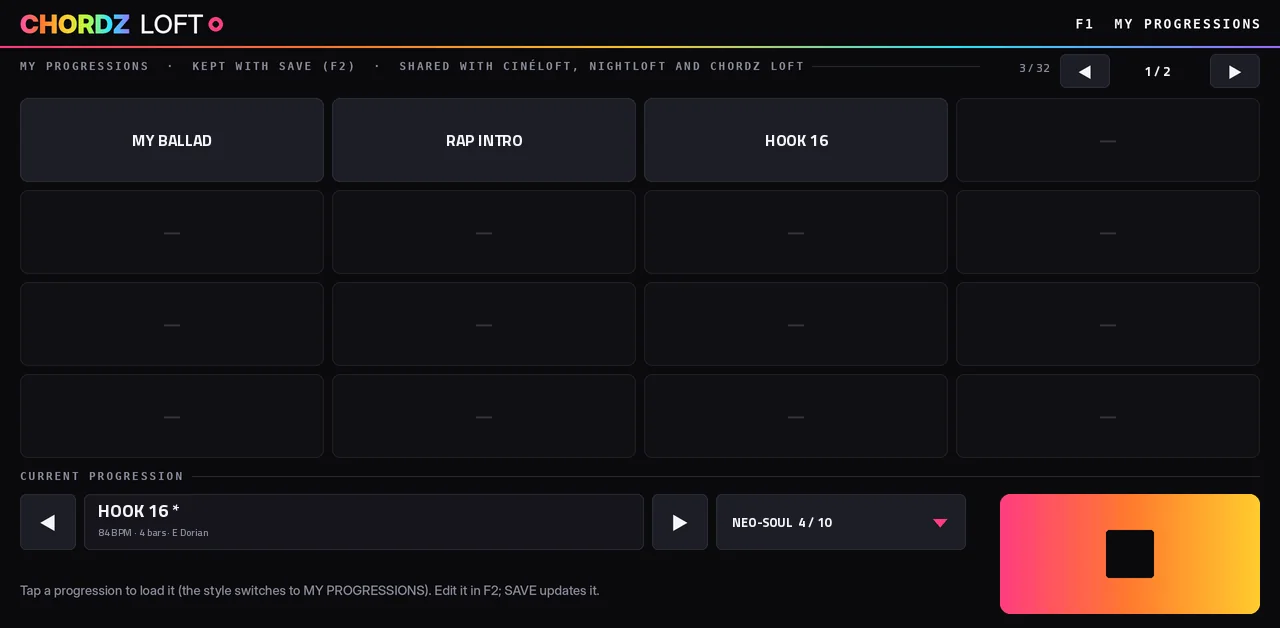 12345
What you see
- Saved progressions Tap one to load it. The style switches to MY PROGRESSIONS.
- Pages How many places are used, and the two pages.
- CURRENT PROGRESSION ◀ ▶ and the name, tempo, bars and key of what is loaded.
- List The list of the current style, as on the STYLE page.
- Play Play / stop to hear it right away.
Tip
TIP Save a progression as soon as it moves you, even half-finished. Name it after the song it is for: in a week, MY PROGRESSIONS becomes your sketchbook.
WHAT IT'S FORYour own library: every progression you keep with SAVE lands here, on two pages. Cinéloft and Nightloft read the same list, so a progression found in one plugin is ready in the others.
Listen
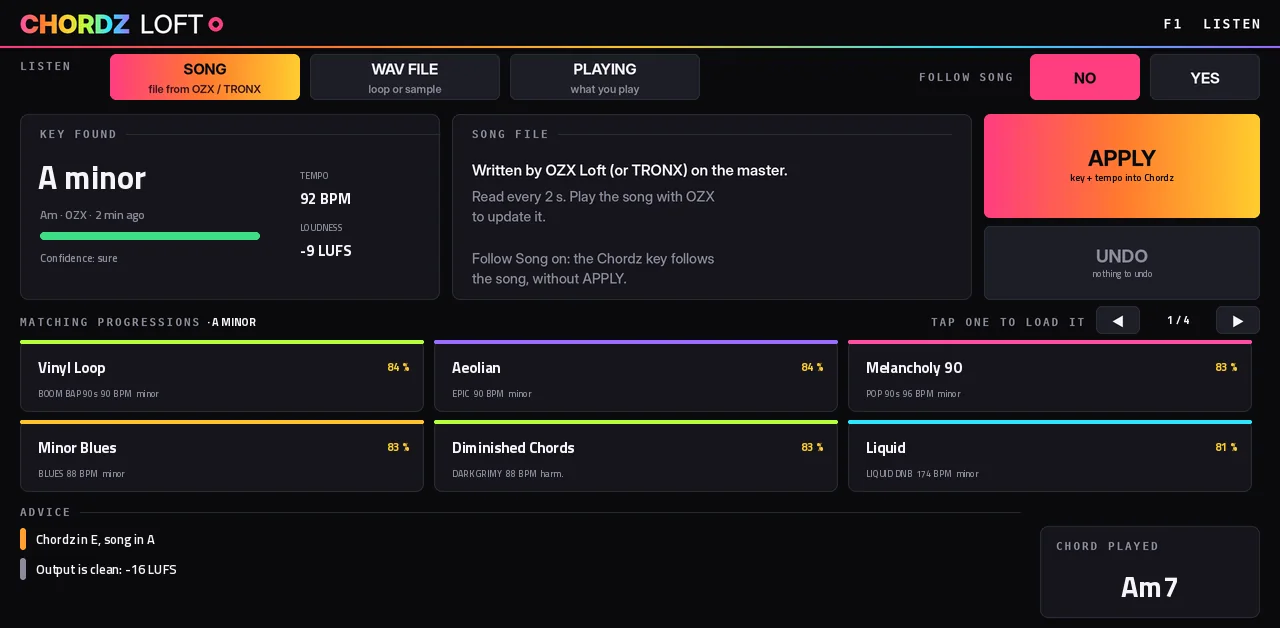 123456789
What you see
- Source SONG (a file written by OZX Loft or TRONX Loft on your master), WAV FILE, or PLAYING (your keys).
- FOLLOW SONG YES: the key of Chordz follows the song by itself, without APPLY.
- KEY FOUND Key, tempo, loudness, where it came from, and a confidence bar (red, orange, green).
- SONG FILE Where the information comes from and how often it is read.
- APPLY Puts the key and the tempo into Chordz.
- UNDO Brings back the key, scale, tempo, style and progression you had before.
- MATCHING PROGRESSIONS Six per page, four pages, from every style and from MY PROGRESSIONS, with a match score. Tap one to load it in the key found.
- ADVICE Short notes, problems first: "Chordz in E, song in A", "Output is clean".
- CHORD PLAYED The name of the chord you are holding on the keys.
Tip
TIP Before you write a single chord, play your sample through LISTEN: in five seconds you know its key, and the matching progressions already sit in it.
WHAT IT'S FORThe assistant. Chordz finds the key and the tempo of your song, then shows the progressions that fit it. It is not a cloud service: it measures the notes, on the MPC, in real time.
Listen: WAV file and playing
1234Tip
TIP Sampling a record? Drop the loop in Studio Loft Export / Listen, tap LISTEN, then APPLY: Chordz takes its key and tempo, and the matching progressions are ready to load.
- 1WAV FILE Any WAV placed in Studio Loft Export / Listen: a loop, a sample, a rough mix.
- 2File ◀ ▶ choose the file, ⟳ reads the folder again.
- 3LISTEN Analyses the whole file: key, tempo and length in bars.
- 4Matches Progressions in the key found, ranked by the notes heard.
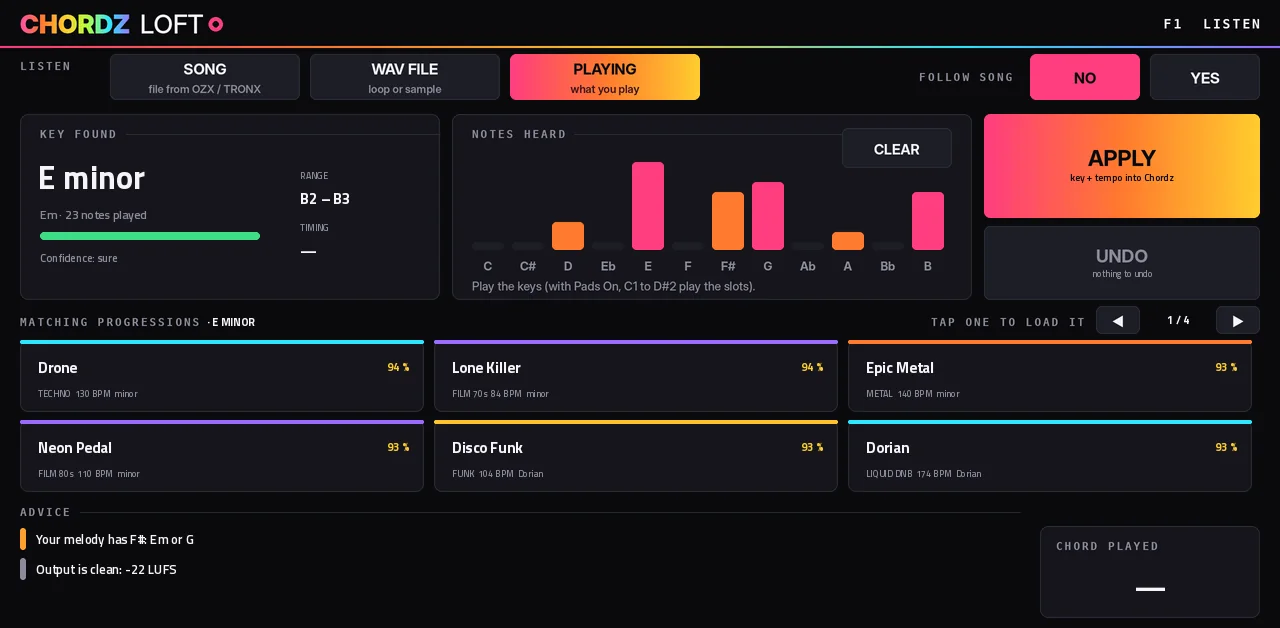
- 1PLAYING Play your keys: Chordz listens.
- 2NOTES HEARD How much of each note you played. CLEAR starts again.
- 3KEY FOUND The key, the range you played and your timing.
- 4ADVICE "Your melody has F#: Em or G".
Chords
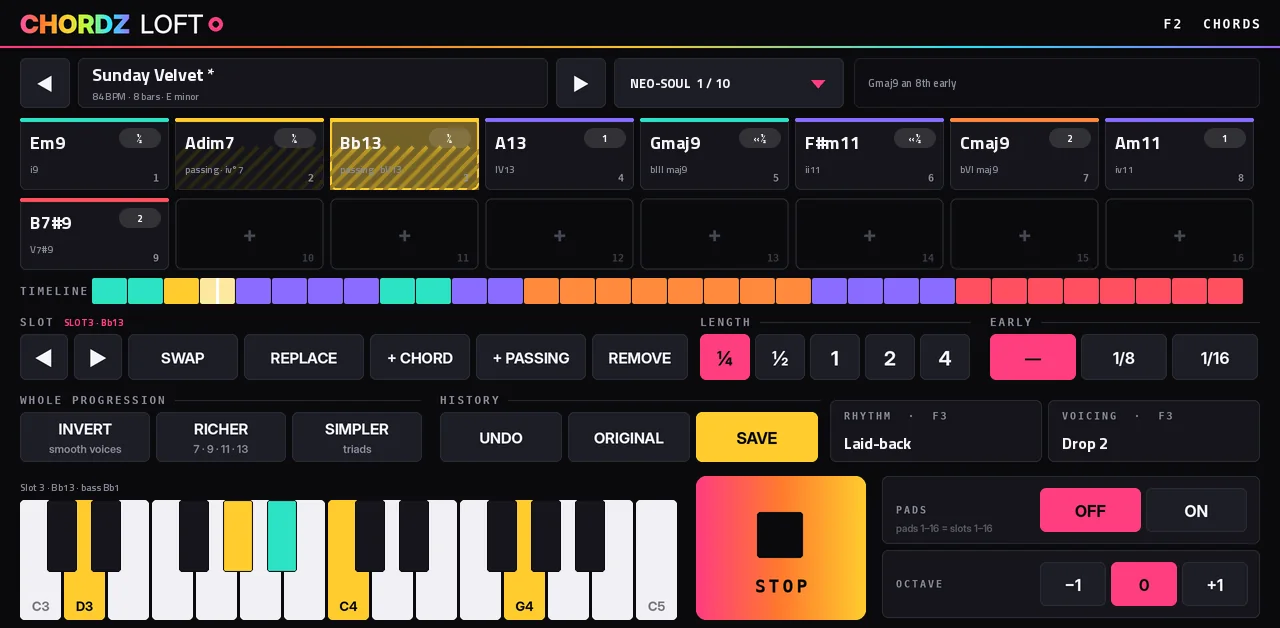 123456789101112131415
What you see
- Progression ◀ ▶, name, tempo, bars and key.
- List All the progressions of the style.
- Last move What you just did ("Gmaj9 an 8th early").
- 16 slots Two rows of eight. Chord, its degree (i9, IV13…), its length and its colour (rest, setup, tension, passing, borrowed).
- TIMELINE The real length of each chord across the bars, in the same colours.
- SLOT ◀ ▶ select a slot. SWAP, REPLACE, + CHORD, + PASSING, REMOVE.
- LENGTH ¼, ½, 1, 2 or 4 bars for the selected chord.
- EARLY Push the chord an 8th or a 16th before the bar: the groove leans forward.
- WHOLE PROGRESSION INVERT (smooth voices), RICHER (7, 9, 11, 13), SIMPLER (triads).
- HISTORY UNDO (32 steps), ORIGINAL, SAVE to MY PROGRESSIONS.
- RHYTHM · VOICING What F3 is set to, as a reminder.
- Keyboard The notes of the selected chord, bass in colour.
- PLAY / STOP Hear the progression while you edit.
- PADS ON: pads 1 to 16 play slots 1 to 16.
- OCTAVE Moves the chords down or up an octave.
Tip
TIP Make one chord a quarter-bar early and add a passing chord before the last one: two taps, and a plain loop starts to sound played by hand.
WHAT IT'S FORThe workbench. Sixteen slots, real lengths, early chords, passing chords: this is where a typical progression becomes yours. Every move can be undone.
Chords: replace and passing
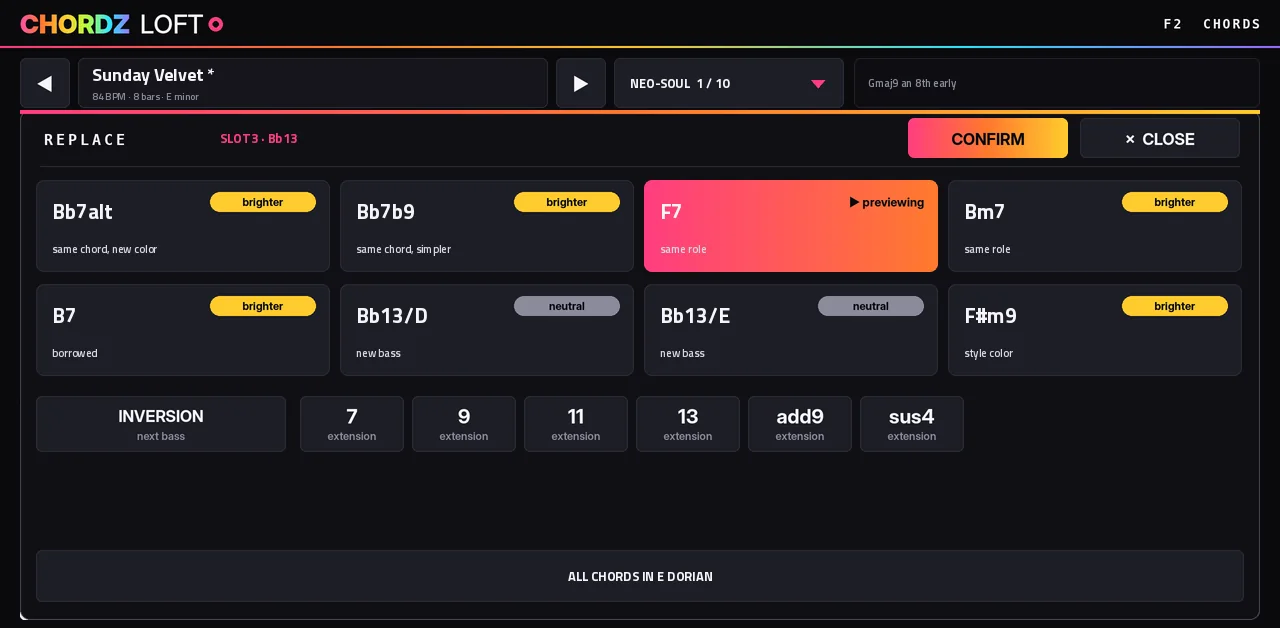 12345
Tip
TIP On the last chord before the loop restarts, + PASSING then "approach from above": the loop falls back to the top by itself.
- 18 suggestions From the closest to the most colourful, each with its colour (brighter, darker, neutral) and its role.
- 2previewing Tap a suggestion to hear it in the progression.
- 3INVERSION · extensions Next bass note, or add 7, 9, 11, 13, add9, sus4.
- 4ALL CHORDS IN … Every chord of the key, for a free choice.
- 5CONFIRM Keeps it. CLOSE leaves the chord as it was.
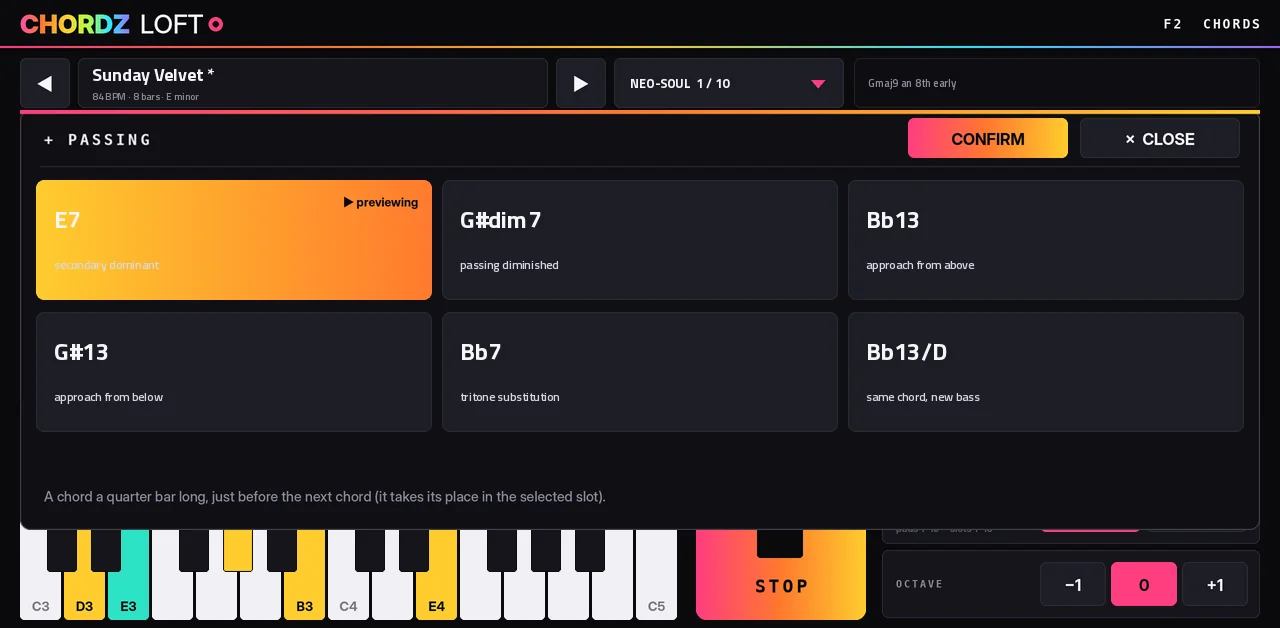
- 16 passing chords Secondary dominant, passing diminished, approach from above or below, tritone substitution, new bass.
- 2CONFIRM A quarter-bar chord just before the next one.
- 3How it works It takes its place in the selected slot.
Naming and sounds
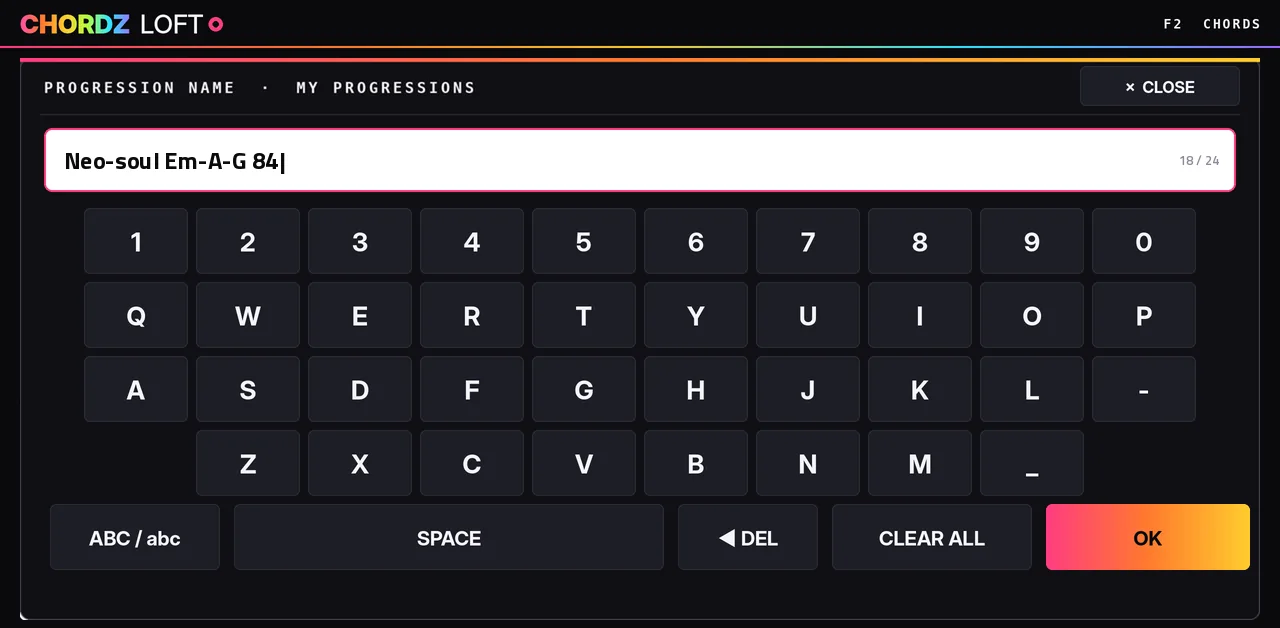 1234
Tip
TIP Give your progressions a name with the tempo in it ("HOOK 16 84"): the exported patterns carry it, and you find them in a second on the MPC.
- 1Name Up to 24 characters; the counter shows how many are used.
- 2Keys Numbers and letters, - and _.
- 3ABC / abc · SPACE · DEL · CLEAR ALL Capitals or small letters, space, delete, clear.
- 4OK Keeps the name.
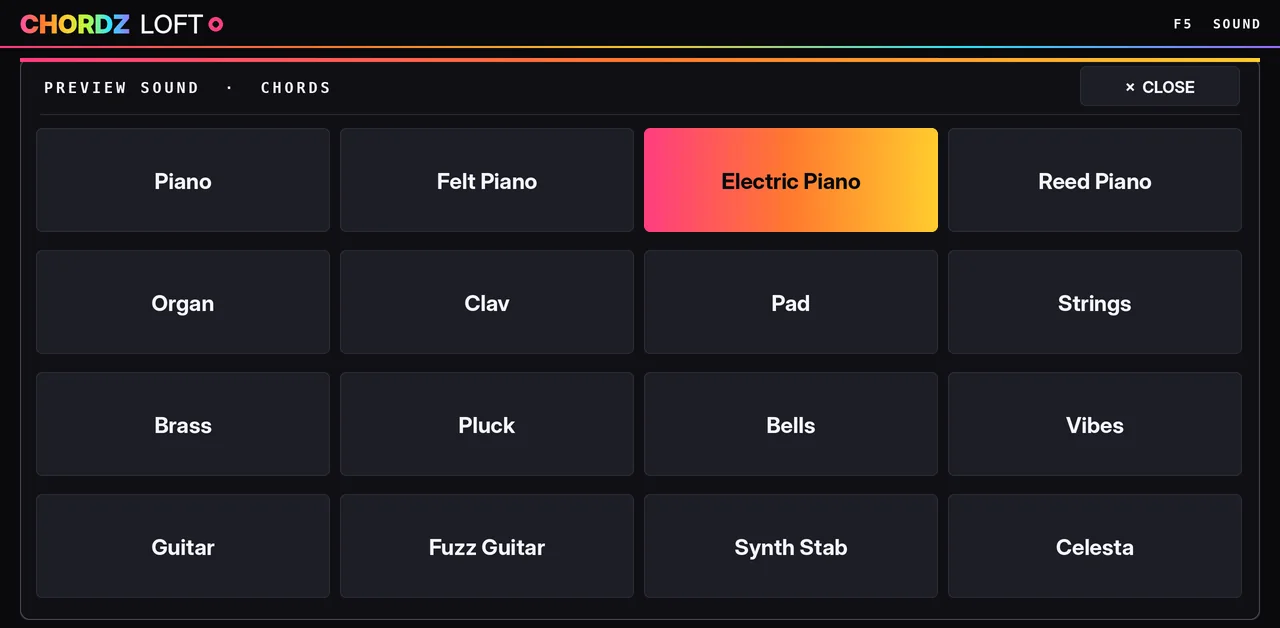
- 116 sounds Piano, Felt Piano, Electric Piano, Reed Piano, Organ, Clav, Pad, Strings, Brass, Pluck, Bells, Vibes, Guitar, Fuzz Guitar, Synth Stab, Celesta.
- 2CLOSE Back to F5 SOUND.
Harmonize
1234567891011What you see
- RECORD Starts on your first note, or on the next bar one if the MPC is playing.
- CLEAR Wipes the melody.
- BARS Melody length: 1, 2 or 4 bars.
- NOTES PLAYED The notes heard in each bar.
- SUGGESTED CHORD One chord per bar, with its role (rest, tension, setup, borrowed).
- ◀ or … ▶ Two other chords for the bar, one tap away.
- MAKE THE PROGRESSION Writes the chords into the current progression (F2). The melody plays on top.
- UNDO Takes it back.
- LISTEN Melody and chords together.
- SAVE Keeps it in MY PROGRESSIONS.
- ADVICE Which notes are outside the key, where the chords came from.
Tip
TIP Hum your hook into the keys before you build the beat. A melody with chords under it is half a song.
WHAT IT'S FORPlay a melody, get the chords. Record 1, 2 or 4 bars on your keys: Chordz proposes one chord per bar that holds the notes you played, and two other choices for each bar.
Rhythm
 123456
What you see
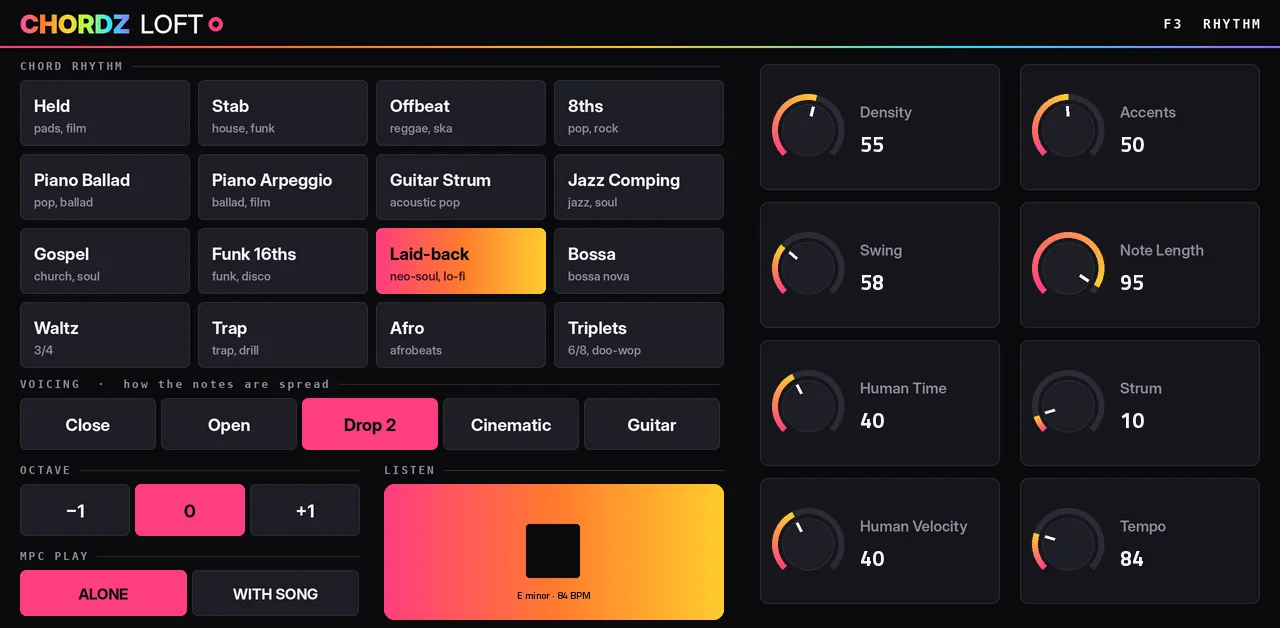
- CHORD RHYTHM 16 rhythms, each with the styles it suits (Laid-back: neo-soul, lo-fi).
- VOICING How the notes are spread: Close, Open, Drop 2, Cinematic, Guitar.
- OCTAVE −1, 0, +1.
- MPC PLAY ALONE: only the plugin's play button starts it. WITH SONG: it starts and stops with the MPC transport, in time.
- LISTEN Play / stop.
- Knobs Density, Accents, Swing, Note Length, Human Time, Strum, Human Velocity, Tempo.
Tip
TIP For a laid-back feel, raise Human Time to about 40 and Strum to 10: the chords stop sounding like a machine without leaving the grid.
WHAT IT'S FORHow the chords are played. Sixteen rhythms from held pads to trap and afro, five voicings, and the knobs that make it breathe.
Bass
 12345
What you see
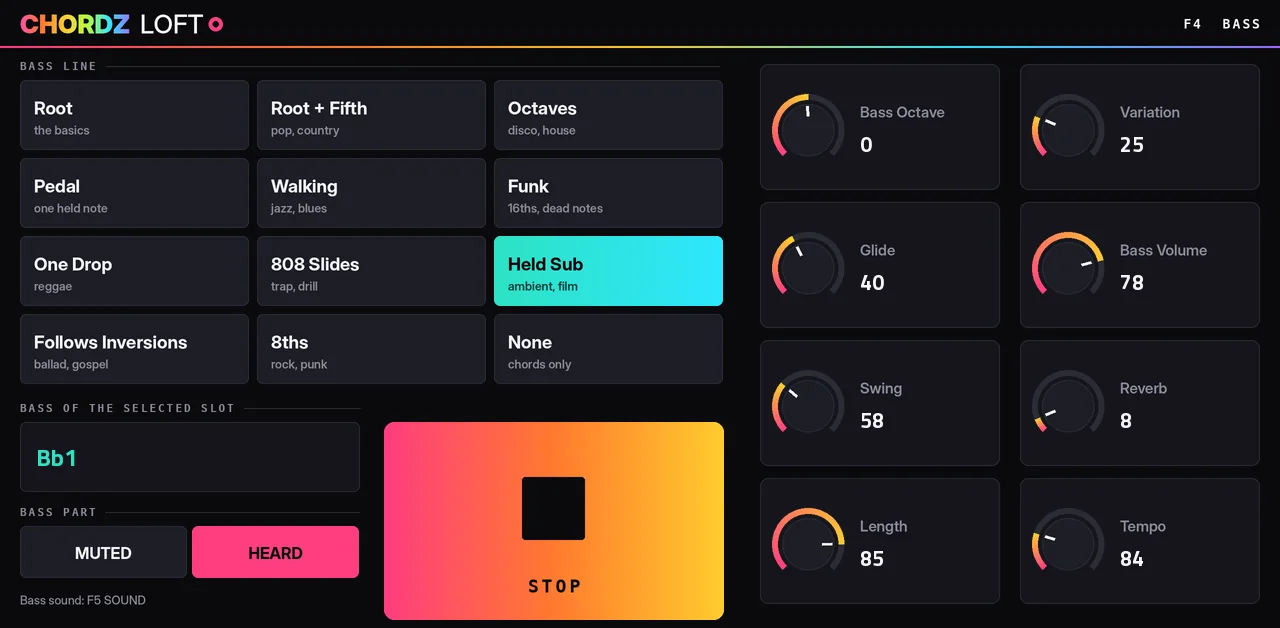
- BASS LINE 12 lines: Root, Root + Fifth, Octaves, Pedal, Walking, Funk, One Drop, 808 Slides, Held Sub, Follows Inversions, 8ths, None.
- BASS OF THE SELECTED SLOT The bass note of the chord you selected in F2.
- BASS PART MUTED or HEARD in the preview.
- Play Play / stop.
- Knobs Bass Octave, Variation, Glide, Bass Volume, Swing, Reverb, Length, Tempo.
Tip
TIP On slow progressions, try Follows Inversions with a little Glide: the bass walks between the chords like a player would.
WHAT IT'S FORA bass line that follows your chords, written in its own pattern. Twelve lines, from root notes to walking, funk and long slides.
Arp
 123456
What you see
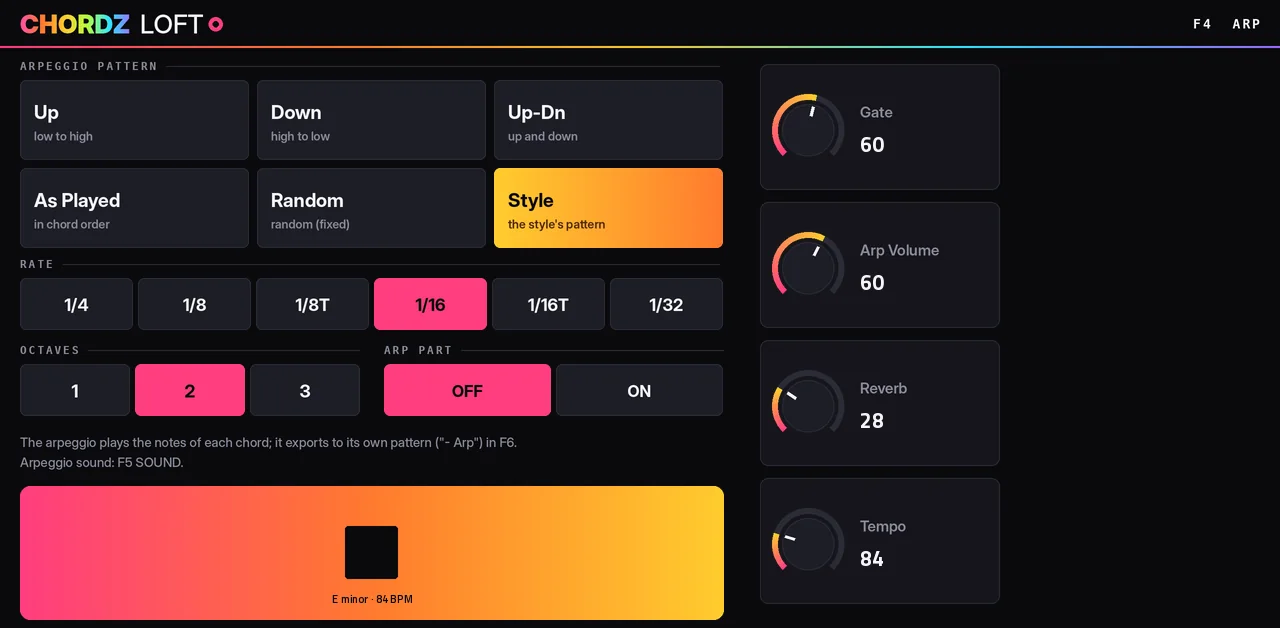
- ARPEGGIO PATTERN Up, Down, Up-Dn, As Played, Random (fixed, so it repeats), Style.
- RATE 1/4, 1/8, 1/8T, 1/16, 1/16T, 1/32.
- OCTAVES 1, 2 or 3.
- ARP PART OFF or ON.
- Play Play / stop.
- Knobs Gate, Arp Volume, Reverb, Tempo.
Tip
TIP Keep the chords long and the arp at 1/16 with a short Gate (about 40): you get movement without crowding the beat.
WHAT IT'S FORAn arpeggio on the notes of each chord, as a third part with its own pattern.
Sound
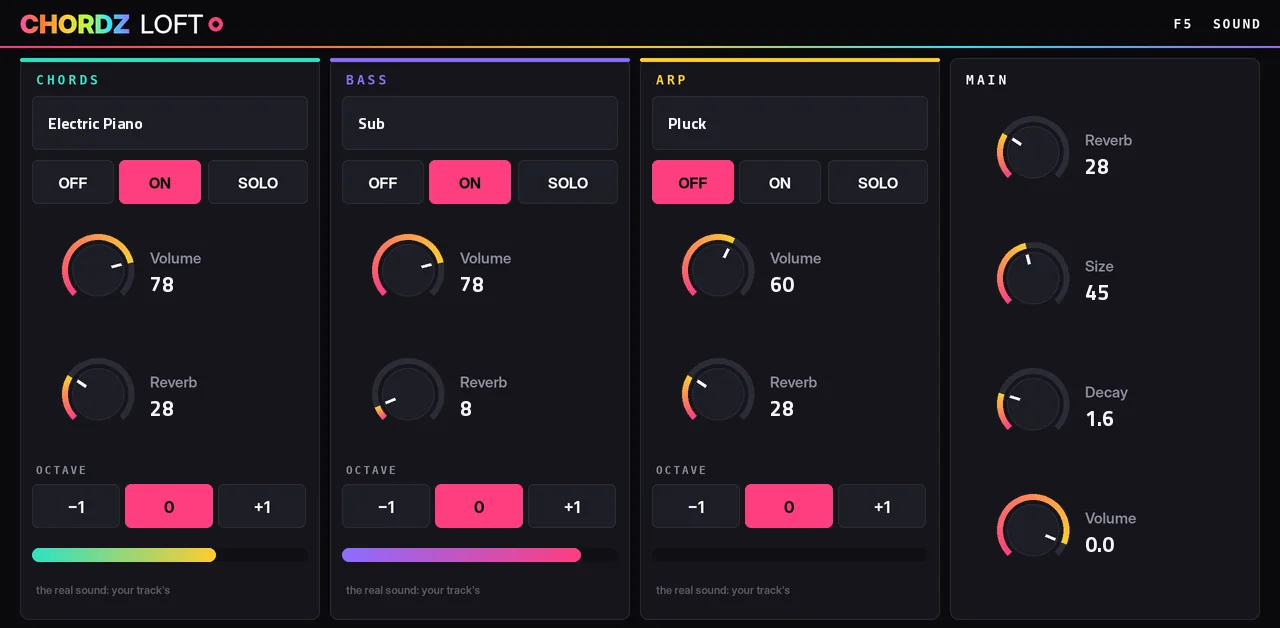 123456
What you see
- Sound of the part Tap the name to open the list: 16 sounds for chords and arp, 6 for the bass.
- OFF · ON · SOLO Mute, hear or solo each part.
- Volume · Reverb For each part.
- OCTAVE −1, 0, +1 for each part.
- Level A meter for each part.
- MAIN Reverb, Size, Decay, and the overall Volume.
Tip
TIP Pick a preview sound close to the one you will use on the track: you will judge the voicing much better.
WHAT IT'S FORThe preview sounds. They are only there so you can hear what you write: once exported, the pattern plays the sound of the MPC track you drop it on.
Export
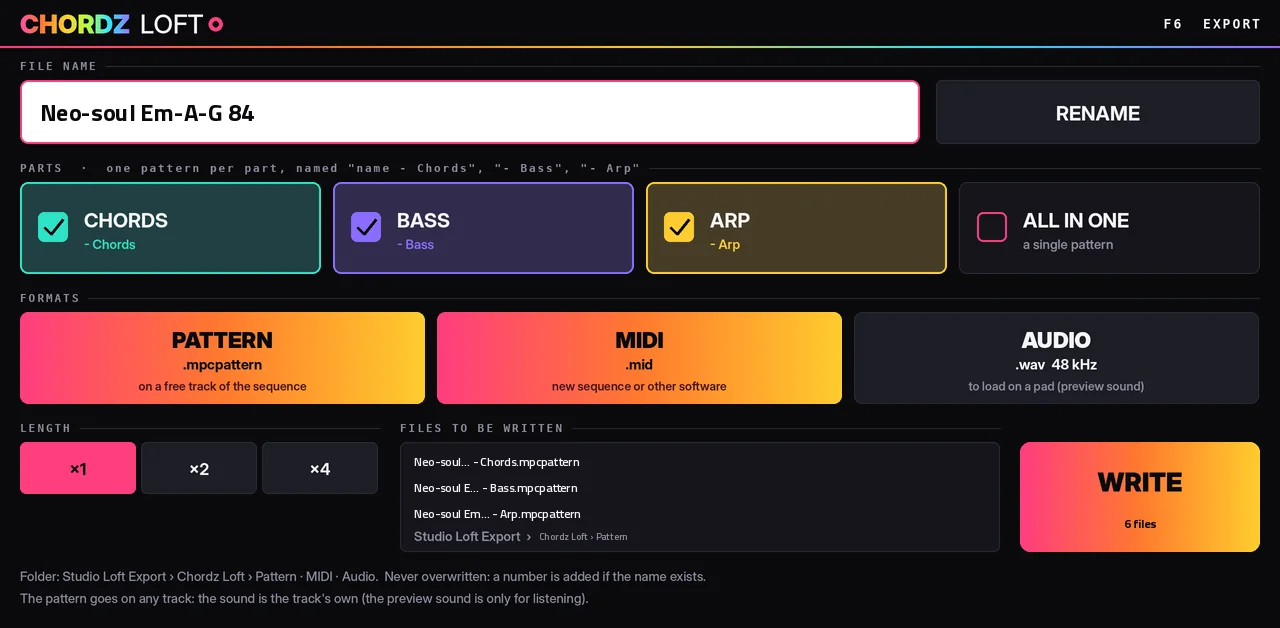 123456
What you see
- FILE NAME Made from the style, the first chords and the tempo. RENAME opens the keyboard.
- PARTS CHORDS, BASS, ARP: one pattern each ("name - Chords", "- Bass", "- Arp"), or ALL IN ONE.
- FORMATS PATTERN (.mpcpattern), MIDI (.mid), AUDIO (.wav 48 kHz, preview sound).
- LENGTH ×1, ×2 or ×4: the progression repeated.
- FILES TO BE WRITTEN The exact files, and the folder: Studio Loft Export › Chordz Loft › Pattern · MIDI · Audio.
- WRITE Writes them. Never overwritten: a number is added if the name exists.
Tip
TIP Export chords and bass as two patterns and put them on two tracks: a soft keys sound on one, your favourite bass on the other. You can then change one without touching the other.
WHAT IT'S FORFrom idea to track. Chordz writes one pattern per part, named after the progression, ready to drop on any track of the MPC, or as MIDI, or as audio.
PRESETS
35 presets, one per style
A preset sets the rhythm, bass line, arp, voicing, preview sounds and tempo of a style. It never touches the progression you are working on, nor MY PROGRESSIONS. Names as shown on the MPC, in folders by family.
Init
- 001INIT - Init
Pop
- 002POP 60s - Jukebox
- 003POP 80s - Neon FM
- 004POP 90s - Unplugged
- 005MODERN POP - Radio
- 006FRENCH POP - Sunday
- 007BALLAD - Rain Piano
Rock
- 008ROCK 60s-70s - Fuzz
- 009ROCK 90s - Garage
- 010METAL - Fifths
- 011PUNK - Pogo
Soul Jazz
- 012SOUL 60s-70s - Memphis
- 013FUNK - Clav
- 014GOSPEL - Church
- 015R&B 90s - Slow Jam
- 016NEO-SOUL - Velvet
- 017JAZZ - Trio
- 018BLUES - Shuffle
- 019BOSSA NOVA - Rio
Rap
- 020BOOM BAP 90s - Vinyl
- 021DARK GRIMY - Basement
- 022TRAP - 808 Bells
- 023DRILL - Slides
- 024GRIME - Square
- 025LO-FI - Cassette
- 026FRENCH RAP - Minor Piano
Electronic
- 027HOUSE - Stabs
- 028TECHNO - Drone
- 029AMBIENT - Haze
- 030LIQUID DNB - Liquid
World
- 031REGGAE - Skank
- 032AFROBEATS - Lagos
Film
- 033FILM 70s - Riviera
- 034FILM 80s - Synths
- 035EPIC - Horizon
EXPANSIONS
Expansion presets
Each Studio Loft expansion adds 8 Chordz presets in its style: the settings and a progression written for it. They sit after the 35 presets, in a folder per expansion. Without the expansion, the name stays visible, choosing it changes nothing and the top of the screen says which expansion unlocks it. Expansions are sold separately on loftplugins.ch.
BASEMENT 94
- 036B94 Basement Keys
- 037B94 Crate Soul
- 038B94 Vinyl Hiss
- 039B94 Smoky Cellar
- 040B94 Soul Chop
- 041B94 Late Pressing
- 042B94 Brown Paper
- 043B94 Sample Flip
MATINEE 74
- 044MAT Tape Strings
- 045MAT Velvet Polar
- 046MAT Slow Zoom
- 047MAT Night Chase
- 048MAT Funk Detective
- 049MAT Riviera Dusk
- 050MAT Organ Mass
- 051MAT Last Reel
NEON MACHINES
- 052NEO Night Drive
- 053NEO Chrome Rain
- 054NEO Neon Tears
- 055NEO Hall Monitor
- 056NEO Grid Runner
- 057NEO Synth Prom
- 058NEO Dark Arcade
- 059NEO Last Signal
BRUSH & SMOKE
- 060BRU Brush Ballad
- 061BRU Smoke Room
- 062BRU Late Set
- 063BRU Rainy Cafe
- 064BRU Blue Corner
- 065BRU Soft Turnaround
- 066BRU Lazy Sunday
- 067BRU Closing Time
SUB PRESSURE
- 068SUB Heavy Bells
- 069SUB Dark Floor
- 070SUB Cold Chain
- 071SUB Menace
- 072SUB Low Pressure
- 073SUB Night Shift
- 074SUB Ghost Choir
- 075SUB Last Warning
WAREHOUSE 4AM
- 076WAR Warehouse Stab
- 077WAR Four AM
- 078WAR Concrete Dub
- 079WAR Hypnotic
- 080WAR Strobe Chord
- 081WAR Deep Shift
- 082WAR Loop Theory
- 083WAR Last Train
SPEC SHEET
Chordz Loft in short
Chordz Loft writes chord progressions in 34 styles and turns them into chord, bass and arp patterns for any MPC track.
For who, for what
- Beatmakers who want soul, jazz or lo-fi chords under their drums without studying harmony.
- Songwriters who need a progression for a hook, or chords under a melody they already have.
- Producers who sample find the key of a loop and the progressions that fit it.
Strong points
- Real progressions per style Typical progressions written for each of the 34 styles, each chord checked note by note.
- Real timing 16 slots, lengths from a quarter bar to 4 bars, early chords, passing chords.
- Three parts, three patterns Chords, bass and arp each exported to its own pattern, MIDI file or WAV.
- It listens Key and tempo from a WAV file, from your song or from what you play; matching progressions.
- Melody to chords HARMONIZE puts one chord per bar under 1 to 4 bars of melody.
- Shared library MY PROGRESSIONS keeps your own progressions, read by Cinéloft and Nightloft too.
Numbers
| Styles | 34, in 7 families |
|---|---|
| Chord slots | 16 (2 × 8) |
| Presets | 35 (Init + one per style), + 8 per expansion |
| Rhythms · bass lines | 16 · 12 |
| Arp | 6 patterns, 6 rates, 1 to 3 octaves |
| Voicings · scales | 5 · 8 |
| Preview sounds | 16 for chords and arp, 6 bass |
| Preview voices | 12 per part, 3 parts |
| Undo | 32 steps |
| Export | .mpcpattern · .mid · .wav 48 kHz, ×1 ×2 ×4 |
| Size | 23 MB installed |
| Runs on | MPC standalone, MPC OS 3.10.1 |
| Format | Plugin instrument (arm32 and arm64) |
SPEC SHEET
Get started
MPC in computer mode: copy the folder Studio Loft - VST - Chordz Loft into VST2 Plugins on the MPC drive. Back in standalone, the MPC finds it in its plugin list.
Create a plugin track and choose Chordz Loft. Pick a preset or a style on F1.
Tap the big play button. Change style, key, progression; edit in F2; export in F6 and drop the patterns on your tracks.
Licence & activation
Yours in three steps.
Buy
Pay once on this site. Your personal link arrives by e-mail and stays valid.
Install Loft Hub
MPC OS 3.10.1 or later, with Enhancements and External Plugin Support turned on in Preferences. Copy Loft Hub to your MPC drive once.
Link and play
In Loft Hub, accept, link your MPC, and your plugins install by themselves. It works on two MPCs. That is it.
Licence and activation
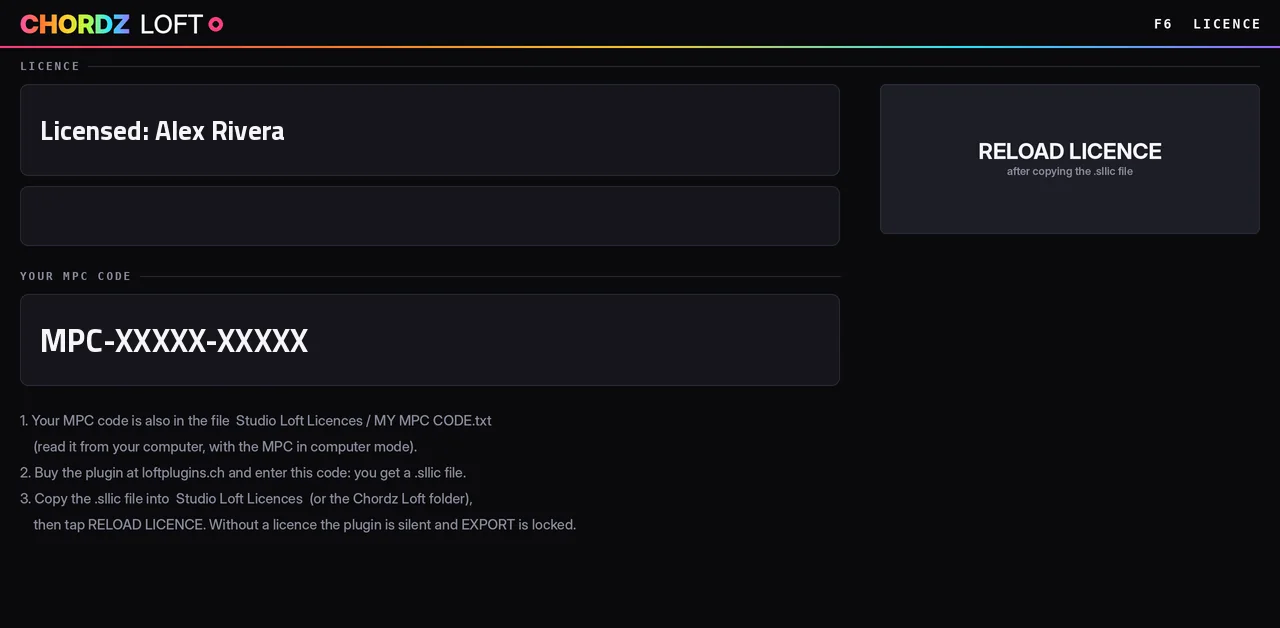 12345
What you see
- Status "Licensed: your name", or "No licence found".
- Shop When there is no licence: where to get one.
- YOUR MPC CODE The code of this MPC, to give on loftplugins.ch.
- How to The three steps, right on the screen.
- RELOAD LICENCE Reads the licence files again after you copied a new one.
Tip
TIP Your MPC code is also in the file Studio Loft Licences / MY MPC CODE.txt: open it from your computer with the MPC in computer mode, and copy-paste it on the site.
WHAT IT'S FORYour licence, your MPC code, and the button that reloads the licence without leaving the plugin.
- Activation: on loftplugins.ch, give your MPC code. You get a .sllic file: copy it into Studio Loft Licences on the MPC drive and tap RELOAD LICENCE.
- 2 MPC per purchase, with no time limit.
- Without a valid licence the plugin is silent and EXPORT is locked; a red line at the top of every page says so and points to LICENCE.
Own it
Chordz Loft
A chord progression generator: drop the chords as patterns on any track.
Chordz Loft is not sold on its own: it comes with the Complete pack and the Ultimate Bundle.