Instrument · Original soundtracks 1968–1979 · version 1.6.1
Cinéloft
ORIGINAL SOUNDTRACKS · 1968–1979
Thrillers, crime films, westerns, space operas. Twenty instruments of European film music played through tape, worn consoles and echo machines, and a generator that writes the chords for you, film style by film style.
3 = $99Any 3 plugins for $99 →
A celesta music box over a tape choir, one note falling inside the chord: the eerie lullaby of an Italian thriller.
The Era knob
One knob, fifty years.
Every preset passes through a chain of the period: ensemble, console, tape, dust, echo, reverb. The Era knob doses all of it at once.
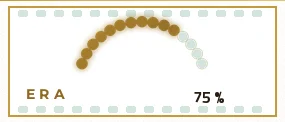
- 0 %Clean and modern. The instruments, without the decade.
- 50 %As designed. The presets sound the way they were voiced.
- 100 %Twice the tape: more wow and flutter, more hiss, softer highs, warmer saturation.
The manual
Every screen,
page by page.
The full user guide, screen by screen, exactly as on the MPC. Setting names stay the English words of the screen.
★ Try it here
Pick a film. Get the chords.
The real progressions from the plugin's bank, voiced the same way. Play with them here; writing them to your MPC as a pattern, MIDI or audio is for the plugin.
Listen only. No export, no download.
Welcome
Thrillers, crime films, westerns, space operas.
Cinéloft is an instrument for your standalone MPC. It plays the instruments heard in European film music of the late sixties and seventies (tape strings and choirs, harpsichord, celesta, electric piano, fuzz guitar, whistling, organs) through tape, worn consoles and echo machines. And it writes the chords for you, film style by film style.
11 of them real recordings
in 10 film moods
How it is organised
The 20 instruments
Gold: real recordings. Outline: synthesized.
Six pages of sound on F1 to F5, the chord generator on F6. Press F5 or F6 again to reach their other pages. Every setting also sits on the 16 Q-Link knobs, column by column, exactly as on the screen.
The magic
Pick a film. Get the chords.
Stuck in front of an empty sequence? Tap a style. Cinéloft lays out a real film-score progression, in the right scale, with the right way of playing it, on the sound you have loaded. One tap on LISTEN and the scene is there.


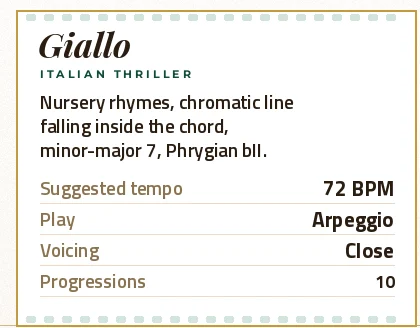
Am → Am(maj7) → Am7 → Am6 → Fmaj7 → E7b9. One note falls inside the chord, bar after bar: the sound of a music box in an empty villa.
Every style comes with
- its own progressions, each with a name and a mood
- a scale and a suggested tempo
- a way of playing (held, pulsed, arpeggio, waltz or bossa) and a voicing
- three presets that suit it, one tap away
You don't start from a blank page any more. You start from a scene.
The magic, part two
Make it yours, then put it on pads.
Replace a chord
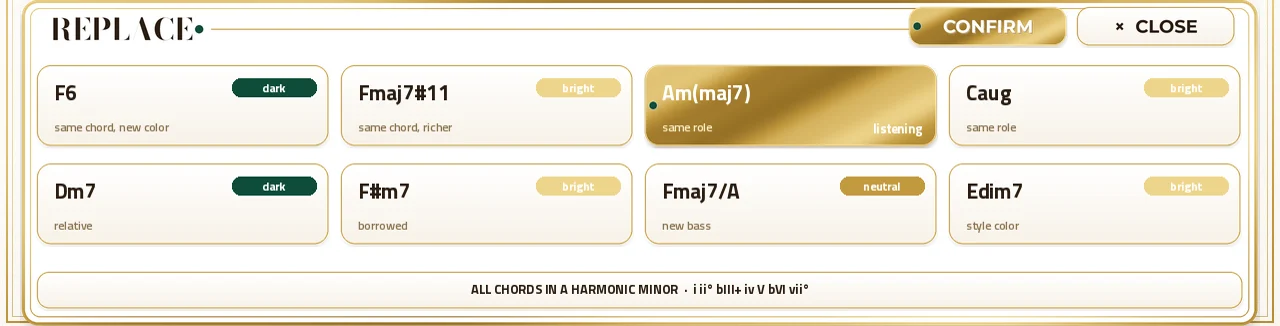
Not quite right? Tap REPLACE: eight chords of the same family, each one marked dark, neutral or bright. Tap to hear, CONFIRM to keep. The progression stays musical, it just becomes yours.
Write it to the MPC
EXPORT… then WRITE: a pattern lands on a free track of your sequence, or a MIDI file, or audio rendered with the sound. Turn PADS on and play the eight chords from pads C1 to G1.
Ten film styles
Plus FREE (every progression, any scale) and MY PROGRESSIONS (your own).
One knob, fifty years
The Era knob.
Every preset passes through a chain of the period: ensemble, console, tape, dust, echo, reverb. The Era knob doses all of it at once.
What Era moves at once
- Wow slow pitch sway
- Flutter fast shimmer
- Tape Sat tape saturation
- Tape Age lost highs, hiss
- Console warm saturation
- Dust soft crackle
- Tape echoes their wobble
CINE
Everything you need to shape a sound in one look: two instruments, a filter, the amp envelope and the Era knob.
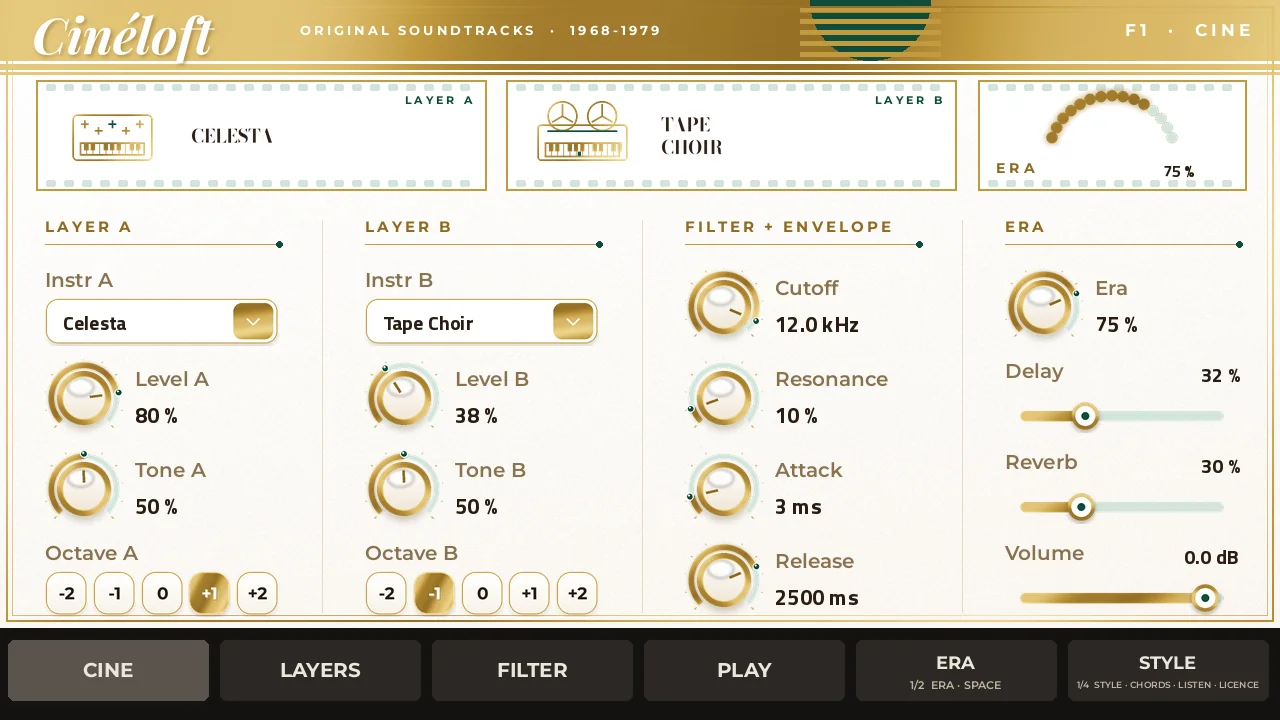 123456789
What you see
- LAYER A card The instrument playing on layer A, drawn as a vignette with its name.
- LAYER B card The second instrument. Both layers play together, or split, or by velocity (see LAYERS).
- ERA gauge How much 1970s tape colour is on the sound, from clean (0 %) to worn (100 %).
- Instr A / Instr B Tap the field to open the list of 20 instruments.
- Level · Tone Volume of the layer, and its brightness: dark, neutral or bright.
- Octave A / B Five buttons, -2 to +2: put a choir an octave up, a bass an octave down.
- FILTER + ENVELOPE Cutoff, Resonance, Attack and Release: the four moves you make most.
- ERA column Era, Delay and Reverb levels, and the final Volume.
- F keys F1 to F6 open the pages. F5 and F6 have several sub-pages: press again.
What it's for
Start here. Pick a preset, then change the two instruments and the Era knob until it feels like a film you half remember.
Tip
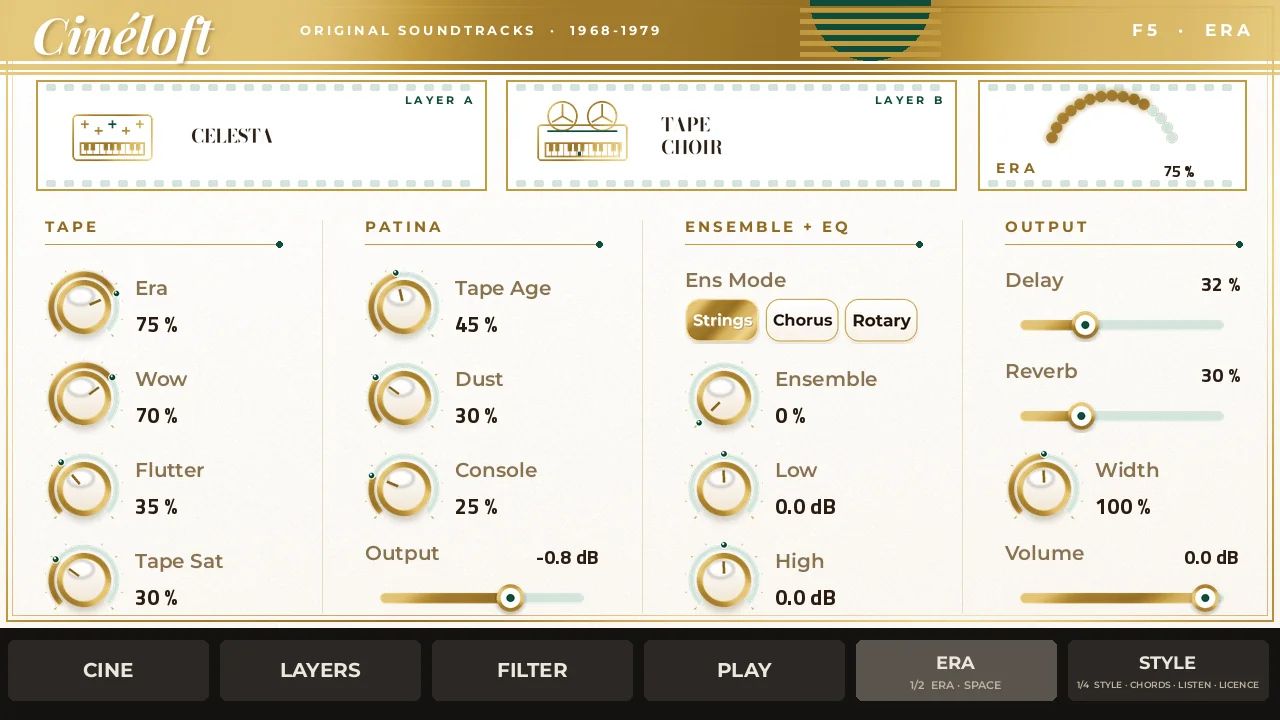
Celesta on A, Tape Choir on B with Level B around 40 %: an instant haunted lullaby. Push Era to 75 % for the old-print feel.
LAYERS
The detail of both layers and how they meet.
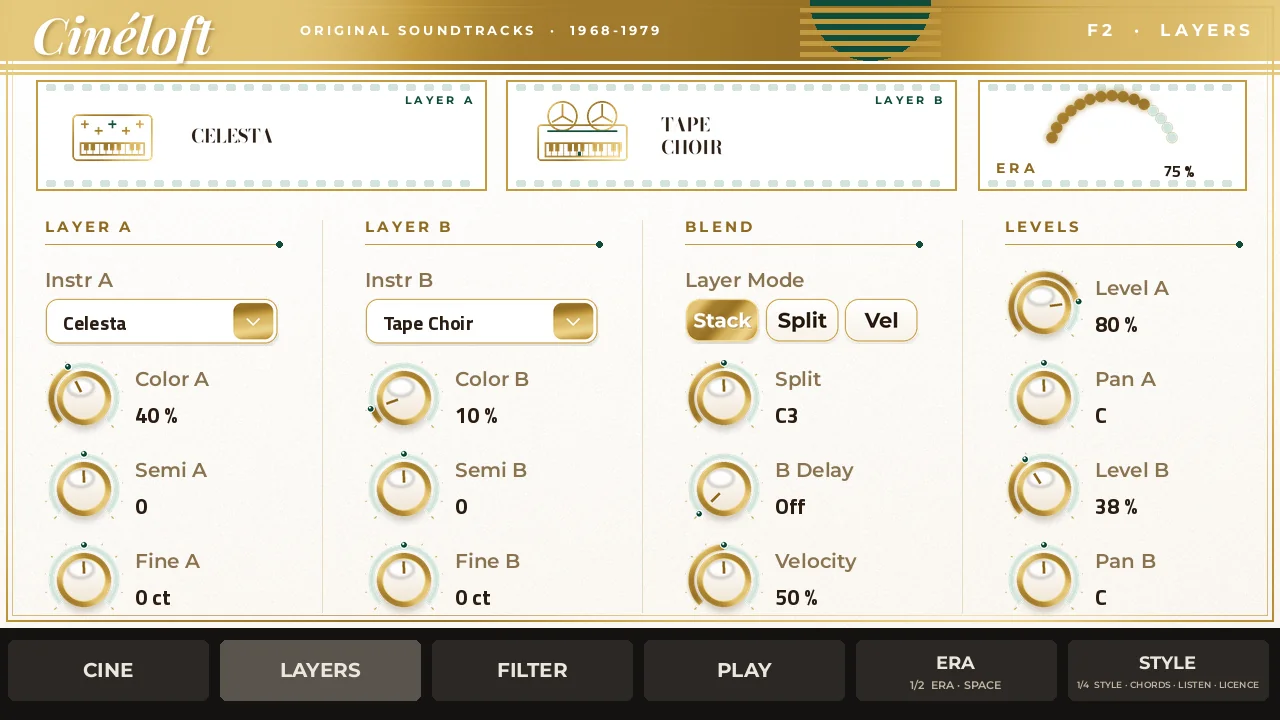 1234567
What you see
- LAYER A Instr A, Color A (each instrument's own character), Semi A and Fine A.
- LAYER B The same four settings for layer B.
- Layer Mode Stack: both layers. Split: A below the split note, B above. Vel: B comes in when you play hard.
- Split The split note, shown as a note name (C3…).
- B Delay Layer B fades in after the note starts: strings swelling behind a piano.
- Velocity How much playing harder makes the sound louder.
- LEVELS Level and Pan of each layer.
What it's for
Come here to build a layered sound, or to put a bass under your left hand and a lead under your right.
Tip
Layer Mode on Split, Round Bass on A, Tine EP on B: bass and keys on one keyboard, ready for a crime-film groove.
FILTER
One filter per voice, its own envelope, and the amp envelope.
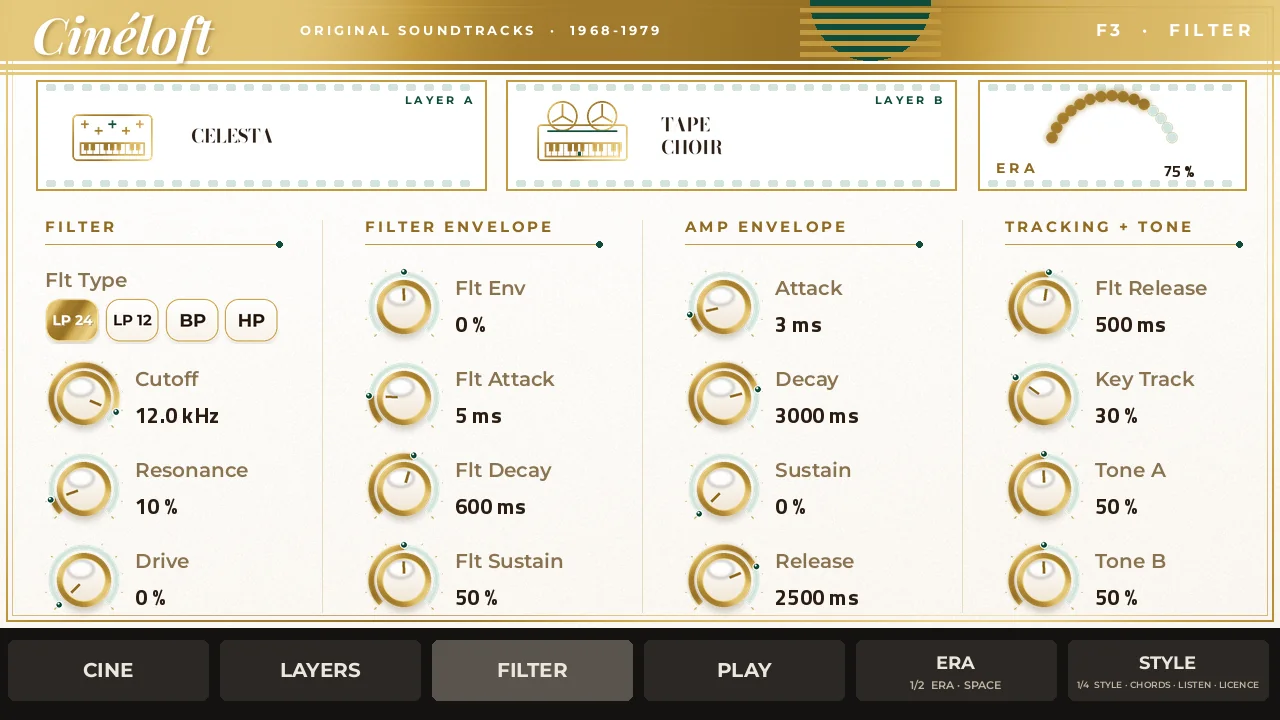 12345
What you see
- Flt Type LP 24 (warm, saturating), LP 12, BP and HP.
- Cutoff · Resonance · Drive Where the filter closes, how much it sings, and how hard it is pushed.
- FILTER ENVELOPE Flt Env (up or down), Flt Attack, Flt Decay, Flt Sustain.
- AMP ENVELOPE Attack, Decay, Sustain, Release of the volume.
- TRACKING + TONE Flt Release, Key Track (brighter high notes), Tone A and Tone B.
What it's for
When a sound needs to bite, breathe or swell.
Tip
For a brass stab: Flt Env at +50 %, Flt Decay short, Sustain low. For pads: slow Attack and long Release.
PLAY
Vibrato, glide, unison and pitch.
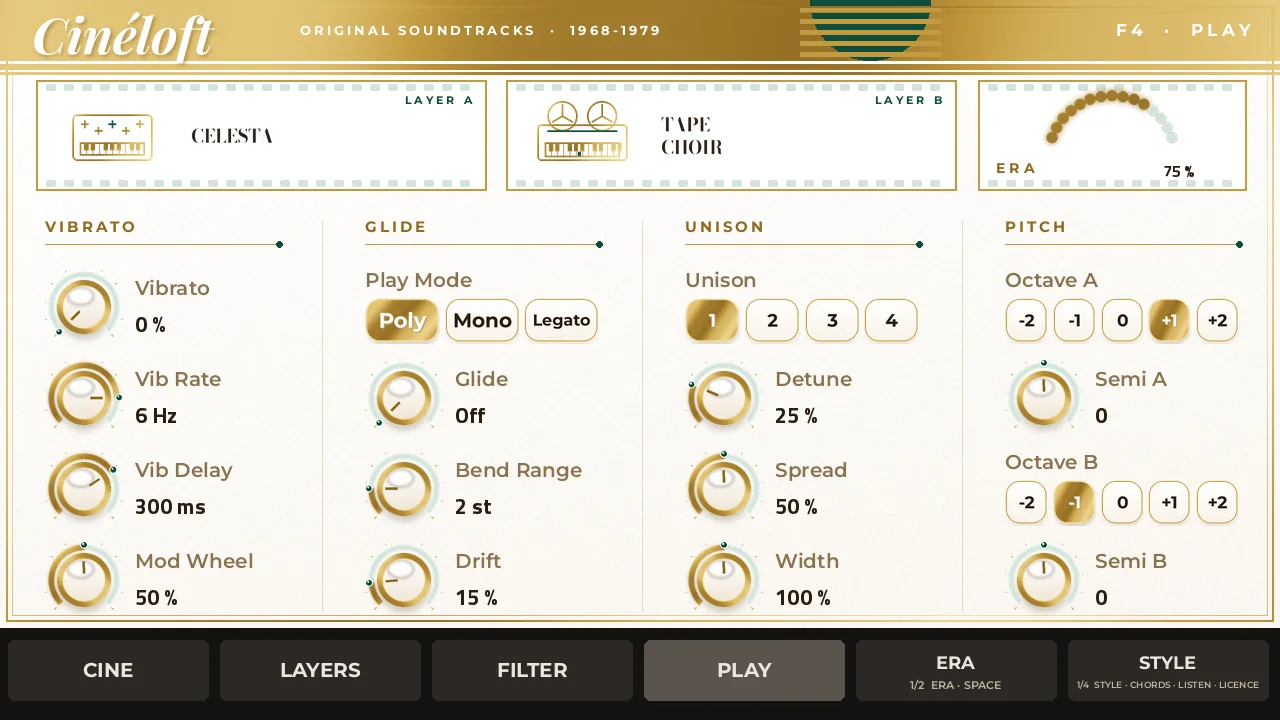 12345
What you see
- VIBRATO Vibrato depth, Vib Rate, Vib Delay (vibrato that arrives late, like a singer) and Mod Wheel.
- Play Mode Poly, Mono or Legato (in Legato a string glides instead of being plucked again).
- Glide · Bend Range · Drift Portamento time, pitch-bend range, and a slow analogue drift.
- Unison 1 to 4 voices per note, with Detune, Spread and Width.
- PITCH Octave and Semi of both layers, at hand while you play.
What it's for
Turn a pad into a lead, or a lead into a whistle that slides between notes.
Tip
Whistle on A, Play Mode Legato, Glide around 120 ms and Vib Delay 300 ms: the lonely melody of a desert showdown.
ERA
Tape, patina and ensemble: everything that makes it sound recorded fifty years ago.
12345What you see
- TAPE Era (the master dose), Wow (slow pitch sway), Flutter (fast shimmer), Tape Sat.
- PATINA Tape Age (lost highs, hiss), Dust (soft crackle), Console (warm saturation) and Output.
- Ens Mode Strings (lush ensemble), Chorus or Rotary (spinning speaker).
- Ensemble · Low · High Ensemble amount and a two-band console EQ.
- OUTPUT Delay and Reverb levels, Width and Volume.
What it's for
To place the sound in time: a little for a modern track that winks at the past, a lot for a full period piece.
Tip
Era at 0 % gives a clean modern sound. Leave it at 50 % for the presets as designed, go to 100 % for a worn print.
SPACE
Press F5 again: tape echoes and reverbs of the period.
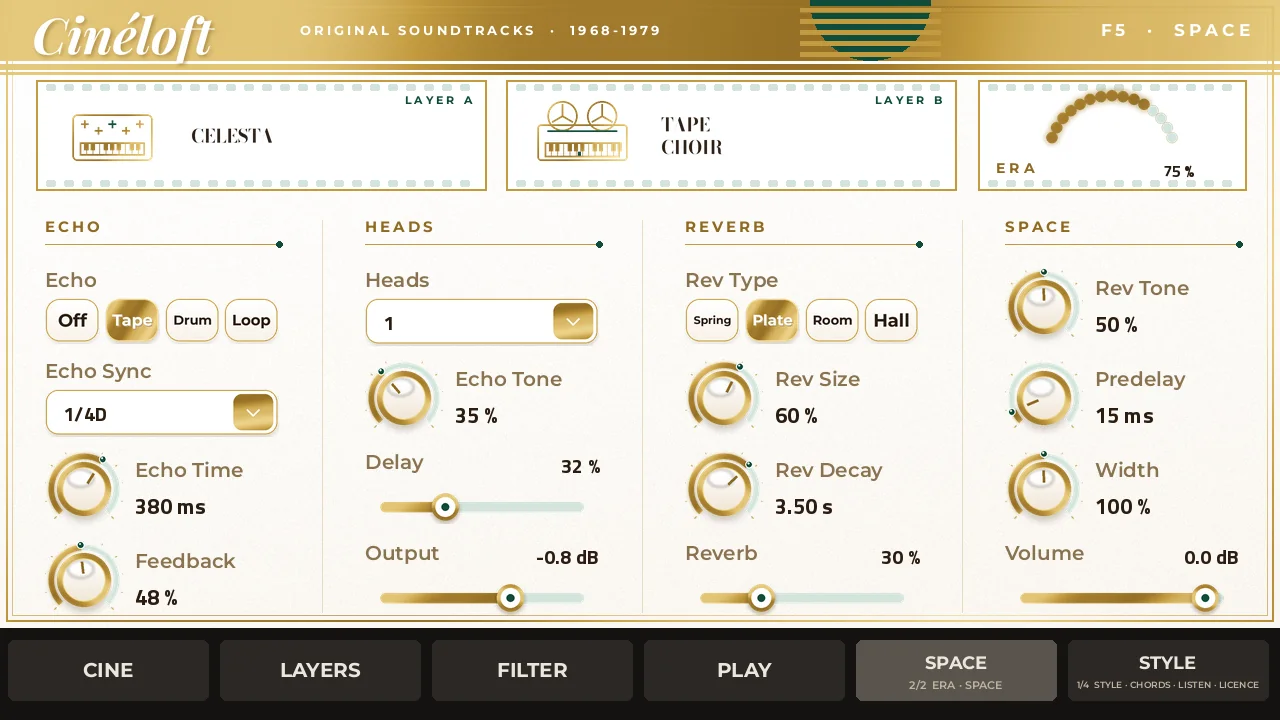 123456
What you see
- Echo Off, Tape (one head, the tape speed wanders), Drum (magnetic drum, four heads) or Loop.
- Echo Sync · Echo Time · Feedback Free time in ms, or locked to the MPC tempo; Feedback up to soft self-oscillation.
- Heads Which playback heads sound: 12 combinations, from 1 to 1+2+3+4.
- Echo Tone · Delay Darkness of the repeats, and the echo level.
- Rev Type Spring, Plate, Room or Hall, with Rev Size, Rev Decay and the Reverb level.
- SPACE Rev Tone, Predelay, Width and Volume.
What it's for
To put the sound in a room, a canyon or a smoky club.
Tip
Echo on Drum, Heads 1+2+3, Feedback 55 %: the swirling repeats of an old western guitar. Add Spring reverb.
STYLE
The chord generator starts here: ten film styles, each with its own progressions, key, scale and sounds.
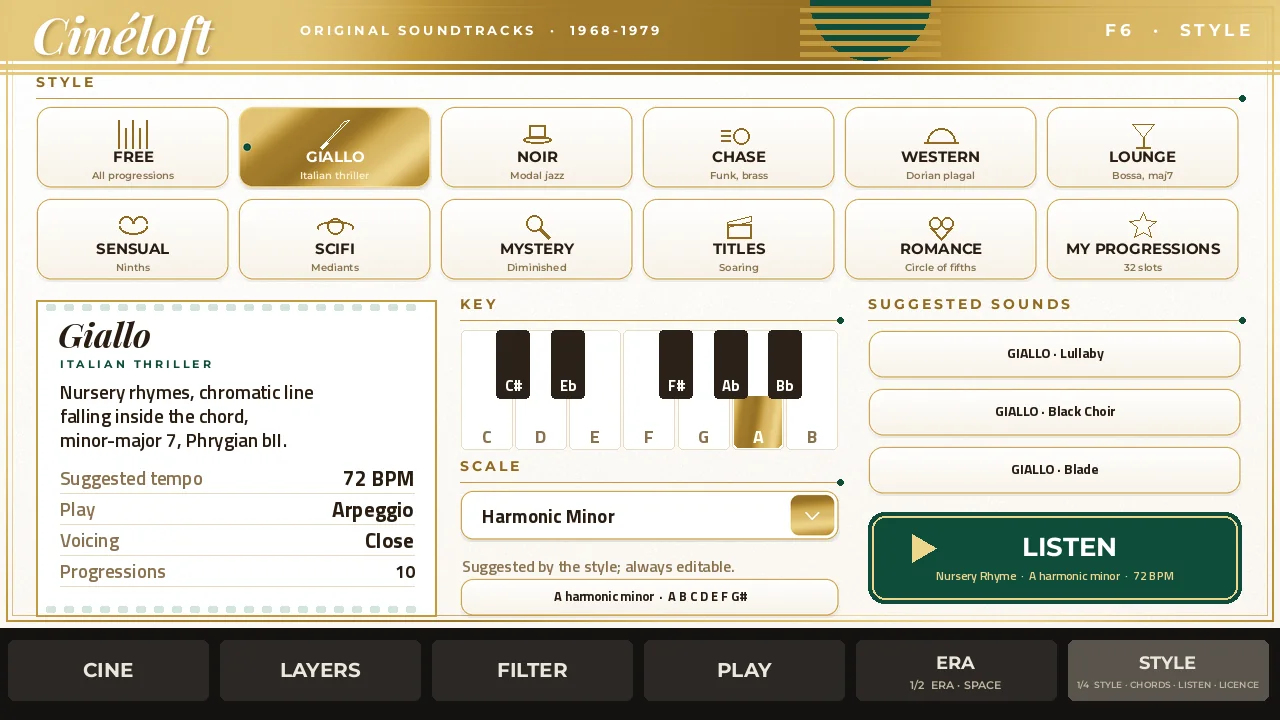 12345678
What you see
- FREE All progressions of every style, in any scale.
- Style tiles GIALLO, NOIR, CHASE, WESTERN, LOUNGE, SENSUAL, SCIFI, MYSTERY, TITLES, ROMANCE.
- MY PROGRESSIONS Your own saved progressions.
- Style card What the style is, its suggested tempo, way of playing, voicing and number of progressions.
- KEY Twelve keys: everything is transposed at once.
- SCALE Suggested by the style, always editable (8 scales, notes written out).
- SUGGESTED SOUNDS Three presets that fit the style: tap one to load it.
- LISTEN Plays the current progression with the current sound.
What it's for
Whenever you need a starting point. Choose a mood, hear it in a second, then go to CHORDS to make it yours.
Tip
Not sure where to start? Tap SCIFI, then LISTEN, and play a slow melody over it with the right hand.
CHORDS
Up to 8 chords, each one editable, played with the current sound.
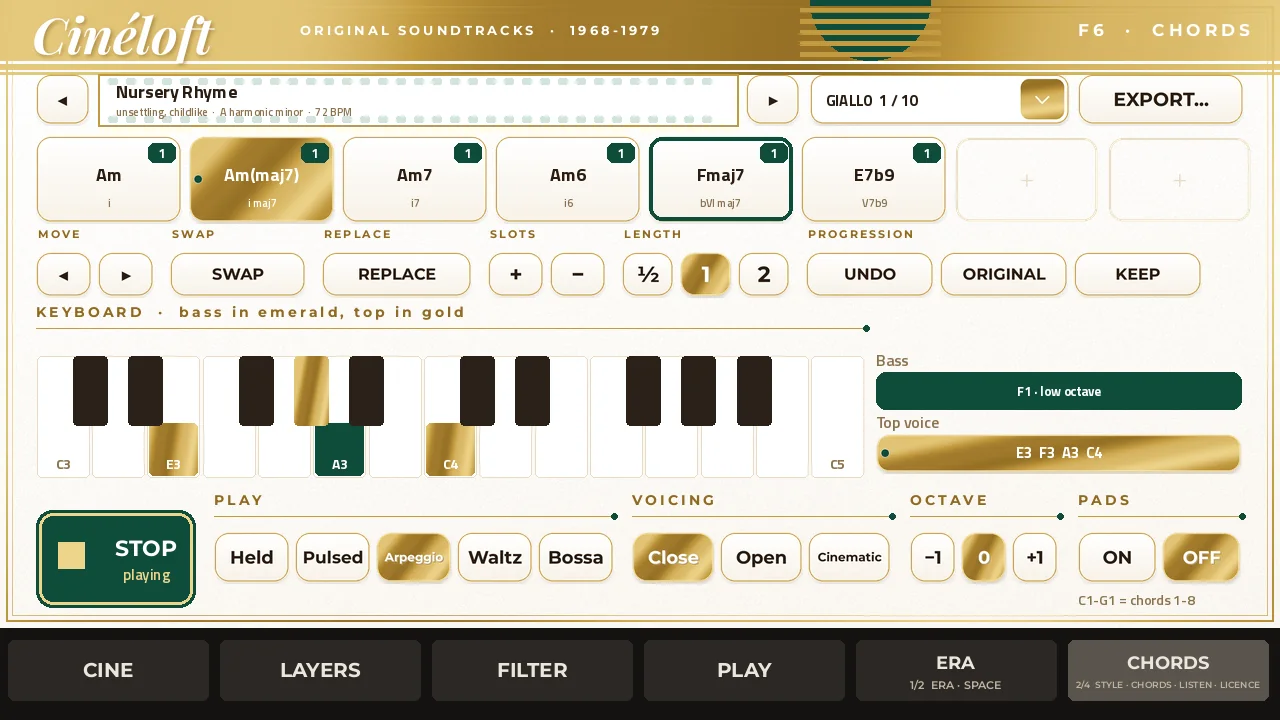 12345678910
What you see
- Progression name · ◀ ▶ Browse the progressions of the style; the list opens from the field on the right.
- EXPORT… Write the progression to the MPC as a pattern, a MIDI file or audio.
- Slots Chord name, its degree in the key, and its length in bars.
- MOVE · SWAP · REPLACE Move a chord, swap two chords, or replace one with a related chord.
- SLOTS + − · LENGTH Add or remove a slot; set a chord to ½, 1 or 2 bars.
- UNDO · ORIGINAL · KEEP Step back, go back to the original, or keep it in MY PROGRESSIONS.
- KEYBOARD The chord being played: bass in emerald, top voice in gold.
- PLAY / STOP Plays in time with the MPC when its transport runs, otherwise at the style tempo.
- PLAY · VOICING · OCTAVE Held, Pulsed, Arpeggio, Waltz, Bossa; Close, Open, Cinematic; -1 to +1.
- PADS ON: notes C1 to G1 play chords 1 to 8, so you can play the progression from pads.
What it's for
To shape the chords until they say exactly what your scene needs.
Tip
Set PLAY on Arpeggio and VOICING on Cinematic, then switch PADS ON: you can now perform the progression live from eight pads.
LISTEN
Find the key of what you play or of a WAV file, and get short advice on your sound.
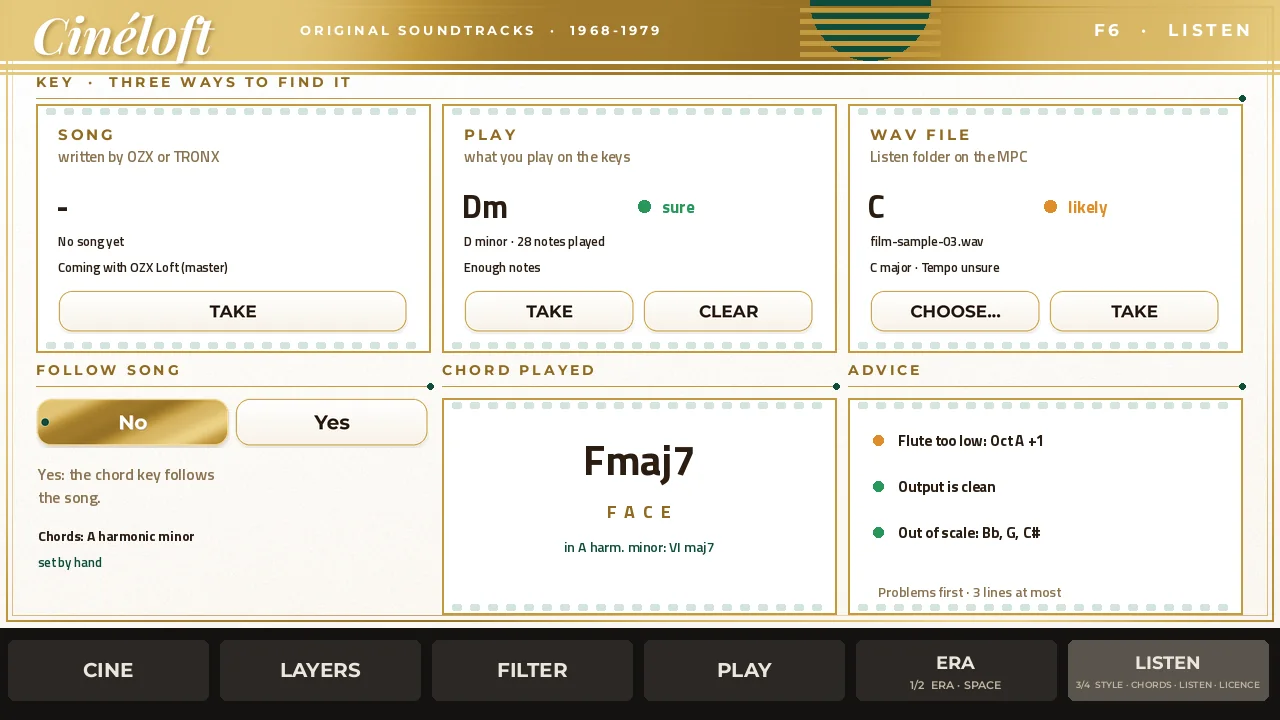 123456
What you see
- SONG The key of the whole song, sent by OZX Loft or TRONX on the master. With neither, it shows “No song yet”.
- PLAY The key of what you play on the keys, with a confidence dot (unsure, likely, sure). TAKE applies it to the chords; CLEAR starts again.
- WAV FILE CHOOSE… a WAV from the Listen folder: its key and tempo. TAKE applies the key.
- FOLLOW SONG Yes: the chord key follows the song key.
- CHORD PLAYED The chord under your fingers, its notes and its degree in the key.
- ADVICE Three short lines, problems first: an instrument too low, notes out of the scale, a clipped output.
What it's for
When you sample, jam or start from a loop and want the chords to match without thinking about theory.
Tip
Play your melody for twenty seconds, wait for the green “sure” dot, then TAKE: the progressions are now in your key.
Instrument list
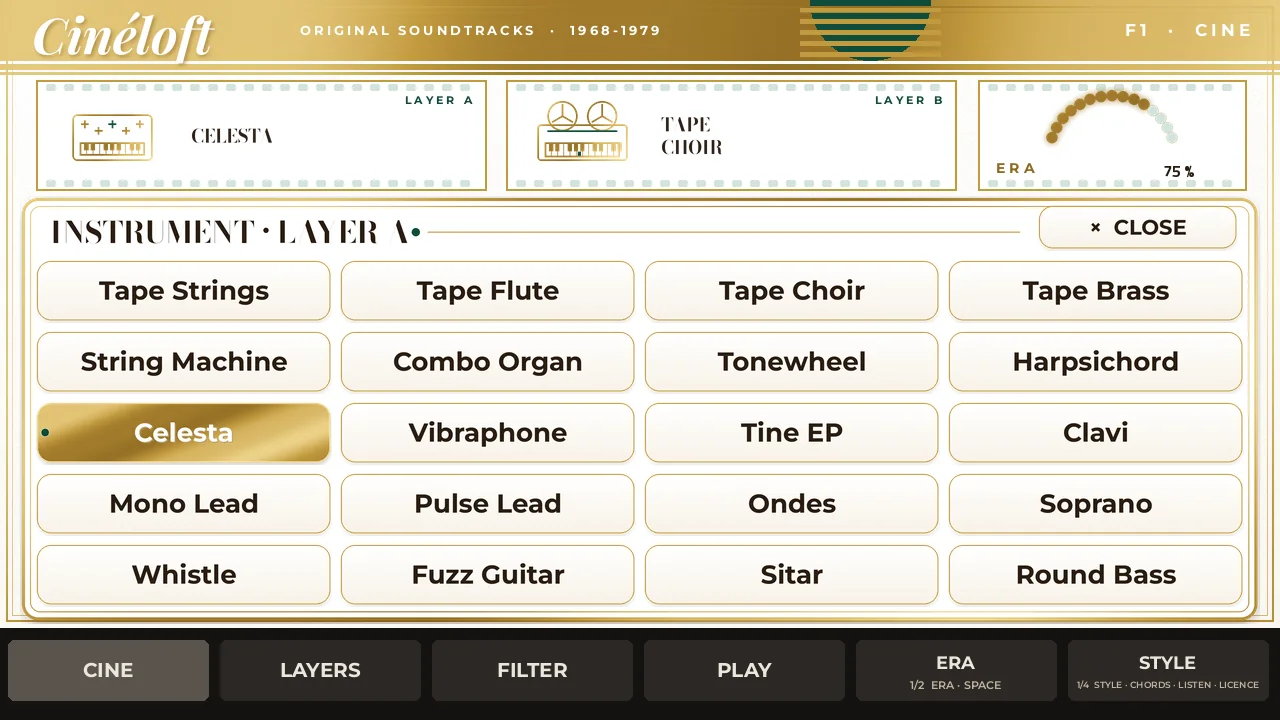
Tap Instr A or Instr B: the 20 instruments, the current one in gold. Tap one, or CLOSE.
Echo heads
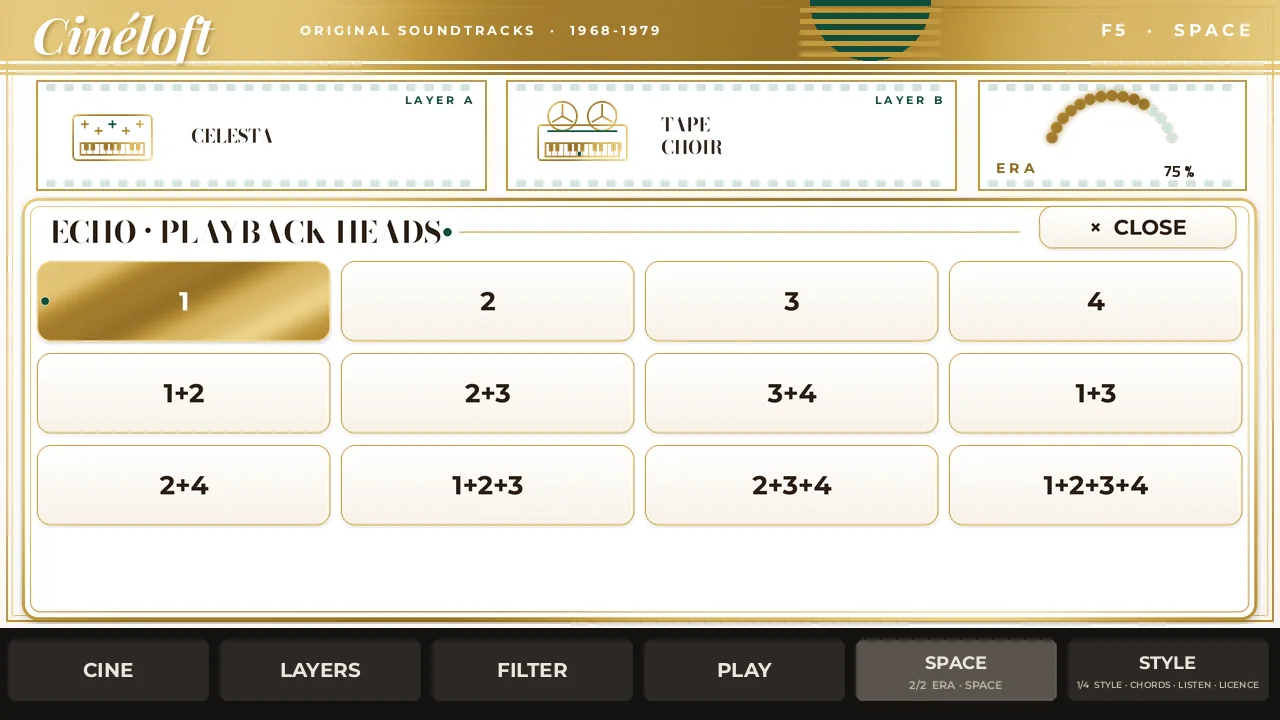
The 12 head combinations of the echo. Echo Sync opens the same kind of list: Free or 11 note values.
Scale
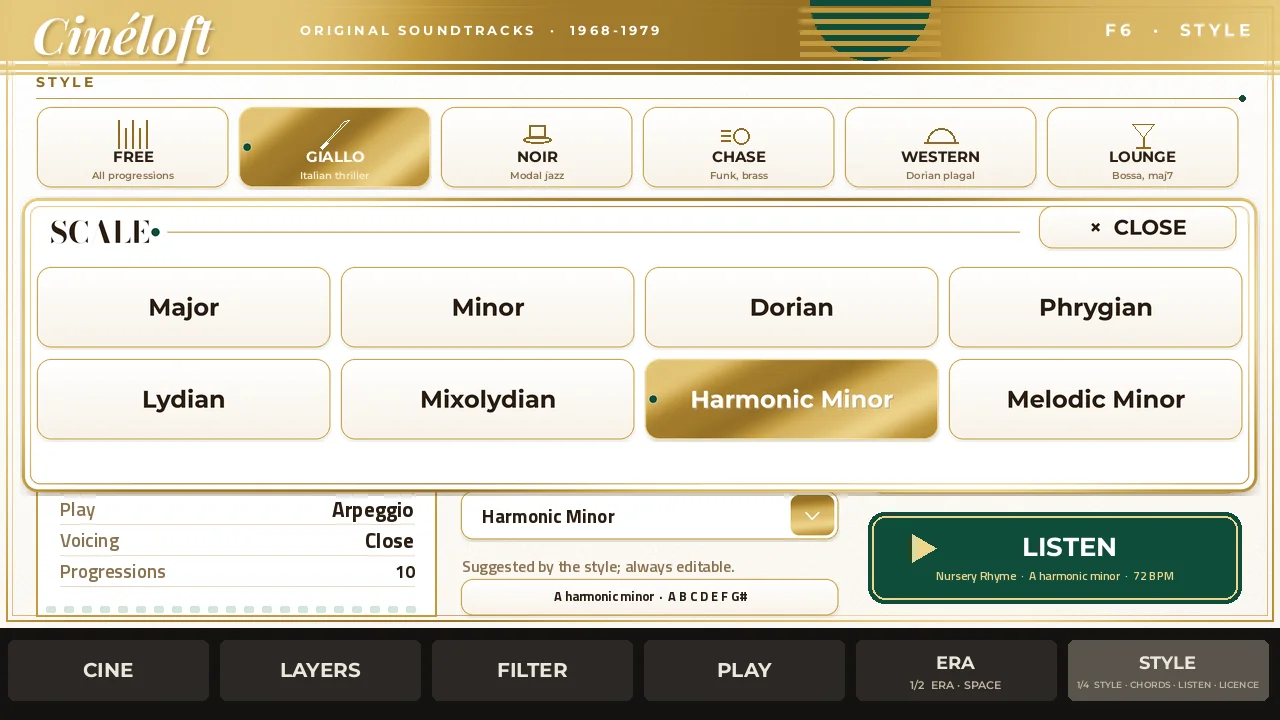
Eight scales: Major, Minor, Dorian, Phrygian, Lydian, Mixolydian, Harmonic Minor, Melodic Minor.
Progressions
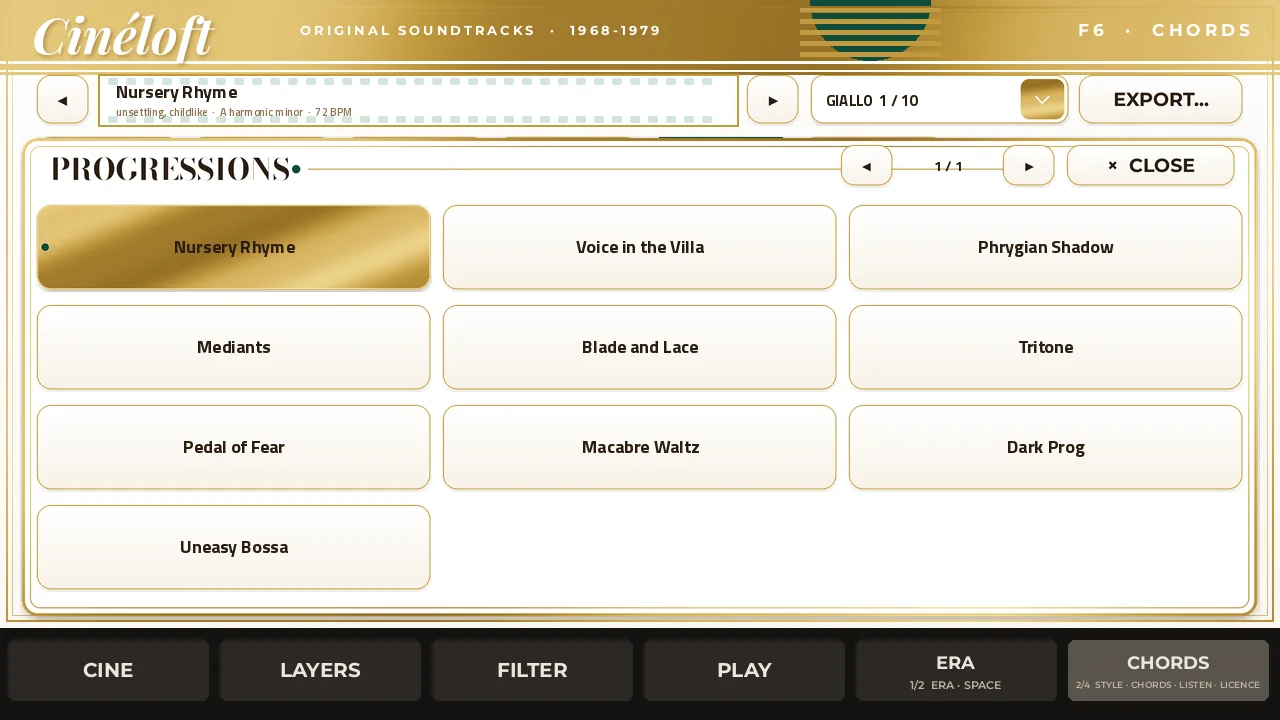
Every progression of the style by name.
Replace
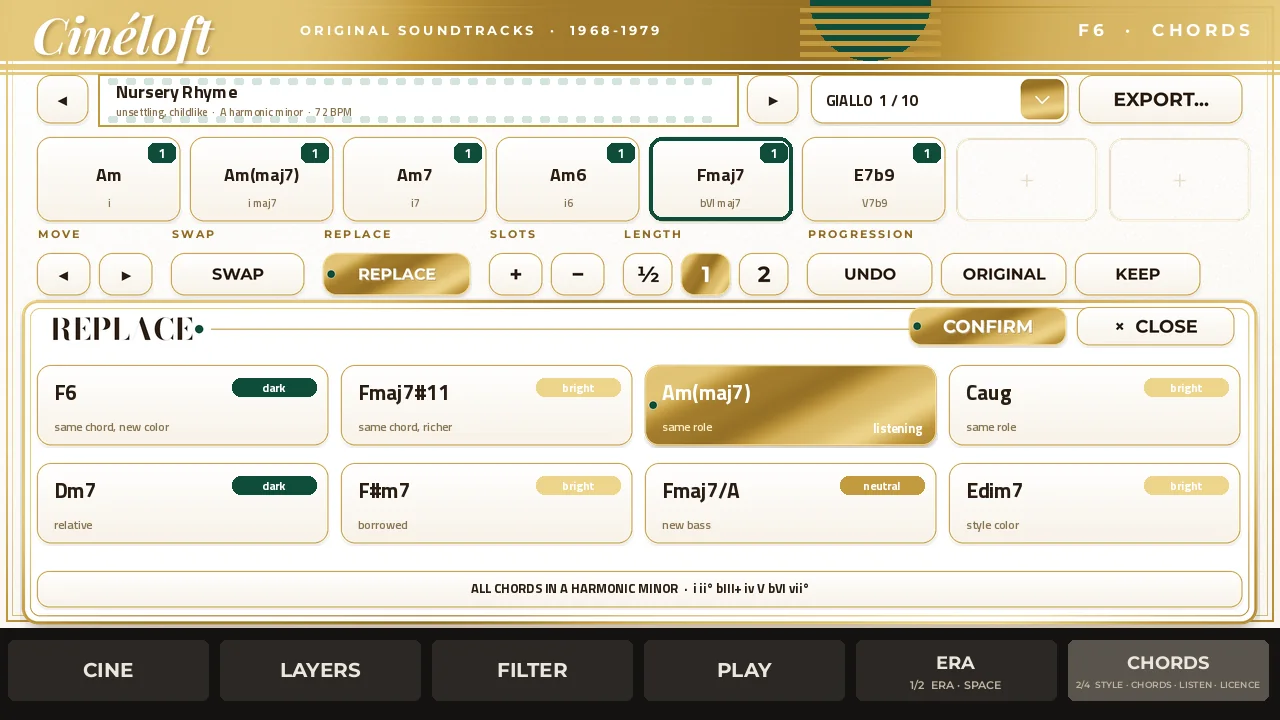
Eight chords of the same family for the selected slot, each marked dark, neutral or bright. Tap to hear, then CONFIRM.
Export
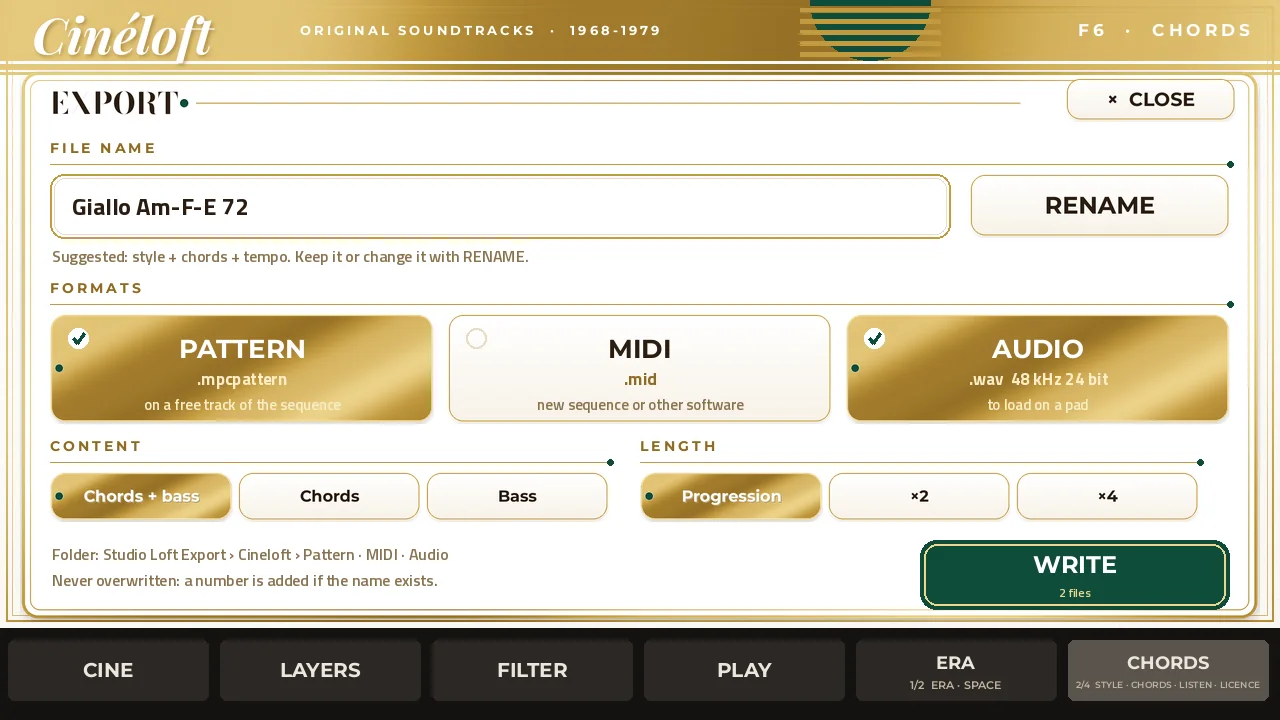
A suggested file name (or RENAME), the formats PATTERN, MIDI and AUDIO, the content and the length. WRITE never overwrites a file.
Name
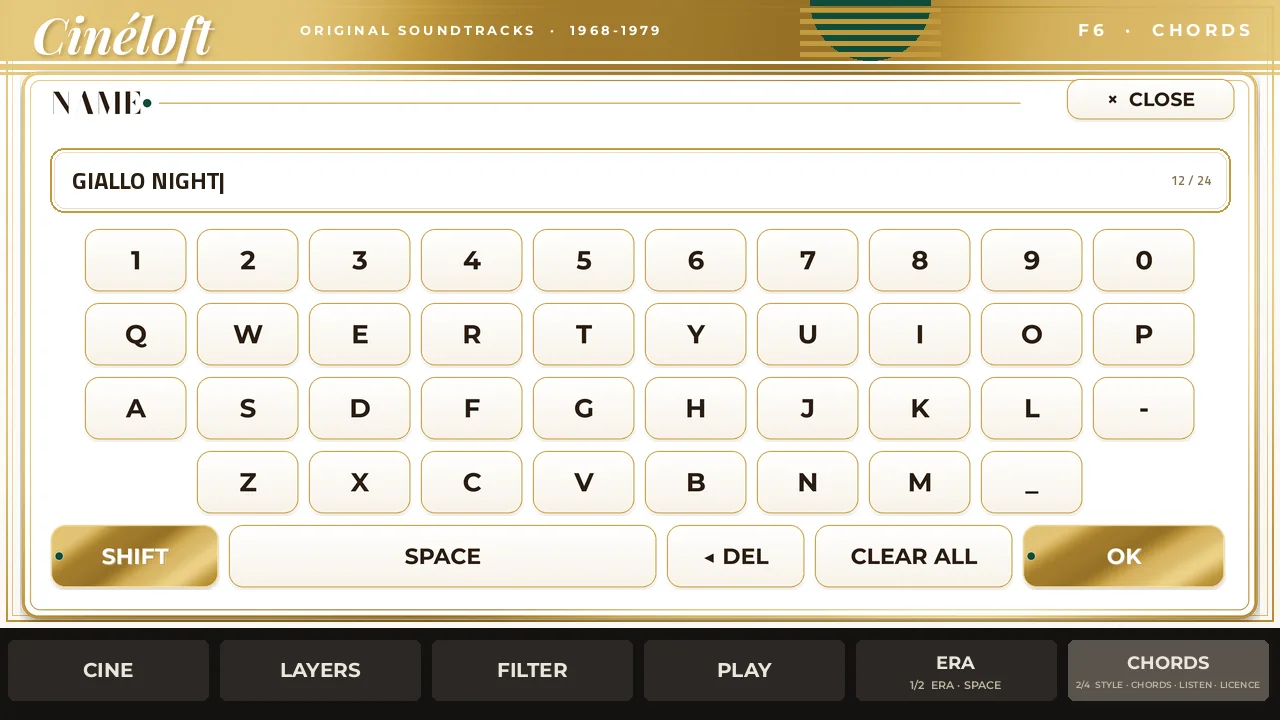
A full keyboard to name the files: letters, numbers, SHIFT, SPACE, DEL, CLEAR ALL and OK.
WAV files
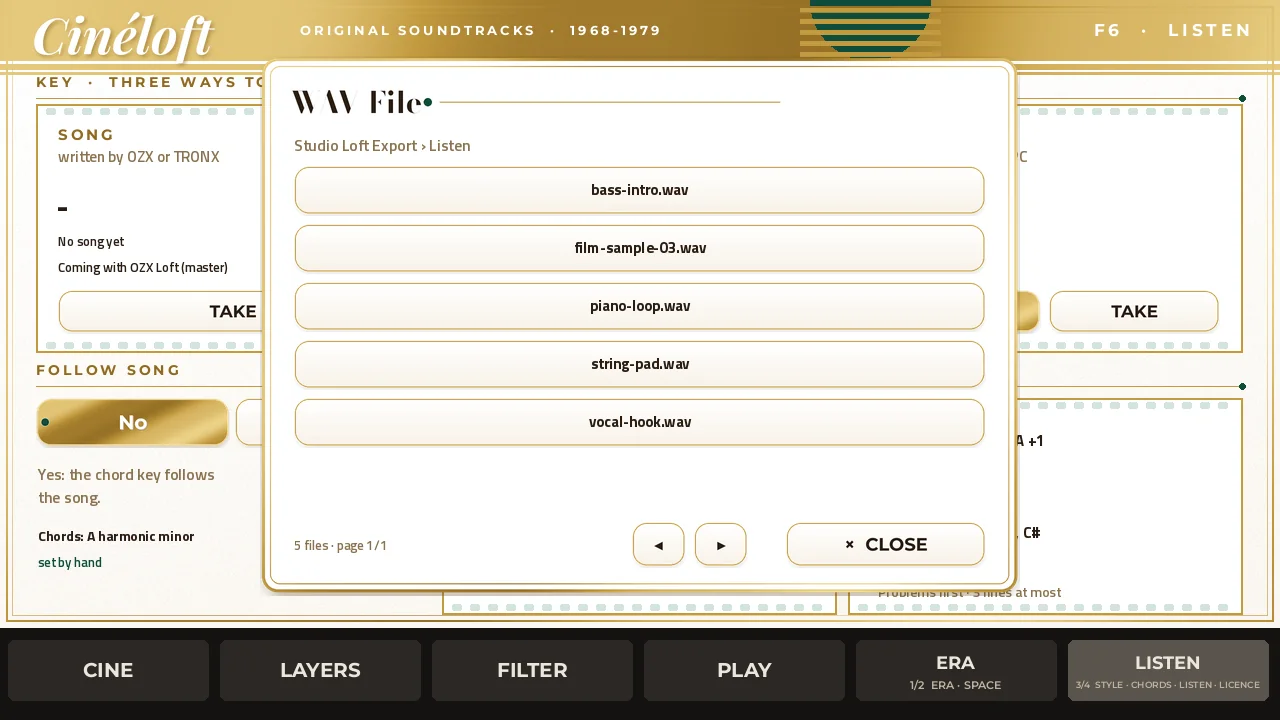
The WAV files of “Studio Loft Export › Listen”, six per page. Tap one to analyse it.
Technical sheet
Cinéloft at a glance
A two-layer instrument for the standalone MPC that plays 1970s film-score sounds through period tape and echoes, with a chord generator in ten film styles.
For who, for what
- Hip-hop and lo-fi producers who want dusty orchestral loops and eerie chords to sample or play.
- Library and soundtrack music: thriller tension, chase funk, westerns, space themes.
- Downtempo, lounge and pop with a vintage European colour.
Strong points
- 11 instruments from real recordings, 9 synthesized, on two layers (Stack, Split, Velocity).
- The Era knob: one control for wow, flutter, tape, hiss, dust and console.
- Three tape-echo types with 12 head combinations, four reverbs including spring.
- A wealth of film-score progressions, editable chord by chord, with related-chord replacement.
- Export to an MPC pattern, MIDI or audio; play the chords from pads.
- An assistant that finds the key of your playing or of a WAV file.
Numbers
Instruments
Real recordings: Tape Strings, Tape Flute, Tape Choir, Tape Brass, Harpsichord, Celesta, Vibraphone, Tine EP, Soprano, Fuzz Guitar, Round Bass.
Synthesized: String Machine, Combo Organ, Tonewheel, Clavi, Mono Lead, Pulse Lead, Ondes, Whistle, Sitar.
Technical sheet
The 161 presets
As they appear on screen and in the MPC browser, one folder per mood.
INIT
- Init
GIALLO
- Lullaby
- Red Organ
- Black Choir
- Blade
- Prog Bass
- Dark Soprano
- Fuzz Cut
- Music Box
- Whisper
- Dark Ondes
- Harpsichord
- Pulse
- Gloomy Combo
- Glass
- Tension
- Nightmare
NOIR
- Trench Coat
- Rain
- Docks
- Stakeout
- Neon
- Fog
- Informer
- Cognac
- Inspector
- Hideout
- Heist
- Blue Night
- Ashtray
- Taxi
- Cobblestones
- Dawn
CHASE
- Clavi Funk
- Fast Bass
- Brass
- Turbo Organ
- Fuzz Riff
- Mono Race
- Siren
- Wah Wah
- Hard Brake
- Hairpin
- Back Alley
- Full Throttle
- Bumper
- Motorbike
- Sitar Run
- Jump
WESTERN
- Whistle
- Desert
- Twang
- Duel
- Soprano
- Choir
- Ocarina
- Saloon
- Horizon
- Dust
- Rider
- Coyote
- Graveyard
- Mariachi
- Sheriff
- Dusk
LOUNGE
- Martini
- Bossa
- Pool
- Riviera
- Cocktail
- Jet Set
- Velvet
- Scat
- Hammock
- Convertible
- Yacht
- Syrup
- Bikini
- Soiree
- Capri
- Pink Neon
SENSUAL
- Sigh
- Satin
- Velvet
- Alcove
- Caress
- Boudoir
- Languor
- Heat
- Skin
- Lascivious
- Haze
- Night
- Shiver
- Murmur
- Honey
- Rapture
SCIFI
- Orbit
- Pulsar
- Nebula
- Station
- Meteor
- Android
- Cosmos
- Satellite
- Ray Gun
- Gravity
- Signal
- Porthole
- Vortex
- Planet
- Comet
- Robot
MYSTERY
- Riddle
- Secret
- Cellar
- Shadow
- Grimoire
- Spell
- Labyrinth
- Manor
- Specter
- Crypt
- Ghost
- Mirage
- Ritual
- Lantern
- Oracle
- Abyss
TITLES
- Overture
- Fresco
- Panorama
- Epic
- Light
- Cinema
- Fanfare
- Silver Screen
- Prologue
- Curtain
- Waltz
- Finale
- Odyssey
- Daybreak
- Credits
- Memory
ROMANCE
- Tenderness
- Rendezvous
- Slow Waltz
- Stroll
- Heart
- Letter
- Melancholy
- Musette
- Venice
- Keepsake
- Watercolor
- Eternity
- Shower
- Lovers
- Farewell
- Vow
Technical sheet
Get started in 3 steps
Install
Copy the folder “Studio Loft - VST - Cinéloft” (keep the é) into “VST2 Plugins” at the root of your MPC drive.
Load
On a track, load a plugin instrument and choose Cinéloft. The 161 presets are in the browser, one folder per mood.
Play
Play the keys or pads. Then press F6, tap a style and LISTEN.
Your files on the MPC drive
Studio Loft Export/My Progressions your saved progressions.
Studio Loft Export/Listen drop WAV files here to analyse them on the LISTEN page.
Studio Loft Licences your licence file and MY MPC CODE.txt.
Cinéloft
Pick a film. Get the chords.
Licence & activation
Yours in three steps.
Buy
Pay once on this site. Your personal link arrives by e-mail and stays valid.
Install Loft Hub
MPC OS 3.10.1 or later, with Enhancements and External Plugin Support turned on in Preferences. Copy Loft Hub to your MPC drive once.
Link and play
In Loft Hub, accept, link your MPC, and your plugins install by themselves. It works on two MPCs. That is it.
LICENCE
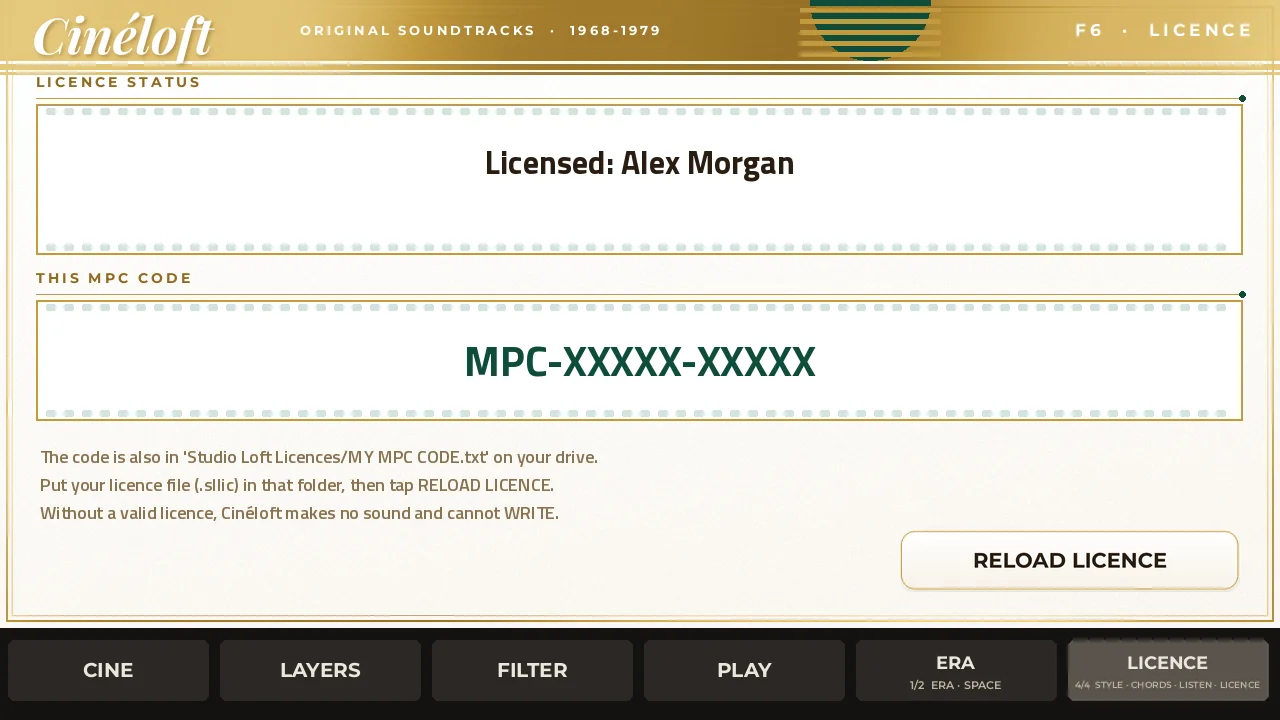
The state of your licence and the code of this MPC, on the fourth page of F6.
 1234
What you see
- LICENCE STATUS Licensed, No licence found, or Licence is for another MPC.
- THIS MPC CODE The code you give on loftplugins.ch to get your licence file.
- Help lines Where the code file is, and where to put your licence file.
- RELOAD LICENCE Reads the licence files again after you copied a new one.
Tip
You don't need to copy the code by hand: it is also written to “Studio Loft Licences/MY MPC CODE.txt” on your drive. Open it from your computer.
Own it
Cinéloft
The sound and the chords of 1970s European film scores.
One payment, yours for good. Your licence works on two MPCs.