Effect · version 1.6.0
Mosaix Loft
TURN ANY SOUND INTO A LIVING MOSAIC OF GRAINS, AND LET IT PLAY IN KEY WITH YOUR TRACK.
Granular effects love to throw pitches around, and that is exactly where they usually clash with your track. Mosaix Loft fixes it before it happens: press LISTEN , play your part, and the plugin tells you what key it hears.
The manual
Every screen,
page by page.
The full user guide, screen by screen, exactly as on the MPC. Setting names stay the English words of the screen.
The one that changes everything
It listens. Then it plays in key.
Granular effects love to throw pitches around, and that is exactly where they usually clash with your track. Mosaix Loft fixes it before it happens: press LISTEN, play your part, and the plugin tells you what key it hears.
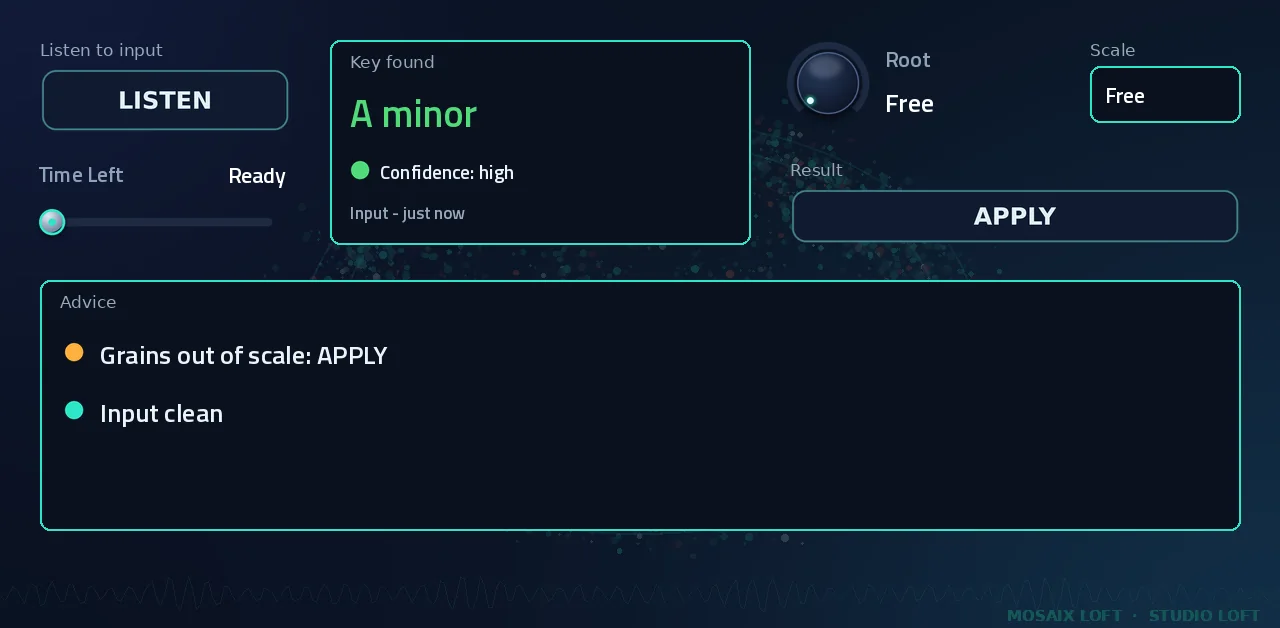
Open LISTEN (F6, then F6 again). Press LISTEN and play your loop or your part for 10 to 15 seconds. The bar counts down the time left.
The key appears in big letters: here A minor, with a coloured dot for the confidence (green = high, orange = medium, red = low) and where it came from.
The advice lines tell you what to do next. Orange dot: a tip. Here: Grains out of scale: APPLY.
Press APPLY
Every grain lands in A minor.
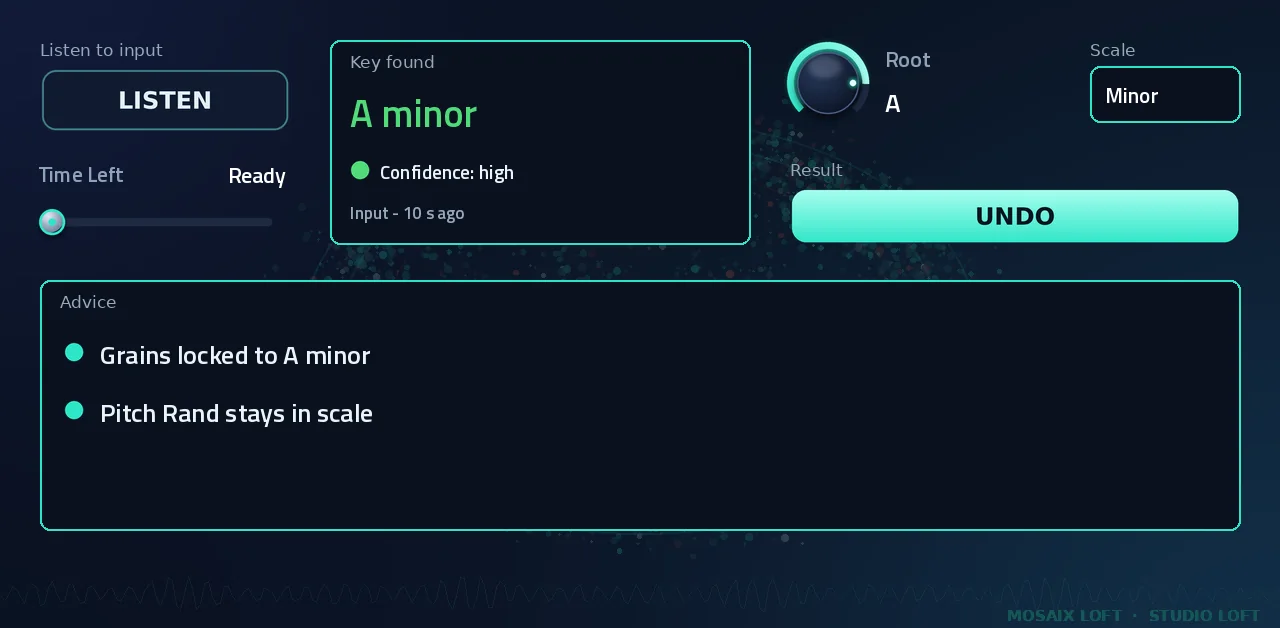
One press sets Root to A and Scale to Minor. From now on Pitch Rand, Chord, Shimmer and Sub Oct only pick notes that belong to the key. Turn Pitch Rand all the way up: it sounds like a melody, not like a mistake.
The button now says UNDO. One more press puts back exactly the settings you had before. Mosaix Loft never changes anything on its own: it listens, it advises, you decide.
You throw a vocal, a guitar or a pad at it, push Pitch Rand and Density, and instead of a pitchy mess you get a shimmering cloud that harmonises with the song.
Three moves to try first
Instant results
Vocal to choir
Load PITCH Major Choir on a vocal. Run LISTEN, press APPLY. Raise Shimmer for a voice an octave above, Sub Oct for weight underneath.
Freeze a moment
On GRAINS, turn Freeze On while the best chord rings. The buffer stops recording, the grains keep playing what is inside: an endless pad from one hit. Move Position to scan it.
Stutter on the grid
Set Trigger to Sync and pick a Repeat value (1/16, 1/8T…). Each grain restarts from the beginning of the last division: a tight, tempo-locked stutter while the sequencer runs.
Breathing texture
On FOLLOW, send Env Dest to Density with a positive Env Amount: the louder you play, the thicker the cloud. Silence thins it out.
Getting around
Your sound, in a thousand pieces
Mosaix Loft cuts the sound that comes in into tiny grains, then plays them back: stretched, pitched, reversed, scattered, frozen or locked to your tempo. A vocal becomes a choir. A loop becomes a stutter. One chord becomes a cloud.
Where to put it
As an insert effect on a track, on a bus, or on the input you are recording. Mosaix Loft has 2 inputs and 2 outputs and needs no MIDI.
How to move around
F1 to F6 open the six sound pages. Press F6 again for LISTEN, and once more for LICENCE. Tap a list to open its menu.
Q-Links
The 16 Q-Links mirror the screen: the top row of Q-Links turns the top row of controls, the second row the second row, and so on. No guessing.
F1
GRAINS
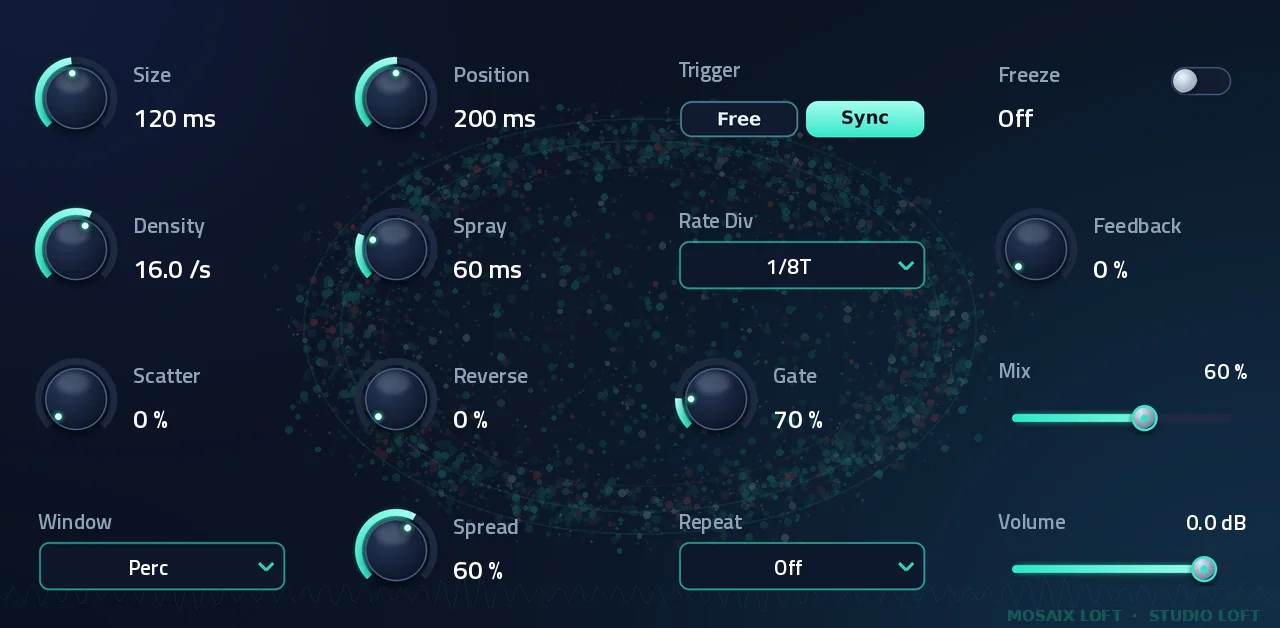
What you see
- Size Length of each grain, 10 ms to 2 s. Short = buzzy and rhythmic, long = smooth and vocal.
- Position How far back in the buffer the grains read, 5 ms to 8 s behind what you play.
- Trigger Free: grains at the Density rate. Sync: one grain per Rate Div, on your tempo.
- Freeze On = the buffer stops recording; the grains keep playing what is inside.
- Density Grains per second in Free mode, 1 to 120.
- Spray Random spread around Position, up to 2 s. More Spray, less recognisable.
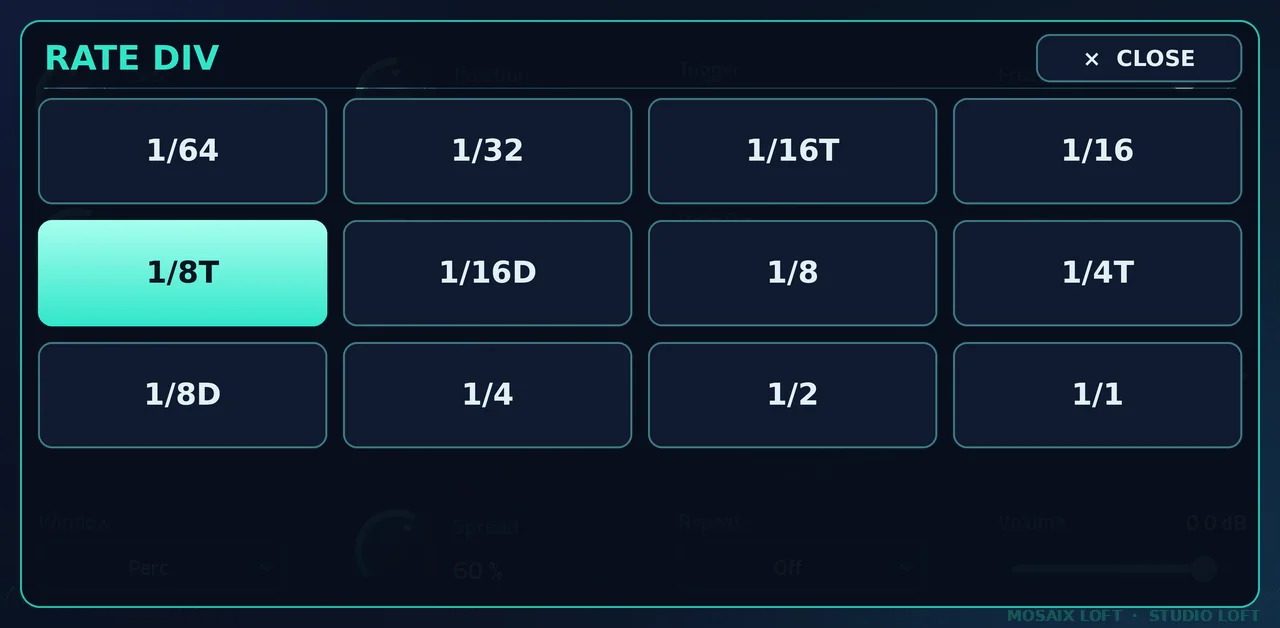
- Rate Div Note value of each grain in Sync mode, 1/64 to 1/1 (with triplets and dotted values).
- Feedback Sends the grains back into the buffer, up to 95 %, for grains made of grains.
- Scatter Irregular timing: 0 = steady grains, higher = more random spacing.
- Reverse Share of grains played backwards, 0 to 100 %.
- Gate Grain length in Sync mode, as a % of the division (5 to 400 %).
- Mix Dry / wet balance.
- Window Shape of each grain: Hann, Smooth, Triangle, Perc, Swell, Rect.
- Spread Stereo width of the grains.
- Repeat Off, or 1/32 to 2/1: each grain restarts at the last division. The tempo stutter.
- Volume Output level, -40 to +6 dB.
What it's for
The heart of the plugin: how big the grains are, how many, where they read from and how they are triggered. Start every sound here.
For a clean rhythmic chop, use Trigger Sync, Window Perc and Gate around 60 %. For a soft pad, use Window Hann, Size above 300 ms and Spray high.
Q-Links on this page
F2
PITCH
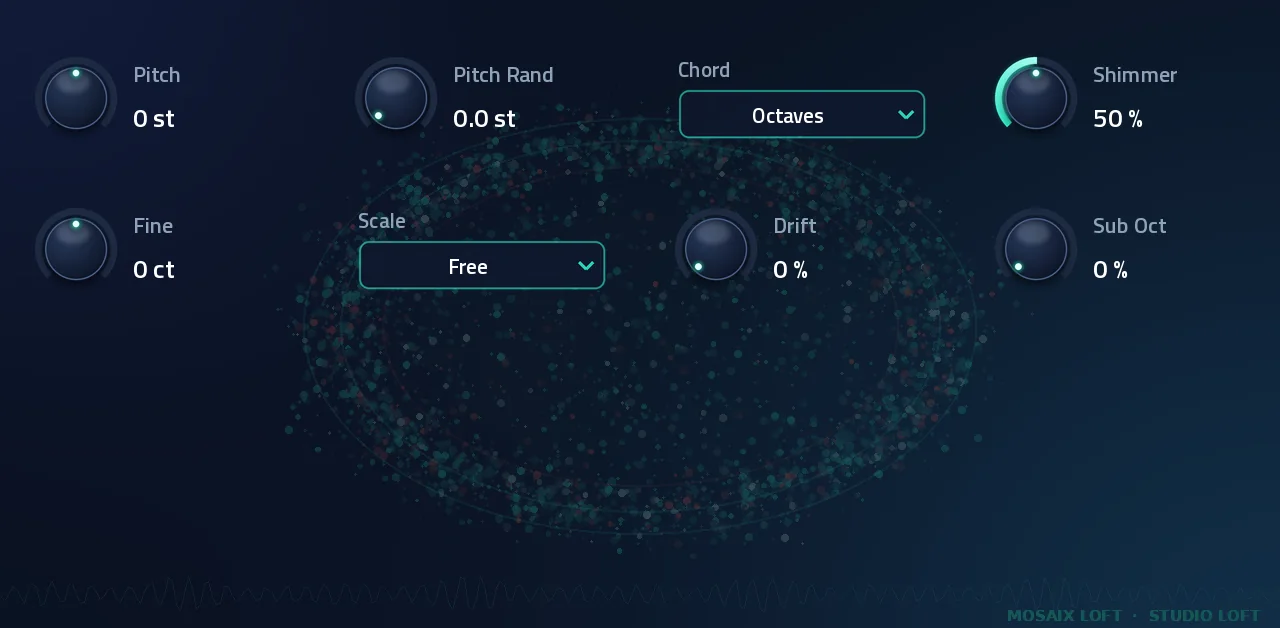
What you see
- Pitch Transpose all grains, -24 to +24 semitones.
- Pitch Rand Random pitch per grain, up to 24 semitones. Follows Scale.
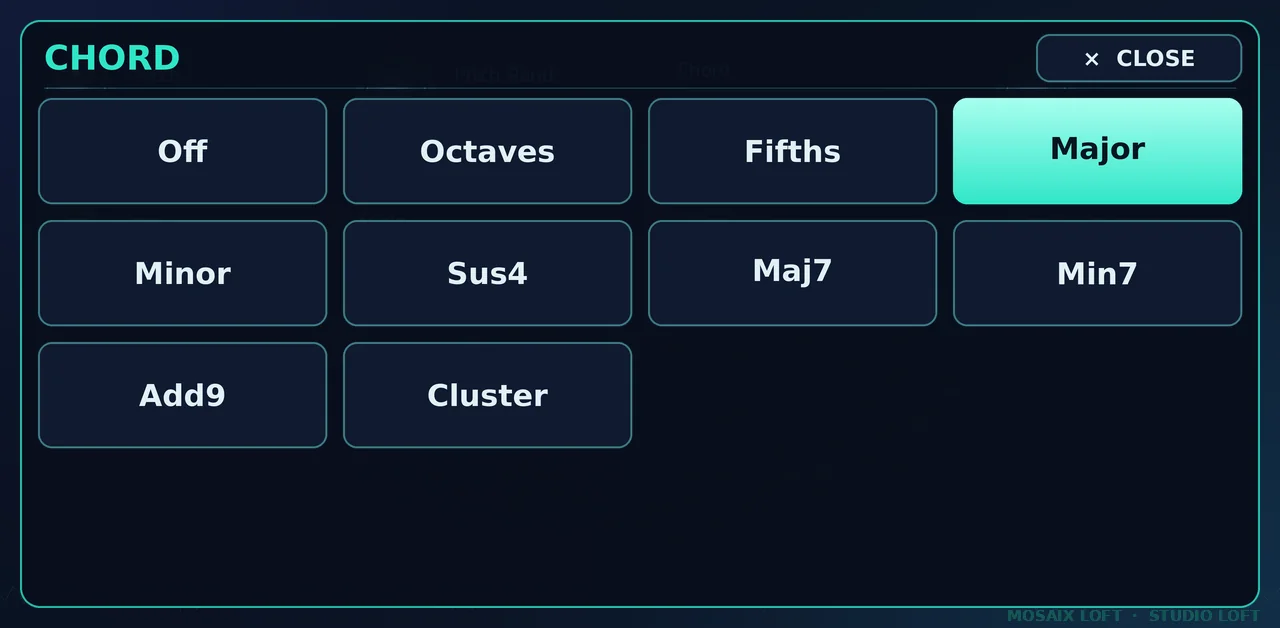
- Chord Plays every grain as a chord: Octaves, Fifths, Major, Minor, Sus4, Maj7, Min7, Add9, Cluster.
- Shimmer Adds grains one octave up.
- Fine Fine tuning, -100 to +100 cents.
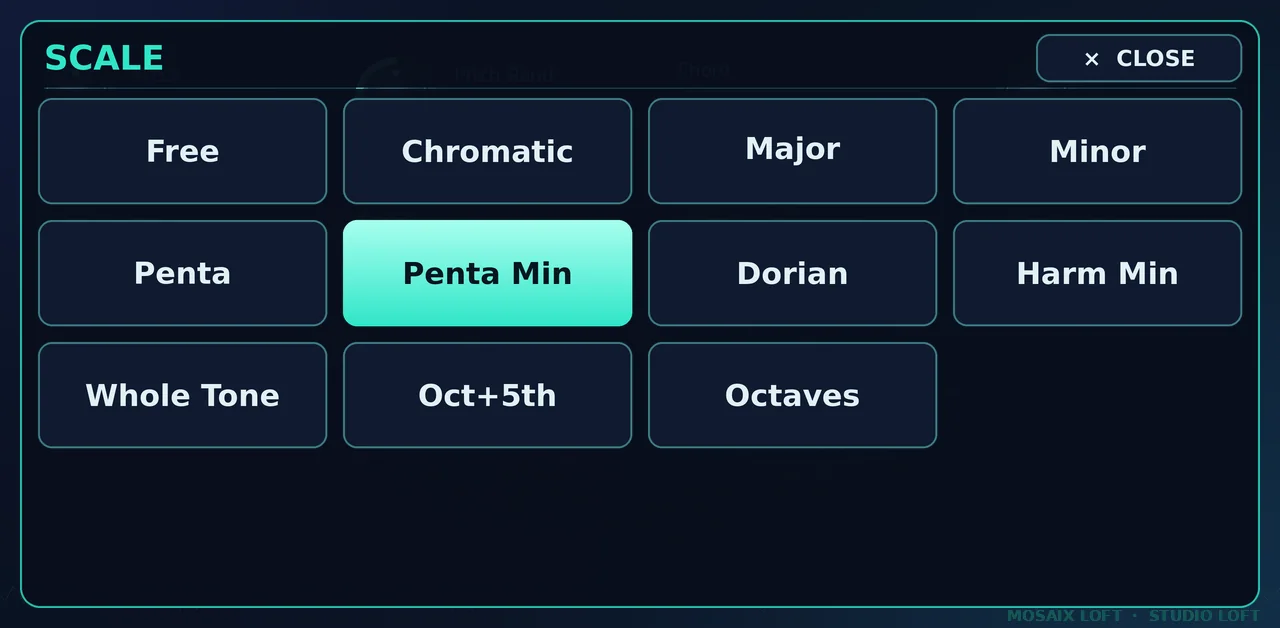
- Scale Keeps Pitch Rand on the notes of a scale: Major, Minor, Penta, Dorian, Harm Min, Whole Tone… Free = no scale.
- Drift Slow wandering of the read position, so the texture keeps evolving.
- Sub Oct Adds grains one octave down.
What it's for
Turns one sound into a harmony. Go here to make a vocal sing a chord, add a glowing octave or a sub layer, or spread the pitch while staying musical.
Run LISTEN first and press APPLY: Scale and Root are then set for you, and Pitch Rand can go high without ever sounding out of tune.
Q-Links on this page
F3
TONE
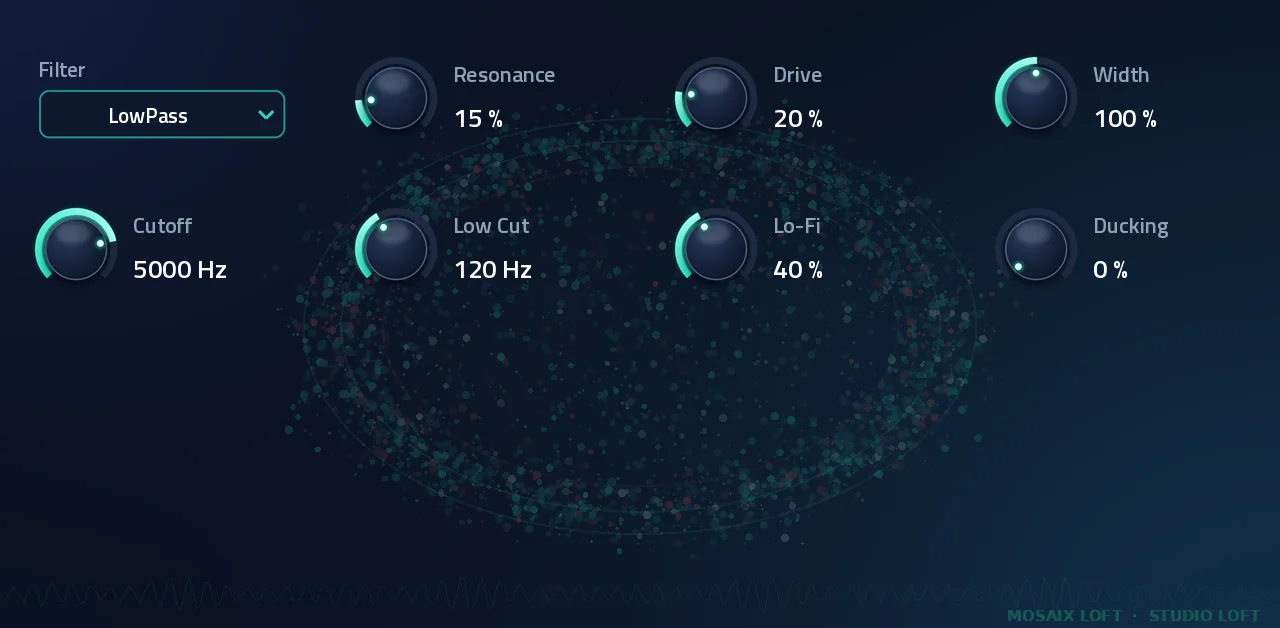
What you see
- Filter Off, LowPass, BandPass or HighPass on the grains.
- Resonance Peak at the cutoff frequency.
- Drive Warm saturation.
- Width Stereo width of the wet sound, 0 (mono) to 200 %.
- Cutoff Filter frequency, 30 Hz to 20 kHz.
- Low Cut Removes the lows below 20 Hz to 2 kHz, keeps the mix clean.
- Lo-Fi Lower resolution and rate for a dusty, old-sampler colour.
- Ducking Lowers the grains while the input is playing, so the effect blooms in the gaps.
What it's for
Shapes the colour of the grains after they are made. Come here when the effect is too bright, too muddy or needs character.
On drums, a Low Cut around 200 Hz keeps your kick clean. Add Ducking at 40 % so the grains bloom in the gaps.
Q-Links on this page
F4
SPACE
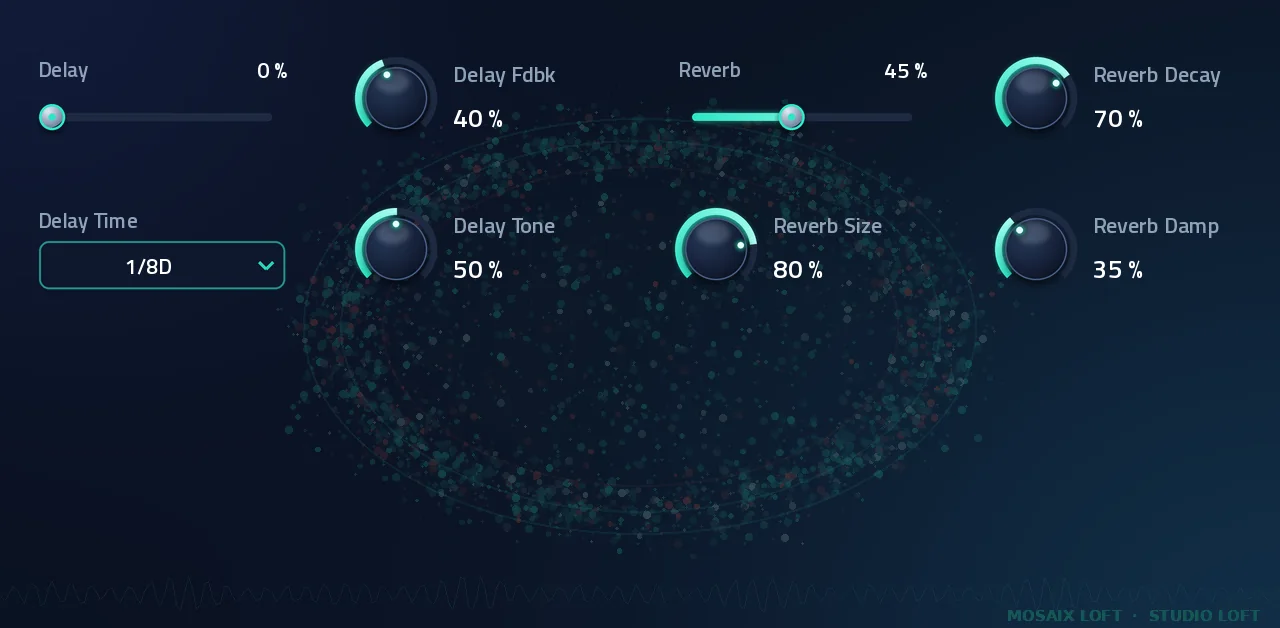
What you see
- Delay Amount of tempo-synced delay.
- Delay Fdbk Number of repeats, up to 95 %.
- Reverb Amount of reverb.
- Reverb Decay Length of the reverb tail.
- Delay Time Note value of the delay, 1/32 to 1/2 (with triplets and dotted values).
- Delay Tone Dark to bright repeats.
- Reverb Size Small room to huge hall.
- Reverb Damp Softens the highs of the tail.
What it's for
Puts the grains in a room. Use it for depth, long ambient tails or rhythmic echoes that follow your tempo.
For a huge ambient wash: Reverb 45 %, Reverb Size 80 %, Decay 70 %, then Shimmer on the PITCH page. Keep Mix around 50 % so the source stays readable.
Q-Links on this page
F5
LFO
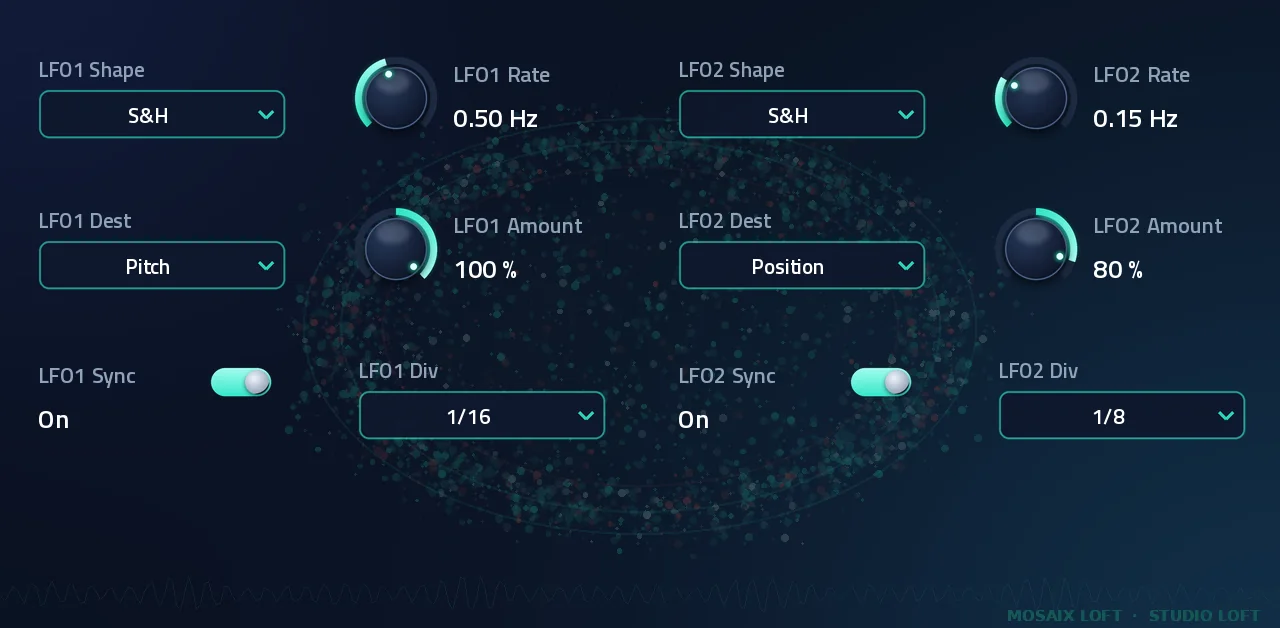
What you see
- LFO1 Shape Sine, Triangle, Saw, Square, S&H (random steps) or Drift (smooth random).
- LFO1 Rate Speed in Hz, 0.02 to 30 Hz, when LFO1 Sync is Off.
- LFO2 Shape Same shapes for the second LFO.
- LFO2 Rate Speed of LFO2 when its Sync is Off.
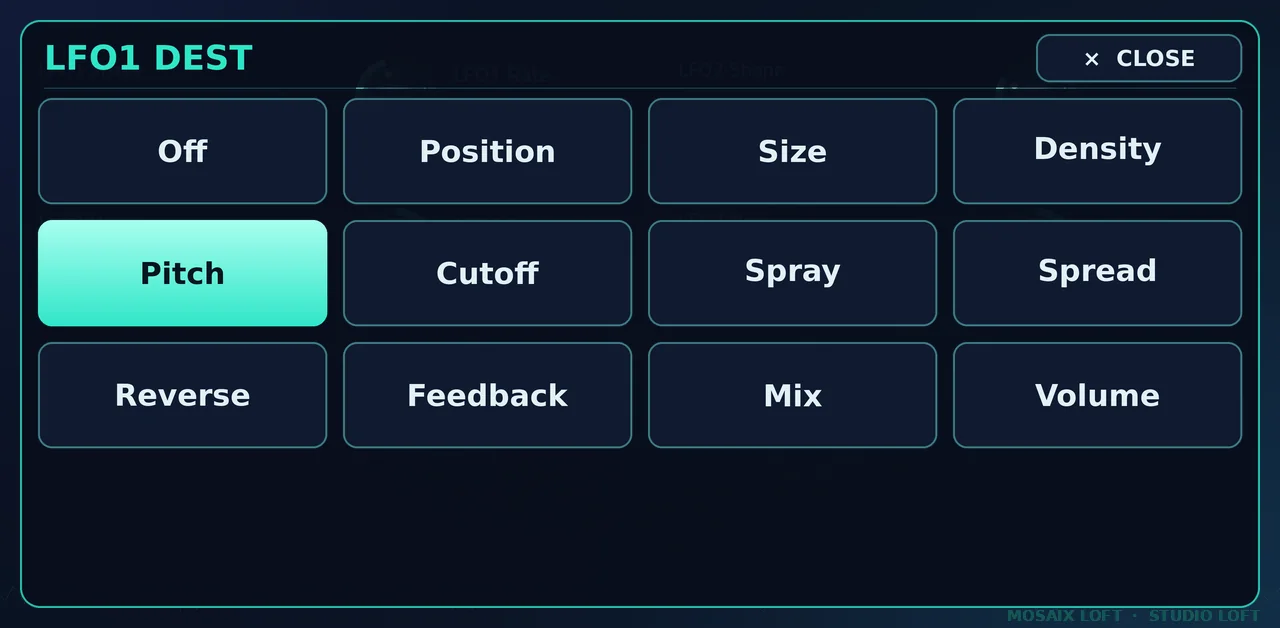
- LFO1 Dest What it moves: Position, Size, Density, Pitch, Cutoff, Spray, Spread, Reverse, Feedback, Mix or Volume.
- LFO1 Amount How much, -100 to +100 % (negative = upside down).
- LFO2 Dest Second destination, same list.
- LFO2 Amount Depth of LFO2.
- LFO1 Sync On = speed set by LFO1 Div and aligned to the bar while the sequencer runs.
- LFO1 Div Synced speed, 1/16 to 4/1.
- LFO2 Sync Tempo sync for LFO2.
- LFO2 Div Synced speed of LFO2.
What it's for
Two LFOs make the sound move on its own. Go here when a static texture needs motion: a slow sweep, a wobble, random jumps.
LFO1 Shape S&H, Sync On, Div 1/16, Dest Pitch with a Scale set: instant random arpeggio, always in key.
Q-Links on this page
F6
FOLLOW
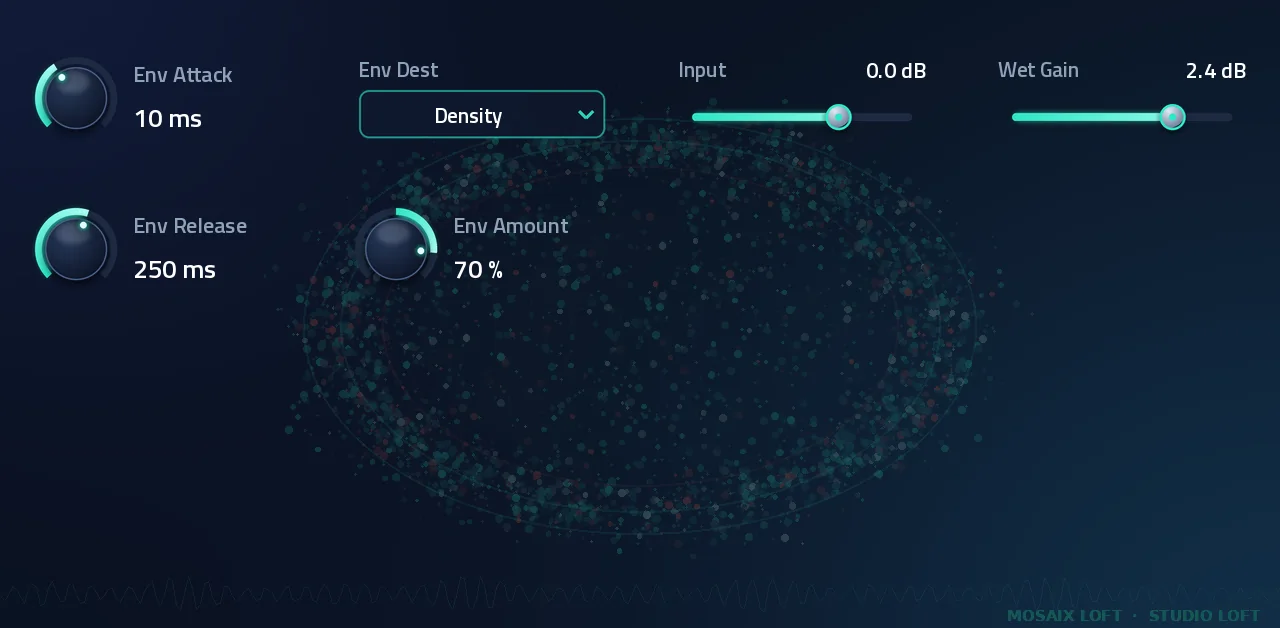
What you see
- Env Attack How fast the follower reacts when you play louder, 1 to 500 ms.
- Env Dest What your playing controls: same list as the LFOs.
- Input Level going into the plugin, -24 to +12 dB.
- Wet Gain Level of the grains alone, -24 to +12 dB.
- Env Release How slowly it falls back when you play softer, 10 ms to 3 s.
- Env Amount How much, -100 to +100 %.
What it's for
The envelope follower listens to the loudness of what comes in and moves a setting with it. The effect reacts to your playing, like a living instrument.
Env Dest Mix with a negative Env Amount: the effect hides while you play and blooms the moment you stop. Perfect behind a vocal.
Q-Links on this page
F6 × 2
LISTEN
What you see
- Listen Starts a 15-second listen of the input. Press again to stop early.
- Time Left Seconds left in the listen, then Ready.
- Key The key found, e.g. A minor.
- Confidence Text How sure it is: green high, orange medium, red low.
- Source Where the key came from and how long ago.
- Root The root note used by the grains. Free = no key. Also on Q-Link 15.
- Scale Name The scale now used by the grains.
- Apply APPLY sets Root and Scale to the key found. UNDO restores your settings.
- Advice 1 Up to three advice lines, problems first: clipping input, low input (with the gain to add), no clear pitch, uncertain key, grains out of scale.
What it's for
Your assistant. Come here when you load the plugin on a melodic sound, or when the song changes key. Nothing is measured except during a listen.
If the advice says Input low, raise Input on the FOLLOW page by the amount shown and listen again: the result gets more confident.
Q-Links on this page
Big, finger-friendly menus
Lists that open full screen
Every list (Window, Rate Div, Repeat, Chord, Scale, Filter, Delay Time, LFO shapes, destinations and divisions, Env Dest) opens as a large grid. Tap the field, or select it and press the data wheel. Tap a choice; CLOSE takes you back. The current choice is lit.
Spec sheet
Mosaix Loft at a glance
A granular effect for MPC standalone that rebuilds any incoming sound from tiny grains, with chords, freeze, tempo-locked stutter, and a listen mode that keeps every grain in key.
Made for
- Ambient and cinematic music: endless pads, shimmer and frozen chords from any source.
- Hip-hop and lo-fi beats: chopped vocal textures, dusty stutters, tape-like colour.
- Electronic music and live sets: tempo-synced grains and repeats on the input, in real time.
Strong points
- LISTEN finds the key of your input; APPLY locks pitch, chords and randomness to it, UNDO puts it back.
- Freeze holds up to 11.9 s of sound and keeps playing it as grains.
- Trigger Sync and Repeat lock grains and stutters to the sequencer tempo.
- Chord, Shimmer and Sub Oct turn one voice into a harmony.
- 2 LFOs and an envelope follower, 11 destinations each.
- Q-Links laid out exactly like the screen.
Numbers
| Presets | 109, in 10 categories |
| Grains | up to 64 at once |
| Buffer | 11.9 s, stereo |
| Sound pages | 6, plus LISTEN and LICENCE |
| Settings | 58 sound settings |
| Modulation | 2 LFOs + 1 envelope follower |
| Inputs / outputs | 2 in, 2 out (insert effect) |
| Size on disk | about 5 MB, no sample banks |
| Runs on | MPC standalone, MPC OS 3.10.1 or later |
| Version | 1.6.0 |
Get going in 3 steps
- Install. Copy the folder Studio Loft - VST - Mosaix Loft into VST2 Plugins on your MPC drive.
- Load. On a track or a bus, add an insert effect and choose Mosaix Loft. Pick a preset.
- Play. Play your sound, go to LISTEN, press LISTEN then APPLY, and shape it with F1 to F6.
The sounds
109 presets
Names exactly as on screen. The number is the one in the preset list.
INIT 1
SHIMMER 12
FREEZE 12
STUTTER 12
PITCH 12
REVERSE 12
CLOUD 12
RHYTHM 12
LOFI 12
FX 12
Credits
Thanks and licences
Built with
The MPC Plugin SDK (MIT licence). The full notice is in the Licences folder of the plugin.
Sounds
Mosaix Loft contains no recorded sound: everything you hear is your own input, transformed.
Code
Written for Studio Loft. Licence check uses Monocypher (CC0 / BSD-2).
Fonts
Screen images: DejaVu Sans (Bitstream Vera / DejaVu licence). This guide: Titillium Web and Anton, both under the SIL Open Font License 1.1.
Note
Studio Loft is an independent developer, not affiliated with the maker of MPC. MPC is a trademark of its owner, named only to say which machines this plugin runs on.
F6 × 3
LICENCE
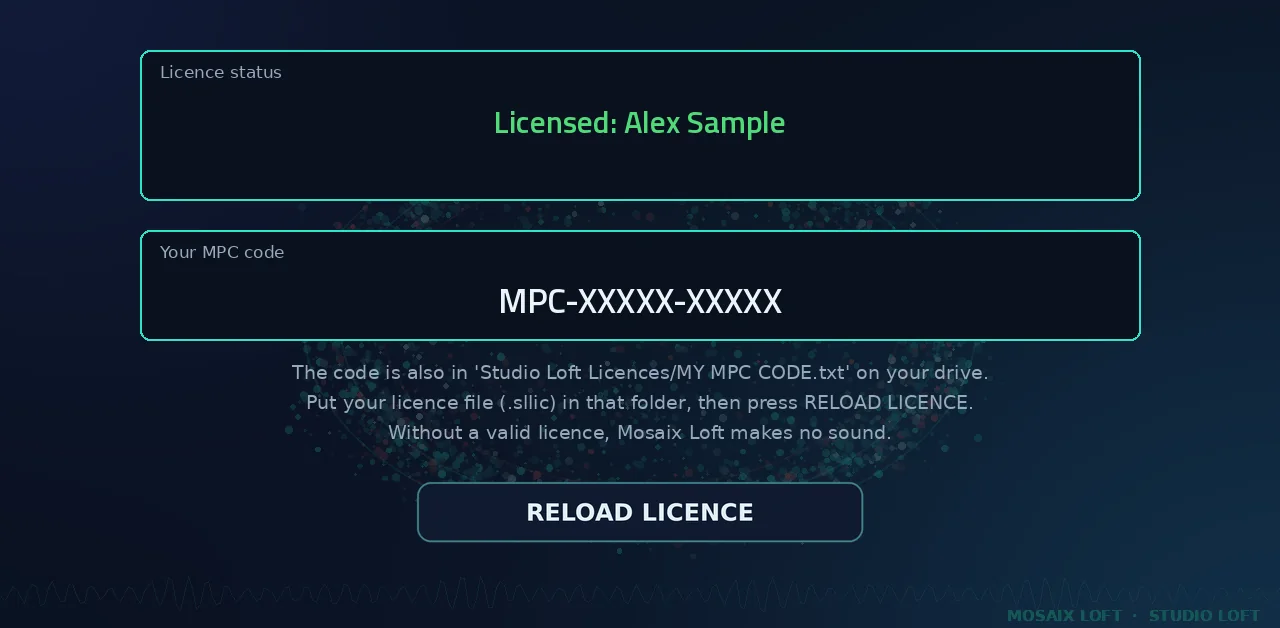
What you see
- Licence Your licence status: Licensed with your name, or what is missing.
- Licence Info When there is no valid licence: where to get one.
- MPC Code The code of your MPC. You give it when you buy, so the licence matches your machine.
- Reload Licence Reads the licence files again after you copied a new one.
What it's for
Everything about your licence in one place. You only come here to activate or check it.
No need to copy the code by hand: open your MPC drive from your computer and paste the code from the text file.
Activate in 3 steps
- Your MPC code is shown here and saved as Studio Loft Licences/MY MPC CODE.txt on your drive.
- Buy at loftplugins.ch, then paste that code on the My purchases page: your licence arrives by e-mail.
- Copy the licence file (.sllic) into Studio Loft Licences, then press RELOAD LICENCE.
Licence & activation
Yours in three steps.
Buy
Pay once on this site. Your personal link arrives by e-mail and stays valid.
Install Loft Hub
MPC OS 3.10.1 or later, with Enhancements and External Plugin Support turned on in Preferences. Copy Loft Hub to your MPC drive once.
Link and play
In Loft Hub, accept, link your MPC, and your plugins install by themselves. It works on two MPCs. That is it.
Own it
Mosaix Loft
A granular effect: freeze, reverse, retune to a scale.
One payment, yours for good. Your licence works on two MPCs.