Effect · Rhythmic motion · version 1.4.0
Movex Loft
9 MODULES · 32 SHAPES · LOCKED TO YOUR MPC
Make any sound move with the beat. Volume pumps, filters ride, echoes throw, the stereo image breathes, and every move lands on the grid of your MPC. One module for a clean sidechain pump, or several stacked for sounds that never stop evolving.
Nine modules
Everything can move.
Every module has its own shape, rate and depth, so a pump on the quarters, a filter that opens over two bars and an echo on the last beat can all run at once, on one track.
- VolumePump, duck and gate.
- FilterLP, BP or HP rides and sweeps.
- PanSwing across the stereo field.
- WidthFrom mono to extra wide.
- PitchVibrato, wow and wobble.
- DriveSaturation that pulses.
- CrushBits and sample rate, in rhythm.
- EchoTempo echo throws, ping-pong.
- TimeTape stops and halftime drags.
The manual
Every screen,
page by page.
The full user guide, screen by screen, exactly as on the MPC. Setting names stay the English words of the screen.
Meet Movex Loft
Your loop stops sitting still.
Movex Loft is a rhythmic motion effect for the MPC. Pick a shape, pick what it moves, pick a rate: volume pumps, filters ride, echoes throw, the stereo image breathes, and every move lands on the grid of your MPC. Use one module for a clean sidechain pump, or stack several for sounds that never stop evolving.
Volume
Pump, duck and gate.
Filter
LP, BP or HP rides and sweeps.
Pan
Swing across the stereo field.
Width
From mono to extra wide.
Pitch
Vibrato, wow and wobble.
Drive
Saturation that pulses: Soft, Hard, Fold, Tube.
Crush
Bits and sample rate, in rhythm.
Echo
Tempo echo throws, ping-pong.
Time
Tape stops and halftime drags.
The signal path
The wow · 1
32 shapes. 9 destinations. One tempo.
Every shape is drawn for rhythm: pumps that swell back in, gates that cut on the step, triplets, tresillo, swing, stairs and random steps. Put any of them on any module, at any of the 16 rates, and it locks to your MPC.
 Sine
 Triangle
 Ramp Up
 Ramp Down
 Square
 Pump
 Pump Hard
 Pump Soft
 Pump Long
 Double Pump
 Gate 1/2
 Gate 1/4
 Gate 3/4
 Stab
 Stairs Up
 Stairs Dn
 Steps 8
 Trance A
 Trance B
 Trance C
 Swing
 Triplets
 Trip Gate
 Dotted
 Tresillo
 Bounce
 Exp Rise
 Exp Fall
 Peak
 Chop 16
 Random
 Smooth Rnd
Sidechain pump
- Vol Shape Pump
- Rate 1/4
- Depth 85 %
Trance gate
- Vol Shape Trance A
- Rate 1 Bar
- Depth 100 %, Smooth 3 %
Halftime drag
- Time Ramp Down, 1/2, Depth 60 %
- Time Max 1/8
- Filter Sine, 2 Bars, LP 4 kHz
The wow · 2
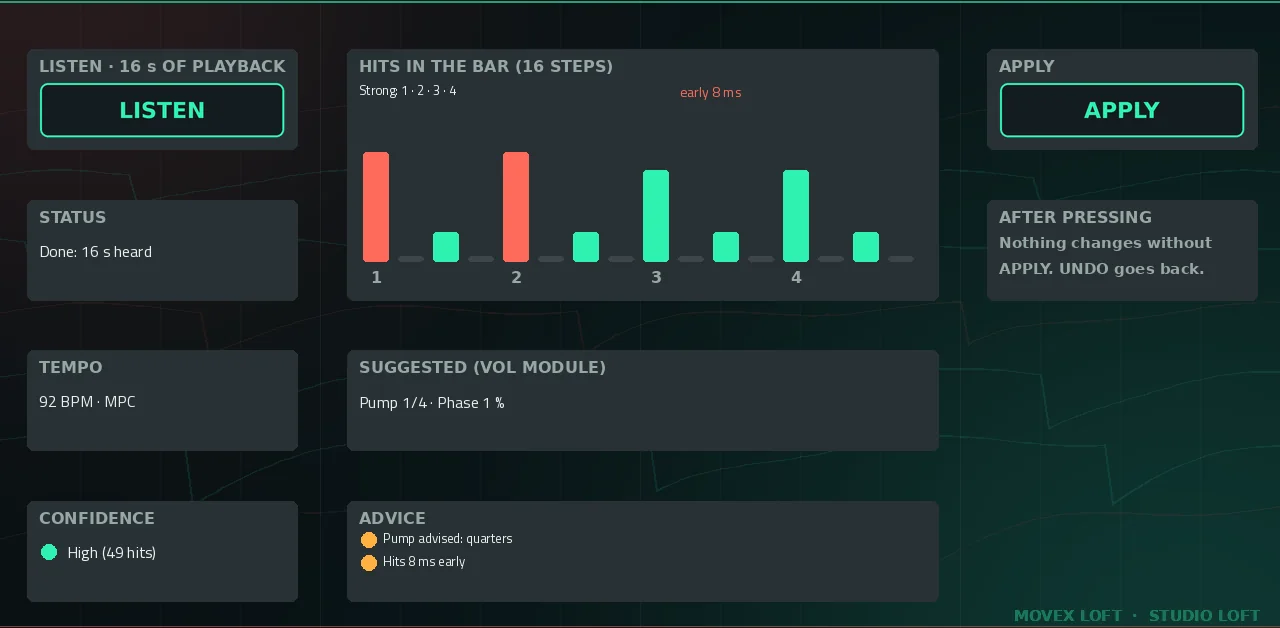
It listens to your beat.
The LISTEN assistant hears 16 seconds of your playing beat, finds where the strong hits really fall, how early or late they sit, and proposes a pump lined up to them. One tap applies it. One more tap undoes it.
Start your beat on the MPC.
On the LISTEN page (F6, then F6 again). It listens for 16 s of playback.
Tempo, strong beats, offset, a 16-step picture of your hits and a suggestion.
The Vol module is set: shape, rate and phase. Not convinced? UNDO.
What it found on this beat
Getting around
Six keys, eleven pages.
The function keys F1 to F6 open the pages. Where a key has more than one page, press it again.
Q-Links follow the screen
The 16 Q-Links match the 4 × 4 grid of the page you are on. Turn the knob under a control to change it.
Touch and the data wheel
Tap a control to select it (it lights with a mint frame), then turn the data wheel.
Picture lists
Tap a Shape, Rate, Delay or Time Max field: a full-screen list opens. Tap a name to choose it, or CLOSE.
Presets
122 presets in 12 banks, from INIT to FX. Load them from the MPC preset browser; the list is at the end of this guide.
Every module, the same eight controls
Switches the module in or out.
The movement. Tap the field to pick one of 32 shapes; the thumbnail shows the one in use.
Length of one cycle, locked to tempo: 8 Bars down to 1/32, with dotted (D) and triplet (T) values.
How far the shape moves the module. 0 % = it stays on its setting, 100 % = full travel.
Where the cycle starts, 0 to 100 %. Slide the dip so it lands right on your kick.
Rounds off hard edges. A little Smooth takes the click out of gates and squares.
Leans the shape earlier (−) or later (+) inside the cycle, from −100 to +100 %.
Lets the input level push the movement. Negative values work the other way: the louder the sound, the further it pulls back.
MAIN
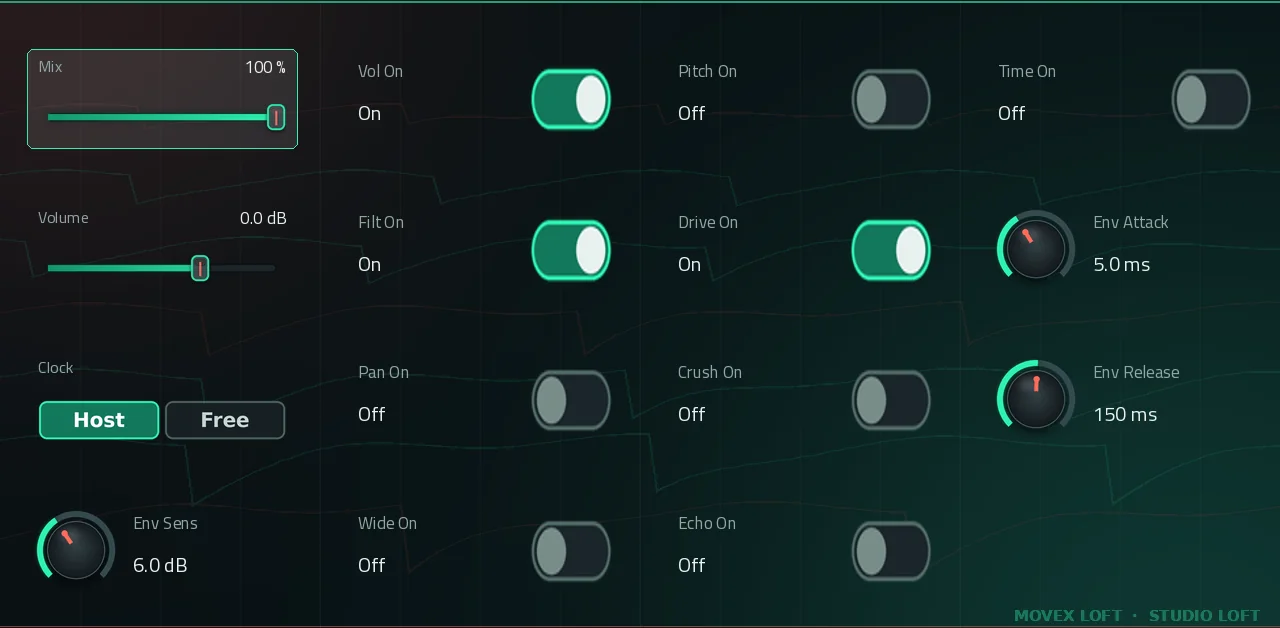
The home screen: what moves, how much, and to which clock.
 1234555555555678
What you see
- Mix Blend between the dry sound (0 %) and the moving sound (100 %).
- Volume Output level, −24 to +12 dB. A built-in limiter keeps the output under −1 dBFS.
- Clock Host: the shapes follow the MPC playhead and land on the beats. Free: they run on their own, at tempo.
- Env Sens Input boost for the envelope follower, −12 to +36 dB. Raise it for quiet sounds.
- Vol On … Echo On Nine quick switches, one per module: Vol, Pitch, Time, Filt, Drive, Pan, Crush, Wide, Echo.
- Env Attack How fast the follower reacts to a hit, 0.5 to 200 ms.
- Env Release How fast it lets go, 10 to 2000 ms.
- Licence line Empty while your licence is valid. If Movex Loft goes silent, it shows where to get a licence; details on the LICENCE page (last page).
What it's for
Start here. Switch on the modules you want, set the overall blend and the output level. The three Env controls tune the envelope follower shared by every module (it is used wherever a module’s Env is not 0 %).
Tip
Keep Mix at 100 % for pumps and gates. On echo or crush moves, pull it back to 40–60 % so the original punch stays underneath.
VOL PAN
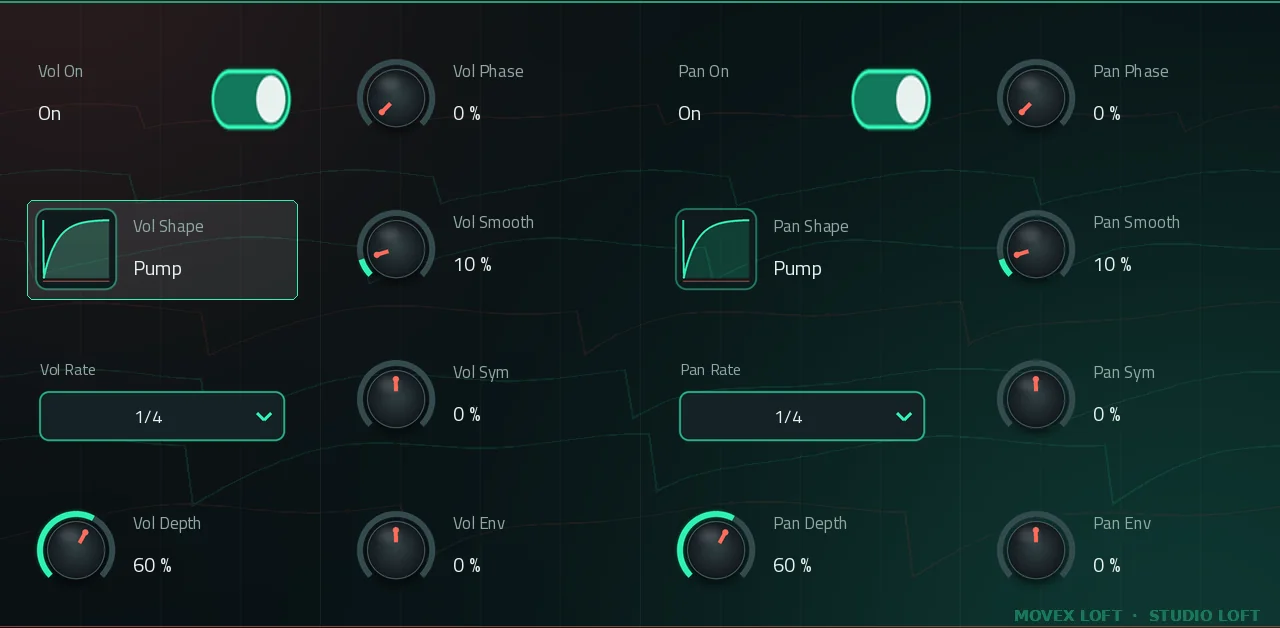
Pumping volume on the left, moving stereo position on the right.
 12345678910111213141516
What you see
- Vol On Module in or out.
- Vol Shape The movement (tap to pick).
- Vol Rate One cycle, 8 Bars … 1/32.
- Vol Depth How far it moves.
- Vol Phase Where the cycle starts.
- Vol Smooth Rounds the edges.
- Vol Sym Leans the shape.
- Vol Env The input pushes it.
- Pan On Module in or out.
- Pan Shape The movement (tap to pick).
- Pan Rate One cycle, 8 Bars … 1/32.
- Pan Depth How far it moves.
- Pan Phase Where the cycle starts.
- Pan Smooth Rounds the edges.
- Pan Sym Leans the shape.
- Pan Env The input pushes it.
What it's for
Volume makes the sound pump, duck or gate in time: the sidechain feel, no sidechain needed. Pan swings the sound across the stereo field.
Tip
Classic pump: Vol Shape Pump, Rate 1/4, Depth 85 % (preset 002 Classic Quarter). Pump late on the kick? Nudge Vol Phase.
Presets that use Volume (49) +45
Presets that use Pan (17) +13
SHAPE LIST
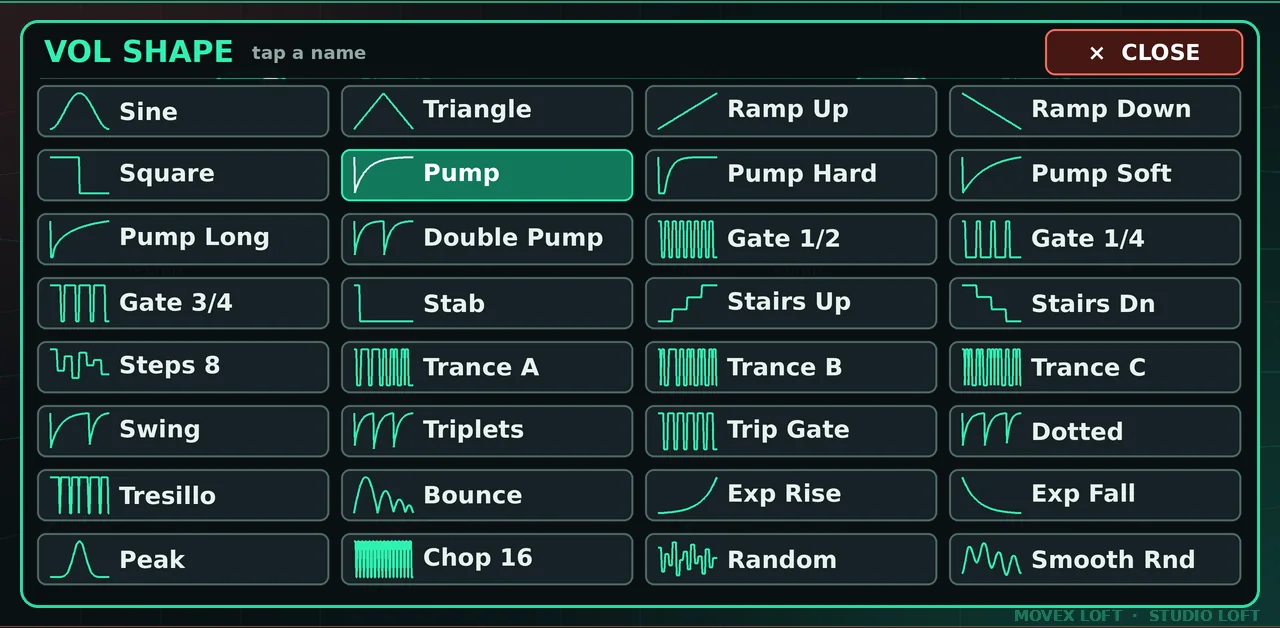
Every module opens the same picture list of 32 shapes.
 123
What you see
- Shape name Tap a name to choose it. The list closes by itself.
- Current shape Lit in mint.
- CLOSE Closes the list without changing anything.
What it's for
Tap any Shape field to open this list. The drawing next to each name is the curve the module follows over one cycle.
Tip
Try the same shape on two modules with a different Rate: a pump at 1/4 on Volume and at 1 Bar on Filter.
Pumps
Pump, Pump Hard, Pump Soft, Pump Long, Double Pump
Duck on the beat and swell back in.
Gates
Gate 1/2, Gate 1/4, Gate 3/4, Stab, Chop 16, Trance A, Trance B, Trance C, Trip Gate
Hard on/off patterns, from simple to trance.
Grooves
Swing, Triplets, Dotted, Tresillo, Bounce
Off-grid feels: swing, three-against-four, bouncing hits.
Curves
Sine, Triangle, Square, Ramp Up, Ramp Down, Exp Rise, Exp Fall, Peak
Smooth waves and one-way sweeps.
Steps & random
Stairs Up, Stairs Dn, Steps 8, Random, Smooth Rnd
Stepped moves and patterns that never repeat the same way.
RATE LIST
One cycle of the shape, always locked to tempo.
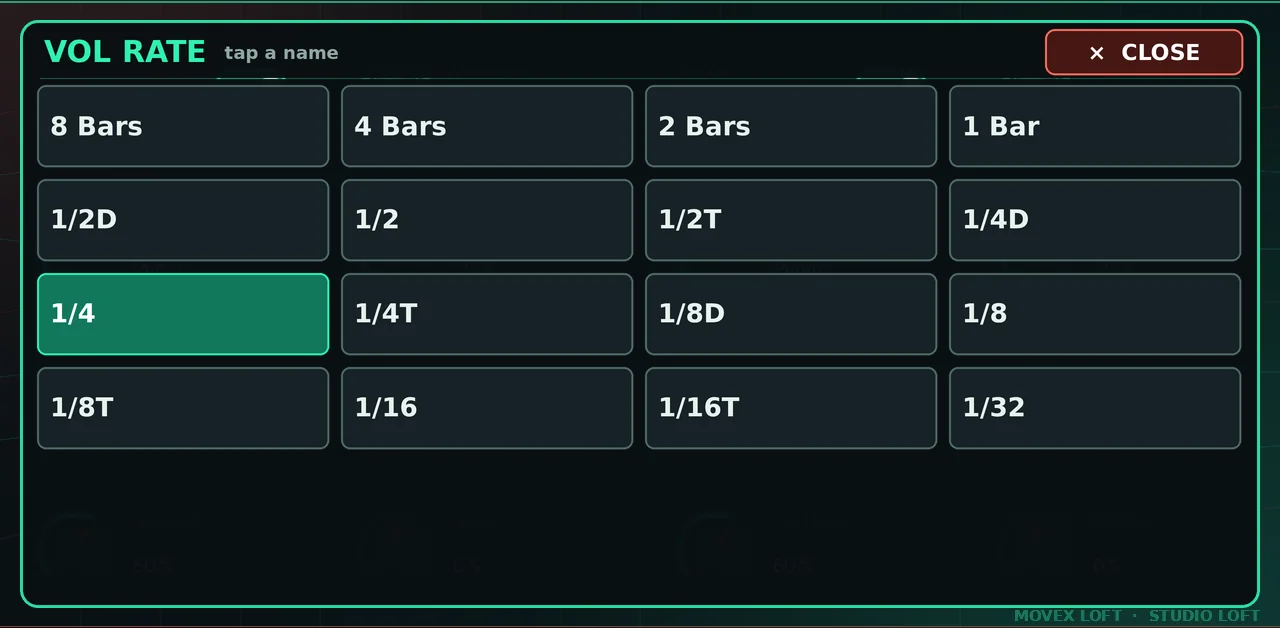 123
What you see
- Rate value 16 values: 8 Bars, 4 Bars, 2 Bars, 1 Bar, 1/2D, 1/2, 1/2T, 1/4D, 1/4, 1/4T, 1/8D, 1/8, 1/8T, 1/16, 1/16T, 1/32.
- Current rate Lit in mint.
- CLOSE Closes the list.
What it's for
Tap any Rate field to open this list. D = dotted (one and a half), T = triplet (two thirds).
Tip
Long rates (2–8 Bars) make slow builds and breathing pads; 1/16 and 1/32 turn any module into a stutter.
One cycle, in beats and at 90 BPM
FILTER
A filter that opens and closes in time.
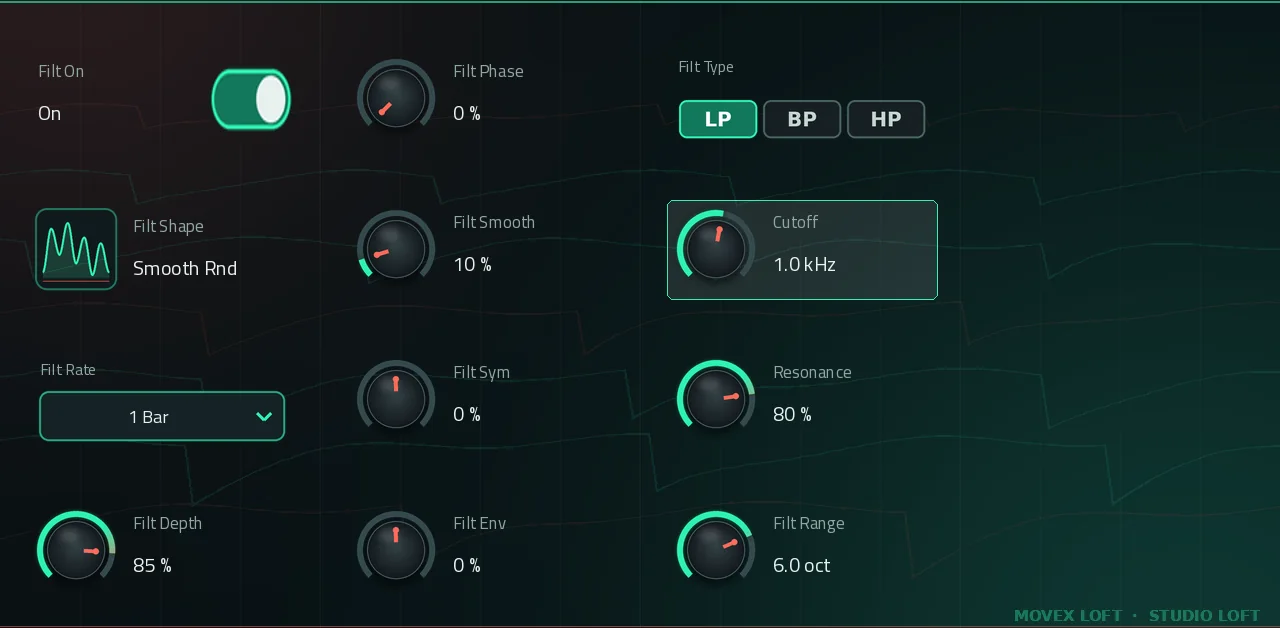 123456789101112
What you see
- Filt On Module in or out.
- Filt Shape The movement (tap to pick).
- Filt Rate One cycle, 8 Bars … 1/32.
- Filt Depth How far it moves.
- Filt Phase Where the cycle starts.
- Filt Smooth Rounds the edges.
- Filt Sym Leans the shape.
- Filt Env The input pushes it.
- Filt Type LP (low-pass), BP (band-pass) or HP (high-pass).
- Cutoff Centre frequency of the movement, 40 Hz to 16 kHz.
- Resonance Peak at the cutoff, 0 to 100 %. High values whistle and talk.
- Filt Range How far the shape sweeps around Cutoff, 0 to 8 octaves.
What it's for
Rhythmic filter rides, slow sweeps, acid squelch and wah. The shape moves the cutoff up and down around the Cutoff setting, as far as Filt Range allows.
Tip
Acid talk: LP, Cutoff 1 kHz, Resonance 80 %, Range 6 oct, Filt Shape Smooth Rnd at 1 Bar (preset 032 Acid Talk).
Presets that use Filter (35) +19
WIDTH
Stereo width that breathes, from mono to extra wide.
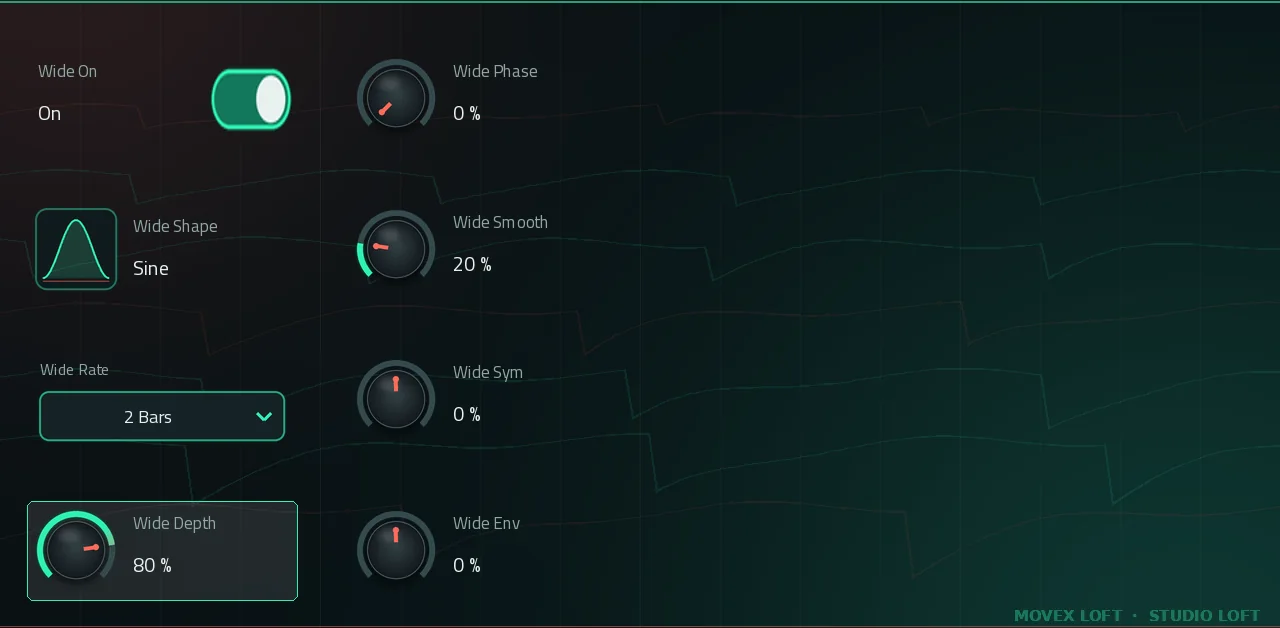 12345678
What you see
- Wide On Module in or out.
- Wide Shape The movement (tap to pick).
- Wide Rate One cycle, 8 Bars … 1/32.
- Wide Depth How far it moves.
- Wide Phase Where the cycle starts.
- Wide Smooth Rounds the edges.
- Wide Sym Leans the shape.
- Wide Env The input pushes it.
What it's for
The shape moves the stereo width (mid/side): from mono to very wide. Press F3 a second time to reach this page.
Tip
Breathe: Sine, 2 Bars, Depth 80 %, Smooth 20 % (preset 046 Breathe). Use it on pads, chords and FX; keep kicks and bass on another track.
Presets that use Width (18) +2
PITCH
Tape wow, vibrato and wobble, in time.
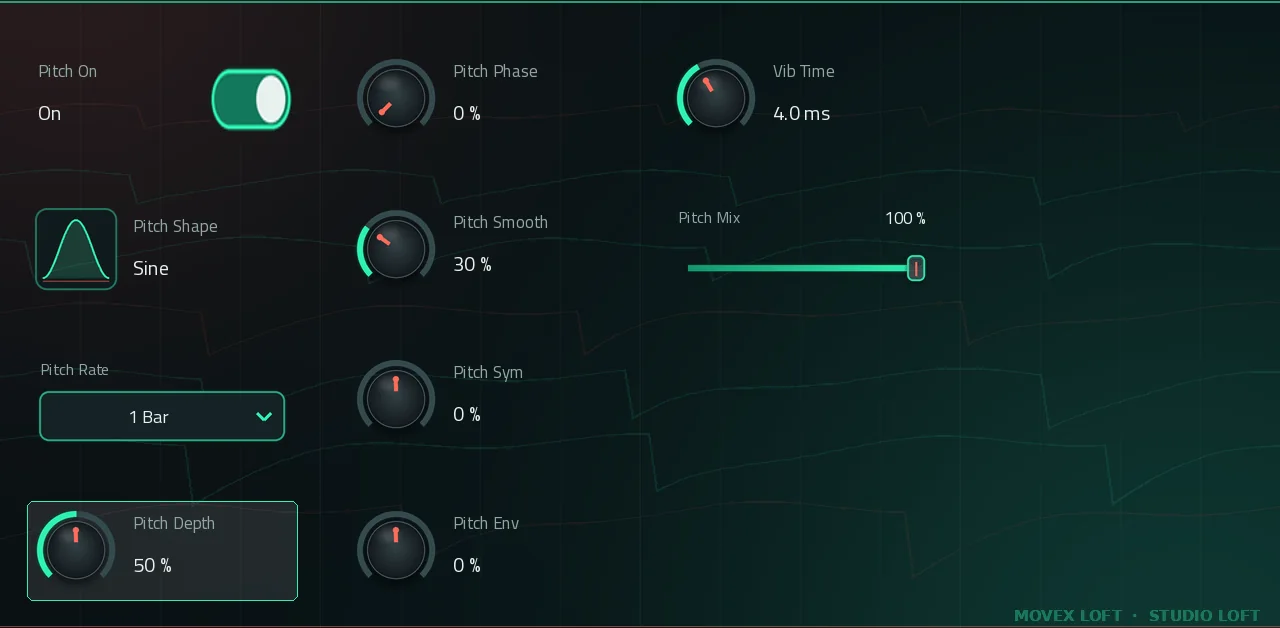 12345678910
What you see
- Pitch On Module in or out.
- Pitch Shape The movement (tap to pick).
- Pitch Rate One cycle, 8 Bars … 1/32.
- Pitch Depth How far it moves.
- Pitch Phase Where the cycle starts.
- Pitch Smooth Rounds the edges.
- Pitch Sym Leans the shape.
- Pitch Env The input pushes it.
- Vib Time Size of the vibrato, 0.2 to 10 ms. Bigger = deeper pitch bend.
- Pitch Mix Blend of the bent sound with the original. Around 50 % it turns into a chorus.
What it's for
A modulated delay bends the pitch up and down following the shape: tape wobble, lazy vibrato, seasick chords.
Tip
Tape wow: Pitch Shape Sine, Rate 1 Bar, Depth 50 %, Smooth 30 %, Vib Time 4 ms (preset 068 Tape Wow).
Presets that use Pitch (7)
TIME
Tape stops, slow-downs and speed-ups, on the grid.
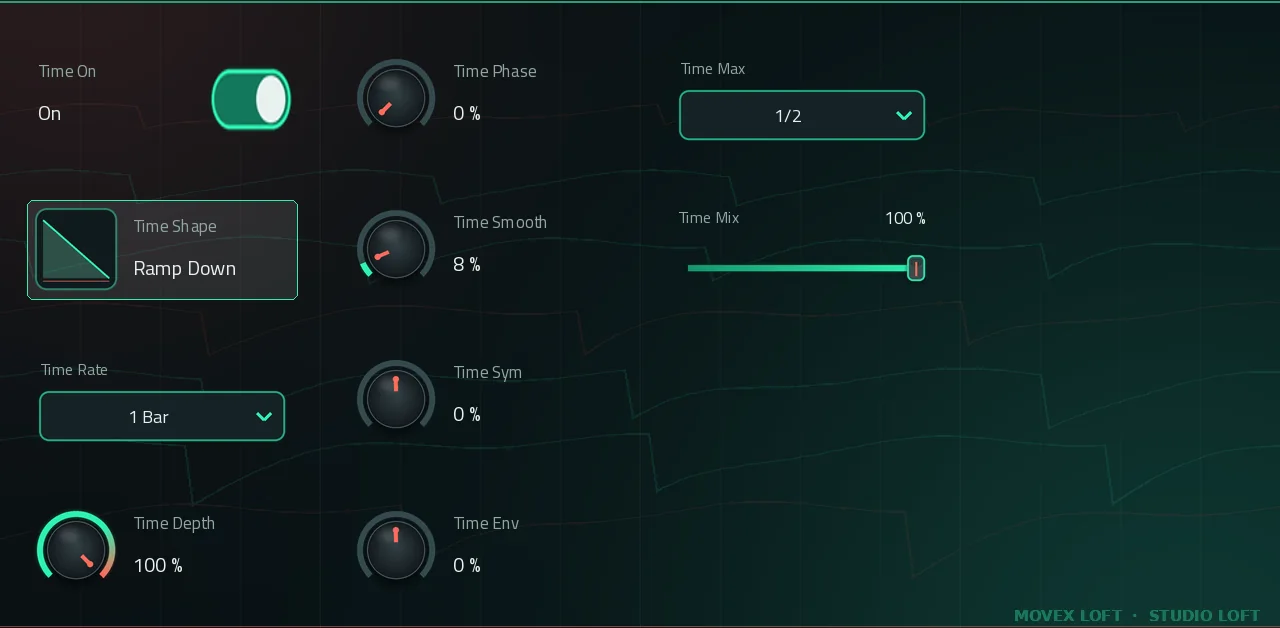 12345678910
What you see
- Time On Module in or out.
- Time Shape The movement (tap to pick).
- Time Rate One cycle, 8 Bars … 1/32.
- Time Depth How far it moves.
- Time Phase Where the cycle starts.
- Time Smooth Rounds the edges.
- Time Sym Leans the shape.
- Time Env The input pushes it.
- Time Max How far playback can fall behind: 1/16, 1/8, 1/4, 1/2 or 1 Bar.
- Time Mix Blend of the slowed sound with the original.
What it's for
The shape changes the playback speed: the sound drags behind and catches up again. Ramp Down gives a tape stop, Pump-style shapes give a lazy halftime drag. Press F4 a second time to reach this page.
Tip
Tape stop at the end of a bar: Ramp Down, 1 Bar, Depth 100 %, Time Max 1/2 (preset 057 Tape Stop).
Presets that use Time (18) +2
DRIVE
Saturation that pulses with the beat.
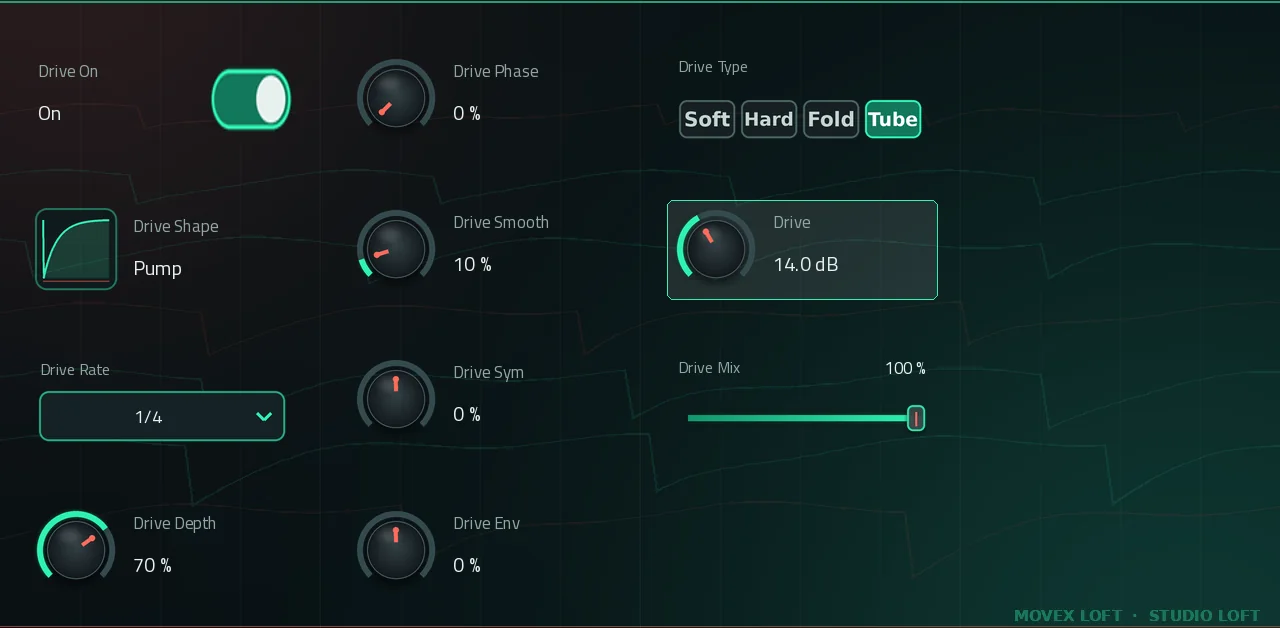 1234567891011
What you see
- Drive On Module in or out.
- Drive Shape The movement (tap to pick).
- Drive Rate One cycle, 8 Bars … 1/32.
- Drive Depth How far it moves.
- Drive Phase Where the cycle starts.
- Drive Smooth Rounds the edges.
- Drive Sym Leans the shape.
- Drive Env The input pushes it.
- Drive Type Soft, Hard, Fold or Tube. Pick the colour of the dirt.
- Drive Amount of saturation, 0 to 36 dB.
- Drive Mix Blend of the driven sound with the clean one.
What it's for
The shape moves the amount of saturation: grit that swells on the off-beat, distortion that only bites on the hits.
Tip
Warm pump: Drive Type Tube, Drive 14 dB, Drive Shape Pump at 1/4, Depth 70 %, with a soft Vol pump (preset 076 Warm Drive Pump).
Presets that use Drive (10)
CRUSH
Lo-fi bit and sample-rate crushing, in rhythm.
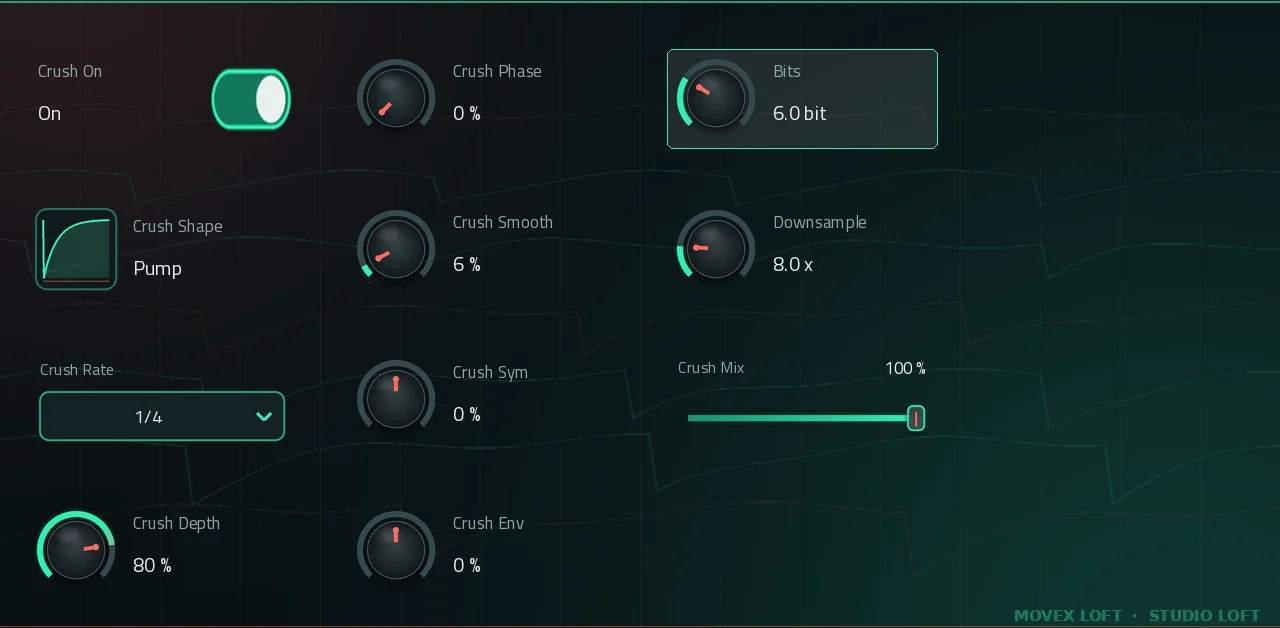 1234567891011
What you see
- Crush On Module in or out.
- Crush Shape The movement (tap to pick).
- Crush Rate One cycle, 8 Bars … 1/32.
- Crush Depth How far it moves.
- Crush Phase Where the cycle starts.
- Crush Smooth Rounds the edges.
- Crush Sym Leans the shape.
- Crush Env The input pushes it.
- Bits Bit depth, 16 (clean) down to 2 (destroyed).
- Downsample Sample-rate reduction, 1x (clean) to 40x.
- Crush Mix Blend of the crushed sound with the clean one.
What it's for
The shape moves the amount of crushing: retro sampler grit that comes and goes. Press F5 a second time to reach this page.
Tip
Crush pulse: Crush Shape Pump at 1/4, Depth 80 %, Bits 6, Downsample 8x (preset 070 Crush Pulse).
Presets that use Crush (11)
ECHO
Echo throws that only happen where the shape says.
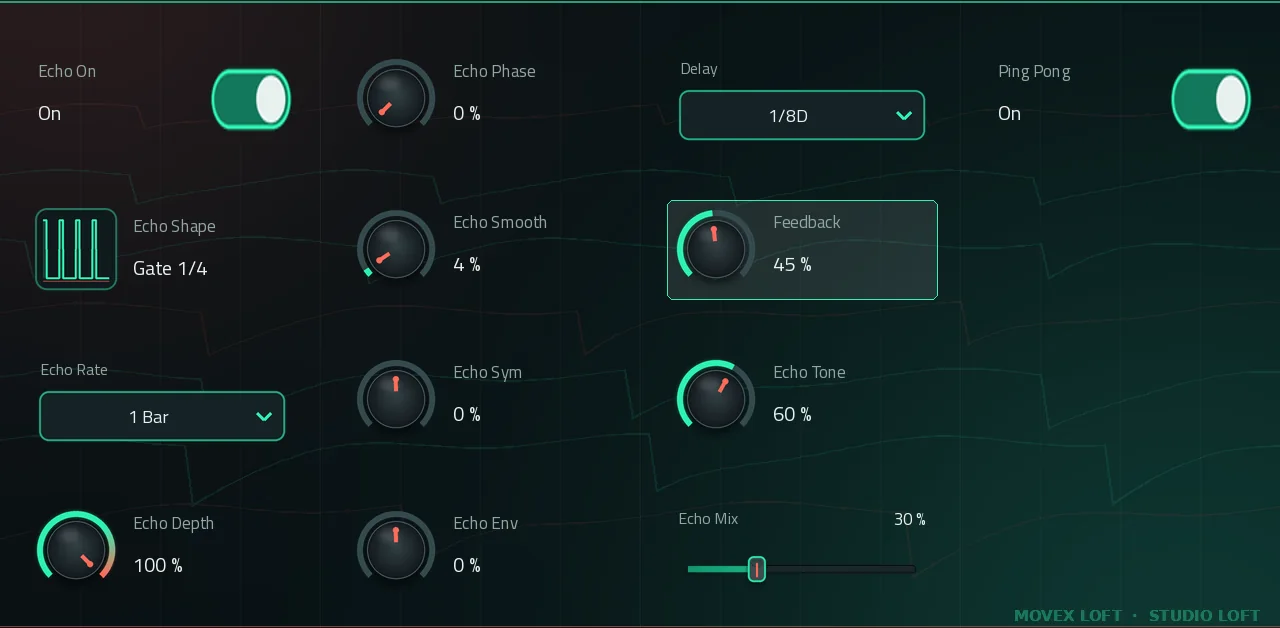 12345678910111213
What you see
- Echo On Module in or out.
- Echo Shape The movement (tap to pick).
- Echo Rate One cycle, 8 Bars … 1/32.
- Echo Depth How far it moves.
- Echo Phase Where the cycle starts.
- Echo Smooth Rounds the edges.
- Echo Sym Leans the shape.
- Echo Env The input pushes it.
- Delay Echo time, locked to tempo: 1/32 to 1/2, with dotted and triplet values.
- Ping Pong Echoes bounce left and right.
- Feedback How many repeats, 0 to 95 %.
- Echo Tone Brightness of the repeats: 0 % dark, 100 % bright.
- Echo Mix Level of the echoes.
What it's for
The shape decides how much sound goes into the delay: echo only the last beat of a bar, or every other hit. The echoes themselves keep ringing in time.
Tip
Disco throws: Echo Shape Gate 1/4 at 1 Bar, Delay 1/8D, Feedback 45 %, Echo Tone 60 %, Echo Mix 30 %, Ping Pong On (preset 095 Disco Echo).
Presets that use Echo (8)
MORE LISTS
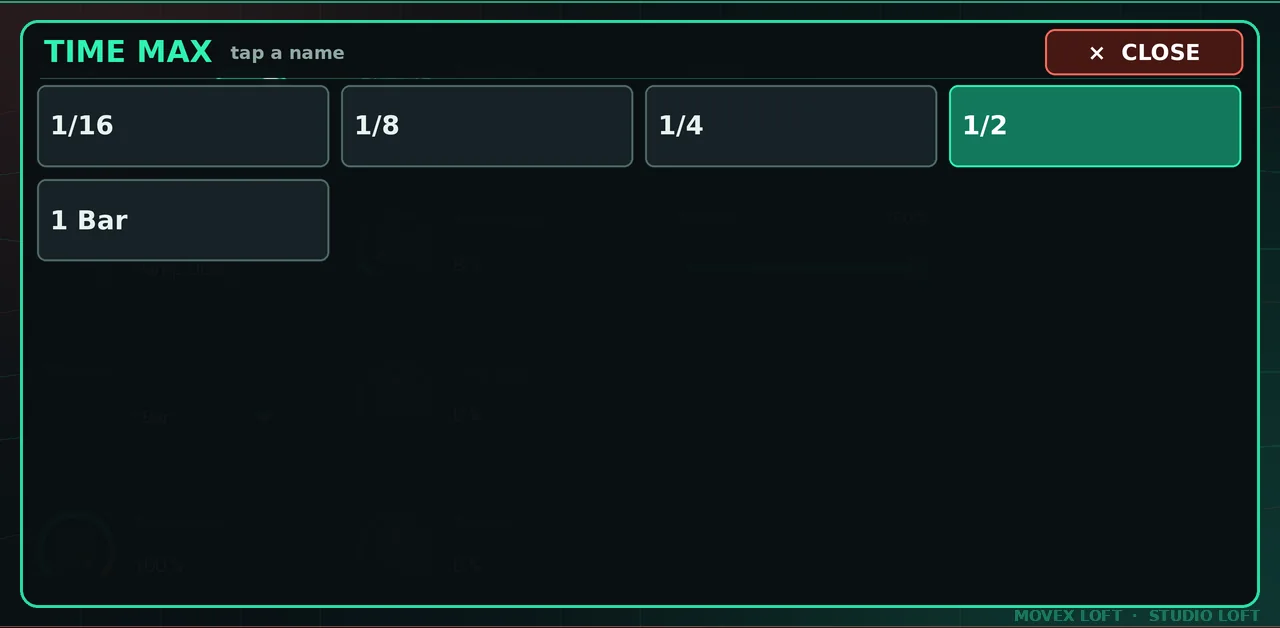
Time Max and Delay open their own picture lists too.
 123
Tip
For a subtle swing-drag on drums, try 1/16 with a low Time Depth.
Time Max List
Tap the Time Max field to open it. Short values keep the drag tight and rhythmic; 1 Bar lets a tape stop sink all the way.
- 1Time Max value 1/16, 1/8, 1/4, 1/2 or 1 Bar.
- 2Current value Lit in mint.
- 3CLOSE Closes the list.
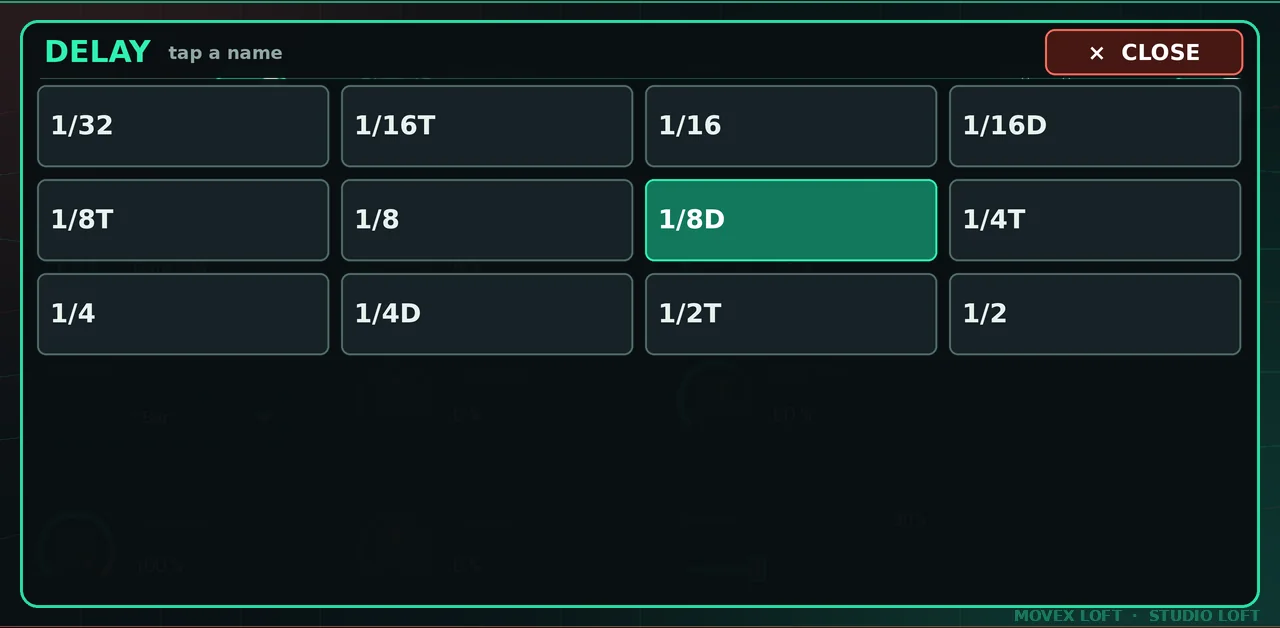
Delay List
Tap the Delay field to open it.
- 1Delay value 12 values: 1/32, 1/16T, 1/16, 1/16D, 1/8T, 1/8, 1/8D, 1/4T, 1/4, 1/4D, 1/2T, 1/2.
- 2Current value Lit in mint.
- 3CLOSE Closes the list.
LISTEN
The assistant that listens to your beat and sets the pump for you.
1234567891011What you see
- LISTEN Start listening while the MPC plays (16 s of playback). It turns into STOP while it listens.
- Status What the assistant is doing, then “Done”.
- Tempo The tempo it locked to.
- Confidence How sure it is, with the number of hits it heard.
- Strong The beats where your strongest hits fall.
- Offset How early or late those hits sit against the grid, in ms.
- Hits in the bar 16 steps: the taller the bar, the stronger the hit on that step.
- Suggested The pump it proposes for the Vol module: shape, rate and phase.
- Advice Up to three short notes about your groove.
- APPLY Sets the Vol module to the suggestion. It turns into UNDO: press again to go back.
- After pressing A reminder: nothing changes until you press APPLY.
What it's for
Press F6 a second time. Use it once your beat plays: it finds where your kicks really fall and lines the pump up to them. Nothing changes until you press APPLY.
Tip
Listen on the full beat (or the kick track), not on the sound you want to pump. Then load Movex Loft on the pad or chord track and press APPLY there.
Presets
122 presets, 12 banks.
Names as they appear in the MPC preset browser. Every preset can be changed and saved with your project.
Init 1
- 001Init
Pump 11
- 002Classic Quarter
- 003Soft Breath
- 004Hard Duck
- 005Long Swell
- 006Double Time
- 007Eighth Pulse
- 008Pump + Filter
- 009Wide Pump
- 010Triplet Pump
- 011Dotted Duck
- 012Kick Follow
Gate 11
- 013Half Steps
- 014Quarter Chop
- 015Three Of Four
- 016Trance Rider
- 017Trance Lift
- 018Trance Echo
- 019Chopper 16
- 020Stutter 32
- 021Triplet Gate
- 022Tresillo
- 023Soft Gate
Filter 11
- 024Slow Sweep
- 025Wah Quarter
- 026Rise 4 Bars
- 027Fall 2 Bars
- 028Pump LP
- 029HP Lift
- 030Step Seq
- 031Random Q
- 032Acid Talk
- 033Env Opener
- 034Bounce BP
Pan 11
- 035Gentle Drift
- 036Quarter Swing
- 037Hard Flip Eighths
- 038Triangle Walk
- 039Ping 16ths
- 040Random Spots
- 041Smooth Wander
- 042Trip Orbit
- 043Pump Pan
- 044Step Steps
- 045Bounce Ball
Wide 11
- 046Breathe
- 047Quarter Bloom
- 048Mono Drop
- 049Open Up
- 050Gate Width
- 051Chorus Wide
- 052Stereo Pulse
- 053Random Field
- 054Wide Pan Mix
- 055Swing Width
- 056Tide
Time 11
- 057Tape Stop
- 058Half Speed
- 059Speed Up
- 060Wobble Tape
- 061Warp Steps
- 062Reverse Feel
- 063Pump Drag
- 064Random Jumps
- 065Stutter Grab
- 066Slow Bend
- 067Vinyl Brake
LoFi 11
- 068Tape Wow
- 069Cassette Flutter
- 070Crush Pulse
- 071Bit Steps
- 072Radio Drift
- 073Dusty Swing
- 074Sampler 12
- 075Drunk Tape
- 076Warm Drive Pump
- 077Broken Toy
- 078Old Phone
Trap 11
- 079808 Room
- 080Hat Roll Gate
- 081Triplet Flow
- 082Dark Pulse
- 083Stop Drop
- 084Echo Throws
- 085Melody Wobble
- 086Pan Hats
- 087Gritty Pump
- 088Phonk Crush
- 089Halftime Feel
House 11
- 090Sidechain 4x4
- 091Filter House
- 092Offbeat Organ
- 093French Pump
- 094Deep Breath
- 095Disco Echo
- 096Chord Stabber
- 097Shuffle Swing
- 098Rising Build
- 099Garage Skip
- 100Tech Gate
DnB 11
- 101Rolling Pump
- 102Growl Motion
- 103Neuro Steps
- 104Break Chop
- 105Liquid Drift
- 106Jungle Echo
- 107Halftime Brake
- 108Wobble Eighths
- 109Crush Rolls
- 110Wide Bass
- 111Triplet Roll
FX 11
- 112Riser Sweep
- 113Downlifter
- 114Space Throws
- 115Glitch Machine
- 116Underwater
- 117Robot Talk
- 118Ping Pong Rain
- 119Tape Slowdown
- 120Bounce Room
- 121Shredder
- 122Ghost Echo
Technical sheet
Movex Loft at a glance.
A tempo-locked motion effect for the MPC: nine modules that pump, filter, pan, widen, bend, drive, crush, echo and slow down your sound in time.
For who, for what
- House & dance: sidechain pumps, filter rides, trance gates.
- Hip-hop & trap: halftime drags, moving hats, echo throws.
- Lo-fi & beat tapes: tape wow, crushed pulses, dusty swing.
Strong points
- Nine modules in one effect, each with its own shape, rate and depth.
- Locked to the MPC tempo and playhead (Host), or free-running.
- 32 rhythm shapes, chosen from a picture list.
- An envelope follower on every module: the motion reacts to the hits.
- LISTEN reads your groove and sets the pump for you.
- Output limiter at −1 dBFS: stacked moves don’t clip.
Get going in 3 steps
- Install: with the MPC in computer mode, copy the folder “Studio Loft - VST - Movex Loft” into “VST2 Plugins” on the MPC drive.
- Load: add Movex Loft as an insert effect on a track, a program or a pad.
- Play: pick a preset, then shape it on the pages F1 to F6.
Licence & activation
Yours in three steps.
Buy
Pay once on this site. Your personal link arrives by e-mail and stays valid.
Install Loft Hub
MPC OS 3.10.1 or later, with Enhancements and External Plugin Support turned on in Preferences. Copy Loft Hub to your MPC drive once.
Link and play
In Loft Hub, accept, link your MPC, and your plugins install by themselves. It works on two MPCs. That is it.
LICENCE
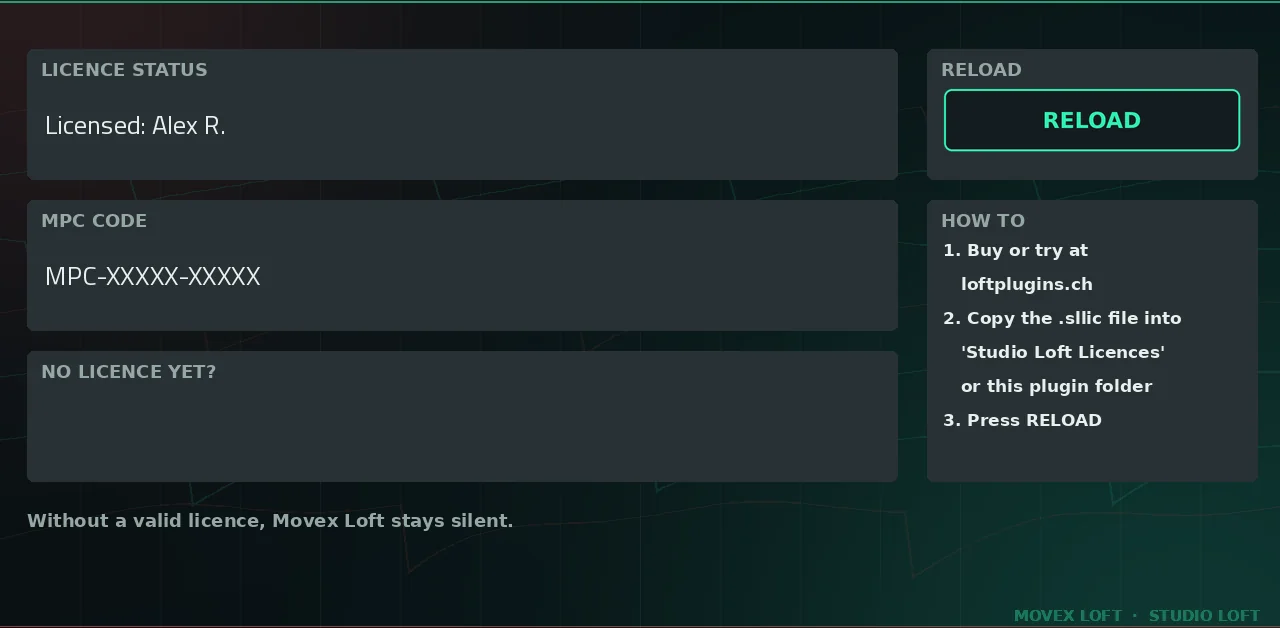
Your licence and this MPC’s code, in one place.
 12345
What you see
- Licence status Licensed with your name.
- MPC Code The code of this MPC. You type it on loftplugins.ch to get your licence file.
- No licence yet? Where to get one, shown only when there is no valid licence.
- RELOAD Reads the licence file again, after you have copied it.
- How to The three steps, always on screen.
What it's for
Press F6 a third time to activate the plugin or check which MPC it is licensed for. Without a valid licence, it stays silent.
Tip
Copy your licence file into the “Studio Loft Licences” folder: one file can serve several Studio Loft plugins.
Activation
Read your MPC Code here, get your licence file on loftplugins.ch, copy it to the MPC, press RELOAD.
One purchase, 2 MPCs
A licence can name two MPCs. Keep your licence file safe: you can copy it again at any time.
Own it
Movex Loft
Rhythmic motion: volume, filter, pan and pitch in time.
One payment, yours for good. Your licence works on two MPCs.