Instrument · version 1.6.0
RevX Loft
THE SYNTH THAT INHALES ON TEMPO, THEN PULSES.
Hit a chord on beat 1. Instead of starting loud and fading, RevX makes it rise like a reversed sound and peak exactly where you want it: at 1/1, on the downbeat of the next bar. Every swell is locked to your tempo, from a quick 1/32 suck to a four-bar riser.
3 = $99Any 3 plugins for $99 →
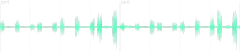
Every chord inhales for one bar and lands exactly on the next downbeat: a simple four-chord loop that breathes.
The manual
Every screen,
page by page.
The full user guide, screen by screen, exactly as on the MPC. Setting names stay the English words of the screen.
The RevX idea
Every note inhales . Right on the beat.
Hit a chord on beat 1. Instead of starting loud and fading, RevX makes it rise like a reversed sound and peak exactly where you want it: at 1/1, on the downbeat of the next bar. Every swell is locked to your tempo, from a quick 1/32 suck to a four-bar riser.


Real sound of the preset REV · Backwards Keys, rendered by the plugin: one chord held for one bar.
- Load REV · Backwards Keys.
- Hold a chord for a full bar: it lands on the next downbeat.
- Set Rev Length to 1/4 for a quick suck, 2/1 for a slow rise.
- On the REV page, set Rev End to Loop: the chord breathes again and again.
Each source has its own Rev switch. Leave it on for source B and turn it off for source A: A gives the punch of the attack, B inhales behind it. One pad, two directions.
Then it pulses
Turn one chord into a groove .
Switch Pulse On and the sound is cut into steps locked to the tempo: 16 patterns, 4 shapes, swing. The same steps can move the filter and the stereo image, and play a pitch sequence: octaves, fifths, chords, Dub.
- Load PULSE · Reverse Pulse.
- Hold a minor chord for two bars.
- On the PULSE page, change Pulse Patt to Offbeat, then Stutter.
- Set Pulse Pitch to Octave: the chord starts to arpeggiate.
On the LISTEN page, turn Follow Song on. When another Studio Loft plugin on your MPC has written the song key, the Pulse Pitch steps stay in that key. Without a song, they follow the key of what you play.
Getting around
15 pages on the six function keys
Press a function key to open its first page; press it again for the next one. The LICENCE page, the last one, is explained at the end of this guide.
| F1 | MAIN → LISTEN |
| F2 | SOURCE A → SOURCE B → SOURCE C → MIX |
| F3 | FILTER |
| F4 | REV → REVERSER |
| F5 | PULSE → LFO |
| F6 | FX → SPACE → MASTER → LICENCE |
Main
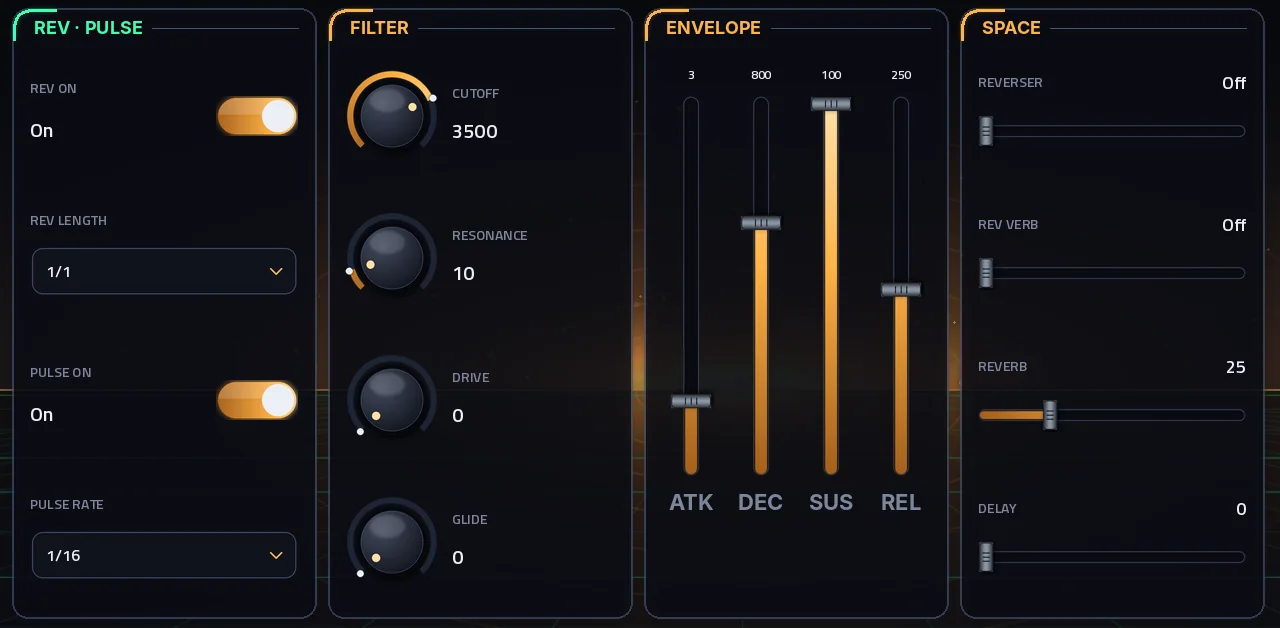 12345678910111213141516
What you see
- 1 Rev On — Turns the swell on: each note rises like a reversed sound.
- 2 Rev Length — How long the swell takes, in note values locked to the tempo (1/32 to 4 bars).
- 3 Pulse On — Turns on the rhythmic Pulse engine.
- 4 Pulse Rate — Length of one Pulse step, locked to the tempo.
- 5 Cutoff — Brightness. Turn down for darker, softer notes.
- 6 Resonance — Adds a singing peak at the cutoff point.
- 7 Drive — Pushes the filter and the distortion for grit.
- 8 Glide — Time each note takes to slide from the previous one.
- 9 Attack — How fast a note fades in.
- 10 Decay — How fast it falls to the sustain level.
- 11 Sustain — Level held while you keep the pad down.
- 12 Release — How long the note rings after you let go.
- 13 Reverser — Mix of the Reverser: the sound you just played, flipped backwards in slices.
- 14 Rev Verb — Sends the reverb into the Reverser: a reversed reverb that sucks in after the note.
- 15 Reverb — Amount of the room reverb.
- 16 Delay — Amount of the tempo-synced echo.
What it's for
Start here. The four columns hold the moves you use most: switch the swell and the Pulse on, set their timing, shape the tone and the envelope, and add space. Rev Length sets the moment of the peak. At 1/1, a note hit on beat 1 rushes up and lands exactly on the next bar: hold the pad for the whole bar to hear all of it. Lists on this page: Rev Length . See next page.
Tip
Rev Length sets the moment of the peak. At 1/1, a note hit on beat 1 rushes up and lands exactly on the next bar: hold the pad for the whole bar to hear all of it.
PULSE · Reverse Pulse
F1 · Main
The lists
Tap the box to open the list, tap a choice: it is applied at once and the list closes. CLOSE leaves it as it is.
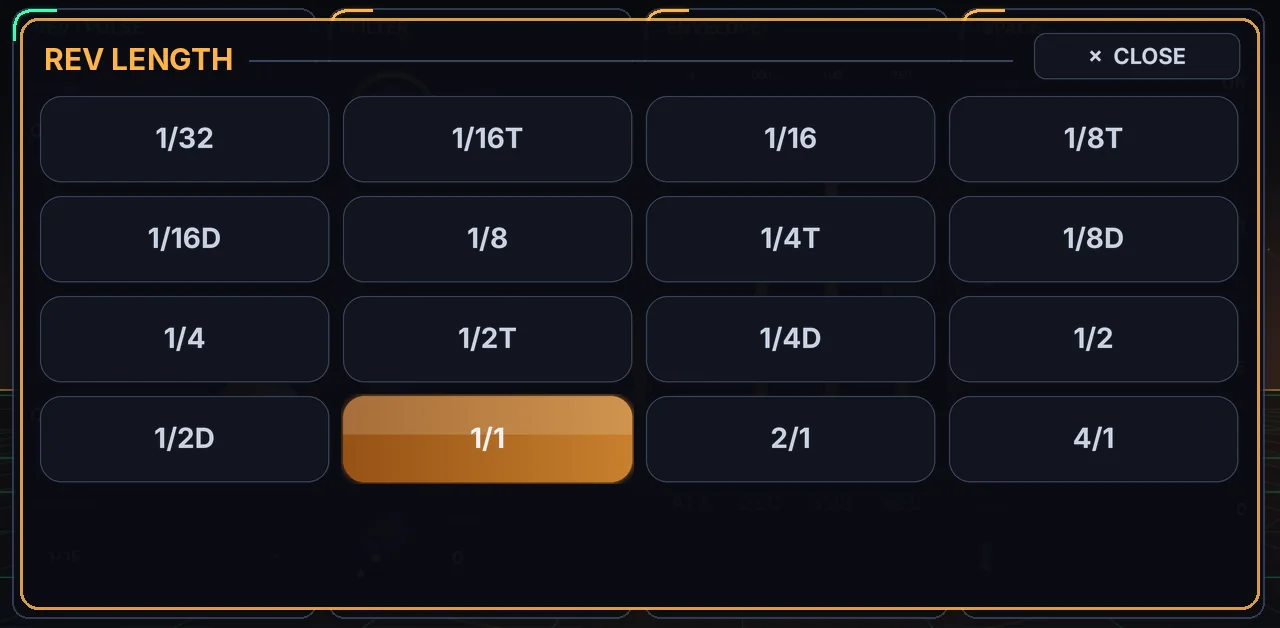
Rev Length
Tap the box and pick a note value: 1/32 for a quick suck, 1/1 for one bar, 4/1 for a four-bar riser. T = triplet, D = dotted.
Listen
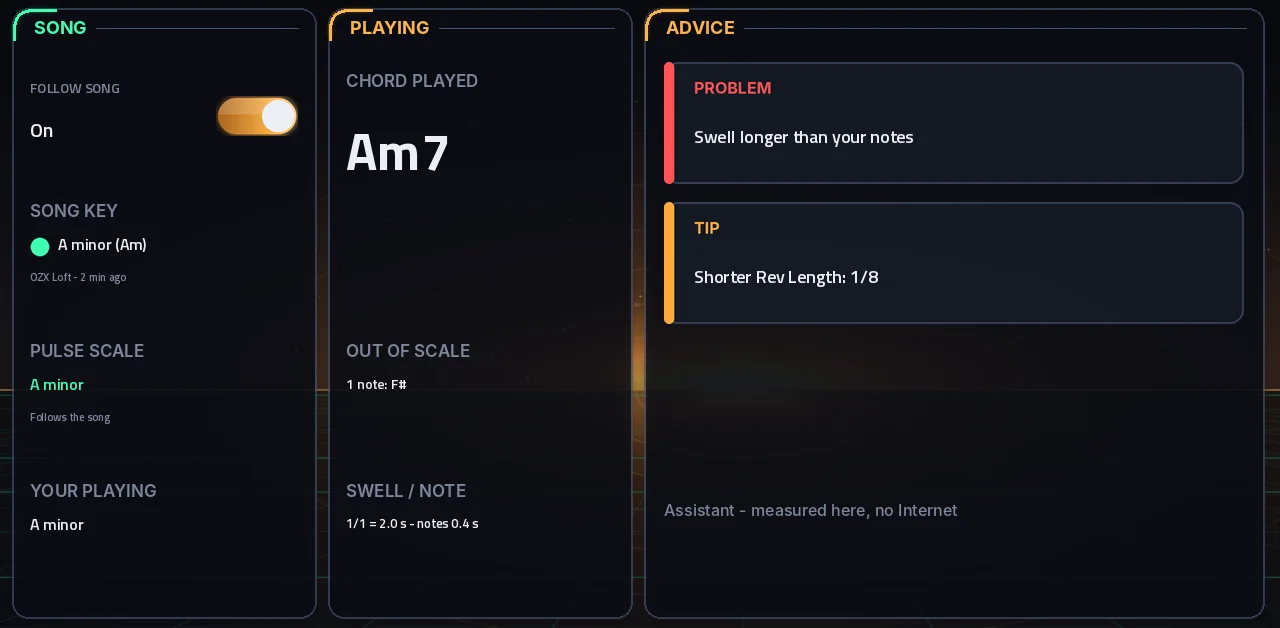 1234567891011
What you see
- 1 Follow Song — On: the Pulse Pitch steps stay inside the key of your song or of your playing.
- 2 Song Key — Key of the song, as written by another Studio Loft plugin on the same MPC. The dot shows how sure it is: red, orange, green.
- 3 Song Source — Which plugin wrote that key, and when.
- 4 Pulse Scale — The scale the Pulse Pitch steps follow right now.
- 5 Pulse Info — Why: follows the song, follows your playing, or original scales.
- 6 Played Key — Key detected from the notes you play.
- 7 Chord — The chord you are holding, in big letters.
- 8 Out Of Scale — Notes you played that are outside the song key.
- 9 Swell Note — Swell length against the length of your notes.
- 10 Tip 1 — Advice, most important first (PROBLEM, TIP or INFO).
- 11 Tip 2 — Second advice line.
What it's for
RevX measures what you play and what it outputs, right on the MPC, with no Internet. It shows the chord you hold, the key of your playing and of your song, and gives up to three short tips when something does not fit. Turn Follow Song on and the Pulse Pitch sequences stay in key on their own: no wrong note when you play over another Studio Loft plugin that set the song key.
Tip
Turn Follow Song on and the Pulse Pitch sequences stay in key on their own: no wrong note when you play over another Studio Loft plugin that set the song key.
PULSE · Reverse Pulse
Source A
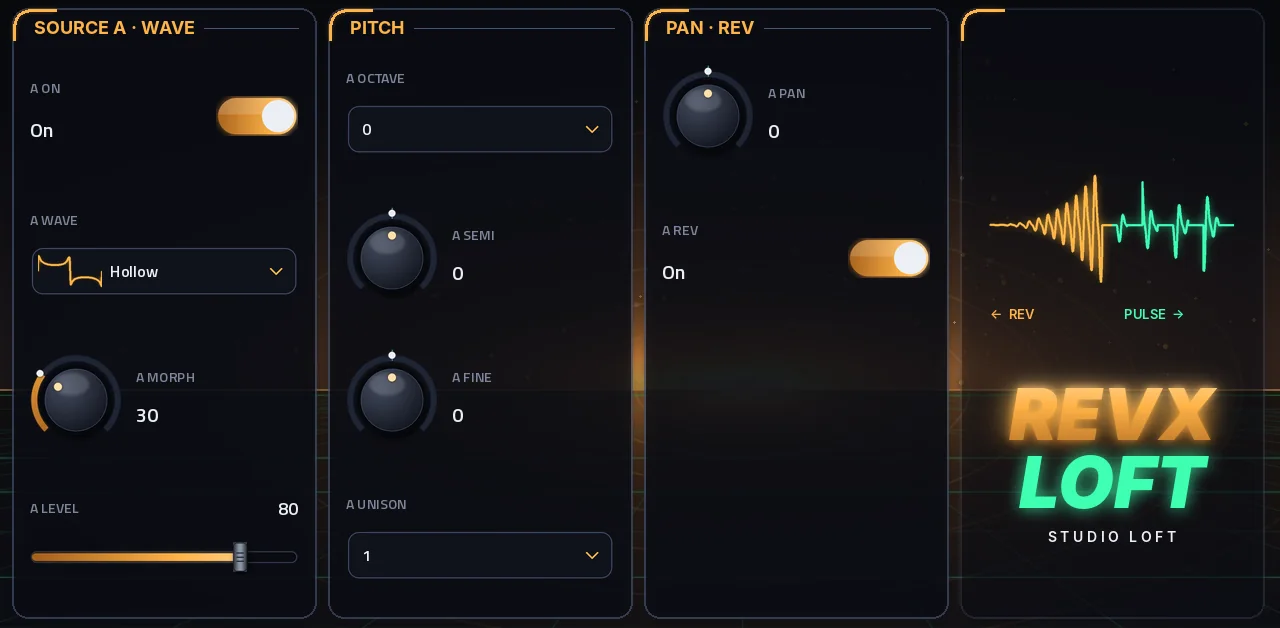 12345678910
What you see
- 1 A On — Turns source A on or off.
- 2 A Wave — One of 16 waveforms for source A.
- 3 A Morph — Blends toward the next waveform in the list.
- 4 A Level — Level of source A.
- 5 A Octave — Octave shift (-3 to +3).
- 6 A Semi — Semitone shift (-12 to +12).
- 7 A Fine — Fine tuning in cents.
- 8 A Unison — 1 to 4 stacked voices for a wider sound.
- 9 A Pan — Position of source A in the stereo field.
- 10 A Rev — On: source A swells. Off: it keeps its normal attack.
What it's for
RevX has three sources (A, B, C). Each one has its own waveform, pitch, unison and pan, and its own Rev switch. Set A Rev to Off and B Rev to On: A gives a clean attack, B inhales behind it. One note, two directions. Lists on this page: A Wave . See next page.
Tip
Set A Rev to Off and B Rev to On: A gives a clean attack, B inhales behind it. One note, two directions.
REV · Inhale Piano
F2 · Source A
The lists
Tap the box to open the list, tap a choice: it is applied at once and the list closes. CLOSE leaves it as it is.
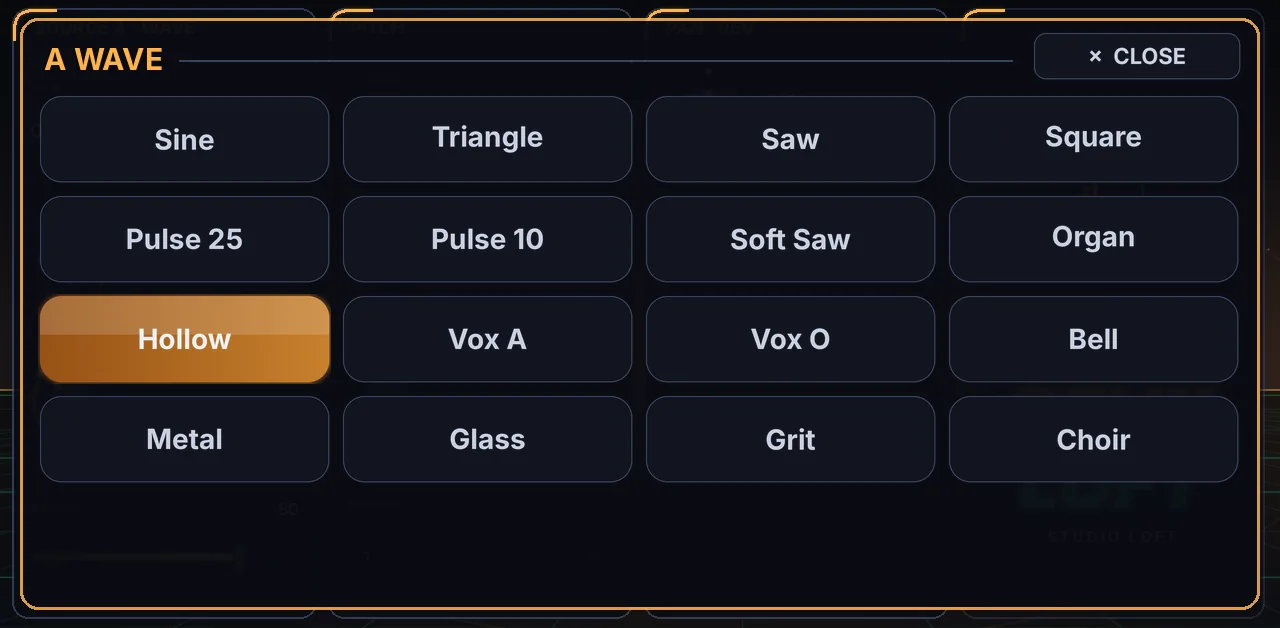
A Wave
16 waveforms made by the plugin itself: classic shapes (Sine, Triangle, Saw, Square, Pulse 25, Pulse 10, Soft Saw) and characters (Organ, Hollow, Vox A, Vox O, Bell, Metal, Glass, Grit, Choir).
Source B
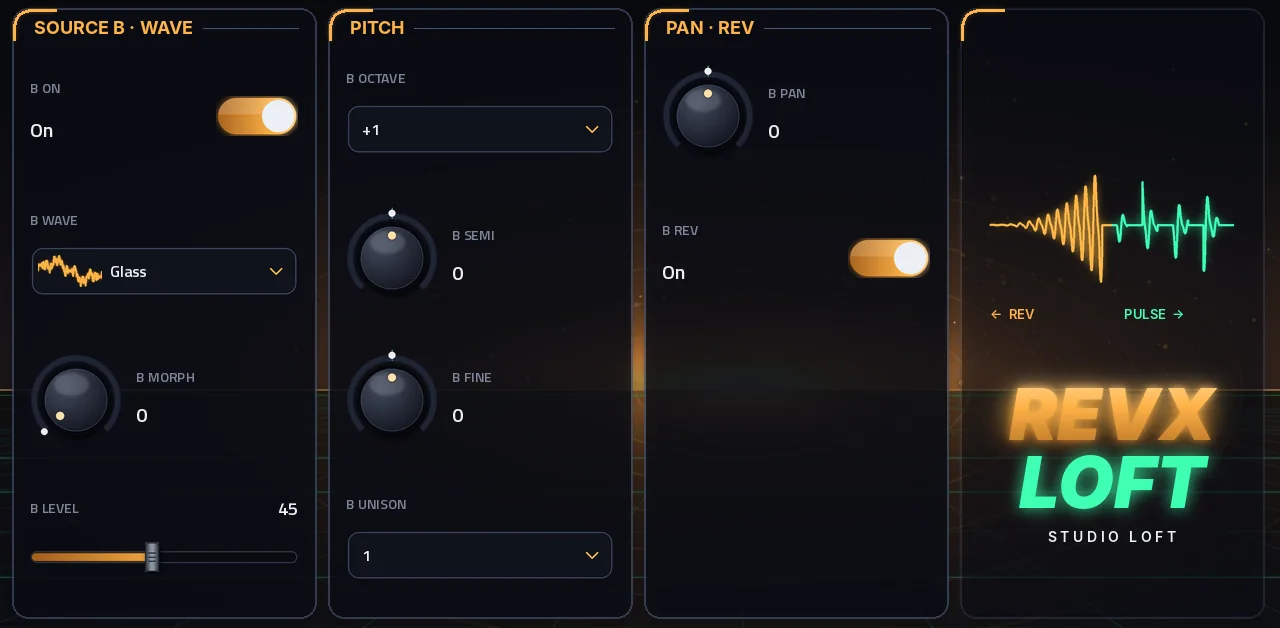 12345678910
What you see
- 1 B On — Turns source B on or off.
- 2 B Wave — One of 16 waveforms for source B.
- 3 B Morph — Blends toward the next waveform in the list.
- 4 B Level — Level of source B.
- 5 B Octave — Octave shift (-3 to +3).
- 6 B Semi — Semitone shift (-12 to +12).
- 7 B Fine — Fine tuning in cents.
- 8 B Unison — 1 to 4 stacked voices for a wider sound.
- 9 B Pan — Position of source B in the stereo field.
- 10 B Rev — On: source B swells. Off: it keeps its normal attack.
What it's for
Same controls as source A. Detune it a few cents (B Fine) against A for a thicker sound, or move it an octave up. Glass or Bell on source B, one octave up, at a low B Level: a shimmer that rises above the main swell.
Tip
Glass or Bell on source B, one octave up, at a low B Level: a shimmer that rises above the main swell.
REV · Bell Rewind
Source C
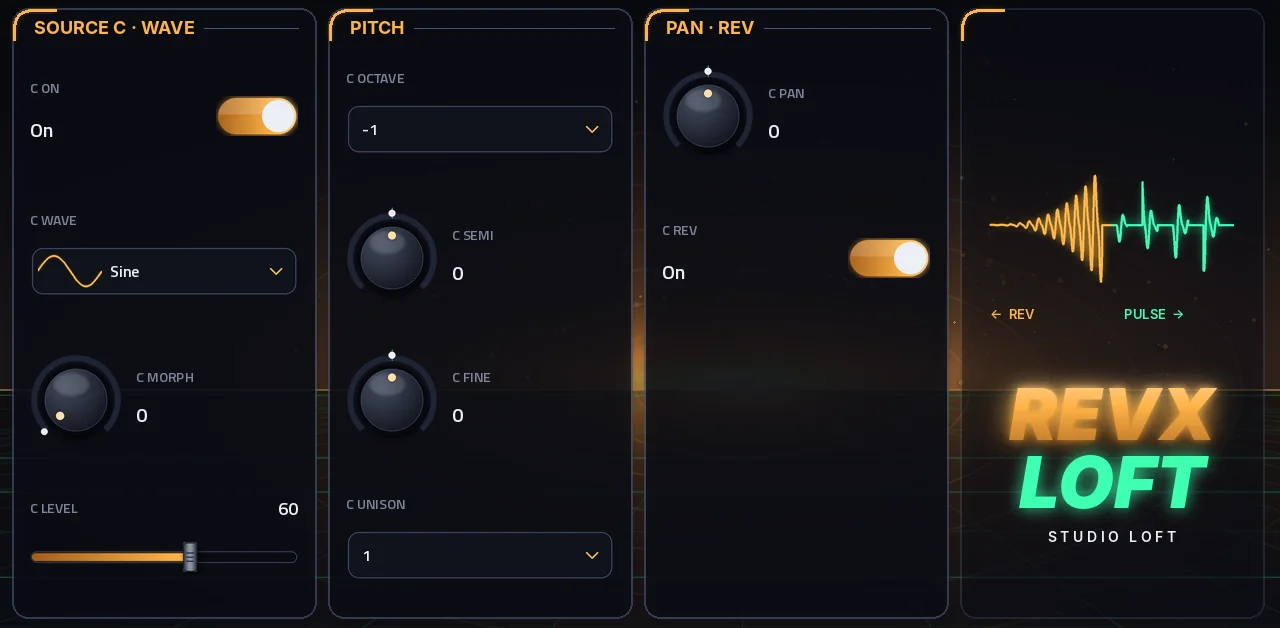 12345678910
What you see
- 1 C On — Turns source C on or off.
- 2 C Wave — One of 16 waveforms for source C.
- 3 C Morph — Blends toward the next waveform in the list.
- 4 C Level — Level of source C.
- 5 C Octave — Octave shift (-3 to +3).
- 6 C Semi — Semitone shift (-12 to +12).
- 7 C Fine — Fine tuning in cents.
- 8 C Unison — 1 to 4 stacked voices for a wider sound.
- 9 C Pan — Position of source C in the stereo field.
- 10 C Rev — On: source C swells. Off: it keeps its normal attack.
What it's for
Same controls again. Source C is ideal for a low layer: C Octave at -1 and a simple wave. Sine on C, Octave -1, Level around 60: weight under the swell without muddying it.
Tip
Sine on C, Octave -1, Level around 60: weight under the swell without muddying it.
REV · Flip Stack
Mix
 1234567891011
What you see
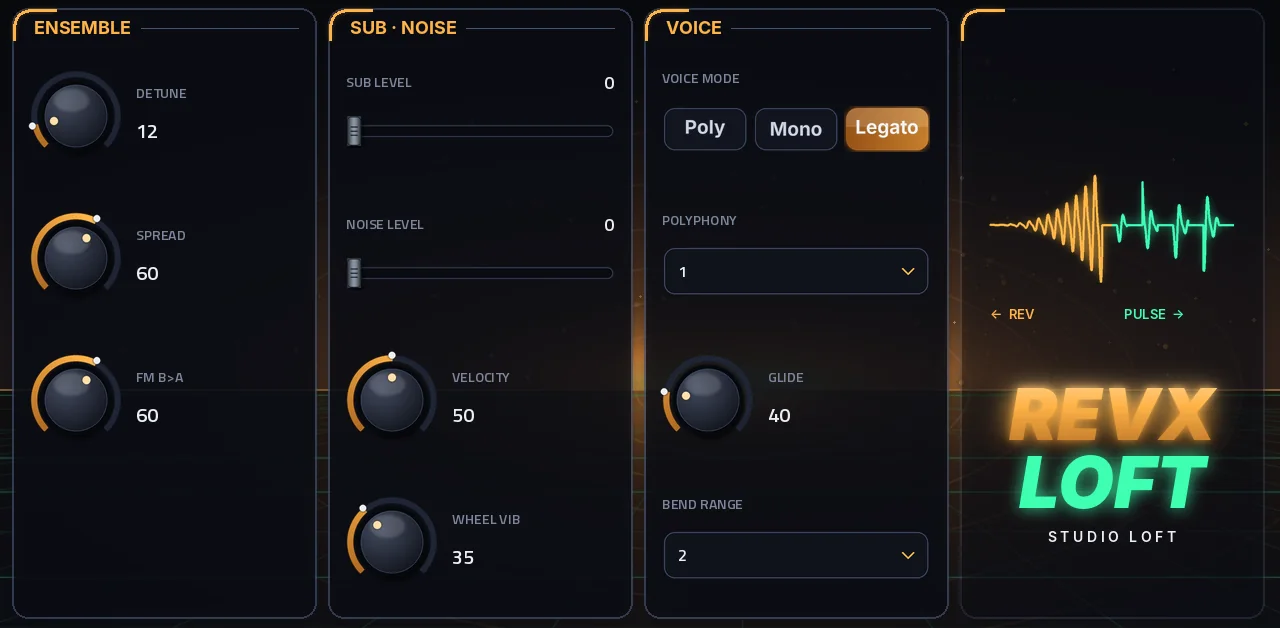
- 1 Detune — Spread in pitch between unison voices.
- 2 Spread — Stereo width of the unison voices.
- 3 FM B>A — Source B modulates the pitch of source A for metallic, bell-like tones.
- 4 Sub Level — Adds a sub layer one octave below.
- 5 Noise Level — Adds noise for air and breath.
- 6 Velocity — How much the pad velocity changes the note.
- 7 Wheel Vib — Vibrato depth on the mod wheel.
- 8 Voice Mode — Poly (chords), Mono (one note) or Legato (one note, no retrigger).
- 9 Polyphony — Maximum number of notes at once (1 to 8).
- 10 Glide — Time each note takes to slide from the previous one.
- 11 Bend Range — Pitch bend range in semitones.
What it's for
Everything that sits between the sources and the filter: unison width, FM, the sub and noise layers, how the MPC pads and wheels play the synth. For a lead, choose Legato and raise Glide to about 40 ms: play overlapping notes and they slide into each other.
Tip
For a lead, choose Legato and raise Glide to about 40 ms: play overlapping notes and they slide into each other.
LEAD · FM Lead
Filter
 1234567891011
What you see
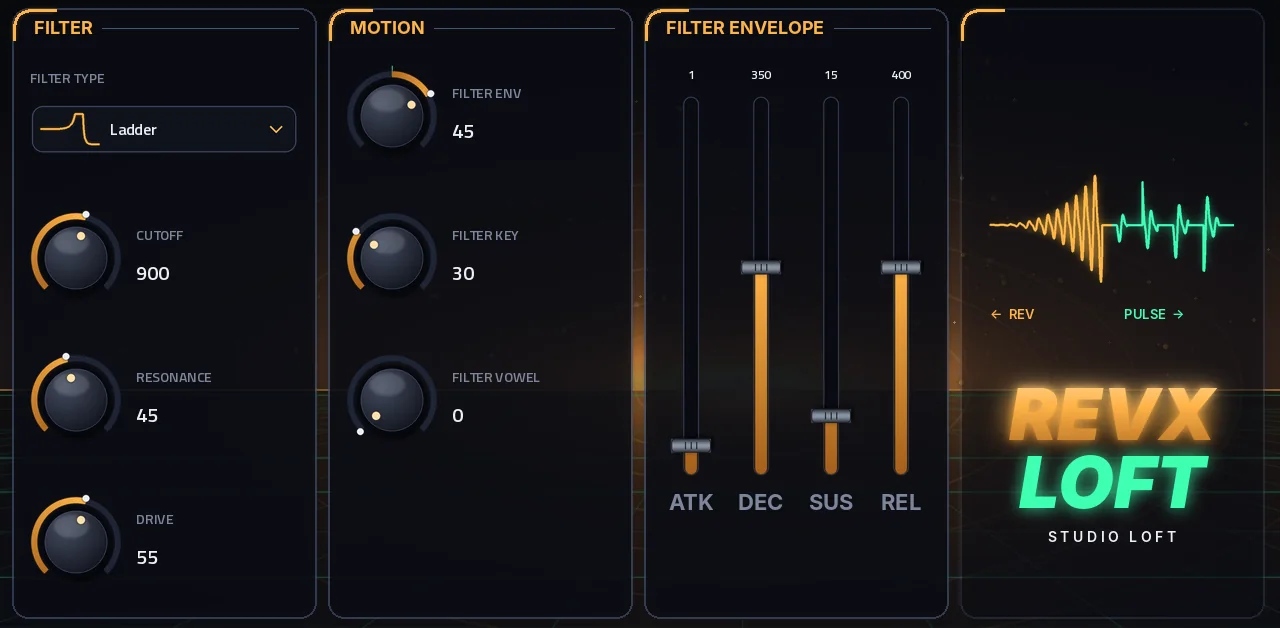
- 1 Filter Type — 8 filters: LP 12, LP 24, Ladder, Band, High, Notch, Comb, Formant.
- 2 Cutoff — Brightness. Turn down for darker, softer notes.
- 3 Resonance — Adds a singing peak at the cutoff point.
- 4 Drive — Pushes the filter and the distortion for grit.
- 5 Filter Env — How much the filter envelope moves the cutoff (negative = closes).
- 6 Filter Key — Higher notes open the filter more.
- 7 Filter Vowel — Vowel colour for the Formant filter.
- 8 FEnv Attack — Filter envelope attack.
- 9 FEnv Decay — Filter envelope decay.
- 10 FEnv Sust — Filter envelope sustain.
- 11 FEnv Rel — Filter envelope release.
What it's for
Pick the filter type, then shape it. The vertical sliders are the filter envelope. Comb and Formant are the colourful ones: Formant plus Filter Vowel gives talking pads, Comb gives metallic, tuned tones. Lists on this page: Filter Type . See next page.
Tip
Comb and Formant are the colourful ones: Formant plus Filter Vowel gives talking pads, Comb gives metallic, tuned tones.
BASS · Scream Bass
F3 · Filter
The lists
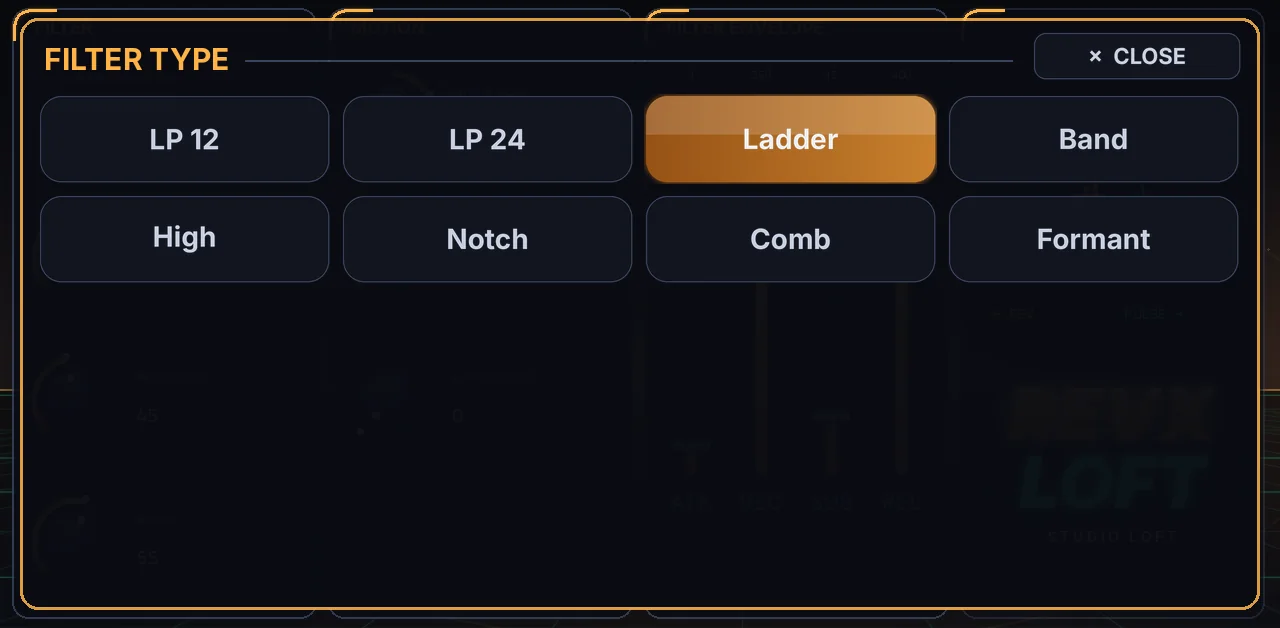
Tap the box to open the list, tap a choice: it is applied at once and the list closes. CLOSE leaves it as it is.
Filter Type
Each type has its own icon. LP 12 and LP 24 for classic warmth, Ladder for thick bass, Band, High and Notch for shaping, Comb and Formant for colour.
Rev
 12345678
What you see
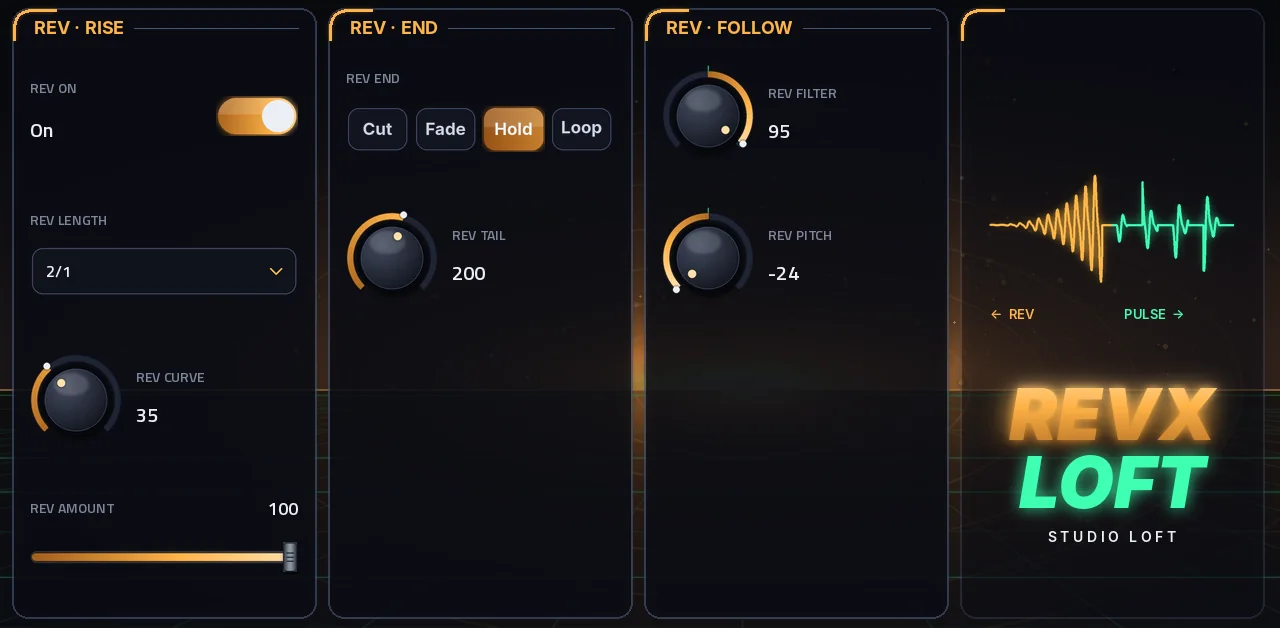
- 1 Rev On — Turns the swell on: each note rises like a reversed sound.
- 2 Rev Length — How long the swell takes, in note values locked to the tempo (1/32 to 4 bars).
- 3 Rev Curve — Shape of the rise: low = steady, high = slow start and a sharp rush at the end.
- 4 Rev Amount — Depth of the swell. 100 = from silence; lower keeps some of the note from the start.
- 5 Rev End — What happens when the swell peaks: Cut (stops), Fade (dies over Rev Tail), Hold (stays), Loop (rises again).
- 6 Rev Tail — Fade time after the peak when Rev End is Fade.
- 7 Rev Filter — The filter opens with the rise (negative values close it instead).
- 8 Rev Pitch — Start the swell this many semitones away and glide into the note.
What it's for
Everything about the rise: its length, its shape, how deep it goes, how it ends, and what the filter and the pitch do while it rises. Rev Pitch at -12 and Rev Filter at +60: each note climbs an octave while it opens up. Instant riser on any chord.
Tip
Rev Pitch at -12 and Rev Filter at +60: each note climbs an octave while it opens up. Instant riser on any chord.
SWELL · Riser FX
Reverser
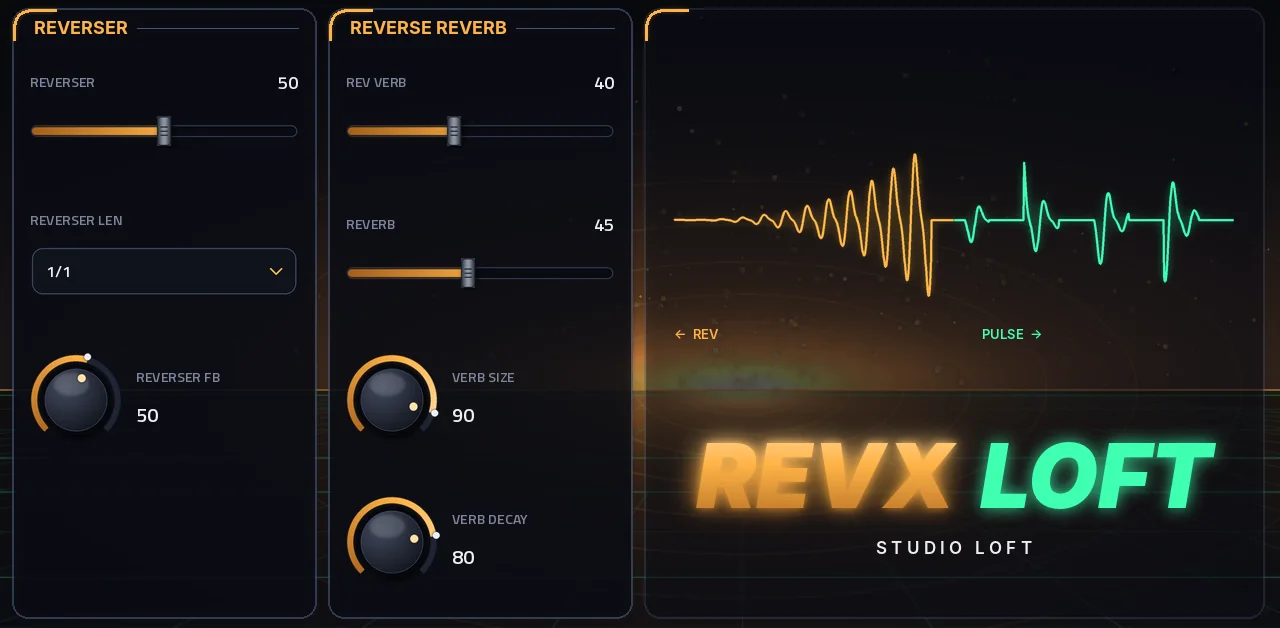 1234567
What you see
- 1 Reverser — Mix of the Reverser: the sound you just played, flipped backwards in slices.
- 2 Reverser Len — Size of each reversed slice, locked to the bar.
- 3 Reverser Fb — Feeds the reversed sound back in for longer, ghostly trails.
- 4 Rev Verb — Sends the reverb into the Reverser: a reversed reverb that sucks in after the note.
- 5 Reverb — Amount of the room reverb.
- 6 Verb Size — Size of the room.
- 7 Verb Decay — Length of the reverb tail.
What it's for
The Reverser records what RevX just played and plays it back reversed, slice by slice, locked to the bar when the transport runs. Rev Verb sends the reverb through it: the reverb sucks in after the note. Reverser at 50, Reverser Len 1/4, Rev Verb at 40: every chord leaves a reversed echo that leads into the next beat. Lists on this page: Reverser Len . See next page.
Tip
Reverser at 50, Reverser Len 1/4, Rev Verb at 40: every chord leaves a reversed echo that leads into the next beat.
TEXTURE · Back Space
F4 · Reverser
The lists
Tap the box to open the list, tap a choice: it is applied at once and the list closes. CLOSE leaves it as it is.
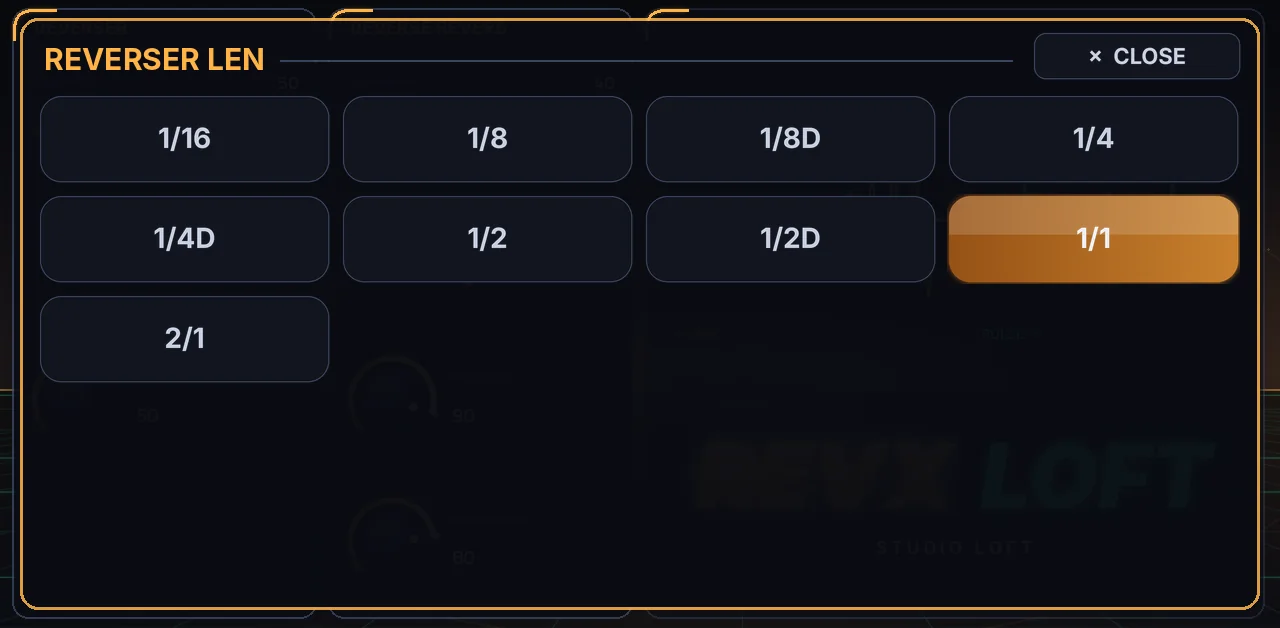
Reverser Len
Slice size of the Reverser, from 1/16 to 2 bars. Short slices stutter, long slices tell the phrase backwards.
Pulse
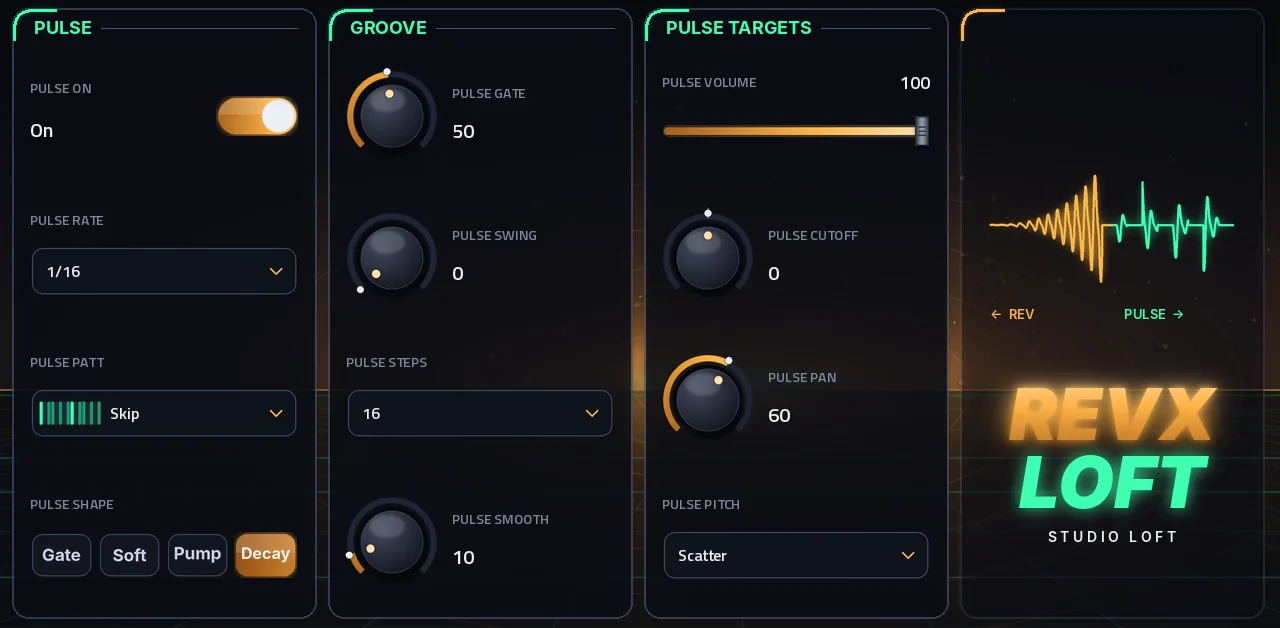 123456789101112
What you see
- 1 Pulse On — Turns on the rhythmic Pulse engine.
- 2 Pulse Rate — Length of one Pulse step, locked to the tempo.
- 3 Pulse Patt — One of 16 rhythmic patterns.
- 4 Pulse Shape — Gate (hard), Soft (rounded), Pump (ducking), Decay (plucky).
- 5 Pulse Gate — How long each step stays open.
- 6 Pulse Swing — Delays every other step for a groovier feel.
- 7 Pulse Steps — Pattern length in steps (1 to 16).
- 8 Pulse Smooth — Softens the edges of each step to remove clicks.
- 9 Pulse Volume — How much the Pulse chops the volume.
- 10 Pulse Cutoff — The Pulse moves the filter on each step.
- 11 Pulse Pan — The Pulse moves the sound left and right.
- 12 Pulse Pitch — Plays a pitch sequence with the steps: octaves, fifths, chords and more.
What it's for
The Pulse chops the sound in steps locked to the tempo. Choose a pattern and a shape, then decide what it moves: volume, filter, pan, and a pitch sequence. Pulse Patt Offbeat, Pulse Shape Pump, Pulse Rate 1/8: instant sidechain feel on any pad, no compressor needed. Lists on this page: Pulse Patt , Pulse Pitch . See next page.
Tip
Pulse Patt Offbeat, Pulse Shape Pump, Pulse Rate 1/8: instant sidechain feel on any pad, no compressor needed.
TEXTURE · Bell Rain
F5 · Pulse
The lists
Tap the box to open the list, tap a choice: it is applied at once and the list closes. CLOSE leaves it as it is.
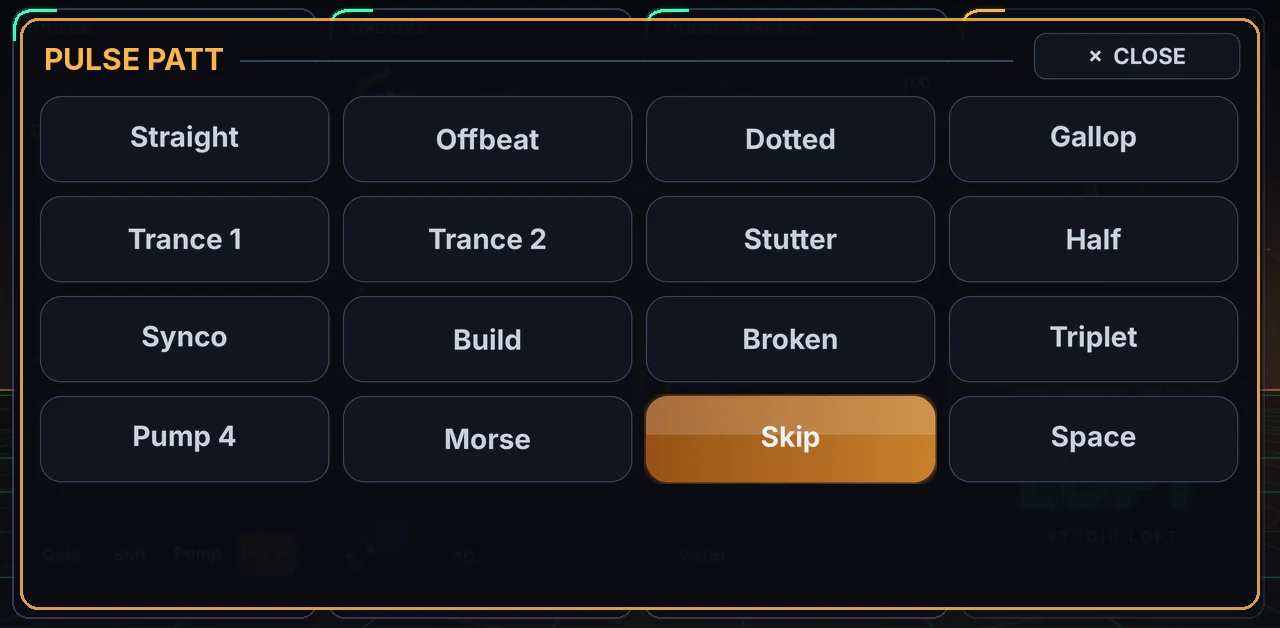
Pulse Patt
16 patterns, from Straight and Offbeat to Gallop, Trance, Stutter, Build, Triplet, Morse and Space.
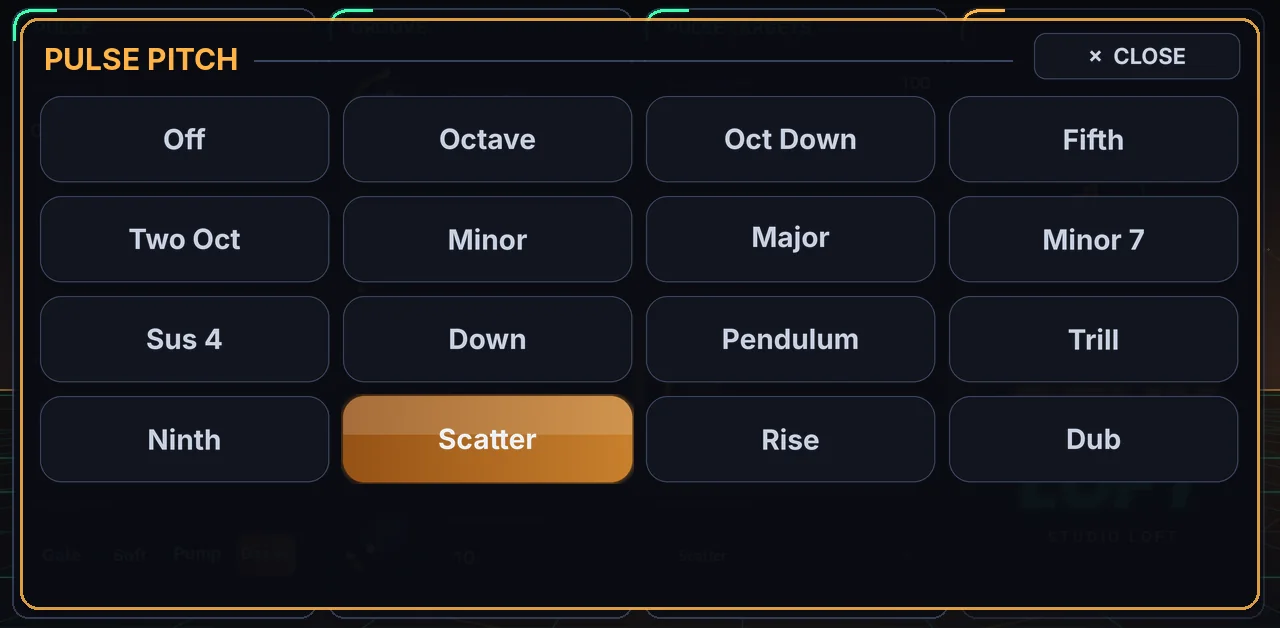
Pulse Pitch
16 pitch sequences that play with the steps: Octave, Oct Down, Fifth, Two Oct, Minor, Major, Minor 7, Sus 4, Down, Pendulum, Trill, Ninth, Scatter, Rise, Dub. Off keeps the pitch still.
LFO
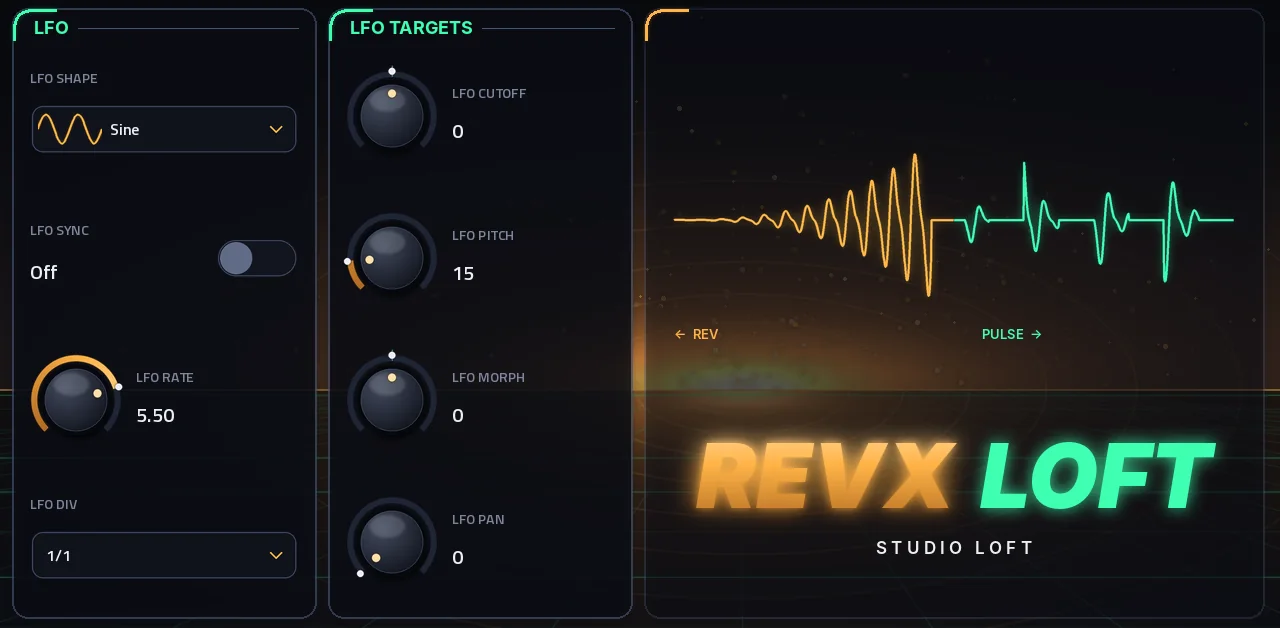 12345678
What you see
- 1 LFO Shape — 7 shapes: Sine, Triangle, Saw Up, Saw Down, Square, S&H, Smooth Rnd.
- 2 LFO Sync — On: speed follows the tempo (LFO Div). Off: free speed (LFO Rate).
- 3 LFO Rate — Free speed in Hz (when LFO Sync is Off).
- 4 LFO Div — Speed as a note value (when LFO Sync is On).
- 5 LFO Cutoff — LFO to filter cutoff.
- 6 LFO Pitch — LFO to pitch (vibrato), in cents.
- 7 LFO Morph — LFO to the waveform Morph of the sources.
- 8 LFO Pan — LFO to stereo position.
What it's for
One LFO with 7 shapes, free or synced to the tempo, sent to filter, pitch, waveform Morph and pan. S&H synced at 1/16 to LFO Cutoff gives a random, stepped filter that never repeats the same way. Lists on this page: LFO Shape . See next page.
Tip
S&H synced at 1/16 to LFO Cutoff gives a random, stepped filter that never repeats the same way.
LEAD · Hollow Lead
F5 · LFO
The lists
Tap the box to open the list, tap a choice: it is applied at once and the list closes. CLOSE leaves it as it is.
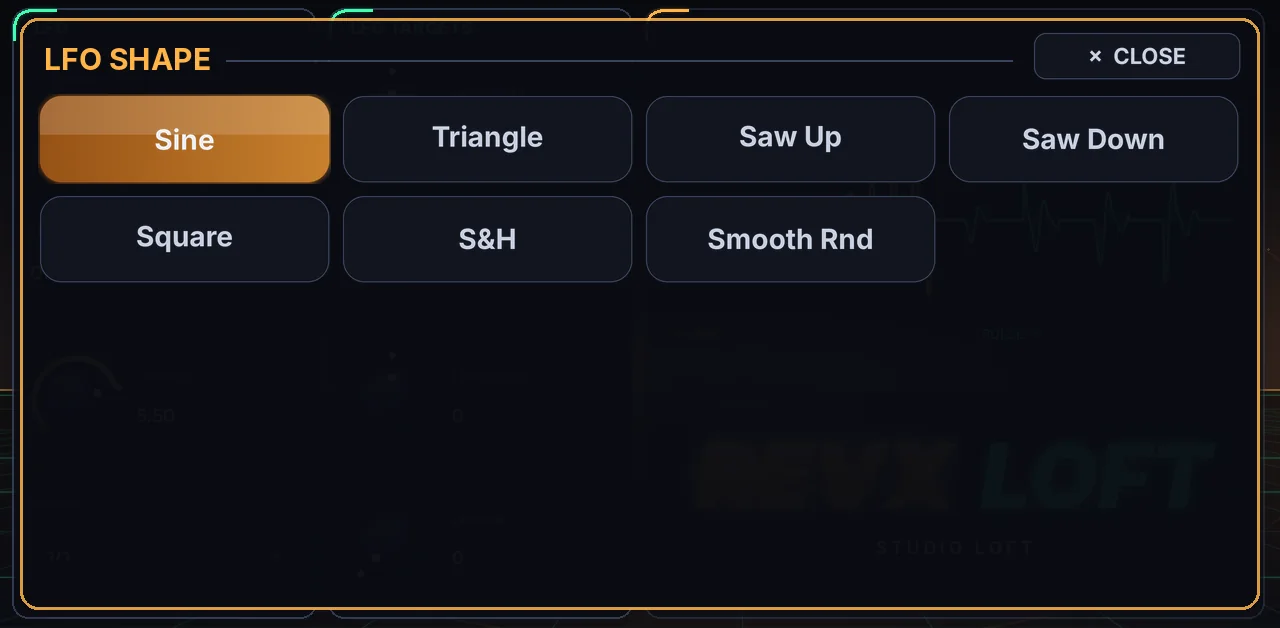
LFO Shape
7 shapes. S&H jumps at random, Smooth Rnd drifts.
FX
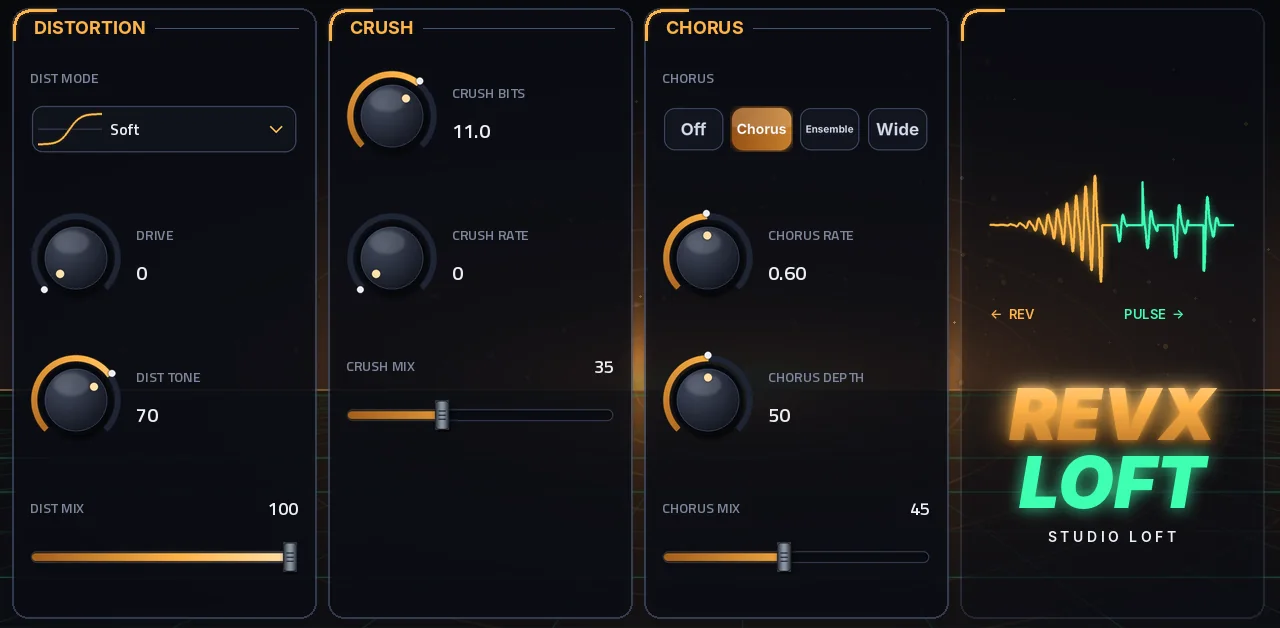 1234567891011
What you see
- 1 Dist Mode — 7 distortions: Soft, Hard, Fuzz, Tube, Fold, Rectify, Scream.
- 2 Drive — Pushes the filter and the distortion for grit.
- 3 Dist Tone — Brightness of the distortion.
- 4 Dist Mix — Blend of distorted and clean sound.
- 5 Crush Bits — Bit depth: lower = rougher (Off at 16).
- 6 Crush Rate — Lowers the sample rate for a lo-fi edge.
- 7 Crush Mix — Blend of crushed and clean sound.
- 8 Chorus — Off, Chorus, Ensemble or Wide.
- 9 Chorus Rate — Speed of the chorus movement.
- 10 Chorus Depth — Depth of the movement.
- 11 Chorus Mix — Blend of the chorus.
What it's for
Colour and dirt after the voices: seven distortions, a bit crusher and a three-mode chorus. Crush Bits around 10 with Crush Mix at 35 adds a dusty edge without losing the body of the sound. Lists on this page: Dist Mode . See next page.
Tip
Crush Bits around 10 with Crush Mix at 35 adds a dusty edge without losing the body of the sound.
REV · Tape Flip
F6 · FX
The lists
Tap the box to open the list, tap a choice: it is applied at once and the list closes. CLOSE leaves it as it is.
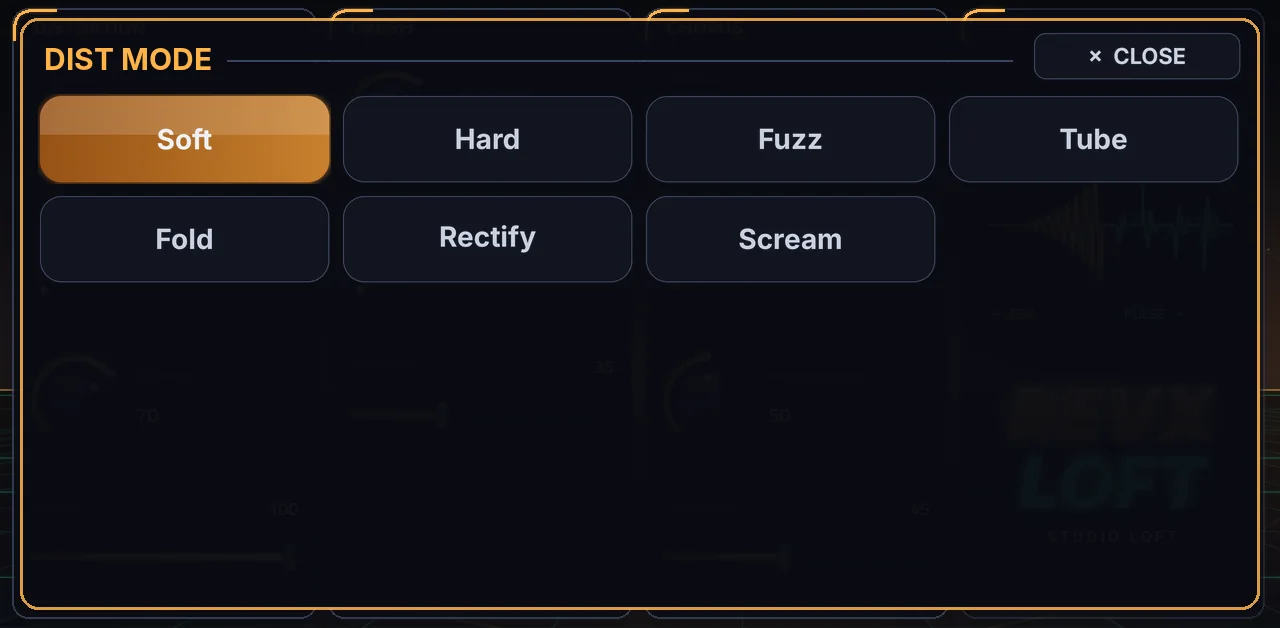
Dist Mode
7 distortions, from a gentle Soft to an aggressive Scream. Fold and Rectify add new harmonics.
Space
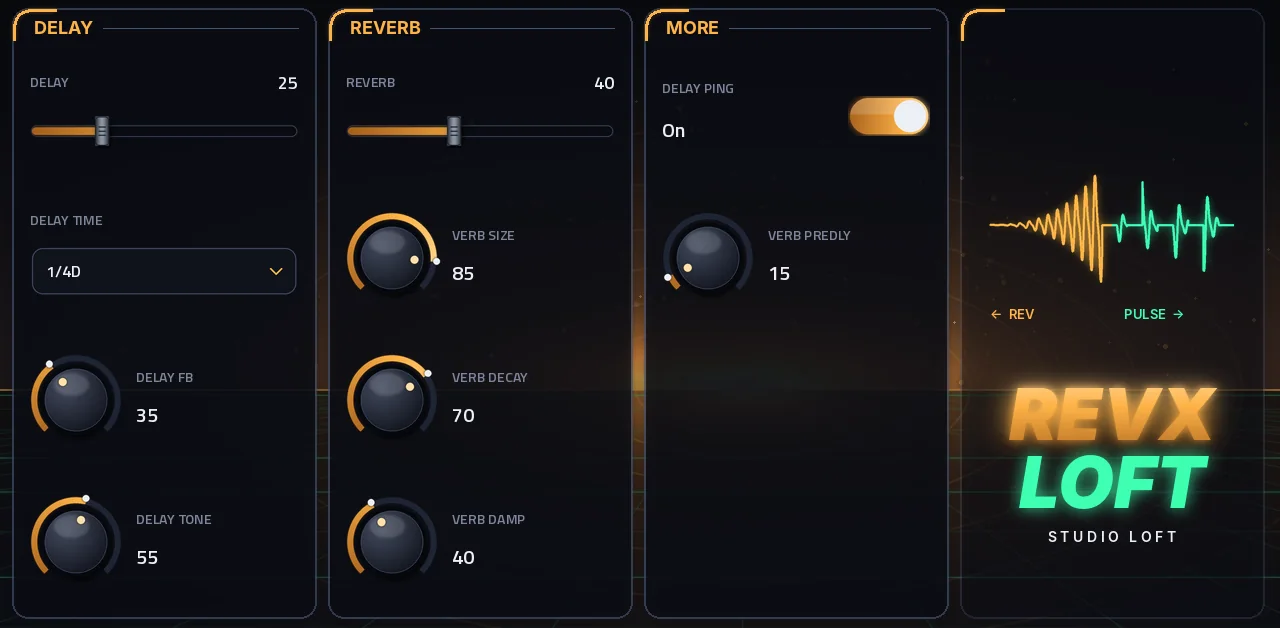 12345678910
What you see
- 1 Delay — Amount of the tempo-synced echo.
- 2 Delay Time — Echo time as a note value, locked to the tempo.
- 3 Delay Fb — Number of repeats.
- 4 Delay Tone — Brightness of the repeats.
- 5 Reverb — Amount of the room reverb.
- 6 Verb Size — Size of the room.
- 7 Verb Decay — Length of the reverb tail.
- 8 Verb Damp — Darkens the reverb tail.
- 9 Delay Ping — Echoes bounce left and right.
- 10 Verb PreDly — Gap before the reverb starts, in ms.
What it's for
A tempo-synced delay with ping-pong, and the reverb that also feeds Rev Verb. Delay Time 1/8D with Delay Ping on and Delay Fb around 35: wide, bouncing repeats that stay in time. Lists on this page: Delay Time . See next page.
Tip
Delay Time 1/8D with Delay Ping on and Delay Fb around 35: wide, bouncing repeats that stay in time.
PAD · Bell Field
F6 · Space
The lists
Tap the box to open the list, tap a choice: it is applied at once and the list closes. CLOSE leaves it as it is.
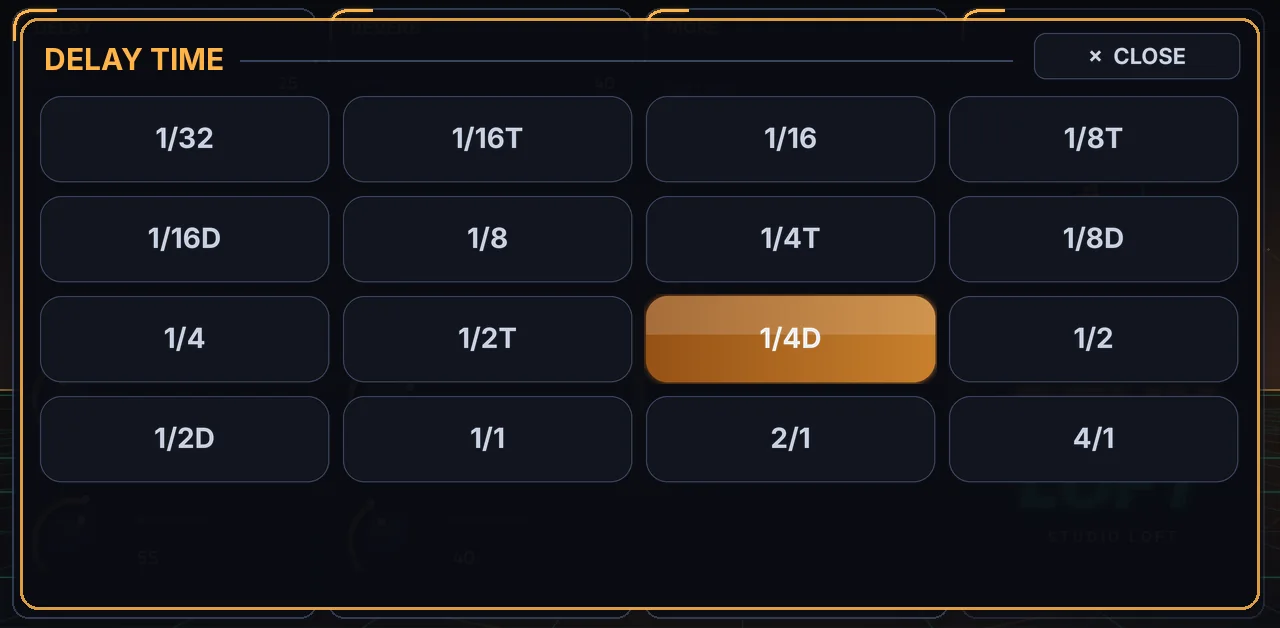
Delay Time
Echo time as a note value. Dotted values (D) give the classic bouncing feel.
Master
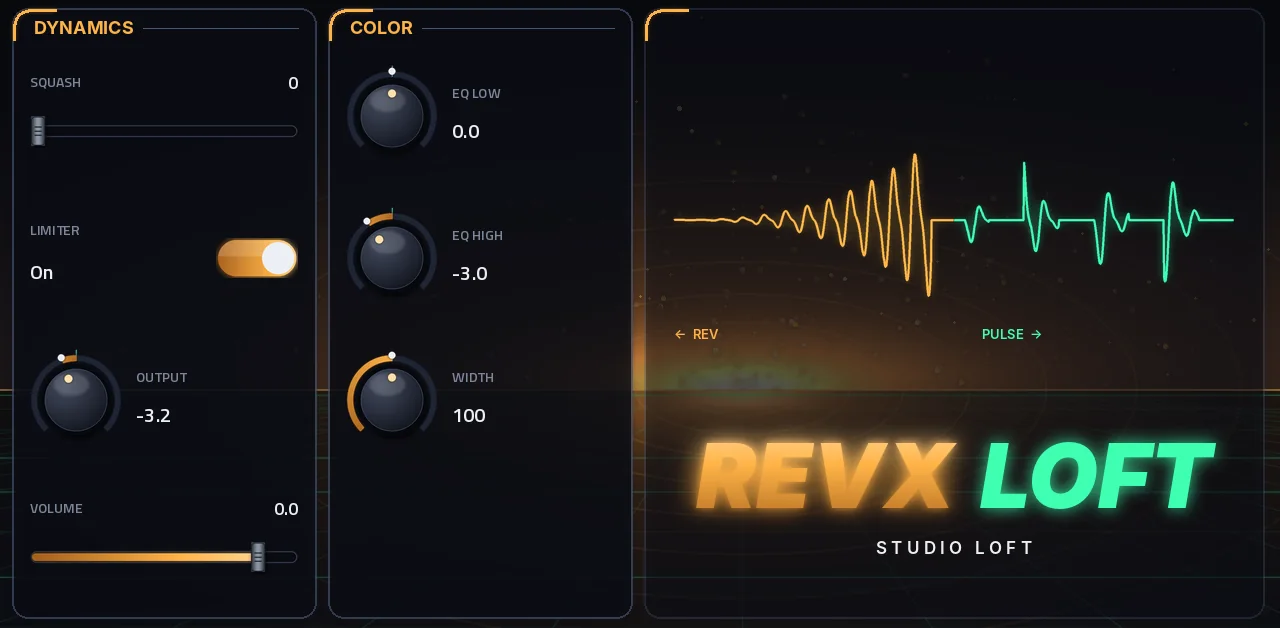 1234567
What you see
- 1 Squash — Multiband squeeze: brings small details up, keeps peaks in check.
- 2 Limiter — Safety limiter at the very end of the chain.
- 3 Output — Gain before the limiter.
- 4 Volume — Final level of the plugin, after everything else.
- 5 EQ Low — Low shelf, -12 to +12 dB.
- 6 EQ High — High shelf, -12 to +12 dB.
- 7 Width — Stereo width: 0 = mono, 100 = normal, 200 = extra wide.
What it's for
The end of the chain: squeeze, tone, width, gain and the safety limiter. Keep the Limiter on when you play loud swells: they peak at the end of the rise, right on the beat.
Tip
Keep the Limiter on when you play loud swells: they peak at the end of the rise, right on the beat.
TEXTURE · Organ Ruins
Spec sheet
RevX Loft in short
RevX Loft is a polyphonic synth for MPC standalone where every note swells up like a reversed sound, locked to your tempo, and a rhythmic Pulse engine chops it into grooves.
For who, for what
Trap, drill and R&B — reversed keys, inhaling pads and sucked chords between the drums.
House, techno and trance — pumping and gated pads, offbeat bass, risers and builds locked to the bar.
Ambient and film-style scoring — slow swells, reversed reverbs and evolving textures for intros and transitions.
Strong points
- Every note can swell like a reversed sound, locked to your tempo, from 1/32 to 4 bars.
- A real Reverser flips what you just played, slice by slice, plus a reversed reverb.
- A Pulse engine with 16 patterns, 4 shapes and 16 pitch sequences that can follow your song key.
- Three sources with 16 waveforms each, unison, FM, sub and noise; each source can swell or not.
- A Listen page that shows your chord and key and gives short tips, measured on the MPC, offline.
- 178 presets in 11 categories, built for MPC standalone.
Numbers
Instrument plugin for MPC standalone, MPC OS 3.10.1 or later. External plugin support must be turned on in Preferences, Enhancements (Beta).
Spec sheet
The 178 presets
As shown on the MPC: CATEGORY · Name. The preset files are numbered 001 to 178 in the same order.
INIT 3
REV 28
SWELL 20
PULSE 25
ARPY 20
PAD 18
Spec sheet
The 178 presets (continued)
As shown on the MPC: CATEGORY · Name. The preset files are numbered 001 to 178 in the same order.
KEYS 14
BASS 16
LEAD 12
TEXTURE 12
FX 10
Spec sheet
Up and running in 3 steps
Install
Copy the folder Studio Loft - VST - RevX Loft into the VST2 Plugins folder of your MPC disk. On the MPC: Preferences, Enhancements (Beta), turn on External Plugin Support.
Load
Create a plugin track and choose Studio Loft, RevX Loft. Pick a preset: REV and SWELL show the swell, PULSE the rhythm.
Play
Set your tempo, hold a chord for a full bar and listen to it inhale into the next bar. Start the sequencer to lock the Reverser to the bar.
REVX LOFT
The synth that inhales on tempo, then pulses.
Licence & activation
Yours in three steps.
Buy
Pay once on this site. Your personal link arrives by e-mail and stays valid.
Install Loft Hub
MPC OS 3.10.1 or later, with Enhancements and External Plugin Support turned on in Preferences. Copy Loft Hub to your MPC drive once.
Link and play
In Loft Hub, accept, link your MPC, and your plugins install by themselves. It works on two MPCs. That is it.
Licence
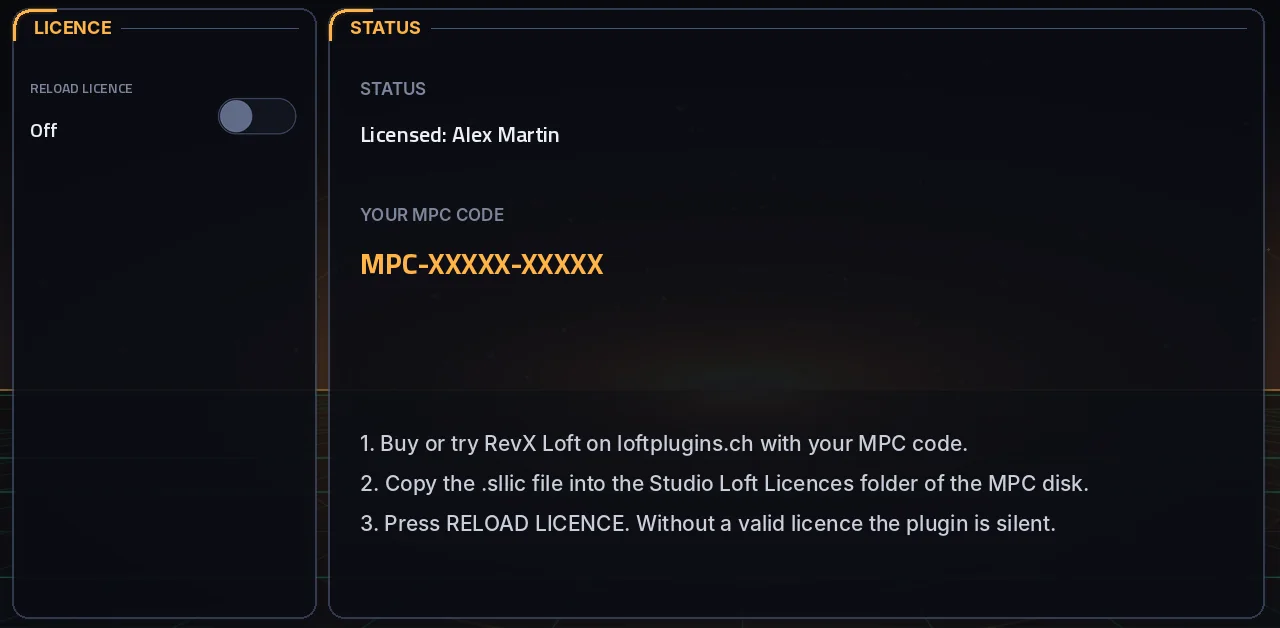 123
What you see
- 1 Reload Licence — Reads the licence files again after you copied a new one.
- 2 Licence — Licence status: licensed, or no licence.
- 3 MPC Code — The code of this MPC. You give it on loftplugins.ch to get your licence.
- One purchase activates 2 MPCs.
- No Internet needed on the MPC: the licence is a small file you copy once.
- Without a valid licence the plugin stays silent, and the MAIN page shows a short red line that tells you where to go, for example: No licence - LICENCE, last page.
What it's for
Open the LICENCE page, or the file MY MPC CODE.txt in the Studio Loft Licences folder of the MPC disk, and note your MPC code. On loftplugins.ch , buy RevX Loft. Copy the .sllic file you receive into the Studio Loft Licences folder of the MPC disk. Press RELOAD LICENCE : the status shows Licensed. Tip Your MPC code is also written to the file MY MPC CODE.txt in the Studio Loft Licences folder of the MPC disk: open it from your computer and copy it, no need to type it from the screen.
Tip
Your MPC code is also written to the file MY MPC CODE.txt in the Studio Loft Licences folder of the MPC disk: open it from your computer and copy it, no need to type it from the screen.
Own it
RevX Loft
A synth that breathes in: reversed notes, tempo-synced pulses.
One payment, yours for good. Your licence works on two MPCs.