Effect · versão 1.4.0
Multix Loft
EIGHT EFFECTS. SIXTEEN STEPS. ONE GRID THAT PLAYS IN TIME WITH YOUR BEAT.
Multix Loft sits on your track or your master like any insert effect. Eight effect lanes, sixteen steps each, locked to the MPC's tempo and position. Light a step and that effect hits exactly there. Light the steps next to it and they become one long move: a Tape Stop over four steps slows down over four steps.
O manual
Cada ecrã,
página a página.
O guia completo, ecrã a ecrã, exatamente como na MPC. Os nomes dos parâmetros ficam em inglês, como no ecrã.
★ Play with it here
Draw the edit. Hear it.
The Multix grid, right in your browser. Pick a sound, light a few steps, press play: each lane fires its effect exactly on those steps. Change the effect of a lane, join steps into longer moves, switch effects off to compare.
WOW The idea in one page
Tap a step. Hear the edit.
Multix Loft sits on your track or your master like any insert effect. Eight effect lanes, sixteen steps each, locked to the MPC's tempo and position. Light a step and that effect hits exactly there. Light the steps next to it and they become one long move: a Tape Stop over four steps slows down over four steps.
Example · the end of a 4-bar loop
Four lanes, a few taps, and the last bar turns into a real transition.
Joined steps (like 15–16) play as one event.
You draw it, you hear it, you keep the take.
effects
Vinyl and tape stops, stutters, rolls, reverse, filters, gate, crush, delay and reverb throws, pitch dives, scratch, pan, volume.
lanes in series
Lane 1 feeds lane 2, and so on to lane 8. Stack a filter under a stutter under a tape stop.
ready-made grids
Break edits, trap rolls, boom bap scratches, drum & bass chops, house pumps, wild FX. Load one and play.
WOW The assistant
It listens. Then it suggests.
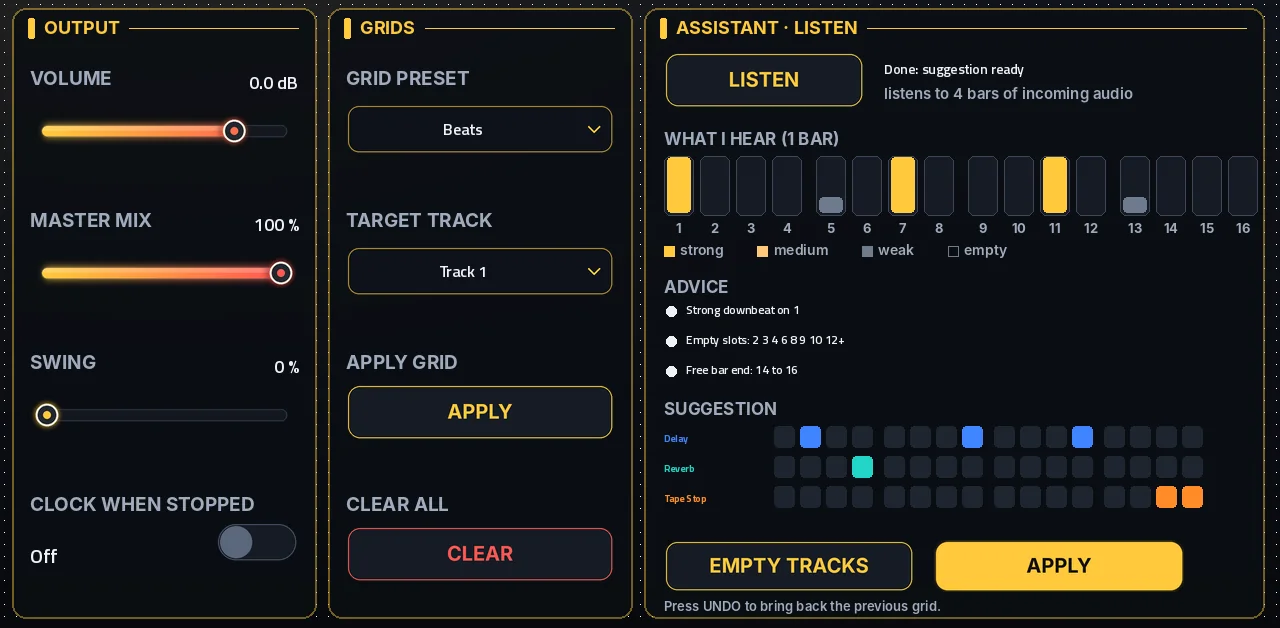
Not sure where an effect should go? Press LISTEN, play your beat, and Multix Loft listens to 4 bars of what comes in. It shows you where the hits are, tells you what it noticed, and proposes up to three effect lanes that fit the holes in your groove. Nothing changes until you press APPLY, and UNDO brings your grid back.
Listen
Press LISTEN, then start playback. It waits for the next bar and listens for 4 bars.
See
WHAT I HEAR shows one bar in 16 steps: strong, medium, weak or empty.
Read
ADVICE: three short lines, like "Strong downbeat on 1" or "Free bar end: 14 to 16".
Try it
SUGGESTION: Delay and Reverb throws in the gaps, a Tape Stop or Stutter at the bar end. APPLY, listen, UNDO if you prefer.
Run LISTEN on a drum loop with some space in it. The more empty steps it finds, the more throws it can place. On a busy loop it goes for the bar end instead.
Getting around
Six pages, one per function key.
Every page is drawn for the MPC touchscreen. Touch a control to select it, then turn the data wheel or a Q-Link to change it.
F1 · GRID
All 8 lanes at once: effect menu, lane mix and the 16 steps. This is where you play.
F2 to F5 · TRACKS
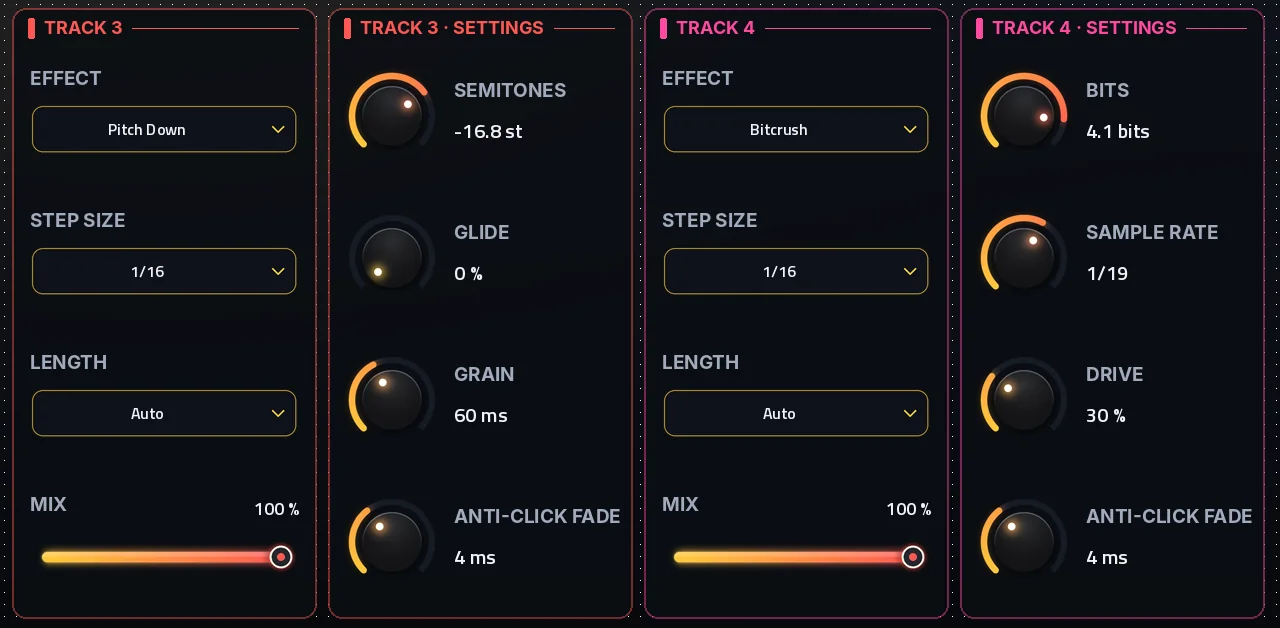
Two lanes per page (1-2, 3-4, 5-6, 7-8): effect, step size, length, mix, and the three controls of the chosen effect.
F6 · GLOBAL
Output volume, master mix, swing, the clock when stopped, ready-made grid patterns, and the LISTEN assistant.
F6 again · LICENCE
Press F6 a second time: licence status, this MPC's code and the RELOAD LICENCE button.
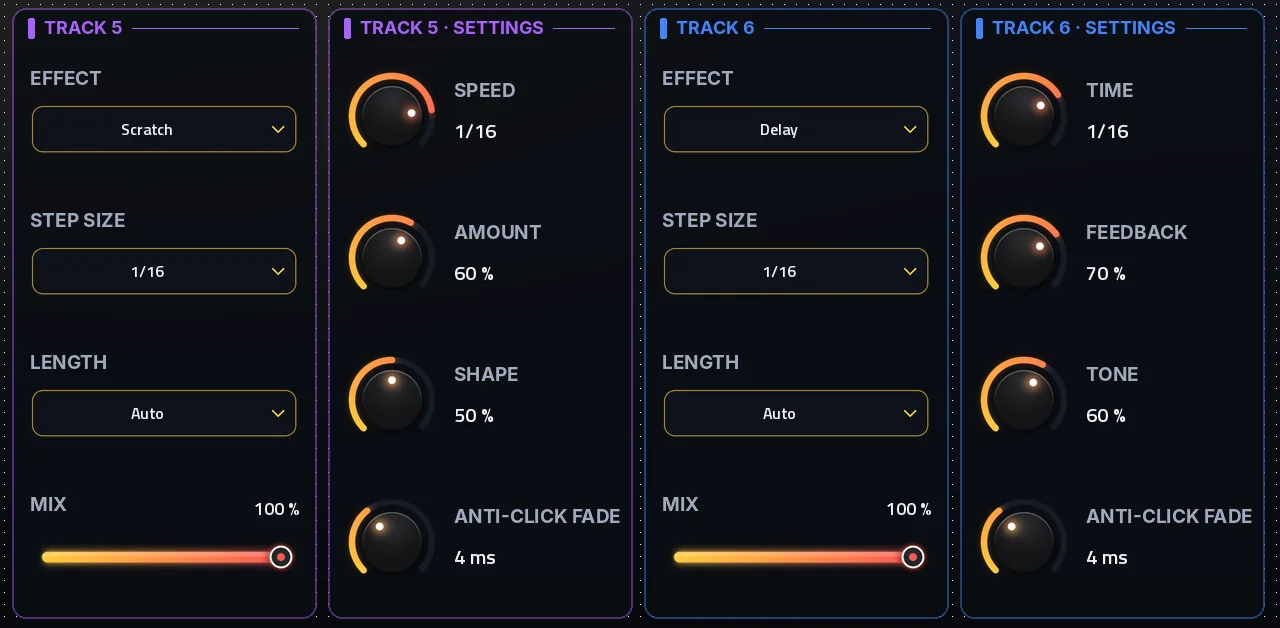
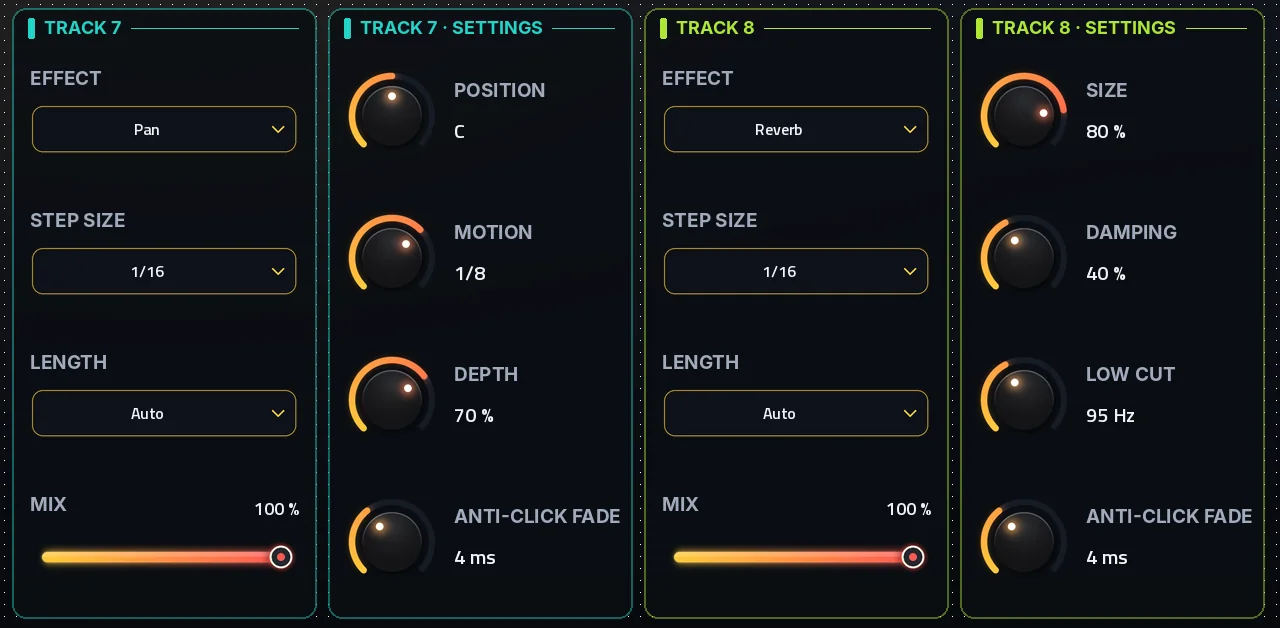
Touch a menu box (effect, step size, length, grid preset, target track) and a list opens over the page. Touch a name to choose it, or CLOSE. Turning the data wheel on a selected menu also steps through the choices.
On each page the Q-Links follow the columns on screen. In Program mode, Q-Links 1–8 are the lane mixes and 9–16 the first effect control of each lane.
The grid: where you play.
O que vê
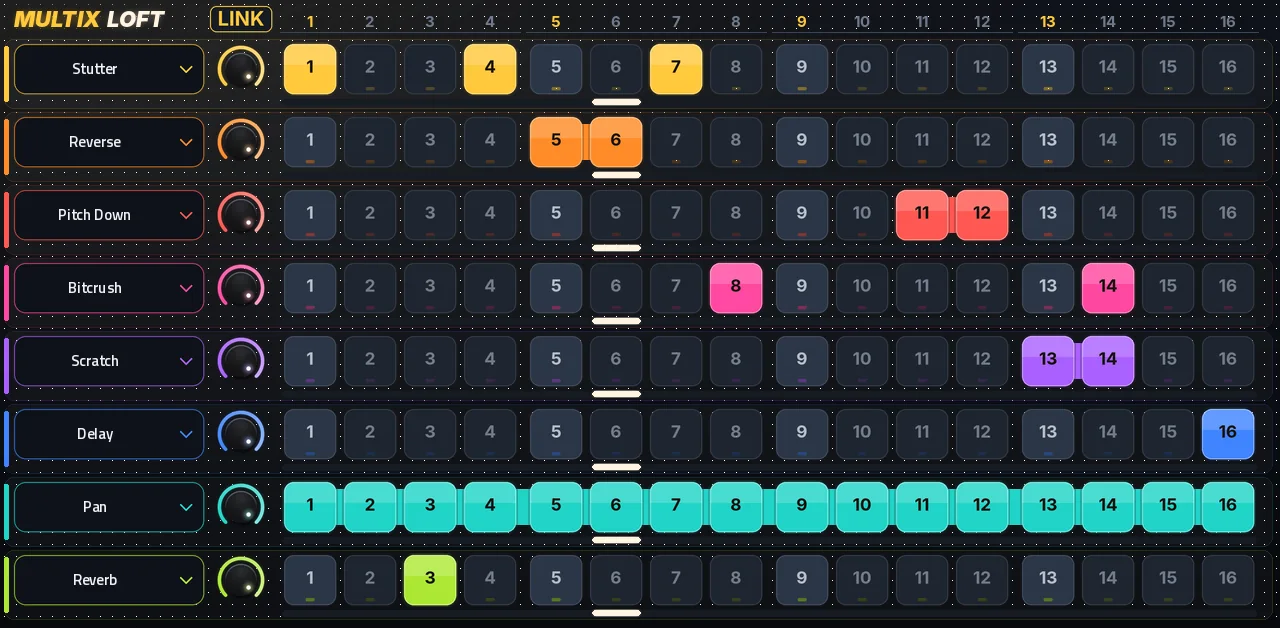
- Effect menu of each lane (Stutter, Reverse…). Touch it to open the effect list.
- Lane mix knob : how much of the lane's effect you hear.
- LINK : when lit, a step you touch joins the step on its left, so the effect keeps going.
- Step numbers 1–16. The beats (1, 5, 9, 13) are highlighted.
- Steps . Lit = the effect plays on that step, in the lane's colour.
- Joined steps play as one event (here Reverse on 5–6).
- Playhead under the steps, following the MPC.
- Lane colour : lanes 1 to 8, processed in that order.
Para que serve
What it's for Writing and performing your edits while the beat plays. You will spend most of your time here: switch an effect, light a few steps, ride the mix knobs.
Dica
Tip For a classic break edit, put a Stutter on step 13 of lane 1 and a Tape Stop on steps 15–16 of another lane. Ride the Stutter lane's mix knob live to bring it in only on the last bar.
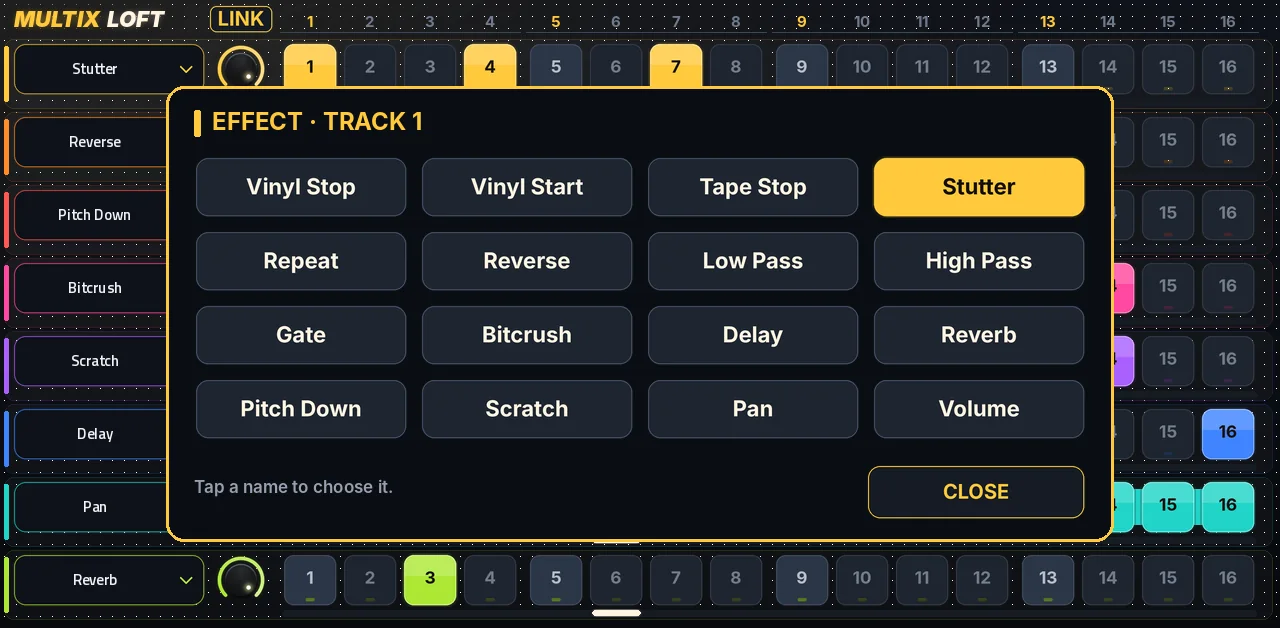
Sixteen effects, one touch away.
O que vê
- EFFECT · TRACK n : the lane you are editing.
- current effect The is lit. Touch another name to switch.
- CLOSE leaves without changing.
Dica
Tip Each effect keeps its own names for controls A, B and C on the TRACKS pages: switch the effect and the labels follow.
Shape each lane in detail.
O que vê
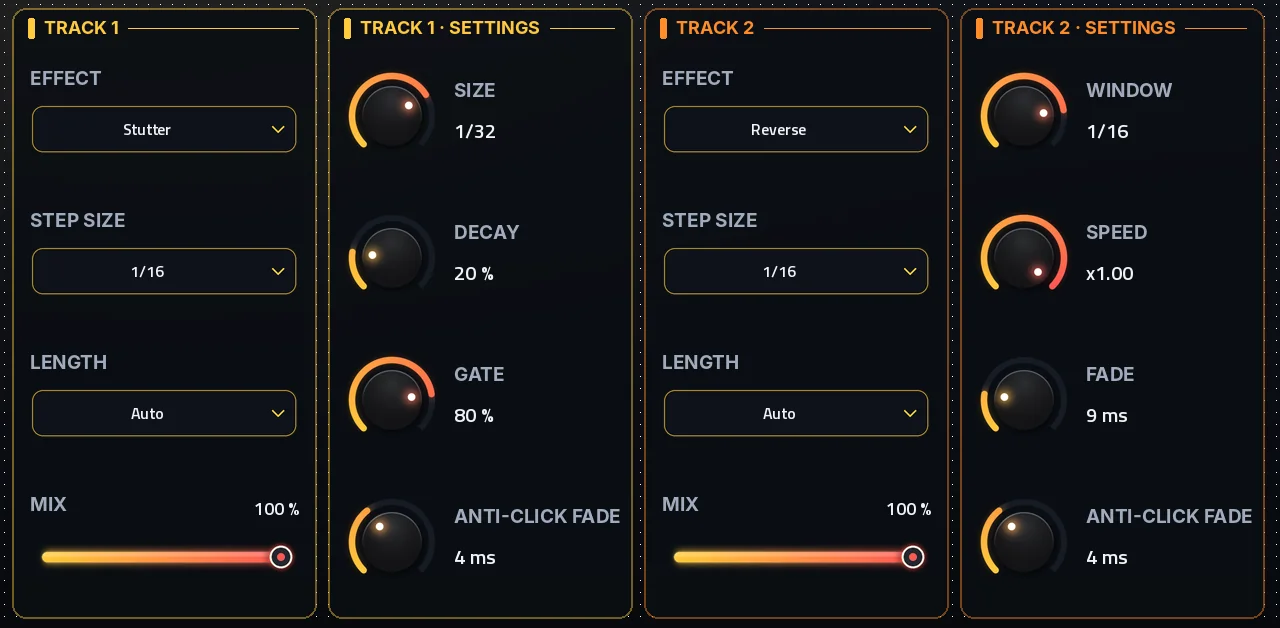
- EFFECT : same menu as on the GRID page.
- STEP SIZE : how long one step lasts, from 1/32 to 1/1, with T (triplet) and D (dotted).
- LENGTH : Auto (16 steps) or 1 to 4 bars. The lane starts again at each loop.
- MIX : dry/effect balance of the lane.
- A, B, C 6 7 Controls : their names and values change with the effect (here Stutter: SIZE, DECAY, GATE).
- ANTI-CLICK FADE : softens the start and end of each event.
Para que serve
What it's for Fine-tuning. The GRID says when , these pages say how . F3, F4 and F5 are the same page for lanes 3-4, 5-6 and 7-8, each in its own colours.
Dica
Tip Set a Stutter lane to STEP SIZE 1/32 and SIZE 1/32 for a machine-gun roll. Raise DECAY so each repeat gets quieter: the roll fades out by itself.
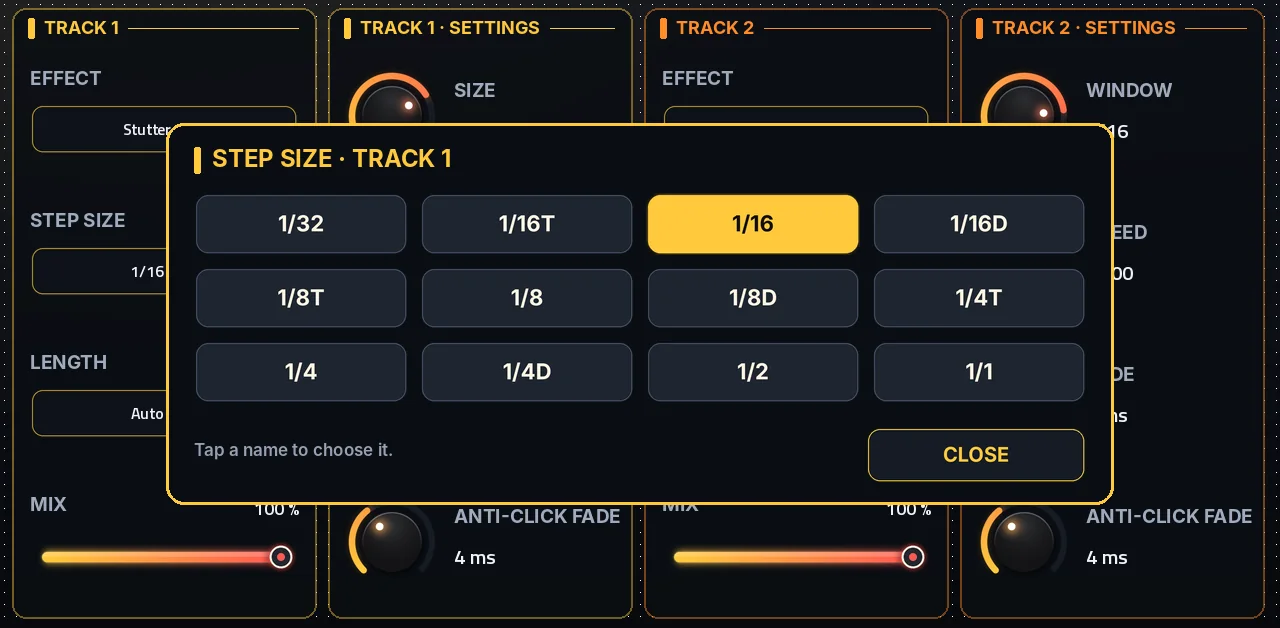
Change the grid's speed and length.
O que vê
- STEP SIZE · TRACK n : 12 values, 1/32 to 1/1. T = triplet, D = dotted.
- The current value is lit (1/16: 16 steps = one 4/4 bar).
Dica
Tip Put a Gate lane on 1/16T over a straight beat: instant triplet swing on the chops.
 3 4
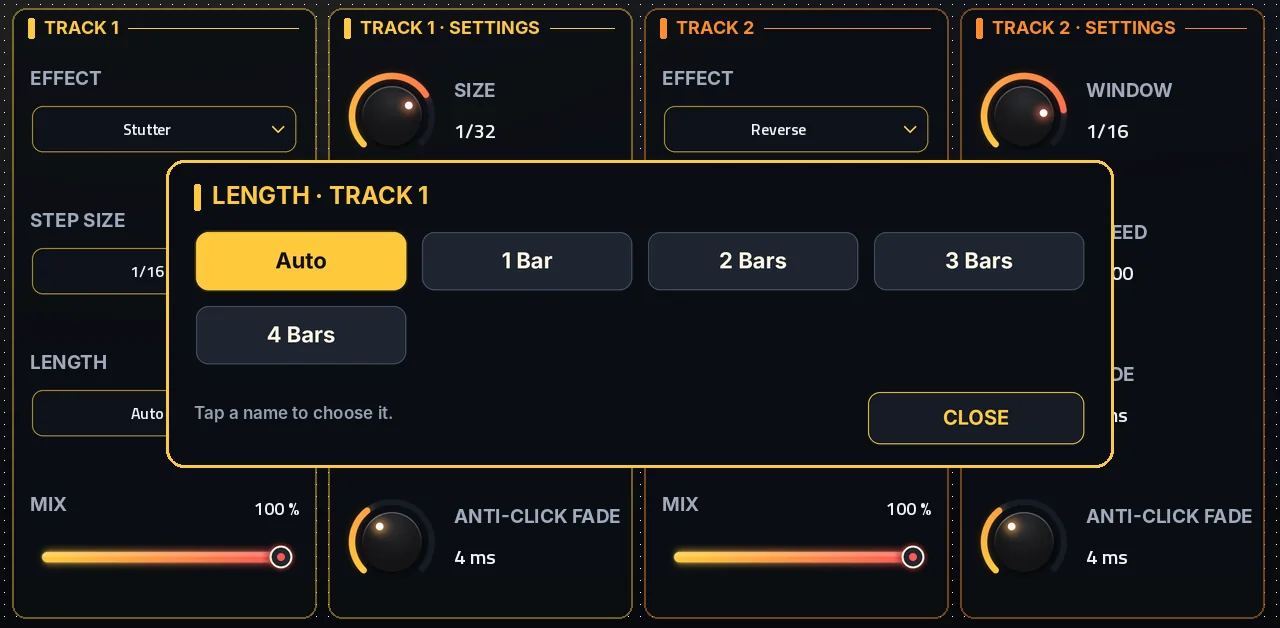
- 3LENGTH · TRACK n: Auto, 1 Bar, 2 Bars, 3 Bars, 4 Bars.
- 4Auto = 16 steps at the chosen step size. With 1 to 4 bars, the lane waits for that many bars before it starts again.
Want the Tape Stop only every 4th bar? Set that lane to STEP SIZE 1/4 and LENGTH 4 Bars: the 16 steps then cover four bars.
Output, ready-made grids and the assistant.
O que vê
- VOLUME : output level of the plugin.
- MASTER MIX : dry/effect balance for all lanes together.
- SWING : delays the off-beat steps for a looser groove.
- CLOCK WHEN STOPPED : On = the grid keeps running when the MPC is stopped.
- GRID PRESET : a ready-made step pattern (Beats, Offbeats, Tresillo…).
- TARGET TRACK : which lane gets it (Track 1–8 or All).
- APPLY writes the pattern. 8 CLEAR empties all steps.
Dica
Tip For a pumping groove: GRID PRESET Beats on a Volume lane, then turn its LEVEL down. Each beat ducks the sound.
Twelve patterns, in two touches.
O que vê
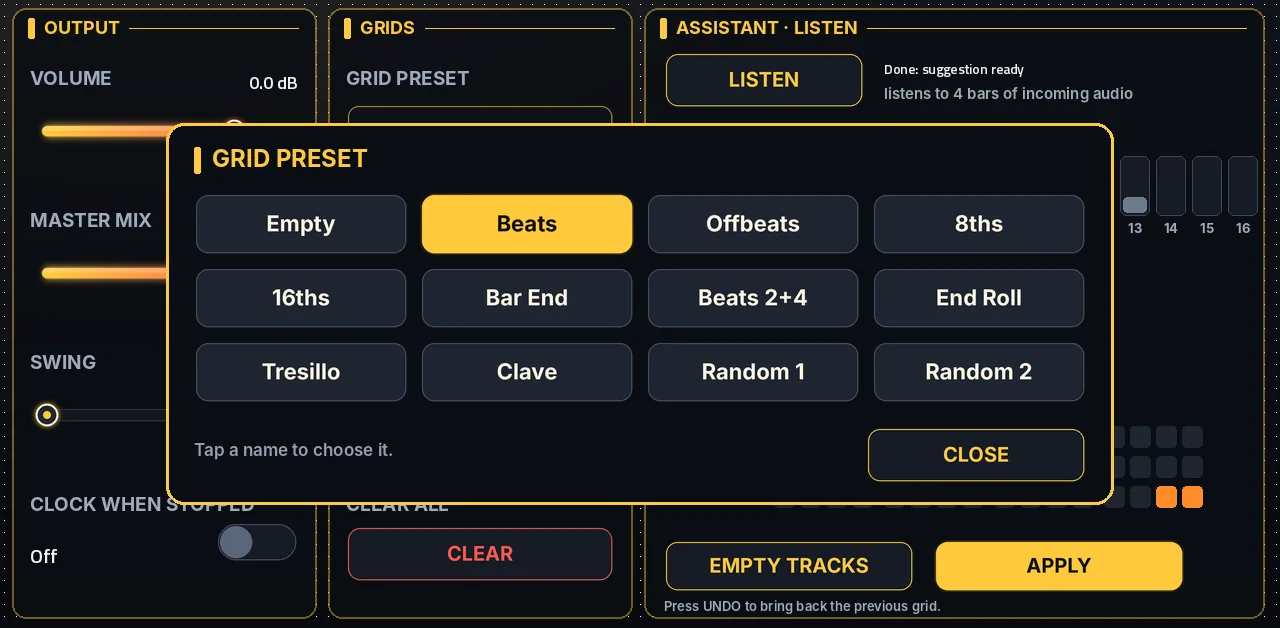
- GRID PRESET : Empty, Beats, Offbeats, 8ths, 16ths, Bar End, Beats 2+4, End Roll, Tresillo, Clave, Random 1, Random 2.
- The current choice is lit.
Para que serve
What it's for Building a grid quickly: drop a pattern, then add or remove a few steps by hand on the GRID page.
Dica
Tip Tresillo on a Delay lane gives echo throws that bounce against a straight beat. Random 1 / 2 are great starting points for glitchy fills.
 3 4
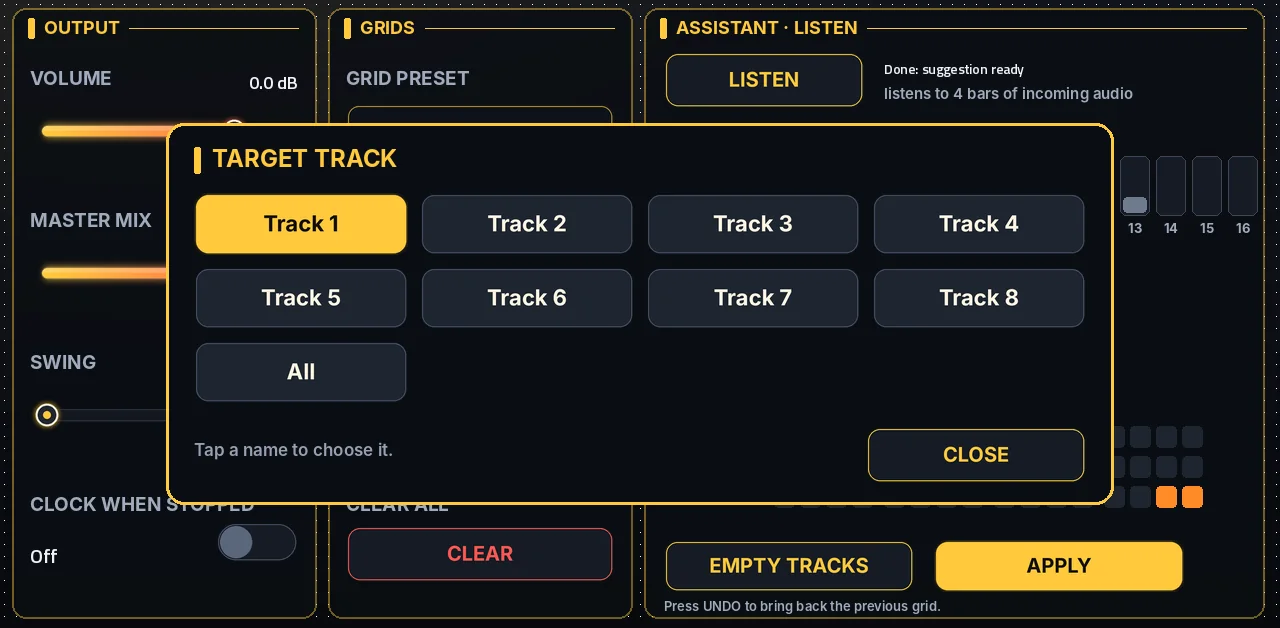
- 3TARGET TRACK: the lane that receives the pattern.
- 4Track 1 to Track 8, or All for every lane at once. Then press APPLY.
Presets
112 presets, 12 categories.
Each preset is a complete grid: effects, steps, step sizes and settings. Shown on the MPC with their category first, like "BREAK Classic Chop".
INIT2
- 001Empty Grid
- 002Eight Effects
BREAK10
- 003Classic Chop
- 004Flipped Break
- 005Hard Cut
- 006Ghost Notes
- 007Final Rewind
- 008Jungle Edit
- 009Slice Shuffle
- 010Half Time
- 011Stop And Go
- 012Chopper 1/32
STUTTER10
- 013Simple 1/16
- 014Burst 1/32
- 015Triplets
- 016Chopper
- 017Glitch Data
- 018Repeat Fade
- 019Rising Roll
- 020Machine Gun
- 021Stammer
- 022Pre-Drop
VINYL10
- 023Bar End Stop
- 024Hard Stop
- 025Long Stop
- 026Spin Up
- 027Stop Start
- 028Baby Scratch
- 029Fast Scratch
- 030Worn Deck
- 031Rewind
- 032Power Cut
TAPE10
- 033Bar End Stop
- 034Quick Stop
- 035Wow Stop
- 036Slow Down
- 037Warped Cassette
- 038Slow Start
- 039Saturated Stop
- 040Heavy Machine
- 041Double Stop
- 042Pitch Octave
FILTER10
- 043LP Breathing
- 044LP Closing
- 045HP Rise
- 046Telephone
- 047LP Offbeat
- 048HP Beats
- 049Wah Rhythm
- 050Underwater
- 051Low Cut Drop
- 052Final Sweep
GATE10
- 053Trance 1/16
- 054Trance 1/32
- 055Triplets
- 056Soft Chop
- 057Bar End
- 058Cuts
- 059Morse
- 060Pump
- 061Speed Up
- 062Gate + Pan
TRAP10
- 063Hat Rolls
- 064Tape Stop 808
- 065Crazy Triplets
- 066Pre-Drop Cut
- 067Pitch 808
- 068Dark Lofi
- 069Adlib Delay
- 070Glitch Melody
- 071Drill Slide
- 072Final Freeze
BOOMBAP10
- 073End Scratch
- 074Dust
- 075Sample Chop
- 076Bass Cut
- 077Raw Style
- 078Deck Stop
- 079Snare Echo
- 080Reverse Hook
- 081Bass Drop Out
- 082Verse End
DNB10
- 083Roll Breakbeat
- 084Chopped Bass
- 085Reverse Break
- 086Pitch Drop
- 087Neuro Crush
- 088Jungle Rewind
- 089Liquid Echo
- 090Pre-Drop Stop
- 091Chopper 1/32
- 092Filter Tension
HOUSE10
- 093Sidechain Pump
- 094Club Filter
- 095Offbeat Echo
- 096Gate Groove
- 097Bouncing Pan
- 0984 Bar Build
- 099Disco Stutter
- 100Reverb Hit
- 101Breakdown Cut
- 102Ping Pong
FX10
- 103Total Chaos
- 104Broken Robot
- 105Space
- 106Ghost Reverse
- 107Endless Slowdown
- 108Radio
- 109Whirlwind
- 110Glitch Machine
- 111Crazy Riser
- 112Dub Siren Echo
Spec sheet
Multix Loft in short.
A step sequencer for effects: eight lanes of sixteen steps, each playing one of sixteen effects in time with the MPC, with an assistant that listens to your beat and suggests where effects should go.
For who · for what
- Hip-hop and boom bap: scratches, vinyl stops, chopped breaks.
- Trap and drill: hat rolls, bass pitch dives, pre-drop cuts.
- House, drum & bass, live sets: filter builds, pumps, transitions.
Strong points
- Locked to the MPC's tempo and position, with swing.
- Joined steps play as one event: real stops and sweeps.
- Step size and length per lane: 1/32 to 1/1, up to 4 bars.
- LISTEN assistant with APPLY / UNDO.
- 12 ready-made grid patterns, applied to one lane or all.
- Designed for the touchscreen; Q-Links follow each page.
Get started in 3 steps
- Install: copy the "Studio Loft - VST - Multix Loft" folder into "VST2 Plugins" on your MPC drive, with your licence file.
- Load: add Multix Loft as an insert effect on a track, a program or the master.
- Play: pick a preset, press play, light some steps on F1 GRID.
Licence
- Activation: give your MPC's code, copy the licence file to the MPC, press RELOAD LICENCE.
- One purchase covers 2 MPCs.
Technical
- Insert effect, stereo in / stereo out.
- MPC standalone, MPC OS 3.10.1.
- 441 parameters, 112 presets as .xpl files, grouped by category.
- Works offline: no account, no internet on the MPC.
Licença e ativação
Seu em três passos.
Compre
Pague uma vez neste site. O seu link pessoal chega por e-mail e continua válido.
Instala o Loft Hub
MPC OS 3.10.1 ou posterior, com Enhancements e External Plugin Support ativados nas Preferences. Copia o Loft Hub uma vez para o disco da MPC.
Liga e toca
No Loft Hub, aceita, liga a tua MPC e os plugins instalam-se sozinhos. Funciona em duas MPC. É só isso.
Your licence, at a glance.
O que vê
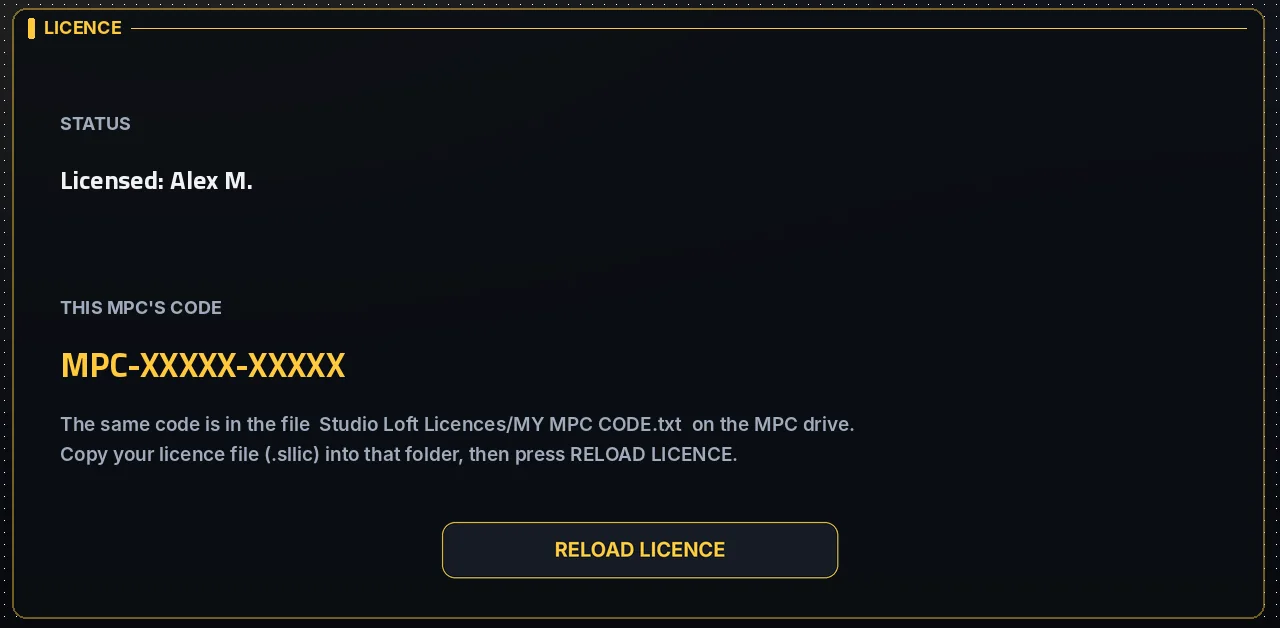
- STATUS : licensed (with the buyer's name), or no licence. Without a valid licence a second line shows where to get one.
- THIS MPC'S CODE
- Where to find the same code on the drive, and where to put the licence file.
- RELOAD LICENCE : reads the licence files again, after you copied a new one.
- F1 GRID While the plugin is muted, a red bar on says so and points to this page.
Para que serve
What it's for Activating Multix Loft. Without a valid licence the plugin is silent. Everything happens offline: no account and no internet needed on the MPC.
Dica
Tip Your MPC's code is also written in Studio Loft Licences/MY MPC CODE.txt on the MPC drive. Connect the MPC to your computer and copy it from there: no typing from the screen.
Seu
Multix Loft
Um sequenciador de efeitos: oito pistas, dezasseis passos.
Um só pagamento, seu para sempre. A sua licença funciona em duas MPC.