Effect · versão 1.5.1
Thermix Loft
DISTORTION THAT MOVES WITH YOUR BEAT.
Most distortion just sits there. Thermix plays along. A sequencer, two LFOs and an envelope push the heat up and down in time with your beat, so a static loop starts to breathe, bounce and swing.
O manual
Cada ecrã,
página a página.
O guia completo, ecrã a ecrã, exatamente como na MPC. Os nomes dos parâmetros ficam em inglês, como no ecrã.
Grit that grooves.
WHY THERMIX
Most distortion just sits there. Thermix plays along. A sequencer, two LFOs and an envelope push the heat up and down in time with your beat, so a static loop starts to breathe, bounce and swing.
Two bars of the preset MOVE - Band Shuffle, as set in the plugin: the lows stay steady on a Tube, the mids bite in rhythm (Seq to Mix B, 8 steps at 1/16), the highs breathe on every beat (LFO 1 to Mix C, 1/4).
What you hear
A drum loop that pumps without a compressor. A bass that growls on the off-beats only. A pad that crackles on bar 2 and clears on bar 3.
Why it's fast
Load a MOVE preset and the motion is already locked to your tempo. Turn Motion on MAIN to dial it from frozen to wild, with one knob.
Try these first
Push it hard. Stay in control.
WHY THERMIX
One knob sets the whole chain on fire. Three safety nets keep it musical: the level stays put, the sub stays clean, the output stays under 0 dBFS. You get the attitude without the mess.
Three stages, three ways
Serial stacks the colours. Parallel blends them side by side. Multi splits the sound in three bands, so the lows can stay warm while the mids bite and the highs sparkle. On a 808, that is the difference between "loud" and "loud and still heavy".
And a second opinion
Not sure? Press LISTEN, play 15 seconds, read the advice. APPLY fixes it, UNDO takes it back.
Try these first
Six keys, ten pages.
FIND YOUR WAY
Touch
Touch a control to select it. It lights up with an orange frame.
Turn
Turn the data wheel to change it, or use the 16 Q-Links: they follow the 4 x 4 grid of the page on screen.
Pick
Touch a list box (curve, LFO shape, division, source, destination) to open its menu. Touch your choice, then CLOSE.
The 12 curves
Main
 12345678910
O que vê
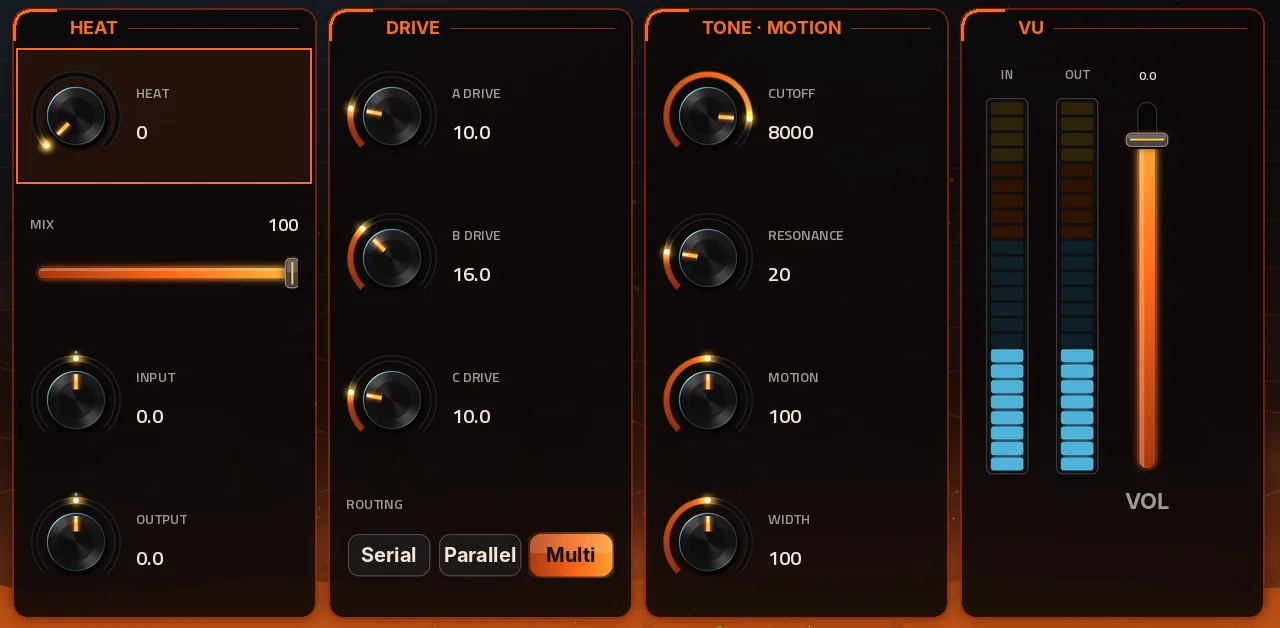
- HEAT 1 The macro: all three drives up to +24 dB, more asymmetry, a darker tone. 0 = as set, 100 = on fire.
- MIX 2 Dry / wet for the whole plugin. The dry signal stays in phase with the wet one, so blending never thins the sound.
- INPUT · OUTPUT 3 Level into the distortion (-24 to +24 dB) and level of the preset after it.
- A · B · C DRIVE 4 How hard each of the three stages is pushed, 0 to 48 dB.
- ROUTING 5 Serial (A then B then C), Parallel (A + B + C side by side) or Multi (lows to A, mids to B, highs to C).
- CUTOFF · RESONANCE 6 The global filter after the distortion (set its type on BANDS).
- MOTION 7 Depth of all the movement in MATRIX, 0 to 200 %. Turn it down to freeze the sound, up to exaggerate it.
- WIDTH 8 Stereo width, from mono (0) to extra wide (200 %).
- IN · OUT 9 Input and output level meters. If you don't need them, switch Meters off on BANDS.
- VOL 10 Final volume of the plugin. Presets never change it.
Dica
For a kick that slaps: set Routing to Multi, keep A Drive moderate so the low end stays round, and push B Drive: the click comes forward and cuts through the mix.
Everything that matters, on one page.
Listen
 12345678
O que vê
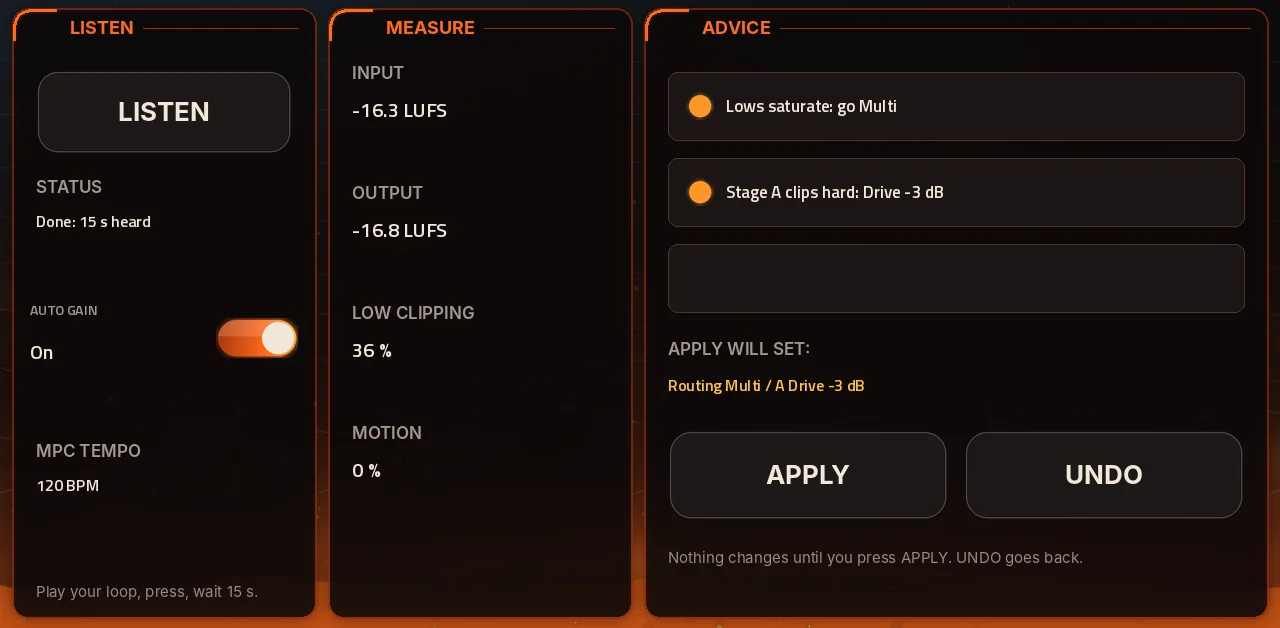
- LISTEN 1 Starts a 15-second listen. Play your loop, press, wait. Press again to stop early (3 s of sound minimum).
- STATUS 2 Where the listen is: ready, listening, or done.
- AUTO GAIN 3 Brings the distorted sound back to the level that went in, so louder never fools your ears.
- MPC TEMPO 4 The tempo the plugin receives. All tempo-synced movement follows it.
- MEASURE 5 Loudness in and out (LUFS), how much of the low end is being clipped, and how much the movement really moves.
- ADVICE 6 Up to three short lines, problems first, each with a coloured dot. If all is well: "Clean sound: nothing to report".
- APPLY WILL SET 7 Exactly what APPLY will change. Two settings at most.
- APPLY · UNDO 8 APPLY sets the advice for you. UNDO puts everything back. Nothing changes until you press APPLY.
Dica
Run LISTEN after big changes on 808s and kicks: it catches a choked low end long before your mix does.
Press a button. Get a second opinion.
Stage A
 12345678
O que vê
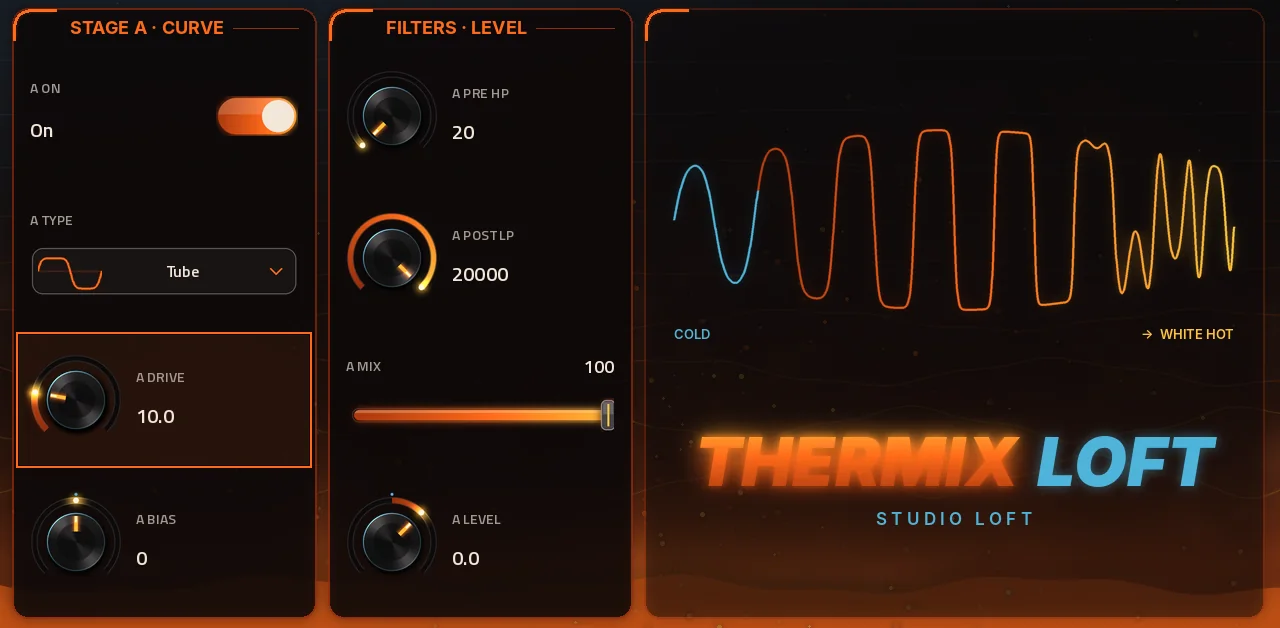
- A ON 1 Turns the stage on or off.
- A TYPE 2 The curve: 12 characters from soft Tube to brutal Scream. Touch the box to open the list.
- A DRIVE 3 How hard the signal hits the curve, 0 to 48 dB.
- A BIAS 4 Asymmetry, -100 to +100 %. Adds warmth and grit. On Bitcrush it lowers the sample rate instead.
- A PRE HP 5 High-pass before the curve: keeps the low end out of this stage.
- A POST LP 6 Low-pass after the curve: tames fizz and harsh top end.
- A MIX 7 Blend of this stage alone, 0 to 100 %.
- A LEVEL 8 Output of the stage, -24 to +12 dB.
Dica
Pre HP around 150 Hz in front of a Fuzz keeps an 808 from turning to mud: the grit sits on top, the weight stays underneath.
Your first stage of heat.
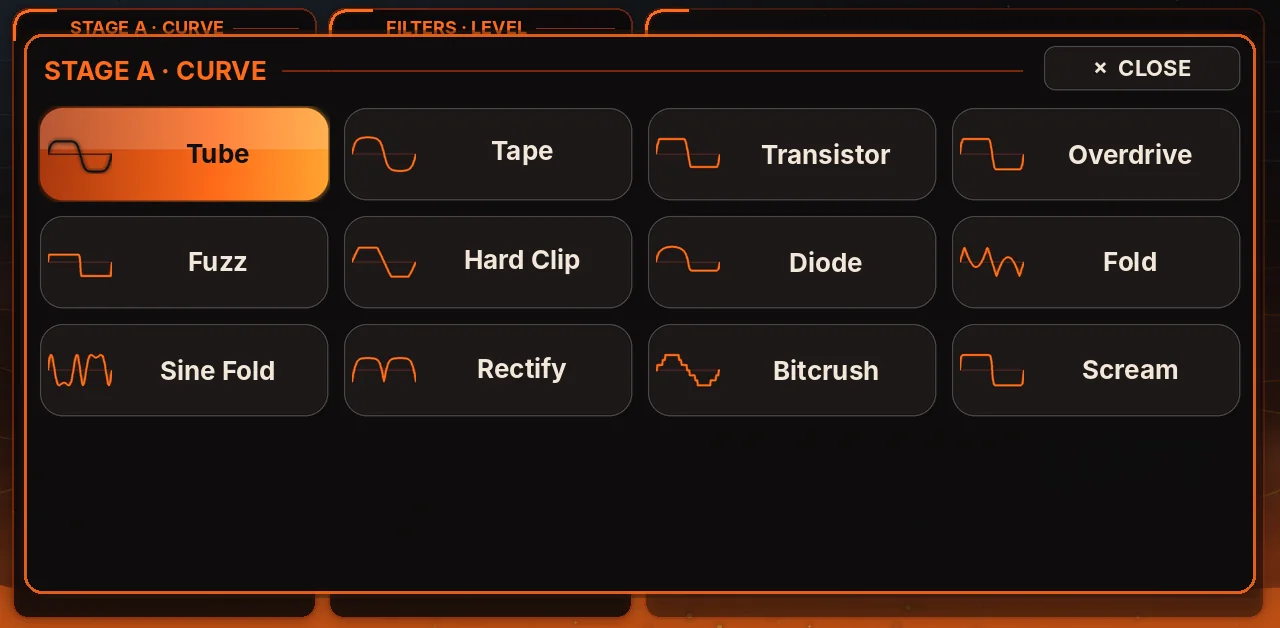 The curve list Touch the TYPE box: all 12 curves, each with its shape. Touch one, then CLOSE.
Stage B
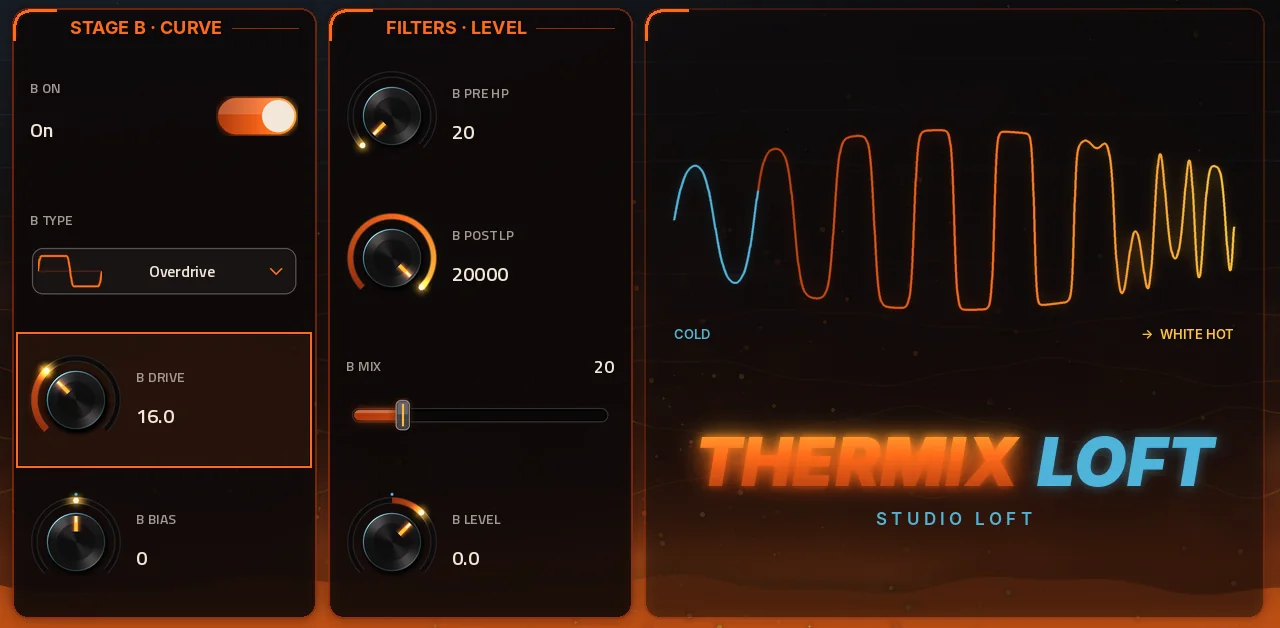 12345
O que vê
- B ON 1 Turns the stage on or off.
- B TYPE 2 One of the 12 curves.
- B DRIVE · B BIAS 3 Push and asymmetry, as on Stage A.
- B PRE HP · POST LP 4 Filters before and after the curve.
- B MIX · B LEVEL 5 Blend and output of the stage.
Dica
Tube in A and Hard Clip in B, both moderate, sound bigger than one stage pushed hard: two gentle stages, one big result.
Same tools, second layer.
Pairs that work
Stage C
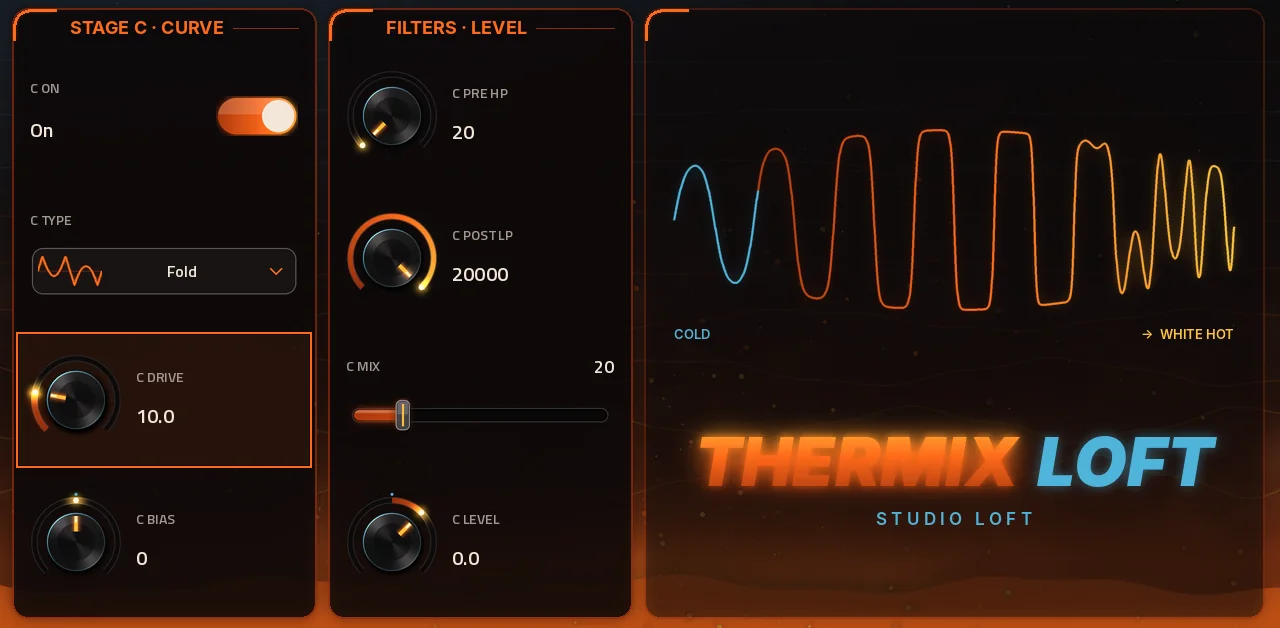 12345
O que vê
- C ON 1 Turns the stage on or off.
- C TYPE 2 One of the 12 curves.
- C DRIVE · C BIAS 3 Push and asymmetry.
- C PRE HP · POST LP 4 Filters before and after the curve.
- C MIX · C LEVEL 5 Blend and output of the stage.
Dica
In Multi, put Fold or Sine Fold on C with a low Mix: hi-hats and snares get a shimmering edge without any harshness.
The finishing touch.
Three bands, three jobs
Bands
123456789O que vê
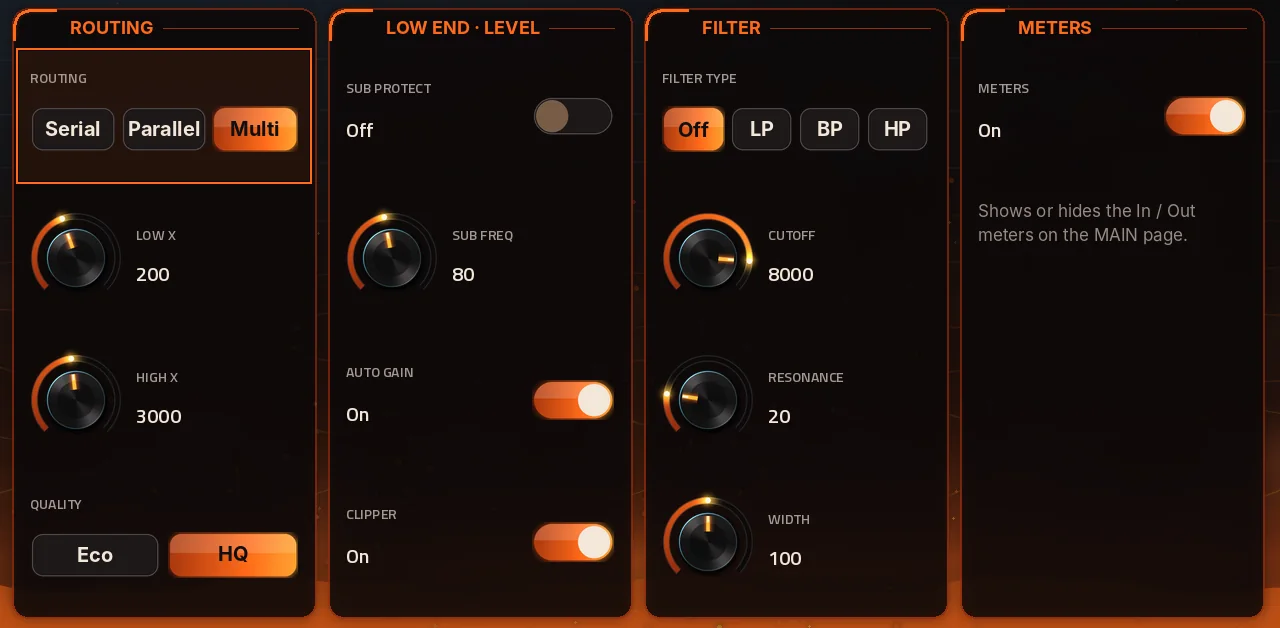
- ROUTING 1 Serial, Parallel or Multi, the same switch as on MAIN.
- LOW X · HIGH X 2 The two crossover points of Multi routing: lows below Low X, highs above High X.
- QUALITY 3 HQ oversamples x2 for a cleaner top end. Eco uses half the processing.
- SUB PROTECT · SUB FREQ 4 Everything below Sub Freq (30 to 250 Hz) skips the distortion and stays clean and mono.
- AUTO GAIN 5 Keeps the output at the input level.
- CLIPPER 6 A soft safety clipper at 0 dBFS on the output.
- FILTER 7 Global filter after the distortion: Off, LP, BP, HP, with Cutoff and Resonance.
- WIDTH 8 Stereo width.
- METERS 9 Switches the level meters on MAIN on or off.
Dica
On 808s, switch Sub Protect on with Sub Freq around 80 Hz: everything above growls, the sub stays clean, round and mono.
Where the low end stays safe.
Move
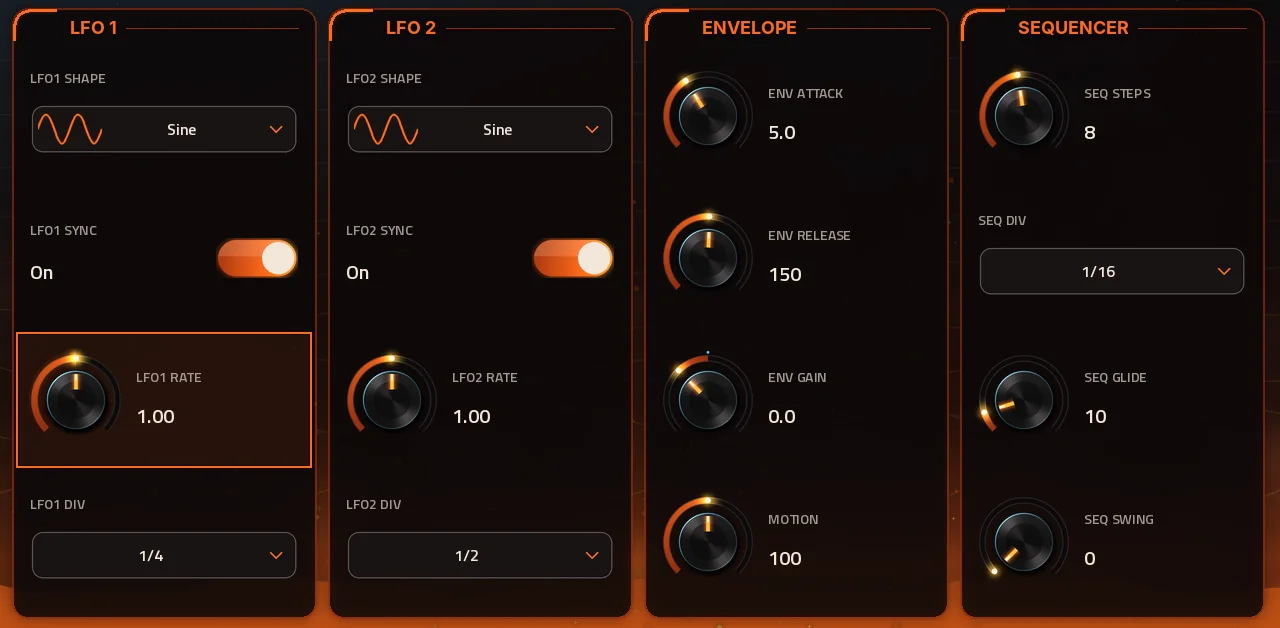 1234567
O que vê
- LFO 1 · LFO 2 1 Two LFOs: Sine, Triangle, Saw Up, Saw Down, Square, S&H and Smooth. Touch the shape box for the list.
- SYNC 2 On: the LFO follows the tempo (Div). Off: free rate in Hz.
- RATE 3 Speed when Sync is off, 0.05 to 20 Hz.
- DIV 4 Speed when Sync is on, from 1/64 to 4 bars, with triplets and dotted values.
- ENVELOPE 5 Follows the level of what you play. Attack, Release and Gain set how it reacts.
- MOTION 6 Overall depth of all movement, 0 to 200 %.
- SEQUENCER 7 Length (1 to 16 steps), speed (Div), Glide between steps and Swing.
Dica
Set LFO 2 to Sync with Div 1/8T and send it to Drive All: the grit swings in triplets against a straight beat.
The engines of motion.
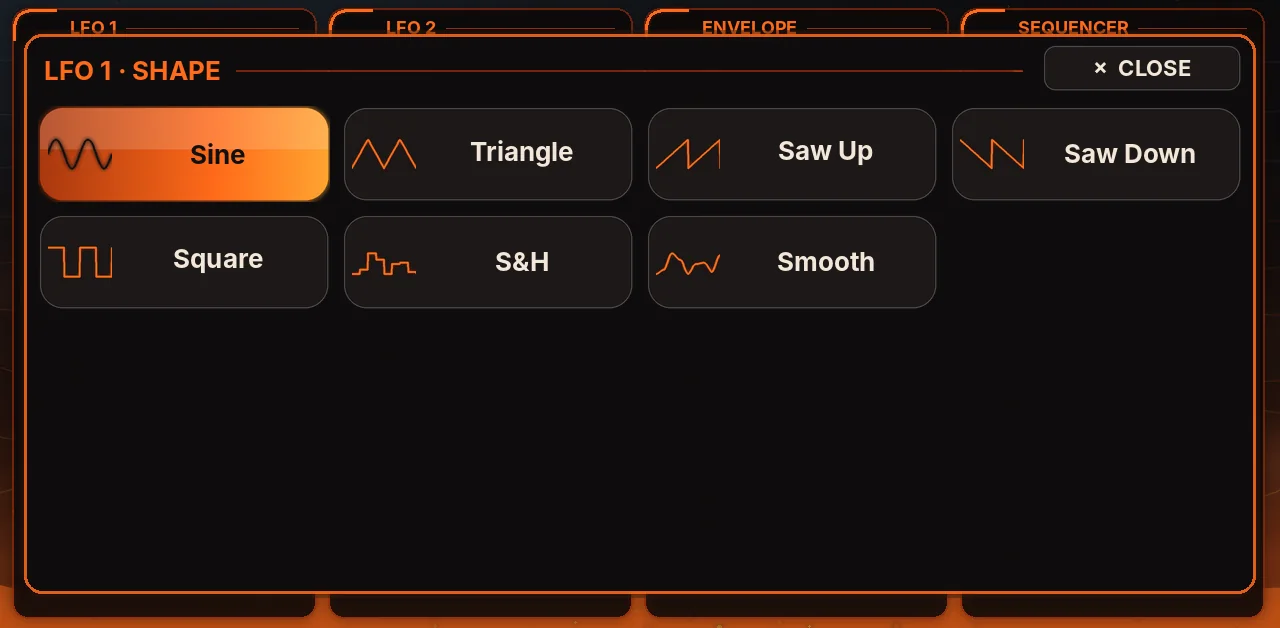 LFO shapes Seven shapes, from smooth Sine to random S&H.
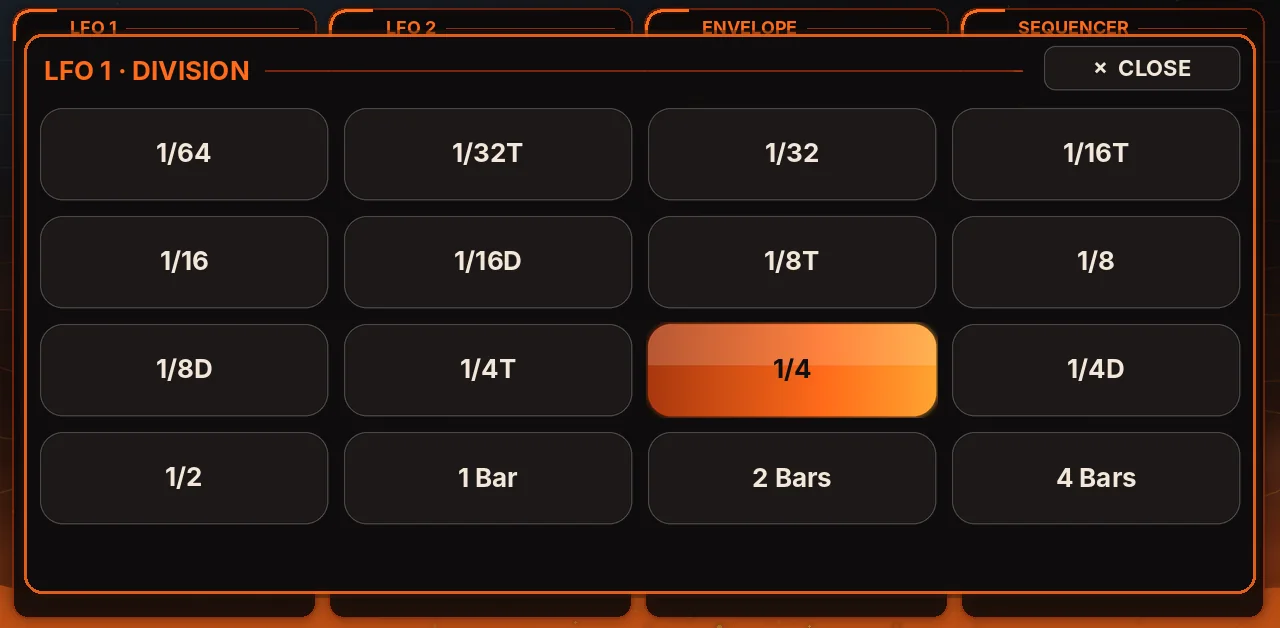 Tempo divisions Sixteen divisions, from 1/64 to 4 bars, with triplets (T) and dotted (D).
Seq
 1234
O que vê
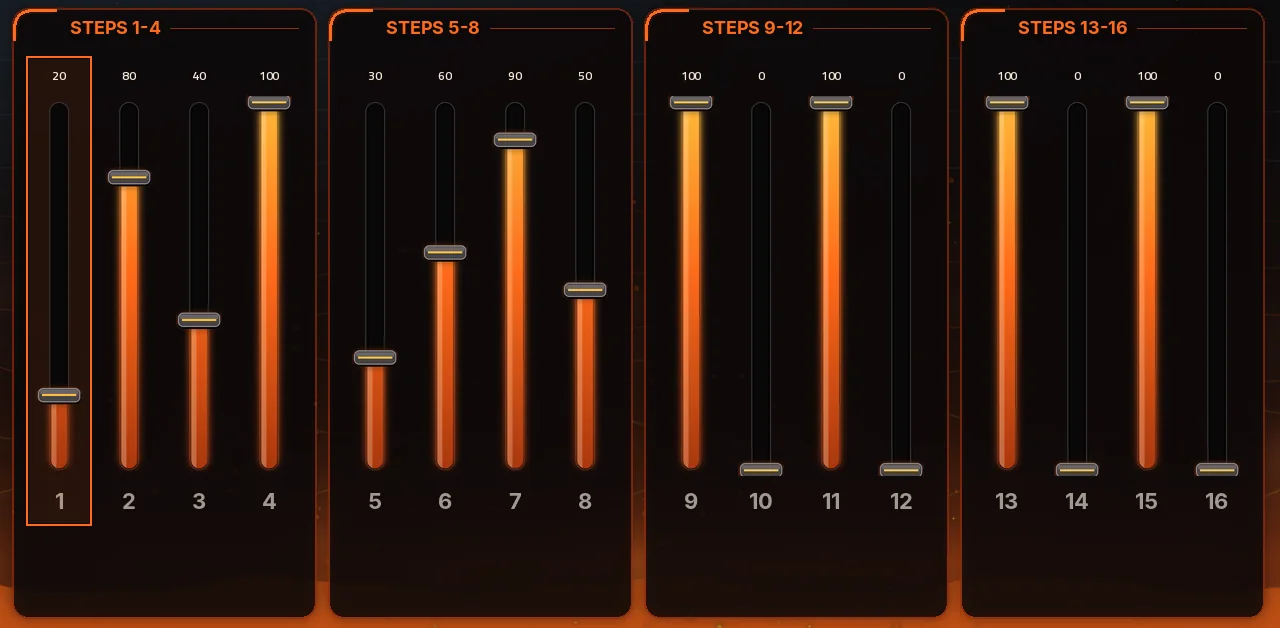
- STEPS 1-4 1 Each slider is one step, 0 to 100 %. The value above it is the current setting.
- STEPS 5-8 2 Shown here at 30, 60, 90 and 50 %: the grit rises through the bar.
- STEPS 9-12 3 Steps beyond Seq Steps (MOVE page) are skipped.
- STEPS 13-16 4 Unused in this preset, which plays 8 steps. Set Seq Steps to 16 for a full bar of 1/16.
Dica
Write 100 - 0 - 50 - 0: the grit hits on the beat and ghosts on the off-beat. Add 20 % Swing on MOVE for a lazier groove.
Draw your groove.
Pattern ideas
Matrix
 1234
O que vê
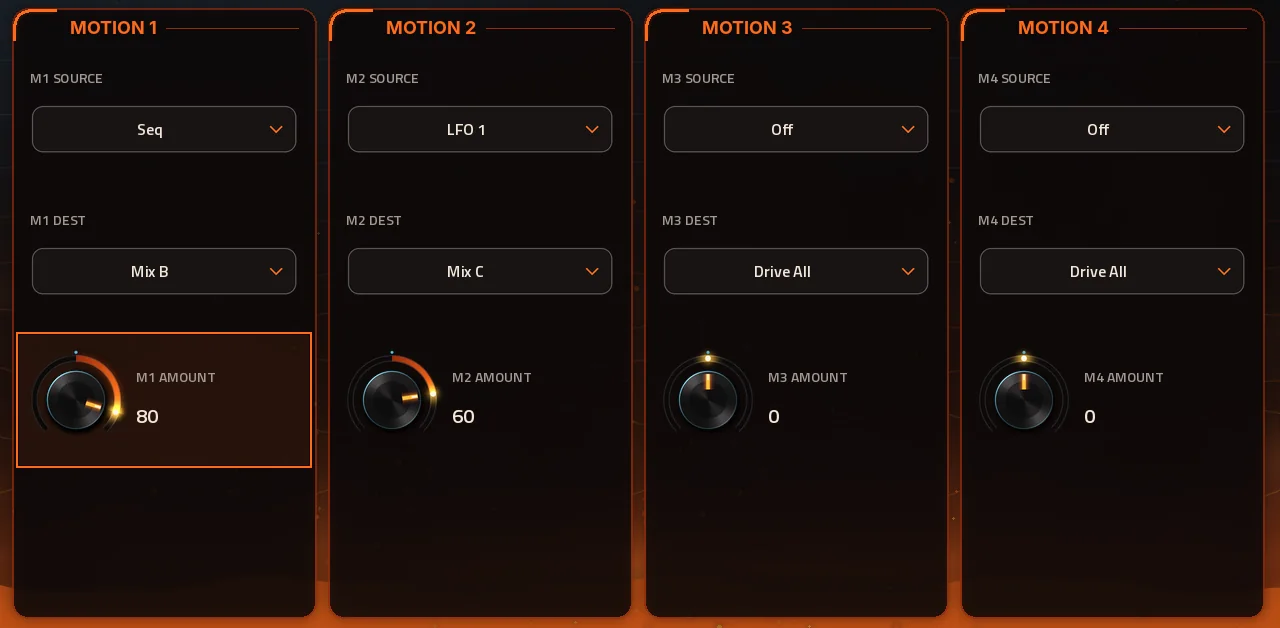
- SOURCE 1 Off, LFO 1, LFO 2, Seq or Env.
- DEST 2 What moves: Drive All, Drive A/B/C, Bias All, Pre HP All, Post LP All, Mix A/B/C, Dry/Wet, Heat, Cutoff, Width, Volume or Pan.
- AMOUNT 3 How much, and in which direction: -100 to +100 %.
- MOTION 2 · 3 · 4 4 Four routes in total. Use them together for complex, living sounds.
Dica
Env to Drive All with a negative Amount: hits come out cleaner and tails get dirtier. Natural, breathing saturation on drums.
Connect motion to sound.
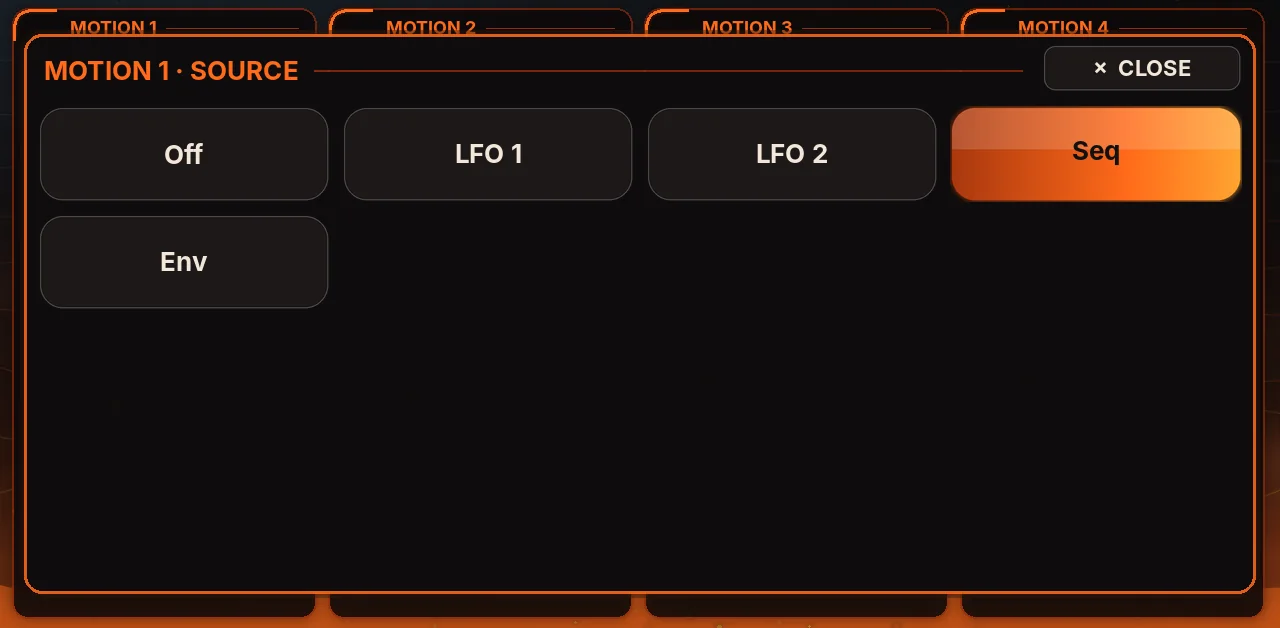 Sources Pick what drives the route.
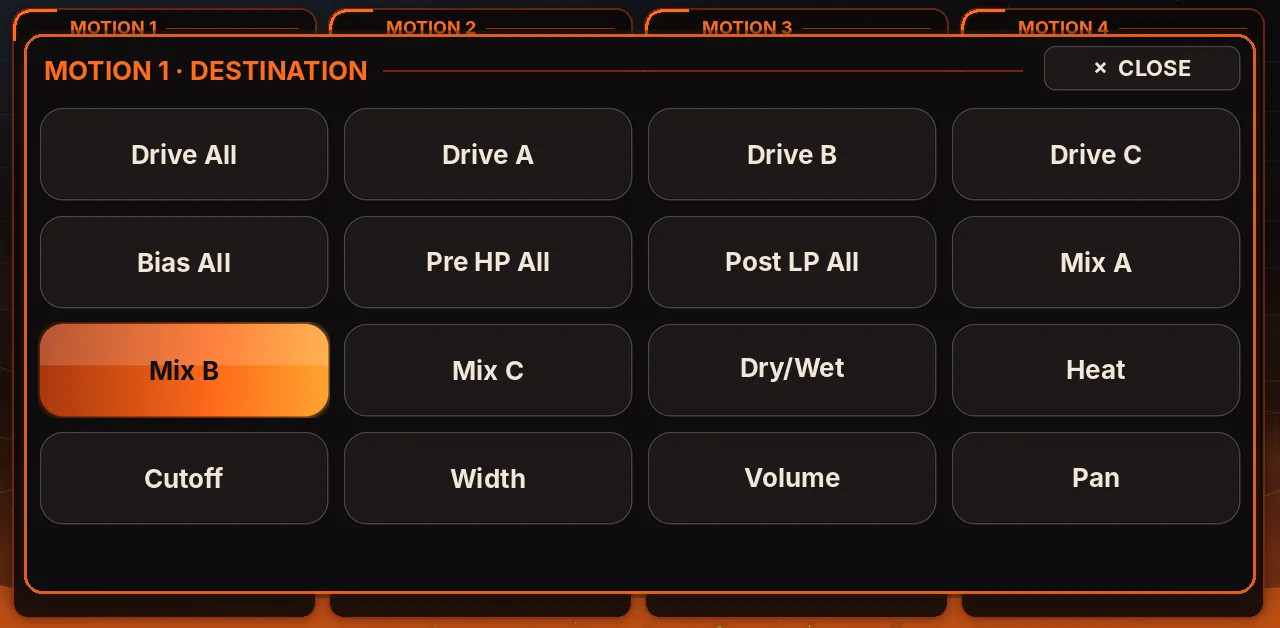 Destinations Sixteen destinations, one touch each.
141 presets, 12 families.
SOUNDS
Names exactly as on screen. All presets are level-matched: switching between them changes the colour, not the volume.
Init 1
- INIT - Init
Kick 13
- KICK - Warm Thump
- KICK - Tape Punch
- KICK - Click Snap
- KICK - Boom Bap Dirt
- KICK - Hard Body
- KICK - Fuzz Bump
- KICK - Folded Top
- KICK - Gated Crunch
- KICK - Lo-Fi Thud
- KICK - Rumble Push
- KICK - Diode Smack
- KICK - Pump Drive
- KICK - Sub Safe Crunch
808 13
- 808 - Warm Growl
- 808 - Drill Bite
- 808 - Trap Fuzz
- 808 - Rectified
- 808 - Folded Sub
- 808 - Phonk Crush
- 808 - Tape Saturate
- 808 - Hard Clip Loud
- 808 - Wobble Grit
- 808 - Env Snarl
- 808 - Diode Buzz
- 808 - Three Band
- 808 - Seq Grit
Bass 13
- BASS - Tube Amp
- BASS - Fuzz Box
- BASS - Growl Mid
- BASS - DnB Detune
- BASS - Synth Bite
- BASS - Wavefold Funk
- BASS - Tape Round
- BASS - Dub Warm
- BASS - Rect Octave
- BASS - Bit Bass
- BASS - Filter Drive
- BASS - Parallel Grit
- BASS - Neuro Motion
Drums 15
- DRUMS - Bus Glue
- DRUMS - Boom Bap Bus
- DRUMS - Crushed Room
- DRUMS - Parallel Smash
- DRUMS - Sampler Grit
- DRUMS - Snare Crack
- DRUMS - Hat Sizzle
- DRUMS - Three Band Bus
- DRUMS - Breakbeat Fuzz
- DRUMS - Env Pump
- DRUMS - Overheads Air
- DRUMS - Shuffle Drive
- DRUMS - Distorted Room
- DRUMS - Tube Warmth
- DRUMS - Glue Breath
Synth 13
- SYNTH - Warm Lead
- SYNTH - Fold Pluck
- SYNTH - Sine Shimmer
- SYNTH - Screaming Saw
- SYNTH - Pad Heat
- SYNTH - Arp Crunch
- SYNTH - Acid Push
- SYNTH - Rect Organ
- SYNTH - Bit Lead
- SYNTH - Stereo Drift
- SYNTH - Parallel Layers
- SYNTH - Diode Edge
- SYNTH - Seq Bias
Vocals 11
- VOX - Warm Mic
- VOX - Radio
- VOX - Megaphone
- VOX - Tape Ad-Lib
- VOX - Crushed Phone
- VOX - Grit Rap
- VOX - Robot Fold
- VOX - Scream Layer
- VOX - Air Exciter
- VOX - Gated Distort
- VOX - Lo-Fi Hook
Lo-fi 13
- LOFI - Dusty Tape
- LOFI - 12-Bit Grit
- LOFI - Cassette Wow
- LOFI - Vinyl Warm
- LOFI - AM Radio
- LOFI - 8 Bit Dream
- LOFI - Muffled Heat
- LOFI - Beat Tape
- LOFI - Old Sampler
- LOFI - Night Drive
- LOFI - Broken Speaker
- LOFI - Jazz Room
- LOFI - Wobbly Tape
Move 15
- MOVE - Drive Pulse 8
- MOVE - Stutter Crush
- MOVE - Gate Grit 16
- MOVE - Fold Sweep
- MOVE - Triplet Heat
- MOVE - Seq Filter
- MOVE - Ping Pong Fuzz
- MOVE - Half Time Wet
- MOVE - Random Grit
- MOVE - Swing Drive
- MOVE - Band Shuffle
- MOVE - Tremolo Tube
- MOVE - Bias Wobble
- MOVE - Env Bloom
- MOVE - Sidechain Grit
Hard 13
- HARD - Gabber Kick
- HARD - Hardtek Rumble
- HARD - Distorted Kick
- HARD - Siren Burn
- HARD - Rave Stab
- HARD - Industrial
- HARD - Frenchcore
- HARD - Tek Pump
- HARD - Bit Destroy
- HARD - Scream Bus
- HARD - Diode Overload
- HARD - Gabber Seq
- HARD - Kick Tail Burn
Master 10
- MASTER - Tape Glue
- MASTER - Tube Warmth
- MASTER - Analog Bus
- MASTER - Loud Clip
- MASTER - 3 Band Heat
- MASTER - Lo-Fi Print
- MASTER - Wide Warmth
- MASTER - Grit Blend
- MASTER - Breathe
- MASTER - Radio Edit
FX 11
- FX - Destroyer
- FX - Sci-Fi Fold
- FX - Sample Rate Sweep
- FX - Rising Heat
- FX - Telephone
- FX - Glitch Seq
- FX - Underwater
- FX - Rectifier Ring
- FX - Chaos Motion
- FX - Speaker Blown
- FX - Bit Riser
Thermix Loft in short.
TECH SHEET
A three-stage distortion for MPC that moves in time with your beat.
For
- Hip-hop and trap: 808s that growl, kicks that slap, drum buses with glue.
- Hard and electronic: rumbles, screaming leads, rhythmic grit locked to the tempo.
- Lo-fi and beat tapes: tape, bitcrush and dusty colour on loops and vocals.
Strong points
- 12 distortion curves on 3 independent stages, each with filters, blend and level.
- Serial, Parallel or 3-band Multi routing.
- Movement locked to the MPC tempo: 2 LFOs, a 16-step sequencer, an envelope follower, 4 routes to 16 destinations.
- Heat macro, Auto Gain, Sub Protect and a safety Clipper.
- LISTEN: measures your sound and suggests up to two fixes, applied or undone in one touch.
Stereo effect, 2 in / 2 out. MPC standalone, MPC OS 3.10.1 or later. Latency 15 samples, reported to the MPC. Version 1.4.1.
Get started in 3 steps
- Install. Copy the folder Studio Loft - VST - Thermix Loft into the VST2 Plugins folder of your MPC drive.
- Load. Put Thermix Loft as an insert effect on a track, a pad or the master, then choose a preset.
- Play. Turn Heat, Mix and Motion on MAIN. Press F1 twice and LISTEN if you want a second opinion.
Good to know
- Quality: HQ for the cleanest top end, Eco to run more instances.
- Volume is never changed by a preset: your mix level stays where you left it.
- No recorded sound inside: every sound is calculated, so the plugin stays light.
- Licence and activation: see the next page.
Credits · Typeface Inter, The Inter Project Authors, SIL Open Font License 1.1. Full licence texts are in the Licences folder of the plugin.
Licença e ativação
Seu em três passos.
Compre
Pague uma vez neste site. O seu link pessoal chega por e-mail e continua válido.
Instala o Loft Hub
MPC OS 3.10.1 ou posterior, com Enhancements e External Plugin Support ativados nas Preferences. Copia o Loft Hub uma vez para o disco da MPC.
Liga e toca
No Loft Hub, aceita, liga a tua MPC e os plugins instalam-se sozinhos. Funciona em duas MPC. É só isso.
Licence & activation
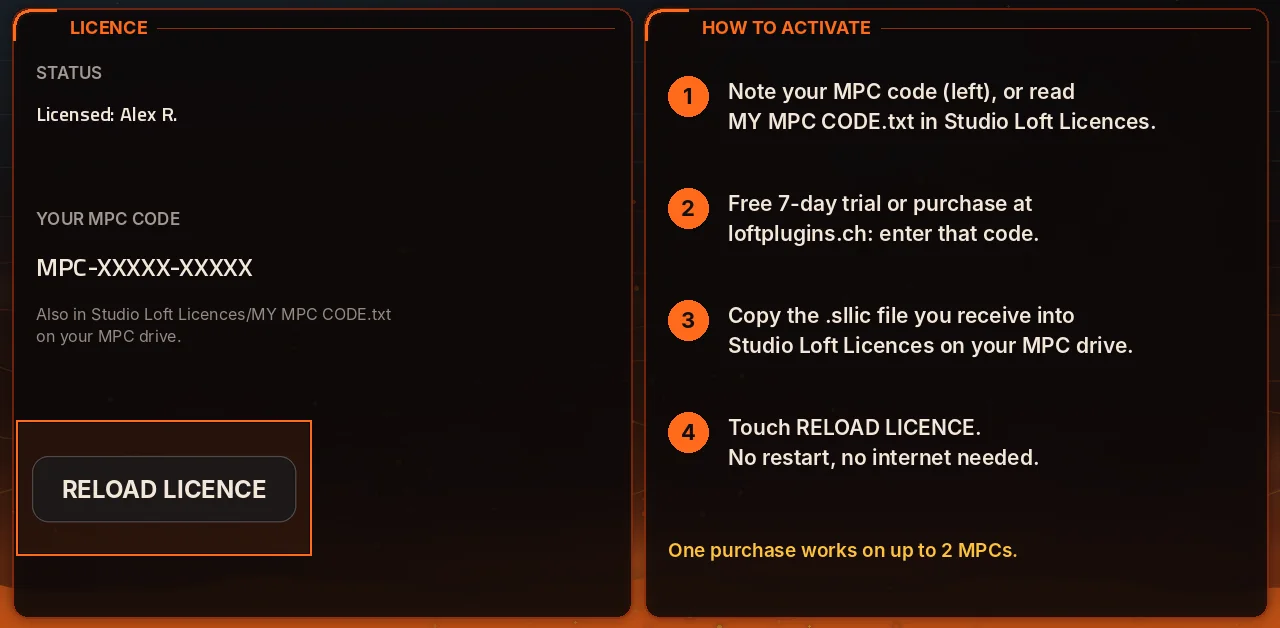 123
O que vê
- STATUS 1 Licensed (with the buyer's name), or "No licence found".
- YOUR MPC CODE 2 The code of your MPC (shown here with a sample code). This is what you enter on the shop.
- RELOAD LICENCE 3 Reads the licence files again after you copy a new one.
Dica
One purchase works on up to 2 MPCs. The MPC never needs an internet connection. Without a valid licence, Thermix stays silent.
Buy it once with your MPC code, and it is yours for life.
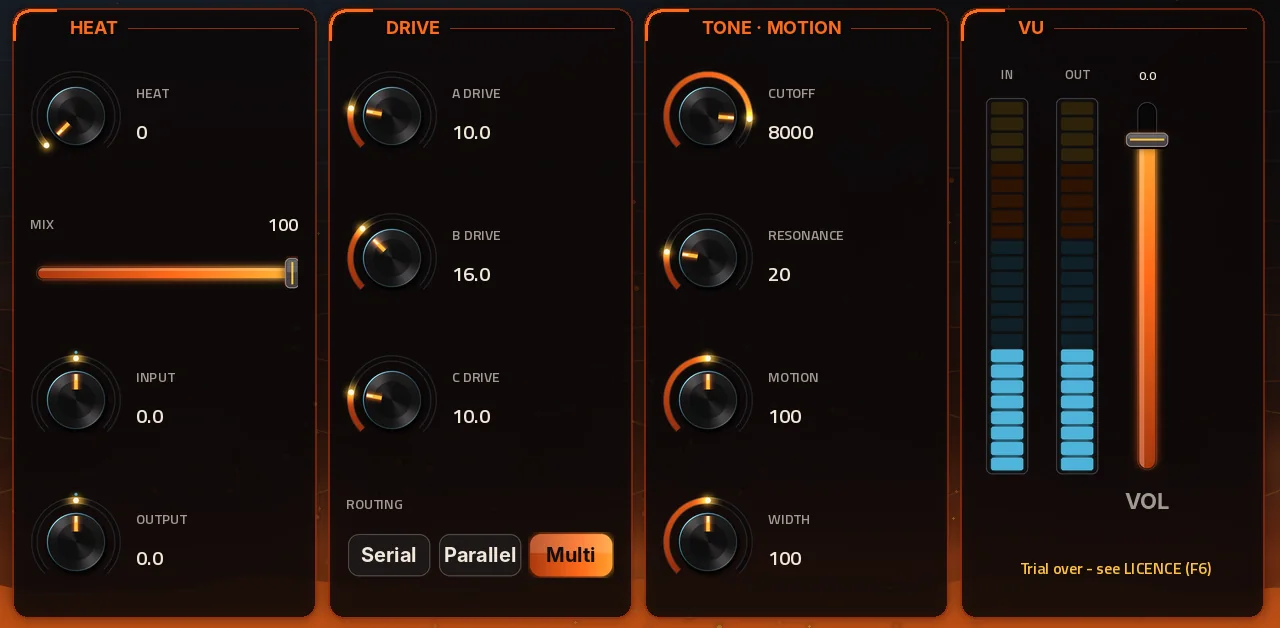 When Thermix is silent MAIN shows one short line under VOL that tells you where to go. It disappears as soon as the licence is valid.
Seu
Thermix Loft
Distorção que se move: três estágios animados a tempo.
Um só pagamento, seu para sempre. A sua licença funciona em duas MPC.