Instrument · versão 1.1.1
Beat Loft Lab
TWO STUDIO LOFT INSTRUMENTS ON ONE PAD.
Beat Loft Lab hosts two of your Studio Loft instruments at the same time: Layer A and Layer B . Pick an instrument, a category and a preset for each, then decide how they meet: stacked, split across the keyboard, or switched by how hard you hit.
A dusty lo-fi piano stacked over a slow, wide pad: four warm ninth chords and a soft melody at 84 BPM.
O manual
Cada ecrã,
página a página.
O guia completo, ecrã a ecrã, exatamente como na MPC. Os nomes dos parâmetros ficam em inglês, como no ecrã.
Welcome
One program. Two instruments.
Beat Loft Lab hosts two of your Studio Loft instruments at the same time: Layer A and Layer B. Pick an instrument, a category and a preset for each, then decide how they meet: stacked, split across the keyboard, or switched by how hard you hit.
Stack a soft pad under a piano, or a sub under a kick. Each layer has its own level, pan, octave, key zone and velocity zone.
The LISTEN page hears both layers and tells you where they fight. One press applies the fix, one press takes it back.
The ENG pages show the real controls of the instrument on each layer, with its own names and values, saved with your project.
What it plays
The Lab makes no sound of its own: it plays the Studio Loft instruments installed next to it on your MPC drive, with all their presets, always the version you have installed. It recognises 13 of them:
Each instrument is its own plugin with its own licence. A layer whose instrument is not installed stays silent and its name shows (missing); the other layer still plays.
Find your way
| F1 | MAIN | Play mode, envelope, Lab filter, effects and volume for the whole sound |
| F2 | MASTER | The instruments' own filters, the Lab LFO, the mix |
| F3 | LAYER A · FILTER A · AMP A · ENG A 1-5 | Press F3 again to move through the pages of layer A |
| F4 | LAYER B · FILTER B · AMP B · ENG B 1-5 | The same pages for layer B |
| F5 | LISTEN · LICENCE | The listening assistant, then your licence (always the last page) |
The Q-Links follow the screen: each column of four controls sits on the matching column of Q-Links, top knob to top control. Double tap a control, or click the data wheel, to open its list or its fine adjustment.
The Lab's secret weapon
It listens. Then it fixes.
Two great sounds can make one muddy sound. Instead of guessing which one to cut, press Listen on the F5 page and play for ten seconds. The Lab hears layer A, layer B, and how the two sit together.
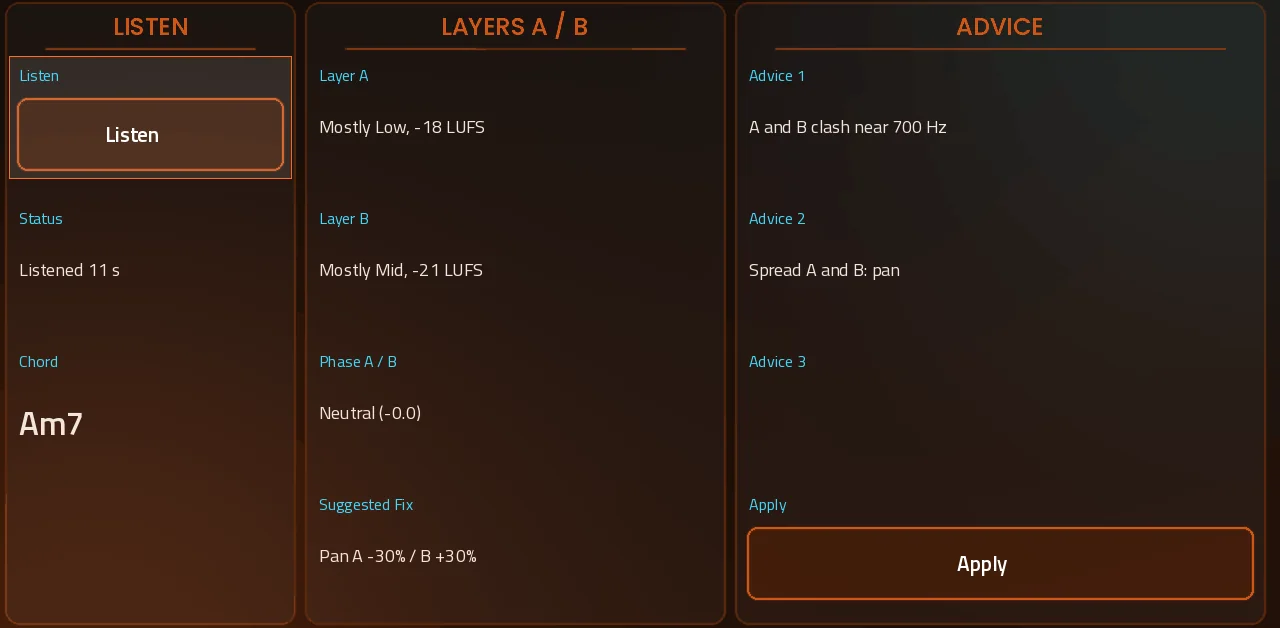
Turn Listen on and play your part: chords, a riff, a few hits. Status counts the seconds.
Where each layer lives (Low, Mid, High) and how loud, the chord you hold, and whether A and B cancel each other.
Suggested Fix is one move. Press Apply: it happens. Press it again: back to how it was.
Listen, a real example
A piano and a pad that fought. For ten seconds.
Layer A: a dusty lo-fi piano. Layer B: a wide, slow pad. Beautiful alone, a little crowded together.
Chord shows Am7 while you hold it.
Layer A: Mostly Low, -18 LUFS. Layer B: Mostly Mid, -21 LUFS. Phase A / B: Neutral, so nothing cancels.
Spread them instead of cutting them: the piano steps left, the pad opens to the right, and both keep their body.
The move is made on the Lab's own controls. Not convinced? Press again and everything returns exactly as it was.
How it feels
You stop fiddling and start writing. The Lab does the boring first pass of the mix, in plain words, while the idea is still fresh. Every fix is a normal Lab setting: you can see it, change it, undo it.
Five zones are checked: 40 Hz, 120 Hz, 700 Hz, 3.5 kHz and 10 kHz.
Warns you when A and B cancel, a classic with a kick and a sub on the same note.
Also checks the result: lows not mono, too loud, too quiet.
Inside each layer
The real controls, right on the Lab.
Press F3 four times and you are no longer on a Lab page: you are inside the instrument of layer A. The ENG pages take the name of each control and the value it displays, from the instrument itself. Change instrument, and the pages rename themselves. Unused boxes simply disappear.
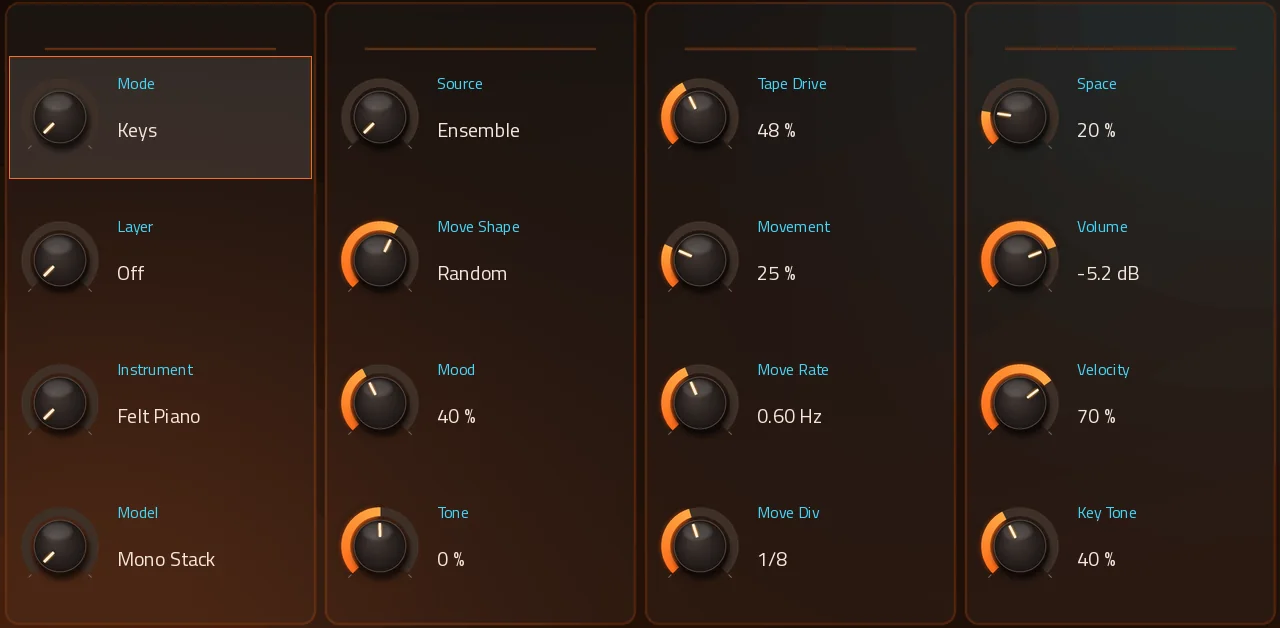
Up to 80 controls of each instrument, over five pages of 16, in the instrument's own order.
Your tweaks are stored in the project and come back when you open it again.
Each column sits on a column of Q-Links, so you play the instrument with your hands, not a menu.
MAIN: the whole sound
O que vê
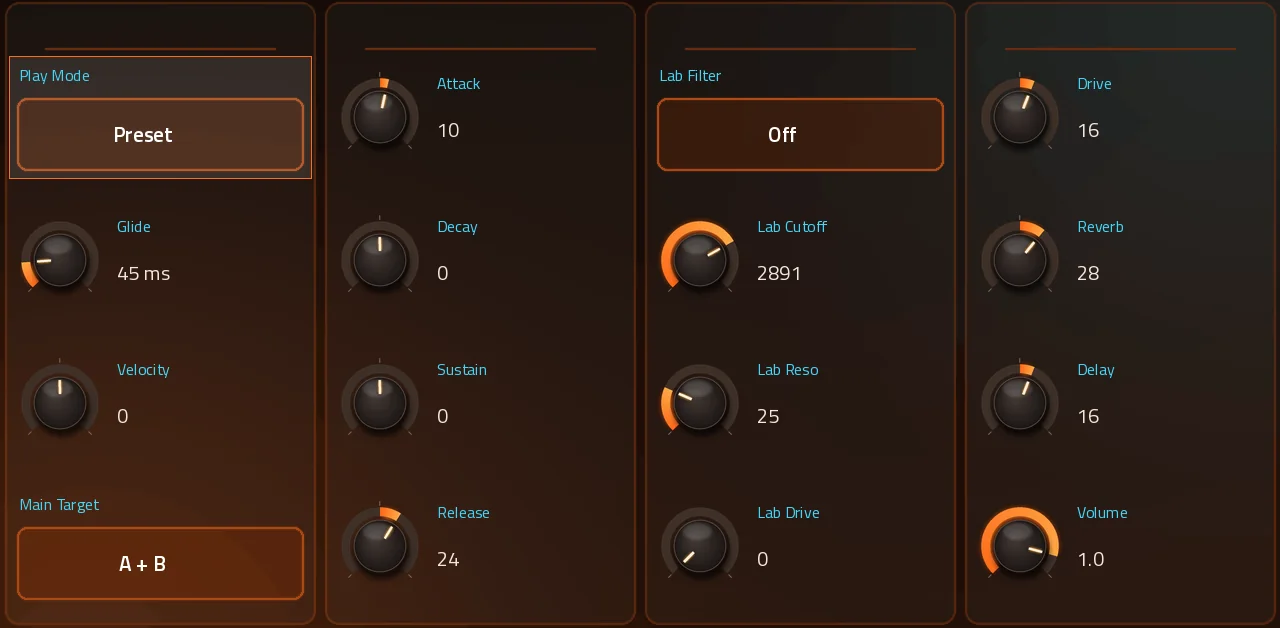
- Play Mode · Glide · Velocity · Main Target Play Mode: Preset keeps each instrument as it is, Poly, Mono and Legato change how both layers play. Glide slides from note to note (0 keeps the presets' own glide). Velocity: more or less response to how hard you play. Main Target: which layers the MAIN and MASTER moves reach, A + B, A or B.
- Attack · Decay · Sustain · Release push the instruments' own envelopes. Centre = unchanged.
- Lab Filter · Lab Cutoff · Lab Reso · Lab Drive one filter on the Lab's output: Off or one of 14 types.
- Drive · Reverb · Delay · Volume more or less of the instruments' own drive and effects (centre = as in the preset), and the level of the whole Lab.
Para que serve
Your performance page. These controls nudge both instruments at once, so a whole stack gets shorter, brighter or wetter with one knob. If the Lab is silent for lack of a licence, a red line at the top tells you where to go. For a pluckier stack, turn Release left and Decay left together, then add a touch of Delay so the notes still have a tail.
Dica
For a pluckier stack, turn Release left and Decay left together, then add a touch of Delay so the notes still have a tail.
Choosing from a list
Controls with a list of choices open it on screen. Turn the data wheel and confirm. The two lists you will use most:
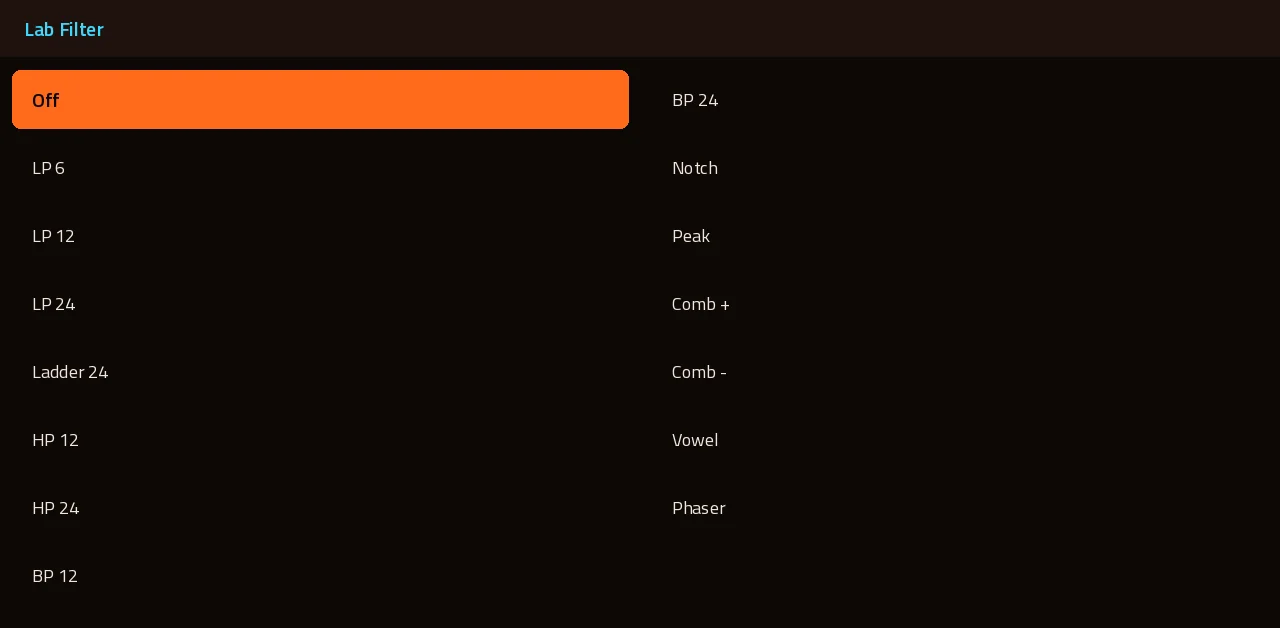 Lab Filter (and A Filter, B Filter): Off, LP 6, LP 12, LP 24, Ladder 24, HP 12, HP 24, BP 12, BP 24, Notch, Peak, Comb +, Comb -, Vowel, Phaser.
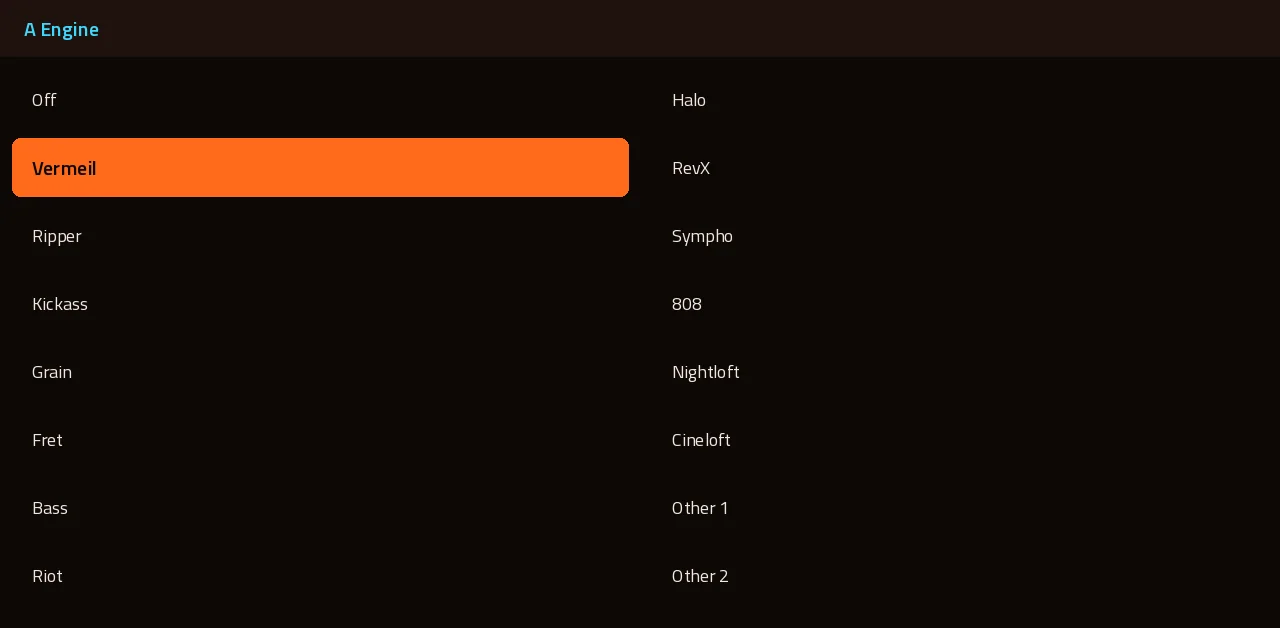 A Engine (and B Engine), on LAYER A: Off, the 13 instruments, and Other 1 and 2 for more Studio Loft instruments found on your drive.
These two pictures show the choices and the current one. The list itself is drawn by your MPC, so it may look a little different on your screen. Controls with only two choices (Listen, Apply, Amp Env, Trigger, Reload Licence) simply flip when you click the wheel.
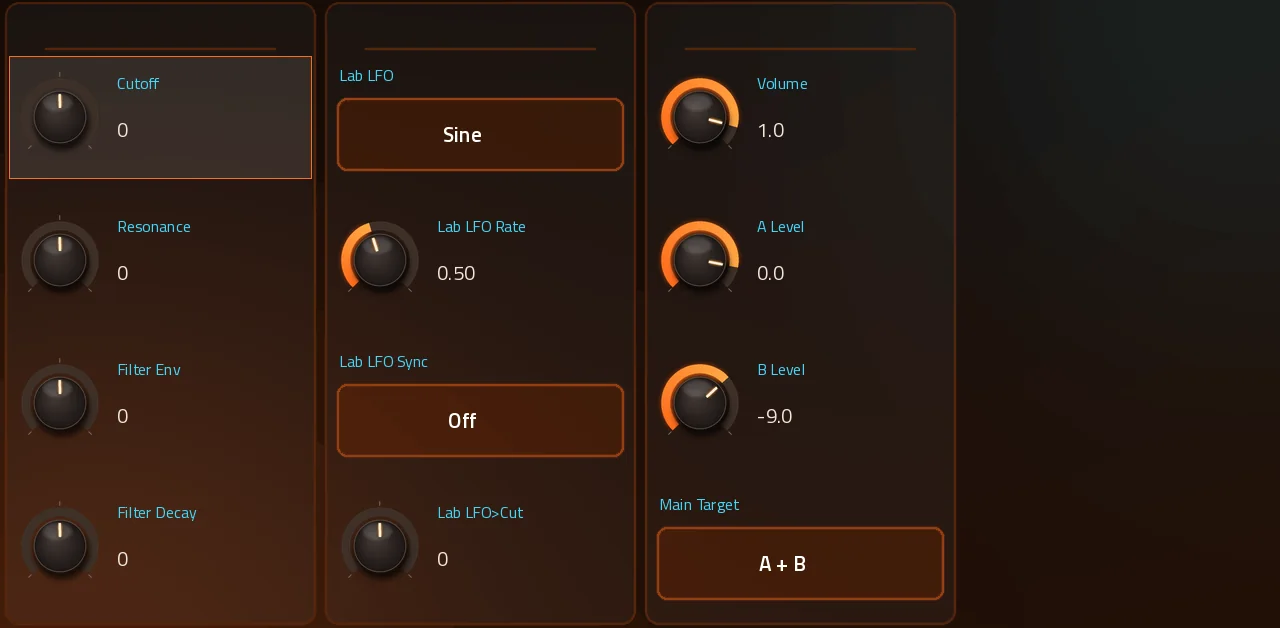
MASTER: tone and motion
O que vê
- Cutoff · Resonance · Filter Env · Filter Decay open, close or sharpen the instruments' own filters, centre = unchanged.
- Lab LFO · Lab LFO Rate · Lab LFO Sync · Lab LFO>Cut a slow or synced wobble on the Lab Filter.
- Volume · A Level · B Level · Main Target the balance of the two layers, at hand.
Para que serve
The second performance page: tone shaping that follows the presets, plus movement for the Lab Filter. Set Lab Filter to LP 24 on MAIN, then Lab LFO Sync to 1/4 and Lab LFO>Cut to +40 %: instant pumping pad, locked to your tempo.
Dica
Set Lab Filter to LP 24 on MAIN, then Lab LFO Sync to 1/4 and Lab LFO>Cut to +40 %: instant pumping pad, locked to your tempo.
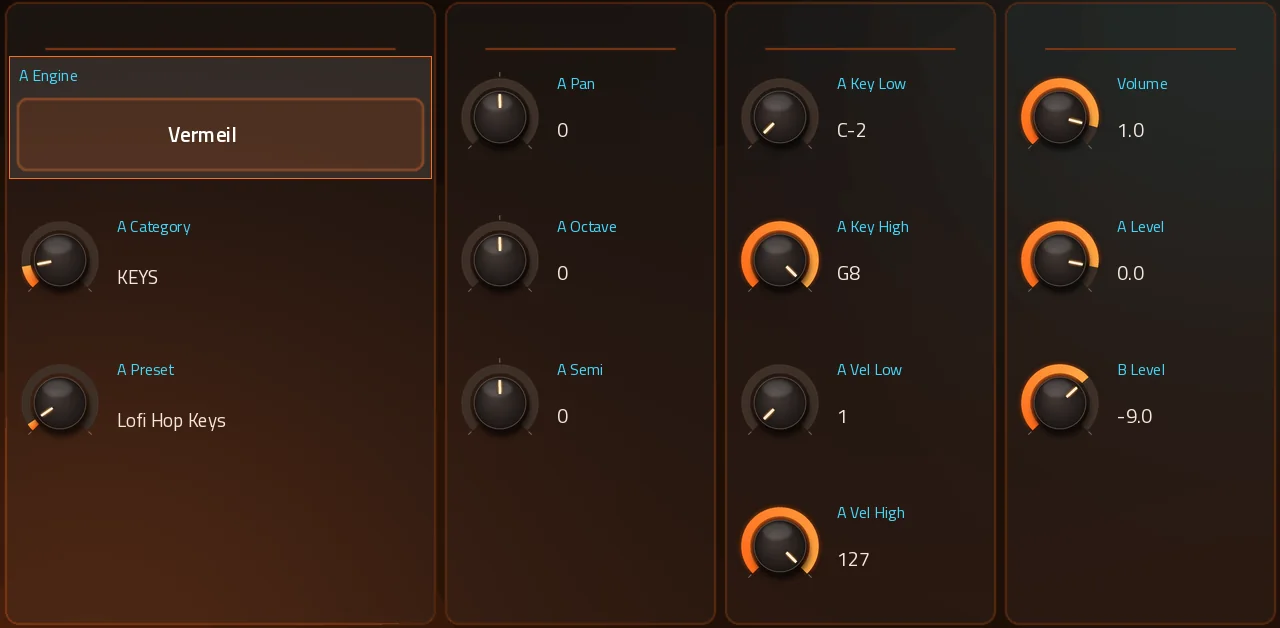
LAYER A: choose and place the sound
O que vê
- A Engine · A Category · A Preset the instrument, then its category and preset, by name.
- A Pan · A Octave · A Semi place it left or right, up or down.
- A Key Low · A Key High · A Vel Low · A Vel High the notes and the playing strengths that trigger layer A.
- Volume · A Level · B Level the mix, also here.
Para que serve
Where layer A gets its sound. The key and velocity zones turn a stack into a split or a velocity switch. Double tap A Engine to open the list of instruments. Bass split: A Key High at B1 for the bass on layer A, then B Key Low at C2 on layer B for keys on top.
Dica
Bass split: A Key High at B1 for the bass on layer A, then B Key Low at C2 on layer B for keys on top.
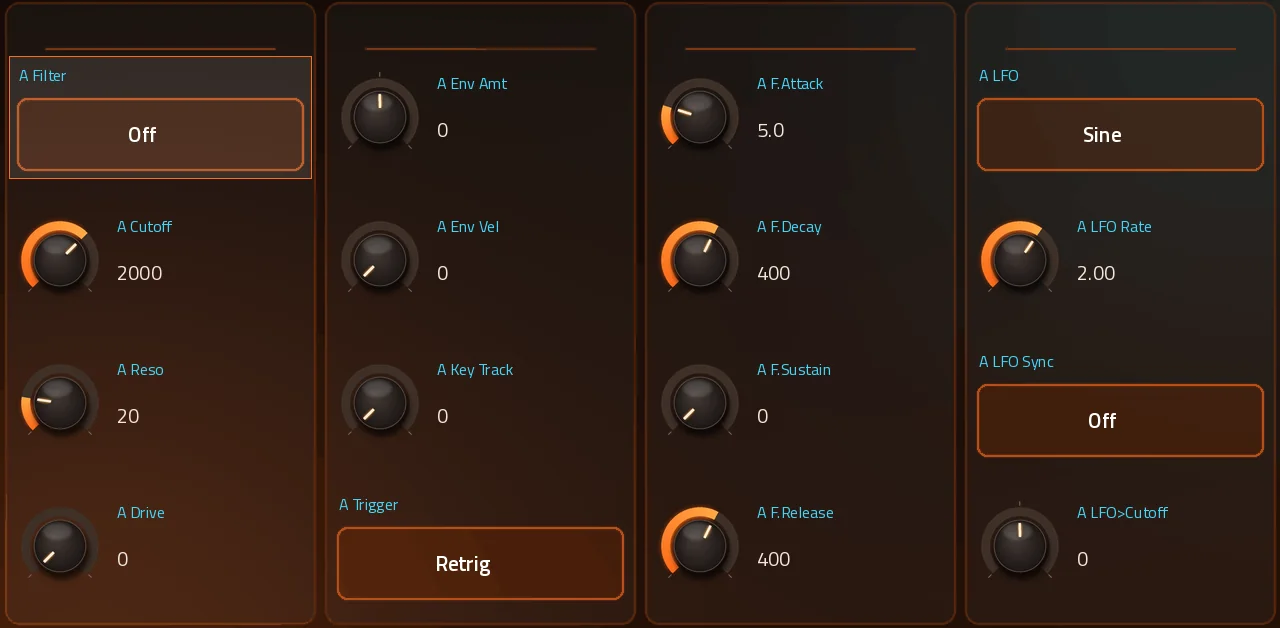
FILTER A: a filter for layer A only
O que vê
- A Filter · A Cutoff · A Reso · A Drive Off or 14 filter types, from gentle LP 6 to Comb, Vowel and Phaser.
- A Env Amt · A Env Vel · A Key Track · A Trigger how much the filter envelope moves, with your velocity and the key.
- A F.Attack · A F.Decay · A F.Sustain · A F.Release the filter envelope.
- A LFO · A LFO Rate · A LFO Sync · A LFO>Cutoff motion on the cutoff, free or in time.
Para que serve
An extra filter on layer A, after the instrument. Use it to carve one layer without touching the other. If layer A is a pad under a piano: A Filter HP 12 at 250 Hz. The low end belongs to the piano again.
Dica
If layer A is a pad under a piano: A Filter HP 12 at 250 Hz. The low end belongs to the piano again.
AMP A: shape layer A in time
O que vê
- A Attack · A Decay · A Sustain · A Release an envelope for layer A, used when A Amp Env is On.
- A Amp Env · A Trigger · A LFO>Amp · A LFO>Pan switch the envelope on, retrigger or legato, tremolo and auto-pan.
- A LFO · A LFO Rate · A LFO Sync · A LFO>Cutoff the same LFO as on FILTER A.
- A Level · A Pan · Volume level and place.
Para que serve
Give layer A a different life from layer B: a slow swell under a fast pluck, or a gated pulse on a pad. Pad swell: A Amp Env On, A Attack around 800 ms, A Release around 2 s. Play short chords and let them bloom.
Dica
Pad swell: A Amp Env On, A Attack around 800 ms, A Release around 2 s. Play short chords and let them bloom.
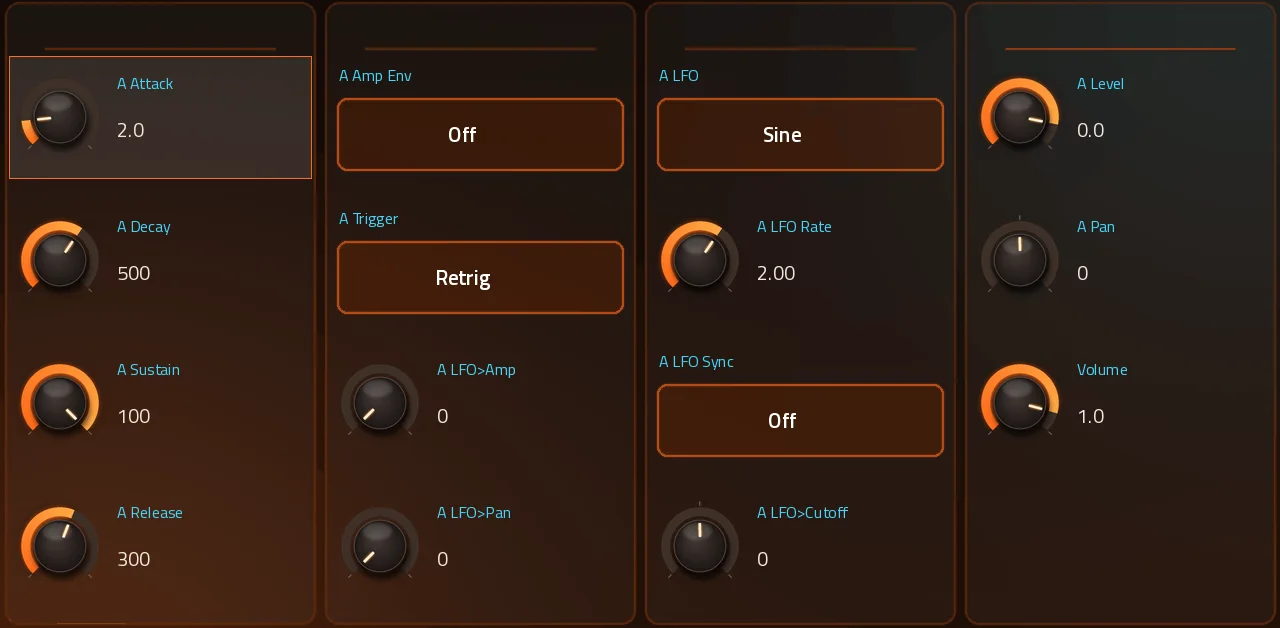
ENG A 1: inside instrument A
O que vê
- Controls 1 to 16 of the instrument on layer A named and displayed by the instrument itself. Here: Mode, Layer, Instrument, Model, Source, Move Shape, Mood, Tone, Tape Drive, Movement, Move Rate, Move Div, Space, Volume, Velocity, Key Tone.
Para que serve
The first page of the instrument's own controls. What you see depends on the instrument of layer A: this one is Vermeil, playing Lofi Hop Keys. Not sure what a control does? Turn it while holding a chord. The value shows the instrument's own units, so you always know where you are.
Dica
Not sure what a control does? Turn it while holding a chord. The value shows the instrument's own units, so you always know where you are.
ENG A 2 and 3
Controls 17 to 48 of the instrument on layer A.
Dica
Tweaks here are saved in your project. Load another Lab preset and the pages follow the new instrument.
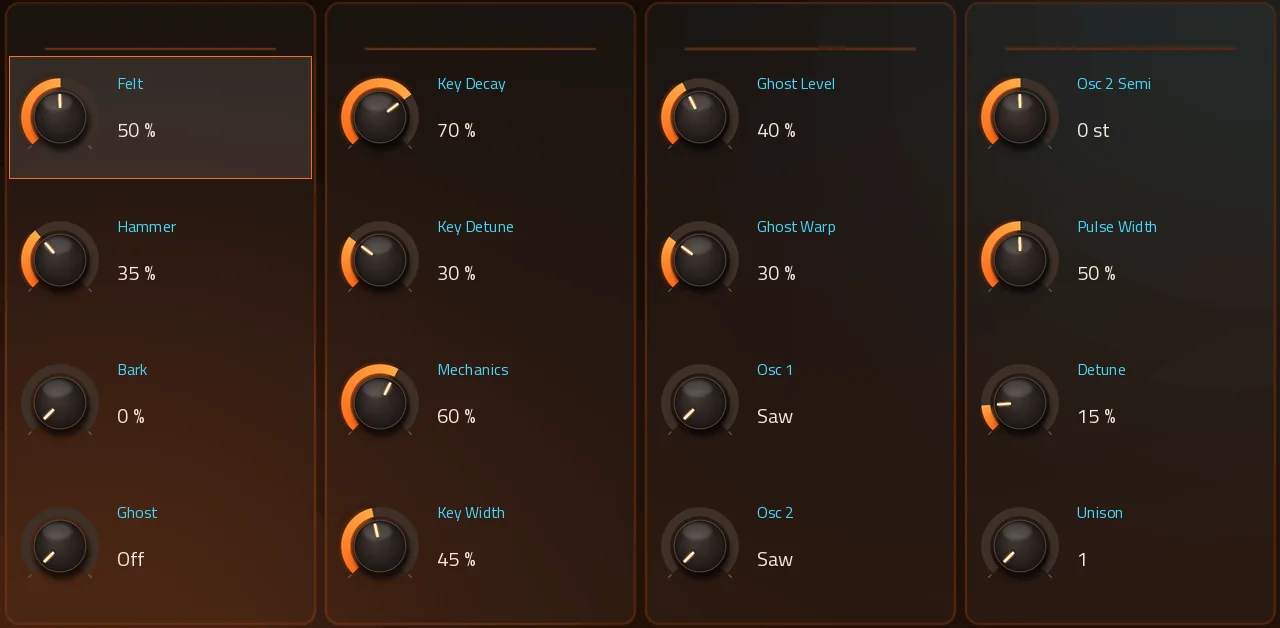 ENG A 2
Felt · Hammer · Bark · Ghost · Key Decay · Key Detune · Mechanics · Key Width · Ghost Level · Ghost Warp · Osc 1 · Osc 2 · Osc 2 Semi · Pulse Width · Detune · Unison
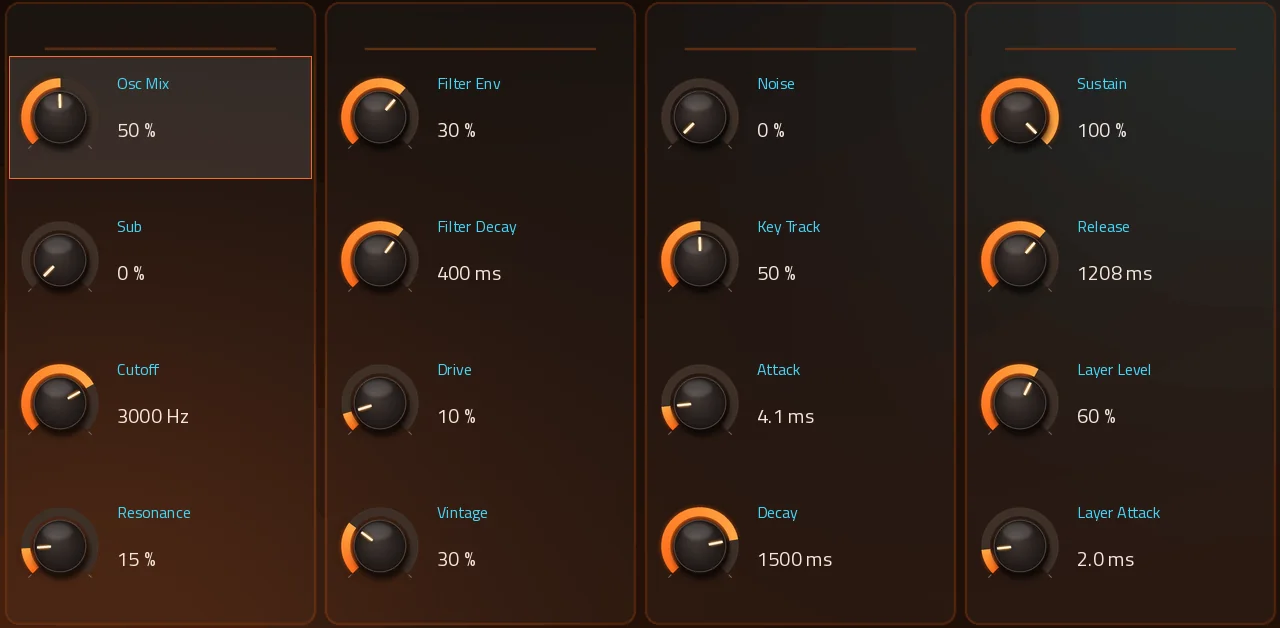 ENG A 3
Osc Mix · Sub · Cutoff · Resonance · Filter Env · Filter Decay · Drive · Vintage · Noise · Key Track · Attack · Decay · Sustain · Release · Layer Level · Layer Attack
ENG A 4 and 5
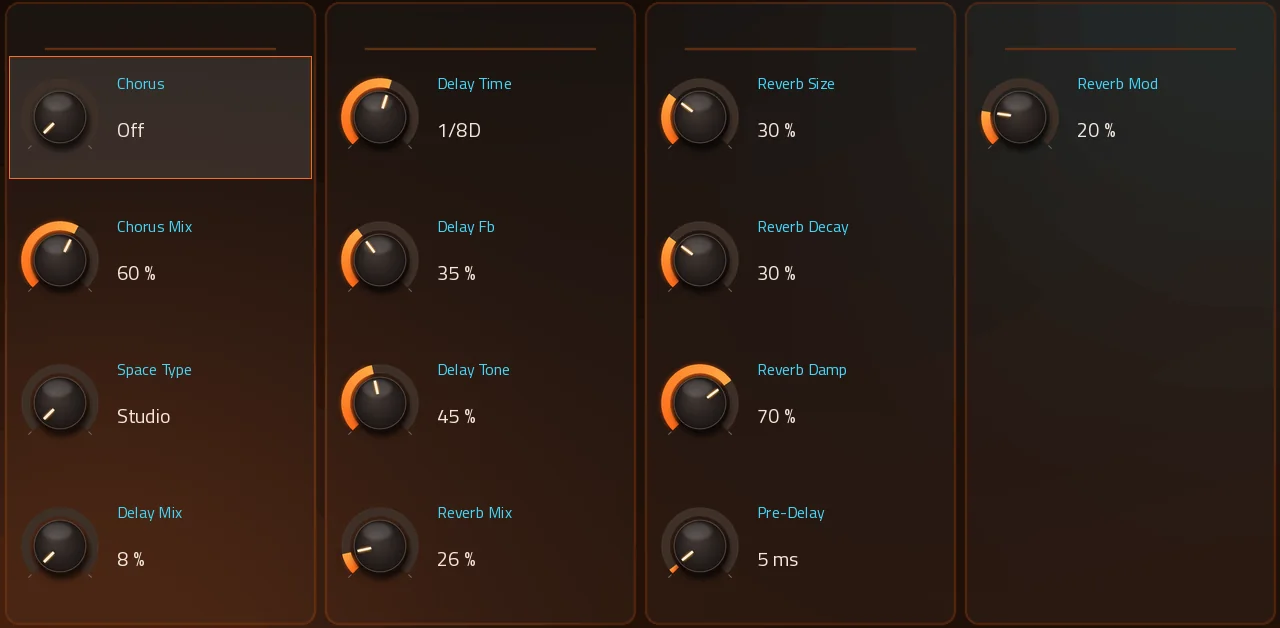
Controls 49 to 80. An instrument with fewer controls leaves empty boxes out, as on ENG A 5.
Dica
Effects usually sit at the end: on Vermeil, ENG A 5 holds chorus, delay and reverb.
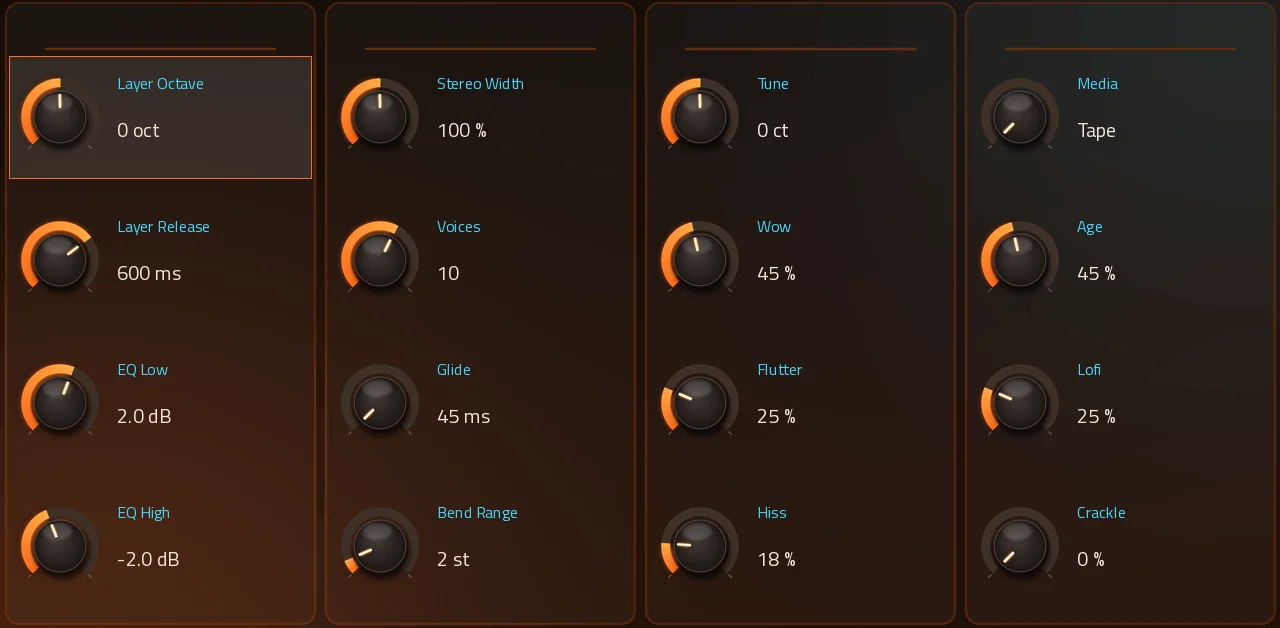 ENG A 4
Layer Octave · Layer Release · EQ Low · EQ High · Stereo Width · Voices · Glide · Bend Range · Tune · Wow · Flutter · Hiss · Media · Age · Lofi · Crackle
 ENG A 5
Chorus · Chorus Mix · Space Type · Delay Mix · Delay Time · Delay Fb · Delay Tone · Reverb Mix · Reverb Size · Reverb Decay · Reverb Damp · Pre-Delay · Reverb Mod
LAYER B: the second sound
O que vê
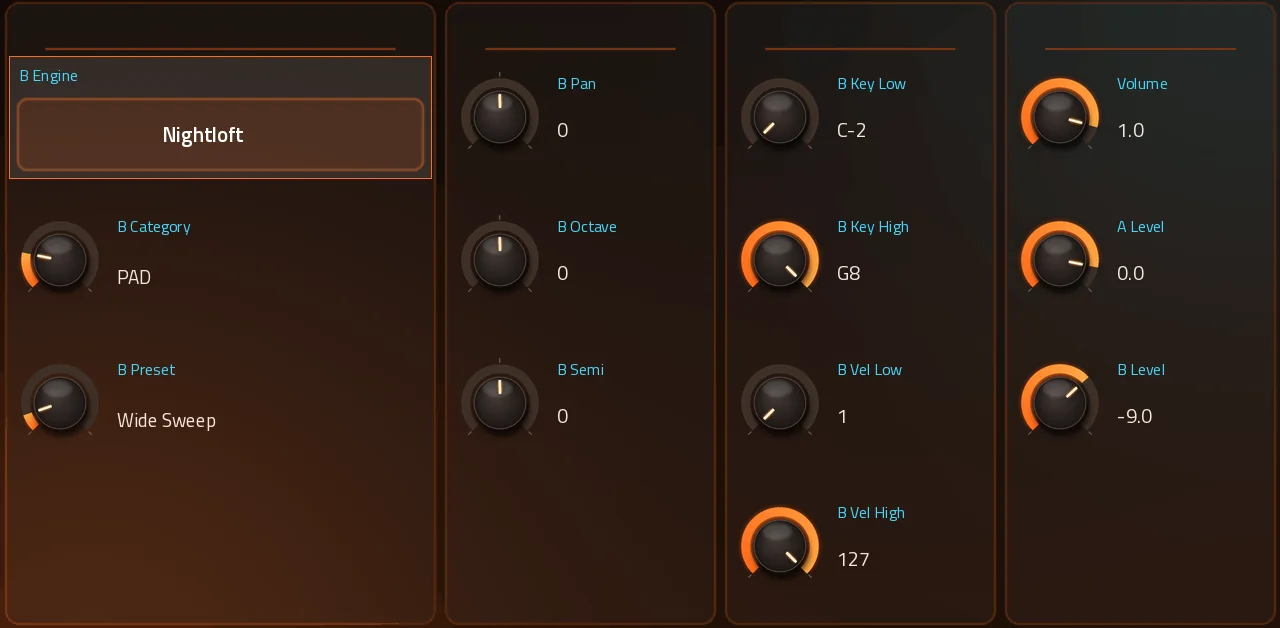
- B Engine · B Category · B Preset the instrument, category and preset of layer B.
- B Pan · B Octave · B Semi place and tuning.
- B Key Low · B Key High · B Vel Low · B Vel High the notes and strengths that trigger layer B.
- Volume · A Level · B Level the mix.
Para que serve
Layer B works exactly like layer A. In this preset it plays Nightloft, Wide Sweep, 9 dB under the piano. Velocity switch: B Vel Low 100 on a bright sound, A Vel High 99 on a soft one. Hit harder and the colour changes.
Dica
Velocity switch: B Vel Low 100 on a bright sound, A Vel High 99 on a soft one. Hit harder and the colour changes.
FILTER B: a filter for layer B only
O que vê
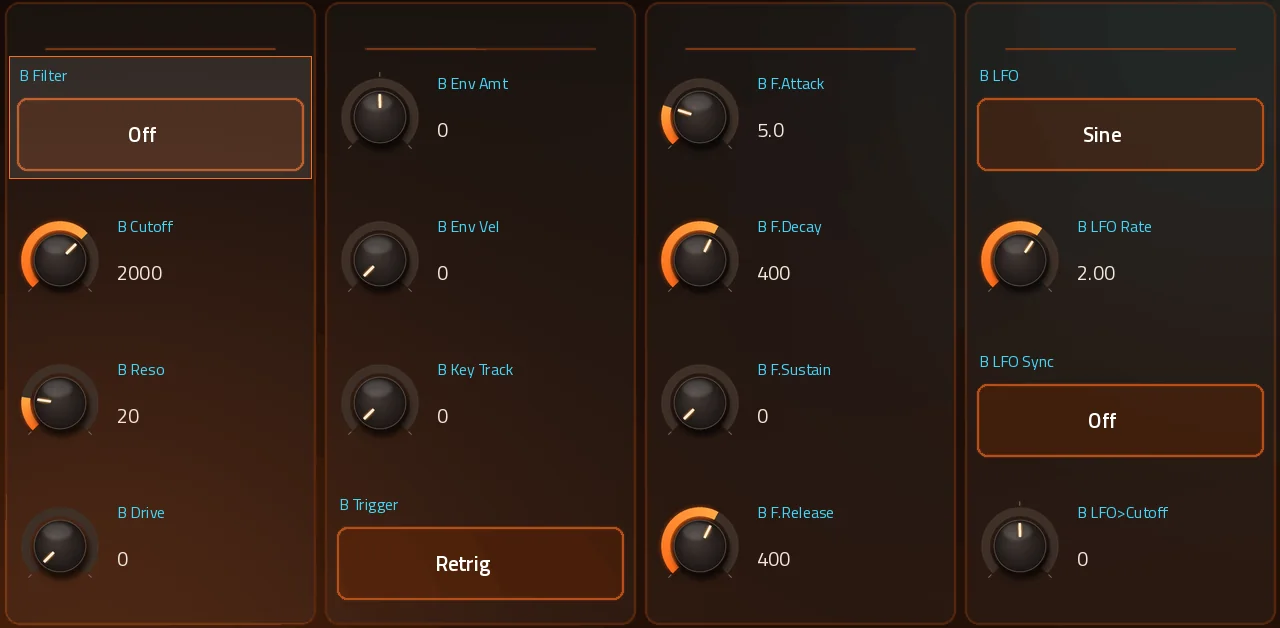
- B Filter · B Cutoff · B Reso · B Drive the filter of layer B.
- B Env Amt · B Env Vel · B Key Track · B Trigger envelope amount, velocity and key follow.
- B F.Attack · B F.Decay · B F.Sustain · B F.Release the filter envelope of layer B.
- B LFO · B LFO Rate · B LFO Sync · B LFO>Cutoff motion on the cutoff.
Para que serve
The same filter as FILTER A, for layer B. On a sub layer, B Filter LP 24 at 120 Hz keeps it clean under any kick.
Dica
On a sub layer, B Filter LP 24 at 120 Hz keeps it clean under any kick.
AMP B: shape layer B in time
O que vê
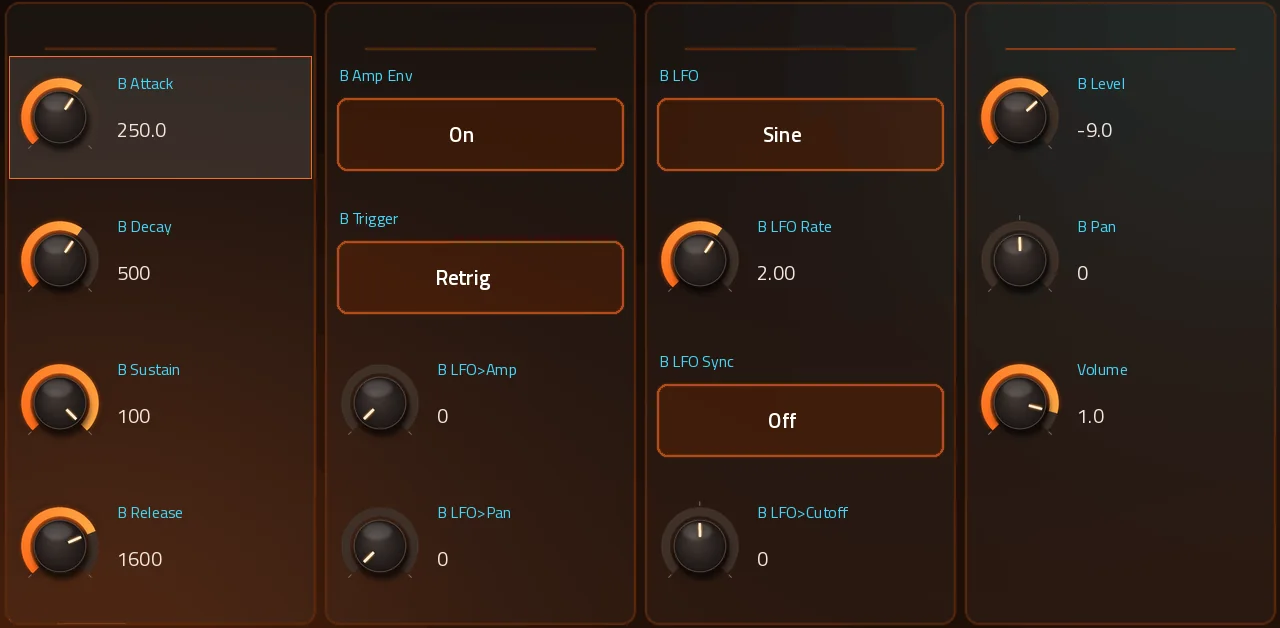
- B Attack · B Decay · B Sustain · B Release the envelope of layer B. In this preset it is On: 250 ms in, 1.6 s out.
- B Amp Env · B Trigger · B LFO>Amp · B LFO>Pan envelope on or off, retrigger, tremolo, auto-pan.
- B LFO · B LFO Rate · B LFO Sync · B LFO>Cutoff the LFO of layer B.
- B Level · B Pan · Volume level and place.
Para que serve
The same as AMP A, for layer B. The Lab presets often use it to fade a pad in under a sharper sound. Rhythmic pad: B LFO Square, B LFO Sync 1/8, B LFO>Amp 80 %. The pad turns into a gated pulse in time.
Dica
Rhythmic pad: B LFO Square, B LFO Sync 1/8, B LFO>Amp 80 %. The pad turns into a gated pulse in time.
ENG B 1: inside instrument B
O que vê
- Controls 1 to 16 of the instrument on layer B Here, Nightloft: Filter Type, Cutoff, Resonance, Flt Env, Seq Rate, Attack, Decay, Sustain, Release, Seq Mode, Transpose, Glide, Night, Reverb, Volume, Mode.
Para que serve
The instrument of layer B, from the inside. Same rules as ENG A: names and values come from the instrument. Nightloft's Seq Mode and Seq Rate live here: turn the pad into a pattern without leaving the Lab.
Dica
Nightloft's Seq Mode and Seq Rate live here: turn the pad into a pattern without leaving the Lab.
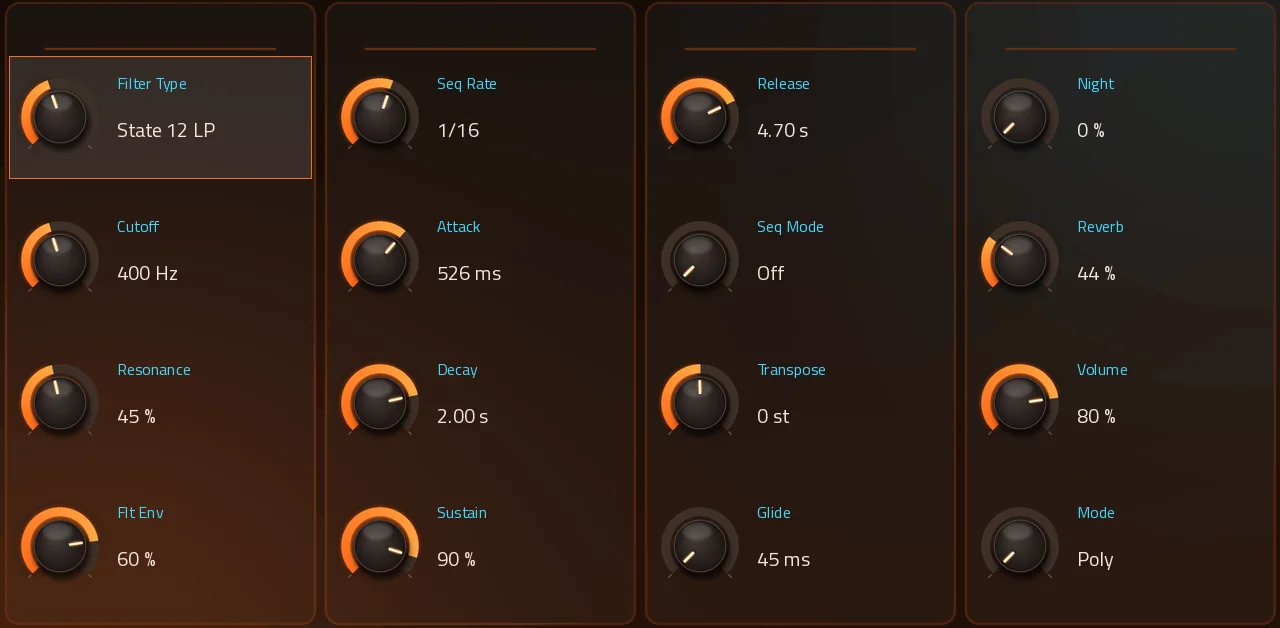
ENG B 2 and 3
Controls 17 to 48 of the instrument on layer B.
Dica
Oscillators and filter envelopes are usually here: the heart of the sound.
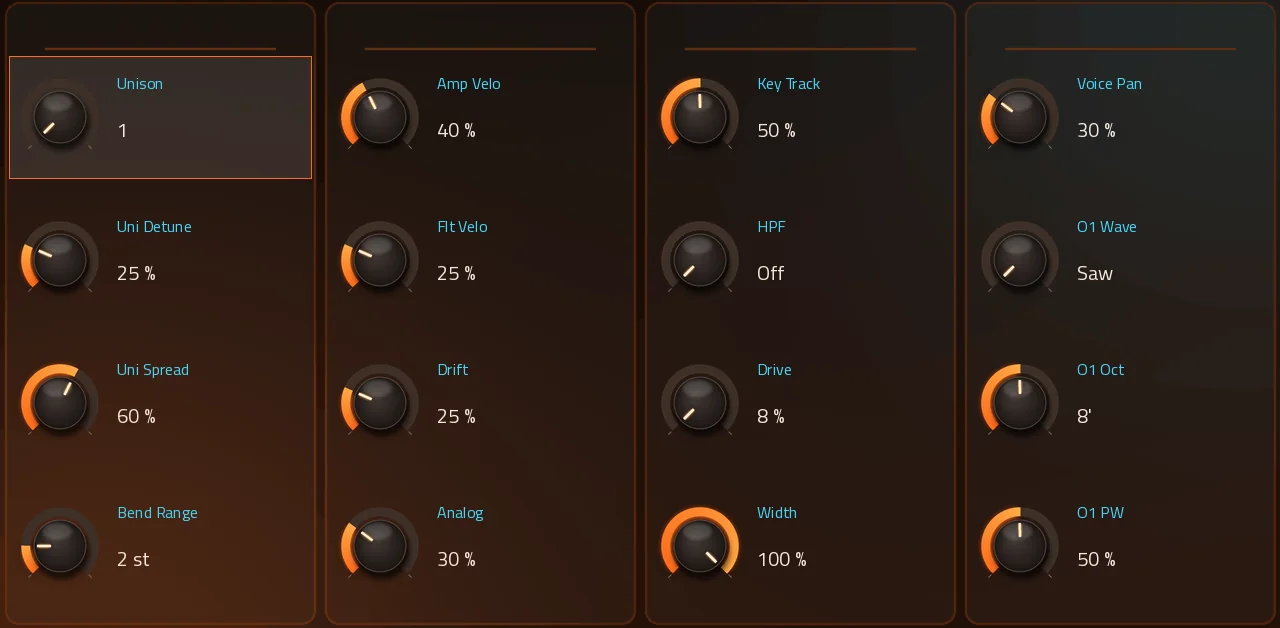 ENG B 2
Unison · Uni Detune · Uni Spread · Bend Range · Amp Velo · Flt Velo · Drift · Analog · Key Track · HPF · Drive · Width · Voice Pan · O1 Wave · O1 Oct · O1 PW
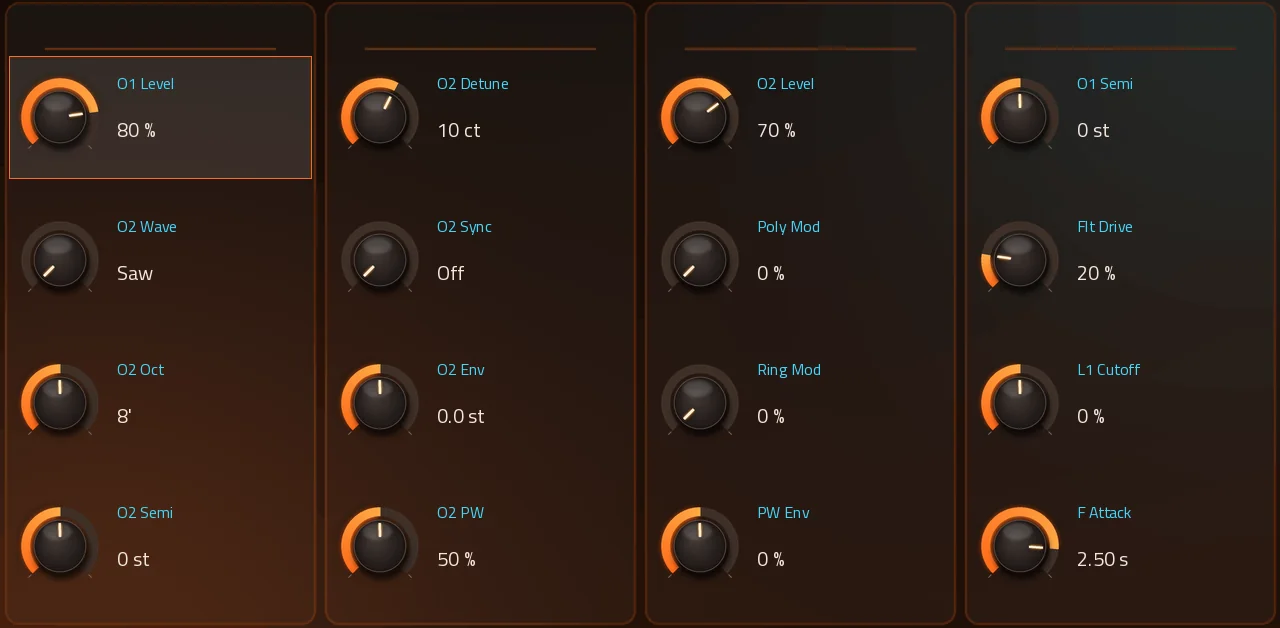 ENG B 3
O1 Level · O2 Wave · O2 Oct · O2 Semi · O2 Detune · O2 Sync · O2 Env · O2 PW · O2 Level · Poly Mod · Ring Mod · PW Env · O1 Semi · Flt Drive · L1 Cutoff · F Attack
ENG B 4 and 5
Controls 49 to 80 of the instrument on layer B.
Dica
Effects and modulation close the list. Try Rev Type and Rev Size for a different room per layer.
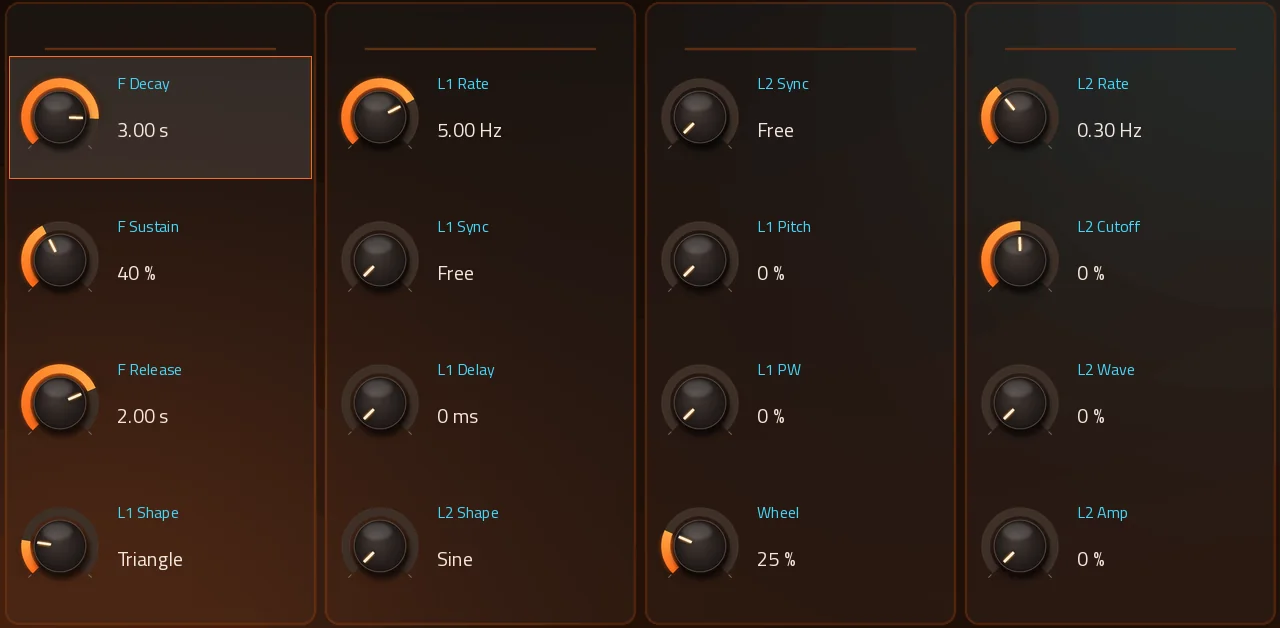 ENG B 4
F Decay · F Sustain · F Release · L1 Shape · L1 Rate · L1 Sync · L1 Delay · L2 Shape · L2 Sync · L1 Pitch · L1 PW · Wheel · L2 Rate · L2 Cutoff · L2 Wave · L2 Amp
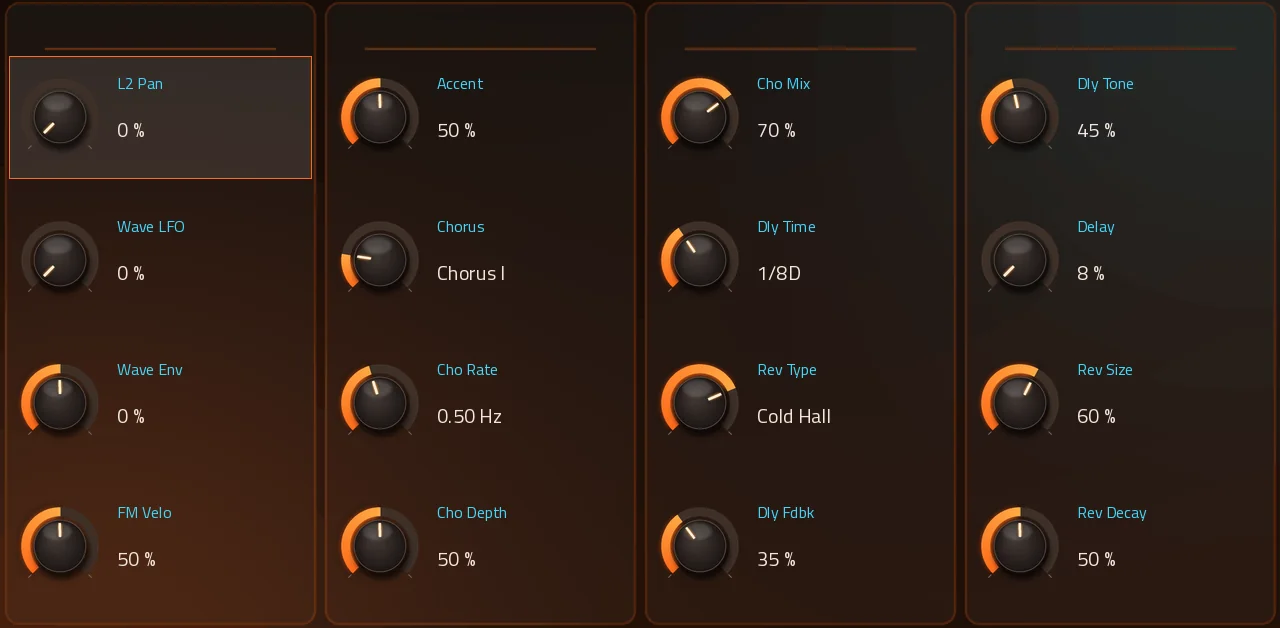 ENG B 5
L2 Pan · Wave LFO · Wave Env · FM Velo · Accent · Chorus · Cho Rate · Cho Depth · Cho Mix · Dly Time · Rev Type · Dly Fdbk · Dly Tone · Delay · Rev Size · Rev Decay
LISTEN: the assistant
O que vê
- Listen · Status · Chord start listening, the seconds heard, the chord you hold.
- Layer A · Layer B where each layer lives (Low, Mid, High) and how loud.
- Phase A / B · Suggested Fix whether A and B cancel, and the one move that helps most.
- Advice 1 · Advice 2 · Advice 3 what the Lab noticed, in plain words.
- Apply makes the suggested move; press again to undo it.
Para que serve
Use it every time you build a new pair: ten seconds of playing, one press. Listen with the part you will really play. A bass line and a pad chord do not clash in the same places.
Dica
Listen with the part you will really play. A bass line and a pad chord do not clash in the same places.
Technical sheet
Beat Loft Lab 1.1.1
A two-layer host for Studio Loft instruments, with a listening assistant that fixes how the layers sit together.
For whom, for what
- Hip-hop and lo-fi: keys stacked on pads, basses split under chords.
- Electronic and hard dance: kick and 808 pairs, stacked leads, gated pulses.
- Scores and moods: orchestral and choir pairs, textures for intros and transitions.
Strong points
- Two instruments in one program, with stack, split and velocity switch.
- LISTEN: band, loudness and phase checks, one-press fix with undo.
- Up to 80 real controls of each instrument on the ENG pages, saved in the project.
- A filter, two envelopes and an LFO per layer, plus a Lab filter and LFO on the output.
- 161 presets in 11 folders, levels matched by measurement.
- Plays your installed instruments: when they get new presets, the Lab sees them.
Numbers
| Layers | 2 |
| Instruments recognised | 13 Studio Loft instruments |
| Presets | 161 in 11 folders |
| Controls | 268 (160 of them for the instruments) |
| Screen pages | 20, on F1 to F5 |
| Filter types | 14 · LFO shapes 7 · sync values 14 |
| Voices | set by each instrument |
| Sounds of its own | none: it plays your instruments |
| Size | about 4.5 MB |
| Runs on | MPC standalone, 32-bit and 64-bit, MPC OS 3.10.1 |
Get started in 3 steps
- Install. Copy the Beat Loft Lab folder into the plugin folder of your MPC drive, next to your Studio Loft instruments.
- Load. Add Beat Loft Lab to a plugin track and open a preset from its folders.
- Play. F1 for the whole sound, F3 and F4 for each layer, F5 to let the Lab listen.
What you need
At least one Studio Loft instrument installed on the same MPC drive. Each instrument played by the Lab needs its own licence.
All 161 presets
The presets, folder by folder
Names as they appear on your MPC. Each preset is a pair: the first word comes from layer A, the second from layer B.
Licença e ativação
Seu em três passos.
Compre
Pague uma vez neste site. O seu link pessoal chega por e-mail e continua válido.
Instala o Loft Hub
MPC OS 3.10.1 ou posterior, com Enhancements e External Plugin Support ativados nas Preferences. Copia o Loft Hub uma vez para o disco da MPC.
Liga e toca
No Loft Hub, aceita, liga a tua MPC e os plugins instalam-se sozinhos. Funciona em duas MPC. É só isso.
LICENCE: buy and activate
O que vê
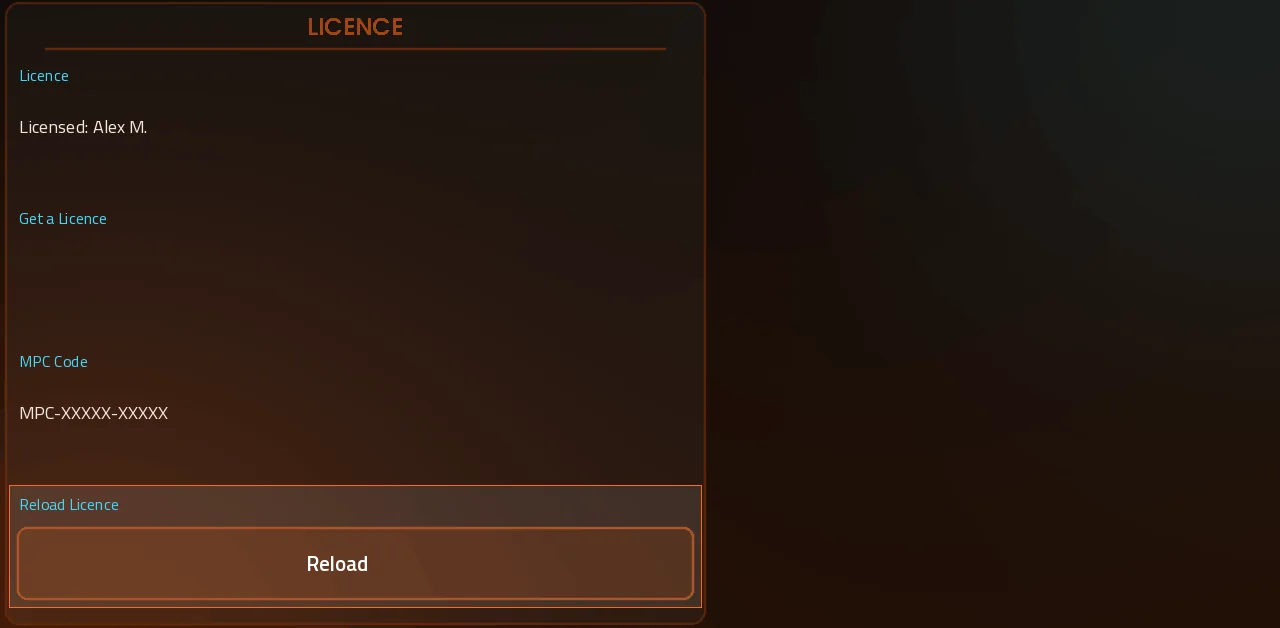
- Licence the state of your licence: the name on your licence, or what is missing.
- Get a Licence where to buy, shown only while you have no licence.
- MPC Code the code of this MPC, asked for when you buy.
- Reload Licence reads your licence files again after you copy a new one.
Para que serve
Always the last page. To buy: note the MPC Code, buy at loftplugins.ch and paste the code on the My purchases page, then copy the licence file you receive by e-mail into the Studio Loft Licences folder of your MPC drive and press Reload Licence. One purchase works on 2 MPCs. While the Lab is silent for lack of a licence, a red line at the top of MAIN sends you here. The code and name shown are examples. Write down the MPC Code before you go to the shop: it is the only thing the licence needs from your machine.
Dica
Write down the MPC Code before you go to the shop: it is the only thing the licence needs from your machine.
Seu
Beat Loft Lab
Dois motores do estúdio juntos num só instrumento.
Beat Loft Lab não é vendido sozinho: vem com o pack Complete e o Ultimate Bundle.